T7 (Battery) rider scrubber
Rider-Scrubber Operator Manual. North America / International. Document 331040, Rev. 11 (02-2024).
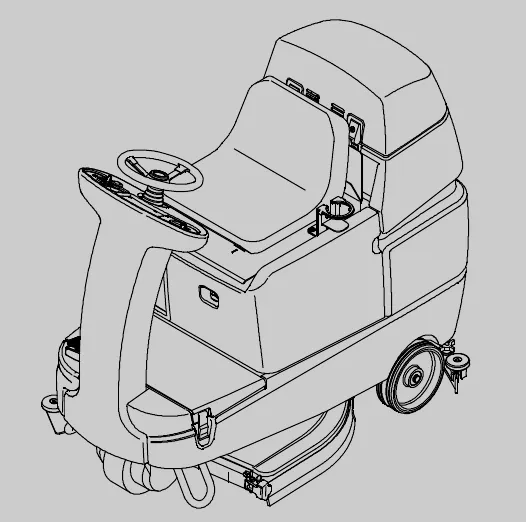
Hygenic® Fully Cleanable Tanks
TennantTrue® Parts
IRIS® a Tennant Technology
ec-H2O® NanoClean
For the latest Parts manuals and other language Operator manuals, visit: www.tennantco.com/manuals
331040
Rev. 11 (02-2024)
Introduction
This manual is furnished with each new model. It provides necessary operation and maintenance instructions.
This machine will provide excellent service. However, the best results will be obtained at minimum costs if:
• The machine is operated with reasonable care.
• The machine is maintained regularly - per the machine maintenance instructions provided.
• The machine is maintained with manufacturer supplied or equivalent parts.
To view, print or download manuals online visit www.tennantco.com/manuals
Protect the environment
Please dispose of packaging materials, used components such as batteries and fluids in an environmentally safe way according to local waste disposal regulations.
Always remember to recycle.
Machine data
Please fill out at time of installation for future reference.
Model No. -
Serial No. -
Installation Date -
Intended use
The T7 is an industrial/commercial rider machine designed to wet scrub both rough and smooth hard surfaces (concrete, tile, stone, synthetic, etc). Typical applications include schools, hospitals / health care facilities, office buildings, and retail centers. Do not use this machine on soil, grass, artificial turf, or carpeted surfaces. This machine is intended for indoor use only. This machine is not intended for use on public roadways. Do not use this machine other than described in this Operator Manual.
Tennant Company
PO Box 1452
Minneapolis, MN 55440
Phone: (800) 553-8033
www.tennantco.com
Tennant Cleaning Systems & Equipment Co., Ltd
Building 1, No. 3777 Caoying Road
Qingpu Shanghai, China 201712
Phone: 86 21 6922 5333
Fax: 86 21 69225151
www.tennantco.com.cn
Insta-Fit is a US registered and unregistered trademark of Tennant Company.
Specifications and parts are subject to change without notice.
Original Instructions. Copyright © 2004-2024 TENNANT Company.
Contents
Links go to the PDF page. The manual's own printed page number is in parentheses.
- Important safety instructions - save these instructions · page 4 (printed 2)
- Operation · page 7 (printed 5)
- Machine components · page 7 (printed 5)
- Controls and instruments · page 8 (printed 6)
- How the machine works · page 9 (printed 7)
- Conventional scrubbing · page 9 (printed 7)
- ec-H2O NanoClean scrubbing system (ec-H2O model) · page 9 (printed 7)
- Brush information · page 10 (printed 8)
- Machine setup · page 10 (printed 8)
- Attaching squeegee assembly · page 10 (printed 8)
- Installing brushes/pads · page 10 (printed 8)
- ec-H2O NanoClean water conditioning cartridge (ec-H2O NanoClean model) · page 11 (printed 9)
- Filling the solution tank · page 11 (printed 9)
- Machine operation · page 12 (printed 10)
- Pre-operation checklist · page 12 (printed 10)
- Before operating · page 12 (printed 10)
- Setting scrub modes · page 12 (printed 10)
- Setting ec-H2O button · page 12 (printed 10)
- Setting brush pressure · page 13 (printed 11)
- Setting solution flow · page 13 (printed 11)
- Economy setting · page 13 (printed 11)
- ec-H2O NanoClean solution flow settings (ec-H2O models labeled ec-H2O NanoClean) · page 13 (printed 11)
- Scrubbing · page 14 (printed 12)
- Double scrubbing · page 15 (printed 13)
- Water pickup mode (no scrubbing) · page 16 (printed 14)
- While operating the machine · page 17 (printed 15)
- Emergency stop button · page 17 (printed 15)
- Hour meter · page 17 (printed 15)
- ec-H2O system indicator light · page 18 (printed 16)
- Solution tank empty indicator · page 19 (printed 17)
- Recovery tank full indicator · page 19 (printed 17)
- Battery discharge indicator · page 19 (printed 17)
- Fault indicator · page 20 (printed 18)
- Circuit breakers · page 21 (printed 19)
- Fuses · page 21 (printed 19)
- Hazard light switch (option) · page 21 (printed 19)
- Draining and cleaning the tanks · page 22 (printed 20)
- Propel system troubleshooting · page 24 (printed 22)
- Machine troubleshooting · page 25 (printed 23)
- Maintenance · page 27 (printed 25)
- Maintenance chart · page 28 (printed 26)
- Batteries · page 29 (printed 27)
- Checking the electrolyte level · page 29 (printed 27)
- Maintenance-free batteries · page 29 (printed 27)
- Checking connections / cleaning · page 29 (printed 27)
- Charging the batteries with off-board charger · page 30 (printed 28)
- Checking on-board battery charger settings · page 31 (printed 29)
- Battery select mode · page 31 (printed 29)
- Charging the batteries with the on-board charger · page 32 (printed 30)
- On-board battery charger error codes · page 32 (printed 30)
- Electric motors · page 33 (printed 31)
- Belts (cylindrical models) · page 33 (printed 31)
- Scrub brushes · page 33 (printed 31)
- Disk brushes and pads · page 33 (printed 31)
- Replacing disk brushes or pad driver · page 33 (printed 31)
- Replacing disk pads · page 34 (printed 32)
- Cylindrical brushes · page 35 (printed 33)
- Replacing or rotating cylindrical brushes · page 35 (printed 33)
- Checking cylindrical brush pattern · page 36 (printed 34)
- Adjusting cylindrical brush taper · page 37 (printed 35)
- Adjusting cylindrical brush width · page 38 (printed 36)
- ec-H2O system (ec-H2O model) · page 39 (printed 37)
- ec-H2O NanoClean water conditioning cartridge replacement · page 39 (printed 37)
- ec-H2O module flush procedure · page 40 (printed 38)
- Squeegee blades · page 41 (printed 39)
- Replacing (or rotating) the rear squeegee blades · page 41 (printed 39)
- Replacing side squeegee blades · page 43 (printed 41)
- Adjusting the squeegee guide roller · page 43 (printed 41)
- Leveling the rear squeegee · page 43 (printed 41)
- Adjusting rear squeegee blade deflection · page 44 (printed 42)
- Skirts and seals · page 45 (printed 43)
- Disk scrub head floor skirt · page 45 (printed 43)
- Recovery tank seal · page 45 (printed 43)
- Solution tank seals · page 45 (printed 43)
- Tires · page 45 (printed 43)
- Pushing, towing, and transporting the machine · page 46 (printed 44)
- Pushing or towing the machine · page 46 (printed 44)
- Transporting the machine · page 46 (printed 44)
- Machine jacking · page 47 (printed 45)
- Storage information · page 47 (printed 45)
- Freeze protection · page 47 (printed 45)
- Flushing antifreeze from ec-H2O module · page 48 (printed 46)
- Specifications · page 49 (printed 47)
- General machine dimensions/capacities · page 49 (printed 47)
- General machine performance · page 49 (printed 47)
- Power type · page 50 (printed 48)
- Tires · page 50 (printed 48)
- ec-H2O system (option) · page 50 (printed 48)
- Machine dimensions · page 51 (printed 49)
Important safety instructions - save these instructions
The following symbols are used throughout this manual as indicated in the descriptions:
The following information signals potentially dangerous conditions to the operator. Know when these conditions can exist. Locate all safety devices on the machine. Report machine damage or faulty operation immediately.
This machine may be equipped with technology that automatically communicates over the cellular network. If the machine will be operated where cell phone use is restricted because of concerns related to equipment interference, please contact a Tennant representative for information on how to disable the cellular communication functionality.
- Do not operate machine:
- Unless trained and authorized.
- Unless operator manual is read and understood.
- Under the influence of alcohol or drugs
- While using a cell phone or other types of electronic devices
- Unless mentally and physically capable of following machine instructions.
- With brake disabled.
- If it is not in proper operating condition.
- In areas where flammable vapors/liquids or combustible dusts are present.
- In areas that are too dark to safely see the controls or operate the machine unless operating / headlights are turned on.
- In areas with possible falling objects unless equipped with overhead guard. - Before starting machine:
- Check machine for fluid leaks.
- Make sure all safety devices are in place and operate properly.
- Check brakes and steering for proper operation.
- Adjust seat and fasten seat belt (if equipped). - When using machine:
- Use only as described in this manual.
- Use brakes to stop machine.
- Go slowly on inclines and slippery surfaces.
- Reduce speed when turning.
- Keep all parts of body inside operator station while machine is moving.
- Use care when reversing machine.
- Never allow children to play on or around machine.
- Do not carry passengers on machine.
- Always follow safety and traffic rules.
- Report machine damage or faulty operation immediately.
- Follow mixing, handling and disposal instructions on chemical containers.
- Follow site safety guidelines concerning wet floors.
Safety instructions, continued
- Before leaving or servicing machine:
- Stop on level surface.
- Turn off machine and remove key. - When servicing machine:
- All work must be done with sufficient lighting and visibility.
- Avoid moving parts. Do not wear loose clothing, jewelry and secure long hair.
- Block machine tires before jacking machine up.
- Jack machine up at designated locations only. Support machine with jack stands.
- Use hoist or jack that will support the weight of the machine.
- Do not push or tow the machine on inclines with the brake disabled.
- Do not power spray or hose off machine near electrical components.
- Disconnect battery connections before working on machine.
- Avoid contact with battery acid.
- Battery installation must be done by trained personnel.
- All repairs must be performed by a trained service mechanic.
- Do not modify the machine from its original design.
- Use Tennant supplied or approved replacement parts.
- Wear personal protective equipment as needed and where recommended in this manual. - When loading/unloading machine onto/off truck or trailer.
- Drain tanks before loading machine.
- Lower scrub head and squeegee before tying down machine.
- Turn off machine and remove key.
- Use ramp, truck or trailer that will support the weight of the machine and operator.
- Use winch. Do not push the machine onto/off the truck or trailer unless the load height is 15 in (380 mm) or less from the ground.
- Block machine tires.
- Tie machine down to truck or trailer.
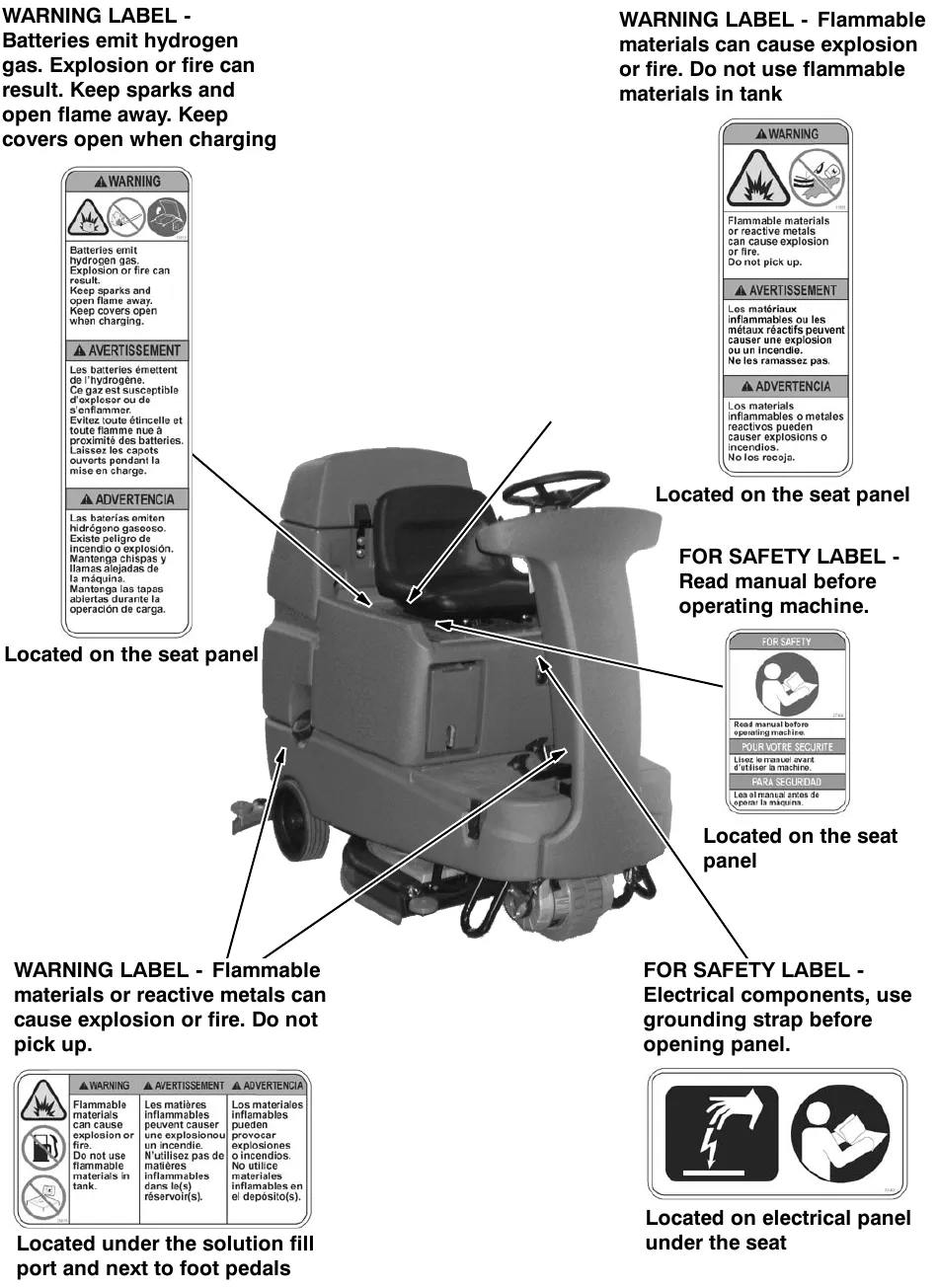
Safety label locations
The safety labels appear on the machine in the locations indicated. If these or any label becomes damaged or illegible, install a new label in its place.
Operation
Machine components
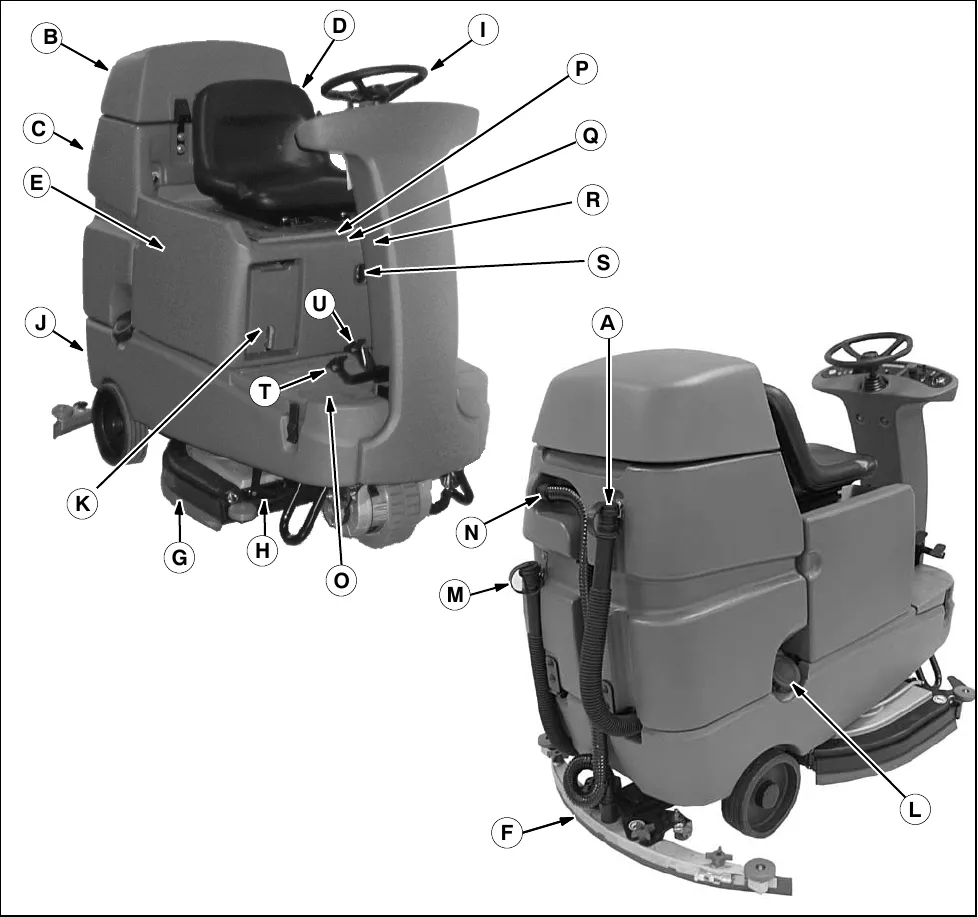
A. Recovery tank drain hose
B. Recovery tank cover
C. Recovery tank
D. Operator seat
E. Batteries
F. Rear squeegee
G. Side squeegee
H. Scrub head
I. Steering wheel
J. Solution tank
K. Tool Box or ec-H2O System Module (option)
L. Solution tank fill cap
M. Solution tank drain hose
N. Squeegee hose
O. Front solution tank cover
P. Hour meter
Q. Circuit breakers
R. 100 A Fuse
S. Battery charging connector
T. Propel pedal
U. Brake pedal
Controls and instruments
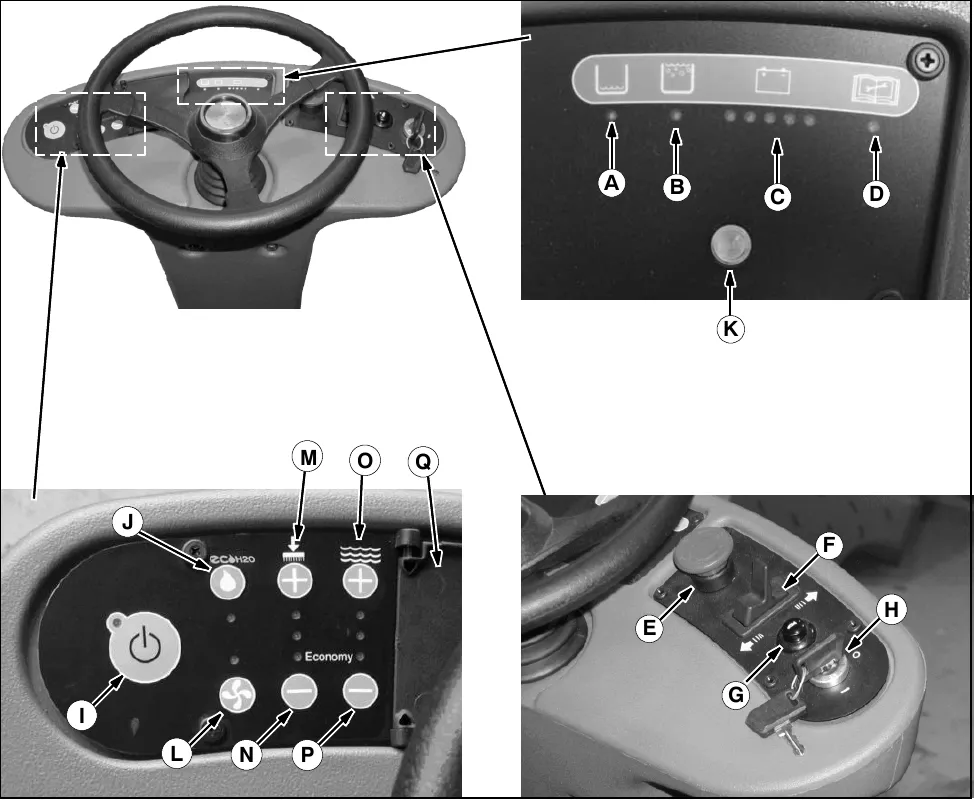
A. Solution tank empty indicator
B. Recovery tank full indicator
C. Battery charge level indicators
D. Fault indicator
E. Emergency Stop Button
F. Directional switch
G. Horn button
H. On/Off key switch
I. One Step scrub button
J. ec-H2O system on/off switch (option)
K. ec-H2O system indicator light (option)
L. Vacuum fan / squeegee button
M. Brush Pressure increase button (+)
N. Brush Pressure decrease button (-)
O. Solution increase button (+)
P. Solution decrease button (-)
Q. Control panel cover
How the machine works
The scrub components of the machine are a solution tank, scrub brushes or pads, a squeegee, a vacuum fan, and a recovery tank.
The buttons on the control panel control the machine scrubbing functions. The One Step Scrub button turns the preset scrub functions on and off. The ec-H2O button (option) enables the ec-H2O (electrically converted water) system. The vacuum fan / squeegee button turns the vacuum fan on/off and raises and lowers the squeegee. The brush pressure buttons control the scrub brush pressure, and the solution buttons control the solution flow.
The steering wheel controls the path of the machine travel. The directional switch controls the forward or reverse direction of the machine. The propel pedal controls the speed of the machine. The brake pedal slows and stops the machine.
There are two different types of scrub heads available, cylindrical and disk. Both scrub heads are available in two different widths. The Disk scrub head is available in 26 in (650 mm) wide and 32 in (800 mm) wide. The Cylindrical scrub head is available in 28 in (700 mm) wide and 32 in (800 mm) wide.
NOTE: The amount and type of soilage play an important role in determining the type of brushes or pads to use. For specific recommendations, see the Brush information section of this manual or contact a Tennant representative.
Conventional scrubbing
Water and detergent from the solution tank flow to the floor through a solution valve. The brushes use the detergent and water solution to scrub the floor clean. As the machine propels forward, the squeegee wipes the dirty solution from the floor. The suction created by the vacuum fan then draws the dirty solution from the squeegee into the recovery tank.
ec-H2O NanoClean scrubbing system (ec-H2O model)
When using the ec-H2O NanoClean technology, normal water passes through a module where it is electrically converted into a cleaning solution. The electrically converted water attacks the dirt, allowing the machine to easily scrub away the suspended soil. The converted water then returns to normal water in the recovery tank.
The ec-H2O system can be used with all double scrubbing applications.
NOTE: Do not enable the ec-H2O system with conventional cleaning detergents in the solution tank. Drain, raise and refill the solution tank with clear cool water only before operating the ec-H2O system. Conventional cleaning detergents/restorers may cause failure to the ec-H2O solution system.
Brush information
For best results, use the correct brush type for the cleaning application. The following are recommended brush applications.
Non-scuff polypropylene brush (Cylindrical and Disk) - This brush uses a softer, general purpose polypropylene bristle to lift lightly compacted soilage without scuffing high-gloss coated floors.
Nylon brush (Cylindrical and Disk) - Softer nylon bristles are recommended for scrubbing coated floors. Cleans without scuffing
Super abrasive bristle brush (Cylindrical and Disk) - Nylon fiber impregnated with abrasive grit to remove stains and soilage. Strong action on any surface. Performs well on buildup, grease, or tire marks.
Surface preparation pad - This maroon pad is for very aggressive floor stripping.
Heavy duty stripping pad - This black pad is for stripping floors. Cuts through old heavy finishes easier to prepare the floor for recoating.
Stripping pad - This brown pad is for stripping floors. Quickly and easily cuts through old finish to prepare the floor for recoating.
Scrubbing pad - This blue pad is for scrubbing floors. Removes dirt, spills, and scuffs. Leaves a clean surface ready for recoating.
Buffing pad - This red pad is for buffing floors. Quickly cleans and removes scuff marks while polishing the floor to a high gloss.
Polishing pad - This white pad is for polishing floors. Maintains a high gloss. Use for buffing very soft finishes and lower traffic areas, and polishing soft waxes on wood floors.
Machine setup
Attaching squeegee assembly
- Stop machine on a level surface.
- Turn the machine ON/OFF key switch off.
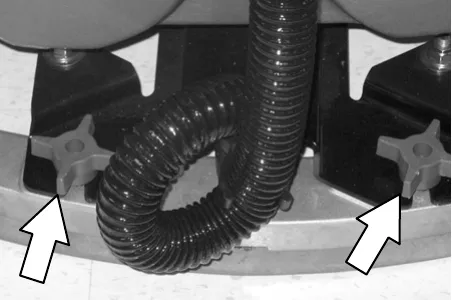
- Place the rear squeegee under the squeegee mount bracket and fasten with the two knobs.
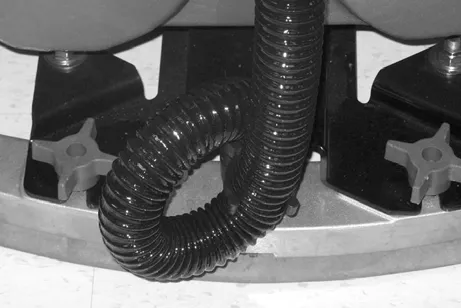
- Connect the vacuum hose to the squeegee assembly. Loop the hose as shown using the hose clip provided.
The squeegee deflection is set at the factory. If the squeegee blade needs adjustments, see Adjusting rear squeegee blade deflection section of this manual.
Installing brushes/pads
To install the brushes or pad, see Replacing disk scrub brushes or pad driver or Replacing cylindrical scrub brushes section of this manual.
ec-H2O NanoClean water conditioning cartridge (ec-H2O NanoClean model)
(ec-H2O models labeled ec-H2O NanoClean)
The ec-H2O system is equipped with a water conditioning cartridge. The cartridge is designed to protect the machine's plumbing system from potential scaling. The cartridge is located under the seat.
The cartridge is required to be replaced when it reaches its maximum water usage or expiration time of when the cartridge was activated, which ever comes first.
Depending on machine usage a new cartridge can last anywhere from 12 to 24 months.
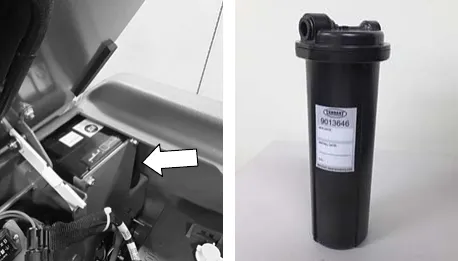
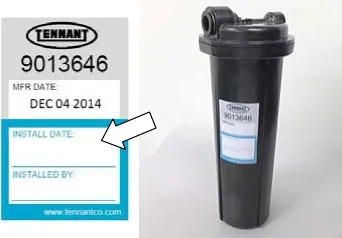
All cartridges are labeled with a manufacture date. The shelf-life of an un-installed cartridge is one year from manufacture date. For new cartridge replacement, the ecH2O module timer must be reset. See ec-H2O NanoClean water conditioning cartridge replacement.
Filling the solution tank
The machine is equipped with a fill port at the rear of the machine.
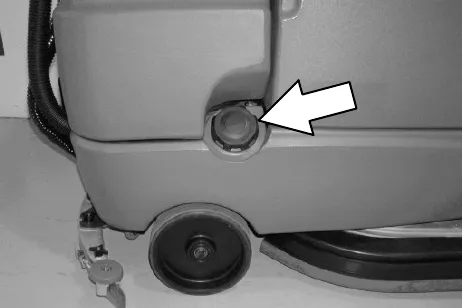
FOR CONVENTIONAL SCRUBBING: Open the solution tank fill port and partially fill it with water (not to exceed 140 °F (60 °C)). Pour the required amount of detergent into the solution tank according to mixing instructions on the bottle. Then continue filling the solution tank with warm water until the water level is just below the fill port.
FOR ec-H2O SCRUBBING: Use cool clean water only (less than 70 °F (21 °C)). Do not add any conventional floor cleaning detergents, system failure may result.
NOTE: When filling the solution tank with a bucket, make sure that the bucket is clean. Do not use the same bucket for filling and draining the machine.
Machine operation
Pre-operation checklist
☐ Check the machine for fluid leaks.
☐ Check the battery fluid and charge level.
☐ Check the tank cover seals for damage and wear.
☐ Clean the vacuum fan inlet filter.
☐ Check the condition of the scrubbing brushes. Remove any string, banding, plastic wrap, or other debris wrapped around them.
☐ Cylindrical brushes: Check that the debris tray is empty and clean.
☐ Check the squeegees for damage, wear and for deflection adjustment.
☐ Check the vacuum hose for debris or blockage.
☐ Drain and clean the recovery tank.
☐ Check the brakes and steering for proper operation.
☐ Check the service records to determine maintenance requirements.
☐ Check the horn, headlights, taillights, safety lights, and backup alarm (if equipped).
☐ For ec-H2O Scrubbing: Ensure that all conventional cleaning agents are drained and rinsed from the solution tank.
☐ For ec-H2O Scrubbing: Ensure that the solution tank is filled with clear cool water only.
Before operating
Pick up oversized debris before scrubbing. Pick up pieces of wire, string, twine, etc., that could become wrapped around the scrub brush.
Plan the scrubbing in advance. Try to arrange long runs with minimum stopping and starting. Do an entire floor or section at one time.
Pre-sweep the area to prevent streaking.
Setting scrub modes
Before scrubbing, select the type of scrubbing will be used, ec-H2O (option) or conventional scrubbing. Then set the preferred brush pressure and solution flow settings.
Setting ec-H2O button
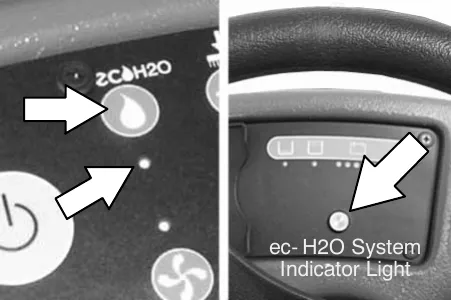
The ec-H2O button enables the ec-H2O system to come on when the One Step Scrub button is on. The light next to the button will come on when it is in this mode.
NOTE: The ec-H2O system indicator light will not turn on until the machine starts scrubbing.
Setting brush pressure
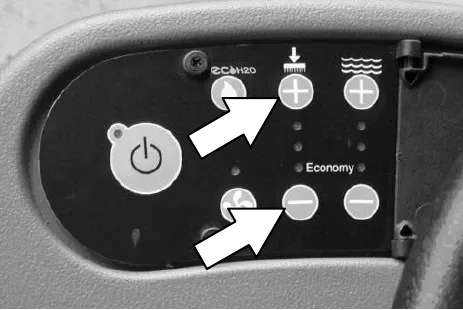
Under normal conditions, the brush pressure should be set to the minimum setting (the bottom light). Under heavy grime conditions, the brush pressure should be set to the maximum setting (the top light). Travel speed and floor conditions will affect scrubbing performance.
With the One Step Scrub button on, press either the Brush Pressure increase button (+) or the Brush Pressure decrease button (-) to set the scrubbing pressure for the surface being cleaned. The new pressure setting will default to this setting when the machine is powered on or off.
Setting solution flow
NOTE: The solution flow cannot be adjusted when the machine is set for ec-H2O scrubbing on ec-H2O models manufactured before ec-H2O NanoClean models.
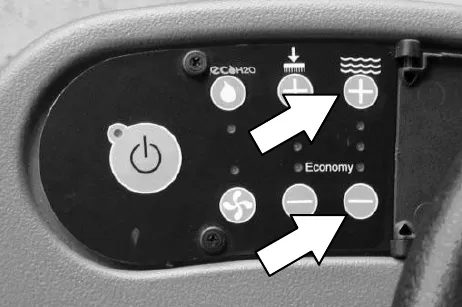
Under normal soilage conditions the solution flow level should be set to the lowest setting (the bottom light). Under heavy grime conditions, the solution flow level should be set to the higher settings (middle or top lights). Travel speed and floor conditions will affect scrubbing performance.
With the One Step Scrub button on, press either Solution increase button (+) or Solution decrease button (-) to set the solution flow level for the surface being cleaned. The new solution flow setting will default to this setting when the machine is powered on or off.
Economy setting
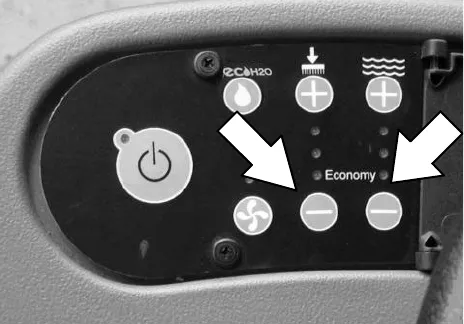
The machine will operate for a longer time if the Brush Pressure and Solution Flow settings are in the Economy setting. The bottom lights of the Brush Pressure and Solution Flow settings are on when the machine is in the Economy setting.
ec-H2O NanoClean solution flow setting
(ec-H2O models labeled ec-H2O NanoClean)
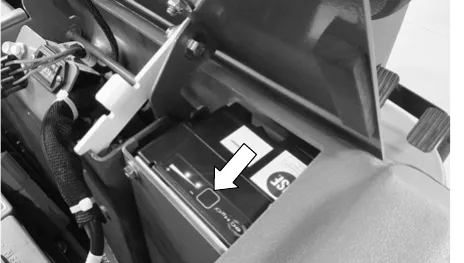
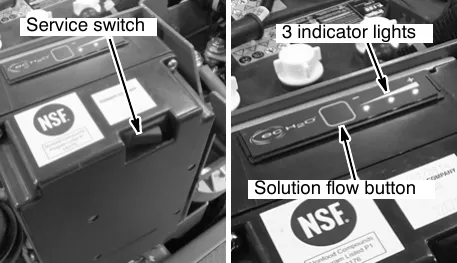
To adjust the solution flow rate when ec-H2O scrubbing, press the solution flow button located on the ec-H2O module. One LED = low, two LEDs = medium, and three LEDs = high. The ec-H2O module is located under the seat.
NOTE: For ec-H2O models manufactured before ec-H2O NanoClean models, contact an Authorized Service Center if solution flow rate adjustment is required.
Scrubbing
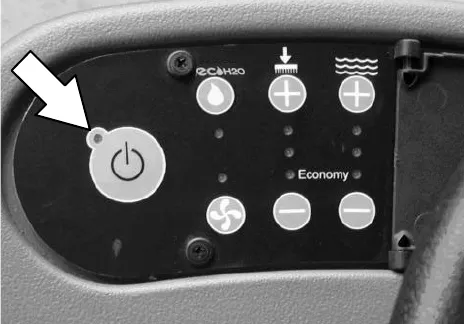
- Turn the On/Off key switch on.
- Turn on lights (if equipped).
- Select the preferred scrubbing settings (See Setting scrub modes).
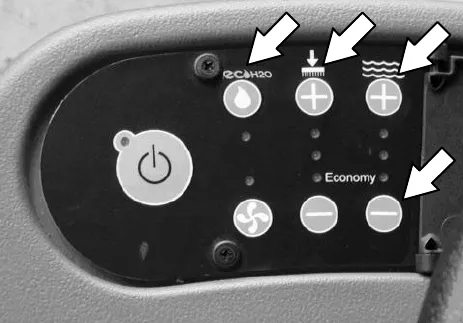
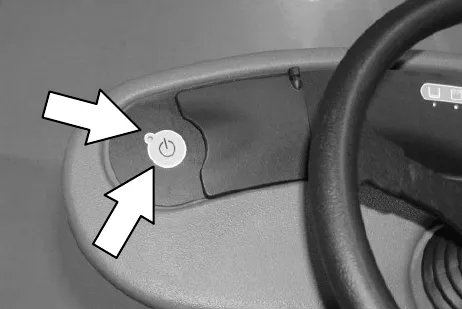
- Press the One Step Scrub button. The light on the button is illuminated. All the preset scrubbing functions will turn on.
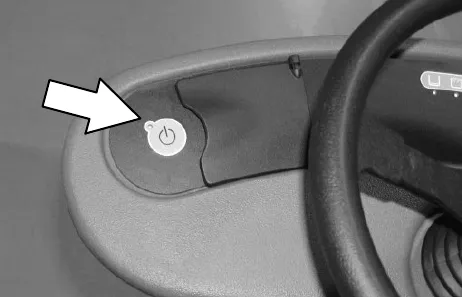
NOTE: Open the control panel cover to adjust the Brush Pressure and Solution Flow Setting while scrubbing if necessary.
NOTE: DO NOT turn the ec-H2O system on during conventional scrubbing. Conventional cleaning detergents/restorers may cause failure to the ec-H2O solution system. Drain, rinse and refill solution tank with cool clean water before operating the ec-H2O system.
- Place the directional switch in the direction the machine is to be moved (forward or reverse).
NOTE: The machine can scrub in both forward or reverse. The horn will sound when in reverse.
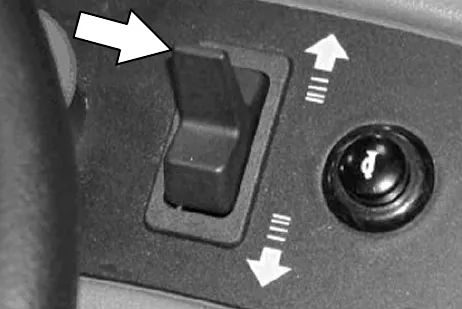
NOTE: The squeegee automatically raises when the machine is driven backwards. This prevents damaging the squeegee. When the machine is placed in reverse, the vacuum fan will shut off after a short delay.
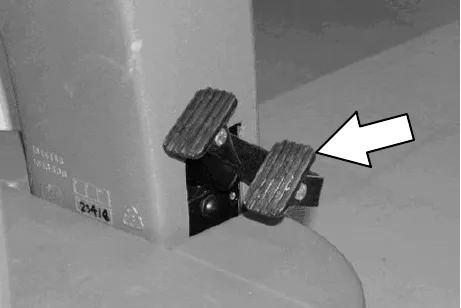
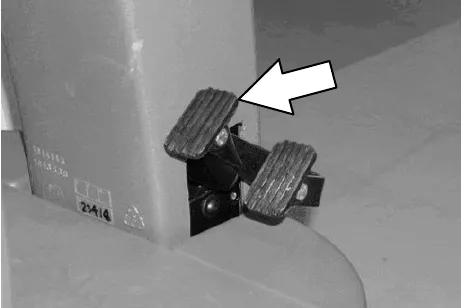
- Press the propel pedal to begin scrubbing.
Scrubbing, continued
- Release the propel pedal to stop the machine. Scrubbing functions stop and the automatic park brake will engage when the machine stops.
- The Brake pedal can be used to control the machine if quicker stopping is needed or if operating on an incline. Do not operate machine on inclines exceeding 7% when scrubbing.
- Press the One Step Scrub button to stop scrubbing. The light next to the One Step Scrub button will turn off and the scrubbing functions will turn off after a short delay.
Double scrubbing
For heavily soiled areas, use the double scrubbing method.
Double scrubbing can be performed using the ec-H2O SCRUBBING SYSTEM (option) or CONVENTIONAL SCRUBBING methods.
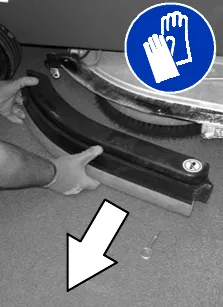
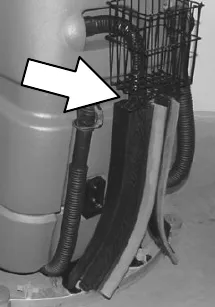
Disk brushes: Before double scrubbing, remove the side squeegees to keep them from channeling water while double scrubbing. To remove the side squeegees, lower the scrub head, then pull the pins on the front and rear ends of the squeegees. If the machine is equipped with the accessory basket, you may hang the side squeegees from the hooks.
To double scrub, press the One Step Scrub button, then the vacuum fan button. The light above the vacuum fan button will turn off, the squeegee will raise and the vacuum fan will stop operating. Then scrub the area.
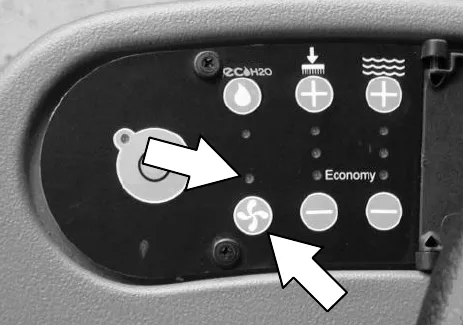
Let the cleaning solution set on the floor for 3-5 minutes.
Double scrubbing, continued
Place the side squeegees back on to the machine before scrubbing the floor the second time.
NOTE: It is easier to put the side squeegees back on to the machine with the scrub head partially lowered. This allows clearance to install the pins.
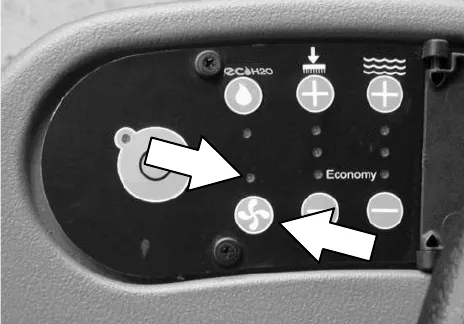
Press the vacuum fan button again to lower the squeegee and to turn on the vacuum fan. The light above the vacuum fan button will come on. Then scrub the floor a second time picking up the cleaning solution.
Water pickup mode (no scrubbing)
The machine can be used to pick up water or non-flammable liquid spills without scrubbing.
To pick up water or non-flammable liquid spills, check to make sure that the One Step Scrub button is not activated. The light next to the One Step Scrub button must be off.
Then press the vacuum fan button. The light above the vacuum fan button will turn on, the squeegee will lower and the vacuum fan will start operating. Then pick up the water or non-flammable liquid spill.
While operating the machine
Drive as straight a path as possible. Avoid bumping into posts or scraping the sides of the machine. Overlap the scrub paths by a few inches (several centimeters).
Avoid turning the steering wheel too sharply when the machine is in motion. The machine is very responsive to the movement of the steering wheel. Avoid sudden turns, except in emergencies.
When scrubbing dead end aisles, start at the closed end of the aisle and scrub out towards the opening.
Adjust the machine speed, brush pressure, and solution flow as required when scrubbing. Use the minimal brush pressure and solution flow settings as possible.
Keep the machine moving to prevent damaging floor finishes.
If poor scrubbing performance is observed, stop scrubbing and refer to Machine troubleshooting.
Conventional Scrubbing: Pour a recommended foam control solution into the recovery tank if excessive foam appears.
Change or rotate pads as necessary.
Observe the battery discharge indicator to ensure there is adequate charge for machine operation.
Observe the solution tank indicator to ensure the solution tank is not empty. Always empty recovery tank before refilling the solution tank.
Observe the recovery tank indicator to ensure the recovery is not full.
Remove the key when leaving the machine unattended.
Perform the Daily Maintenance Procedures after scrubbing (see Maintenance).
Drive the machine slowly on inclines. Use the brake pedal to control machine speed on descending inclines. Scrub with the machine up inclines rather than down inclines.
Do not operate machine in areas where the ambient temperature is above 110 °F (43 °C). Do not operate scrubbing functions in areas where the ambient temperature is below freezing 32 °F (0 °C).
The maximum rated incline for scrubbing with the machine is 7%. The maximum rated incline during transport of the machine is 19.25%.
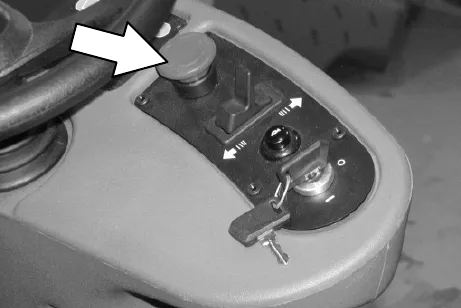
Emergency stop button
The Emergency Stop Button halts all power to the machine in case of an emergency. Press the button to halt the machine power. To restart the machine, turn the Emergency Stop Button to the right. Then turn the on/off switch to the off position and then to the on position.
NOTE: This button should not be used for normal stopping as premature wear to the parking brake may occur.
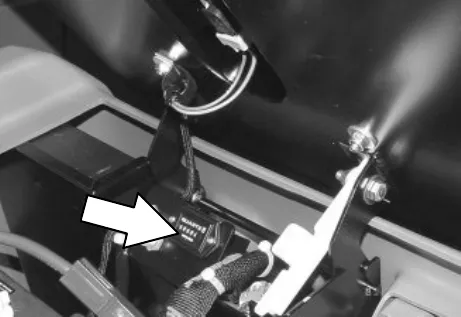
Hour meter
The hour meter records the number of hours the machine has been powered on. This information is useful for servicing the machine. It is located under the seat.
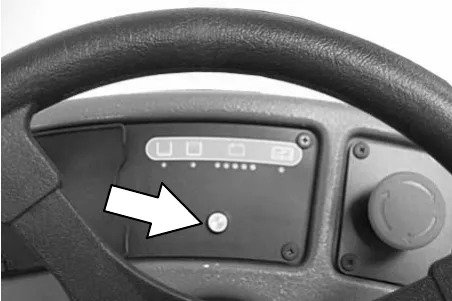
ec-H2O system indicator light
The ec-H2O system indicator light will not turn on until the machine starts scrubbing.
ec-H2O NanoClean models
(ec-H2O models labeled ec-H2O NanoClean)
| ec-H2O system indicator light code | Condition |
|---|---|
| Solid green | Normal operation |
| Blinking green/red | Water conditioning cartridge expired. Replace cartridge. |
| Solid or blinking* red | Contact Service Center |
If the ec-H2O system indicator light begins to blink green/red, the water conditioning cartridge needs to be replaced (See ec-H2O NanoClean water conditioning cartridge replacement).
*Verify if cleaning detergent was added to solution tank. If ec-H2O system was operated with cleaning detergent, drain solution tank, add clear water and operate the ec-H2O system until the indicator light code clears.
ec-H2O models
(ec-H2O models manufactured before ec-H2O NanoClean models)
| ec-H2O system indicator light code | Condition |
|---|---|
| Solid green | Normal operation |
| Blinking red | Flush ec-H2O module |
| Solid red | Contact Service Center |
If an alarm sounds and the ec-H2O system indicator light begins to blink red, the ec-H2O module must be flushed to resume ec-H2O operation (See ec-H2O module flush procedure).
NOTE: When the alarm sounds and the light blinks red, the machine will bypass the ec-H2O system. To continue scrubbing, turn the ec-H2O switch off and change over to conventional scrubbing.
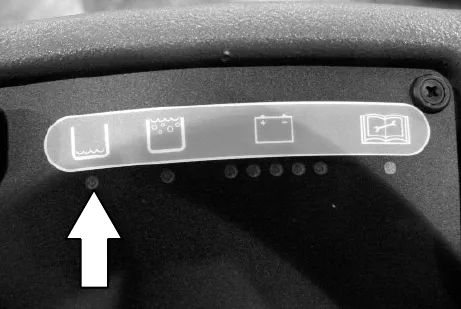
Solution tank empty indicator
Batteries and chargers: make sure your charger is compatible with your batteries, and set its charging algorithm to your battery pack before you use it.
The solution tank empty indicator comes on when the solution tank is empty. When this happens, the scrub functions are disabled. If necessary, press the ONE STEP Scrub button for an additional minute of operation to pick up standing water or solution.
Recovery tank full indicator
The recovery tank full indicator comes on when the recovery tank is full. When this happens, the scrub functions are disabled. If necessary, press the ONE STEP Scrub button for an additional minute of operation to pick up standing water or solution.
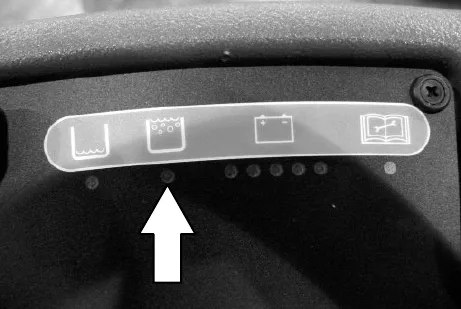
Battery discharge indicator
The battery discharge indicator shows the charge level of the batteries.
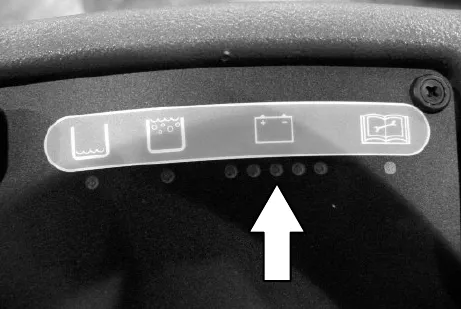
When the batteries are fully charged, all five lights are lit. As the batteries discharge, the lights go out until only the left light is blinking.
When the left light blinks, the scrubbing functions will shut off to alert the operator of the battery condition. The machine will still propel when the light is blinking. Recharge the batteries when the light blinks. If necessary, press the ONE STEP Scrub button for an additional minute of operation to pick up standing water or solution.
NOTE: Do not charge batteries more often than necessary. Excessive charging could reduce the life of the batteries. It is best to charge the batteries only when the left light indicates that the battery needs charging. See Batteries in the Maintenance section.
NOTE: The blinking left battery discharge light will not reset from blinking until the batteries are fully charged.
Fault indicator
The fault indicator light (shown in upper right) comes on when there a fault is detected in the propelling motor, vacuum fan motor, or brush motors.
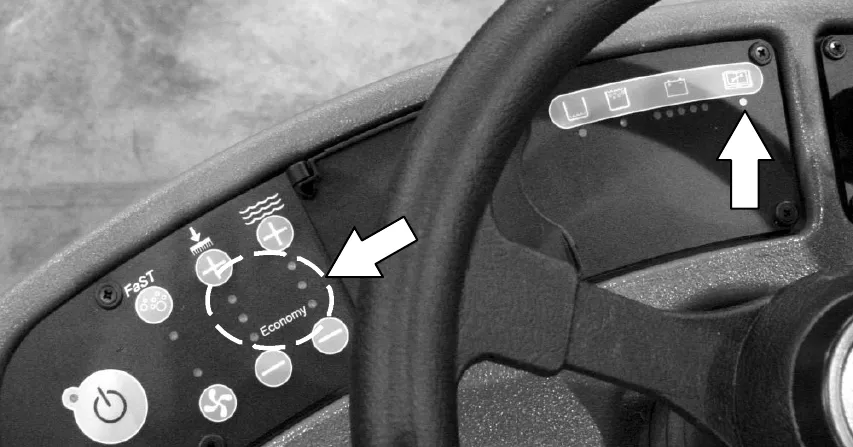
Refer to the table below to determine the cause for the fault or failure.
| Indicator(s) | Cause(s) | Remedy |
|---|---|---|
| Fault Light blinks | Propel motor is overloaded | Contact Tennant service representative |
| Fault Light and top Brush Pressure Light both blink | The right or rear Brush Motor is overloaded (possibly from string or banding wrapped around motor) | Remove string / banding from motor or Contact Tennant service representative |
| Fault Light and bottom Brush Pressure Light both blink | The left or front Brush Motor is overloaded (possibly from string or banding wrapped around motor) | Remove string / banding from motor or Contact Tennant service representative |
| Fault Light and Vacuum Fan Light both blink | Vacuum Fan Motor is overloaded | Contact Tennant service representative |
Circuit breakers
Circuit breakers are resettable electrical circuit protection devices that stop the flow of current in the event of a circuit overload. Once a circuit breaker is tripped, allow breaker to cool and then press the reset button to manually reset the breaker.
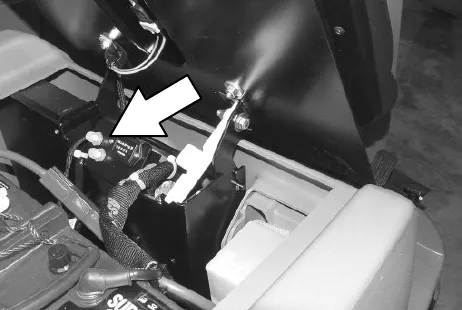
If the overload that caused the circuit breaker to trip is still there, the circuit breaker will continue to stop current flow until the problem is corrected.
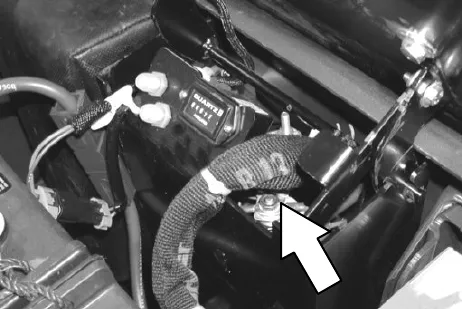
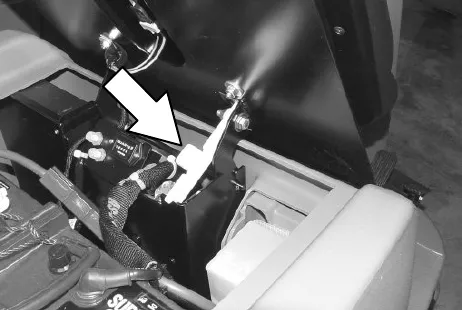
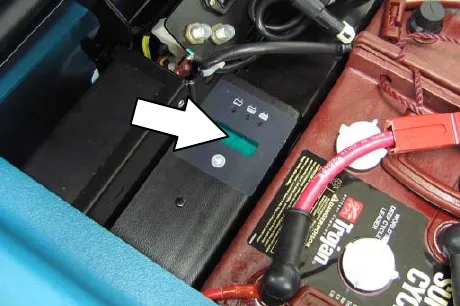
The circuit breakers are located inside the battery compartment next to the hour meter.
The chart shows the circuit breakers and the electrical components they protect.
| Circuit breaker | Rating | Circuit protected |
|---|---|---|
| CB1 | 5 A | Instrument Panel - power |
| CB2 | 15 A | Accessories |
Fuses
The fuse is a one-time protection device designed to stop the flow of current in the event of a circuit overload. The 100 A fuse is located inside the battery compartment near the hourmeter. It protects the propel circuit.
NOTE: Always replace the fuse with a fuse of the same amperage.
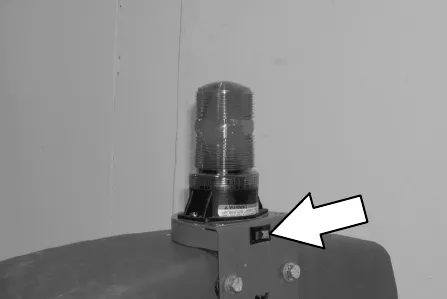
Hazard light switch (option)
The Hazard Light Switch operates the optional hazard light.
Draining and cleaning the tanks
When cleaning is finished, or when the recovery tank full indicator comes on, the recovery tank should be drained and cleaned. The solution tank then can be filled again for additional cleaning.
- Drive the machine to a solution disposal drain.
- Turn the machine ON/OFF key switch off.
- Tilt the operator seat forward and hook the seat latch into place to hold up the seat.
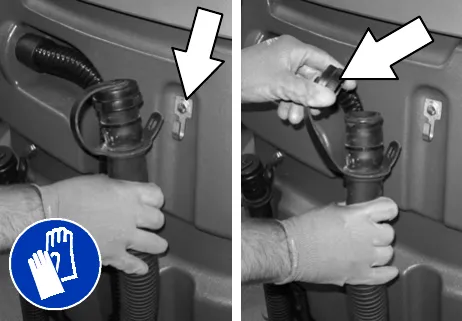
- Remove the recovery tank drain hose. While holding the hose up, remove the plug, then slowly lower the drain hose to the floor drain or sink.
- Lift the recovery tank cover. Flush the inside of the recovery tank with clean water.
NOTE: DO NOT use steam to clean tanks. Excessive heat can damage tanks and components.
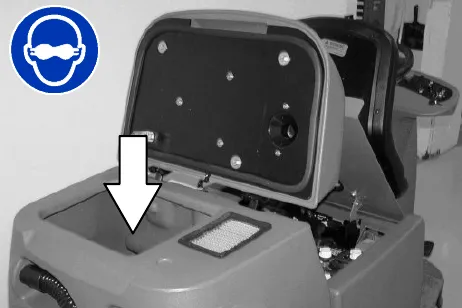
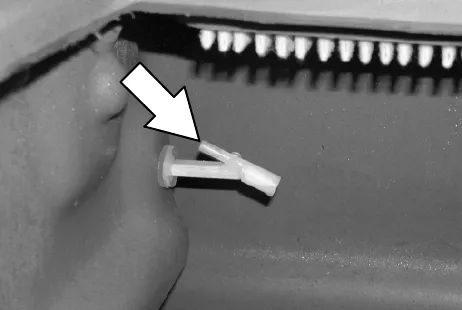
- Rinse the float sensor located inside the recovery tank.
- Replace the recovery tank drain hose cap and mount the drain hose back onto the mounting clip after the tank is drained.
Draining and cleaning the tanks, continued
- Remove and clean the vacuum fan filter. Clean the filter with a damp cloth or low pressure water hose if dirty. Allow the vacuum fan filter to dry completely before reinstalling it in the machine.
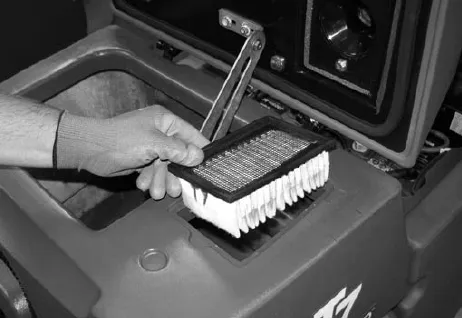
- Close the recovery tank cover.
- Remove the solution tank drain hose. While holding the hose up, remove the plug, then slowly lower the drain hose to the floor drain or sink.
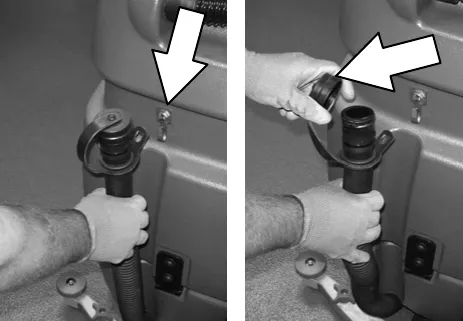
- Tilt the recovery tank back to access the solution tank. Make sure the recovery tank is empty before tilting.
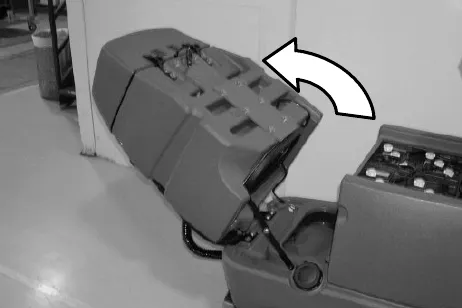
- Flush the solution tank and rinse the float sensor located inside the back part of the solution tank. Rinse the screen filter on the bottom of the tank.
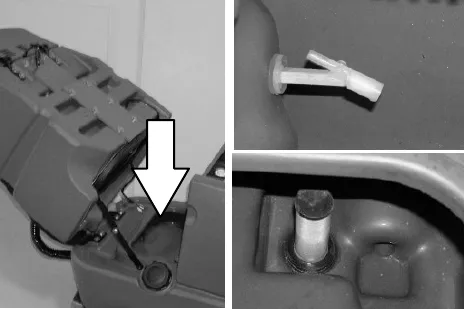
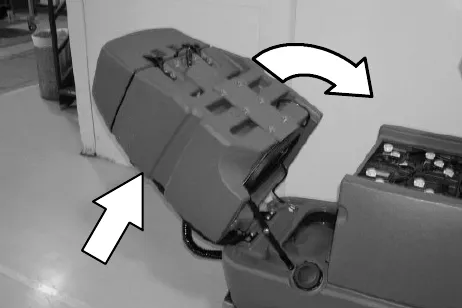
- Carefully push the recovery tank forward to close the solution tank.
- Unhook the seat latch and lower the operator seat.
- Clean the front of the solution tank through the front access port located under the front solution tank cover. Wipe the bottom of the cover and the tank seal before replacing the cover.
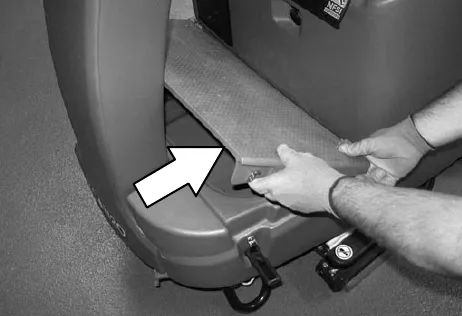
Draining and cleaning the tanks, continued
- Cylindrical scrub head: Remove and clean the debris tray. Place the tray back in the scrub head when finished.
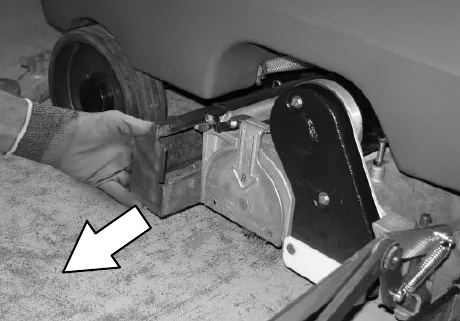
- Replace the solution tank drain hose cap and mount the drain hose back onto the mounting clip after after the tank is drained.
Propel system troubleshooting
The audio alarm (horn) will sound and/or warning lights will come on when a propelling system fault or failure is detected. The machine will stop propelling when this happens. Refer to the table below to determine the cause for the fault or failure.
| Indicator(s) | Cause(s) | Remedy |
|---|---|---|
| Horn repeatedly beeps 2 times | Propel pedal depressed without operator in seat | Sit in seat when operating machine |
| Horn repeatedly beeps 4 times | ON/OFF key switch is turned on while propel pedal is engaged | Release the propel pedal before turning key on |
| Horn repeatedly beeps 5 times | Failure in the Throttle system has occurred | Contact Tennant service representative |
| Horn repeatedly beeps 6 times | Failure in the Brake system has occurred | Contact Tennant service representative |
| Horn repeatedly beeps 7 times | Failure in the Parking Brake system has occurred | Contact Tennant service representative |
| Horn repeatedly beeps 8 times | Emergency Stop Button is engaged | Reset Emergency Stop Button |
| Horn repeatedly beeps 9 times | ON/OFF key switch is turned on while battery charger is plugged into machine | Unplug battery charger before starting machine |
| Fault Light blinks | Propel motor is overloaded | Contact Tennant service representative |
Machine troubleshooting
| Problem | Cause | Remedy |
|---|---|---|
| Trailing water - poor or no water pickup | Vacuum fan turned off | Turn vacuum fan on |
| Worn squeegee blades | Rotate or replace squeegee blades Parts › | |
| Squeegee out of adjustment | Adjust squeegee | |
| Vacuum hose clogged | Flush vacuum hoses | |
| Vacuum fan filter dirty | Clean vacuum fan filter | |
| Vacuum fan cover seals worn | Replace seals Parts › | |
| Debris caught on squeegee | Remove debris | |
| Vacuum hose to squeegee or recovery tank disconnected or damaged | Reconnect or replace vacuum hose Parts › | |
| Recovery tank cover not completely closed | Check for obstructions and close cover | |
| Vacuum fan will not turn on | Vacuum fan switch turned off | Turn vacuum switch on |
| Recovery tank full | Drain recovery tank | |
| Foam filling recovery tank | Empty recovery tank | |
| Use less detergent | ||
| Recovery tank sensor dirty or stuck | Clean or replace sensor Parts › | |
| Little or no solution flow to the floor (Conventional Scrubbing Mode) | Solution tank empty | Fill solution tank |
| Solution flow turned off | Turn solution flow on | |
| Solution supply lines plugged | Flush solution supply lines | |
| Clogged solution tank filter | Drain solution tank. remove solution tank filter, clean and reinstall | |
| Poor scrubbing performance | One Step Scrub button not on | Turn One Step Scrub button on |
| Improper detergent or brushes used | Contact Tennant service representative | |
| Recovery tank full | Empty recovery tank | |
| Solution tank empty | Fill solution tank | |
| Debris caught on scrub brushes or pads | Remove debris | |
| Worn scrub brush | Replace scrub brush Parts › | |
| Broken or loose brush drive belt (Cylindrical models) | Replace or tighten belt Parts › | |
| Brush pressure set too light | Increase brush pressure | |
| Low battery charge | Charge batteries until the charger automatically turns off |
ec-H2O NanoClean models
(ec-H2O models labeled ec-H2O NanoClean)
| Problem | Cause | Remedy |
|---|---|---|
| ec-H2O system indicator light blinking green/red | Water conditioning cartridge has expired | Replace cartridge (See ec-H2O NanoClean water conditioning cartridge replacement) Parts › |
| ec-H2O system indicator is red or blinking* red | ec-H2O system fault has been detected | Contact Service Center |
Machine troubleshooting, continued
*Verify if cleaning detergent was added to solution tank. If ec-H2O system was operated with cleaning detergent, drain solution tank, add clear water and operate the ec-H2O system until the indicator light code clears.
ec-H2O models
(ec-H2O models manufactured before ec-H2O NanoClean models)
| Problem | Cause | Remedy |
|---|---|---|
| ec-H2O system indicator light blinking red | Mineral deposit build-up in module | Flush module (See ec-H2O module flush procedure) |
| Alarm sounds | ||
| ec-H2O system indicator light solid red | Defective module | Contact Service Center |
| ec-H2O system indicator light does not turn on | Defective light or module | Contact Service Center |
| No water flow | Clogged module | Contact Service Center |
| Defective solution pump | Replace solution pump Parts › |
Maintenance
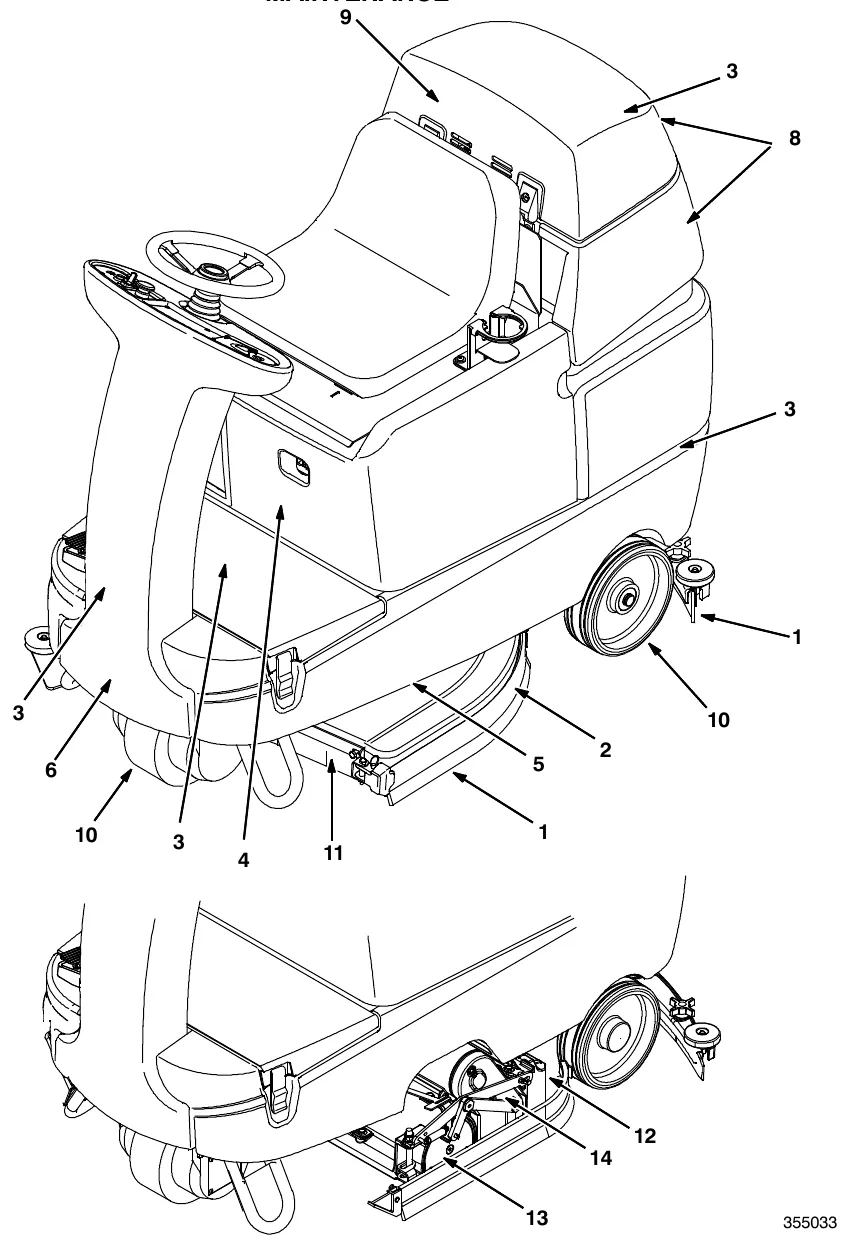
Maintenance chart
The table below indicates the Person Responsible for each procedure.
O = Operator.
T = Trained Personnel.
| Interval | Person Resp. | Key | Description | Procedure | Lubricant/ Fluid | No. of Service Points |
|---|---|---|---|---|---|---|
| Daily | O | 1 | Side and rear squeegees Parts › | Check for damage and wear | - | 3 |
| Check deflection and leveling | - | 6 | ||||
| O | 2 | Scrub brushes / pads Parts › | Check for damage, wear, debris | - | 2 | |
| O | 8 | Recovery tank | Clean tank, screen filter, and float sensor | - | 1 | |
| O | 9 | Vacuum fan filter Parts › | Clean | - | 1 | |
| O | 12 | Debris tray (Cylindrical brushes) | Clean | - | 1 | |
| Weekly | T | 4 | Battery cells (Lead acid batteries) | Check electrolyte level | DW | 3 |
| 50 Hours | O | 11 | Disk scrub head floor skirt Parts › | Check for damage and wear | - | 2 |
| O | 13 | Cylindrical brushes Parts › | Check taper and rotate front to rear | - | 2 | |
| 100 Hours | T | 3 | Vacuum Fan and tank seals Parts › | Check for damage and wear | - | 3 |
| T | 14 | Cylindrical brush drive belts Parts › | Check tension | - | 2 | |
| 200 Hours | T | 4 | Battery terminals and cables | Check and clean | - | 12 |
| 500 Hours | T | 9 | Vacuum fan motor(s) | Check motor brushes (Check every 100 hours after initial 500 hour check) | - | 1 |
| T | 5 | Scrub brush motors | Check motor brushes (Check every 100 hours after initial 500 hour check) | - | 2 | |
| T | 6 | Propelling motor | Check motor brushes (Check every 100 hours after initial 500 hour check) | - | 1 | |
| T | 10 | Tires Parts › | Check for damage and wear | - | 3 |
LUBRICANT/FLUID
DW . . . . Distilled water
NOTE: More frequent maintenance intervals may be required in extremely dusty conditions.
Batteries
Batteries and chargers: make sure your charger is compatible with your batteries, and set its charging algorithm to your battery pack before you use it.
The lifetime of the batteries depends on their proper maintenance. To get the most life from the batteries;
• Do not charge the batteries more than once a day and only after running the machine for a minimum of 15 minutes.
• Do not leave the batteries partially discharged for long period of time.
• Only charge the batteries in a well-ventilated area to prevent gas build up. Charge batteries in areas with ambient temperatures 80 °F (27 °C) or less.
• Allow the charger to complete charging the batteries before re-using the machine.
• Maintain the proper electrolyte levels of flooded (wet) batteries by checking levels weekly.
Checking the electrolyte level
The flooded (wet) lead-acid batteries require routine watering as described below. Check the battery electrolyte level weekly.
NOTE: Do Not check the electrolyte level if the machine is equipped with a battery watering system.
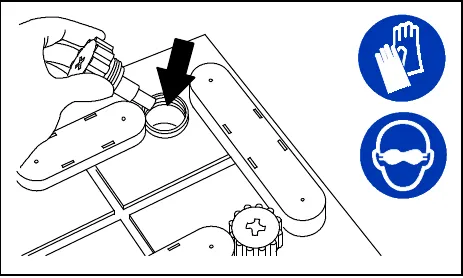
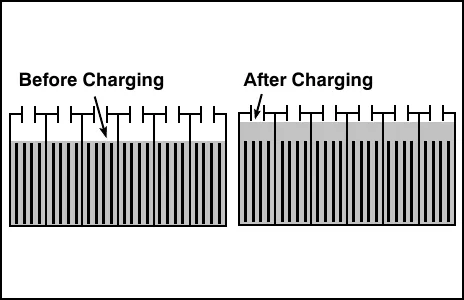
The electrolyte level should be slightly above the battery plates as shown before charging. Add distilled water if low. DO NOT OVERFILL. The electrolyte will expand and may overflow when charging. After charging, distilled water can be added up to about 0.12 in (3 mm) below the sight tubes.
NOTE: Make sure the battery caps are in place while charging. There may be a sulfur smell after charging batteries. This is normal.
Maintenance-free batteries
Maintenance-free (Sealed AGM) batteries do not require watering. Cleaning and other routine maintenance is still required.
Checking connections / cleaning
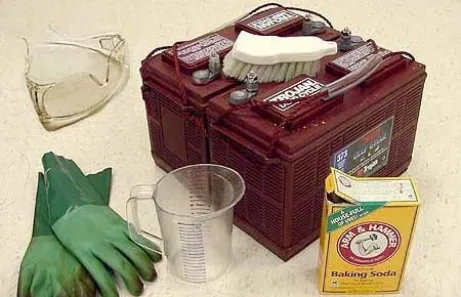
After every 200 hours of use check for loose battery connections and clean the surface of the batteries, including terminals and cable clamps, with a strong solution of baking soda and water. Replace any worn or damaged wires. Do not remove battery caps when cleaning batteries.
Charging the batteries with off-board charger
Batteries and chargers: make sure your charger is compatible with your batteries, and set its charging algorithm to your battery pack before you use it.
- Drive the machine to a flat, dry surface.
NOTE: Make sure the area is well ventilated.
- Turn the machine ON/OFF key switch off.
- Tilt the operator seat forward and hook the seat latch into place to hold up the seat
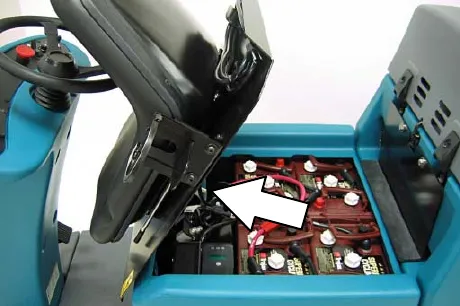
NOTE: Make sure the batteries have the proper electrolyte level before charging. See Checking the electrolyte level.
- Plug the charger connector into the machine battery charging connector.
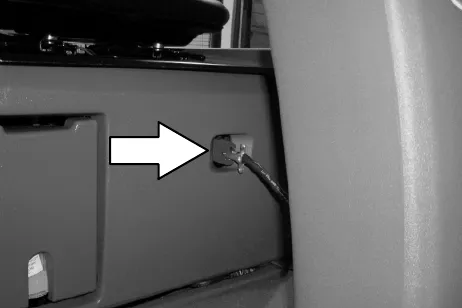
- Plug the battery charger into the wall outlet.
NOTE: If the red "ABNORMAL CYCLE" lamp lights when the TENNANT charger is plugged into a wall outlet, the charger cannot charge the battery and there is something wrong with the battery.
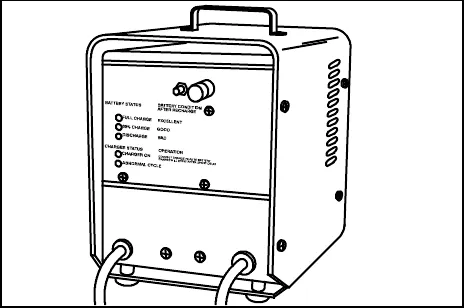
- The TENNANT charger will start automatically. When the batteries are fully charged, the TENNANT charger will automatically turn off.
NOTE: Do not disconnect he charger's DC cord from the machine's battery charging connector when the charger is operating. Arcing may result. If the charger must be interrupted during charging, disconnect the AC power supply cord first.
- After the charger has turned off, unplug the charger from the machine battery charging connector.
- Unhook the seat latch and lower the operator seat.
Checking on-board battery charger settings
Batteries and chargers: make sure your charger is compatible with your batteries, and set its charging algorithm to your battery pack before you use it.
If your machine is equipped with the on-board charger, the charger settings must be set for your battery type before charging. Failure to properly set will result in battery damage.
To determine your battery type, see battery label. Contact your battery supplier if not specified.
To verify the setting of the charger, connect the charger cord into an electrical receptacle. The charger will display a sequence of codes. One of the codes will either read "GEL" or "Acd".
GEL = Set for sealed/maintenance free batteries.
Acd = Set for wet/lead acid batteries.
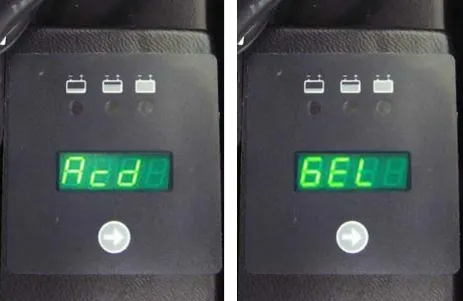
To change the charger's setting to "GEL" or "Acd", unplug charger cord, peel up the corner of the display label and set the switches accordingly. The charger cord must be unplugged when resetting
After charger is properly set for battery type, run the Battery Select Mode (See Battery select mode).
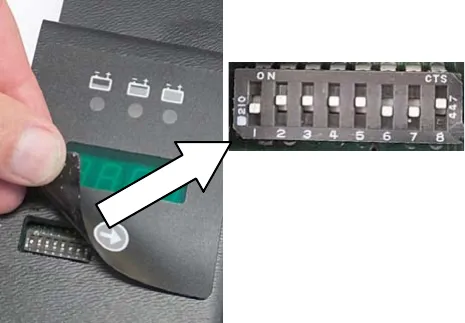
| ID | Charge profile description | Dipswitch settings | |||||||
|---|---|---|---|---|---|---|---|---|---|
| DP1 | DP2 | DP3 | DP4 | DP5 | DP6 | DP7 | DP8 | ||
| 61 | GEL, SONNENSCHEIN | ON | ON | ON | ON | ON | OFF | OFF | ON |
| 02 | WET, TROJAN, 240 AH (DEFAULT) | OFF | ON | ON | ON | ON | OFF | OFF | ON |
| 187 | LITHIUM, SDI | ON | OFF | ON | ON | ON | OFF | OFF | ON |
| 03 | WET, TROJAN, 360 AH | OFF | OFF | ON | ON | ON | OFF | OFF | ON |
| 11 | WET, ENERSYS/ TAB | ON | ON | OFF | ON | ON | OFF | OFF | ON |
| 31 | AGM, DISCOVER | OFF | ON | OFF | ON | ON | OFF | OFF | ON |
| 22 | WET, LEOCH, DT 146 | ON | OFF | OFF | ON | ON | OFF | OFF | ON |
| 49 | AGM, LEOCH | OFF | OFF | OFF | ON | ON | OFF | OFF | ON |
| 09 | AGM, OPTIMA | ON | ON | ON | OFF | ON | OFF | OFF | ON |
| 10 | AGM, TROJAN | OFF | ON | ON | OFF | ON | OFF | OFF | ON |
Battery select mode
Use the Battery Select Mode when changing to a different battery type. This will reprogram the machine's control board to ensure the battery discharge indicator operates according to battery type. If not properly programmed, premature battery damage my result.
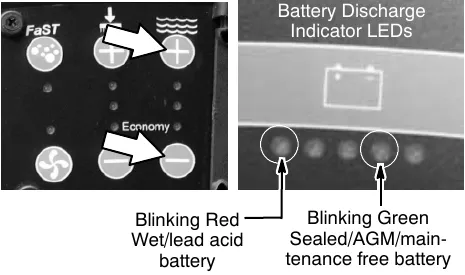
- To enter the Battery Select Mode, press and hold the solution flow increase button (+) while turning the key switch on. Release the button when a LED on the battery discharge indicator begins to blink.
- Refer to the LEDs for battery selection settings below. To select the proper battery type, press the solution flow decrease button (-) to advance selection.
- Turn key switch off to save setting.
Charging the batteries with the on-board charger
Batteries and chargers: make sure your charger is compatible with your batteries, and set its charging algorithm to your battery pack before you use it.
NOTE: If your machine is equipped with the on-board battery charger, make sure that the charger is properly set for your battery type before charging (See Checking on-board battery charger settings).
- Drive the machine to a flat, dry surface.
NOTE: Make sure the area is well ventilated.
- Turn the machine ON/OFF key switch off.
- Tilt the operator seat forward and hook the seat latch into place to hold up the seat
- Connect the charger's AC power supply cord into a properly grounded wall outlet.
- The charger will display a sequence of codes once the cord is connected. Three-digits + the following code:
A = Charging current
U = Battery Voltage
h = Charging time
C = Charging ampere-hours [Ah]
E = Energy used [Kwh] - Press the arrow button to review the codes.
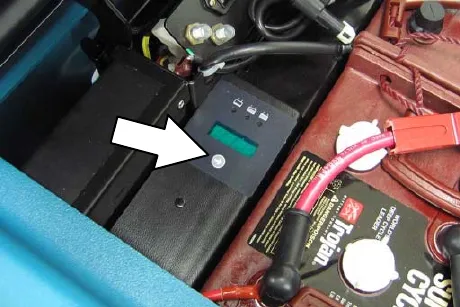
Once the charging cycle begins, the indicator lights will progress from red, yellow to green. When the green indicator light comes on, the charging cycle is done. Unplug the charger cord.
If the charger detects a problem, the charger will display an error code. See On-board battery charger error codes.
On-board battery charger error codes
| Display code | Fault | Solution |
|---|---|---|
| bat | Loose or damaged battery cable | Check battery cable connections. |
| Battery exceeded maximum voltage level. | No action necessary. | |
| E01 | Exceeded maximum battery voltage allowed. | No action necessary. |
| E02 | Safety thermostat exceeded maximum internal temperature. | Check if the charger vents are obstructed. |
| E03 | Exceeded maximum time for charging phase leaving the batteries undercharged due to a sulfated or faulty battery. | Repeat the charging cycle and if the error code E03 reappears check battery or replace it. |
| SCt | Safety timer exceeded maximum charging time. Interrupts charging cycle. | Replace battery. |
| Srt | Possible internal short circuit. | Contact Service Center. |
Electric motors
The carbon brushes on the vacuum fan motor, the propelling motor, and the scrub brush motors should be inspected after the initial 500 hours of machine operation and then every 100 hours after the initial 500 hours.
Belts (cylindrical models)
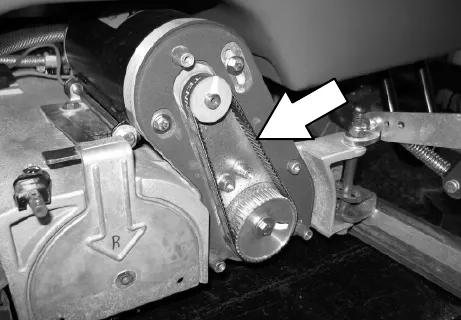
The two brush drive belts are located on the cylindrical brush scrub head. The belts drive the cylindrical brushes. Proper belt tension is a 0.25 in (6 mm) deflection from a force of 5.0 to 5.4 lb (2.3 to 2.5 kg) at the belt midpoint.
Check and adjust the belt tension every 100 hours of operation.
Scrub brushes
The machine can be equipped with either disk or cylindrical scrub brushes, or cleaning pads. Check scrub brushes daily for wire or string tangled around the brush or brush drive hub. Also check for brushes damage and wear.
Disk brushes and pads
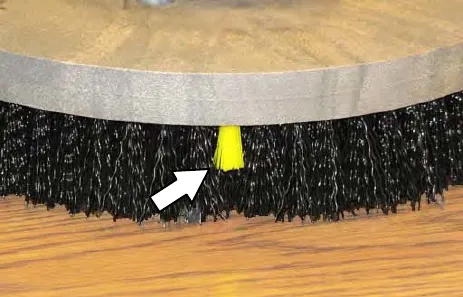
Replace the pads when they no longer clean effectively. Replaces the brushes when they no longer clean effectively or when the bristles are worn to the yellow indicator.
Cleaning pads must be placed on pad drives before they are ready to use. The cleaning pad is held in place by a pad holder.
Cleaning pads need to be cleaned immediately after use with soap and water. Do not wash the pads with a pressure washer. Hang pads, or lie pads flat to dry.
NOTE: Always replace brushes and pads in sets. Otherwise one brush or pad will be more aggressive than the other.
Replacing disk brushes or pad driver
- Stop machine on a level surface. Make sure the scrub head is in the raised position.
- Turn the machine ON/OFF key switch off.
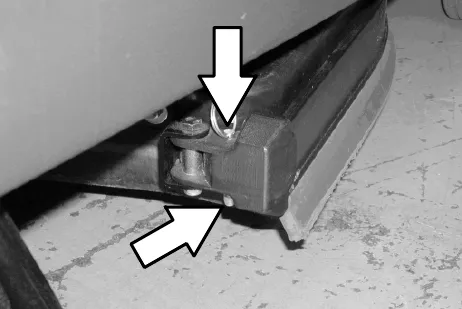
- Pull the pin from the side squeegee retainer pivot.
- Open the side squeegee retainer pivot toward the front of the machine, then pull the side
Replacing disk brushes or pad driver, continued
Step 4, continued from previous page: squeegee toward the rear of the machine to access the scrub brushes or pads.
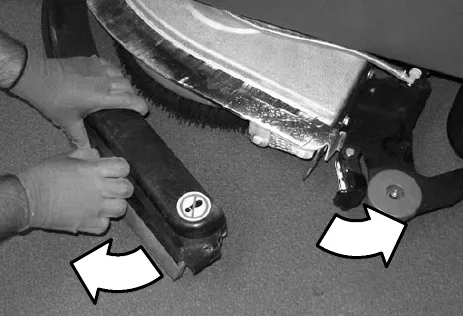
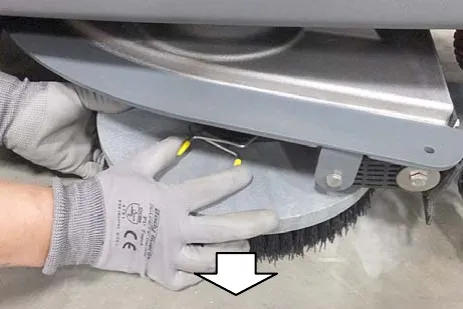
- Press the spring clip together with your thumb and index finger. The brush/pad driver will drop off the drive hub.
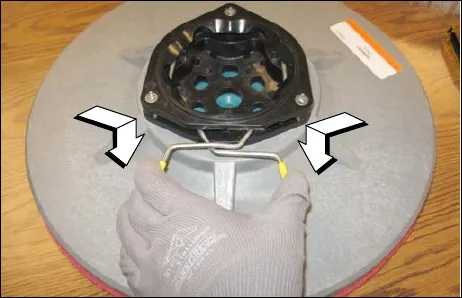
- Set the yellow spring clip to the open position to make brush installation easier. Press spring clip together and downward to set.
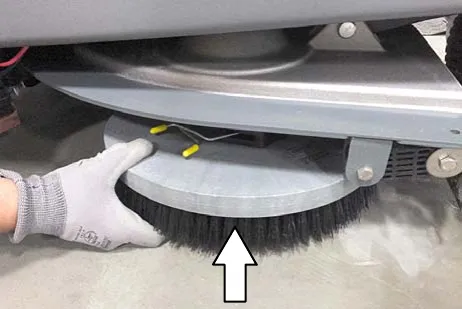
- Align the pad driver or brush under the motor hub and push it upward to engage hub. Ensure that it is securely mounted onto the motor hub.
- Close the side squeegee and the retainer pivot, then insert the pin.
NOTE: Be sure the pin is inserted completely through the bottom.
Replacing disk pads
- Remove the pad driver from the machine.
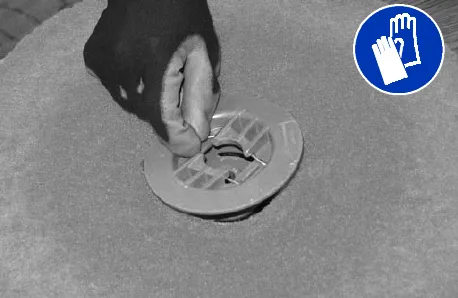
- Squeeze the spring clip together to remove the center disk.
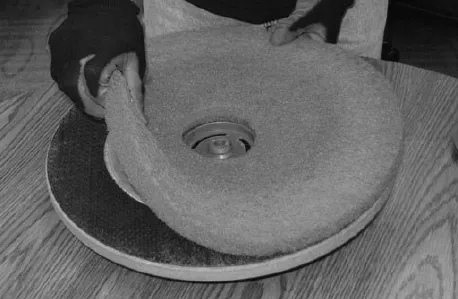
- Flip or replace the scrub pad, center the scrub pad on the pad driver. Then reinstall the center disk to secure the pad in place on the
Replacing disk pads, continued
Step 3, continued from previous page: pad driver.
- Reinsert the pad driver into the machine.
Cylindrical brushes
Check the brush taper and rotate the brushes from front-to-rear every 50 hours of machine operation for maximum brush life and best scrubbing performance.
The cylindrical brushes should be replaced if large amounts of bristles are missing, or if the remaining bristle length is less than 0.62 in (15 mm).
NOTE: Replace worn brushes in pairs. Scrubbing with brushes of unequal bristle length will result in diminished scrubbing performance.
Replacing or rotating cylindrical brushes
- Stop machine on a level surface. Make sure the scrub head is in the raised position.
- Turn the machine ON/OFF key switch off.
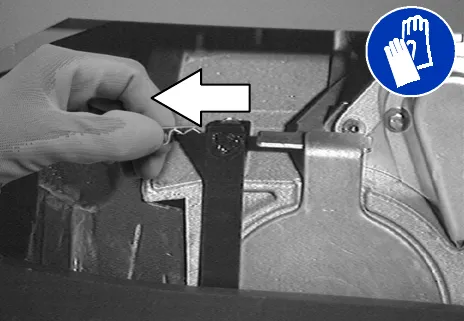
- Remove the cotter pin that holds the side squeegee in place. Swing the squeegee away from the scrub head.
- Remove idler plate from the scrub head by pressing the spring tab downward.
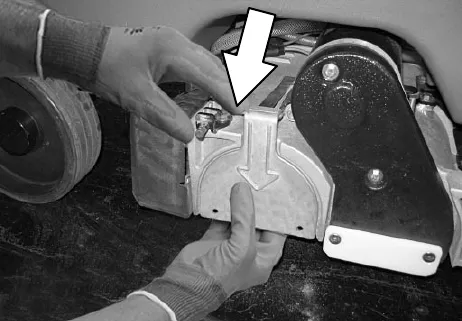
- Pull the old brush out of the scrub head.
- Attach the idler plate to the new or rotated brush on the end that has the double row of bristles. Install the brush.
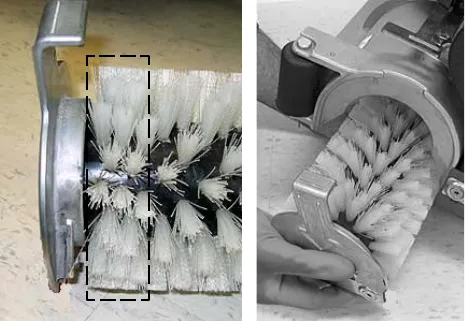
- Push down on the door to catch the door in the scrub head, then pull up on the door to latch it into the spring.
- Repeat for the other brush on the other side of the scrub head
NOTE: Each side of the scrub head is stamped with a letter. The idler door of that side of the scrub head is stamped with the same letter. Make sure the letter on the door matches the letter on the scrub head when replacing the doors.
Checking cylindrical brush pattern
- Apply chalk, or a similar marking material, to a smooth and level section of the floor.
NOTE: If chalk or other material is not available, allow the brush to spin on the floor for two minutes. A polish mark will remain on the floor.
- Raise the scrub head, then position the brushes over the chalked area.
- Block the front or rear wheels to prevent the machine from moving.
- Lower the scrub head in the chalked area and slowly press the propel pedal until the scrub brushes start spinning. Allow the machine to scrub in the same place for 15 to 20 seconds.
- Raise the scrub head and drive the machine away from the chalked area.
- Observe the brush patterns. If the brush pattern is the same width across the entire length of each brush and both brushes are the same width, no adjustment is necessary.
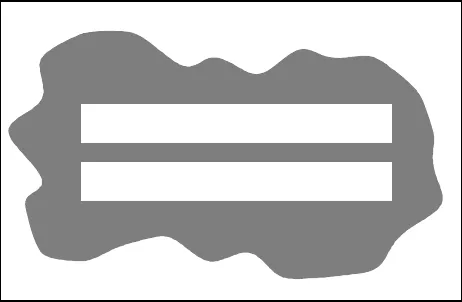
- If the brush patterns are tapered, see Adjusting cylindrical brush taper section of this manual.
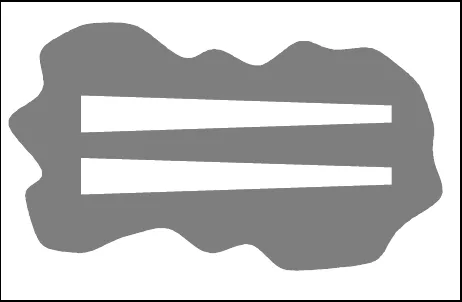
- If the width of the brushes is not the same, see Adjusting cylindrical brush width section of this manual.
Adjusting cylindrical brush taper
- Stop machine on a level surface. Make sure the scrub head is in the raised position.
- Turn the machine ON/OFF key switch off.
- Remove the cotter pin that holds the side squeegee in place. Swing the squeegee away from the scrub head.
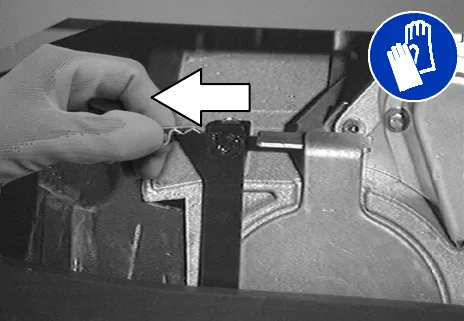
- Remove idler plate from the scrub head by pressing the spring tab downward.
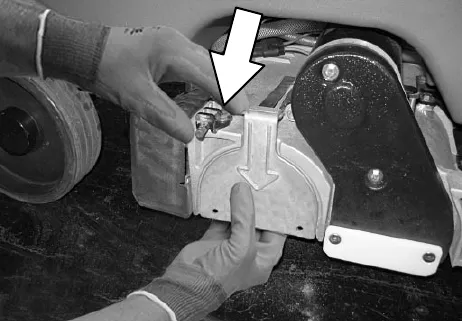
- While holding the flat end of the idler shaft with a wrench, loosen the mounting screw on the outside of the idler door.
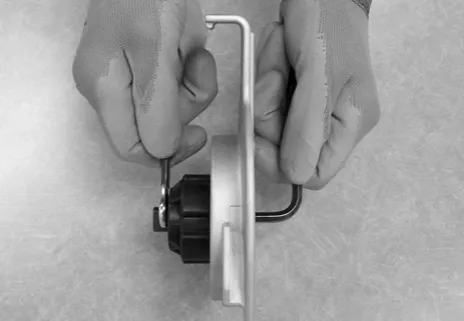
- Turn the idler shaft to raise or lower the end of the brush as needed to straighten the brush pattern. Tighten the mounting screw.
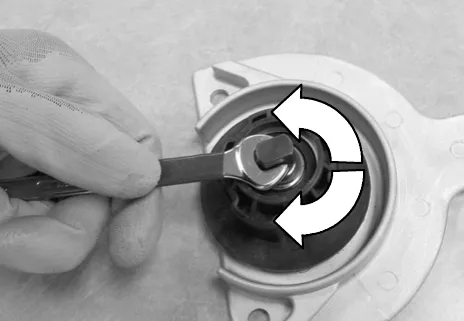
- Check the brush patterns again and readjust as necessary until both patterns are the same.
Adjusting cylindrical brush width
- Stop machine on a level surface. Make sure the scrub head is in the lowered position.
- Turn the machine ON/OFF key switch off.
- Loosen the two scrub head mounting screws.
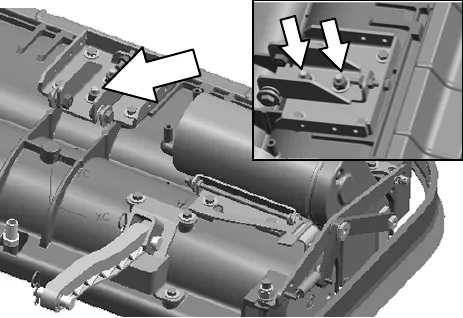
- Loosen the jam nut, then adjust the brush width adjustment screw. Tighten the jam nut and the two scrub head mounting screws when finished.
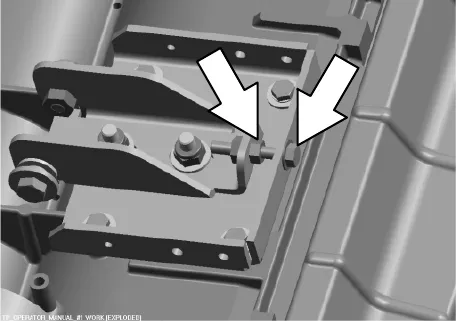
- Check the brush patterns again and readjust as necessary until both brush patterns are the same.
ec-H2O system (ec-H2O model)
ec-H2O NanoClean water conditioning cartridge replacement
(ec-H2O models labeled ec-H2O NanoClean)
The water conditioning cartridge is required to be replaced when it reaches its maximum water usage or expiration time of when the cartridge was activated, which ever comes first. The ec-H2O system indicator light will blink green/red when it's time to replace cartridge.
Depending on machine usage, on average, a new cartridge can last anywhere from 12 months for heavy machine usage to 24 months for light machine usage. Parts ›
- Disconnect the wire harness from operator seat and carefully remove seat from machine.
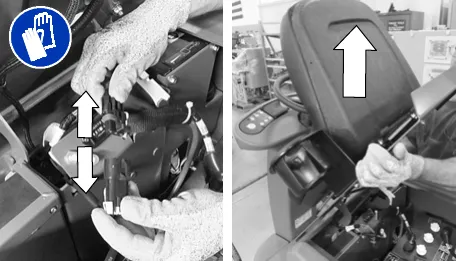
- Remove the battery compartment shroud from machine to access cartridge.
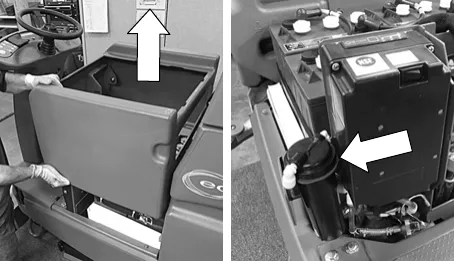
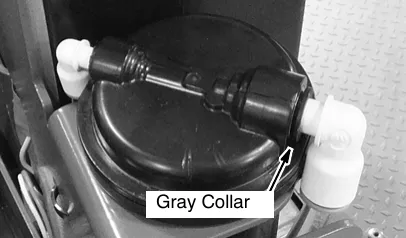
- Disconnect the two hose connectors from cartridge by pressing the gray collars inward and pulling the connectors outward. Lift cartridge to remove.
- Fill in the installation date on the new cartridge label.
- Install the new cartridge and reconnect the two hoses. Make sure the hose connectors are fully inserted into new cartridge.
- Reset timer for new cartridge.
Carefully read and understand all steps first before performing procedure.- Turn key on.
- Press and hold the service switch, located on the ec-H2O module, for 10 seconds. After releasing service switch, the three solution flow indicator lights will begin to (ripple) move back and forth.
- Within 5 seconds after releasing the service switch, while the three indicator lights are moving back and forth, quickly press and release the solution flow button located on ec-H2O module.
The three indicator lights will then blink three times to indicate timer has been reset. Repeat process if the three indicator lights do not blink three times.
- Reinstall the battery compartment shroud and operator seat.
ec-H2O module flush procedure
(ec-H2O models manufactured before ec-H2O NanoClean models)
This procedure is only required when an alarm sounds and the ec-H2O system indicator light begins to blink red.
- Drain the solution tank and recovery tank of all water.
- Pour 2 gallons (8 liters) of white or rice vinegar into the solution tank at full strength. Do not dilute. Use the rear fill port when adding vinegar. Do not use the front fill port.
NOTE: Use white or rice vinegar only. The acidity level should be between 4-8%. Do not use other acids for this procedure.
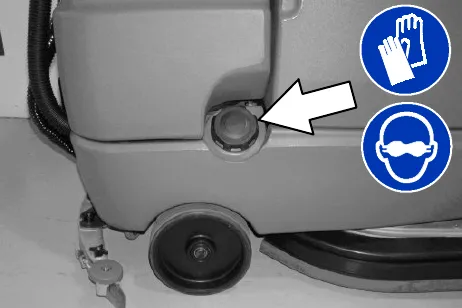
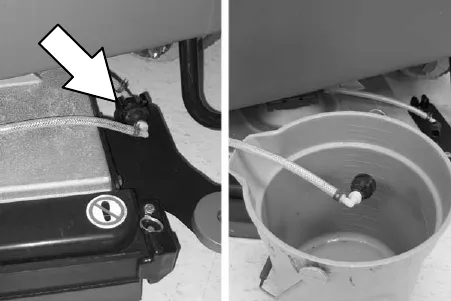
- Disconnect the black connector fitting at the scrub head and place the hose into a bucket.
- Turn the key to the on position.
- Press and release the ec-H2O module flush switch to start the flush cycle. The module is located under the seat
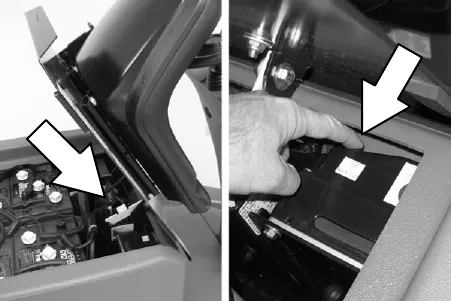
NOTE: The module will automatically shut off when the flush cycle is complete (approx. 7 minutes). The module must run the full 7 minute cycle in order to reset the system indicator light and alarm.
- After the 7 minute flush cycle, drain, rinse and fill solution tank with clean water. Then press the flush switch again to rinse out any remaining vinegar from module. After 1-2 minutes, press the flush switch to turn off the module.
Repeat flush procedure if the ec-H2O module does not reset. If module fails to reset, contact an Authorized Service Center.
Squeegee blades
The side squeegees control water spray and channel water into the path of the rear squeegee. The side squeegee blades are not adjustable.
The rear squeegee assembly channels water into the vacuum fan suction. The front blade channels the water and the rear blade wipes the floor.
Check the squeegee blades daily for damage and wear. Rotate or replace the squeegee blades if the leading edge is torn or worn half-way through the thickness of the blade. Replace the side squeegee deflectors if they become worn.
The rear squeegee can be adjusted for leveling and deflection. The deflection and leveling of the squeegee blades should be checked daily, or when scrubbing a different type of floor.
The rear squeegee assembly can be removed from the squeegee pivot to prevent damage during transport of the machine.
Replacing (or rotating) the rear squeegee blades
- Stop machine on a level surface. Make sure the scrub head is in the raised position.
- Turn the machine ON/OFF key switch off.
- Remove the squeegee suction hose from the rear squeegee assembly. Then loosen both rear squeegee assembly mounting knobs.
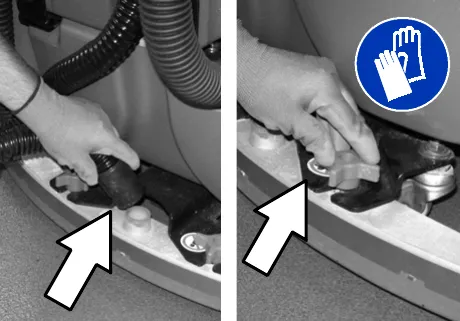
- Pull the rear squeegee assembly from the machine.
- Loosen the rear squeegee retaining band tension latch and remove the retaining band.
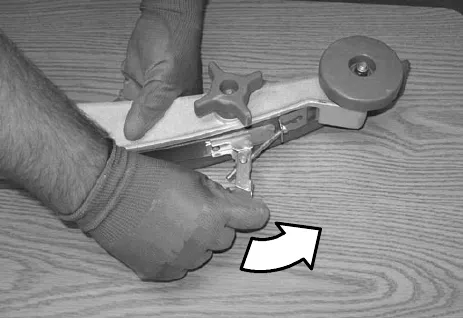
- Remove rear squeegee blade from the rear squeegee assembly.
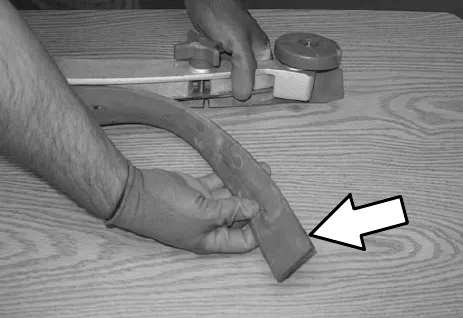
- Loosen the two outer knobs on the rear squeegee assembly. Remove the front squeegee blade from the squeegee assembly.
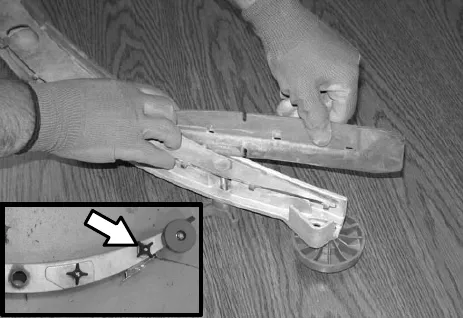
- Install the new front squeegee blade or rotate the existing blade to the new edge. Be sure the holes in the front squeegee blade are hooked onto the tabs on the front blade clamp.
Replacing (or rotating) the rear squeegee blades, continued
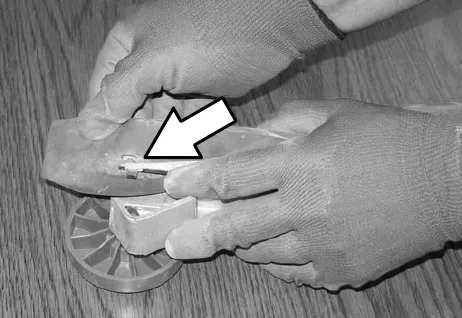
- Lightly tighten the two outer knobs.
- Install the new rear squeegee blade or rotate the existing blade to the new edge. Be sure the holes in the squeegee blade are hooked onto the tabs on the squeegee assembly.
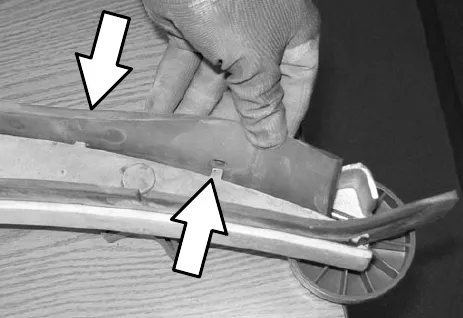
- Reinstall the rear squeegee retaining band onto the squeegee assembly. Be sure each of the flanges on the retaining band are seated in the cut outs in the rear squeegee assembly.
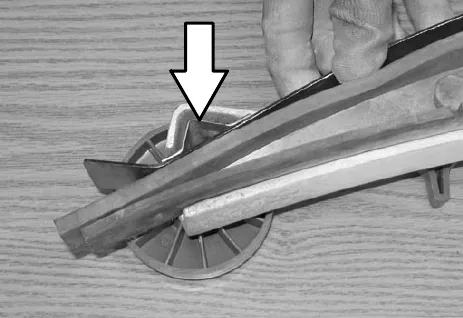
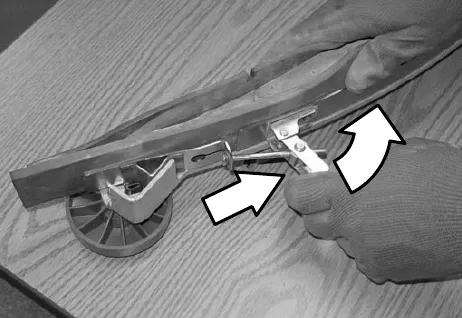
- Tighten the rear squeegee retaining band tension latch.
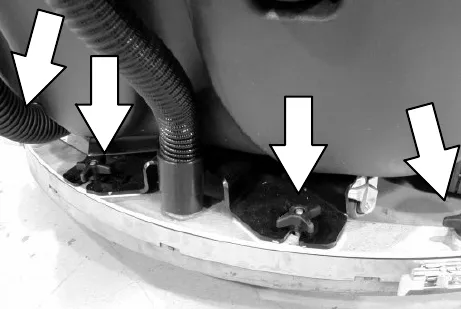
- Reinstall the rear squeegee under the squeegee mount bracket and tighten all four knobs.
- Reinstall the squeegee suction hose onto the rear squeegee assembly.
Replacing side squeegee blades
- Open the side squeegee.
- Pull the old side squeegee blade from the side squeegee retainer. Slide the new blade onto the retainer.
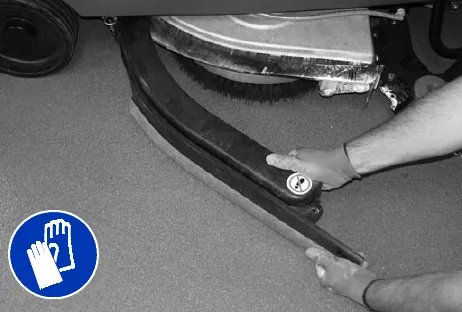
- Close the side squeegee.
Adjusting the squeegee guide roller
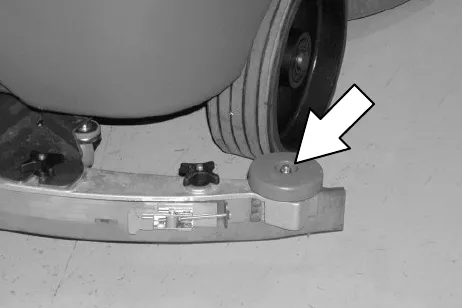
The squeegee guide rollers are located on both ends of the rear squeegee. The rollers guide the squeegee blade end along a wall. Loosen the nut located at the top of the guide roller and move the roller in or out to adjust how close the end of the squeegee blade is to the wall. The squeegee blade end should be further away from the wall when the floor curves up into the wall.
Leveling the rear squeegee
Leveling of the squeegee assures the entire length of the squeegee is in even contact with the surface being scrubbed. Perform this adjustment on an even and level floor.
- Lower the squeegee and drive the machine forward a few feet.
- Turn off the machine ON/OFF key switch.
- Look at the deflection of the squeegee over the full length of the squeegee blade.
- If the deflection is not the same over the full length of the blade, turn the squeegee leveling bolt to make adjustments.
The squeegee leveling bolt is located directly behind the squeegee suction hose. DO NOT disconnect the suction hose from the squeegee frame when leveling squeegee.
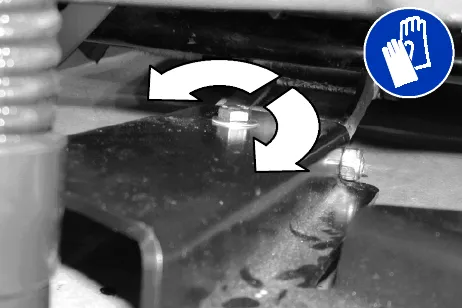
Turn the squeegee leveling bolt counter-clockwise to increase the deflection at the ends of the squeegee.
Turn the squeegee leveling bolt clockwise to decrease the deflection at the ends of the squeegee blade.
- Drive the machine forward with the squeegee down to recheck the squeegee blade deflection if adjustments were made.
- Readjust the squeegee blade deflection if necessary.
Adjusting rear squeegee blade deflection
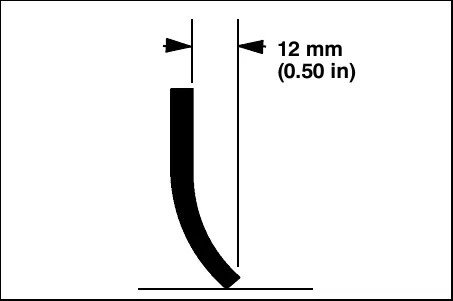
Deflection is the amount of curl the overall squeegee blade has when the machine moves forward. The best deflection is when the squeegee wipes the floor dry with a minimal amount of deflection.
- Lower the squeegee and drive the machine forward a few feet (meters).
- Turn off the machine ON/OFF key switch.
- Look at the amount of deflection or "curl" of the squeegee blade. The correct amount of deflection is 0.50 in (12 mm) for scrubbing smooth floors and 0.62 in (15 mm) for rough floors.
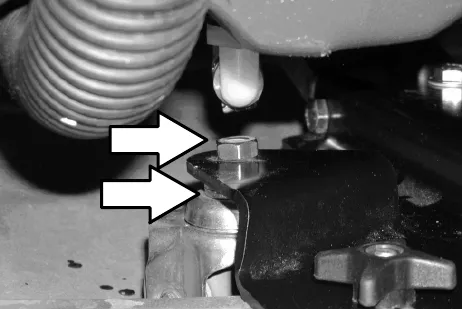
- If the overall squeegee blade deflection needs to be adjusted, loosen the jam nuts on the squeegee casters and adjust the height.
- Drive the machine forward again to recheck the squeegee blade deflection after adjustments are made.
- Readjust the squeegee blade deflection if necessary.
Skirts and seals
Disk scrub head floor skirt
The skirt is located in front of the disc brush scrub heads. Check the skirt for damage and wear after every 50 hours of operation.
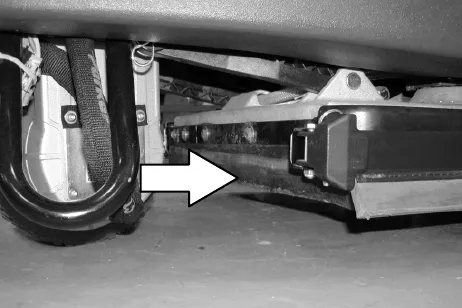
The skirts should clear the floor by 0 to 0.25 in (0 to 6 mm) when the scrub brushes are new and the scrub head is down.
Recovery tank seal
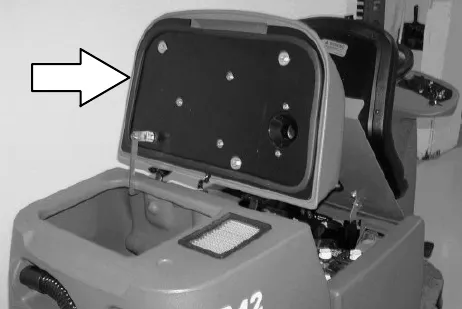
The recovery tank seal is located on the bottom of the recovery tank cover. Check the seal for damage and wear after every 100 hours of operation.
Solution tank seals
There are two solution tank seals. Check the seal for damage and wear after every 100 hours of operation.
A front seal is located on the bottom of the solution tank cover. A rear seal is located on the bottom of the recovery tank.
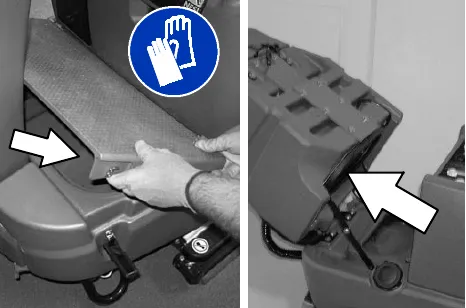
Tires
The machine has three solid rubber tires: one tire is front and two are in the rear. Check the tires for damage and wear after every 500 hours of operation.
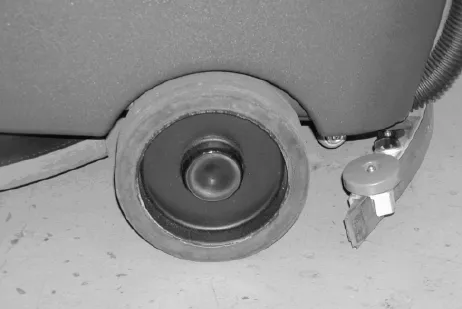
Pushing, towing, and transporting the machine
Pushing or towing the machine
If the machine becomes disabled, it can be pushed from the front or rear, but only tow it from the front.
Before attempting to push or tow the machine, disengage the brake as described below.
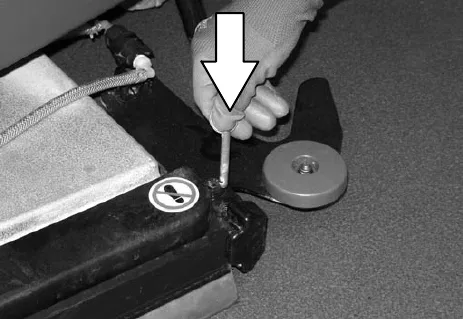
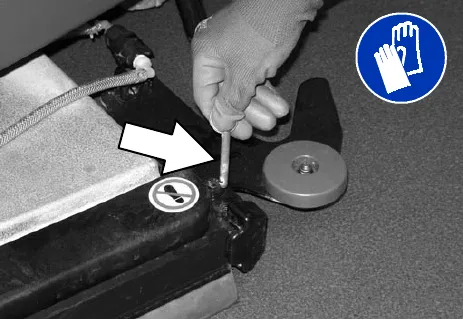
To disengage the brake, insert the tip of a small screw driver between the electronic brake lever and the hub.
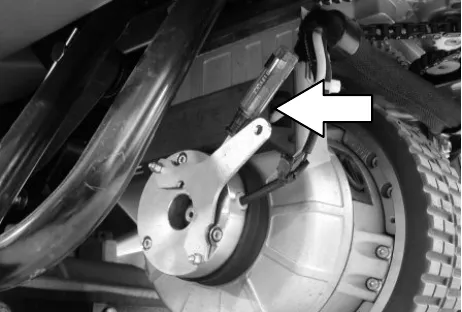
For models manufactured before serial number 10263298, the propel motor harness connector must also be disconnected.
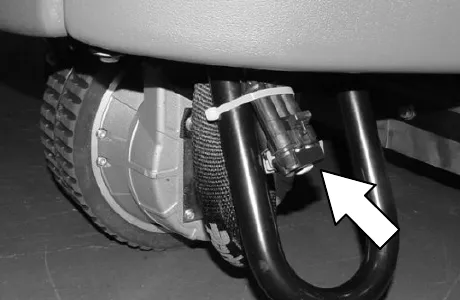
Only push or tow the machine on a level surface. Do not exceed 2 mph (3.2 km/h). It is NOT intended to be pushed or towed at a high speed.
Immediately after pushing or towing the machine, remove the screw driver to enable the parking brake.
Transporting the machine
When transporting the machine by trailer or truck, be certain to follow the tie-down procedure below:
- Raise the squeegee and scrub head.
- Load the machine using a ramp that can support the machine weight and operator. Do not operate the machine on a ramp incline that exceeds 19.25%.
- Position the front of machine against the front of the trailer or truck.
- Lower the scrub head and squeegee after the machine is positioned on the trailer or truck.
- Place a block behind each wheel to prevent the machine from rolling.
- Route the front tie-down straps through the stabilizer arms and then secure the tie-downs to the trailer or truck to prevent the machine from tipping.
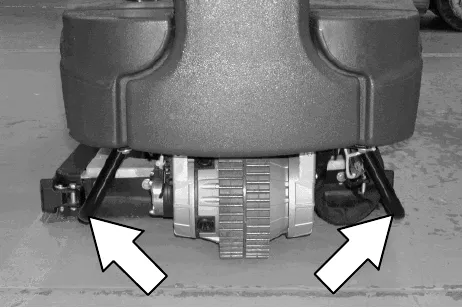
NOTE: It may be necessary to install tie-down brackets to the floor of the trailer or truck.
- Route the rear tie-down straps through the opening at the center part of the rear axle.
Corrected an obvious misprint: speed printed as "3.2 kp/h (2 mph)" (now 2 mph (3.2 km/h); 2 mph is 3.2 km/h).
Machine jacking
Batteries and chargers: make sure your charger is compatible with your batteries, and set its charging algorithm to your battery pack before you use it.
Empty the recovery and solution tanks before jacking the machine. Jack up the machine for service at the designated locations. Use a hoist or jack capable of supporting the weight of the machine. Always stop the machine on a flat, level surface and block the tires before jacking up the machine.
Front jacking locations are located on both sides of the machine.
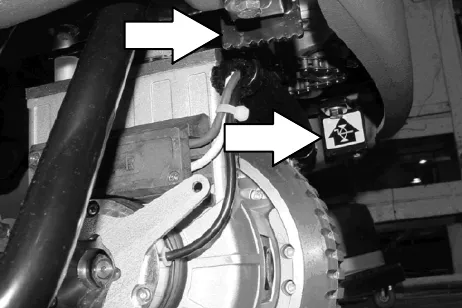
Rear jacking locations are located on both sides of the machine at the axles.
Storage information
The following steps should be taken when storing the machine for extended periods of time.
- Drain and clean the solution and recovery tanks. Open the recovery tank cover to promote air circulation.
- Charge the batteries before storing machine to prolong the life of the batteries. Recharge batteries once a month.
- Disconnect batteries before storing.
- Park the machine in a cool, dry area. Do not expose the machine to rain. Store indoors.
Freeze protection
- Drain the solution tank and recovery tank of all water.
- Pour 2 gallons (8 liters) of Propylene Glycol Based / Recreational Vehicle (RV) antifreeze into the solution tank at full strength. Do not dilute.
- Turn the machine power on and operate the solution flow system. Turn the machine off when the antifreeze appears at the scrub head.
Continue with the freeze protection procedure if machine is equipped with the ec-H2O system.
ec-H2O NanoClean models:
(ec-H2O models labeled ec-H2O NanoClean)
Operate machine in the ec-H2O mode to cycle antifreeze through ec-H2O system.
After storing machine in freezing temperatures, drain any remaining antifreeze from the solution tank. Add clean water to solution tank and operate the machine to flush system.
ec-H2O models:
(ec-H2O models manufactured before ec-H2O NanoClean models)
- Press and release the flush switch on the ec-H2O module to cycle the antifreeze through ec-H2O system. When the antifreeze appears at the scrub head, press the switch again to turn off the module.
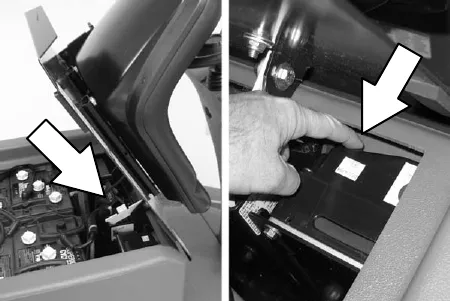
Flushing antifreeze from ec-H2O module
If the antifreeze is not properly flushed from the ec-H2O system, the ec-H2O module may detect an error and not function (ec-H2O switch indicator light will turn red). If this occurs, reset key and repeat the flush procedure as described below.
(ec-H2O models manufactured before ec-H2O NanoClean models)
- Drain the antifreeze from the solution tank into a bucket.
- Fill the solution tank with cool water until full (See Filling the solution tank).
- Disconnect the black connector fitting at the scrub head and place the hose into a bucket.
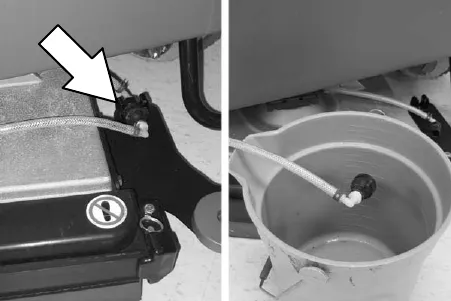
- Press and release the ec-H2O module flush switch to start the flush cycle. The module is located under the seat.
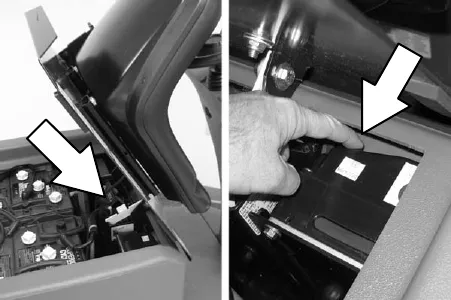
When the water turns clear, press the module switch again to stop the flush cycle.
Dispose the antifreeze in an environmentally safe way according to local waste disposal regulations.
- The machine is now ready for scrubbing.
Specifications
General machine dimensions/capacities
| Item | Disk 26 in (650 mm) | Cylindrical 28 in (700 mm) | Disk 32 in (800 mm) | Cylindrical 32 in (800 mm) |
|---|---|---|---|---|
| Length | 60 in (1520 mm) | |||
| Height | 50 in (1270 mm) | |||
| Width / frame | 29 in (740 mm) | 31.7 in (810 mm) | 29 in (740 mm) | 31.7 in (810 mm) |
| Width / machine with scrub head | 31.5 in (800 mm) | 32.5 in (830 mm) | 36 in (910 mm) | 36.5 in (930 mm) |
| Width / rear squeegee (roller to roller) | 33.25 in (850 mm) | 33.25 in (850 mm) | 39.25 in (1000 mm) | 39.25 in (1000 mm) |
| Brush diameter | 13 in (330 mm) | 6 in (150 mm) | 16 in (410 mm) | 6 in (150 mm) |
| Brush length | - | 28 in (700 mm) | - | 32 in (800 mm) |
| Scrubbing path width | 26 in (650 mm) | 28 in (700 mm) | 32 in (800 mm) | 32 in (800 mm) |
| Solution tank capacity | 29 gallons (110 L) | |||
| Recovery tank capacity | 29 gallons (110 L) | |||
| Weight/net less batteries | 585 lb (265 kg) | 632 lb (287 kg) | 585 lb (265 kg) | 653 lb (296 kg) |
| Weight/with standard battery package | 850 lb (386 kg) | 897 lb (407 kg) | 850 lb (386 kg) | 918 lb (416 kg) |
| Weight/with heavy duty battery package | 975 lb (443 kg) | 1022 lb (464 kg) | 975 lb (443 kg) | 1043 lb (473 kg) |
| GVWR | 1485 lb (675 kg) | |||
| Protection Grade | IPX3 | |||
| Values determined as per EN 60335-2-72 | Disk 26 in (650 mm) | Cylindrical 28 in (700 mm) | Disk 32 in (800 mm) | Cylindrical 32 in (800 mm) |
|---|---|---|---|---|
| Sound pressure level LpA | 69 dB(A) | 75 dB(A) | 69 dB(A) | 75 dB(A) |
| Sound uncertainty KpA | 3.5 dB(A) | 3.0 dB(A) | 3.5 dB(A) | 3.0 dB(A) |
| Sound power level LWA + Uncertainty KWA | 85 dB(A) | 87 dB(A) | 85 dB(A) | 87 dB(A) |
| Vibration - Hand-arm | 0.139 m/s² | 0.070 m/s² | 0.139 m/s² | 0.070 m/s² |
| Vibration - Whole body | 0.045 m/s² | 0.023 m/s² | 0.045 m/s² | 0.023 m/s² |
| Vibration uncertainty K | 0.040 m/s² | 0.080 m/s² | 0.040 m/s² | 0.080 m/s² |
General machine performance
| Item | Measure |
|---|---|
| Aisle turnaround width for 26 in (650 mm) scrub head | 68.5 in (1730 mm) |
| Aisle turnaround width for 32 in (800 mm) scrub head | 72.5 in (1840 mm) |
| Travel Speed (maximum) | 4 mph (6.4 km/h) |
| Maximum rated climb and descent angle with full tanks | 10.5% |
| Maximum rated climb and descent angle with empty tanks | 19.25% |
| Maximum rated climb and descent angle when scrubbing | 7% |
Power type
Batteries and chargers: make sure your charger is compatible with your batteries, and set its charging algorithm to your battery pack before you use it.
| Type | Quantity | Volts | Ah rating | Weight (each) |
|---|---|---|---|---|
| Batteries (standard lead acid) | 4 | 6 | 235 @ 20 hr rate | 66 lb (30.0 kg) |
| Batteries (heavy duty lead acid) | 4 | 6 | 335 @ 20 hr rate | 97.5 lb (44.5 kg) |
| Batteries (Gel) | 4 | 6 | 180 @ 20 hr rate | 66 lb (30.0 kg) |
| Batteries (heavy duty Gel) | 4 | 6 | 220 @ 20 hr rate | 66 lb (30.0 kg) |
| Type | Use | VDC | hp (kW) |
|---|---|---|---|
| Electric Motors | Scrub brush (Disk) | 24 | 0.6 hp (0.45 kW) |
| Scrub brush (Cylindrical) | 24 | 0.75 hp (0.50 kW) | |
| Vacuum fan | 24 | 0.6 hp (0.45 kW) | |
| Propelling | 24 | 1.1 hp (0.85 kW) |
| Type | VDC | amp | Hz | Phase | VAC |
|---|---|---|---|---|---|
| Chargers (Smart) | 24 | 20 | 60 | 1 | 120 |
| 24 | 25 | 60 | 1 | 120 | |
| Chargers (Gel/Agm) | 24 | 20 | 60 | 1 | 120 |
| 24 | 20 | 50 / 60 | 1 | 240 | |
| Chargers (On-Board) | 24 | 25 | 50 / 60 | 1 | 115 |
Tires
| Location | Type | Size |
|---|---|---|
| Front (1) | Solid | 3.5 in wide x 10 in OD (90 mm wide x 260 mm OD) |
| Rear (2) | Solid | 3.0 in wide x 10 in OD (80 mm wide x 260 mm OD) |
ec-H2O system (option)
| Item | Measure |
|---|---|
| Solution pump | 24 Volt DC, 5A, 1.5 GPM (5.7 LPM) open flow, 70 psi bypass setting |
| Solution flow rate* | 0.30 gpm (1.1 L/min) Disk model |
| 0.40 gpm (1.5 L/min) Cylindrical brush model | |
| 0.50 gpm (1.9 L/min) Optional |
* ec-H2O models manufactured before ec-H2O NanoClean models - If the optional solution flow rates are required, contact an Authorized Service Center.
Corrected obvious misprints: "heavy duty aead acid" batteries printed as "lead acid" (as in the standard lead acid row above); "Cylinderical" printed as "Cylindrical".
Machine dimensions
Rear squeegee width (top view): for 26 in (650 mm) and 28 in (700 mm) squeegee, 33.25 in (850 mm). For 32 in (800 mm) squeegee, 39.25 in (1000 mm).
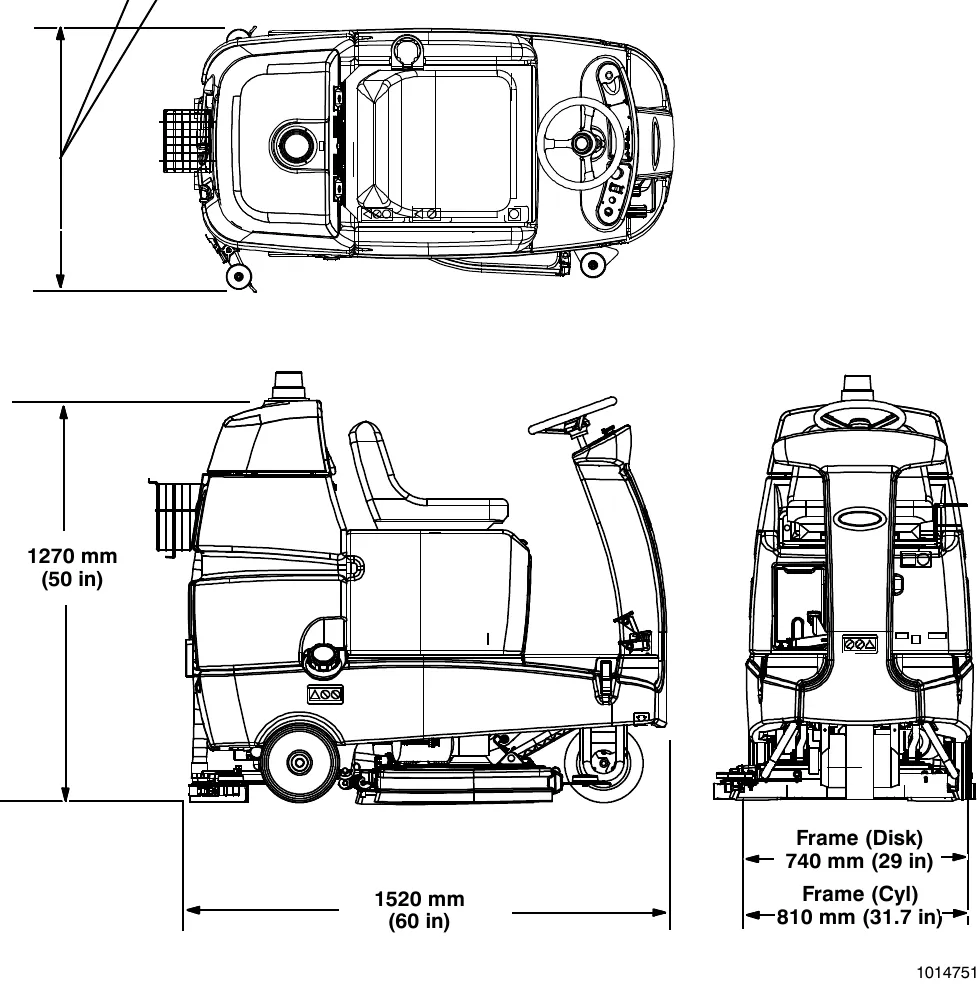
Height: 50 in (1270 mm)
Length: 60 in (1520 mm)
Frame (Disk): 29 in (740 mm)
Frame (Cyl): 31.7 in (810 mm)
Corrected an obvious misprint: the rear squeegee width for the 26 in and 28 in squeegees was printed above the drawing as "800 mm" (now 850 mm, as in the table on page 49 and as 33.25 in works out).
Tennant and Nobles are trademarks of Tennant Company. Southeastern Equipment & Supply is an independent dealer.