Tennant T300e operator manual
T300e Walk-Behind Floor Scrubber. English EN. Operator Manual. North America.
Hygenic fully cleanable recovery tank. TennantTrue Parts.
Document 9014506. Rev. 04 (02-2024).
For the latest Parts manuals and other language Operator manuals, visit: www.tennantco.com/manuals
Introduction
This manual is furnished with each new model. It provides necessary operation and maintenance instructions.
Read this manual completely and understand the machine before operating or servicing it.
This machine will provide excellent service. However, the best results will be obtained at minimum costs if:
- The machine is operated with reasonable care.
- The machine is maintained regularly - per the maintenance instructions provided.
- The machine is maintained with manufacturer supplied or equivalent parts.
To view, print or download manuals online visit www.tennantco.com/manuals
Protect the environment
Please dispose of packaging materials and used machine components such as batteries in an environmentally safe way according to your local waste disposal regulations.
Always remember to recycle.
Tennant Company
10400 Clean Street
Eden Prairie, MN 55344-2650
USA
Phone: (800) 553-8033
www.tennantco.com
Trojan is a registered trademark of Trojan Battery Company.
Specifications and parts are subject to change without notice.
Original Instructions. Copyright ©2015-2022 Tennant Company. All rights reserved.
Intended use
The automatic floor scrubber is intended for commercial use, for example in hotels, schools, hospitals, factories, shops, offices and rental businesses. It is designed to scrub hard floor surfaces (concrete, tile, stone, synthetic, etc.) in an indoor environment. This machine is not intended for cleaning carpets or sanding wood floors. Use only recommended pads/brushes and commercially available floor cleaning detergents. Do not use this machine other than described in this Operator Manual.
Machine data
Please fill out at time of installation for future reference.
Model No. -
Serial No. -
Installation Date -
Serial number location
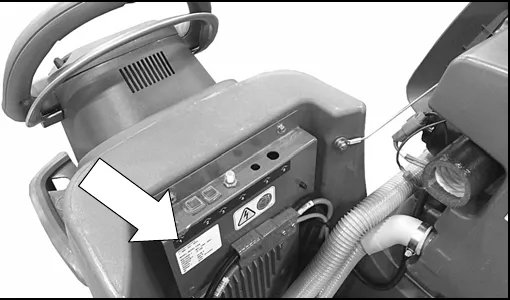
Uncrating machine
Carefully check machine for signs of damage. Report damages at once to carrier. Contact distributor or Tennant for missing items.
To uncrate the machine, remove straps, wheel blocks and shipping brackets. Using the supplied ramp carefully back the machine off the pallet. Make sure scrub head is in the raised position.
Table of contents
Introduction (2)
Intended use (2)
Machine data (2)
Serial number location (2)
Uncrating machine (2)
Table of contents (3)
Operation
Important safety instructions (4)
Safety labels (6)
Machine components (7)
Machine symbols (8)
Control panel components (8)
T300e control panel (8)
Installing batteries (9)
Lithium-ion battery (9)
Flooded (wet) and maintenance-free sealed lead-acid batteries (9)
Battery pack lift-out tray (option) (9)
How the machine works (10)
Brush and pad information (10)
Machine setup (11)
Charge batteries (11)
Attaching squeegee assembly (11)
Installing brush/pad - 3 lug disk (11)
Installing brush/pad - Insta-Click magnetic disk (option) (12)
Installing pad - orbital (13)
Installing cylindrical brushes (13)
Filling solution tank (14)
ec-H2O NanoClean water conditioning cartridge (ec-H2O model) (15)
Accessory rail (15)
Machine operation (16)
Pre-operation check list (16)
Operating machine (16)
While operating machine (18)
Emergency shut-off button (drive models) (18)
Battery discharge indicator (18)
Circuit breaker panel (19)
Hour meter (19)
Draining tanks (20)
Draining recovery tank (20)
Draining solution tank (20)
Service indicator codes (21)
Service indicator codes - continued (22)
On-board battery charger service indicator codes (22)
ec-H2O system service indicator codes - option (23)
Maintenance
Maintenance chart (24)
Machine maintenance (25)
After daily use (25)
After weekly use (26)
After every 50 hours of use (27)
After every 100 hours of use (27)
Electric motors (27)
Belts (28)
Orbital scrub head isolators (28)
Batteries (28)
Flooded (wet) and maintenance-free sealed lead-acid batteries (28)
Checking connections / cleaning (29)
Lithium-ion battery (29)
Battery power button / battery discharge indicator (30)
Charging batteries (30)
Battery charger settings (31)
Changing on-board battery charger settings (32)
Manual battery watering system (Trojan Battery option) (33)
Squeegee blade replacement (34)
ec-H2O NanoClean water conditioning cartridge replacement (35)
Loading/unloading machine for transporting (36)
Storing machine (36)
Freeze protection (36)
Troubleshooting (37)
Specifications
General machine dimensions/capacities/performance (39)
General machine dimensions/capacities/performance (continued) (40)
Machine dimensions (41)
Corrected an obvious misprint: “Changing on-board battery charger settings” is listed in the printed contents as page 31 (now 32, where the heading appears).
Important safety instructions - save these instructions
The following warning precautions are used throughout this manual as indicated in their description:
The following information signals potentially dangerous conditions to the operator. Know when these conditions can exist. Locate all safety devices on the machine. Report machine damage or faulty operation immediately.
- Read manual before operating machine.
- Do not use or pick up flammable materials.
- Do not use near flammable liquids, vapors or combustible dusts.
This machine is not equipped with an explosion proof motor. The electric motor will spark upon start up and during operation which could cause a flash fire or explosion if machine is used in an area where flammable vapors/liquids or combustible dusts are present. - Batteries emit hydrogen gas. Explosion or fire can result. Keep sparks and open flame away when charging.
- Disconnect battery cables and charger cord before cleaning and servicing machine.
- Do not charge batteries with damaged cord. Do not modify plug.
If the charger supply cord is damaged or broken, it must be replaced by the manufacturer or its service agent or a similarly qualified person in order to avoid a hazard. - Do not use outdoors. Store indoors.
- Spinning pad/brush, keep hands away.
IRIS Telemetry (option): This machine may be equipped with technology that automatically communicates over the cellular network. If the machine will be operated where cell phone use is restricted because of concerns related to equipment interference, please contact a Tennant representative for information on how to disable the cellular communication functionality.
- Do not operate machine:
- Unless trained and authorized.
- Unless operator manual is read and understood.
- Unless mentally and physically capable of following machine instructions.
- Under the influence of alcohol or drugs.
- While using a cell phone or other types of electronic devices.
- If not in proper operating condition.
- In outdoor areas. This machine is for indoor use only.
- In areas where flammable vapors/liquids or combustible dusts are present.
- With pads or accessories not supplied or approved by Tennant. The use of other pads may impair safety.
- In areas with possible falling objects.
- In areas that are too dark to safely see the controls or operate machine.
- Before operating machine:
- Check machine for fluid leaks.
- Make sure all safety devices are in place and operate properly.
- When operating machine:
- Use only as described in this manual.
- Report machine damage or faulty operation immediately.
- Wear closed-toe, non-slip work shoes.
- Reduce speed when turning.
- Go slowly on inclines and slippery surfaces.
- Do not scrub on inclines that exceed 9% grade or transport on inclines that exceed 21% grade.
- Follow site safety guidelines concerning wet floors.
- Follow mixing, handling and disposal instructions on chemical containers.
- Do not carry passengers on machine.
- Use care when reversing machine.
- Keep children and unauthorized persons away from machine.
- Do not allow machine to be used as a toy.
Important safety instructions (continued)
- Before leaving or servicing machine:
- Stop on level surface.
- Set the parking brake, if equipped.
- Turn off machine and remove key.
- When servicing machine:
- Disconnect battery connection and charger cord before working on machine.
- All work must be done with sufficient lighting and visibility.
- All repairs must be performed by trained personnel.
- Use Tennant supplied or approved replacement parts.
- Do not modify the machine from its original design.
- Do not jack up machine.
- Avoid moving parts. Do not wear loose clothing or jewelry and secure long hair.
- Do not disconnect the off-board charger’s DC cord from the machine’s receptacle when the charger is operating. Arcing may result. If the charger must be interrupted during charging cycle, disconnect the AC power supply cord first.
- Do not use incompatible battery chargers as this may damage battery packs and potentially cause a fire hazard.
- Inspect charger cord regularly for damage.
- Keep work area well ventilated.
- Avoid contact with battery acid.
- Keep all metal objects off batteries.
- Do not power spray or hose off machine.
- Use a hoist or adequate assistance when lifting batteries.
- Battery installation must be done by trained personnel.
- Wear personal protection equipment as needed and where recommended in this manual.
- When loading/unloading machine onto/off truck or trailer:
- Drain tanks before loading machine.
- Use a ramp, truck or trailer that can support the machine weight and operator.
- Do not operate the machine on a ramp incline that exceeds a 21% grade level.
- Use a winch if ramp incline exceeds a 21% grade level.
- Lower the scrub head and squeegee before tying down machine.
- Turn machine off and remove key.
- Set parking brake (if equipped).
- Block machine wheels.
- Use tie-down straps to secure machine.
- When using Lithium-ion Battery Model:
- Battery service to be performed by Tennant Service only.
- Battery is designed exclusively for specific Tennant machine applications. Do not install battery in unapproved machines.
- Dispose of battery in accordance with local regulations. Contact Tennant Service.
- Contact Tennant Service or your local regulatory authorities for proper transporting instructions of lithium-ion batteries.
- Use only OEM approved battery charger supplied with lithium-ion battery.
- Do not expose battery to temperatures below -4°F (-20°C), above 140°F (60°C).
- Do not use machine immediately after long-term extreme temperature storage. Before use, return battery module temperature range to 50°F (10°C) ~ 95°F (35°C)
- Do not operate or store battery in hazardous environment (electrically charged, humidity, extreme temperatures and magnetic fields).
- Do not expose battery to flame or plasma.
- Do not disassemble or mistreat battery. Do not tear seal tape or will void warranty.
- Do not drop, crush or subject battery to impact, as it may cause battery to heat up or catch fire.
- Do not put battery in fire or water to avoid battery explosion.
- Do not touch battery with wet hand, avoid electric shock.
- Stop using or charging the battery immediately if battery has abnormal temperature, leakage or other abnormal conditions.
Safety labels
The safety labels appear on the machine in the locations indicated. Replace labels if they are missing or become damaged or illegible.
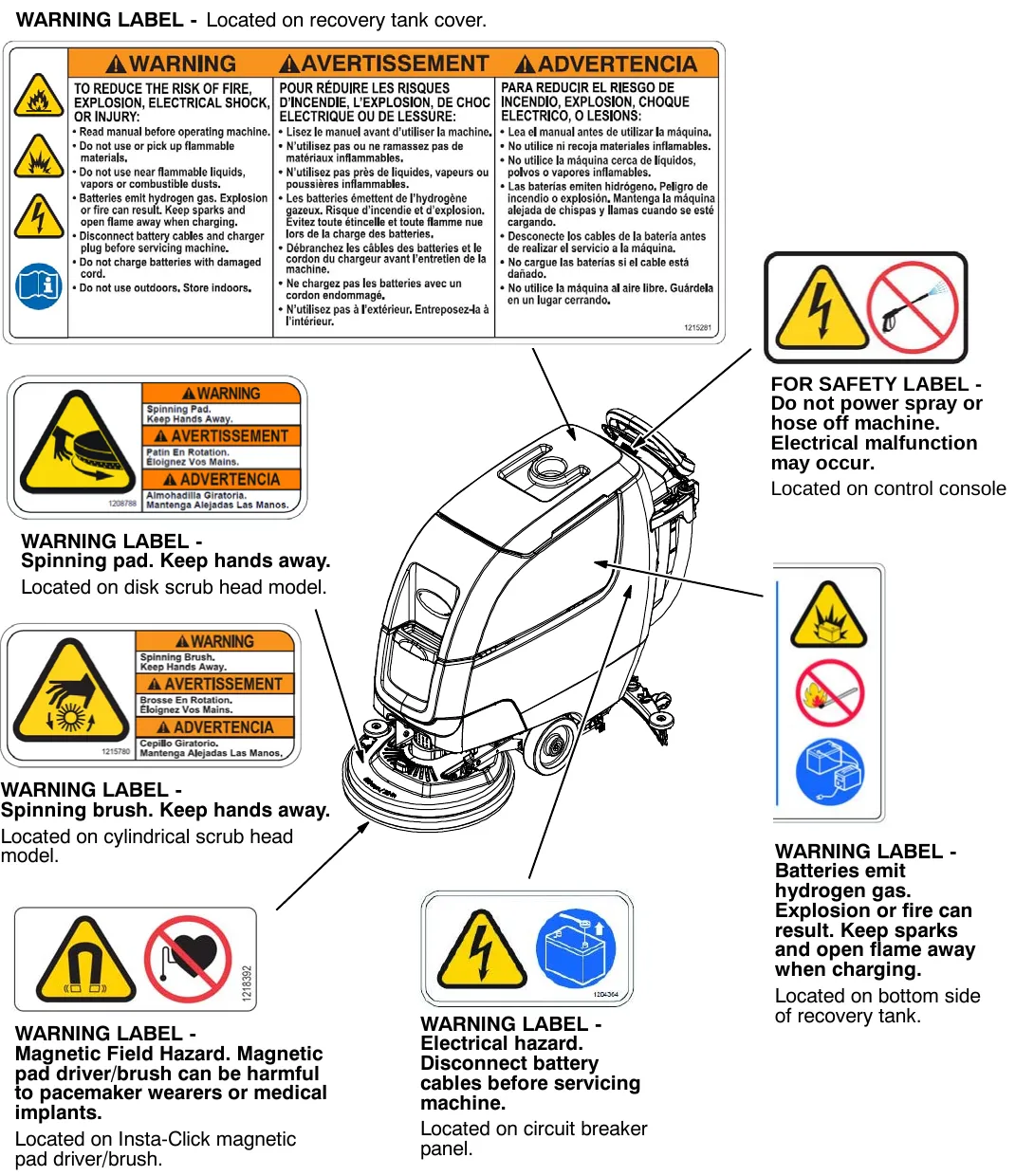
WARNING LABEL - Located on recovery tank cover.
WARNING LABEL - Spinning pad. Keep hands away. Located on disk scrub head model.
WARNING LABEL - Spinning brush. Keep hands away. Located on cylindrical scrub head model.
WARNING LABEL - Magnetic Field Hazard. Magnetic pad driver/brush can be harmful to pacemaker wearers or medical implants. Located on Insta-Click magnetic pad driver/brush.
WARNING LABEL - Electrical hazard. Disconnect battery cables before servicing machine. Located on circuit breaker panel.
FOR SAFETY LABEL - Do not power spray or hose off machine. Electrical malfunction may occur. Located on control console
WARNING LABEL - Batteries emit hydrogen gas. Explosion or fire can result. Keep sparks and open flame away when charging. Located on bottom side of recovery tank.
Machine components
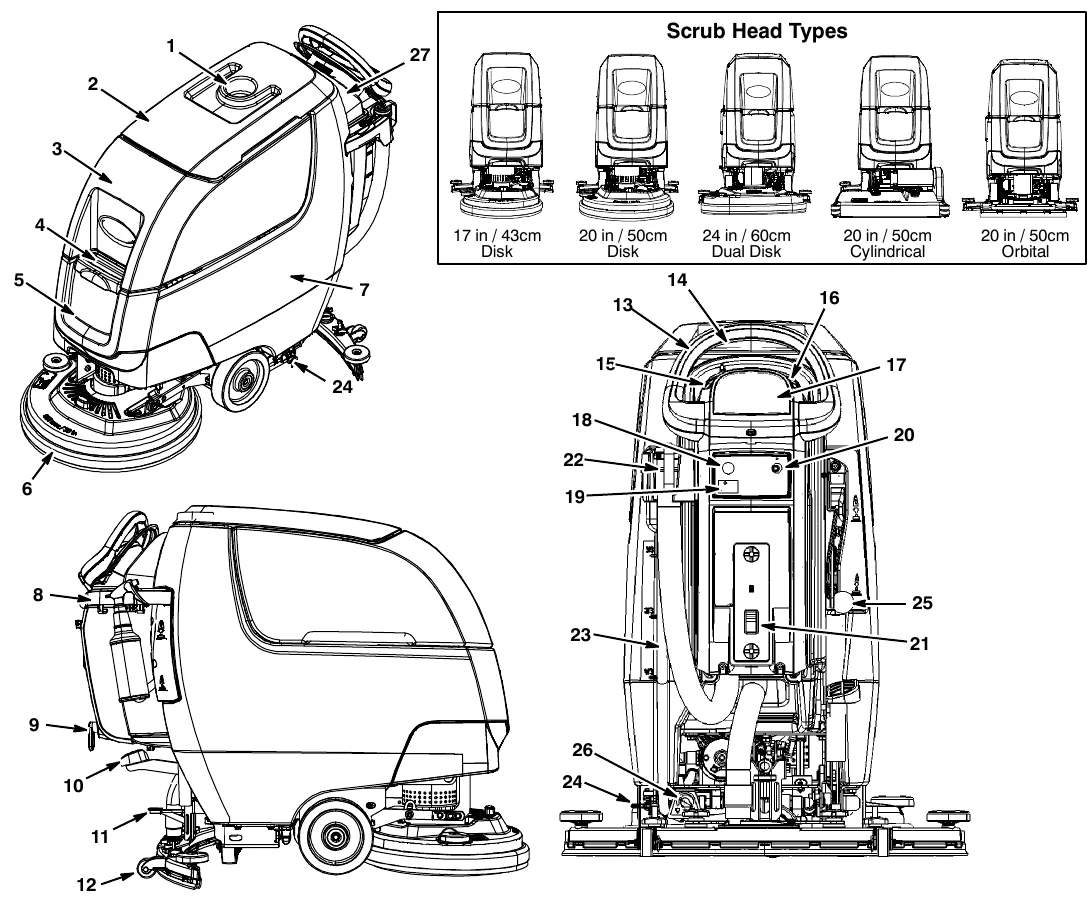
Scrub head types: 17 in (43 cm) disk, 20 in (50 cm) disk, 24 in (60 cm) dual disk, 20 in (50 cm) cylindrical, 20 in (50 cm) orbital.
- Cup holder/tray
- Recovery tank lid
- Recovery tank
- Solution tank fill-port
- Solution tank
- Scrub head
- Battery compartment
- Accessory rail(s)
- On-board battery charger cord hooks
- Scrub head lift pedal
- Squeegee foot pad
- Squeegee assembly
- Control handle
- Control handle start bail
- Speed control knob (drive model)
- Forward/Reverse lever (drive model)
- Control panel display
- Emergency stop button (option)
- Hour meter
- Key switch
- Off-board battery charger receptacle
- Recovery tank drain hose
- Solution tank level/drain hose
- Parking brake (option)
- Dual down pressure lever (option)
- Solution flow control knob
- Circuit breaker panel splash guard.
Machine symbols
Batteries and chargers: make sure your charger is compatible with your batteries, and set its charging algorithm to your battery pack before you use it.
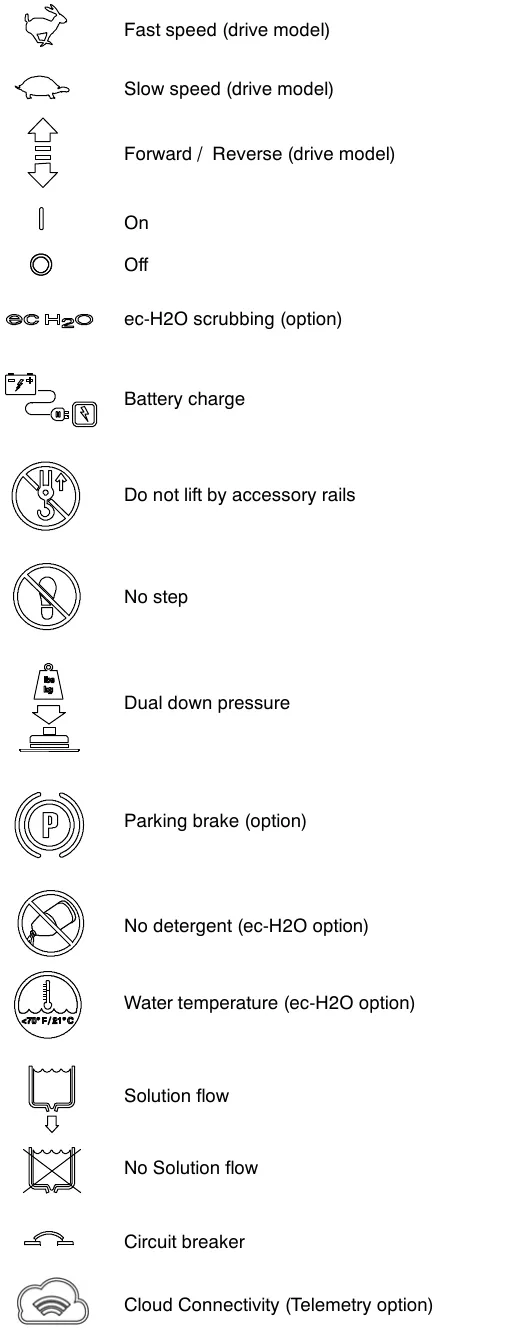
Symbols shown, top to bottom: fast speed (drive model); slow speed (drive model); forward / reverse (drive model); on; off; ec-H2O scrubbing (option); battery charge; do not lift by accessory rails; no step; dual down pressure; parking brake (option); no detergent (ec-H2O option); water temperature (ec-H2O option); solution flow; no solution flow; circuit breaker; cloud connectivity (telemetry option).
Control panel components
T300e control panel
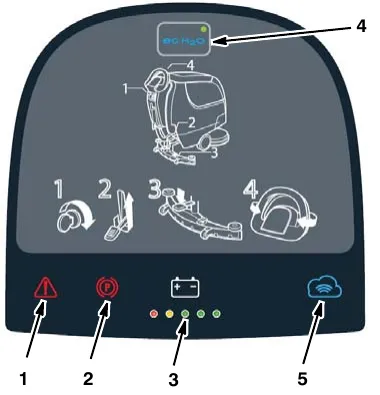
- Service indicator - Lights up when a machine or charger fault is detected.
- Parking brake indicator (option) - Lights up when parking brake lever is engaged. To turn off indicator, disengage parking brake lever near left rear wheel.
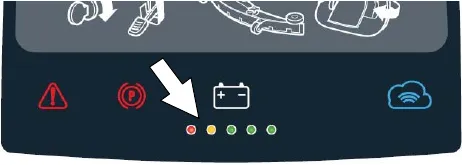
- Battery discharge indicator (BDI) - The battery discharge indicator serves two functions. In normal scrub mode it displays the charge level of the batteries. It also, in conjunction when the service indicator is flashing, provides specific LED codes when a machine or charger fault is detected.
- ec-H2O button / indicator (Option) - A blue ec-H2O indicator appears when the machine is equipped with ec-H2O option.
- Telemetry Connectivity indicator (Option) - Lights up blue when machine is connected to the cloud.
Installing batteries
Batteries and chargers: make sure your charger is compatible with your batteries, and set its charging algorithm to your battery pack before you use it.
Lithium-ion battery
For machines equipped with lithium-ion battery, contact Tennant Service for battery service and replacement.
Flooded (wet) and maintenance-free sealed lead-acid batteries
Battery specifications
Two 12 volt deep-cycle batteries.
Contact distributor or Tennant for battery recommendations.
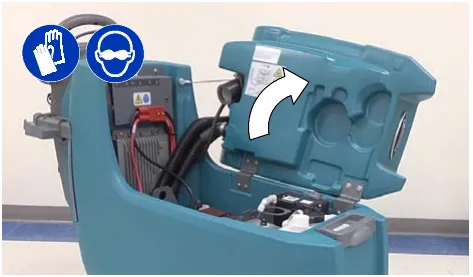
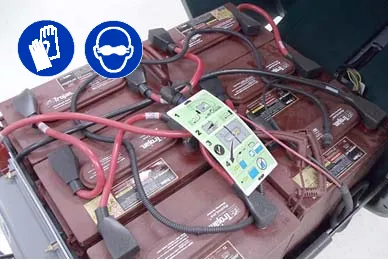
- Lift the recovery tank to access the battery compartment (Figure 1).
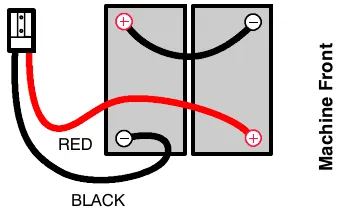
- With adequate assistance, carefully install the batteries into the battery compartment. Arrange the batteries as shown (Figure 2).
- Using the supplied battery post boots, connect the cables to the battery posts as shown (Figure 2). Connect the machine’s black (-) battery cable last. Use insulated tools when working near batteries.
IMPORTANT: Make sure that the machine’s battery charger is properly set before charging. See BATTERY CHARGER SETTINGS. (page 31)
Battery pack lift-out tray (option)
Models equipped with the optional battery lift-out tray for quick or frequent battery pack exchange.
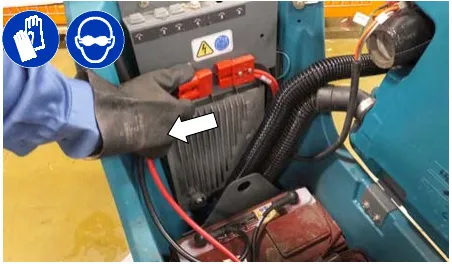
- Disconnect the battery cable connection at machine (Figure 3).
- Using an approved lift strap that supports the weight of battery pack, connect the strap to the two lift brackets as shown. Using a lift hoist rated to handle the weight of the battery pack, carefully lift the battery packs to and from machine. Keep one hand on the battery lift-out tray when lifting for stability (Figure 4). Before lifting battery pack, make sure the batteries are secured to the battery lift-out tray with the supplied battery strap as shown (Figure 4).
Installing batteries (continued)
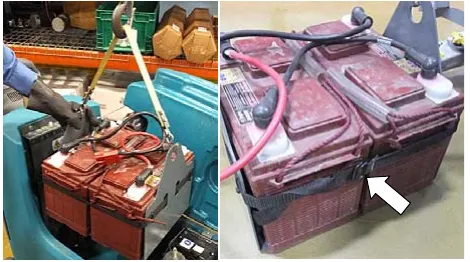
- Reconnect the battery cable connection after installing battery pack.
How the machine works
Conventional scrubbing:
When using the conventional scrubbing mode, water and detergent mixture from the solution tank flows to the floor and the rotating brush(es)/pad(s) scrub the floor clean. As the machine moves forward, the squeegee with vacuum suction picks up the dirty solution from the floor into the recovery tank.
ec-H2O NanoClean Technology (option):
When using the ec-H2O NanoClean technology, normal water passes through a module where it is electrically converted into a cleaning solution. The electrically converted water attacks the dirt, allowing the machine to easily scrub away the suspended soil. The converted water then returns to normal water in the recovery tank.
Brush and pad information
For best cleaning results use the appropriate brush or pad for your cleaning application. Listed below are brushes and pads and the applications for which each is best suited.
NOTE: The amount and type of soilage play an important role in determining the type of brush or pad to use. Contact a Tennant representative for specific recommendations.
Soft nylon bristle scrub brush (White) - Recommended for cleaning coated floors without removing finish. Cleans without scuffing.
Polypropylene bristle scrub brush (Black) - This general purpose polypropylene bristle scrub brush is used for scrubbing lightly compacted soilage. This brush works well for maintaining concrete, wood and grouted tile floors.
Super abrasive bristle scrub brush (Gray) - Nylon fiber impregnated with abrasive grit to remove stains and soilage. Strong action on any surface. Performs well on buildup, grease, or tire marks.
Polishing pad (White) - Used to maintain highly polished or burnished floors.
Buffing pad (Red) - Used for light duty scrubbing without removing floor finish.
Scrubbing pad (Blue) - Used for medium to heavy-duty scrubbing. Removes dirt, spills, and scuffs and leaves surface clean ready for recoating.
Stripping pad (Brown) - Used for stripping of floor finish to prepare the floor for recoating.
Heavy duty stripping pad (Black) - Used for aggressive stripping of heavy finishes/sealers, or very heavy duty scrubbing.
Surface preparation pad (Maroon) - Used for very aggressive chemical free removal of floor finish to prepare the floor for re-coating
Machine setup
Batteries and chargers: make sure your charger is compatible with your batteries, and set its charging algorithm to your battery pack before you use it.
Charge batteries
Lithium-ion batteries must be charged prior to initial use, see CHARGING BATTERIES (page 30).
Attaching squeegee assembly
- Lift the squeegee mount bracket to the raised position. Place toe under pedal to lift (Figure 5).
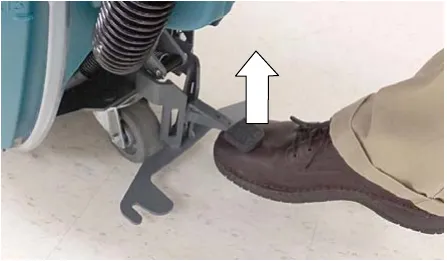
- Mount the squeegee assembly to the squeegee mount bracket (Figure 6). Tighten knobs to secure squeegee assembly to bracket.
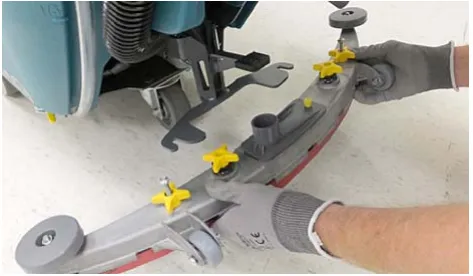
- Connect the vacuum hose to the squeegee assembly (Figure 7).
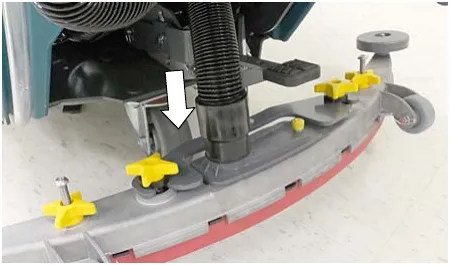
Installing brush/pad - 3 lug disk
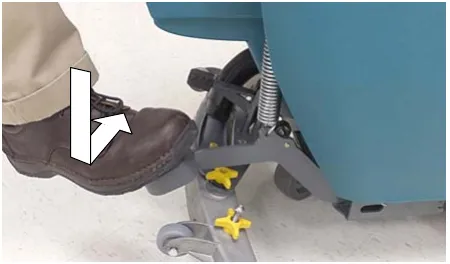
- Step down on the scrub head lift pedal to raise the scrub head off the floor (Figure 8).
- Attach the pad to the pad driver before installing the disk (Figure 9). Secure pad with centerlock.
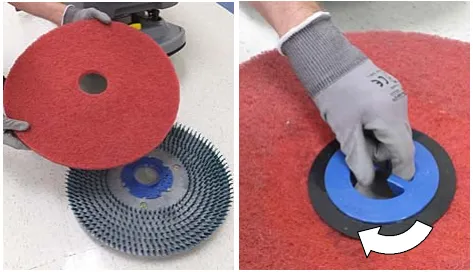
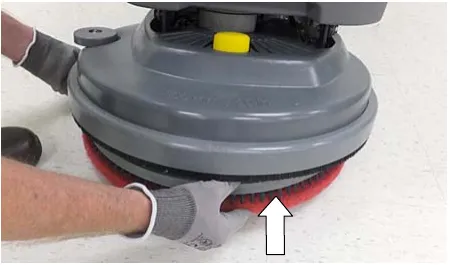
- Single disk model - Position the three lugs into the motor hub slots and give the pad driver/brush a quick counter-clockwise turn to engage hub (Figure 10). View through the scrub head window to align lugs.
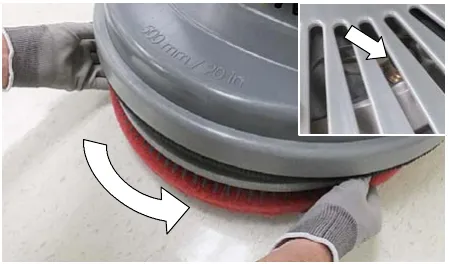
Installing brush/pad - 3 lug disk (continued)
Dual disk model - Turn the brush motor hub until the lug slot with spring clip is visible. Position the three lugs into the motor hub slots and give the pad driver/brush a quick turn towards the spring clip (Figure 11). View through the scrub head window to align lugs.
NOTE: The left and right disks engage the hubs in opposite directions.
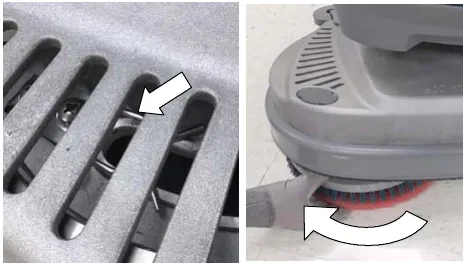
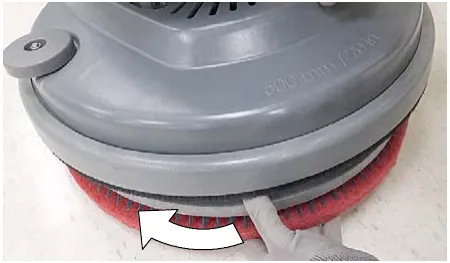
- Single disk model - To remove the pad driver/brush, grip the disk and give it a quick turn in the direction as shown (Figure 12).
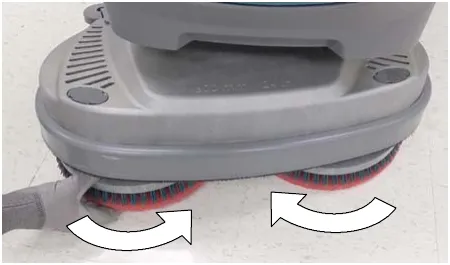
Dual disk model - To remove the pad driver/brush, grip the disk and give it a quick turn in the direction as shown (Figure 13).
Installing brush/pad - Insta-Click magnetic disk (option)
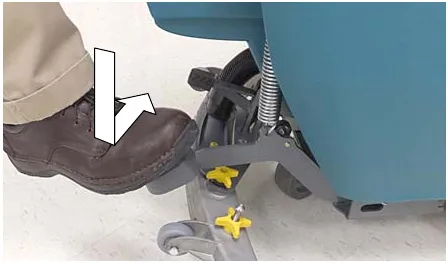
- Step down on the scrub head lift pedal to raise the scrub head off the floor (Figure 14).
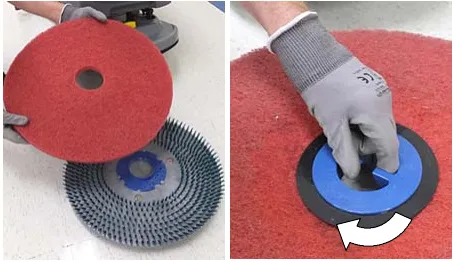
- Attach the pad to the pad driver before installing the driver (Figure 15). Secure pad with centerlock.
- Place the pad driver/brush under the scrub head and lift into position. The Insta-Click pad driver/brush will automatically click into position (Figure 16).
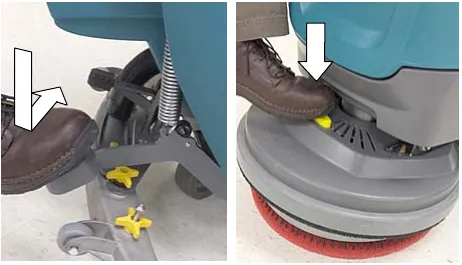
- To remove the pad driver(s)/brush(es), raise the scrub head and press the yellow plunger button with foot or hand (Figure 17). Pad will drop to floor.
Installing pad - orbital
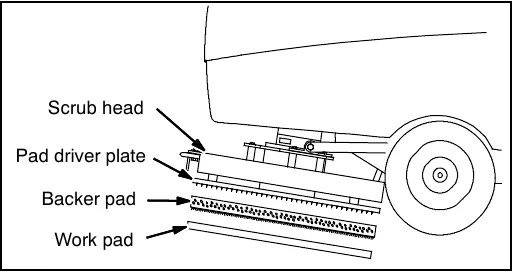
For best cleaning performance and to avoid damaging the pad driver plate or floor surface, always use backer pad with work pads (Figure 18).
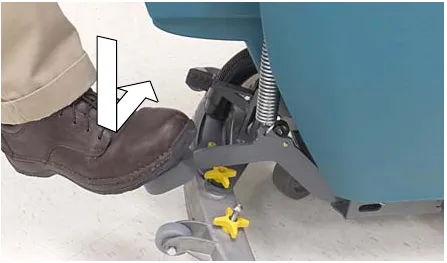
- Step down on the scrub head lift pedal to raise the scrub head off the floor (Figure 19).
- Install the backer pad, retaining strips facing outward, to bottom of scrub head (Figure 20). Make sure pad is centered on scrub head.
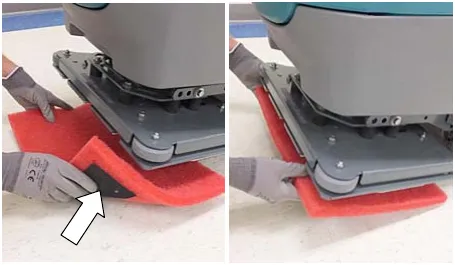
- Attach the work pad to the backer pad (Figure 21).
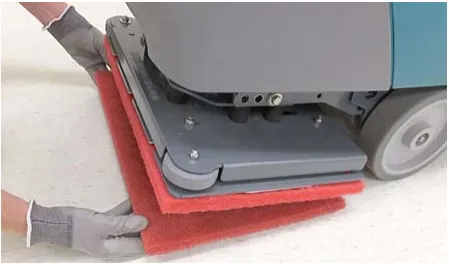
Installing cylindrical brushes
- Step down on the scrub head lift pedal to raise the scrub head off the floor (Figure 22).
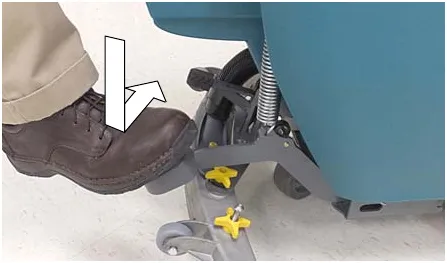
Installing cylindrical brushes (continued)
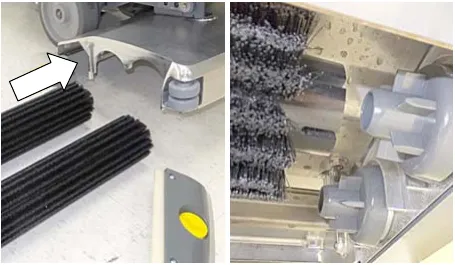
- Remove the debris tray by sliding it out from the scrub head (Figure 23).
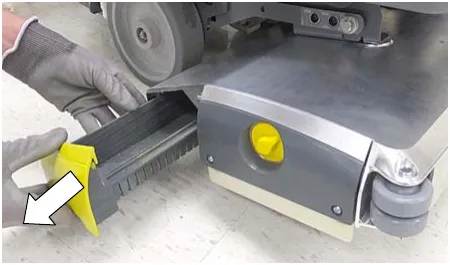
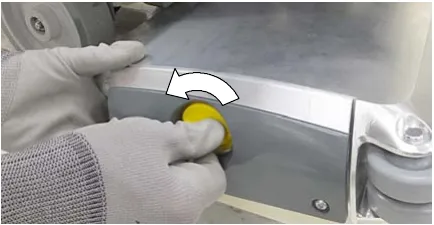
- Remove the idler plate from the scrub head by unscrewing the yellow knob (Figure 24).
- Slide the brushes into the scrub head and connect the slotted ends of each brush into the drive hubs (Figure 25).
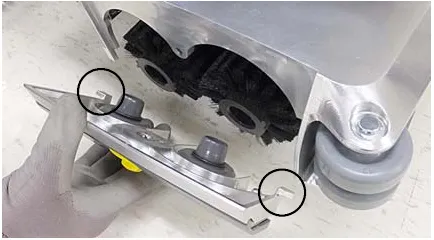
- Connect the idler plate to the brush ends and reattach the idler plate. Make sure the idler plate hooks are engaged before tightening knob (Figure 26).
- Replace debris tray.
Filling solution tank
Remove the solution tank lid and fill the solution tank. Stop filling tank when the level reaches the “3/3” mark on the solution tank drain hose indicator (Figure 27).
ec-H2O Scrubbing - Fill solution tank with only cool clean water (less than 70°F (21°C)). Do not add conventional floor cleaning detergents. An ec-H2O system fault will occur if cleaning detergents are added.
Conventional Scrubbing - Fill solution tank with water (not to exceed 140°F (60°C)). Pour a recommended cleaning detergent into the solution tank according to mixing instructions on the container.
NOTE: Do not use the ec-H2O system when there are conventional cleaning detergents in the solution tank. Drain, rinse, and refill the solution tank with clear cool water before operating the ec-H2O system. Conventional cleaning detergents will cause an ec-H2O system fault.
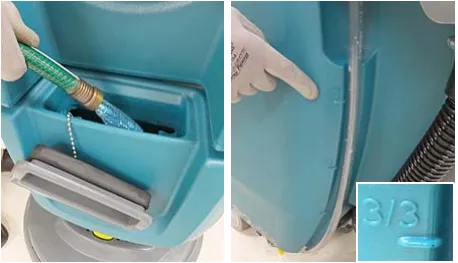
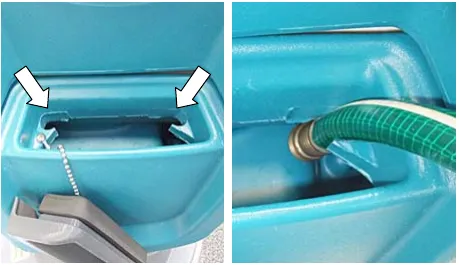
The solution tank fill-port is equipped with two hose clips to hold hose while filling. The two clips are different hose diameter sizes (Figure 28).
ec-H2O NanoClean water conditioning cartridge (ec-H2O model)
The ec-H2O system is equipped with a water conditioning cartridge (Figure 29). The cartridge is designed to protect the machine’s plumbing system from potential scaling.
The cartridge is required to be replaced when it reaches its maximum water usage or expiration time of when the cartridge was activated, which ever comes first.
Depending on machine usage a new cartridge can last anywhere from 12 to 24 months.
The control panel will signal a code when it’s time to replace cartridge. See SERVICE INDICATOR CODES for further details (page 21).
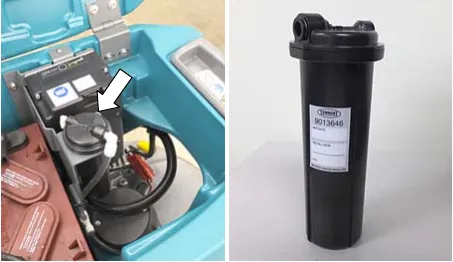
All cartridges are labeled with a manufacture date. The shelf-life of an un-installed cartridge is one year from manufacture date. For new cartridge replacement, the ecH2O module timer must be reset. See ec-H2O NanoClean WATER CONDITIONING CARTRIDGE REPLACEMENT (page 35).
Accessory rail
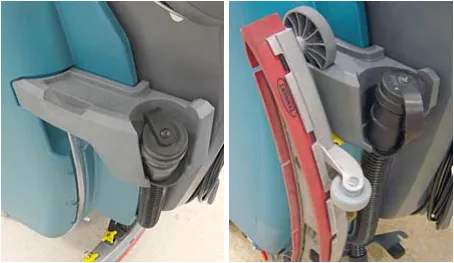
The machine is equipped with an accessory rail which also serves as the recovery tank and solution tank drain hose holder.
The accessory rail is designed to store the squeegee assembly and other accessory items (Figure 30).
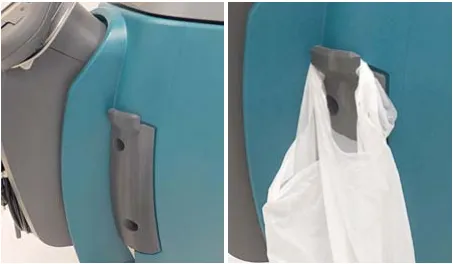
A debris bag hook is located on the left side of the control console (Figure 31).
Machine operation
Pre-operation check list
- Sweep area and remove any obstructions.
- Check brushes/pads for wear and damage.
- Check squeegee blades for wear and damage.
- Confirm recovery tank empty and screen and debris tray is clean.
- Check scrub head skirt for wear and damage.
- Cylindrical brush model - confirm scrub head debris tray is empty and clean.
- ec-H2O Scrubbing: Confirm solution tank is filled with clear cool water only.
- ec-H2O Scrubbing: Ensure all conventional cleaning agents/restorers are drained and rinsed from solution tank.
- Check machine for proper operation.
Operating machine
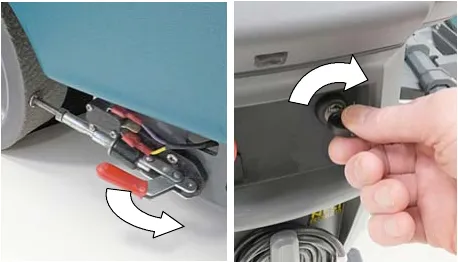
- Release the parking brake lever, if equipped (Figure 32)
- Turn the key to the on ( I ) position (Figure 32).
- ec-H2O Models: The ec-H2O system automatically turns on at each key start. A blue ec-H2O indicator appears when machine is equipped with the ec-H2O option. The green LED illuminates when ec-H2O is activated. To turn off the ec-H2O system, press the ec-H2O button. The green LED indicator will disappear (Figure 33).
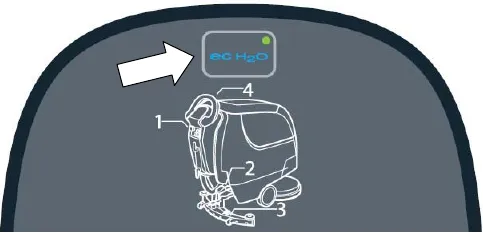
| ec-H2O indicator | Condition |
|---|---|
| Solid blue | Normal operation |
| Blinking blue/red | Water conditioning cartridge expired. Replace cartridge. |
| Solid or blinking red | See Service Indicator Codes. |
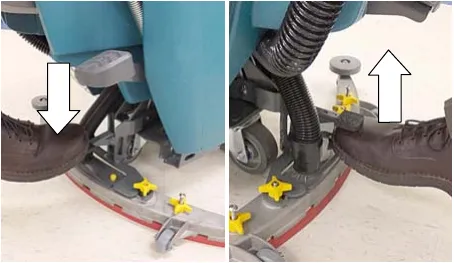
- Lower the scrub head to the floor by stepping on the scrub head lift pedal as shown (Figure 34).
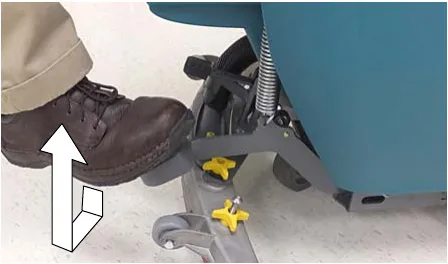
- Lower the squeegee assembly to floor by stepping on foot pad as shown (Figure 35). To raise squeegee assembly, place toe under foot pad and lift. The vacuum motor will start when squeegee assembly is lowered.
Operating machine (continued)
- Drive models - push the directional lever to the forward position to go forward (Figure 36). To reverse the machine pull the directional lever backwards.
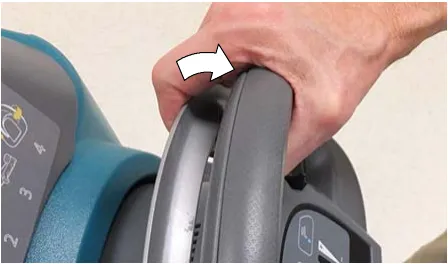
- To begin scrubbing, pull the start bail (Figure 37).
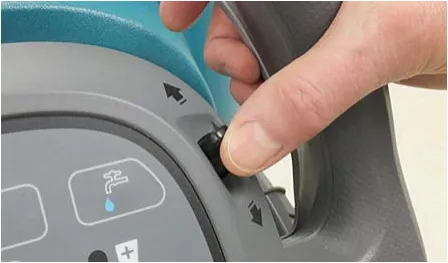
- Drive models - Adjust the scrubbing speed by turning the speed dial to the desired speed (Figure 38).
Push models - Slowly push the machine forward. The rotating brush(es) will help assist the machine forward.
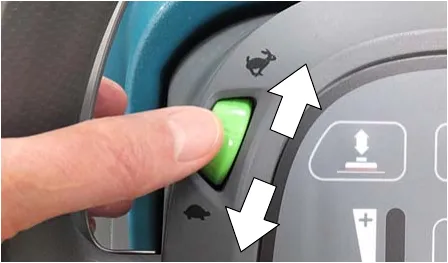
- ec-H2O model: To adjust the solution flow rate when ec-H2O scrubbing, press the solution flow button located on the ec-H2O module (Figure 39). One LED= low, two LED’s=medium, and three LED’s= high.
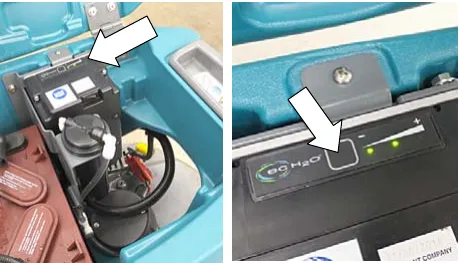
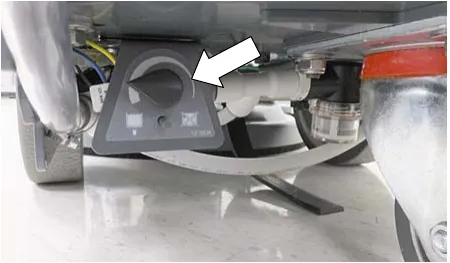
- To adjust the solution flow rate when conventional scrubbing, turn the solution flow control knob located underneath machine (Figure 40).
NOTE: The solution flow control knob is only functional when conventional scrubbing.
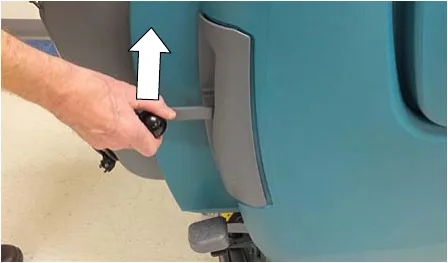
- T300e model option - When extra brush pressure is needed for heavily soiled areas lift the down pressure lever (Figure 41).
NOTE: Release the down pressure lever when raising scrub head.
- To stop scrubbing, release the start bail and raise the scrub head and squeegee assembly off floor. Turn key off and set parking brake, if equipped.
While operating machine
- Overlap each scrub path by 2 inches (5 cm).
- Keep machine moving to prevent damage to floor finish.
- Wipe squeegee blades with a cloth if blades leave streaks.
- Avoid bumping the machine into posts and walls.
- Pour a recommended foam control solution into the recovery tank if excessive foam appears.
- Use the double scrubbing method for heavily soiled areas. First scrub the area with the squeegee up, let solution set for 3-5 minutes, then scrub the area a second time with squeegee down.
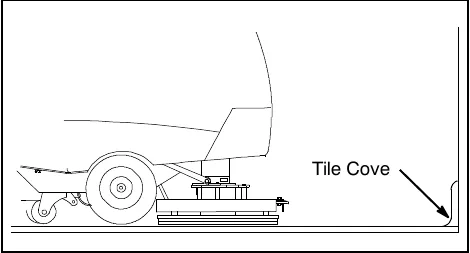
- Orbital Scrub Head Model - Use caution when working near the tile cove (Figure 42) and floor mounted fixtures such as pedestal sinks and other breakable items. Keep the metal scrub head edge away to avoid possible damage.
- When leaving the machine unattended, remove the key and set the parking brake, if equipped.
- Do not operate machine in areas where the ambient temperature is above 110°F (43°C) or below freezing 32°F (0°C).
Emergency shut-off button (drive models)
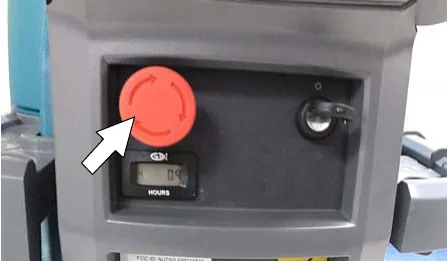
Push the emergency shut-off button in the event of an emergency (Figure 43). This red button shuts off all power to machine. To regain power, turn the button clockwise and restart the key.
Only use this button in the event of an emergency. It is not intended for routine machine shutdown.
Battery discharge indicator
The battery discharge indicator (BDI) displays the charge level of the batteries while the machine is operating. When the batteries are fully charged, all five indicators are lit (Figure 44). When the discharge level reaches the red light, stop scrubbing and recharge the batteries. If the red light begins to flash, the scrubbing function will automatically shut off to protect the batteries from total discharge. Drive Model: The machine will still propel when the red light is flashing, this will allow user to transport machine to charging station.
Circuit breaker panel
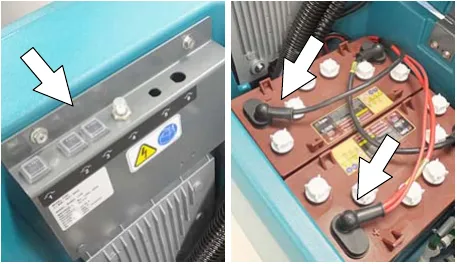
The machine is equipped with resettable circuit breakers to protect the machine from a current overload. If a circuit breaker trips, disconnect the battery cable connection and reset the breaker by pressing the reset button after the breaker has cooled down. Reconnect the battery cable connection. If the circuit breaker does not reset or continues to trip contact service personnel.
The circuit breaker panel is located near the battery compartment and identified as described below (Figure 45).
| Circuit breaker | Rating | Circuit protected |
|---|---|---|
| CB1 | 4 A | Key switch, control board |
| CB2 | 4 A | ec-H2O module |
| CB3 | 4 A | ec-H2O pump |
| CB4 | 30 A | Propel |
| CB5 | 37 A | Brush motor |
| CB6 | 20 A | Vacuum motor |
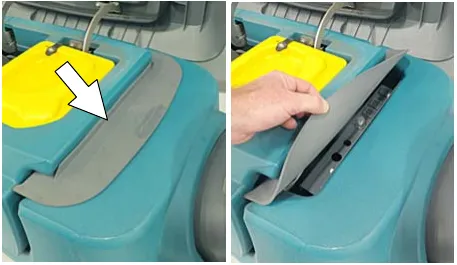
The circuit breaker panel is protected by a splash guard. To access the circuit breaker panel when the recovery tank is in the down position lift the splash guard as shown (Figure 46).
Hour meter
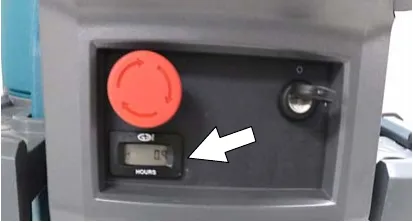
The hour meter records the number of hours the machine has been operated. Use the hour meter to perform specific maintenance procedures and to record service history (Figure 47).
Draining tanks
Draining recovery tank
Drain and clean the recovery tank daily and between solution tank refills.
- Transport the machine to drain area.
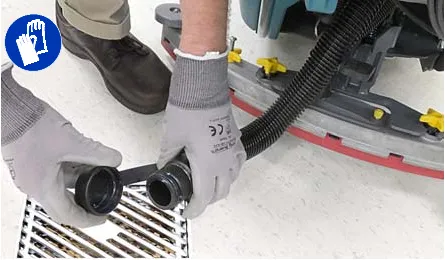
- For models equipped with drain hose caps, hold the hose upward, remove cap then slowly lower hose to drain. For models equipped with flow control valve drain hose, lower hose and slowly open valve to drain (Figure 48).
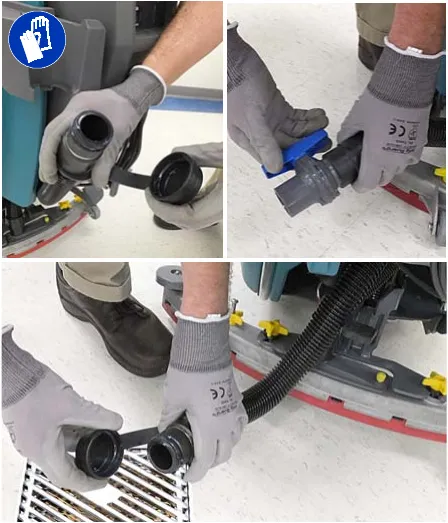
NOTE: When using a bucket to drain the machine, do not use the same bucket to fill the solution tank.
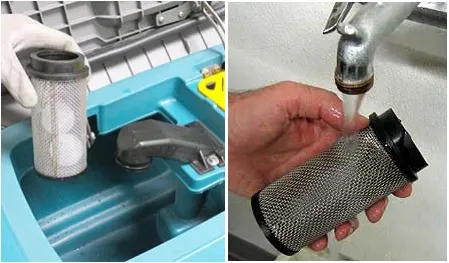
- Remove and clean the float shut-off screen (Figure 49).
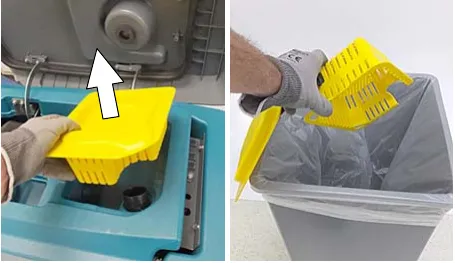
- Remove the debris tray and empty (Figure 50).
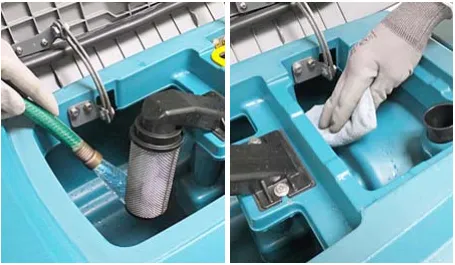
- Rinse out the recovery tank with clean water and wipe clean of any soil residue (Figure 51).
Draining solution tank
Drain the solution tank daily.
- Transport the machine to drain area.
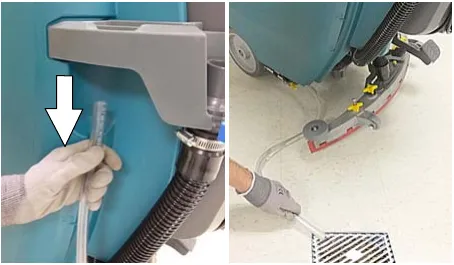
- To drain remaining water from solution tank, pull the solution hose from the accessory rail (Figure 52). Firmly reconnect the solution hose to accessory rail after draining tank.
Draining solution tank (continued)
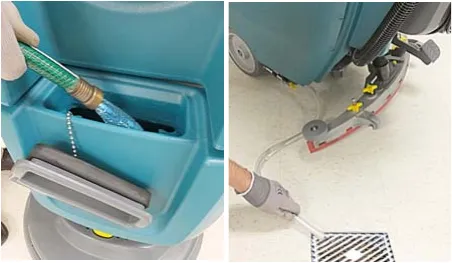
- Rinse out solution tank with clean water (Figure 53).
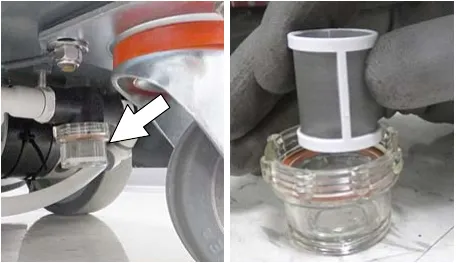
- Remove the solution tank filter and clean screen after every 50 hours of use (Figure 54). Solution filter is located under machine at rear. Drain solution tank before removing filter.
Service indicator codes
Batteries and chargers: make sure your charger is compatible with your batteries, and set its charging algorithm to your battery pack before you use it.
When the machine or battery charger detects a fault, the service indicator will flash. A fault code will be provided to determine problem as described below.
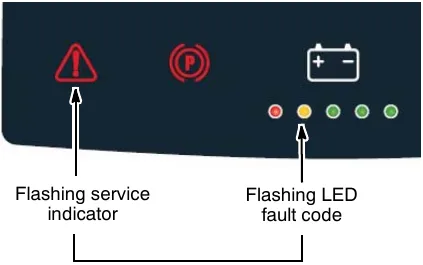
| LED fault code | Cause | Solution |
|---|---|---|
| Emergency stop button activated. | Release emergency stop button and restart machine. | |
| Brush motor wiring, connector or control board problem. | Contact service. | |
| Vacuum motor wiring, connector or control board problem. | Contact service. | |
| Propel circuit breaker tripped. | Disconnect battery and reset circuit breaker. If trip repeats, contact service. | |
| Software load failure. | Contact service. | |
| Propel I-Drive fault Propel I-Drive communication lost | Restart machine. If fault repeats, contact service. | |
| Propel motor shorted fault | Contact service. | |
| Brush motor over current | Contact service. |
Service indicator codes - continued
| LED fault code | Cause | Solution |
|---|---|---|
| Start bail is pulled or obstructed before turning machine on. | Release start bail or remove bail obstruction before turning machine on. | |
| Brush motor control board fault Vacuum motor control board fault | Disconnect battery cable connection and contact service to replace control board. | |
| Vacuum motor over current. | Contact service. | |
| Vacuum motor shorted fault. | Contact service. | |
| Brush motor shorted fault. | Contact service. | |
| Charger communication fault Scrub control board comm. fault ec-H2O system comm. fault | Restart. If fault code persists, contact service. |
On-board battery charger service indicator codes
| LED fault code | Cause | Solution |
|---|---|---|
| Charger error condition. | Contact service. | |
| Charger is not connected to battery pack. | Check cable connections. | |
| Charger overheated. | Let charger cool. Move to well ventilated area. Charge batteries in areas with temperatures 80°F (27°C) or less. If fault persists, contact service. | |
| Charger communication fault | Restart charger. If fault code persists, contact service. | |
| Charger timer exceeded maximum charging time. Interrupts charging cycle. | Replace Batteries. |
ec-H2O system service indicator codes - option
T300e control panel
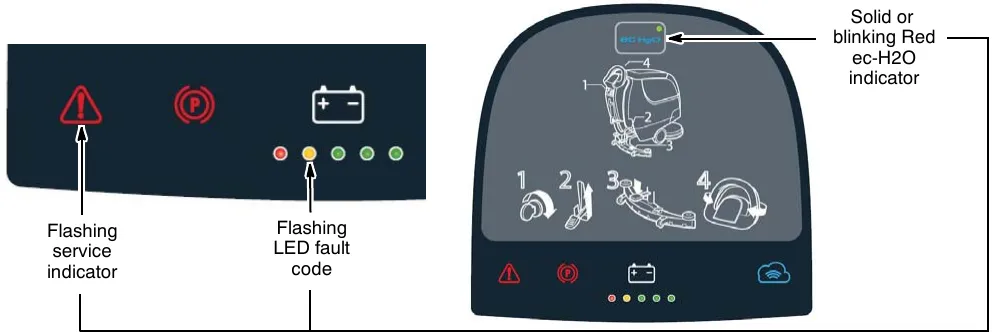
| LED fault code | Cause | Solution |
|---|---|---|
| ec-H2O system communication fault. | Restart. If fault code persists, contact service. | |
| ec-H2O pump wiring, connector or control board problem. | Contact service. | |
| ec-H2O pump over current | Contact service. | |
| ec-H2O pump shorted fault | Contact service. | |
| ec-H2O circuit breaker tripped | Reset circuit breaker. If trip repeats, contact service. | |
| ecH2O indicator solid red | ec-H2O electrical faults | Contact service. |
| ecH2O indicator blinking red* | ec-H2O water and plumbing faults | Contact service. |
| ecH2O indicator blinking blue/red | Water conditioning cartridge expired | Replace water conditioning cartridge. |
*Verify if cleaning detergent was added to solution tank. If ec-H2O system was operated with cleaning detergent, drain solution tank, add clear water and operate the ec-H2O system until the fault code clears.
Maintenance chart
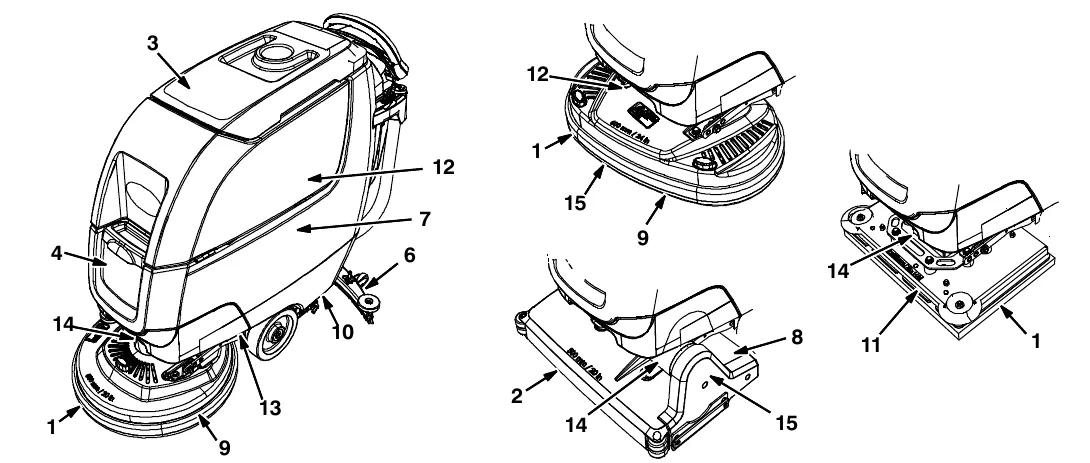
| Interval | Person resp. | Key | Description | Procedure |
|---|---|---|---|---|
| Daily | Operator | 1 | Pad(s) Pads › | Check, flip or replace |
| Operator | 1 | Brush(es) Brushes › | Check, clean | |
| Operator | 2 | Cylindrical Brushes Brushes › | Check, clean | |
| Operator | 3 | Recovery tank | Drain, rinse, clean float shut-off screen and debris tray if equipped | |
| Operator | 4 | Solution tank | Drain, rinse | |
| Operator | 6 | Squeegee Blades, p. 34 › | Clean, check for damage and wear | |
| Operator | 7 | Batteries | Charge if necessary | |
| Operator | 8 | Debris trough | Clean | |
| Operator | 9 | Scrub head skirt | Check for damage and wear | |
| Weekly | Operator | 7 | Battery cells | Check electrolyte level |
| Operator | 6 | Squeegee assembly drip trap reservoir | Check, clean | |
| 50 Hours | Operator | 2 | Cylindrical brushes. | Rotate brushes. Check for wear |
| Operator | 2 | Cylindrical scrub head | Clean underside of scrub head | |
| Operator | 3 | Recovery tank lid seal Seal › | Check for wear. | |
| Operator | 10 | Solution tank filter Filter › | Clean | |
| 100 Hours | Operator | 7 | Battery watering system (option) | Check hoses for damage and wear |
| 200 Hours | Operator | 7 | Batteries, terminals and cables | Check and clean |
| 500 Hours | Trained personnel | 11 | Lower orbital isolators Isolators › | Replace (4 qty) |
| 750 Hours | Trained personnel | 12 | Vacuum motor Carbon brushes › | Replace carbon brushes |
| 1250 Hours | Trained personnel | 13 | Propel motor Carbon brushes › | Replace carbon brushes |
| Trained personnel | 14 | Brush motor Carbon brushes › | Replace carbon brushes | |
| Trained personnel | 15 | Brush belt Belt › | Replace belt |
O = Operator T = Trained Personnel
Machine maintenance
Batteries and chargers: make sure your charger is compatible with your batteries, and set its charging algorithm to your battery pack before you use it.
To keep the machine in good working condition, simply perform the following maintenance procedures.
After daily use
- Drain and rinse out the recovery tank (Figure 55). See DRAINING TANKS (page 20).
- Remove the debris tray and empty (Figure 56).
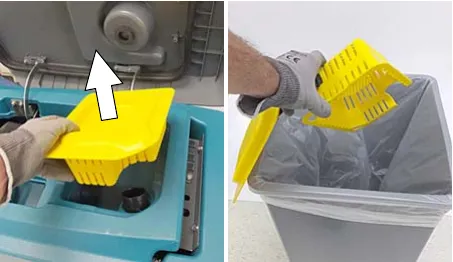
- Remove and clean the float shut-off screen (Figure 57).
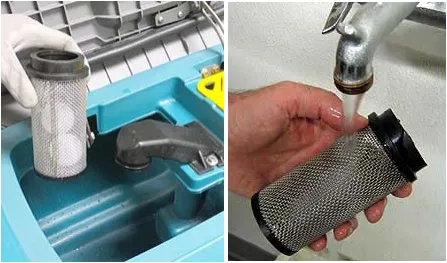
- Drain and rinse out the solution tank (Figure 58).
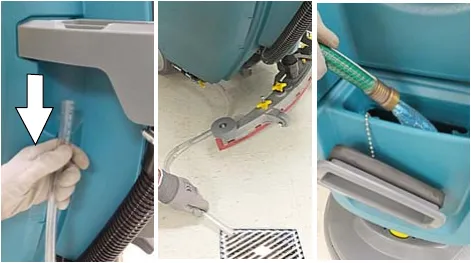
- Disk scrub head - Turn pad over or replace when worn (Figure 59).
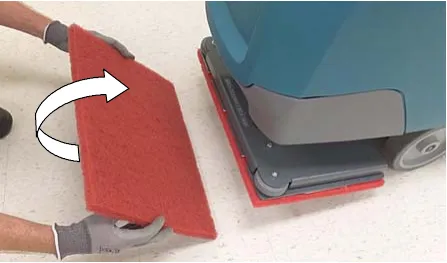
Orbital scrub head - Turn the work pad over or replace when worn (Figure 60).
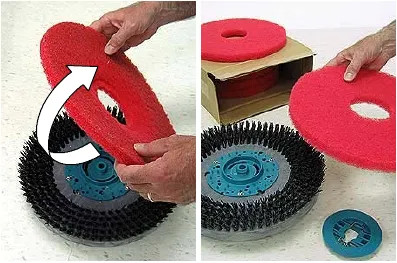
- Insta-Click pad driver/brushes - clean any debris buildup from hub connection area (Figure 61).
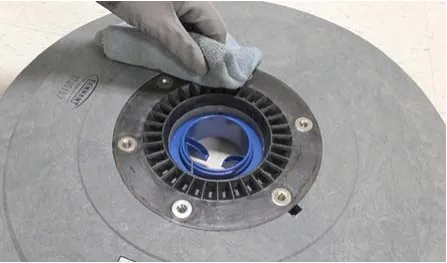
After daily use (continued)
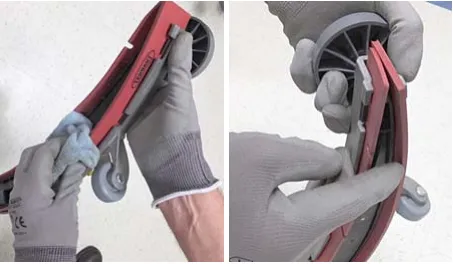
- Wipe the squeegee blades clean. Inspect blades for wear and damage (Figure 62). Rotate blade if worn. See SQUEEGEE BLADE REPLACEMENT (page 34).
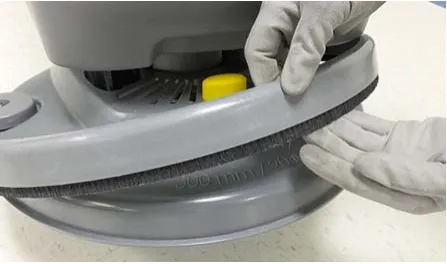
- Check the scrub head skirt for wear or damage (Figure 63). Replace if worn or damaged.
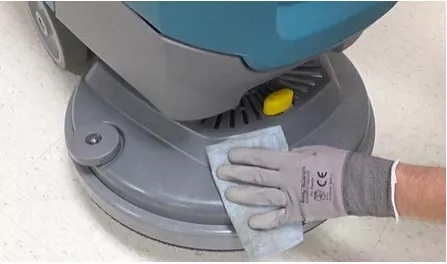
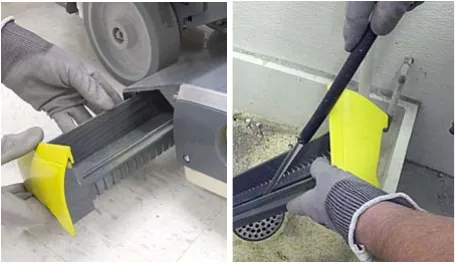
- Clean the outside surface of the machine with an all purpose cleaner and damp cloth (Figure 64).
- Cylindrical scrub head - Remove and clean debris trough (Figure 65).
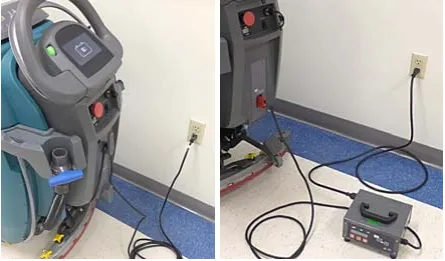
- Charge batteries (Figure 66). See BATTERIES (page 28).
After weekly use
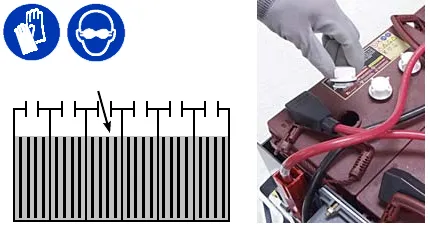
- Check the electrolyte level in all batteries (Figure 67). See BATTERIES (page 28).
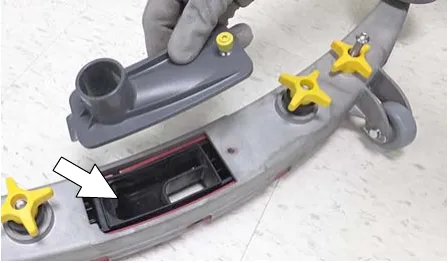
- Remove the drip trap cover from the squeegee assembly and clean reservoir (Figure 68).
After every 50 hours of use
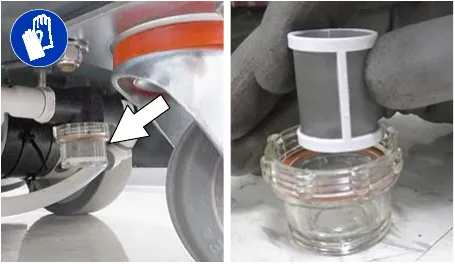
- Remove the solution tank filter and clean screen (Figure 69). Turn the filter bowl counter-clockwise to remove. Make sure to drain solution tank before removing filter.
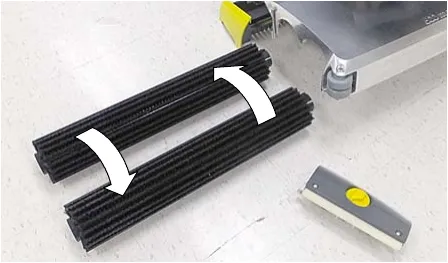
- Cylindrical brushes - Rotate brushes from front to rear (Figure 70). Replace brushes when they no longer clean effectively.
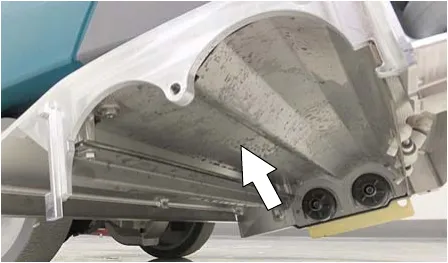
- Cylindrical scrub head - Remove debris buildup from underside of scrub head (Figure 71).
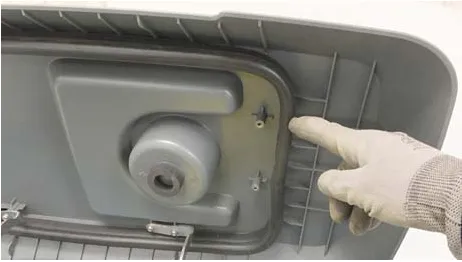
- Inspect and clean the seal on the recovery tank lid (Figure 72). Replace seal if damaged.
After every 100 hours of use
If machine is equipped with the optional battery watering system, check the watering hoses and connections for damage and wear (Figure 73). Replace system if damaged.
Electric motors
Replace motor carbon brushes as indicated. Contact trained personnel for carbon brush replacement.
| Carbon brush replacement | Hours |
|---|---|
| Vacuum motor | 750 |
| Propel motor (drive model) | 1250 |
| Disk brush motor | 1250 |
| Cylindrical brush motor | 1250 |
| Orbital brush motor | 1250 |
Belts
Batteries and chargers: make sure your charger is compatible with your batteries, and set its charging algorithm to your battery pack before you use it.
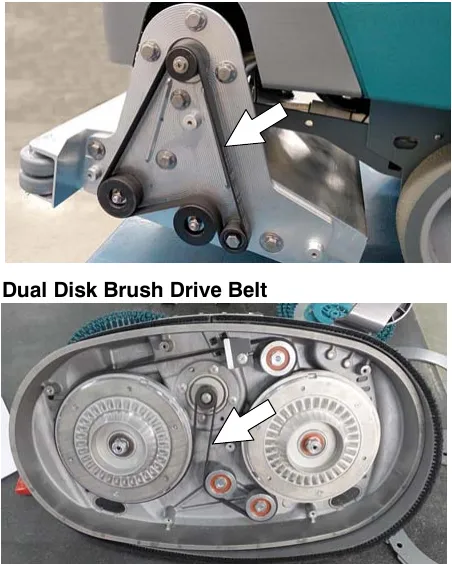
Replace belts every 1250 hours. Contact trained personnel for belt replacement (Figure 74).
Orbital scrub head isolators
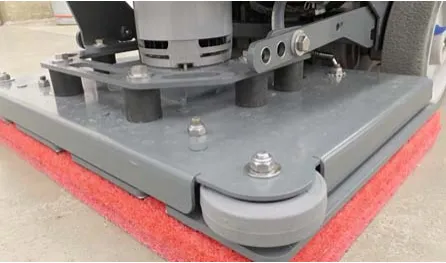
Replace the four lower vibration isolators every 500 hours. The lower isolators (hidden) are located between the deck plate the driver plate. Contact trained personnel for isolator replacement (Figure 75).
Batteries
Your machine is equipped with either flooded (wet) lead-acid, maintenance-free (Sealed AGM) batteries or lithium-ion battery supplied by Tennant.
Flooded (wet) and maintenance-free sealed lead-acid batteries
The lifetime of the batteries depends on their proper maintenance. To get the most life from the batteries;
- Do not charge the batteries more than once a day and only after running the machine for a minimum of 15 minutes.
- Do not leave the batteries partially discharged for long period of time.
- Only charge the batteries in a well-ventilated area to prevent gas build up. Charge batteries in areas with ambient temperatures 80°F (27°C) or less.
- Allow the charger to complete charging the batteries before re-using the machine.
- Maintain the proper electrolyte levels of flooded (wet) batteries by checking levels weekly.
Your machine is equipped with either flooded (wet) lead-acid or maintenance-free batteries supplied by Tennant.
Maintenance-free (Sealed AGM) batteries do not require watering. Cleaning and other routine maintenance is still required.
The flooded (wet) lead-acid batteries require routine watering as described below. Check the battery electrolyte level weekly.
NOTE: Do Not check the electrolyte level if the machine is equipped with the optional battery watering system. Proceed to the BATTERY WATERING SYSTEM (page 33).
The electrolyte level should be slightly above the battery plates as shown before charging (Figure 76, page 29). Add distilled water if low. DO NOT OVERFILL. The electrolyte will expand and may overflow when charging. After charging, distilled water can be added up to about 0.12 in (3 mm) below the sight tubes.
Batteries (continued)
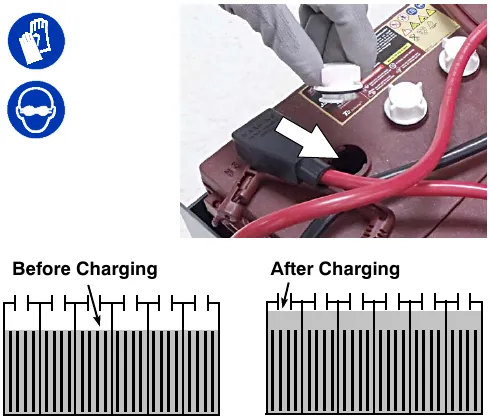
NOTE: Make sure the battery caps are in place while charging. There may be a sulfur smell after charging batteries. This is normal.
Checking connections / cleaning
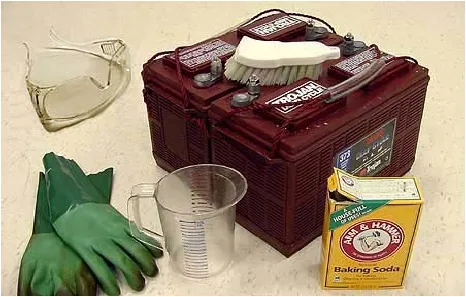
After every 200 hours of use, check for loose battery connections and clean the surface of the batteries, including terminals and cable clamps to prevent battery corrosion. Use a scrub brush with a strong mixture of baking soda and water (Figure 77). Do not remove battery caps when cleaning batteries.
Lithium-ion battery
Batteries and chargers: make sure your charger is compatible with your batteries, and set its charging algorithm to your battery pack before you use it.
The lithium-ion battery pack is a maintenance-free battery protected by a battery management system (BMS). To achieve the maximum battery life, carefully follow the instructions below:
- Lithium-Ion batteries must be charged prior to initial use.
- Carefully follow the Important Safety Instructions section in the manual when using the Lithium-ion Battery Model.
- Only use the lithium-ion battery charger supplied with machine.
- Charge battery pack in well-ventilated areas. For best charging performance, charge the battery pack in temperatures below 80°F (27°C) and above 32°F (0°C). Battery pack may shut down and not take a charge in elevated or freezing temperatures.
- Do not store the machine for an extended period if battery is discharged to the last bar, the battery may further discharge to a level that is unrecoverable.
- When the machine shuts down due to a depleted battery pack, do not repeatedly cycle the key on and off. This may cause permanent battery pack damage. Recharge battery pack immediately to avoid damage.
- Opportunity charging (i.e. partial charge cycle of a half hour or more) is only recommended if discharge level is below 80%.
- Do not operate machine in temperatures above 104°F (40°C) or below -4°F (-20°C). Machine may shutdown if exceed these temperatures.
- Contact Tennant Service for lithium-ion battery service and replacement.
Battery power button / battery discharge indicator
Batteries and chargers: make sure your charger is compatible with your batteries, and set its charging algorithm to your battery pack before you use it.
Each Lithium-Ion battery contains a power button to turn on/off the battery power supply. The battery discharge indicator (BDI) displays the current state of the battery (Figure 78).
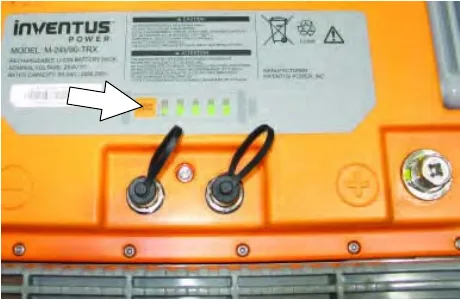
To display the battery charge status or fault state (while the batteries are active), press and hold the power button of any battery for one second. When the batteries are fully charged, all five green indicators are lit. As the battery discharges, the indicator levels decreases. If the indicators flash red the battery is getting very low. If the indicators display solid red along with green, the battery has a fault. Contact Tennant Service to fix the fault.
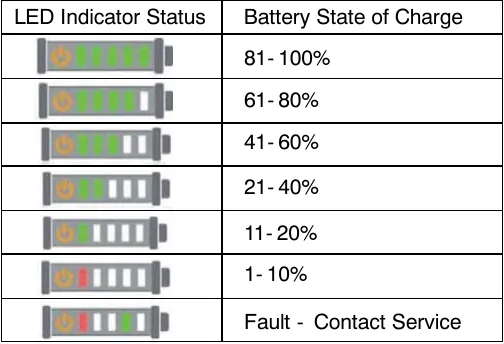
| LED indicator status | Battery state of charge |
|---|---|
| Five green LEDs lit | 81-100% |
| Four green LEDs lit | 61-80% |
| Three green LEDs lit | 41-60% |
| Two green LEDs lit | 21-40% |
| One green LED lit | 11-20% |
| One red LED lit | 1-10% |
| Red LED lit along with a green LED | Fault - Contact Service |
To turn off the battery power (while the batteries are active), press and hold the battery power button of any battery for 20 seconds. The battery discharge indicators will turn off. Turning off one battery will shut down power to all connected batteries. Batteries should be shut down before any service is completed on the battery modules.
To turn on the battery power (when the batteries are shutdown), press and hold the power button on each battery for 5 seconds. The battery discharge green indicators will illuminate when turned on.
Charging batteries
The charging instructions in this manual are intended for the battery charger supplied with your machine. The use of other battery chargers that are not supplied and approved by Tennant are prohibited.
If your machine is equipped with an off-board battery charger refer to the charger’s owners manual for operating instructions. Contact distributor or Tennant for battery charger recommendations if machine is not equipped with charger.
IMPORTANT NOTICE: The battery charger is set to charge the battery type supplied with your machine. If you choose to change to a different battery type or capacity (i.e. flooded (wet) lead-acid, maintenance-free, sealed, AGM batteries, etc.), the charger’s charging profile must be changed to prevent battery damage. See BATTERY CHARGER SETTINGS (page 31).
- Transport the machine to a well-ventilated area.
- Park the machine on a flat, dry surface, turn off machine and remove key.
- If the machine is equipped with flooded (wet) lead-acid batteries check the battery electrolyte level weekly before charging. See FLOODED (WET) LEAD-ACID BATTERIES (page 28).
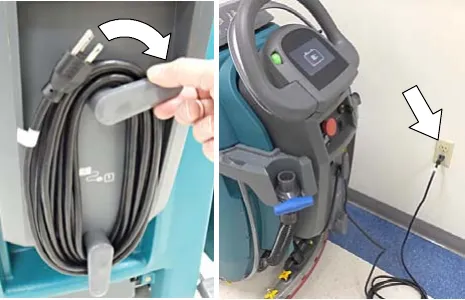
- For models equipped with on-board chargers, remove the charger’s power cord from the storage hooks and plug power cord into a properly grounded wall outlet (Figure 79).
Charging batteries (continued)
For models equipped with off-board chargers, first connect the charger’s DC cord into the machine’s battery charge receptacle then plug the AC power supply cord into a properly grounded wall outlet (Figure 80). Refer to the off-board battery charger’s owner manual for operating instructions.
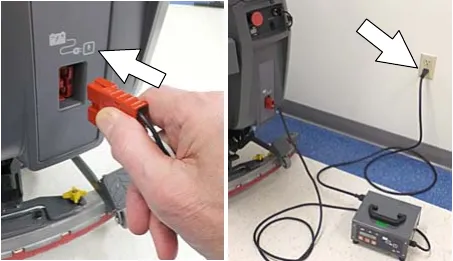
- The charger will automatically begin charging and and shut off when fully charged. The maximum charging cycle may take up to 6-12 hours depending on battery type.
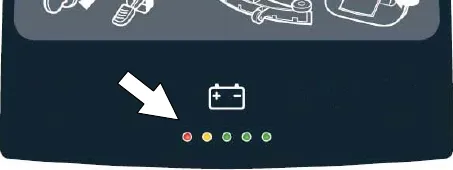
On-board battery charger: The battery discharge indicator lights will ripple back and forth during the charging cycle. When all five lights repeatedly flash two times, the charging cycle is complete (Figure 81).
For Lithium-ion batteries: During the charging cycle, starting from left to right,the indicator light will flash, turn solid then progress to the next light. Once the charging cycle completes this process through all five lights, all lights will repeatedly flash two times at the end of the charge cycle.
For models equipped with an off-board charger, always disconnect the AC power supply cord first before disconnecting charger from machine.
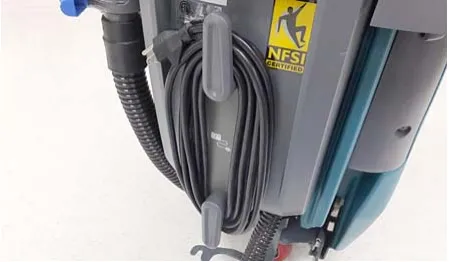
- After charging batteries unplug the power supply cord and wrap cord around the cord hooks (Figure 82).
Battery charger settings
Batteries and chargers: make sure your charger is compatible with your batteries, and set its charging algorithm to your battery pack before you use it.
NOTE: The following instructions apply to models equipped with flooded lead-acid or sealed AGM batteries.
The battery charger is set to charge the battery type supplied with your machine. If you choose to change to a different battery type or capacity, the charger’s charging profile must be changed to prevent battery damage.
The machine’s battery discharge indicator (BDI) must also be reprogrammed to match battery type to prevent battery damage and/or short run-time.
NOTE: For machines shipped without batteries, the battery discharge indicator and the on-board battery charger are set for GEL batteries as the default. If you choose to use a different battery type, the settings must be changed as described as below.
NOTE: For machines shipped without batteries and supplied with an Off-Board Charger, the off-board battery charger is set for wet lead-acid batteries from the factory. The machine’s battery discharge indicator is set for GEL batteries as the default. The machine’s battery discharge indicator must be reprogrammed to match charger settings (See OFF-BOARD BATTERY CHARGER below).
OFF-BOARD BATTERY CHARGER:
To change the off-board battery charger settings, refer to the off-board charger’s owner manual.
To reprogram the machine’s battery discharge indicator (BDI) service application software is required, contact service.
ON-BOARD BATTERY CHARGER:
To change the on-board battery charger settings, service application software is required, contact service. As an alternative, the charger settings may be manually changed as describe below. The battery discharge indicator will automatically reprogram to match battery type when the battery charger profile is changed.
Changing on-board battery charger settings
To manually change the on-board battery charger settings for a different battery type, carefully follow instructions as described below :
NOTE: The manual method is only an alternative if unable to change setting by use of the Service Application Software performed by Service.
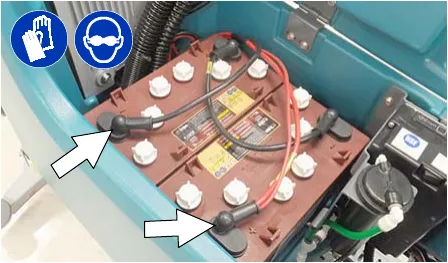
- Disconnect battery cables (Figure 83).
- Unwrap the battery charger power cord from the cord hooks.
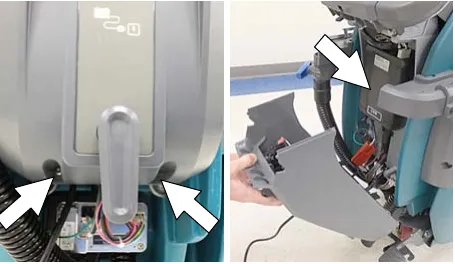
- Using a T25 star screwdriver, remove the two screws located at the bottom of the control console to access battery charger (Figure 84).
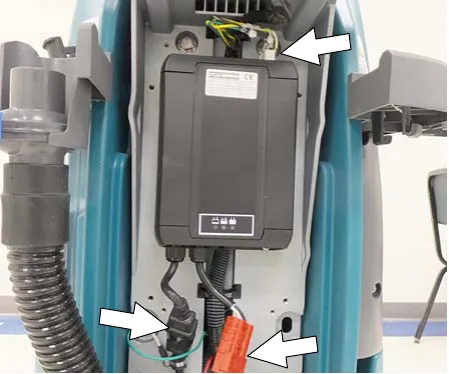
- Disconnect the battery cable, power cord and wire harness from charger. Using a T25 star screwdriver, remove the four screws that mount charger to machine (Figure 85). Remove charger from machine.
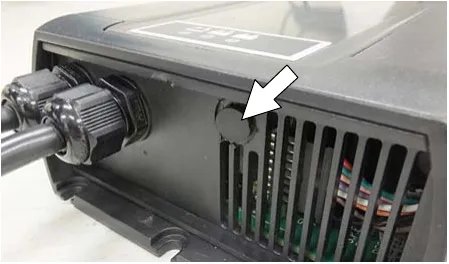
- Remove the black cap from bottom side of charger to access the profile dial (Figure 86)
- Using a small standard screwdriver, turn the dial to the appropriate battery type according to the following chart (Figure 87).
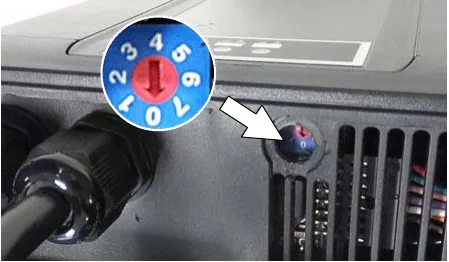
| Dial position | Battery description settings with AH ranges |
|---|---|
| 0 | CAN-BUS setting* |
| 1 | Wet, Trojan 105-155 AH |
| 2 | Wet, Enersys/Tab 105-155 AH |
| 3 | AGM, Discover 80-150 AH |
| 4 | AGM, Fullriver 80-150 AH |
| 5 | AGM, TPPL, Enersys 20-40 AH |
| 6 | Gel, Sonnenschein 80-150 AH |
*The CAN-BUS setting, dial position “0”, is the software setting that is programmed to match battery type supplied with machine. When the dial is manually changed to a different setting, it should not be reset back to “0” otherwise battery damage may result. Service Application Software is required to reset dial back to “0”. Contact Service.
- Replace the black cap on charger, reinstall battery charger and replace control console.
- Reconnect the battery cable connection.
- To set the BDI for the new battery type, plug the on-board battery charger cord into an electrical outlet. The machine’s software will automatically reprogram the BDI to the new battery type.
Manual battery watering system (Trojan Battery option)
Batteries and chargers: make sure your charger is compatible with your batteries, and set its charging algorithm to your battery pack before you use it.
The following instructions are for models equipped with the manual battery watering system option.
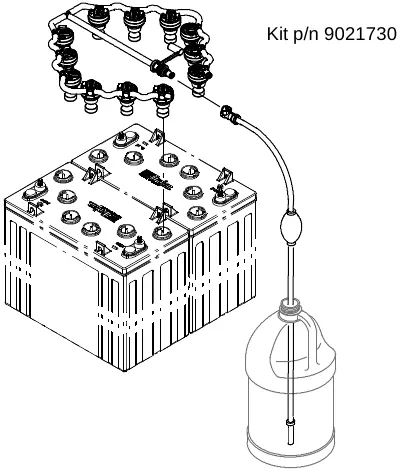
The optional manual battery watering system provides a safe and easy way to maintain the proper electrolyte levels in your batteries. It is designed exclusively for Trojan flooded (wet) lead-acid batteries.
Before using the battery watering system check hoses and connections for damage or wear.
- Fully charge batteries prior to using the battery watering system. Do not add water to batteries before charging, the electrolyte level will expand and may overflow when charging.
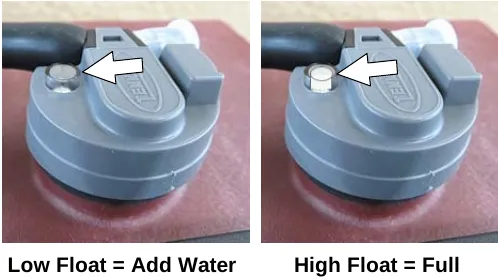
- After charging batteries, check the electrolyte level indicator on each battery cap. If any of the indicator floats are low, add water as described in the next step (Figure 88).
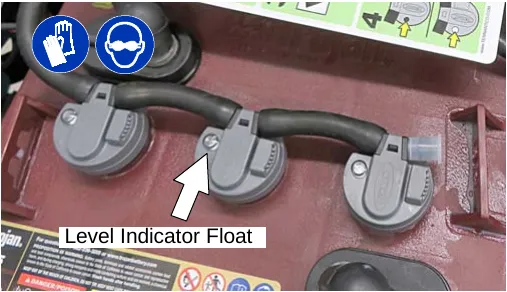
- If the level indicator has a low white float add water as described in the following instructions. (Figure 89).
- Locate the battery fill hose coupler inside the battery compartment. Remove the dust cap and connect the hand pump hose (Figure 90).
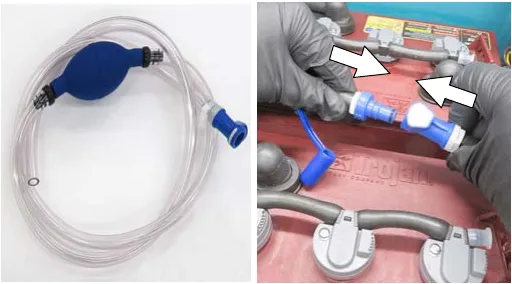
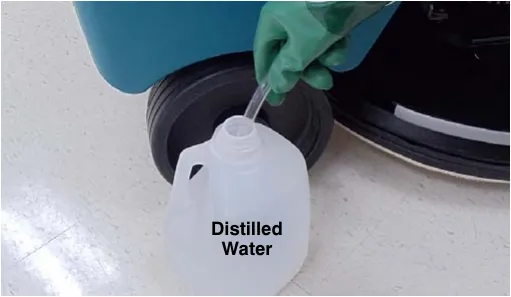
- Submerge the other end of the hand pump hose into a bottle of distilled water (Figure 91).
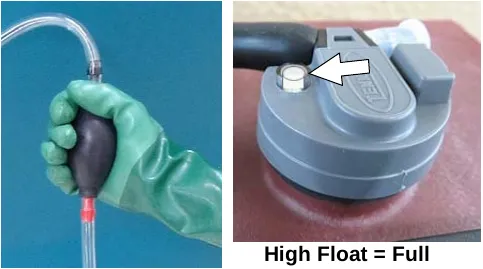
- Squeeze the bulb on the hand pump hose until firm. The indicator float will rise when full (Figure 92).
- After adding water, replace the dust cap on the battery watering distribution hose and store the hand pump hose inside the machine's battery compartment for future use.
Squeegee blade replacement
Each squeegee blade has four wiping edges. When the blades become worn, simply rotate the blades end-for-end or top-to-bottom for a new wiping edge. Replace blade if all four edges are worn.
- Remove the squeegee assembly from the machine.
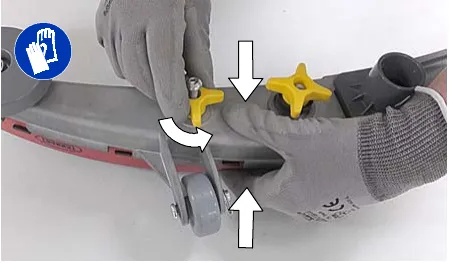
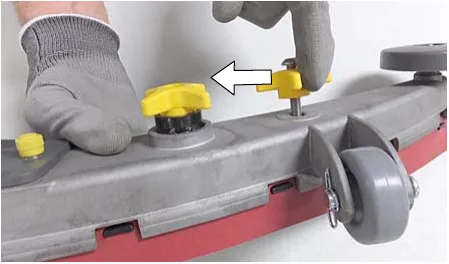
- Fully loosen the two outside knobs on squeegee assembly. This will separate the spring loaded blade retainer from squeegee frame (Figure 93). To loosen the knobs quickly, squeeze the blade retainer and squeegee frame together.
- Remove worn blade(s) from the blade retainer (Figure 94).
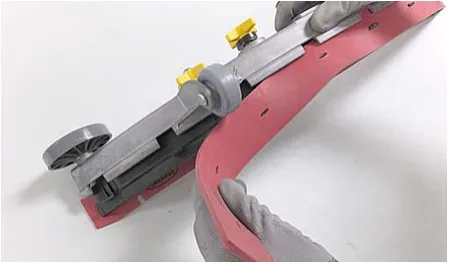
- Rotate the rear blade to a new wiping edge (Figure 95). Make sure to align the slots in the blade with retainer tabs.
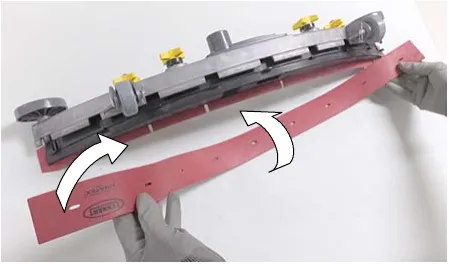
- Squeeze the squeegee frame and blade retainer together and re-tighten the two outside knobs (Figure 96).
ec-H2O NanoClean water conditioning cartridge replacement
The water conditioning cartridge is required to be replaced when it reaches its maximum water usage or expiration time of when the cartridge was activated, which ever comes first. The control panel will signal a code when it’s time to replace cartridge. See CONTROL PANEL OPERATION for further details.
Depending on machine usage, on average, a new cartridge can last anywhere from 12 months for heavy machine usage to 24 months for light machine usage.
- Park the machine on a level surface, remove the key and set parking brake, if equipped.
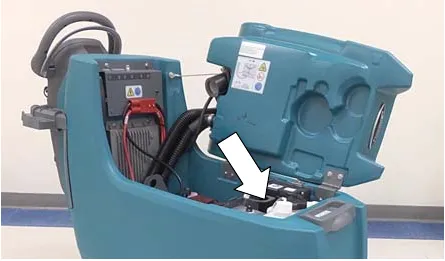
- Lift the recovery tank to access the ec-H2O water conditioning cartridge (Figure 97). Drain recovery tank before lifting tank.
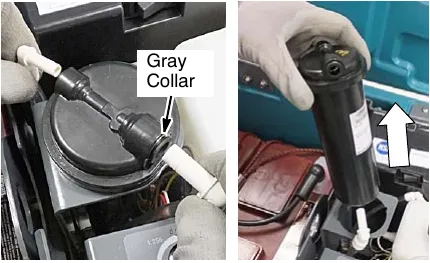
- Disconnect the two hose connectors from the top of the cartridge by pressing the gray collars inward and pulling the connectors outward (Figure 98). Lift cartridge to remove.
- Fill in the installation date on the new cartridge label (Figure 99).
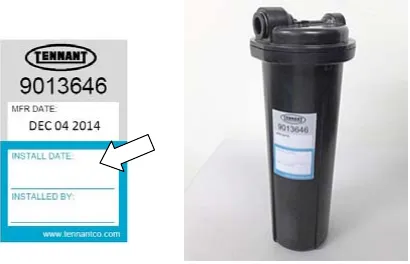
- Install the new cartridge and reconnect the two hoses. Make sure the hose connectors are fully inserted into the cartridge.
- Reset timer for new cartridge.
Carefully read and understand all steps first before performing procedure.
- Turn key on.
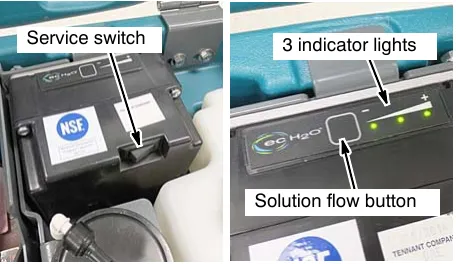
- Press and hold the service switch, located on the ec-H2O module, for 10 seconds. After releasing service switch, the three solution flow indicator lights will begin to (ripple) move back and forth (Figure 100).
- Within 5 seconds after releasing the service switch, while the three indicator lights are moving back and forth, quickly press and release the solution flow button located on ec-H2O module (Figure 100).
The three indicator lights will then blink three times to indicate timer has been reset.
Repeat process if the three indicator lights do not blink three times.
Loading/unloading machine for transporting
Batteries and chargers: make sure your charger is compatible with your batteries, and set its charging algorithm to your battery pack before you use it.
When transporting the machine by use of trailer or truck, carefully follow the loading and tie-down procedure:
- Raise the scrub head and remove squeegee assembly.
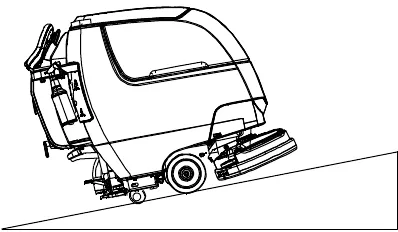
- Use a ramp that can support the machine weight and operator and carefully load machine. Do not operate the machine on a ramp incline that exceeds a 21% grade level (Figure 101). A winch must be used when ramp incline exceeds a 21% grade level.
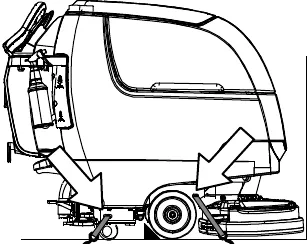
- Once loaded, position the front of the machine up against the front of the trailer or truck. Lower the scrub head, turn key off and set parking brake, if equipped (Figure 102).
- Place a block behind each wheel (Figure 102).
- Using tie-down straps, secure the machine using the four tie-down brackets located on the machine frame (Figure 102). It may be necessary to install tie-down brackets to the floor of your trailer or truck.
Storing machine
The following steps should be taken when storing the machine for extended periods of time.
- Charge the batteries before storing machine to prolong the life of the batteries. Recharge lead-acid batteries once a month. Recharge Lithium-ion batteries once a year.
- Disconnect batteries before storing.
- Lithium-ion batteries: Turn off battery power with the battery power button.
- Drain and rinse recovery tank and solution tank.
- Store the machine in a dry area with squeegee and scrub head in the up position.
- Open the recovery tank lid to promote air circulation.
- If storing machine machine in freezing temperatures, proceed to FREEZE PROTECTION.
NOTE: To prevent potential machine damage store machine in a rodent and insect free environment.
The following steps should be taken when storing the machine for extended periods of time.
Freeze protection
Storing machine in freezing temperatures.
- Completely drain solution tank and recovery tank.
- Empty the water from the solution tank filter located under machine. Replace filter.
- Pour 1 gallon (4 liters) of propylene glycol based recreational vehicle (RV) antifreeze into the solution tank.
- Turn machine on and operate the solution flow system. Turn the machine off when the antifreeze is visible on floor.
Models equipped with ec-H2O option - Operate ec-H2O scrubbing to cycle antifreeze through system. - After storing machine in freezing temperatures, drain any remaining antifreeze from the solution tank. Add clean water to solution tank and operate the machine to flush system.
Troubleshooting
| Problem | Cause | Solution |
|---|---|---|
| Service indicator icon is blinking | Machine or on-board battery charger fault has been detected | See SERVICE INDICATOR CODES |
| ec-H2O indicator icon is red or blinking red | ec-H2O system fault has been detected | See SERVICE INDICATOR CODES |
| Machine will not operate | Emergency stop button activated | Turn button to reset |
| Machine fault detected | See SERVICE INDICATOR CODES | |
| Batteries discharged | Recharge batteries | |
| Loose battery cable(s) | Tighten loose cables | |
| Faulty battery(s) | Replace battery(s) Batteries › | |
| Faulty key switch | Contact service | |
| Faulty start bail switch | Contact service | |
| Circuit breaker tripped | Reset circuit breaker | |
| Faulty control board | Contact service | |
| On-board battery charger will not operate | Plug not connected to power supply | Check plug connection |
| Batteries over discharged | Replace batteries Batteries › | |
| Battery charger fault detected | See SERVICE INDICATOR CODES | |
| Faulty charger | Replace charger Charger › | |
| Machine will not propel (Drive Model) | Propel fault has been detected. | See SERVICE INDICATOR CODES |
| Circuit breaker tripped | Reset circuit breaker | |
| Faulty propel motor or wiring | Contact service | |
| Worn carbon brushes in motor | Contact service | |
| Brush motor will not operate | Brush motor fault has been detected. | See SERVICE INDICATOR CODES |
| Faulty pad motor or wiring | Contact service | |
| Circuit breaker tripped | Reset circuit breaker | |
| Worn carbon brushes in motor | Contact service | |
| Broken or loose belt (dual disk/cylindrical models) | Contact service | |
| Vacuum motor will not operate | Squeegee assembly is raised off floor | Lower squeegee assembly to floor |
| Vacuum motor fault has been detected | See SERVICE INDICATOR CODES | |
| Faulty vacuum motor or wiring | Contact service | |
| Circuit breaker tripped | Reset circuit breaker | |
| Poor scrubbing performance | Debris caught in brush/pad | Remove debris |
| Worn brush/pad | Replace brushes/pad Pads and brushes › | |
| Incorrect brush pressure | Adjust brush pressure | |
| Wrong brush/pad type | Use correct brush/pad for application | |
| Low battery charge | Recharge batteries |
Corrected an obvious misprint: “ec-H2o indicator icon” printed as “ec-H2o” (now ec-H2O, as printed everywhere else in this manual).
Troubleshooting - continued
| Problem | Cause | Solution |
|---|---|---|
| Trailing water - poor or not water pickup | Full recovery tank or excessive foam buildup | Drain recovery tank |
| Loose drain hose cap or flow control valve is open | Replace cap or close flow control valve on drain hose | |
| Worn squeegee blades | Rotate or replace squeegee blades Squeegee blades › | |
| Clogged drip trap (Squeegee assembly) | Remove cover and clean | |
| Clogged squeegee assembly | Clean squeegee assembly | |
| Loose vacuum hose connection | Secure vacuum hose connection | |
| Clogged vacuum hose | Flush vacuum hose | |
| Clogged vacuum hose | Flush vacuum hose | |
| Damaged vacuum hose | Replace vacuum hose Vacuum hose › | |
| Clogged float shut-off screen in recovery tank | Clean screen | |
| Recovery tank lid not completely closed | Check lid for obstructions | |
| Defective seals on recovery tank lid | Replaced seal Lid seal › | |
| Little or no solution flow | Empty solution tank | Refill solution tank |
| Low solution flow rate set | Increase solution flow rate | |
| Clogged solution tank filter | Clean filter | |
| Plugged solution supply line | Flush solution supply line | |
| Short run time | Low battery charge | Charge batteries |
| Batteries need maintenance | See BATTERIES | |
| Defective battery or end of battery life | Replace batteries Batteries › | |
| Battery discharge indicator (BDI) programmed incorrectly | See CHARGING BATTERIES | |
| Faulty charger | Replace battery charger Charger › | |
| Brush pressure set too high | Lower brush pressure. Lower dual down pressure lever if equipped |
General machine dimensions/capacities/performance
| Model | 17 in (43 cm) Disk (Push) | 20 in (50 cm) Disk (Push) | 17 in (43 cm) Disk (Drive) | 20 in (50 cm) Disk (Drive) |
|---|---|---|---|---|
| Length | 51.25 in (1302 mm) | 54 in (1372 mm) | 51.25 in (1302 mm) | 54 in (1372 mm) |
| Width | 20 in (508 mm) | 22 in (559 mm) | 20 in (508 mm) | 22 in (559 mm) |
| Height | 43.1 in (1095 mm) | 43.1 in (1095 mm) | 43.1 in (1095 mm) | 43.1 in (1095 mm) |
| Weight | 220 lb (98 kg) | 230 lb (104 kg) | 230 lb (104 kg) | 240 lb (109 kg) |
| Weight (with batteries) | 366 lb (166 kg) | 376 lb (171 kg) | 390 lb (177 kg) | 400 lb (181 kg) |
| GVW | 457 lb (207 kg) | 467 lb (212 kg) | 482 lb (219 kg) | 492 lb (223 kg) |
| Squeegee width | 30.4 in (772 mm) | |||
| Recovery tank capacity | 14 gal (53 L) | |||
| Solution tank capacity | 11 gal (42 L) | |||
| Scrubbing path width | 16.9 in (430 mm) | 19.9 in (505 mm) | 16.9 in (430 mm) | 19.9 in (505 mm) |
| Down pressure | 47 lbs (21.3 kg) | 52 lbs (23.5 kg) | 47 lbs (21.3 kg) | 51 lbs (23 kg) |
| Dual down pressure | 88 lbs (40 kg) | 92 lbs (41.7 kg) | 86 lbs (39 kg) | 90 lbs (41 kg) |
| Scrubbing speed | Pad assist | 200 fpm (61 mpm) | ||
| Transport speed | n/a | n/a | 240 fpm (73 mpm) | |
| Reverse speed | n/a | n/a | 144 fpm (44 mpm) | |
| Productivity rate - estimated actual | 9,340 ft²/hr (868 m²/hr) | 11,208 ft²/hr (1041 m²/hr) | 12,453 ft²/hr (1157 m²/hr) | 14,943 ft²/hr (1388 m²/hr) |
| ec-H2O productivity rate - est. actual | 9,668 ft²/hr (898 m²/hr) | 11,602 ft²/hr (1078 m²/hr) | 12,891 ft²/hr (1198 m²/hr) | 15,469 ft²/hr (1437 m²/hr) |
| Aisle turnaround width | 52 in (1321 mm) | 54.5 in (1384 mm) | 52 in (1321 mm) | 54.5 in (1384 mm) |
| Ramp incline for scrubbing | 9% maximum | |||
| Ramp incline for transporting | 21% maximum | |||
| Ramp incline for loading - empty tanks | 21% maximum | |||
| Solution flow rate - T300e | 0.5 gpm (1.9 L/min) maximum | |||
| ec-H2O solution flow rate | Low: 0.12 gpm (0.45 L/min), Med: 0.25 gpm (0.94 L/min), High: 0.35 gpm (1.3 L/min) | |||
| Brush motor | 24 VDC, 0.68 hp (0.50 kW) | |||
| Propel motor | n/a | n/a | 24 VDC, 0.23 hp (0.175 kW) | |
| Vacuum motor | 24 VDC, 0.5 hp (0.37 kW) | |||
| Water lift | 34.5 in (876 mm) | |||
| ec-H2O solution pump | 24 VDC, 1.0 gpm (3.8 L/min), min open flow | |||
| Machine voltage | 24 VDC | |||
| Battery capacity | 2-12V 105AH C/20 Wet, 2-12V 130AH C/20 Wet, 2-12V 150AH C/20 Wet, 2-12V 140AH C/20 Sealed/AGM, 1-24V 90Ah Lithium-ion | |||
| Total power consumption | 31.5A nominal | 36.5A nominal | 34.5A nominal | 39.5A nominal |
| Battery Charger - on-board | 100-240VAC, 50/60Hz, 24VDC, 13A | |||
| Battery Charger - smart off-board | 100-240VAC, 50/60Hz, 24VDC, 13A | |||
| Battery Charger - on-board (Lithium-ion battery model) | 100-240VAC, 50/60Hz, 24VDC, 27A | |||
| Battery Charger - smart off-board (Lithium-ion battery model) | 100-240VAC, 50/60Hz, 24VDC, 27A | |||
| Protection grade | IPX3 | |||
| Sound pressure level LpA* | 67 dB(A) | 67 dB(A) | 67 dB(A) | 67 dB(A) |
| Sound uncertainty KpA* | 0.8 dB(A) | 0.8 dB(A) | 0.8 dB(A) | 0.8 dB(A) |
| Sound power level uncertainty LpA - uncertainty KpA* | 84.3 dB(A) | 84.3 dB(A) | 84.3 dB(A) | 84.3 dB(A) |
| Machine vibration at hand-arm* | <2.5 m/s² | |||
| Ambient operating temperature | Min: 32°F (0°C), Max: 110°F (43°C) | |||
*Values per EN 60335-2-72. Specifications are subject to change without notice.
General machine dimensions/capacities/performance (continued)
| Model | 24 in (60 cm) Dual Disk | 20 in (50 cm) Cylindrical Brush | 20 in (50 cm) Orbital |
|---|---|---|---|
| Length | 51.75 in (1314 mm) | 50.5 in (1283 mm) | 49 in (1245 mm) |
| Width | 26 in (660 mm) | 25 in (635 mm) | 20.5 in (521 mm) |
| Height | 43.1 in (1095 mm) | 43.1 in (1095 mm) | 43.1 in (1095 mm) |
| Weight | 250 lb (113 kg) | 250 lb (113 kg) | 255 lb (116 kg) |
| Weight (with batteries) | 410 lb (186 kg) | 410 lb (186 kg) | 415 lb (188 kg) |
| GVW | 502 lb (228 kg) | 502 lb (228 kg) | 507 lb (230 kg) |
| Squeegee width | 30.4 in (772 mm) | ||
| Recovery tank capacity | 14 gal (53 L) | ||
| Solution tank capacity | 11 gal (42 L) | ||
| Scrubbing path width | 23.6 in (600 mm) | 19.7 in (500 mm) | 19.7 in (500 mm) |
| Down pressure | 57 lbs (26 kg) | 53 lbs (24 kg) | 63 lbs (28.5 kg) |
| Dual down pressure | 97 lbs (44 kg) | 64 lbs (29 kg) | 109 lbs (49.5 kg) |
| Scrubbing speed | 200 fpm (61 mpm) | ||
| Transport speed | 240 fpm (73 mpm) | ||
| Reverse speed | 144 fpm (44 mpm) | ||
| Productivity rate - estimated actual | 18,264 ft²/hr (1697 m²/hr) | 14,943 ft²/hr (1388 m²/hr) | 14,943 ft²/hr (1388 m²/hr) |
| ec-H2O productivity rate - est. actual | 18,906 ft²/hr (1756 m²/hr) | 15,469 ft²/hr (1437 m²/hr) | 15,469 ft²/hr (1437 m²/hr) |
| Aisle turnaround width | 53.5 in (1346 mm) | 52 in (1321 mm) | 49 in (1245 mm) |
| Ramp incline for scrubbing | 9% max. | ||
| Ramp incline for transporting | 21% max. | ||
| Ramp incline for loading - empty tanks | 21% max. | ||
| Solution flow rate | 0.5 gpm (1.9 L/min) maximum | ||
| ec-H2O solution flow rate | Low: 0.12 gpm (0.45 L/min), Med: 0.25 gpm (0.94 L/min), High: 0.35 gpm (1.3 L/min) | ||
| Brush motor | 24 VDC, 0.68 hp (0.50 kW) | ||
| Propel motor | 24 VDC, 0.23 hp (0.175 kW) | ||
| Vacuum motor | 24 VDC, 0.5 hp (0.37 kW) | ||
| Water lift | 34.5 in (876 mm) | ||
| ec-H2O solution pump | 24 VDC, 1.0 gpm (3.8 L/min), min open flow | ||
| Machine voltage | 24 VDC | ||
| Battery capacity | 2-12V 105AH C/20 Wet, 2-12V 130AH C/20 Wet, 2-12V 150AH C/20 Wet, 2-12V 140AH C/20 Sealed/AGM. 1-24V 90Ah Lithium-ion | ||
| Total power consumption | 36A nominal | 40A nominal | 30A nominal |
| Battery Charger - on-board | 100-240VAC, 50/60Hz, 24VDC, 13A | ||
| Battery Charger - smart off-board | 100-240VAC, 50/60Hz, 24VDC, 13A | ||
| Battery Charger - on-board (Lithium-ion battery model) | 100-240VAC, 50/60Hz, 24VDC, 27A | ||
| Battery Charger - smart off-board (Lithium-ion battery model) | 100-240VAC, 50/60Hz, 24VDC, 27A | ||
| Protection grade | IPX3 | ||
| Sound pressure level LpA* | 67.7 dB(A) | 68.7 dB(A) | 67.5 dB(A) |
| Sound uncertainty KpA* | 0.8 dB(A) | 0.8 dB(A) | 0.8 dB(A) |
| Sound power level uncertainty LpA - uncertainty KpA* | 83.8 dB(A) | 84.2 dB(A) | 83.5 dB(A) |
| Machine vibration at hand-arm* | <2.5 m/s² | ||
| Ambient operating temperature | Min: 32°F (0°C), Max: 110°F (43°C) | ||
*Values per EN 60335-2-72. Specifications are subject to change without notice.
Machine dimensions
Single disk model
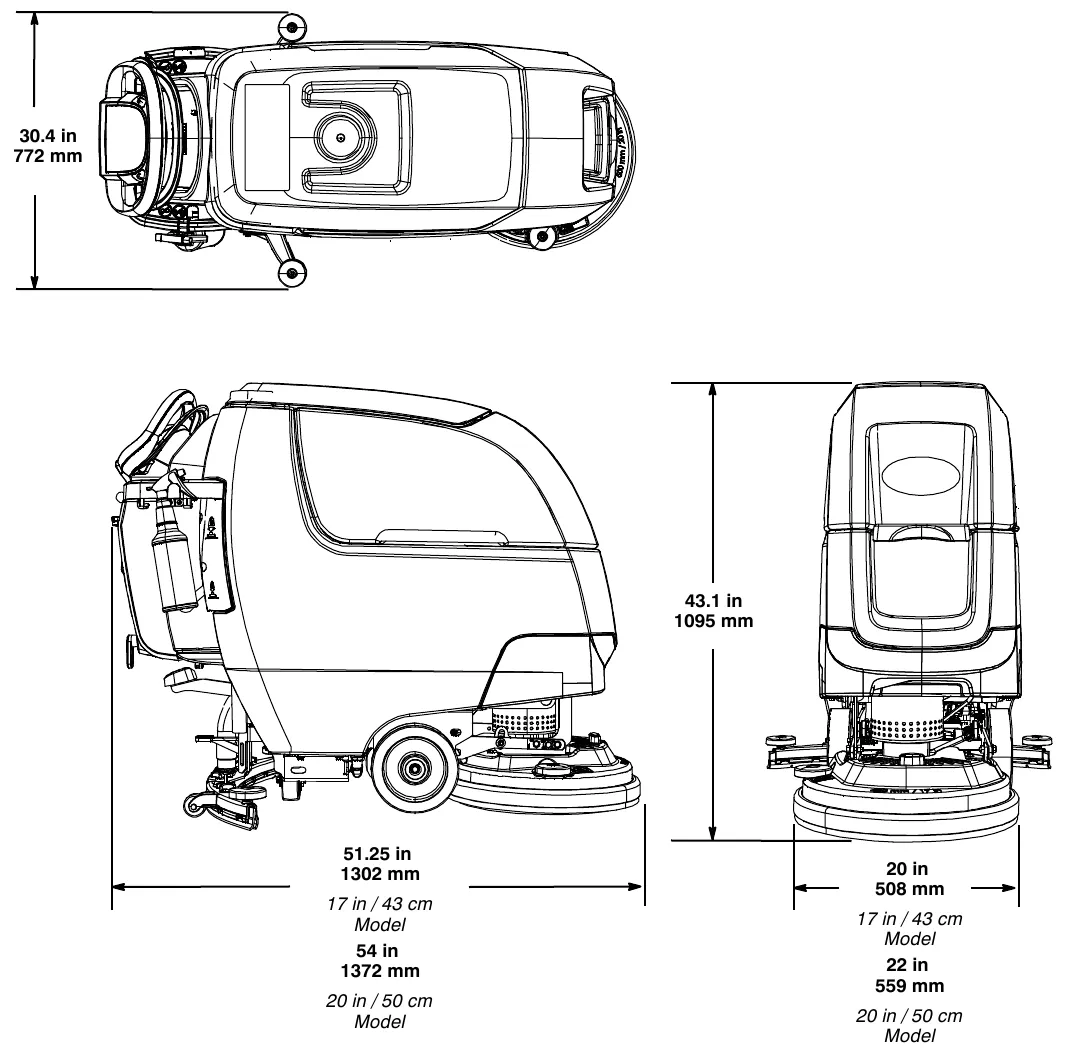
- Squeegee assembly width (top view): 30.4 in (772 mm)
- Height: 43.1 in (1095 mm)
- Length: 51.25 in (1302 mm) for the 17 in (43 cm) model; 54 in (1372 mm) for the 20 in (50 cm) model
- Width: 20 in (508 mm) for the 17 in (43 cm) model; 22 in (559 mm) for the 20 in (50 cm) model
Machine dimensions: dual disk model
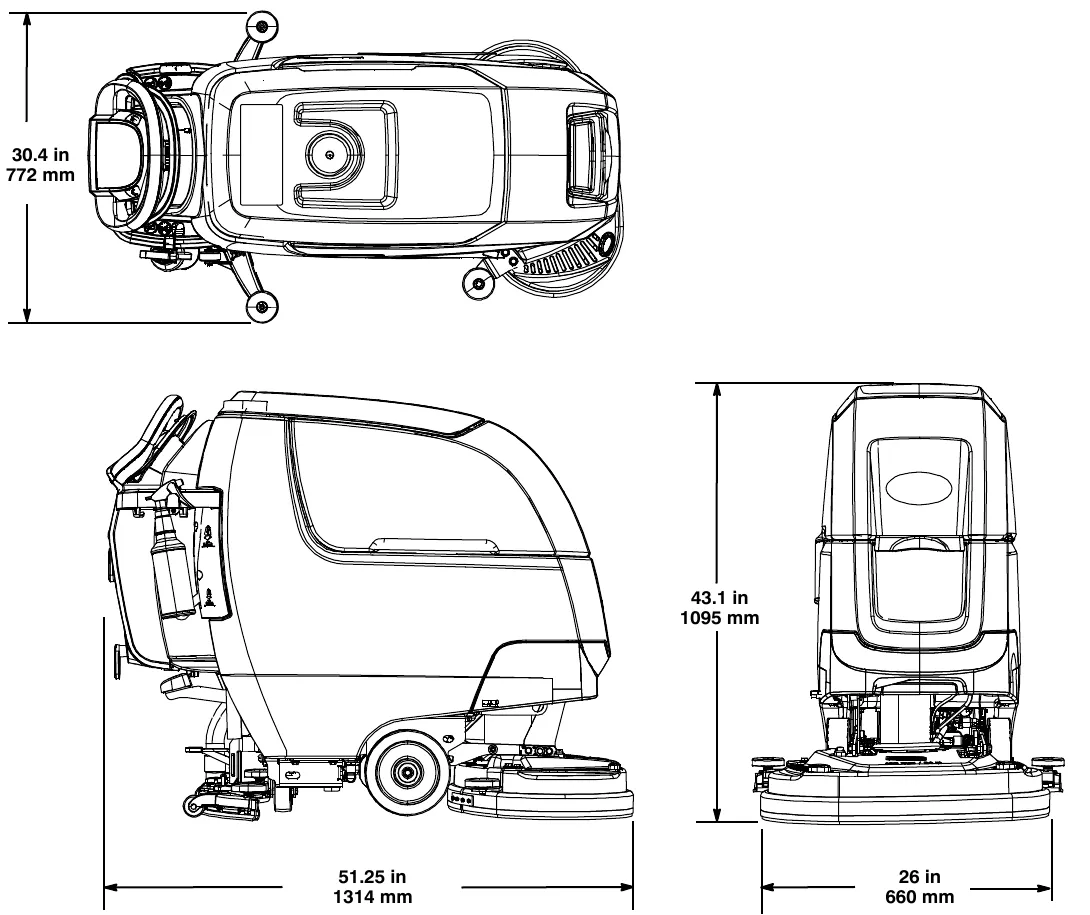
- Squeegee assembly width (top view): 30.4 in (772 mm)
- Height: 43.1 in (1095 mm)
- Length: 51.75 in (1314 mm)
- Width: 26 in (660 mm)
Corrected an obvious misprint: the dual disk length is printed in the drawing as “51.25 in” (now 51.75 in, as on page 40, and 1314 mm = 51.75 in).
Machine dimensions: cylindrical brush model
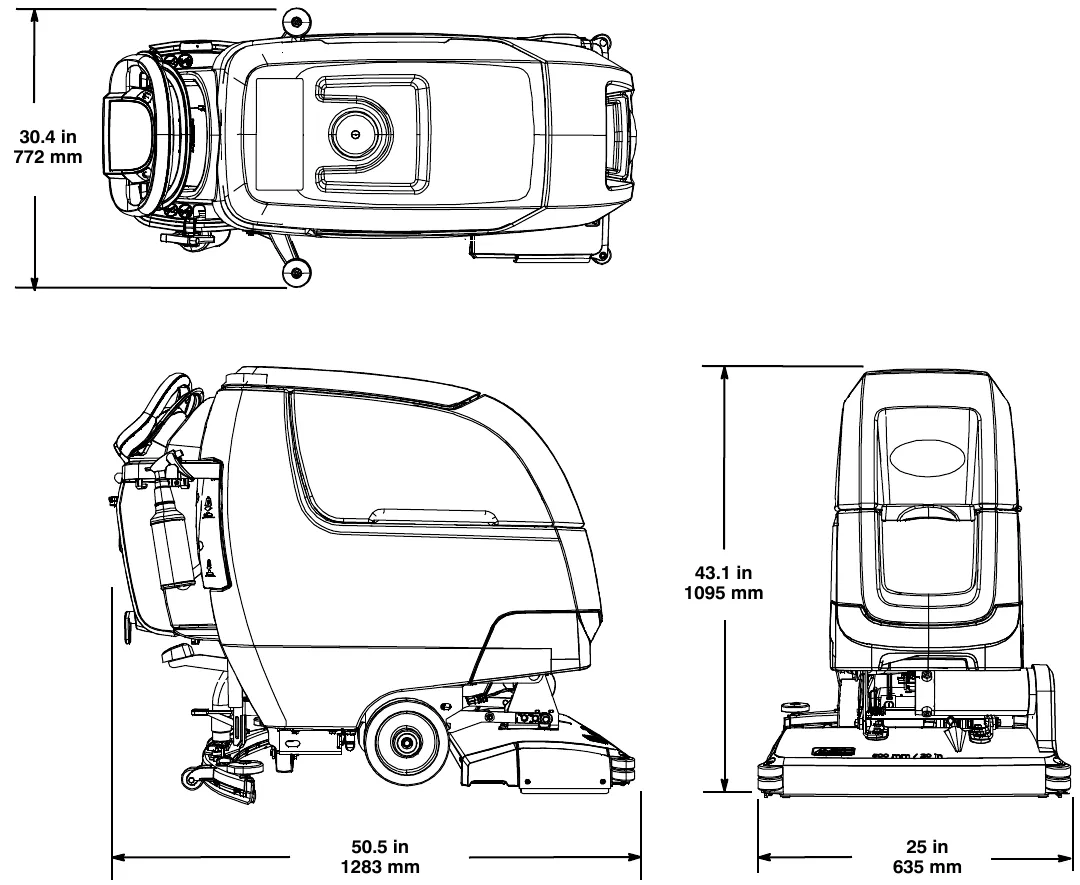
- Squeegee assembly width (top view): 30.4 in (772 mm)
- Height: 43.1 in (1095 mm)
- Length: 50.5 in (1283 mm)
- Width: 25 in (635 mm)
Machine dimensions: orbital pad model
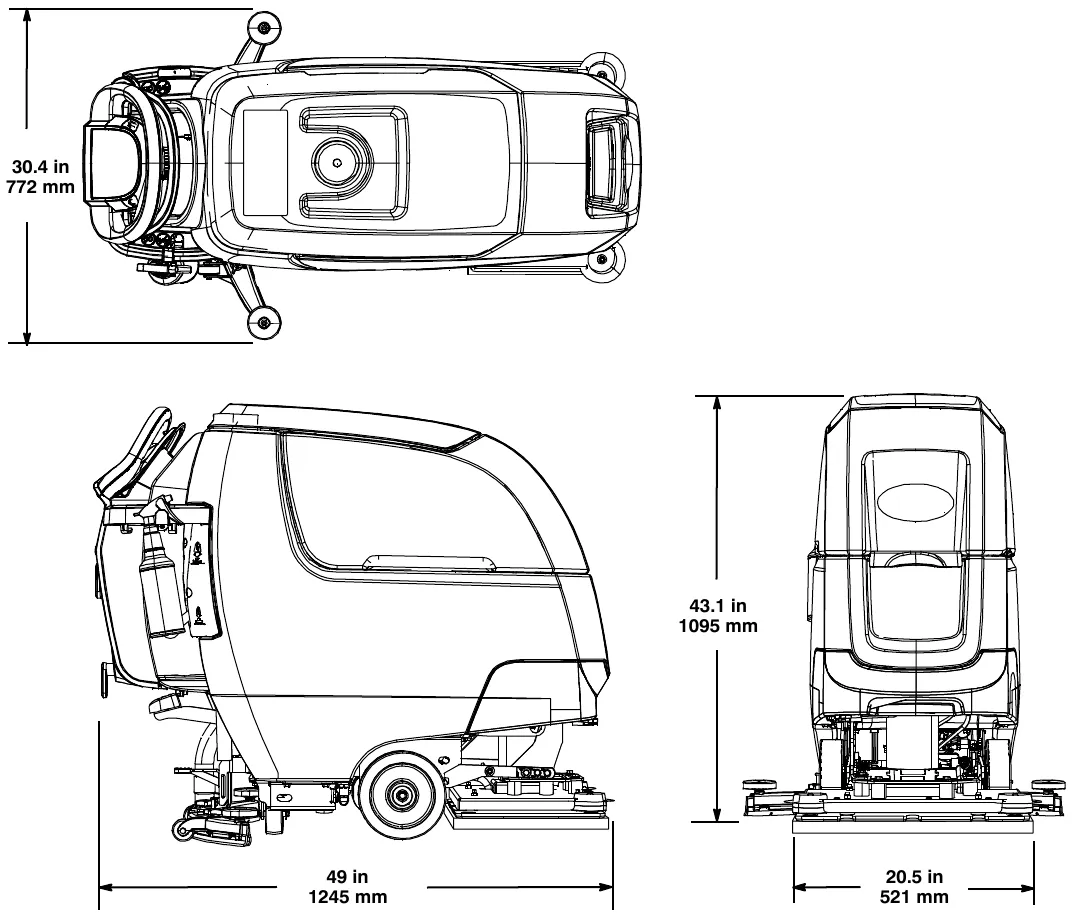
- Squeegee assembly width (top view): 30.4 in (772 mm)
- Height: 43.1 in (1095 mm)
- Length: 49 in (1245 mm)
- Width: 20.5 in (521 mm)
Tennant and Nobles are trademarks of Tennant Company. Southeastern Equipment & Supply is an independent dealer.