CS5 BATTERY FLOOR SCRUBBER
OPERATOR’S MANUAL (EN)
Model Part No.:
1251580 - SCRUBBER [CS5 NA]
North America
To view, print or download the parts manual, visit: www.tennantco.com/manuals
PLDC04335
Rev. 07 (12-2021)
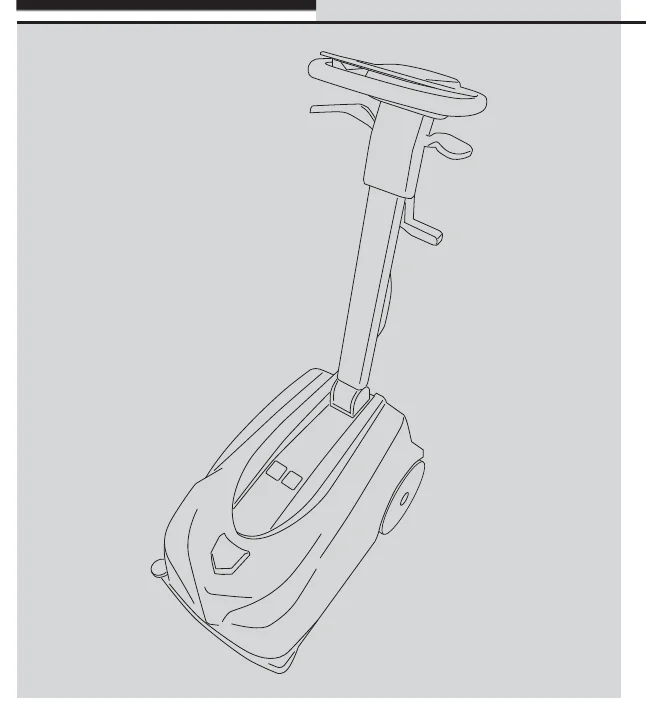
TABLE OF CONTENTS
| Section | Page |
|---|---|
| IMPORTANT SAFETY PRECAUTIONS | 2 |
| MEANING OF SYMBOLS | 6 |
| TECHNICAL SPECIFICATIONS | 7 |
| MACHINE DIMENSIONS | 8 |
GENERAL INFORMATION
| 9 |
TECHNICAL INFORMATION
| 10 |
HANDLING AND INSTALLATION
| 11 |
PRACTICAL GUIDE FOR THE OPERATOR
| 15 |
| PERIODS OF INACTIVITY | 20 |
MAINTENANCE INSTRUCTIONS
| 20 |
| TROUBLESHOOTING | 24 |
| ALARMS | 25 |
| RECOMMENDED SPARE PARTS | 26 |
IMPORTANT SAFETY PRECAUTIONS
- Read the operating instructions carefully before using the machine for the first time.
- Keep the instructions handy, in a safe place. They constitute an important component of the machine and must be handed over together with the machine in the event of its being sold or transferred.
TABLE OF CONTENTS
Whilst the machine is manufactured to a high standard of safety, safety in operation can be guaranteed only by complying with the instructions in this manual.
Correct use
- The machine is not designed for use by persons (including children) with reduced physical, sensory or mental capabilities, or lack of experience and knowledge.
- Use of the machine as a toy is prohibited: make certain this does not happen.
- Children should be supervised to ensure they do not play with the machine.
- Cleaning and maintenance of the machine must in any event be carried out exclusively by adults in full possession of the requisite mental and physical faculties.
- The machine is designed to operate in temperatures between +4°C/39,2°F and +40°C/104°F. When the machine is not being used, the temperature range is +0°C/32°F and +50°C/122°F
- The machine is designed to operate at relative humidity levels between 30% and 95%.
- The machine can operate at altitudes up to 2000 m maximum.
- This machine is intended for commercial use, for example in hotels, schools, hospitals, factories, shops, offices and business premises generally.
- The machine must only be used indoors.
- The machine must be kept indoors at all times.
- Do not use the machine on surfaces with a gradient steeper than 2%.
Danger of electric shock
- Switch off the machine and disconnect the battery before commencing any cleaning or maintenance work.
- If the machine is not working as it should, or if it has suffered a heavy impact, or been dropped, damaged, left out in the open or fallen into water, do not use it until it has been checked out; contact a specialist technician approved by Tennant or take the machine to any Tennant service centre.
- Do not clean the machine with water or a high pressure hose.
- Never attempt to carry out repairs on the machine. Should the need arise, contact a specialist technician approved by Tennant or take the machine to any Tennant service centre.
Fire risk
- Do not use the machine to clean up flammable or combustible liquids such as petrol, and do not operate the machine in areas where these liquids may be present.
- Do not pick up burning or smoking material like cigarettes, matches or hot ashes.
- Do not position the machine on or in close proximity to a cooker or any other hot surface, as the battery could catch fire or explode.
Risk of injury
- Keep hair, loose garments, fingers and all other parts of the body well clear of slots and moving parts.
- Avoid any contact with moving parts of the machine (brushes and pad drivers).
- Take particular care when cleaning steps and stairs.
- Do not use the machine if plastic parts are damaged as a result of a fall or impact; avoid contact with broken pieces and sharp edges.
- Always keep detergents out of the reach of children. In the event of detergent making contact with the eyes or the skin,
- ...immediately wash repeatedly with water, and if swallowed, consult a doctor immediately.
- Carefully follow the facility safety guidelines concerning wet floors.
- Place wet floor signs as needed when operating the machine.
Risk of damage caused by improper use
- Use only original spare parts supplied by the manufacturer.
- Use only commercially approved cleaning detergents. Machine damage caused by improper detergents will void the manufacturer’s warranty.
- Do not insert objects of any kind into the ventilation slots. Do not operate the machine with blocked ventilation slots. Remove all dust, dirt, hair and debris that might be blocking the air flow.
Battery charger and Battery
- Battery charger: inspect the battery charge cable periodically for possible damage. If damage has occurred, do not use the battery charger until the cable has been replaced;
- Make certain the power sockets used for battery chargers are properly earthed and protected by a 2-pole thermal magnetic switch with differential circuit-breaker:
- rated current 10-16A
- IΔn differential current: 0.03A
- Icn breaking capacity: 6000 A
- AC differential breaker trip
- When recharging the battery, use only the battery charger (BACA00263 code), supplied by the manufacturer of the machine.
- NEVER unplug the battery charger by pulling the power cable, grip the plug, not the cable.
- NEVER touch the battery charger power cable with wet hands.
- DO NOT use extensions to power the battery charger.
- Use only batteries supplied by the manufacturer (BAAC00196 code), as other types of battery could explode, causing injury to persons and damage to property.
- Keep the battery away from sparks and flames.
- DO NOT smoke near battery or charger.
- DO NOT charge the battery outdoors.
- DO NOT expose the battery to temperatures above 100°C / 212°F.
- Charge the battery at a temperature between + 4°C / 39.2°F and + 40°C / 104°F.
- NEVER leave the battery in enclosed areas, such as in cars on hot days, where temperatures can be much higher than the outside temperature.
- DO NOT attempt to repair or modify the battery or battery charger, replace it if faulty.
- DO NOT short circuit the battery or charger terminals with conductive objects such as paper clips, the battery may ignite or explode.
- DO NOT crush, drop, incinerate or damage the battery.
- DO NOT use a damaged battery in any way.
- DO NOT remove the battery with the machine on, risk of unintentional operation of the machine and risk of voltage fluctuation on the electronic equipment.
- Ensure the battery is disposed of correctly, in compliance with current local environmental regulations. Do not throw the battery away as household waste.
MEANING OF SYMBOLS
| Symbol | Meaning |
|---|---|
 | NEGOTIABLE GRADIENT |
 | OPERATOR MANUAL, INSTRUCTIONS FOR USE |
 | READ THE MANUAL BEFORE USING THE MACHINE |
 | DIRECT CURRENT |
 | CLASS III APPLIANCE. AN APPLIANCE IS IDENTIFIED AS CLASS III WHEN ITS EXPLOSION-PROOF PROTECTION IS BASED ON THE FACT THAT THERE ARE NO VOLTAGES HIGHER THAN THE ULTRA-LOW SAFETY EXTRA-LOW VOLTAGE (SELV). THIS MEANS IN PRACTICE THAT THE APPLIANCE IS POWERED BY A BATTERY OR A SELV TRANSFORMER. |
 | BRUSHES ON/OFF. |
 | DETERGENT SOLUTION FLOW ON/OFF AND REGULATION. |
 | SUCTION ON/OFF. |
 | “ECO” OPERATING MODE. |
 | MACHINE ON/OFF. |
 | SPECIAL WASTE. DO NOT DISPOSE OF AS NORMAL WASTE. |
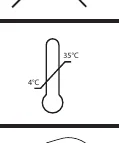 | MINIMUM AND MAXIMUM TEMPERATURE OF LIQUID IN TANK. |
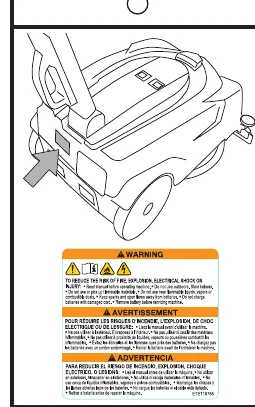 | SAFETY LABEL THE SAFETY LABEL IS MOUNTED ON THE MACHINE IN THE LOCATION INDICATED. REPLACE THE LABEL IF BECOMES DAMAGED OR ILLEGIBLE. |
 | BATTERY RECYCLING LABEL. |
TECHNICAL SPECIFICATIONS
| Specification | Unit | Value |
|---|---|---|
| Cleaning width | mm | 280 |
| inches | 11.02 | |
| Squeegee width | mm | 380 |
| inches | 14.96 | |
| Productivity (for Hour) Theoretically Max. | m2/h | 976 |
| ft2/h | 10505 | |
| Productivity (for Hour) Estimate Coverage | m2/h | 639 |
| ft2/h | 6875 | |
| Number of brushes | no. | 1 |
| Brush diameter | mm | 280 |
| inches | 11.02 | |
| Maximum brush pressure | g/cm2 | 30 |
| kPa | 3.4 | |
| Brush rotation speed | rpm rpm | 160 |
| Rated brush motor power | W | 100 |
| HP | 0.134 | |
| Rated suction motor power | W | 160 |
| HP | 0.21 | |
| Overall power of the machine in operation PM | W | 248 |
| HP | 0.33 | |
| Maximum speed | km/h | 3.5 |
| mph | 2.17 | |
| Solution tank | l | 5 |
| galls. | 1.32 | |
| Dirty water tank | l | 5 |
| galls. | 1.32 | |
| Rear wheel diameter | mm | 200 |
| inches | 7.87 | |
| Maximum slope | % | 2 |
| Gross weight (GVW) | kg | 26 |
| lbs | 57.32 | |
| Weight of the machine in transit without battery | kg | 18.3 |
| lbs | 40.34 | |
| Weight of the machine in transit with battery | kg | 19.8 - 20.2 |
| lbs | 43.65 - 44.53 | |
| Number of batteries | no. | 1 |
| Machine / battery voltage VM | V | 36 |
| Item | Unit | Value |
|---|---|---|
| Battery capacity (2 versions) | Ah | 5.5 - 7.5 |
| Battery recharge supply voltage, V | V | 42 |
| Max battery charging current, I | A | 4 |
| Battery charging current (battery charger included) | A | 2 |
| Machine dimensions (X, Y, Z) | mm | X= 615, X1= 770, Y= 399, Y1= 1049, Z= 412.5 |
| inches | X= 24.21, X1= 30.31, Y= 15.7, Y1= 41.29, Z= 16.24 | |
| Battery compartment dimensions | mm | Custom battery compartment |
| Packing Size | mm | 800 x 400 x 470 |
| inches | 31.49 x 15.74 x 18.5 | |
| Sound pressure - Annex DD (Emission of acoustical noise) EN 60335-2-72: 2012 | LpA (dBA) | 63 |
| Sound pressure uncertainty | K(dBA) | 3 |
| Vibration level (hand) - IEC 60335-2-72 | ahv m/sec2 | <=2,5 |
| Maximum water and detergent temperature | °C | 40 |
| °F | 104 | |
| Degree of protection | IP | IPX3 |
Gross weight (GVW): maximum permissible weight with the machine fully loaded and ready for use. The gross weight of the machine comprises the detergent tank filled with clean water, the dirty water tank, empty, the largest recommended battery pack and all accessories, namely cables, hoses, detergents and brushes.
V, I: charging / supply values
VM , PM : machine in operation (all active functions)
MACHINE DIMENSIONS
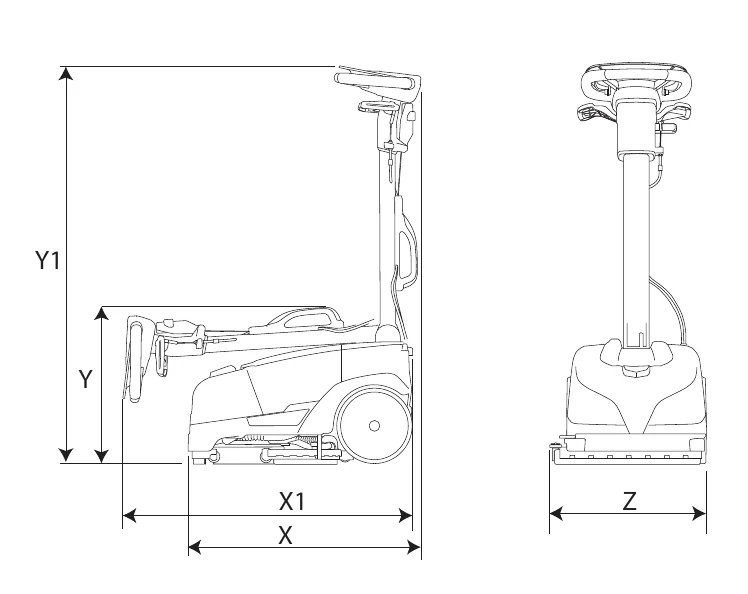
X-Y-Z: See "TECHNICAL SPECIFICATIONS" table
GENERAL INFORMATION
Purpose of this manual
This manual has been written by the Manufacturer and is an integral part of the equipment package making up the machine1.
It defines the purpose for which the machine has been designed and built and contains all the information needed by operators2.
In addition to this manual, containing information intended essentially for users, other publications are available providing specific information for technicians entrusted with maintenance3.
The terms “right” and “left”, “clockwise” and “anti-clockwise” refer to the forward movement of the machine.
Constant compliance with the instructions provided in this manual guarantees the safety of the operator and the machine, ensures low running costs and high quality results and extends the working life of the machine. Failure to follow these instructions may lead to injury to the operator or damage to the machine, floor and environment.
Consult the table of contents at the beginning of the manual to find the section of interest without delay.
Parts of the text requiring special attention are printed in bold and preceded by the symbols illustrated and described here.
In line with the company's policy of constant product development and updating, the Manufacturer reserves the right to make modifications without prior notice.
Whilst the machine in your possession may differ appreciably from the illustrations in this document, the safety and the information regarding the product are guaranteed reliable.
Identifying the machine
The nameplate provides the following information:
- Model
- Battery voltage.
- Rated current draw.
- Serial number.
- Year of manufacture.
- IP degree of protection.
- Gross weight.
- Maximum negotiable gradient.
- Name of manufacturer.
Documentation/equipment accompanying the machine
- Operator’s manual;
- Quick Guide
1 The definition "machine" replaces the trade name “CT5” of the product to which this manual refers.
2 Persons responsible for using the machine without performing any operations requiring precise technical skills.
3 Persons with experience, technical training and a knowledge of legislation and standards, able to perform all the necessary operations and to recognise and avoid possible risks in handling, installation, use and maintenance of this machine.
TECHNICAL INFORMATION
General description
This machine is a scrubber dryer for sweeping, washing and drying flat, horizontal, smooth or moderately rough, uniformly structured and obstacle-free floors in civil and industrial premises.
The scrubber dryer spreads a solution of water and detergent in the correct concentration on the floor and then scrubs it to remove the dirt. By carefully choosing the detergent and brushes (or abrasive disks) from the wide range of accessories available, the machine can be adapted to a wide range of combinations of types of floor and dirt.
The machine incorporates a wet vacuuming system which dries the floor immediately after washing. The drying action is produced by the suction motor, which generates a partial vacuum in the dirty water tank. Squeegees mounted beneath the tank are designed to collect the film of dirty water with the machine moving in both forward and reverse directions.
Parts of the machine
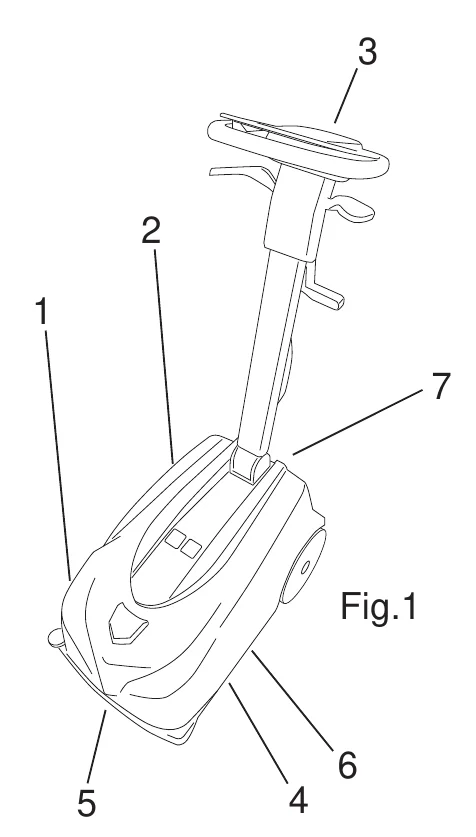
Main parts of the machine:
- The water/detergent tank (fig. 1, ref. 1) contains and carries the mixture of clean water and cleaning product.
- The dirty water tank (fig. 1, ref. 2) collects the dirty water picked up from the floor after washing;
- Control panel (fig. 1, ref. 3).
- Head assembly (fig. 1, ref. 4), the main element comprises the brush that spreads the detergent solution over the floor and washes the surface, bringing about the removal of the dirt.
- Front squeegee assembly (fig. 1, ref. 5), which wipes and dries the floor when the machine is pulled toward the operator.
- Rear squeegee assembly (fig. 1, ref. 6), which wipes and dries the floor when the machine is pushed forward by the operator.
- Battery (fig. 1, ref. 7).
Accessories
- Brushes; Soft (SPPV02580 code ); Medium [Standard] (SPPV02438 code ); Hard (SPPV02581 code ).
- Pad Holder (SPPV02582 code ).
- Standard battery (BAAC00192 code).
- Battery charger (BACA00263 code).
HANDLING AND INSTALLATION
Lifting and transporting the palletized machine
The machine comes packed in a cardboard box by the manufacturer. Handle with care to avoid impact and ensure the machine is not overturned.
Delivery checks
On taking delivery of the machine, check carefully that the packing and machine it contains are both intact.
Unpacking
When unpacking the machine, proceed as follows:
- Cut and remove the plastic straps using scissors or nippers;
- Open the box:
- Remove the following items from the packaging:
- use and maintenance manual;
- warranty reply card;
- quick guide;
- bumper wheel;
- front squeegee:
- brush;
- battery charger.
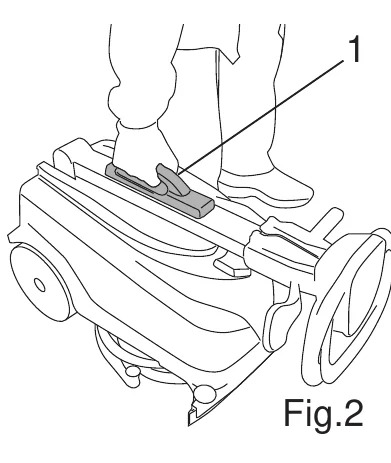
- Lift the machine out of the box by the handle (fig. 2, ref. 1) and set it down on the floor.
- Pull the handle up at right angles to the machine, referring to the section "Adjusting the handle rake angle"
- Remove the dirty water tank and the detergent tank and set them on the floor, referring to the section "Emptying the water/detergent tank" and "Emptying the dirty water tank".
- Tilt the machine backwards and rest the handle on the floor.
- Cut the ties applied to the rear squeegee.
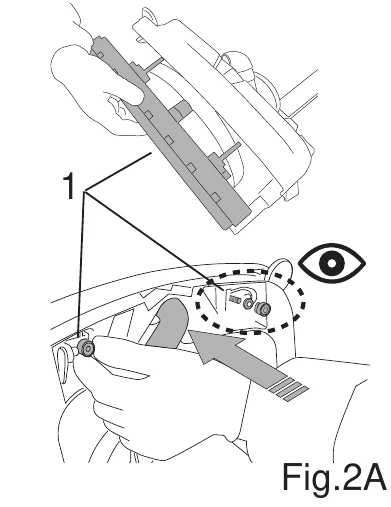
- Install the front squeegee (fig. 2A, ref. 1).
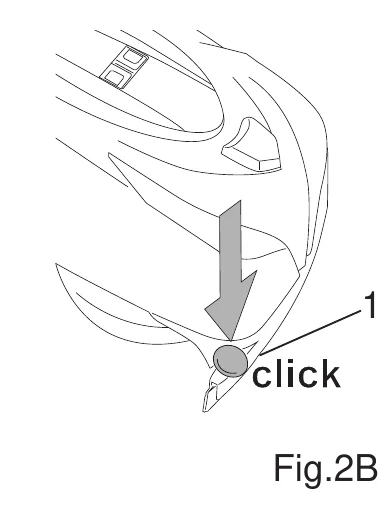
- Install the bumper wheel (fig. 2B, ref. 1).
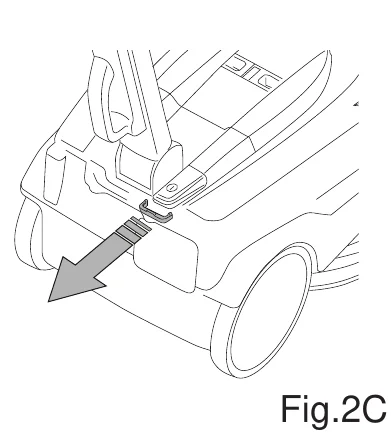
- Remove the mechanical lock from the switch (Fig.2C)
Selection of parking position
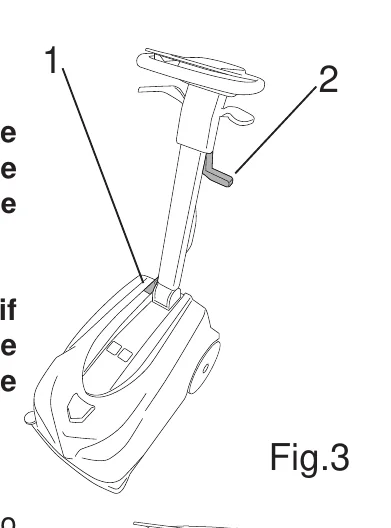
- Turn off the machine off at the main switch (fig. 3, ref. 1).
- Raise the squeegee by operating the lever (fig. 3, ref. 2).
- Fold the handle fully forward toward the head assembly, referring to the section "Adjusting the handle rake angle"
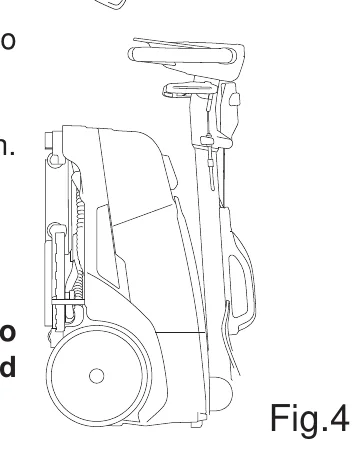
- Pull the machine up into the vertical position (fig. 4).
- Wipe dry the front squeegee, rear squeegee and brush with a cloth.
Lifting and transporting the machine
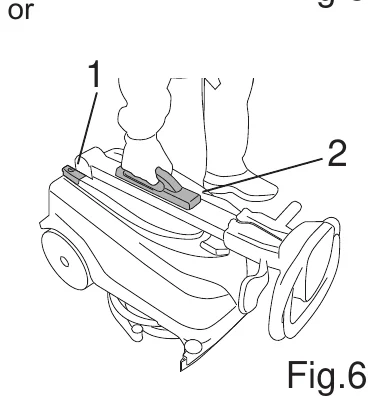
- Turn off the machine off at the main switch (fig. 6, ref. 1).
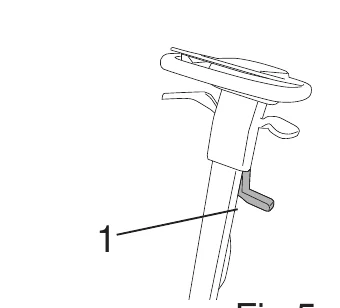
- Raise the squeegee by operating the lever (fig. 5, ref. 1).
- Fold the handle fully forward toward the head assembly.
- Lift the machine by the grip on the shaft of the handle (fig. 6, ref. 2).
Transport on wheels
The machine can be moved from one place to another on its wheels and steered in all directions:
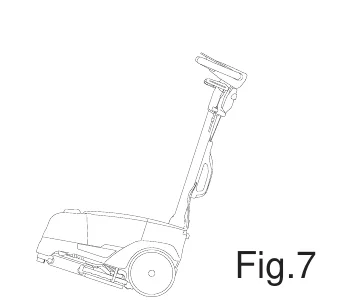
- Set the angle of the handle so that it stands perpendicular to the machine.
Tilt the machine backwards (fig. 7), and it can be wheeled backwards or forwards as required.
Adjusting the handle rake angle
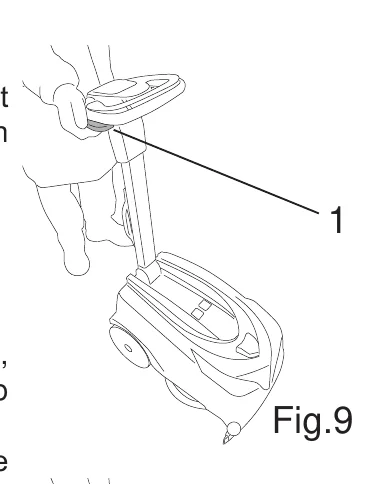
Pull the adjustment lever (fig. 9, ref. 1) and hold, then set the handle at the desired angle. Releasing the lever, the handle will remain locked in the position selected.
Fitting the brush/pad driver
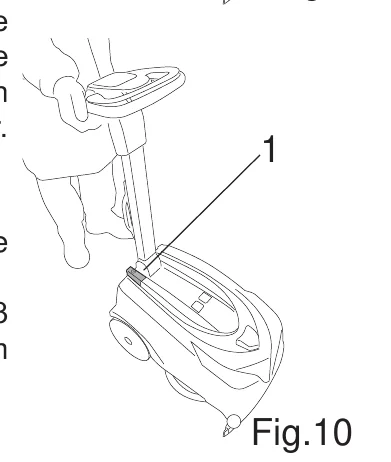
- Press the main switch (fig. 10, ref. 1) to turn on the machine.
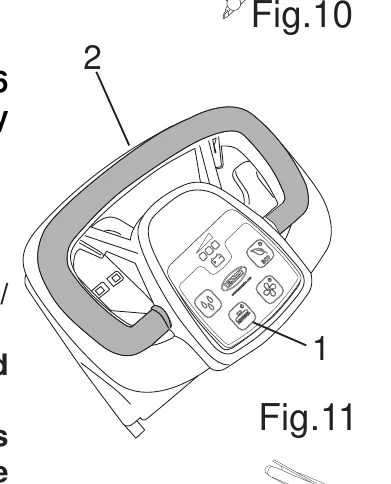
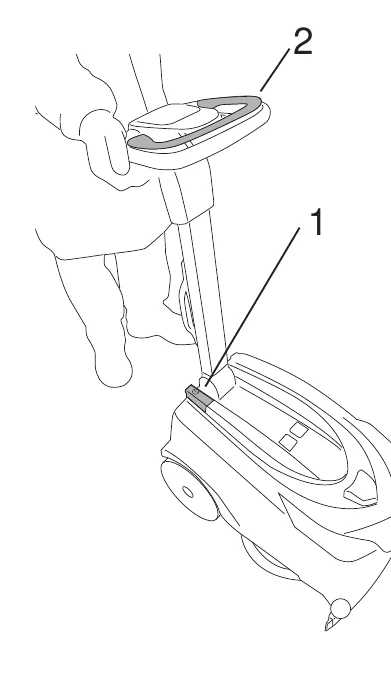
- Press the brush control button (fig. 11, ref. 1).
- Rest the brush on the floor in front of the machine.
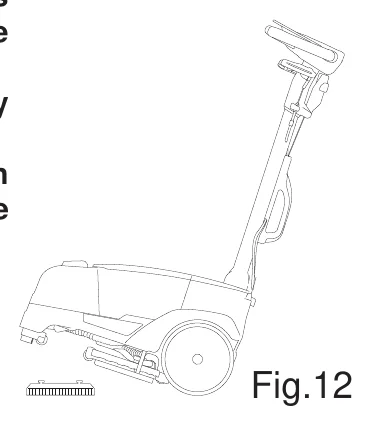
- Pull back on the handle to elevate the front part of the machine, position the brush cowling directly over the brush, and proceed to lower the machine (fig. 12).
- Jog the brush control lever (fig. 11, ref. 2) repeatedly; this will enable the brush to engage automatically with the hub of the flange. If the operation is not successful, reposition the machine as before, then repeat the steps of aligning the brush and jogging the control lever.
Brush/pad driver release
- Press the main switch (fig. 10, ref. 1) to turn on the machine.
- Pull back on the handle to elevate the front part of the machine (fig. 12).
- Press the brush control button (fig. 11, ref. 1) and hold for 3 seconds; the machine will activate the brush release mechanism automatically.
Battery: preparation / installation / recharging
- Use only batteries supplied by the manufacturer (BAAC00196 code), as other types of battery could explode, causing injury to persons and damage to property.
- Keep the battery away from sparks and flames.
- DO NOT smoke near battery or charger.
- DO NOT charge the battery outdoors.
- DO NOT expose the battery to temperatures above 100°C / 212°F.
- Charge the battery at a temperature between + 4°C / 39.2°F and + 40°C / 104°F.
- NEVER leave the battery in enclosed areas, such as in cars on hot days, where temperatures can be much higher than the outside temperature.
- DO NOT attempt to repair or modify the battery or battery charger, contact Tennant for any issues.
- DO NOT short circuit the battery or charger terminals with conductive objects such as paper clips, the battery may ignite or explode.
- DO NOT crush, drop, incinerate or damage the battery.
- DO NOT use a damaged battery in any way.
The battery is a sealed unit and guaranteed safe under normal circumstances; in the unlikely event of fluid leaking from the battery, do not touch the fluid and be sure to take the following precautions:
- Contact with the skin can cause irritation; wash with soap and water.
- Inhalation of vapours can cause irritation to the airways; stay out in the open air and consult a doctor.
- Contact with the eyes can cause irritation; flood the eyes with water immediately and thoroughly for at least 15 minutes, and consult a doctor.
Whilst the battery will normally come fully charged and ready for use, it is good policy nonetheless to run a recharge cycle before the machine is put into service, proceeding as indicated below:
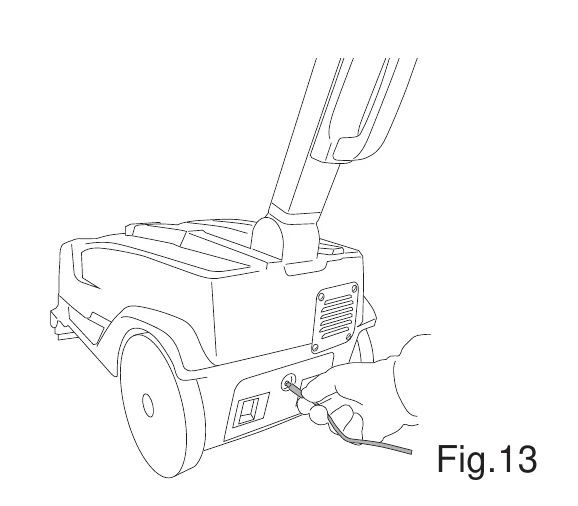
- Insert the jack plug of the battery charger into the socket on the battery (fig. 13).
- Plug the battery charger into the mains power socket.
- Wait for the recharge cycle to finish; the Led on the battery charger will turn green.
- Disconnect the battery charger from the power socket and from the battery.
Battery: removal
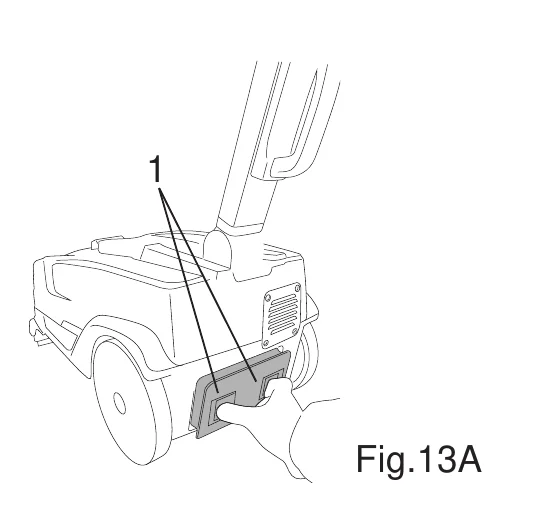
Press the two sliding release catches and remove the battery from its housing (fig. 13A, ref. 1).
Battery: disposal
Ensure the battery is disposed of correctly, in compliance with current local environmental regulations. Do not throw the battery away as household refuse.
PRACTICAL GUIDE FOR THE OPERATOR
Follow the safety precautions concerning the use of detergents given in the section “Important Safety Precautions”.
Preparing the machine for work
Proceed as follows before starting work.
- Check the battery charge indicator lights to ensure that the battery is fully charged and, if not, run the recharge cycle, referring to the section “Battery: preparation / installation / recharging”.
- Make certain that the dirty water tank is empty, and if not, empty it, referring to the section “Emptying the dirty water tank”.
- Make certain that the detergent solution tank is full, and if not, proceed to fill it, referring to the section “Filling the water/detergent tank”.
- Adjust the position of the handle, referring to the section "Adjusting the handle rake angle".
- Fit the brush, referring to the section "Fitting the brush/pad driver".
Controls
Batteries and chargers: make sure your charger is compatible with your batteries, and set its charging algorithm to your battery pack before you use it.
The machine has the following controls and indicator lights:
- Main switch (fig. 14, ref. 1): connects and disconnects electrical power to and from all functions of the machine.
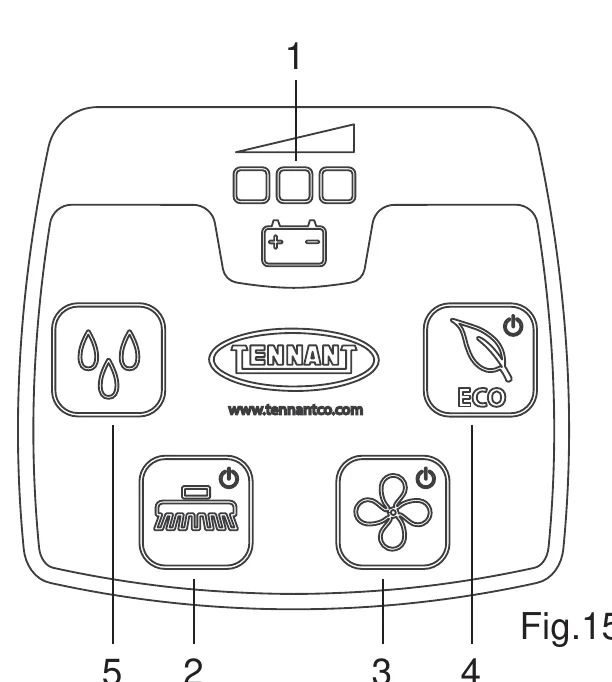
- Battery charge indicator (fig. 15, ref. 1): consists of 3 Leds, red, yellow and green, showing the battery charge level. Possible charge level indications:
- 100% battery: red, yellow and green LED on.
- 30% battery: red and yellow LED on.
- 10% battery: red LED on steadily.
- 5% battery: red LED on blinking, battery completely flat, after a few seconds the brush and suction motors will be shut off;
- Brush control button (fig. 15, ref. 2): enables (Led alight) and disables (Led dark) operation of the "Brush" function; the brush does not start rotating until the "Brush control lever"(fig. 14, ref. 2) is operated.
- Suction control button (fig. 15, ref. 3): switches on (“Led alight”) and switches off (“Led dark”) the suction motor, which generates the vacuum needed to dry the floor after scrubbing. The motor comes into operation only when activated by way of the "Brush control lever".
- Detergent flow button (Fig.15-Ref.5): to enable, disable or change the flow of detergent solution, proceed as follows:
- press the detergent flow button once, all three drops will light up and maximum flow will be enabled. When the button is pressed a second time, the flow is decreased and only two drops remain lit. Repeating the same procedure decreases the flow further until it stops, at which stage none of the drops will be lit.
- ECO button (fig.15, ref. 4): enables (Led alight) and disables (Led dark) ECO operating mode.
Working
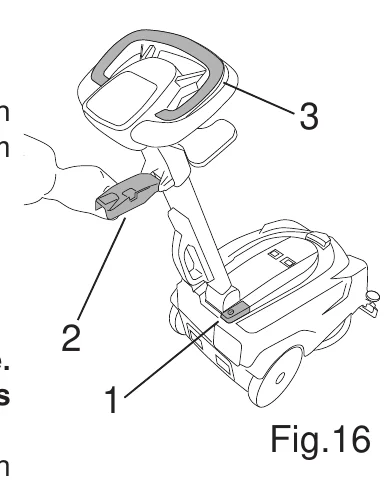
- Press the main switch (fig. 16, ref. 1).
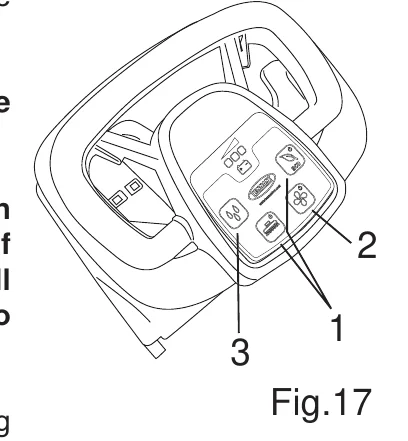
- Press the brush button or the ECO button (fig. 17, ref. 1), in addition to activating the brush, this will also enable the vacuum function and the flow of detergent solution.
- Lower the squeegee by operating the lever (fig. 16, ref. 2).
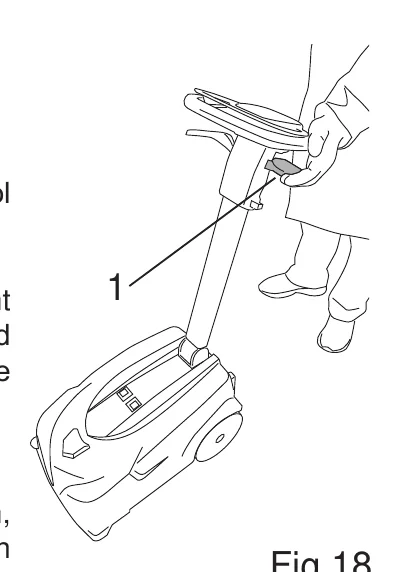
- Depress the brush control lever (fig. 16, ref. 3).
- Begin working.
- When work is in progress, check the thoroughness of the wash and regulate the flow of detergent solution accordingly, with the relative button (fig. 17, ref. 3).
In cases where floors are soiled with particularly stubborn dirt, scrubbing and drying operations can be performed in two separate stages.
Prewashing with brushes or pads:
- Raise the squeegee by operating the lever (fig. 16, ref. 2).
- Press the main switch (fig. 16, ref. 1).
- Press the brush control button (fig. 17, ref. 1).
- Switch off the vacuum function by pressing the suction control button (fig. 17, ref. 2).
- Depress the brush control lever (fig. 16, ref. 3).
- When scrubbing particularly dirty areas, give the detergent sufficient time to perform its chemical action of detaching and suspending the dirt in the film of water, and allow the brushes time to exert an effective mechanical action.
Drying:
- Lower the squeegee by operating the lever (fig. 16, ref. 2).
- Press the suction control button to activate the vacuum function, and pass over the area washed previously: this will produce an effect similar to a thorough scrub, with the result that subsequent routine maintenance work on the floor will be less time-consuming.
Removal of dirty water tank lid
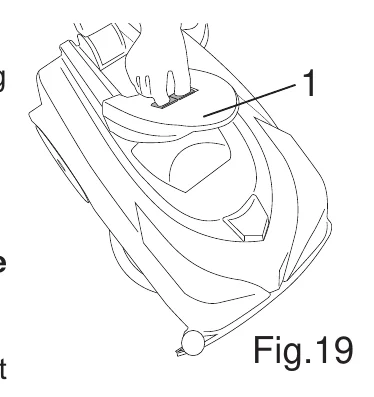
- Release the lid of the dirty water tank by pressing the two sliding catches toward one another (fig. 19, ref. 1).
- Lift off the lid.
Installation of dirty water tank lid
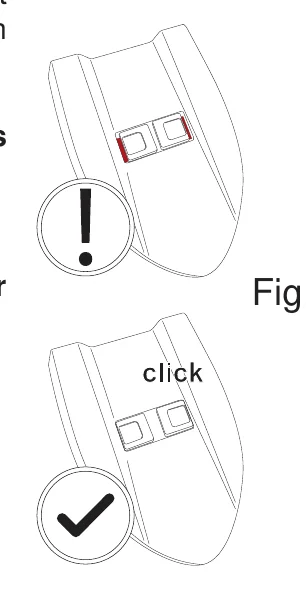
- Place the lid on the tank.
- Apply downward pressure to the lid, sufficient to make certain that the two sliding release catches spring outwards and engage with the top of the dirty water tank (Fig.20).
Filling the water/detergent tank
The tank can be filled in two different ways:
Tank installed on the machine:
- Turn off the machine at the main switch.
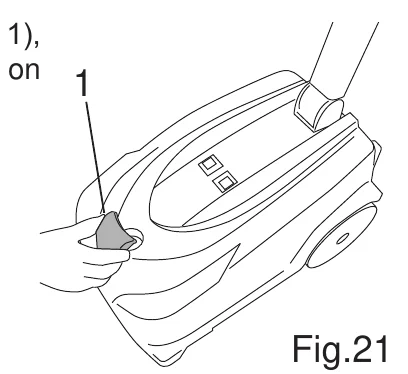
- Remove the cap of the detergent tank (fig.21, ref. 1).
- Fill the tank.
Tank removed from the machine:
- Turn off the machine at the main switch.
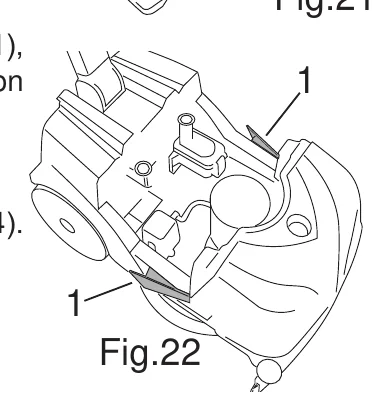
- Press in the two lateral tank retaining catches (fig. 22, ref. 1), separate the dirty water tank from the frame and set it down on the floor.
- Remove the cap of the detergent tank.
- Separate the detergent tank from the frame.
- Fill the tank (fig. 23).
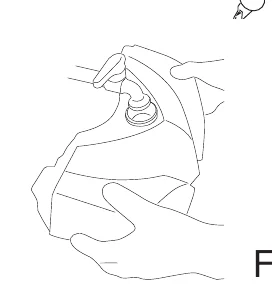
Emptying the water/detergent tank
The tank can be emptied by proceeding as follows:
- Turn off the machine at the main switch.
- Take the machine to the disposal area.
- Press in the two lateral tank retaining catches (fig. 22, ref. 1), separate the dirty water tank from the frame and set it down on the floor.
- Separate the detergent tank from the frame.
- Remove the cap of the detergent tank.
- Empty the contents of the tank by way of the front opening (fig. 24).
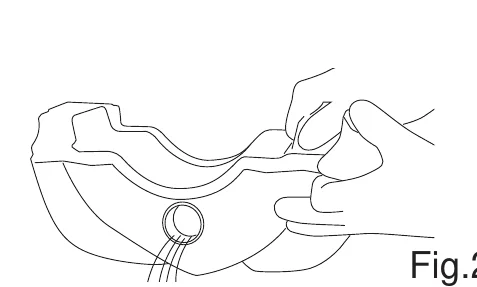
Emptying the dirty water tank
An automatic float-controlled shut-off device mounted to the lid of the dirty water tank is designed to inhibit further operation of the vacuuming system when the tank is full. It is possible to recognize when the vacuuming system has been shut off, as the suction motor will suddenly become noisier in operation, and the floor will not dry as expected. In this situation, the operator must stop the machine and empty the dirty water tank, proceeding as follows:
- Turn off the machine at the main switch.
- Take the machine to the disposal area.
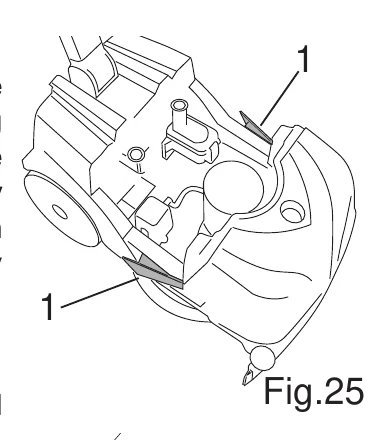
- Press in the two lateral tank retaining catches (fig. 25, ref. 1), and separate the dirty water tank from the frame.
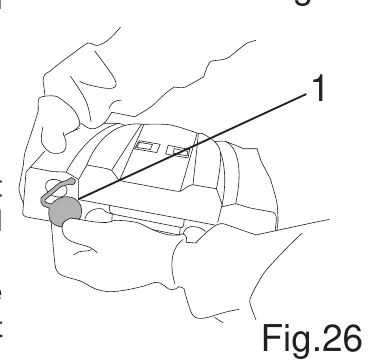
- Remove the cap of the dirty water tank (fig.26, ref. 1).
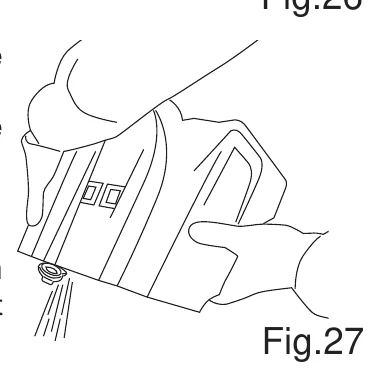
- Empty the tank (fig. 27).
Drive adjustment
The machine is equipped with a special mechanical drive device that exploits the friction created between brush and floor to generate forward movement.
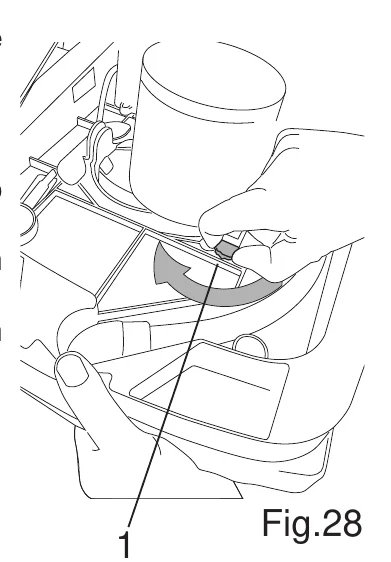
The driving force produced by the device can be varied by turning the relative knob (fig. 28, ref. 1), which presents two sectors of different colour, one green and the other yellow:
- turning the knob to the position that exposes the green sector, the driving force is increased.
- turning the knob to the position that exposes the yellow sector, the driving force is decreased.
- To make the adjustment, proceed as follows:
- Turn off the machine at the main switch.
- Remove the dirty water tank and the detergent tank and set them on the floor, referring to the section "Emptying the water/detergent tank" and "Emptying the dirty water tank".
- Elevate the brush/motor by taking up the weight with one hand, and with the other hand, turn the knob (fig. 28, ref. 1) to the position desired.
Finishing work
- Turn off the machine at the main switch.
- Empty the dirty water tank and rinse with clean water, referring to the section "Emptying the dirty water tank".
- Empty the detergent solution tank, referring to the section “Emptying the water/detergent tank”.
- Stow the machine in the parking position, referring to the section "Selection of parking position".
PERIODS OF INACTIVITY
Proceed as follows to prepare the machine for extended periods of inactivity:
- Remove the battery from the machine, referring to the section “Battery: removal” and recharge it fully, referring to the section “Battery: preparation / installation / recharging". The battery should also be recharged regularly when the machine is not in use, so as to keep it constantly at the maximum charge level.
- Clean the squeegee blades with a moist cloth, referring to the section “Cleaning the squeegees”.
- Open up and clean the chamber of the diverter valve, referring to the section “Cleaning the diverter valve”.
- Detach and clean the suction hoses of the squeegees, referring to the section "Cleaning the front squeegee suction hose" and "Cleaning the rear squeegee suction hose".
- Make certain the tanks have been emptied completely and are perfectly clean, referring to the section "Emptying the dirty water tank" and "Emptying the water/detergent tank".
- Stow the machine in the parking position, referring to the section "Selection of parking position".
MAINTENANCE INSTRUCTIONS
This chapter describes how maintenance is carried out.
Maintenance - General rules
When cleaning the machine, always observe the following precautions:
- Avoid the use of high pressure washers. Water could penetrate the electrical compartment or the motors, leading to damage or the risk of short circuit.
- Do not use steam, as the heat generated could cause plastic parts to lose their shape.
- Do not use solvents or hydrocarbon based products. These can damage the cowling and rubber components.
Cleaning the suction float
- Release the lid of the dirty water tank.
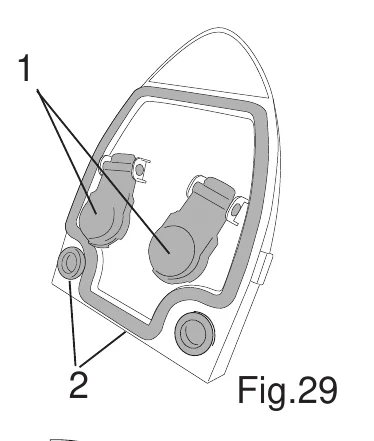
- Turn the lid over and check that the floats can move freely (fig. 29, ref. 1).
- Clean the seals with a moist cloth (fig. 29, ref. 2).
- Refit the lid.
Cleaning the water/detergent tank filter
- Remove the dirty water tank and the detergent tank and set them on the floor, referring to the section "Emptying the water/detergent tank" and "Emptying the dirty water tank".
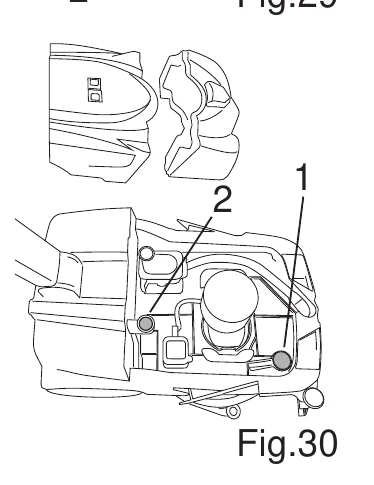
- Remove the filter and wash with water (fig. 30, ref. 1).
Cleaning the suction filter
- Remove the dirty water tank from the machine and set it on the floor, referring to the section "Emptying the dirty water tank".
- Remove the filter and wash with water (fig. 30, ref. 2).
Cleaning the front squeegee suction hose
- Remove the dirty water tank and the detergent tank and set them on the floor, referring to the section "Emptying the water/detergent tank" and "Emptying the dirty water tank".
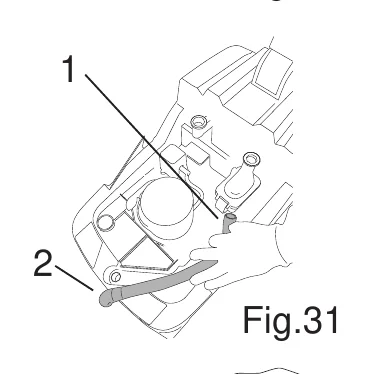
- Detach the hose from the diverter valve (fig. 31, ref. 1) and from the front squeegee (fig. 31, ref. 2).
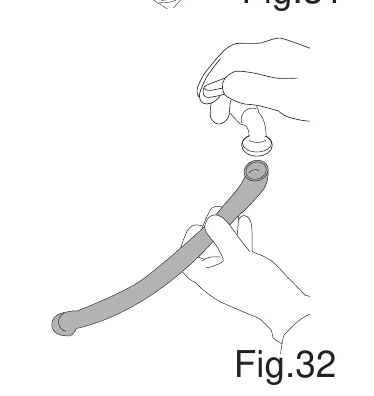
- Wash the hose by directing water into the bore (fig. 32)
- Reattach the hose.
Cleaning the rear squeegee suction hose
- Remove the dirty water tank and the detergent tank and set them on the floor, referring to the section "Emptying the water/detergent tank" and "Emptying the dirty water tank".
- Pull the handle up perpendicular to the machine.
- Lower the squeegee by operating the lever.
- Tilt the machine backwards and rest the handle on the floor.
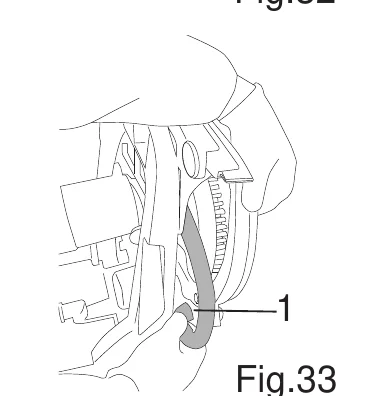
- Detach the hose from the diverter valve and from the rear squeegee (fig. 33, ref. 1).
- Wash the hose by directing water into the bore (fig. 32)
- Reattach the hose.
Cleaning the diverter valve
- Remove the dirty water tank and the detergent tank and set them on the floor, referring to the section "Emptying the water/detergent tank" and "Emptying the dirty water tank".
- Detach the front squeegee suction hose from the diverter valve.
- Detach the rear squeegee suction hose from the diverter valve.
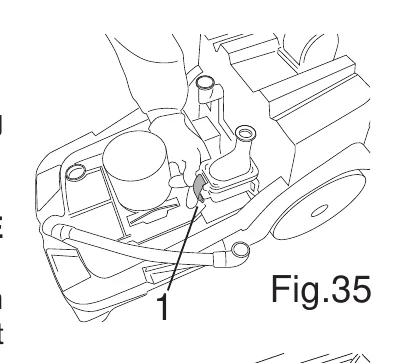
- Release the retaining lever (fig. 35, ref. 1) and remove the cover of the diverter valve.
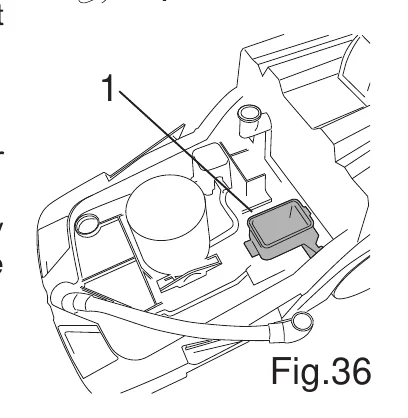
- Clean the chamber of the valve (fig. 36, ref. 1), removing any encrustations, and rinse with clean water; wipe the seals of the cover with a soft cloth.
Cleaning the squeegee
- Remove the dirty water tank and the detergent tank and set them on the floor, referring to the section "Emptying the water/detergent tank" and "Emptying the dirty water tank".
- Pull the handle up perpendicular to the machine.
- Tilt the machine backwards and rest the handle on the floor.
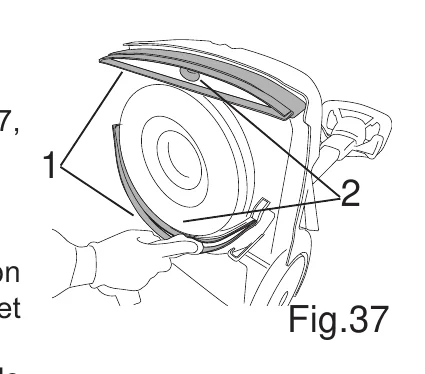
- Clean the blades of both squeegees with a moist cloth (fig. 37, ref. 1).
- Clean the suction inlet port of both squeegees (fig. 37, ref. 2).
Squeegee adjustment
The squeegee is factory-adjusted to give an optimum drying action on different types of floor surface, but in the event that results do not meet expectations, there are further adjustments that can be made.
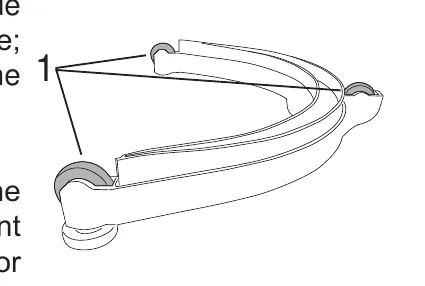
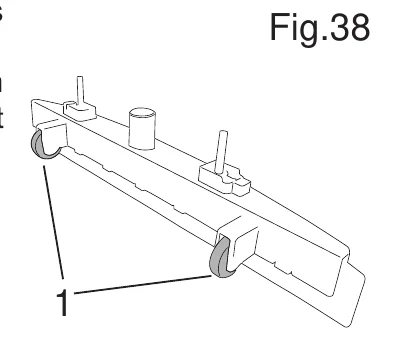
To ensure a faultless drying action, the lip of the squeegee blade should deflect 45° along its entire length, relative to the floor surface; the height of the squeegee can be adjusted by raising or lowering the wheels (fig. 38, ref. 1).
Replacing the squeegee blades
The squeegee blades collect the film of water and detergent from the floor and prepare the way for perfect drying. With time, the constant wiping action causes the edge of the blade in contact with the floor to become rounded and cracked, with the result that drying is less thorough and the blade must be replaced. Proceed as follows:
- Remove the dirty water tank and the detergent tank and set them on the floor, referring to the section "Emptying the water/detergent tank" and "Emptying the dirty water tank".
- Pull the handle up perpendicular to the machine.
- Tilt the machine backwards and rest the handle on the floor.
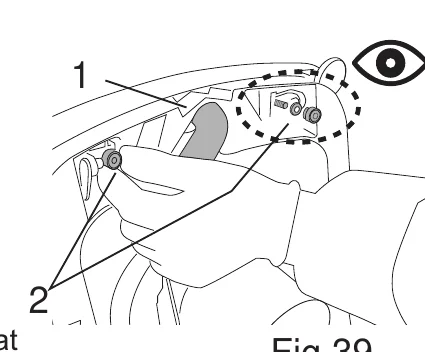
Front squeegee:
- Detach the suction hose from the squeegee (fig. 39, ref. 1).
- Unscrew the knobs (fig.39, ref. 2).
- Separate the squeegee from the machine (fig. 40, ref. 1).
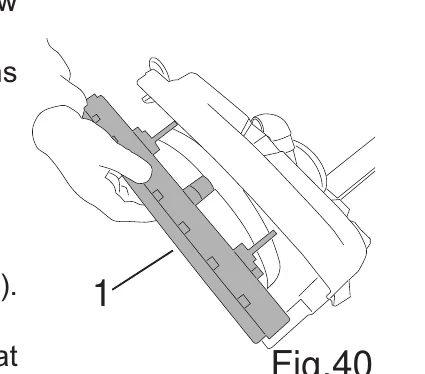
- Pull out the blade, so as to free the entire assembly (fig. 41).
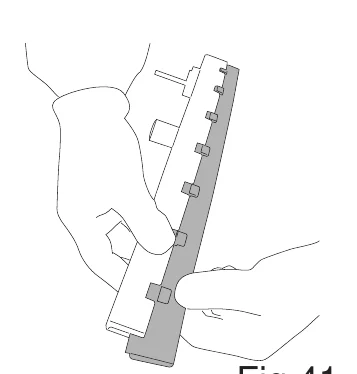
- Remove the blade.
- Either refit the same blade with the wiping edges reversed, so that it can be used until both edges are worn out, or replace with a new blade, clipping it to the slots in the body of the squeegee;
- Refit the squeegee to the machine, following the instructions described previously.
Rear squeegee:
- Lower the squeegee control lever.
- Detach the suction hose from the squeegee (fig. 42, ref. 1).
- Unscrew the knobs (fig.42, ref. 2).
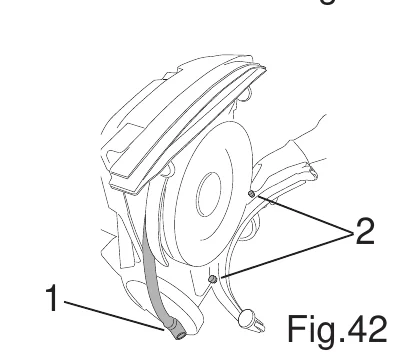
- Pull out the blade, so as to free the entire assembly (fig. 43, ref. 1).
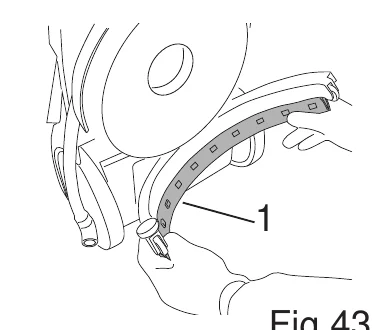
- Remove the blade (fig. 44).
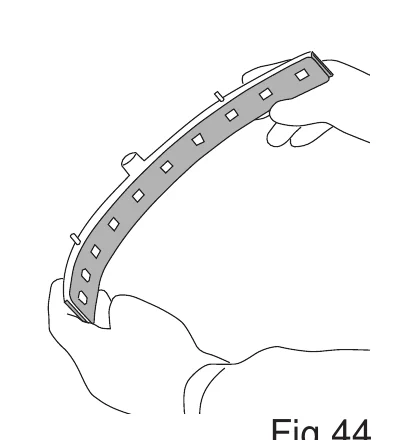
- Either refit the same blade with the wiping edges reversed, so that it can be used until both edges are worn out, or replace with a new blade, clipping it to the slots in the body of the squeegee;
- Refit the squeegee to the machine, following the instructions described previously.
Replacing the brush
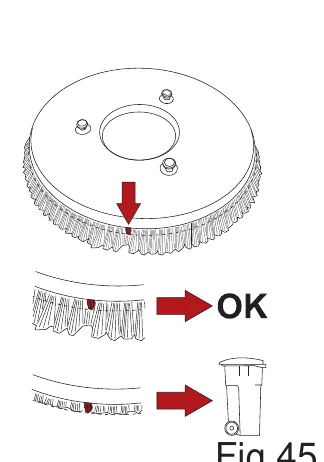
The brush presents a number of tufts, coloured red, with bristles shorter in length than the rest (fig. 45). When the tufts of black bristles wear down to the same length as the red bristles, the brush must be replaced. For directions on replacement of the brush, refer to the sections “Releasing the brush/pad drive board" and "Fitting the brush/pad drive board".
Periodic checks
| CHECK | DAILY OPERATIONS | WEEKLY OPERATIONS | MONTHLY OPERATIONS |
|---|---|---|---|
| Cleaning the dirty water tank | X | ||
| Cleaning the suction floats | X | ||
| Cleaning the water/detergent tank filter | X | ||
| Cleaning the suction filter | X | ||
| Cleaning the front squeegee suction hose | X | ||
| Cleaning the rear squeegee suction hose | X | ||
| Cleaning the diverter valve | X | ||
| Cleaning the squeegee blades | X | ||
| Checking squeegee blade wear | X | ||
| Checking brush wear | X |
TROUBLESHOOTING
| PROBLEMS | CAUSES | SOLUTIONS |
|---|---|---|
| Machine not working. | Flat battery. | Recharge the battery. |
| Main switch is not on. | Press main switch. | |
| Brush not rotating. | Brush control button not depressed. | Press the brush button. |
| Brush control lever not activated. | Activate brush control lever. | |
| Brush motor not starting easily. | You are working with a dry brush on a very rough floor. | Increase the quantity of detergent. |
| Machine not scrubbing uniformly. | The brush or disk is worn. | Replace the brush. |
| Detergent solution not reaching brush. | The detergent tank is empty | Fill detergent tank. |
| The filter is dirty. | Clean filter of water/detergent tank. | |
| The hose delivering the detergent to the brush is clogged. | Remove blockage. | |
| Suction motor not working. | Suction control button not depressed. | Press the suction button. |
| Problem | Cause | Remedy |
|---|---|---|
| Squeegee not cleaning or vacuum weak. | The edge of the squeegee rubber blades in contact with the floor is worn. | Replace the rubber blades. |
| Float controlled shut-off has been tripped (dirty water tank full). | Empty the dirty water tank. | |
| Squeegee suction hose clogged. | Unclog the hose. | |
| The suction hose is not connected to the squeegee or is damaged. | Connect or repair the hose. | |
| Diverter valve dirty. | Clean diverter valve. | |
| Battery not giving expected operational endurance. | The battery charger is not working. | Replace battery charger. |
ALARMS
| Signal | Cause | Remedy |
|---|---|---|
| Red Led alight on brush control button, 1 fast blink. | Brush motor overcurrent/short circuit. | Switch off all functions of the machine. Restart the machine. If the alarm appears again, make certain that the brush is not being used on a particularly rough floor. If the problem persists, contact customer service. |
| Red Led alight on brush control button, 2 fast blinks. | Detergent pump overcurrent/short circuit. | Switch off all functions of the machine. Restart the machine. If the problem persists, contact customer service. |
| Red Led alight on suction control button, 1 fast blink. | Suction motor overcurrent/short circuit. | Switch off all functions of the machine. Restart the machine. If the problem persists, contact customer service. |
| Green battery charge Led blinking. | Excess battery voltage. | Check the integrity, operation and use of the battery charger supplied with the machine. Wait 10 minutes then try again. |
| Battery charge LEDs flash in sequence. | Battery charging. | Detach the charging power connector from the battery. |
| Battery charge LEDs flash simultaneously. | No communication between Power Board and Touch Board. | Wiring or board problem. Contact customer service. |
| Logo LED is flashing slowly and double beep of buzzer occurs when the brush control lever is pressed. | Incorrect machine position. | Place the machine horizontally. |
Tennant and Nobles are trademarks of Tennant Company. Southeastern Equipment & Supply is an independent dealer.