Aztec ProScrub 20 Operator Manual
OWNER’S MANUAL
THE PROSCRUB
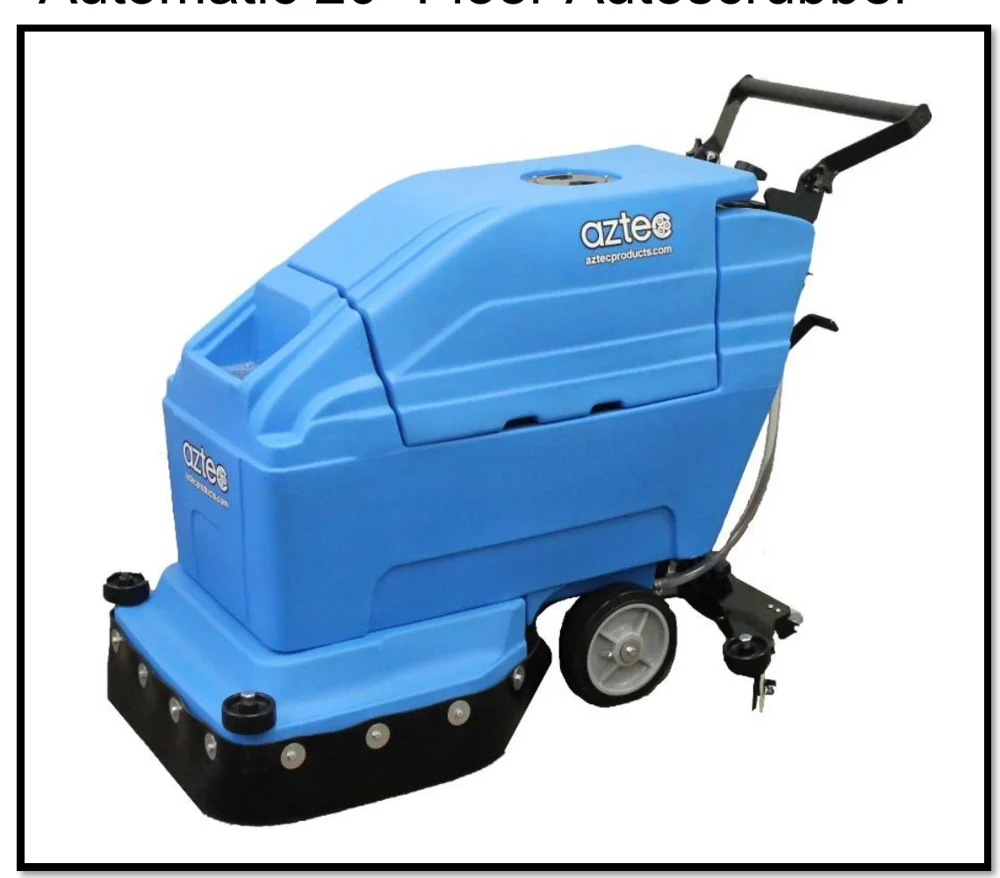
Automatic 20” Floor Autoscrubber
EQUIPMENT DISTRIBUTOR: _________________________________________
DIST. SALESPERSON: ____________________ PHONE #: ________________
DATE OF PURCHASE: ____________________ INVOICE #: _______________
WWW.AZTECPRODUCTS.COM
[email protected]
201 COMMERCE DRIVE, MONTGOMERYVILLE, PA 18936
2-2026
TABLE OF CONTENTS
| Topic | Page |
|---|---|
| INTRODUCTION & GENERAL SAFETY MESSAGE INFORMATION | PG 3-5 |
| PROSCRUB SPECIFICATIONS | PG 5 |
| BEFORE OPERATION CHECKLIST | PG 6 |
| DRAINING AND FILLING THE TANKS | PG 7-8 |
| PROSCRUB DIAGRAM | PG 8 |
| PROSCRUB OPERATION | PG 9-10 |
| PROSCRUB HELPFUL HINTS | PG 10 |
| HOW TO REMOVE SQUEEGEE (without tools) | PG 10 |
| STORAGE AND HANDLING SAFETY INFORMATION | PG 11 |
| PROSCRUB MAINTENANCE SCHEDULE | PG 12-13 |
| BATTERY MAINTENANCE SCHEDULE & BATTERY CHARGING | PG 14-15 |
| REPLACEMENT PARTS AND DIAGRAMS: | |
| SOLUTION TANK PARTS | PG 16 |
| VACUUM TANK PARTS | PG 17 |
| SHROUD ASSEMBLY PARTS | PG 18 |
| SQUEEGEE ASSEMBLY PARTS | PG 19 |
| DRIVE ASSEMBLY PARTS | PG 20 |
| CONTROL PANEL PARTS | PG 21 |
| WIRING DIAGRAM | PG 22 |
| TROUBLESHOOTING | PG 23 |
| RETURN GOODS POLICY | PG 24 |
| RETAILER / DISTRIBUTOR CONTACT INFO | PG 24 |
| PROSCRUB WARRANTY | PG 25 |
INTRODUCTION
Thank you for purchasing this Aztec Products, Inc. machine. You have purchased a quality product and we welcome you to the Aztec family. It is critically important to utilize proper training, understanding, maintenance and care for this product. Neglect of the Safety Messages, especially the DANGER, WARNING, CAUTION and NOTICE statements throughout this Owner’s Manual may lead to serious injury or death, and/or cause damage to the floor and/or facility.
For best results from your Aztec machine, you must read and understand this Owner’s Manual, and follow all operation guidelines and safety messages. Protect your WARRANTY by following all maintenance guidelines and keeping a dated log. If a problem should arise, consult an authorized Aztec service center.
All information in this Owner’s Manual is up to date and based on the latest product information available at the time of printing. Aztec Products, Inc. reserves the right to make changes at any time without notice or incurring obligation. This Owner’s Manual and the maintenance log must be kept as a permanent part of the machine and remain with the machine if resold.
No part of this document may be copied or reproduced without written permission.
GENERAL SAFETY MESSAGE INFORMATION
Your safety and the safety of others is very important. As the manufacturer, we have provided important safety messages throughout this manual and on the machine. The purpose of these safety messages is to prevent damage to you, your machine, the property, and/or the environment.
Please read and understand this information thoroughly. A safety message alerts you to potential hazards that could result in injury or death, and/or cause damage to the floor and/or facility. Each safety message is preceded by a universal safety alert symbol (!) and one of these safety words: DANGER, WARNING, CAUTION, or NOTICE. These signal words mean:

IMPORTANT SAFETY INFORMATION
The 20” ProScrub automatic scrubber is designed to scrub floors in an indoor environment and is not recommended for any other use. Contact the Aztec parts department [email protected] for additional application questions.
IMPORTANT SAFETY INFORMATION continued
PROSCRUB SPECIFICATIONS
| ProScrub Dimensions | Length: 44" (111.76 cm) Width: 23" (58.42 cm) Height: 35" (88.9 cm) |
| Solution Tank Capacity | 12 Gallons (45.4 Liters) |
| Recovery Tank Capacity | 15 Gallons (56.8 Liters) |
| Cleaning Path | 20” (51 cm) |
| Pad/brush Diameter | 20” (51 cm) |
| Squeegee Width | 30” (76 cm) |
| Brush Motor | ¾ hp, 220 RPM |
| Vacuum Motor | ½ hp, 2 stage, 24volt |
| Scrubbing Pressure | 65# |
| Batteries | Two (2) 130 amp/hour, 12volt Deep cycle, lead/acid |
Read this Owner’s Manual carefully and keep it with machine at all times; all questions regarding the care and safety of this equipment:
AZTEC PRODUCTS
800-331-1423 / 215-393-4700
[email protected]
www.aztecproducts.com
Order Replacement Parts: aztec.parts
BEFORE OPERATION CHECKLIST
Before beginning your pre-operation checklist, the machine must be on a level surface, with the machine switch in the OFF position. Always check the following items before you start the machine:
A. READ AND UNDERSTAND ALL SAFETY MESSAGES
Carefully read and understand all SAFETY INSTRUCTIONS on pgs 3-6.
B. CHECK THE GENERAL CONDITION OF THE MACHINE
- Look around and underneath the machine for signs of leaks.
- Look for signs of damage.
- Check that all covers are in place, and all nuts, bolts and screws are tightened.
- Address all of the above issues before proceeding.
C. CHECK THE MAINTENANCE SCHEDULE
Review the MAINTENANCE SCHEDULE on pgs 12-13. Perform any maintenance necessary before proceeding.
D. INSTALL FRESH PADS OR BRUSHES
BRUSH INSTALLATION (see pg 8 for diagram)
- Get an assistant – this is a 2-person job
- Lower the brush head by stepping down on the pedal; push pedal forward to lower
- Position squeegee so that it is centered behind the autoscrubber
- Tilt autoscrubber back onto squeegee to access motor hub for installation; do not leave the autoscrubber tilted back any longer than necessary to avoid damaging squeegee blades
PAD INSTALLATION (see pg 8 for diagram)
- Get an assistant – this is a 2-person job
- Remove plastic centerlok from pad driver
- Center pad on a pad driver and re-attach centerlok
- Be sure to attach pad to pad driver before installing driver to motor hub
DRAINING AND FILLING THE TANKS
DRAINING THE PROSCRUB RECOVERY TANK:
- Make sure Solution Control Knob is completely turned to OFF position
- Remove black recovery tank lid
- Remove Black Drain Hose from holder; place hose end over a drain and unscrew cap to start flow
- When recovery tank is almost empty, lift lid like you would to examine batteries and hold lid diagonally to fully drain
- Close tank
- Unscrew lid on recovery tank and use hose to rinse out tank
- Screw cap back on Black Drain Hose and replace drain hose securely
DRAINING AND FILLING THE TANKS continued
DRAINING THE PROSCRUB SOLUTION TANK:
- Make sure Solution Control Knob is completely turned to OFF position
- Pull clear hose off bracket at back of the machine and drain into a bucket or into floor drain
- Turn Solution Control Knob clockwise to clean out solution flow system
- Rinse solution tank with clean water through Black Drain Hose
- Reconnect Black Drain Hose to bracket securely; make sure it is tightly connected
FILLING THE PROSCRUB SOLUTION TANK:
- Make sure Solution Control Knob is completely turned to OFF position
- Fill the tank with up to 14 gallons of water and chemical solution
- The Clear Fill Indicator Hose can be used as a fluid fill indicator level if it is unplugged and held at the same height as if plugged in
- If the Clear Fill Indicator Hose has been used as a fluid fill indicator, plug it back in when tank is being filled
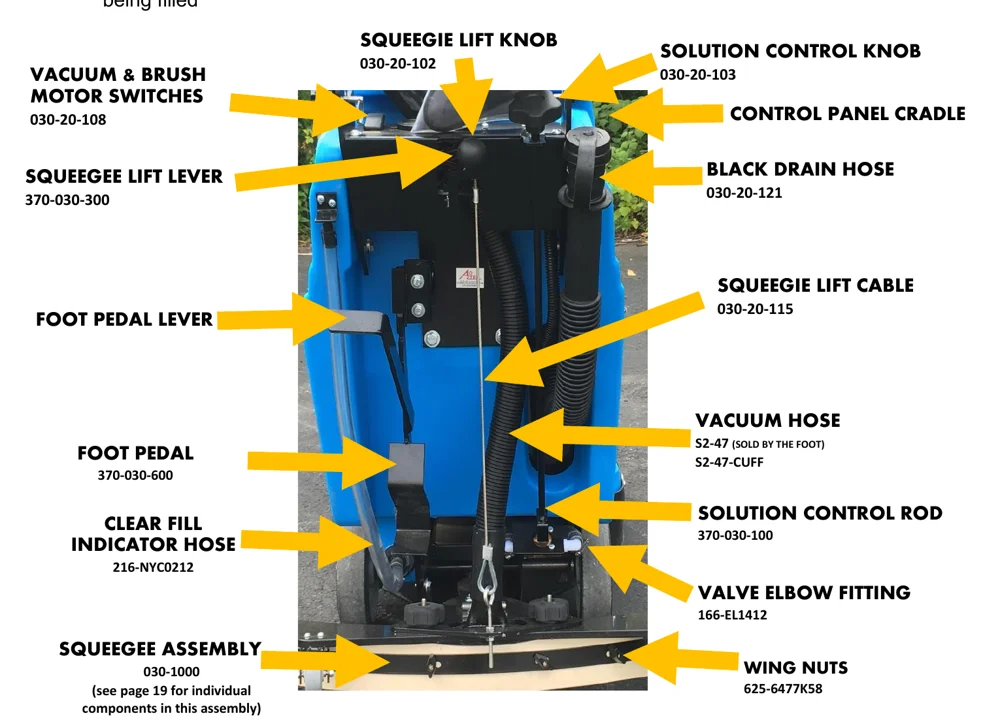
Callout labels and part numbers shown on the figure:
| Item | Part number |
|---|---|
| SQUEEGIE LIFT KNOB | 030-20-102 |
| SOLUTION CONTROL KNOB | 030-20-103 |
| VACUUM & BRUSH MOTOR SWITCHES | 030-20-108 |
| CONTROL PANEL CRADLE | |
| SQUEEGEE LIFT LEVER | 370-030-300 |
| BLACK DRAIN HOSE | 030-20-121 |
| SQUEEGIE LIFT CABLE | 030-20-115 |
| FOOT PEDAL LEVER | |
| VACUUM HOSE | S2-47 (SOLD BY THE FOOT) S2-47-CUFF |
| FOOT PEDAL | 370-030-600 |
| SOLUTION CONTROL ROD | 370-030-100 |
| CLEAR FILL INDICATOR HOSE | 216-NYC0212 |
| VALVE ELBOW FITTING | 166-EL1412 |
| SQUEEGEE ASSEMBLY | 030-1000 (see page 19 for individual components in this assembly) |
| WING NUTS | 625-6477K58 |
PROSCRUB OPERATION
For your safety, to ensure compliance with environmental regulations, and to maximize the service life of your equipment, it is very important to take a few minutes before you operate this machine to check its condition. Be sure to take care of any problem you find, or have your service dealer correct it before you operate this machine.
Refer to the GENERAL OPERATION SAFETY Information on pgs 3-5 and the BEFORE OPERATION CHECKLIST on pg 6 before operating the ProScrub:
- Lower squeegee by releasing the Squeegee Lift Lever and lowering it from the “locked” position.
- Push top of Foot Pedal Lever forward to release the pad drive/brush drive down.
- Turn Vacuum Motor Switch to ON position.
- Turn Solution Control Knob counter clockwise slightly to activate flow. The more the lever is turned, the faster the flow of solution. Open completely for maximum flow.
- Turn Brush Motor switch to “ON” position. Do not let the scrubber stay in one position for more than a few seconds after brush rotation has started; damage to floor may result.
- Begin scrubbing floor by pushing machine forward and walking in straight line. Adjust solution flow accordingly. Be sure to keep hands and feet clear of rotating brush/pad driver.
- When finished scrubbing, turn both Brush Motor and Vacuum Motor switches to OFF position.
- Use your foot to press the bottom of the Foot Pedal down until it clicks once, into a locked, raised position, to raise the head.
- Lift Squeegee Lift Lever to raise squeegee off floor and place lever in locked, raised position.
- Check floor to ensure no puddles have been left by the squeegee or under the machine.
- Move machine to safe and secure storage area.
- Check battery charge level and charge batteries if necessary (see BATTERY MAINTENANCE and BATTERY CHARGING on pgs 14-15).
- If transporting the ProScrub off site, the Foot Pedal can be pushed further down to 2nd locked, “transport” position.
- If transporting the ProScrub, squeegee can be removed without tools and placed in Control Panel Cradle (see below and pg 8 for diagram).
PROSCRUB OPERATION HELPFUL HINTS
- The ProScrub works best when operating in a straight path; turning the machine at too sharp an angle can result in squeegee spillover
- While scrubbing, periodically check the recovery tank. If foam buildup is heavy, use a defoamer to prevent damage.
- If more scrubbing pressure is needed, pull brush lever upwards while operating machine.
- If squeegee is leaving streaks, lift squeegee to the “UP” position and wipe blades with clean, dry cloth.
- Before stopping or turning, shut off solution flow to prevent excess solution on the scrub path.
- If you are stopping for more than five seconds, shut off brushes/pads to prevent floor damage.
- Frequently check battery meter for charge level. When it drops to the red zone, a recharge is necessary. Do not continue to operate machine after the needle drops into the red zone. Battery damage will occur.
HOW TO REMOVE THE PROSCRUB SQUEEGEE (WITHOUT TOOLS)
- Using the Squeegee Lift Lever, lower the squeegee to the floor (see pg 8 for diagram)
- Unscrew the two squeegee attachment knobs
- Disconnect the Vacuum Hose from the squeegee
- Raise the Squeegee Lift Lever to the disengaged position, leaving the Squeegee Lever disconnected on the floor
STORAGE AND HANDLING SAFETY INFORMATION
Batteries and chargers: make sure your charger is compatible with your batteries, and set its charging algorithm to your battery pack before you use it.
MAINTENANCE SCHEDULE
Batteries and chargers: make sure your charger is compatible with your batteries, and set its charging algorithm to your battery pack before you use it.
MAINTENANCE SCHEDULE (CONTINUED)
DAILY
- Remove and clean pad or brush
- Remove and clean lint from ball float shutoff screen (located in recovery tank)
- Drain and rinse both tanks; remove any clogging debris in vacuum intake hole in recovery tank
- Raise squeegee and wipe with clean, damp cloth to remove any soil
- Recharge batteries if necessary; refer to BATTERY MAINTENANCE (see pgs 14-15) as needed
WEEKLY
- Flush tanks and solution lines with vinegar solution: 1 quart (.94L) vinegar and 3 gallons (11.3L) water
- Rinse with clean water
- Clean battery terminals to prevent corrosion
- Check for loose or corroded battery cables
- Check fluid level in batteries (lead acid batteries only)
MONTHLY
- Lubricate axle and caster grease fittings with water-resistant grease
- Lubricate all linkage pivot points with silicone spray, then coat with a water-resistant grease to maintain smooth operation
- Check scrubber for water leaks and loose nuts or bolts
EVERY 250 HOURS
- Check brush motor for carbon brush wear; replace when down to 3/8" or less
- Check vacuum motor for carbon brush wear; replace when down to 3/8" or less
BATTERY MAINTENANCE
Batteries and chargers: make sure your charger is compatible with your batteries, and set its charging algorithm to your battery pack before you use it.
- To dissolve battery corrosion, mix a solution of baking soda and water. Brush solution carefully over battery. Do not allow solution to enter battery cells.
- After drying, use a wire brush to clean terminal posts and cable connections.
- After all wires are connected, thoroughly apply a coating of grease to battery terminals to help maintain a good connection and prevent further corrosion.
- Check for worn or loose cables and replace if necessary.
- Check fluid level in batteries every 10 charges (lead acid batteries only).
BATTERY CHARGING
BATTERY CHARGING continued
LEAD ACID BATTERIES: Lead acid batteries must have fluid checked every 10 charges. If fluid is low, fill with distilled water to top of plates.
Battery charger specifications:
Output voltage – 24 volts
Output current – 10 to 20 amps
Automatic shutoff circuit
For deep cycle battery charging, life expectancy of a battery is based on the number of charges it receives. To get the most life from your battery, recharge when the meter drops into the red zone.
- Make sure all switches are in the “OFF” position.
- Open recovery tank to access batteries.
- Plug charger into receptacle near battery compartment.
- Plug charger into grounded wall outlet AFTER connecting charger to scrubber. Charger will automatically begin charging and will shut off automatically when batteries are fully charged.
- Do not use an adapter or remove grounded blade on plug.
- After charger has turned off, first unplug it from the wall outlet, then from the scrubber.
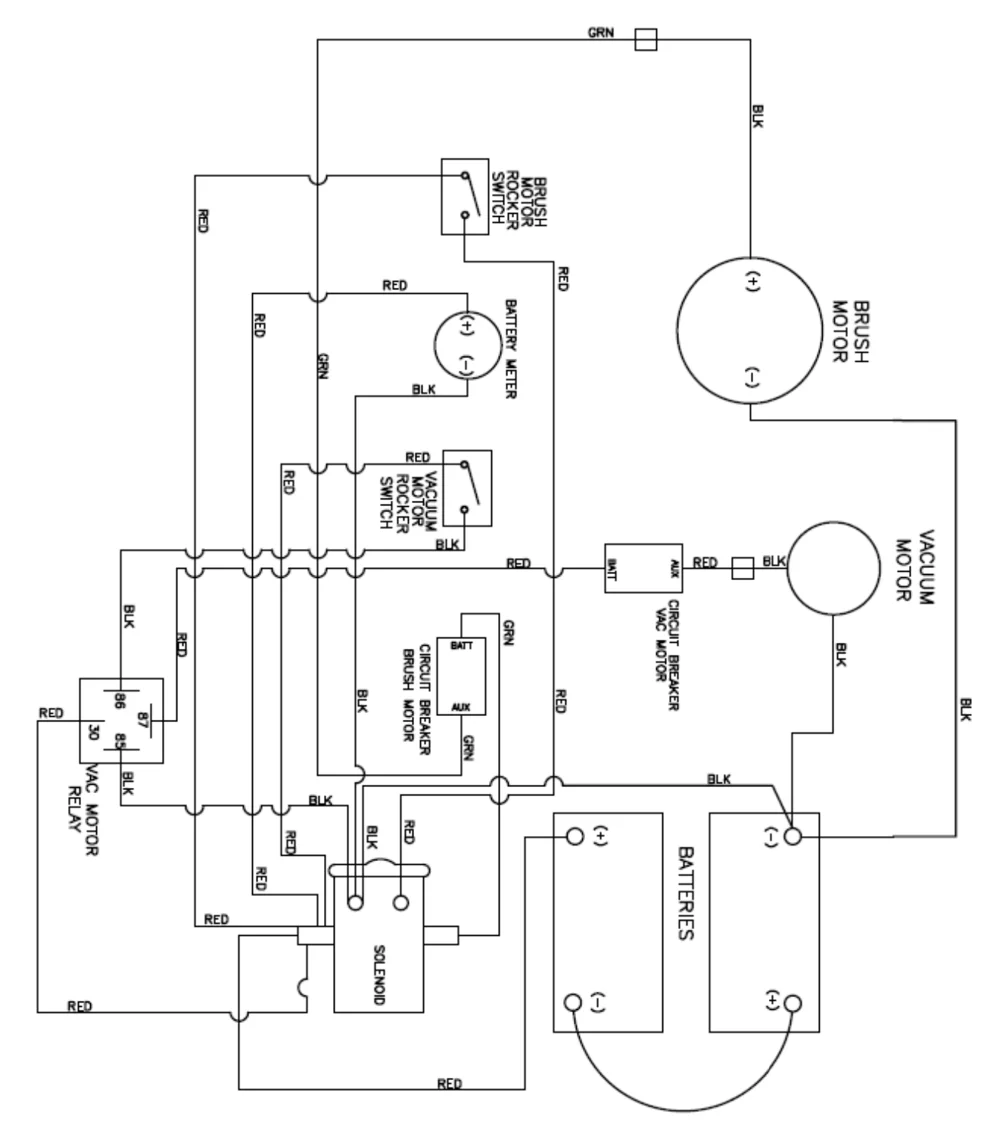
WIRING DIAGRAM
TROUBLESHOOTING
| PROBLEM | SYMPTOM | SOLUTION |
|---|---|---|
| No power, nothing runs | Batteries need charging | Charge the batteries |
| Batteries faulty | Replace batteries | |
| Loose battery cable | Tighten cable connection | |
| Batteries not connected properly | Connect properly | |
| Brush motor does not run | Faulty brush switch | Contact service center |
| Machine circuit breaker has tripped | Allow motor to cool down, breaker will automatically reset | |
| Faulty wiring | Contact service center | |
| Faulty brush motor | Contact service center | |
| Carbon brushes worn | Replace if worn to 3/8 or less | |
| Faulty solenoid | Contact service center | |
| Vacuum motor does not run | Faulty vacuum switch | Contact service center |
| Faulty wiring | Contact service center | |
| Faulty vacuum motor | Contact service center | |
| Carbon brushes worn | Replace if worn to 3/8 or less | |
| Short run time | Batteries not fully charged | Charge batteries |
| Bad cell in one or more batteries | Replace battery | |
| Batteries need maintenance | See “Battery Maintenance” | |
| Faulty charger | Replace charger | |
| Little or no solution flow with knob in open position | Solution flow lever is not activated | Push flow lever forward |
| Solution line is clogged | Remove hose and blow compressed air through it. Then flush with clean water | |
| Solution valve is clogged | Remove valve and clean. Do not scratch or damage inside | |
| Rod does not rotate when knob is turned on | Solution flow adjustment knob needs adjusting with set screws | |
| Poor squeegee pickup | Recovery tank is full | Empty tank |
| Ball float shutoff screen is clogged | Remove screen and clean | |
| Squeegee is clogged with debris | Clean squeegee | |
| Squeegee blades are worn Squeegee thumbscrews are loose | Replace blades Tighten screws | |
| Vacuum hose connections are loose | Push hose firmly onto connections | |
| Vacuum hose is worn or has a hole | Replace | |
| Vacuum is clogged with debris | Remove debris | |
| Tank gasket is defective | Replace gasket | |
| Recovery tank water inlet is plugged | Empty recovery tank and tilt sideways And flush in water to remove clogged debris | |
| Recovery tank lid is loose Vacuum motor is loose | Tighten lid Tighten down vacuum motor, do not over-tighten! | |
| Battery charge is low | Do not run scrubber if meter is in the red zone |
RETURN GOODS POLICY
The ProScrub autoscrubber is an innovative and unique machine. Since it was first introduced it has undergone a process of continuous improvement. This has been accomplished based on comments and suggestions by customers and by the return of any defective or failed parts. Examining causes of failures firsthand allows us to solve current problems and avoid them in the future. While this may at first seem to be an inconvenience, ultimately you benefit from safer and more reliable products. Please give us the opportunity to serve you better by following these RGA (Return Goods Authorization) rules.
Aztec maintains the serial number, date of shipment or sale, and customer name on each piece of equipment sold. If you were the purchaser, please reference that information on your request for replacement or repair. If you purchased the equipment through a dealer, please contact them.
Order the replacement part from your Distributor, or call Aztec: 800-331-1423. We will ship warranted parts at our expense.
Get an RGA number when you are ordering the replacement part. Return the failed part to us within 30 days, freight prepaid, exactly as it was at the time of failure. Our inspection and evaluation will attempt to determine the probable cause of failure.
If our inspection reveals that the failed part was defective, we will credit your account for the entire amount of the part including your cost of return freight.
We intend to be reasonable on any matter that is related to our warranty service or other wear-related problems which our customers feel need attention. Please help us to help you. Before assuming that a part is defective, check the repair manual to see if the problem might be something that you or one of your employees might be capable of correcting. If it is not, follow the above policy and depend on us to respond quickly and responsibly.
RETAILER/DISTRIBUTOR CONTACT INFO
PURCHASE DATE:
DISTRIBUTOR NAME:
DISTRIBUTOR PHONE NUMBER(S):
NOTES:
AZTEC PROSCRUB WARRANTY
This quality product is warranted to be free from defects in workmanship and materials. The warranty is limited as follows:
| COMPONENT | TERM OF WARRANTY |
|---|---|
| Rotational molded parts | 3 years |
| Vacuum Motor | 1 year |
| Brush Motor | 1 year |
| Batteries | 1 year prorated by Manufacturer * |
| Charger | 3 year by Manufacturer † |
The warranty does not apply to consumable or wear parts such as:
Squeegies, Pumps, Motors, Brushes, Pads, etc
The warranty does not apply to damage or failure caused by abuse, misuse, neglect, disassembly, alteration or repair, lack of proper maintenance, theft, or damage by freight carriers. The warranty applies to parts, labor, and ground freight only. It does not cover incidental or consequential damages.
In order to obtain parts warranty, the following procedure must be followed:
- Customer must contact their Distributor for an RGA (Return Goods Authorization) number.
- Return defective item via prepaid ground freight to your purchase source with RGA number clearly marked on packaging. Original purchase invoice is also required.
- Pack item(s) carefully for return. Aztec is not responsible for inbound freight damage.
- Only authorized dealers may make warranty repairs.
The need for proper care and maintenance for this product cannot be overstated. Poor maintenance, neglect or abuse can void this warranty. Never leave your machine in a truck or outside storage area where there is a potential for freezing. Read and follow the Maintenance Schedule in your Owner’s manual.
Vacuum motors carry a one-year limited warranty; motors showing any of the following signs of misuse or abuse are excluded from the warranty:
- Signs of moisture in or on the fan/mount chamber area (this means that water or foam has been sucked through the motor, voiding the warranty).
- Dirty motor, where failure has been caused by inadequate filtering resulting from a failure to maintain motor and keep filter clean.
You have purchased a quality product. Each of its components has been tested and approved for use in this application. It is unlikely that you will ever have a warranty claim if you properly maintain your machine.
* Battery warranty is one (1) year prorated from battery manufacturer, contact the manufacturer directly for information.
† Charger warranty is three (3) years and must be returned to charger manufacturer, call Quick Charge Corp, (405) 634-2120
This warranty is non-transferable.
AZTEC PRODUCTS, INC • www.aztecprocucts.com
[email protected]
201 Commerce Drive • Montgomeryville, PA 18936 • 215-393-4700 * 800-331-1423
Aztec is a trademark of Aztec Products, Inc. Southeastern Equipment & Supply is an independent dealer.