
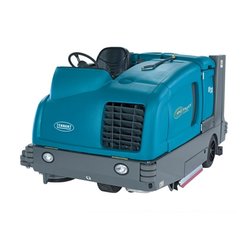
SC750, SC800, SC750 ST, SC800 ST instructions for use
Original instructions. Form no. 56091123. 5/2014 revised 8/2017 REV D.
This manual is printed in four languages: A-English, B-Español, C-Português, D-Français. The English section is pages A-1 to A-25.
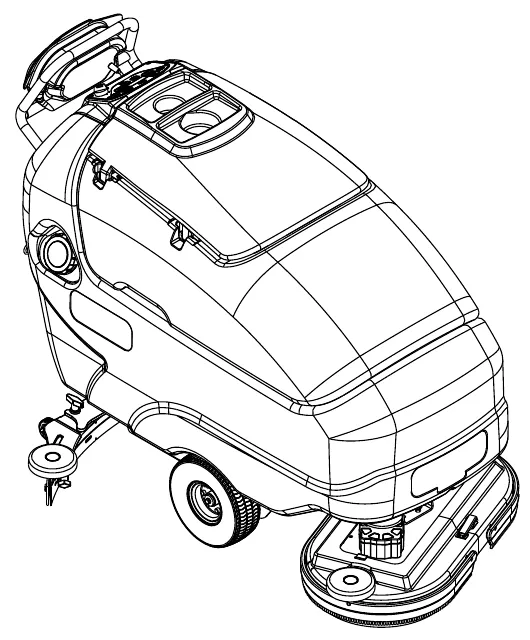
Model numbers
- 56112000 (SC750-26D)
- 56112004 (SC750-28D)
- 56112006 (SC750-28C)
- 56112012 (SC750 ST-26D)
- 56112013 (SC750 ST-28C)
- 56112016 (SC800-28D)
- 56112018 (SC800-28C)
- 56112024 (SC800-32C)
- 56112028 (SC800-34D)
- 56112032 (SC800 ST-34D)
- 56112780 (SC750-28R)
- 56384869 (SC800 ST28C)
- 56384870 (SC800 ST-26D)
- 56384871 (SC800-26D)
- 56384872 (SC800-28R)
This manual is only for machines manufactured after June 2014.
Table of contents
- Introduction – page 3
- Cautions and warnings – pages 4 – 5
- Know your machine – pages 6 – 7
- Control panel – SC750, SC800 – page 8
- Control panel – SC750 ST, SC800 ST – page 9
- Preparing the machine for use
- Operating the machine
- After using the machine – page 20
- Maintenance schedule – page 20
- Servicing the vacuum motor – page 20
- Lubricating the machine – page 20
- Maintenance
- Troubleshooting – page 23
- Technical specifications – page 24
- Material composition – page 24
Introduction
This manual will help you get the most from your Advance™ automatic scrubber/dryer. Read it thoroughly before operating the machine.
Note: Bold numbers in parentheses indicate an item illustrated on pages 6-9 unless otherwise noted.
This product is intended for commercial use only.
Parts and service
Repairs, when required, should be performed by your Authorized Advance Service Center, who employs factory trained service personnel, and maintains an inventory of Advance original replacement parts and accessories.
Call Advance for repair parts or service. Please specify the Model and Serial Number when discussing your machine.
Modifications
Modifications and additions to the cleaning machine which affect capacity and safe operation shall not be performed by the customer or user without prior written approval from Nilfisk Inc. Unapproved modifications will void the machine warranty and make the customer liable for any resulting accidents.
Nameplate
The Model and Serial Number of your machine are shown on the Nameplate in the battery compartment. This information is needed when ordering repair parts for the machine. Use the space below to note the Model and Serial Number of your machine for future reference.
Model: ____________________
Serial Number: ____________________
Unpacking the machine
When the machine is delivered, carefully inspect the shipping packaging and the machine for damage. If damage is evident, save the shipping carton (if applicable) so that it can be inspected. Contact the Advance Customer Service Department immediately to file a freight damage claim. Refer to the unpacking instruction sheet included with the machine to remove the machine from the pallet.
Cautions and warnings
Symbols
Advance uses the symbols below to signal potentially dangerous conditions. Read this information carefully and take the necessary steps to protect personnel and property.
- DANGER! Is used to warn of immediate hazards that will cause severe personal injury or death.
- WARNING! Is used to call attention to a situation that could cause severe personal injury.
- CAUTION! Is used to call attention to a situation that could cause minor personal injury or damage to the machine or other property.
Read all instructions before using.
General safety instructions
Specific Cautions and Warnings are included to warn you of potential danger of machine damage or bodily harm. This machine is for commercial use, for example in hotels, schools, hospitals, factories, shops and offices other than normal residential housekeeping purposes.
- This machine should only be used by properly trained and authorized persons.
- This machine is not intended for use by persons (including children) with reduced physical, sensory or mental capabilities, or lack of experience and knowledge.
- While on ramps or inclines, avoid sudden stops. Avoid abrupt sharp turns. Use low speed down ramps.
- Observe the Gross Vehicle Weight, GVW, of the machine when loading, driving, lifting or supporting the machine.
- Keep sparks, flame and smoking materials away from batteries. Explosive gases are vented during normal operation.
- Charging the batteries produces highly explosive hydrogen gas. Charge batteries only in well-ventilated areas, away from open flame. Do not smoke while charging the batteries.
- Remove all jewelry when working near electrical components.
- Turn the key switch off (O) and disconnect the batteries before servicing electrical components.
- Never work under a machine without safety blocks or stands to support the machine.
- Do not dispense flammable cleaning agents, operate the machine on or near these agents, or operate in areas where flammable liquids exist.
- Do not clean this machine with a pressure washer.
- Do not operate this machine on ramps or inclines of more than a 2 percent gradient.
- Only use the brushes provided with the appliance or those specified in the instruction manual. The use of other brushes may impair safety.
- Do not stare into laser. Class 1 Laser Product IEC 60825-1, 2007 AND 21CFR1040.10
Cautions and warnings (continued)
- This machine is not approved for use on public paths or roads.
- This machine is not suitable for picking up hazardous dust.
- Use care when using scarifier discs and grinding stones. Advance will not be held responsible for any damage to floor surfaces caused by scarifiers or grinding stones.
- When operating this machine, ensure that third parties, particularly children, are not endangered.
- Before performing any service function, carefully read all instructions pertaining to that function.
- Do not leave the machine unattended without first turning the key switch off (O), removing the key and securing the machine.
- Turn the key switch off (O) and remove the key, before changing the brushes, and before opening any access panels.
- Take precautions to prevent hair, jewelry, or loose clothing from becoming caught in moving parts.
- Use caution when moving this machine in below freezing temperature conditions. Any water in the solution, recovery or detergent tanks or in the hose lines could freeze, causing damage to valves and fittings. Flush with windshield washer fluid.
- The batteries must be removed from the machine before the machine is scrapped. The disposal of the batteries should be safely done in accordance with your local environmental regulations.
- Do not use on surfaces having a gradient exceeding that marked on the machine.
- All doors and covers are to be positioned as indicated in the instruction manual before using the machine.
- Refer to the battery charger OEM product manual for additional specific battery charger warnings.
- Any use or adjustments of the Laser other than those specified herein may result in hazardous radiation exposure.
SAVE THESE INSTRUCTIONS
Know your machine
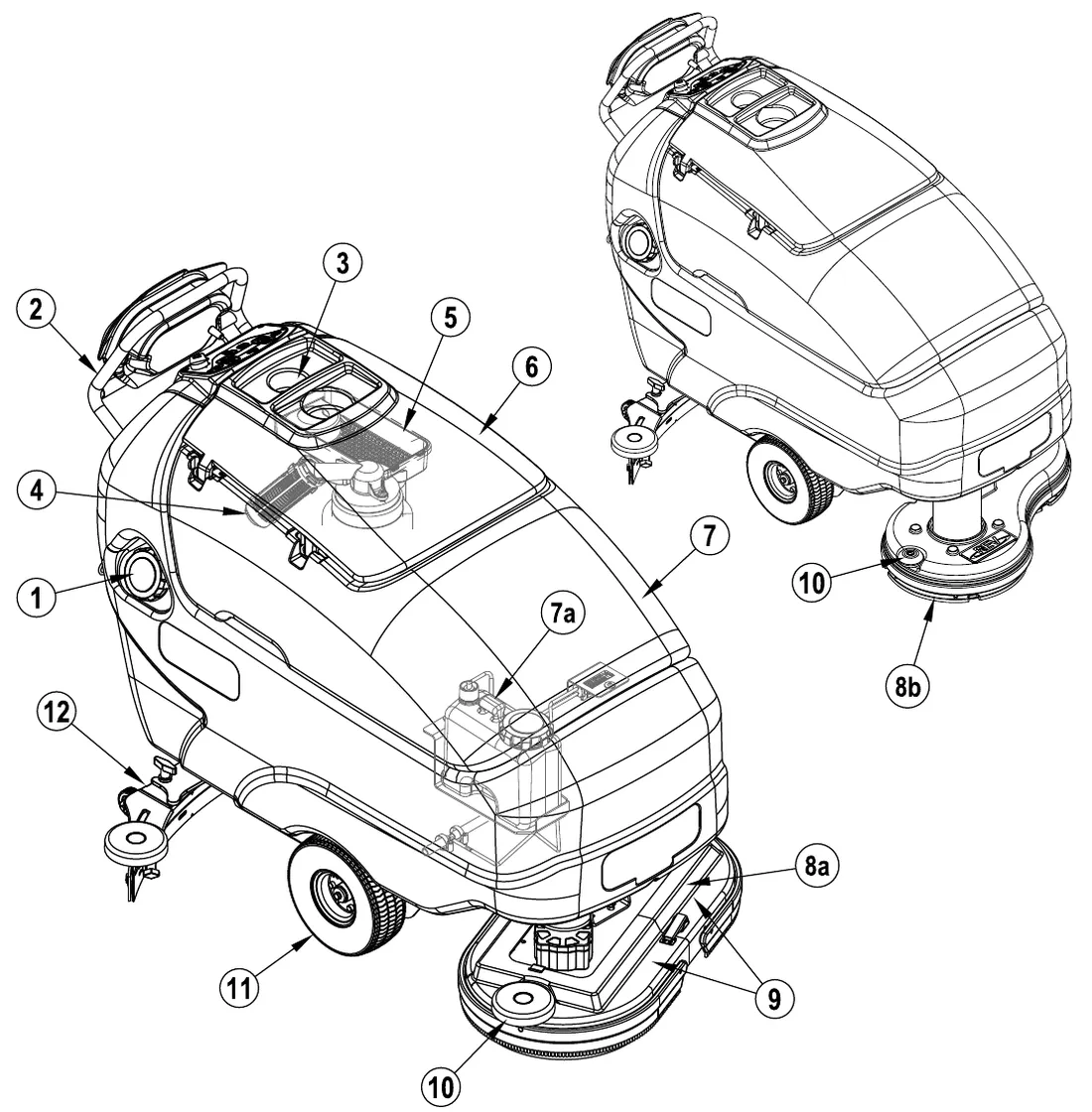
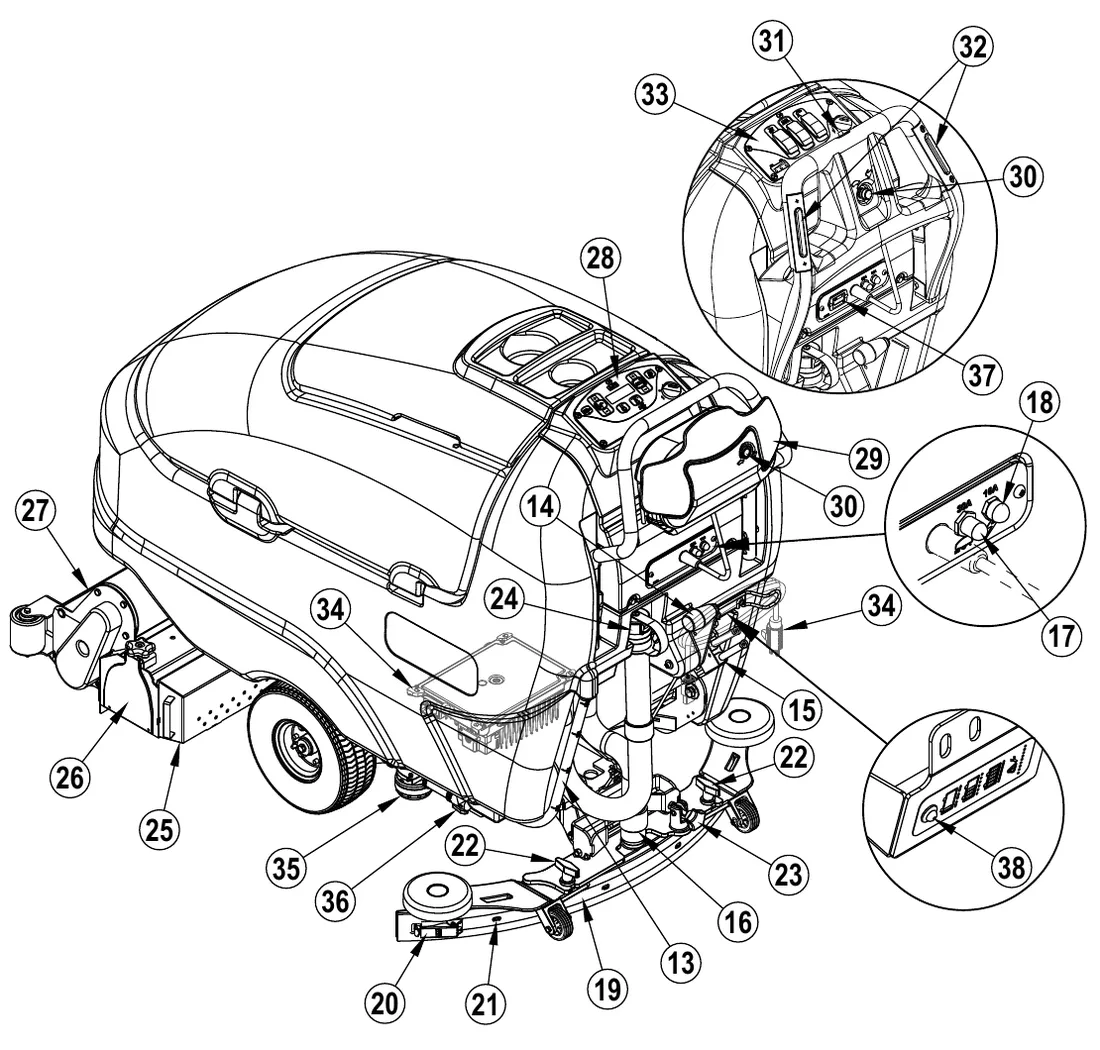
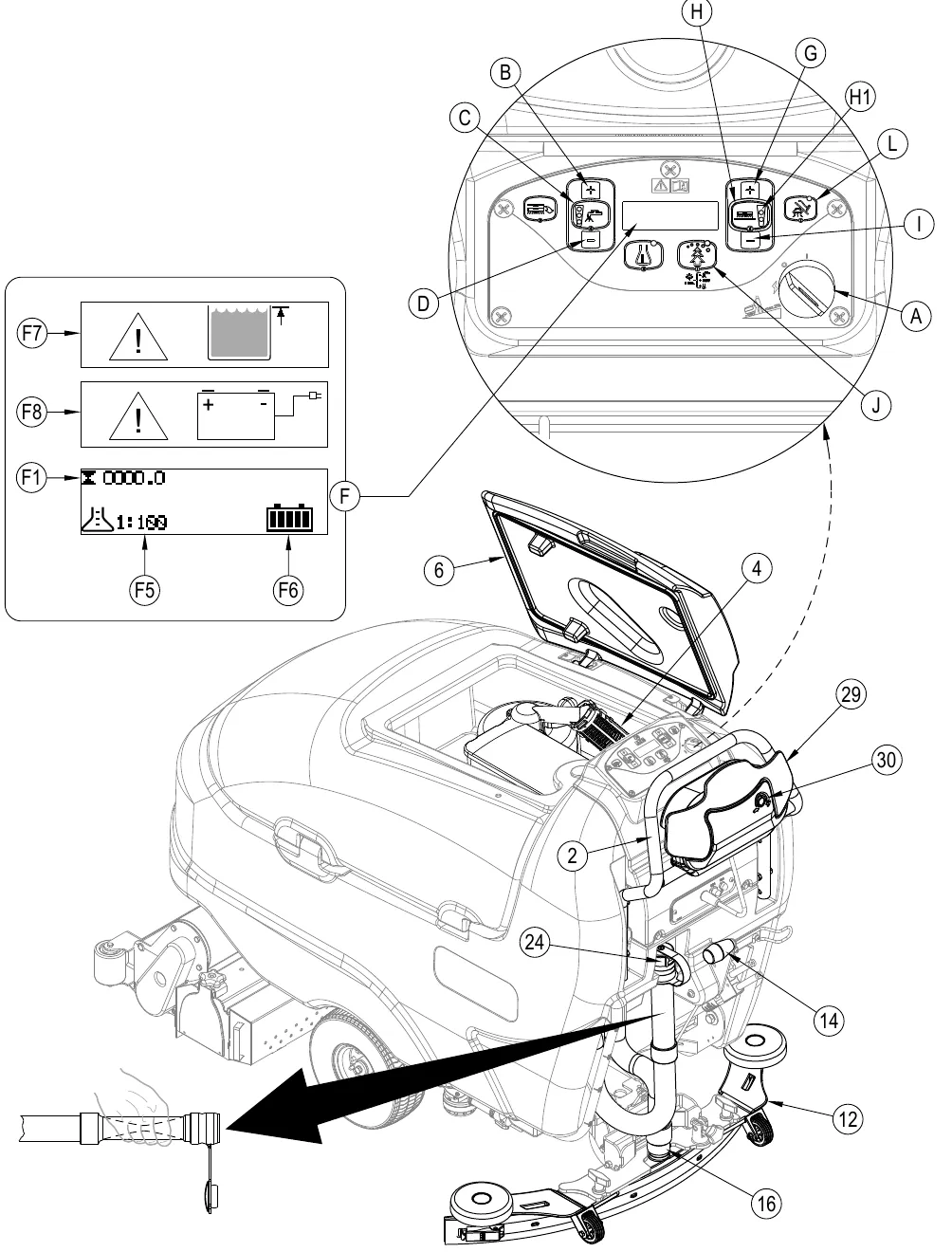
As you read this manual, you will occasionally run across a bold number or letter in parentheses - example: (2). These numbers refer to an item shown on these pages unless otherwise noted. Refer back to these pages whenever necessary to pinpoint the location of an item mentioned in the text. NOTE: Refer to the service manual for detailed explanations of each item illustrated on the next 4 pages.
| Item | Name |
|---|---|
| 1 | Solution Tank Fill |
| 2 | Operator Control Handle |
| 3 | Bottle Holders |
| 4 | Recovery Tank Shutoff Float |
| 5 | Debris Tray |
| 6 | Recovery Tank Lid |
| 7 | Recovery Tank (Detergent Cartridge Access Cover) |
| 7a | Detergent Cartridge (EcoFlex models only) |
| 8a | Scrub Deck (Disc models) |
| 8b | Scrub Deck (REV model) |
| 9 | Brush Housings (include Bristle Skirt) |
| 10 | Scrub Deck Bumper Wheel |
| 11 | Drive Wheel |
| 12 | Squeegee Assembly |
Know your machine (continued)
| Item | Name |
|---|---|
| 13 | Solution Drain Hose / Level Indicator |
| 14 | Squeegee Raise / Lower Lever |
| 15 | Battery Pack Connector |
| 16 | Recovery Hose |
| 17 | Wheel Drive Circuit Breaker (30 Amp) |
| 18 | Control Circuit Circuit Breaker (10 Amp) |
| 19 | Squeegee Blade Tension Strap |
| 20 | Squeegee Blade Latch |
| 21 | Squeegee Blade Alignment Pins |
| 22 | Squeegee Mount Thumb Nut |
| 23 | Squeegee Adjustment Knob |
| 24 | Recovery Tank Drain Hose |
| 25 | Debris Hopper (Cylindrical Models Only) |
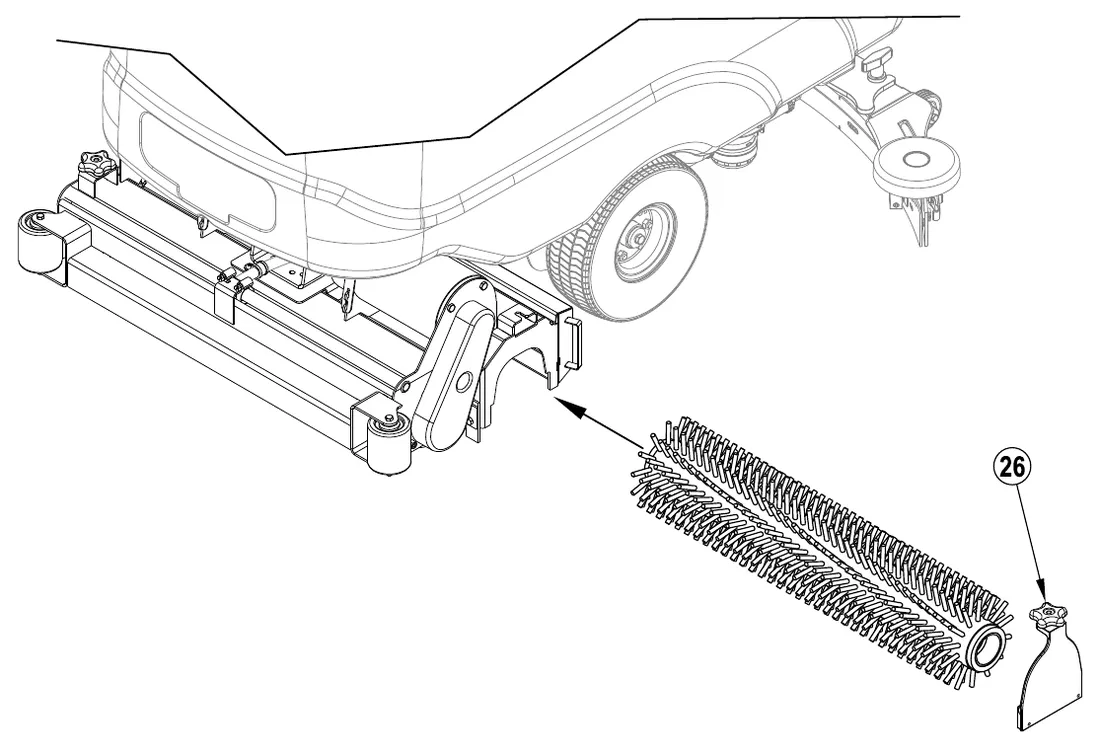
| 26 | Idler Assembly (Cylindrical Models Only) |
| 27 | Solution Manifold (Cylindrical Models Only) |
| 28 | Control Panel (SC750, SC800) |
| 29 | Drive Paddle |
| 30 | Speed Limit Control Knob |
| 31 | Reverse Button (SC750 ST, SC800 ST) |
| 32 | Palm Drive Buttons (SC750 ST, SC800 ST) |
| 33 | Control Panel (SC750 ST, SC800 ST) |
| 34 | Onboard Battery Charger (Not found on all models) |
| 35 | Solution Filter |
| 36 | Solution Shut-off Valve |
| 37 | Hour Meter (Optional on ST Models) |
| 38 | Battery Charge Status LED (SC750, SC800) |
Control panel – SC750, SC800
| Item | Name |
|---|---|
| A | Key Switch (Main Power) |
| B | Solution Increase Switch |
| C | Solution ON/OFF Switch |
| C1 | Solution Flow Indicators (Normal, Heavy & Extreme) |
| D | Solution Decrease Switch |
| E | Detergent ON/OFF Switch |
| F | Display Panel |
| F1 | Hour Meter |
| F2 | Solution Tank Level Indicator |
| F3 | Fault Codes |
| F4 | Detergent Indicator (if so equipped) |
| F5 | Detergent Ratio Indicator |
| F6 | Battery Indicator |
| F7 | Recovery Tank FULL Indicator |
| F8 | Battery Low Indicator |
| G | Scrub Pressure Increase Switch |
| H | Scrub ON/OFF Switch (Disc System - Regular & Heavy) (Cylindrical System - 1 Pressure Sensing) |
| H1 | Scrub Pressure Indicator |
| I | Scrub Pressure Decrease Switch |
| J | EcoFlex Switch |
| K | Brush Remove Switch (Disc Decks Only) (Brush Remove Switch is disabled on REV model) |
| L | Vacuum/Wand Switch |
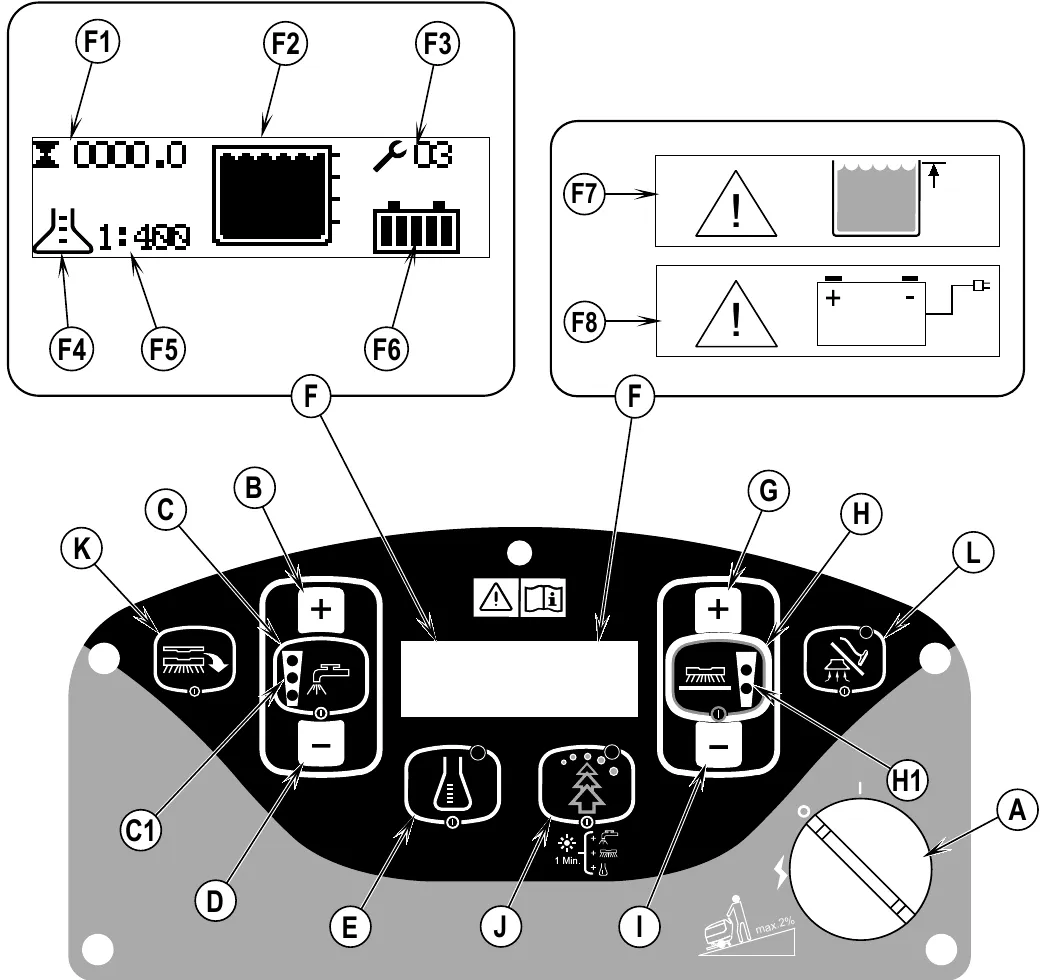
The panel carries a label showing a gradient limit of max. 2%.
Control panel – SC750 ST, SC800 ST
| Item | Name |
|---|---|
| A | Key Switch (Main Power) |
| B | Solution ON/OFF Switch (Low, Medium & High) |
| B1 | Solution Flow Indicator |
| C | Vacuum/Wand Switch |
| C1 | Vacuum Motor Disabled Indicator |
| D | Scrub ON/OFF Switch (Disc System - Regular & Heavy) (Cylindrical System - 1 Pressure Sensing) |
| D1 | Scrub Pressure Indicator |
| E | Battery Indicator |
| F | Fault Code Indicator |
Scrub pressure and solution flow settings
Indicator lights are shown as printed: ● filled circle, ○ open circle (upper light first).
| Switch | Setting | Presses | Indicator lights as printed |
|---|---|---|---|
| Scrub ON/OFF (D) | Cylindrical Scrub Pressure | press once | ● ● |
| Heavy Disc Scrub Pressure | press twice | ● ● | |
| Regular Disc Scrub Pressure | press once | ○ ● | |
| Solution ON/OFF (B) | High Solution Flow | press three times | ● ● ● |
| Medium Solution Flow | press twice | ○ ● ● | |
| Low Solution Flow | press once | ○ ○ ● |
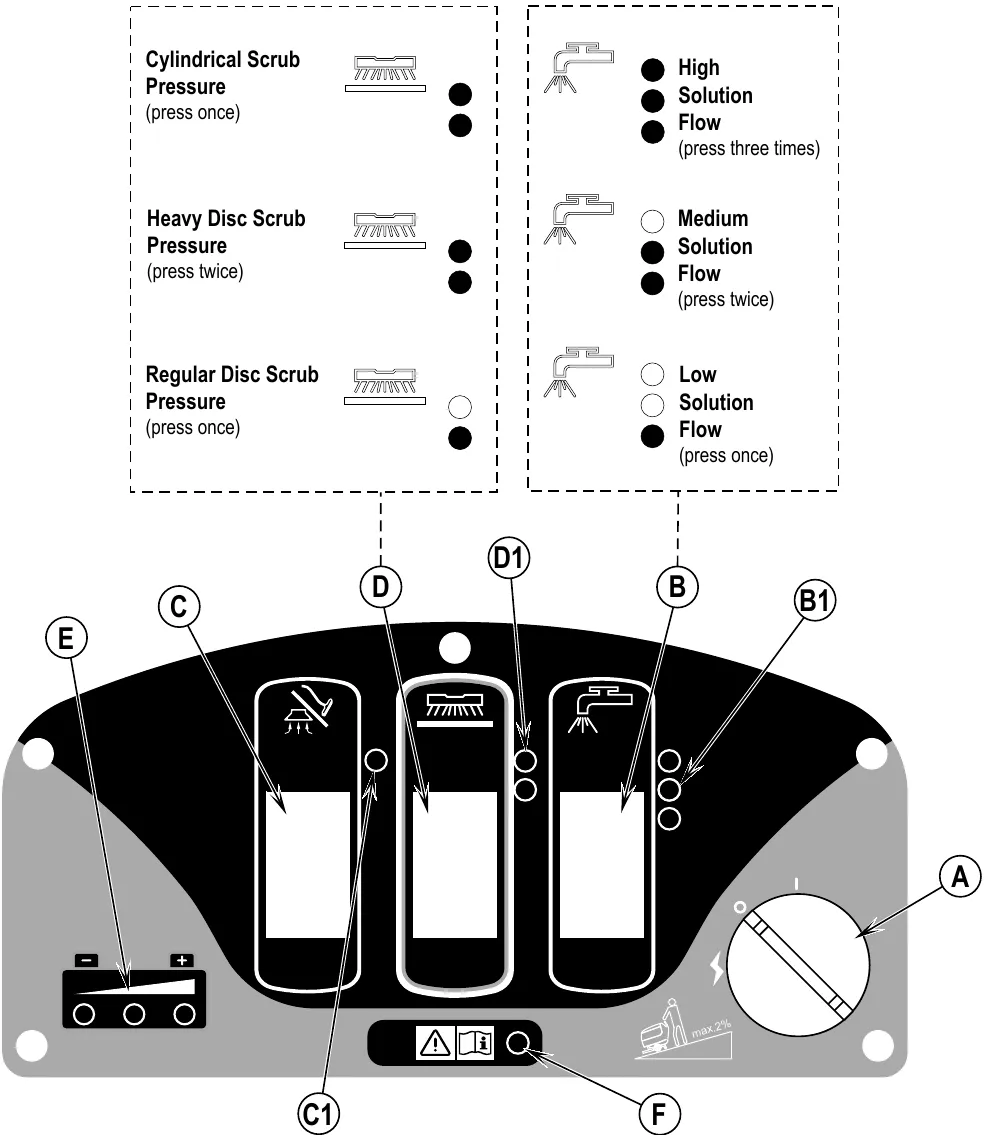
The panel carries a label showing a gradient limit of max. 2%.
Batteries
If your machine shipped with batteries installed do the following:
- Check that the batteries are connected to the machine (15).
- Turn ON the Key Switch (A) and check the Battery Indicator (F6 or E). If the gauge is completely filled or the green light is ON, the batteries are ready for use. If the gauge is less than full or the green light is OFF, the batteries should be charged before use. See the “Charging The Batteries” section.
IMPORTANT!: IF YOUR MACHINE HAS AN ONBOARD BATTERY CHARGER REFER TO THE OEM PRODUCT MANUAL FOR INSTRUCTIONS REGARDING SETTING THE CHARGER FOR BATTERY TYPE.
If your machine shipped without batteries installed do the following:
- Consult your Authorized Advance dealer for recommended batteries.
- Install the batteries by following the instructions below.
IMPORTANT!: IF YOUR MACHINE HAS AN ONBOARD BATTERY CHARGER REFER TO THE OEM PRODUCT MANUAL FOR INSTRUCTIONS REGARDING SETTING THE CHARGER FOR BATTERY TYPE.
When Servicing Batteries...
- Remove all jewelry
- Do not smoke
- Wear safety glasses, rubber gloves and a rubber apron
- Work in a well-ventilated area
- Do not allow tools to touch more than one battery terminal at a time
- ALWAYS disconnect the negative (ground) cable first when replacing batteries to prevent sparks.
- ALWAYS connect the negative cable last when installing batteries.
- Remove the batteries from their shipping crate and carefully inspect them for cracks or other damage. If damage is evident, contact the carrier that delivered them or the battery manufacturer to file a damage claim.
- Turn the Master Key Switch (A) OFF and remove the key.
- Disconnect the Battery Pack Connector (15)
- Tip the recovery tank to the side, locked position. Remove the battery cables from inside the battery compartment.
- Your machine comes from the factory with enough battery cables to install four 6 volt batteries. Carefully lift the batteries into the battery compartment and arrange them exactly as shown in FIGURE 1. Secure the batteries as close to the back of the machine as possible.
- Install the battery cables as shown. Position the cables so the battery caps can be easily removed for battery service.
- Carefully tighten the nut in each battery terminal until the terminal will not turn. Do not over-tighten the terminals, or they will be very difficult to remove for future service.
- Coat the terminals with spray-on battery terminal coating (available at most auto parts stores).
- Put one of the black rubber boots over each of the terminals and connect the Battery Pack Connector (15).
When changing batteries or the charger, please contact your local authorized service center for correct battery, charger and machine settings to prevent battery damage.
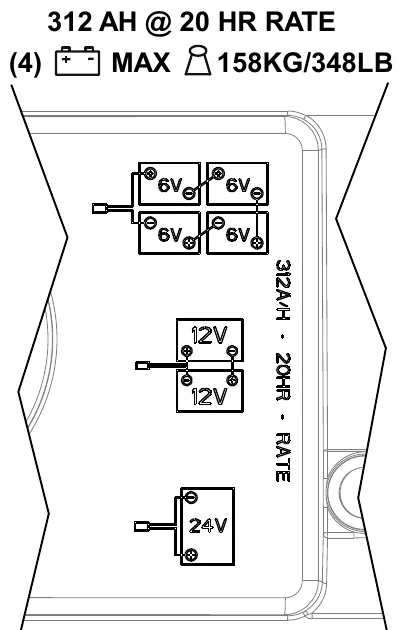
Figure 1 is marked: 312 AH @ 20 HR RATE; (4) battery symbol, MAX weight symbol, 348 lb (158 kg). The layouts shown are four 6V batteries, two 12V batteries, or one 24V battery.
Installing the brushes (disc system)
- Make sure the Scrub Deck (8a) is in the RAISED position. Make sure the Key Switch (A) is off (O).
- If using pads, install the pads on the pad holders.
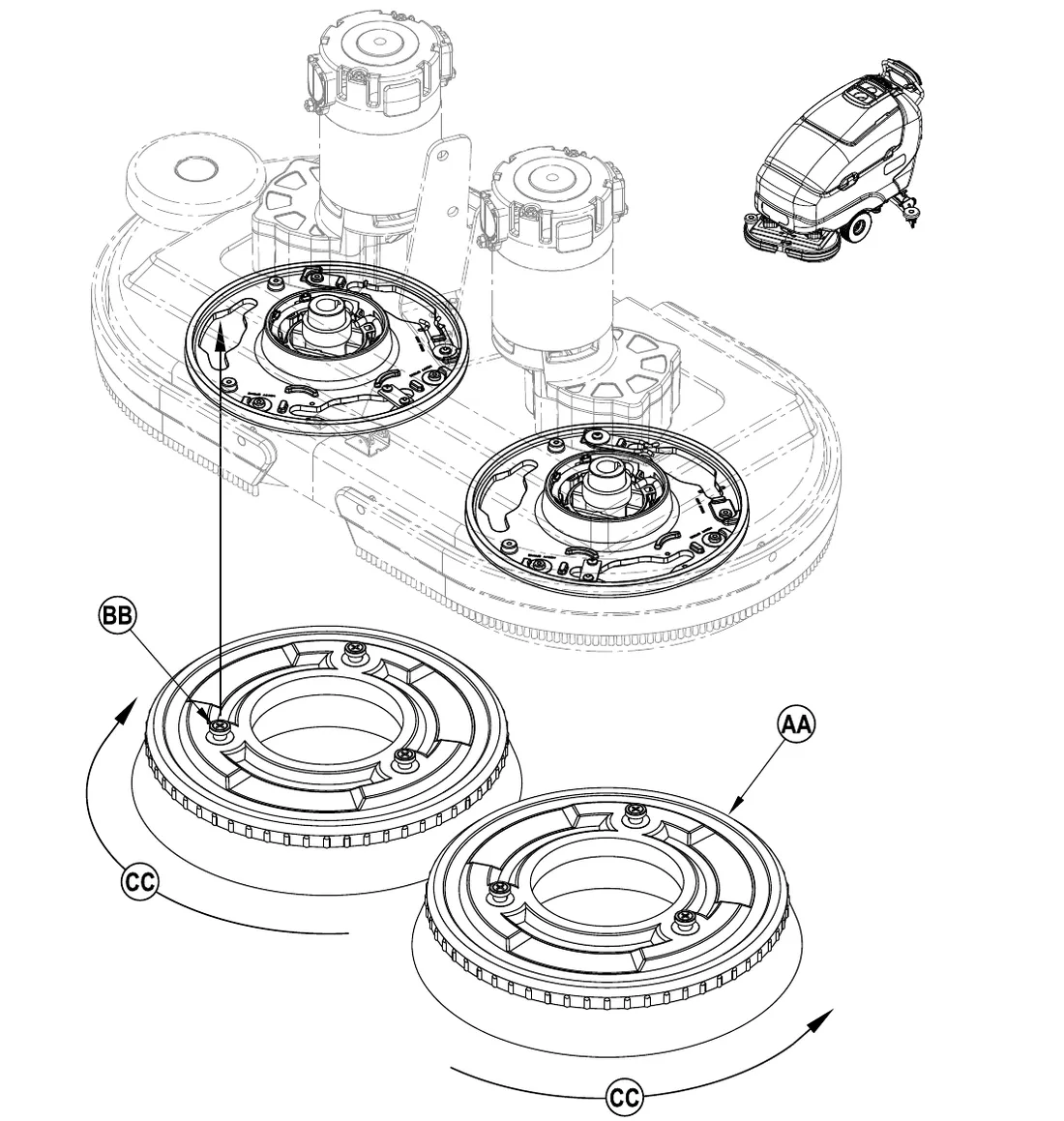
- See Figure 2. To mount the Brushes (AA) (or pad holders) align the Lugs (BB) on the brush with the holes on the mounting plate and turn to lock in place (turn the outside edge of brush towards the rear of machine as shown (CC)).
Install the brushes (cylindrical system)
- Make sure the Brush Deck is in the RAISED position. Make sure the Key Switch (A) is off (O).
- See Figure 3. To access the brushes loosen the black knobs (one on each side) on top of the idler assemblies (26) and remove the idler assemblies. Slide the brush into the housing, lift slightly, push and turn until it seats. Re-install the idler assemblies.
Installing the pads (REV system)
- Make sure the Scrub Deck (8b) is in the RAISED position. Make sure the Key Switch (A) is off (O).
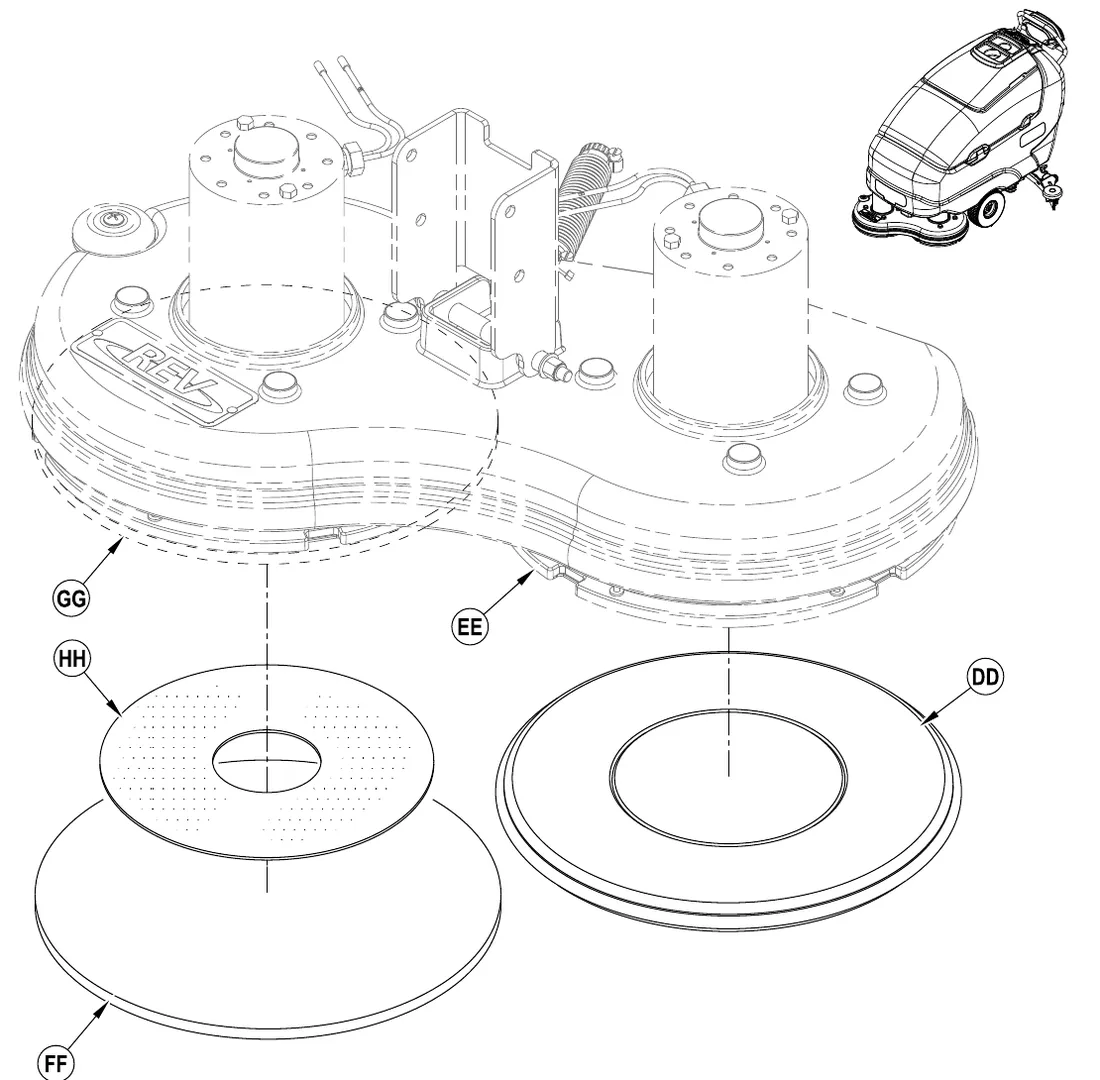
- See Figure 4. If using the Microfiber Pad (DD), install directly to the Pad Driver Assembly (EE).
- If using the Maroon Pad (FF), install the standard Red Pad (GG) to the Pad Driver Assembly (EE) first and use the 2 Sided Velcro (HH) between the red pad and maroon pad to hold it in place.
NOTE: If the Maroon SPP pad is not installed as defined above, damage to the pad driver will result!
Installing the optional REV brushes (REV system)
- Make sure the Scrub Deck (8b) is in the RAISED position. Make sure the Key Switch (A) is off (O).
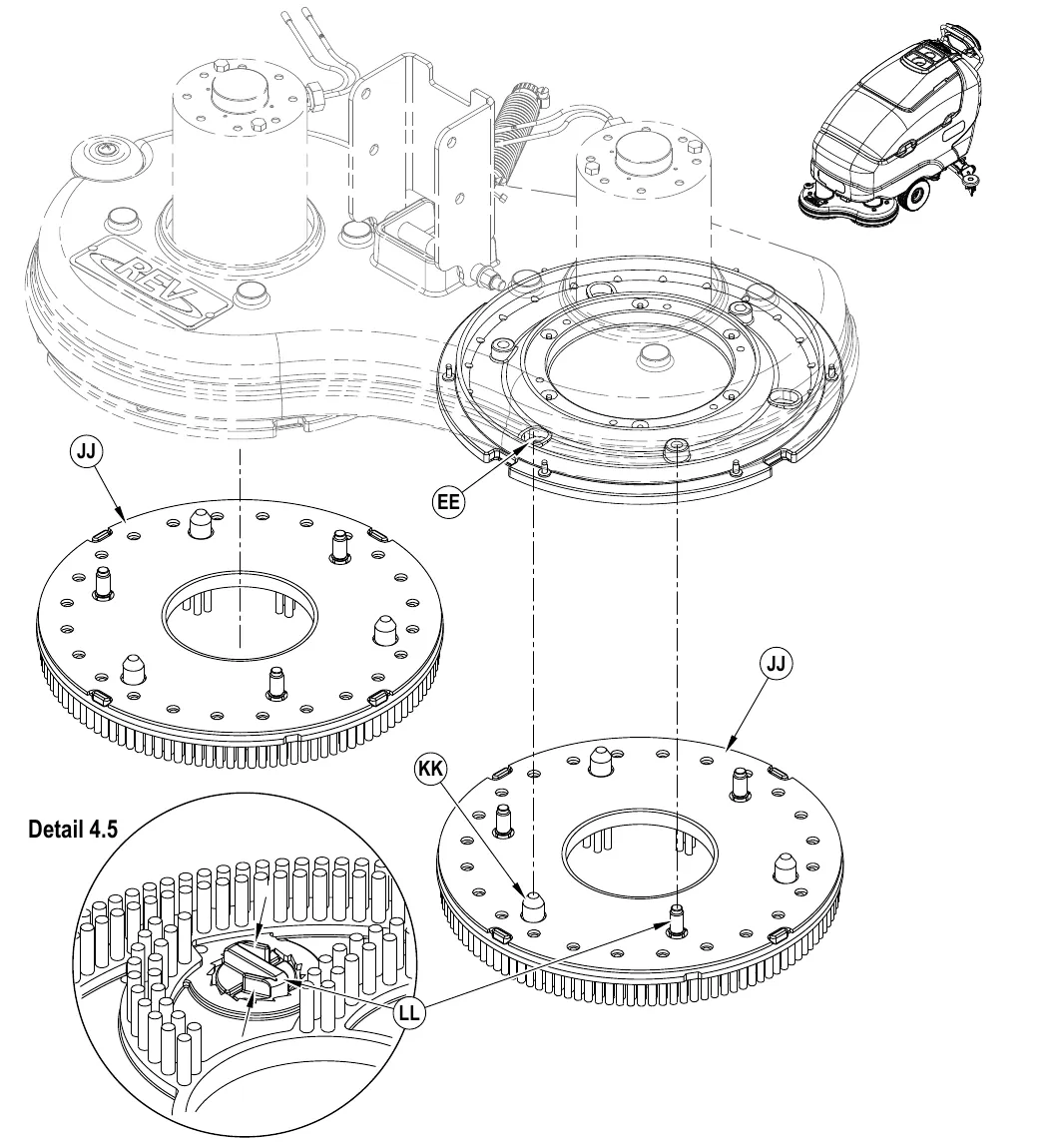
- See Figure 4.5. To install the REV Brushes (JJ) align the Lugs (KK) on the brush with the clearance holes on the Pad Driver Assembly (EE) as shown. Turn the Brush Screw (LL) clockwise until tight and in a locked position. NOTE: Hand tighten only! Damage to the retaining fastener may result if mechanical means for tightening are used.
- See Detail 4.5. To remove the REV Brushes (JJ), squeeze in on the tabs of the Brush Screw (LL) to unlock keeping pressure on the tabs while turning the screw counter clockwise to Loosen until the brushes can be removed.
NOTE: The Brush Screw (LL) is designed to stay locked in place when operating the REV Scrub System.
Filling the solution tank
Fill the solution tank with a maximum of 21 gallons (79.5 Liters) for SC750/SC750 ST models and 25 gallons (94.6 Liters) for SC800/SC800 ST models of cleaning solution. Do not fill the solution tank above 3 inches (7.5 cm) from the bottom of the Solution Fill (1). The solution should be a mixture of water and the proper cleaning chemical for the job. Always follow the dilution instructions on the chemical container label. NOTE: EcoFlex machines can either be used conventionally with detergent mixed in the tank or the detergent dispensing system can be used. When using the detergent dispensing do not mix detergent in the tank, plain water should be used.
Squeegee installation
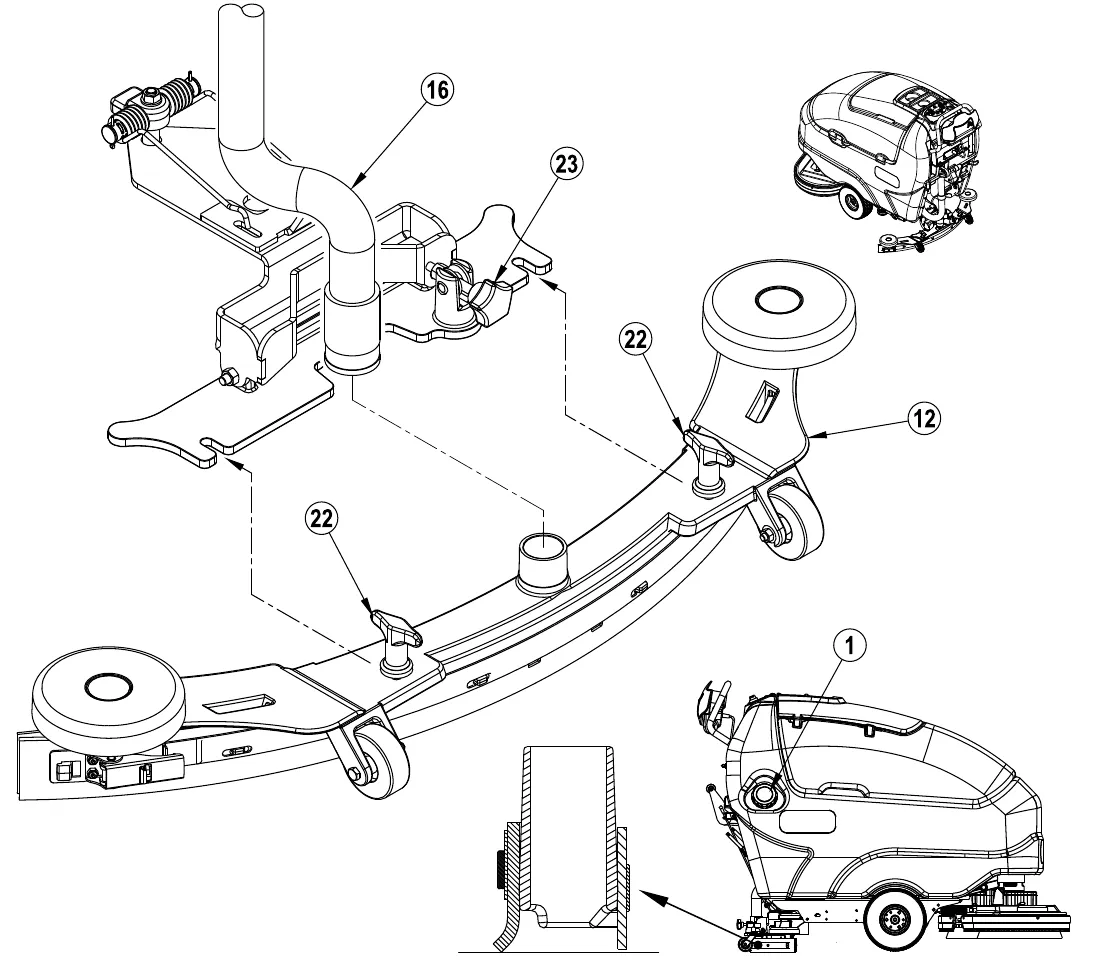
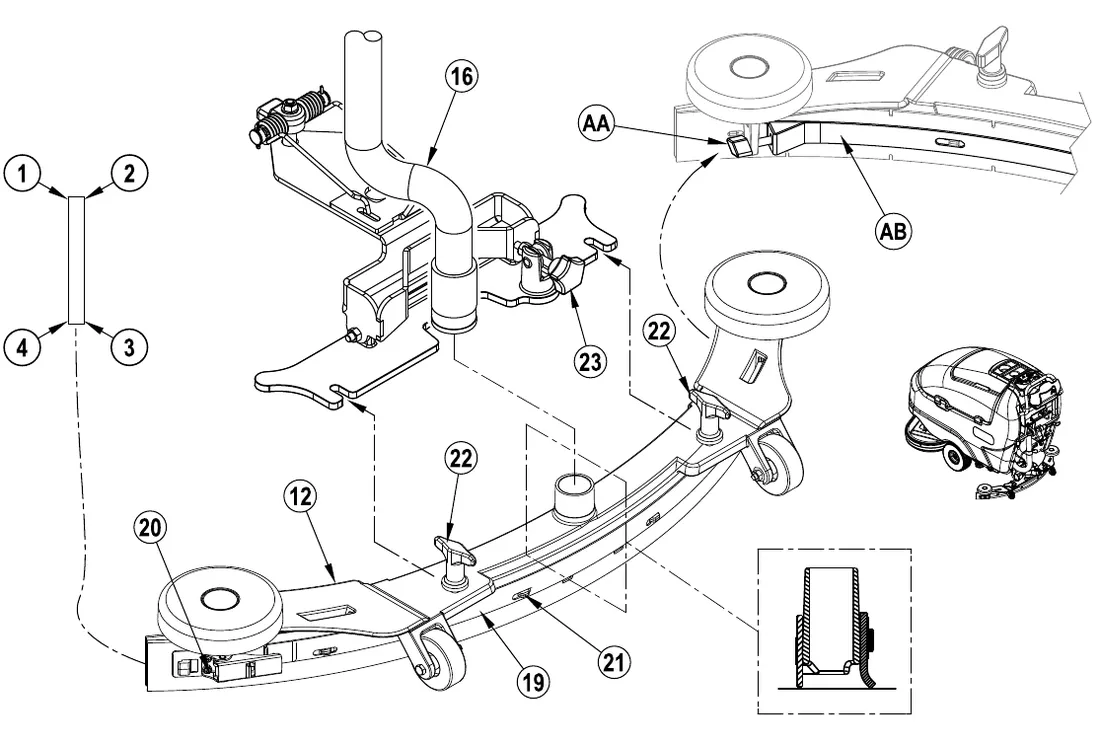
- See Figure 5. Slide the Squeegee Assembly (12) onto the squeegee mount bracket and tighten the Squeegee Mount Thumb Nuts (22).
- Connect the Recovery Hose (16) to the squeegee inlet.
- Lower the squeegee, move the machine ahead slightly and adjust the squeegee tilt using the Squeegee Adjustment Knob (23) so that the rear squeegee blade touches the floor evenly across its entire width and is bent over slightly as shown.
Detergent system preparation and use (EcoFlex models only)
Common instructions
Pressing and releasing the Detergent Switch (E) while the solution system is active will cause the detergent system to alternately turn on and off. The system should be purged of previous detergent when switching to a different detergent. SERVICE NOTE: Move machine over floor drain before purging because a small amount of detergent will be dispensed in the process.
To purge when changing chemicals
- Disconnect and remove the detergent cartridge.
- Turn the Key Switch (A) ON. Press and hold the Solution Switch (C) and the Detergent Switch (E) down for 3 seconds. NOTE: Once activated the purge process takes 10 seconds. See illustration on next page for Detergent System indicators. Normally one purge cycle is adequate to purge the system.
To purge weekly
- Disconnect and remove the detergent cartridge. Install and connect a Cartridge filled with clean water
- Turn the Key Switch (A) ON. Press and hold the Solution Switch (C) and the Detergent Switch (E) down for 3 seconds. NOTE: Once activated the purge process takes 10 seconds. See illustration on next page for Detergent System indicators. Normally one purge cycle is adequate to purge the system.
When the Detergent Cartridge is almost empty a Display Panel (F) indicator will come on. This “Low Detergent” indicator will remain on until you reset the system. Once this indicator comes on you should be able to simply pour an entire gallon bottle of detergent into the Cartridge to refill without worrying about measuring. NOTE: Only reset the system when the cartridge is full. When switching cartridges, the “Low Detergent” indicator is only accurate if the replacement cartridge is at the same level as the cartridge being replaced.
To reset
- Turn the Key Switch (A) ON. Press and hold together the Solution Increase Switch (B) and the Solution Decrease Switch (D) down for 3 seconds. See illustration on next page for Detergent System indicators.
Detergent ratio
- The detergent ratio is locked at 1:400, except while overriding the EcoFlex cleaning mode. The pre-programmed ratio that is used during EcoFlex override can be adjusted. With the detergent system OFF, press and hold the Detergent ON/OFF Switch (E) for 2 seconds. The detergent indicator will flash and each press of the switch will cycle through the available ratios (1:32, 1:50, 1:64, 1:100, 1:128, 1:150, 1:200, 1:256, 1:300, 1:400). Once the desired ratio is displayed on the screen (F5), stop and it will lock in after 5 seconds.
- With EcoFlex in the OFF/disabled state (LED off) the detergent ratio is adjustable. With the detergent system OFF, press and hold the Detergent ON/OFF Switch (E) for 2 seconds. The detergent indicator will flash and each press of the switch will cycle through the available ratios (see above). Once the desired ratio is displayed on the screen (F5), stop and it will lock in after 5 seconds.
Cartridge specific instructions
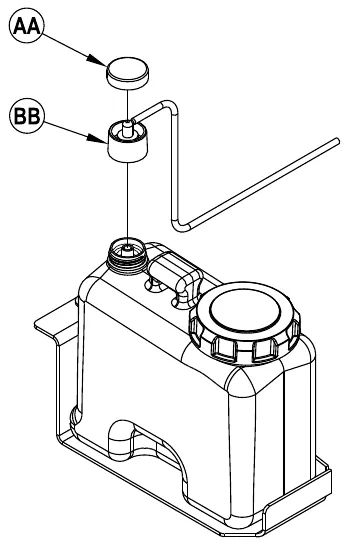
Fill the detergent cartridge with a maximum of 1.25 gallons (4.73 Liters) of detergent. SERVICE NOTE: Remove the detergent cartridge from the detergent box prior to filling to avoid spilling detergent on the machine.
It is recommended that a separate cartridge be used for each detergent you plan to use. The detergent cartridges have a white decal on them so you can write the detergent name on each cartridge to avoid mixing them up. When installing a new cartridge, remove the Cap (AA) and place the cartridge in the detergent box. Install the Dry Break Cap (BB) as shown.
Detergent system preparation and use (EcoFlex models only)
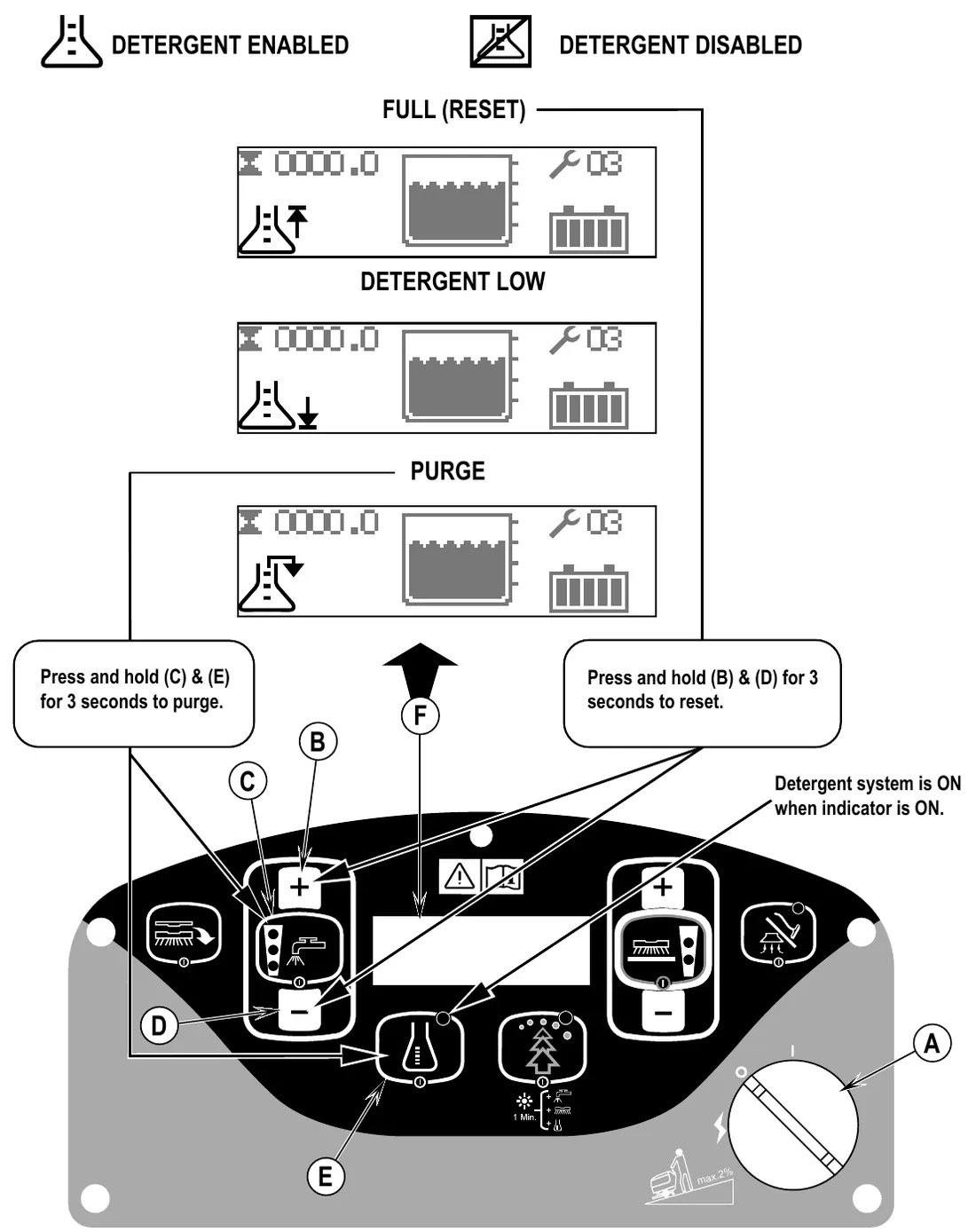
What the illustration shows:
- Symbols: Detergent enabled, Detergent disabled.
- Display panel (F) screens: Full (reset), Detergent low, Purge.
- Press and hold (C) & (E) for 3 seconds to purge.
- Press and hold (B) & (D) for 3 seconds to reset.
- Detergent system is ON when indicator is ON.
- The ramp decal on the panel is marked max. 2%.
Wet scrubbing
To Scrub…
- Follow the instructions in the “Preparing the Machine for Use” section of this manual.
- a. SC750, SC800 models: Turn the Master Key Switch (A) ON (I). This will display the control panel indicator lights, reference the Battery Condition Indicator (F6) and Hour Meter (F1) before proceeding.
- a. To transport the machine to the work area, push the Drive Paddle (29) forward to go forward or pull the Drive Paddle (29) backward to move the machine in reverse. Vary the pressure on the Drive Paddle (29) to obtain the desired speed. NOTE: Speed Control Knob (30) is used to control the maximum speed in either forward or reverse.
- a. Press and hold the Solution Switch (C) for 5 seconds to pre-wet the floor. NOTE: This must be done prior to pressing the Scrub ON/OFF Switch (H).
- a. Press the Scrub ON/OFF Switch (H), the scrub pressure will default to Normal (one scrub pressure indicator lit). Use the Scrub Pressure Increase Switch (G) and Scrub Pressure Decrease Switch (I) to change between Regular and Heavy Scrub modes. Only one pressure sensing is available for cylindrical machines. The solution flow rate will automatically adjust to coincide with the scrub pressure.
NOTE: The solution flow rate can be changed independently of the scrub pressure by pressing the Solution Increase Switch (B) or Solution Decrease Switch (D). Any subsequent scrub pressure adjustments will reset the solution flow rate to correspond with the scrub pressure.
NOTE: The scrub, solution, vacuum and detergent (EcoFlex models) systems are automatically enabled when the Scrub ON/OFF Switch (H) is pressed. Any individual system can be turned OFF or back ON by simply pressing its switch at any time during scrubbing. No further action is required other than lowering the squeegee (12).
- a. Lower the squeegee with the Squeegee Raise / Lower Lever (14).
- a. When the Drive Paddle (29) is in the neutral position, the scrub, vacuum, solution and detergent (EcoFlex models) systems are activated but not running. Grip the Operator Control Handle (2) and push the Drive Paddle (29) forward to start the scrub, vacuum, solution and detergent (EcoFlex models), and to move the machine forward. For best results, move the machine at a slow walking speed. Press the Solution Switch (C) once to turn OFF while making sharp turns. Pull the Drive Paddle (29) backward to move the machine in reverse. The brushes will run while moving the machine in reverse, but solution and chemical will not be dispensed.
- b. ST models: Turn the Master Key Switch (A) ON (I). This will display the control panel indicator lights, reference the Battery Indicator (E) before proceeding.
- b. To transport the machine to the work area, push either of the Palm Buttons (32) to go forward or press either Palm Button (32) and the Reverse Button (31) to move the machine in reverse. NOTE: Speed Control Knob (30) is used to control the maximum speed in either forward or reverse.
- b. Press and hold the Solution Switch (B) for 5 seconds to pre-wet the floor. NOTE: This must be done prior to pressing the Scrub ON Switch (D).
- b. Press the Scrub ON Switch (D) once for Regular Scrub Pressure (one scrub pressure indicator lit) or twice for Heavy Scrub Pressure (two scrub pressure indicators lit). Only one pressure sensing is available for cylindrical machines. Once the scrub system is activated, pressing the Solution Switch (B) will toggle between solution off, low, medium and high solution flow rates.
NOTE: The solution and vacuum systems are automatically activated when the Scrub ON Switch (D) is pressed. No further action is required other than lowering the squeegee (12). Any individual system can be turned OFF or back ON by simply pressing its switch at any time during scrubbing.
- b. Lower the squeegee with the Squeegee Raise / Lower Lever (14).
- b. When the Palm Buttons (32) are not being pressed (machine stationary), the scrub, vacuum and solution systems are activated but not running. Grip the Operator Control Handle (2) and press either of the Palm Buttons (32) to start the scrub, vacuum, solution, and to move the machine forward. For best results, move the machine at a slow walking speed. Press either palm button plus the reverse button to move the machine in reverse. The brushes will run while moving the machine in reverse, but solution will not be dispensed.
- When scrubbing, check behind the machine occasionally to see that all of the waste water is being picked up. If there is water trailing the machine, you may be dispensing too much solution, the recovery tank may be full, or the squeegee tool may require adjustment.
- EcoFlex models only: The machine defaults to the EcoFlex cleaning mode (EcoFlex Switch Indicator is lit GREEN) conserving solution and detergent. Press the EcoFlex Switch (J) to override the EcoFlex cleaning mode and temporarily increase scrub pressure, solution flow and the detergent ratio. This will cause the indicator to flash (YELLOW) for one minute, solution flow rate will increase to the next level, scrub pressure will increase to the next level and the detergent ratio will increase to the pre-programmed ratio. The pre-programmed ratio that is used during EcoFlex override can be adjusted. With the detergent system OFF, press and hold the Detergent ON/OFF Switch (E) for 2 seconds. The detergent indicator will flash and each press of the switch will cycle through the available ratios (1:32, 1:50, 1:64, 1:100, 1:128, 1:150, 1:200, 1:256, 1:300, 1:400). Once the desired ratio is displayed on the screen (F5), stop and it will lock in after 5 seconds.
NOTE: Pressing and holding the EcoFlex Switch (J) for 2 seconds disables the EcoFlex system. The only way to re-enable is to push the EcoFlex Switch (J) again. Cycling the Key Switch (A) does not re-enable the system. The EcoFlex system will only function if the Scrub System (H) has been enabled.
- For extremely dirty floors, a one-pass scrubbing operation may not be satisfactory and a “double-scrub” operation may be required. This operation is the same as a one-pass scrubbing except on the first pass the squeegee is in the up position. This allows the cleaning solution to remain on the floor to work longer. The final pass is made over the same area, with the squeegee lowered to pick up the accumulated solution.
- The recovery tank has a shut-off float (4) that causes a change in pitch in the vac motor. When this float is activated, the recovery tank must be emptied. The machine will not pick up water with the float activated.
- When the operator wants to stop scrubbing or the recovery tank is full;
SC750, SC800 models: Press the Scrub ON/OFF Switch (H) once. This will automatically stop the scrub motors and the solution flow and the deck will raise to its upper limit. NOTE: The vacuum will stop after a 10 second delay. This is to allow any remaining water to be picked up without turning the vacuum back on.
SC750 ST, SC800 ST models: Press the Scrub ON/OFF Switch (D) once to the down position when it is in the regular scrub mode. This will automatically stop the scrub motors and the solution flow and the deck will raise to its upper limit. NOTE: The vacuum will stop after a 10 second delay. This is to allow any remaining water to be picked up without turning the vacuum back on.
- Raise the squeegee with the Squeegee Raise / Lower Lever (14). and drive the machine to a designated wastewater “DISPOSAL SITE” and empty the recovery tank. To empty, pull the Recovery Tank Drain Hose (24) from its hanger and open the cap (hold the end of the hose above the water level in the tank to avoid sudden, uncontrolled flow of waste water). The Recovery Tank Drain Hose (24) can be squeezed to regulate the flow. Refill the solution tank and continue scrubbing.
Wet scrubbing
NOTE: Make sure the Recovery Tank Lid (6) and the Recovery Tank Drain Hose (24) cap are properly seated or the machine will not pick-up water correctly. When the batteries require recharging the Battery LOW Indicator (F8) will come on (SC750, SC800 models) or the Battery Indicator (E) will flash red (Standard models) and the vacuum motor will shut off after 30 seconds. Transport the machine to a service area and recharge the batteries according to the instructions in the Battery section of this manual.
Wet vacuuming
Fit the machine with optional attachments for wet vacuuming.
- Disconnect the Recovery Hose (16) from the Squeegee (12).
- Attach suitable wet pick-up tools to the hose (Available from Advance).
- Turn the Master Key Switch (A) ON.
- Press the Vacuum/Wand Switch (L) (SC750, SC800 models) or (C) (SC750 ST, SC800 ST models) once to turn ON the vacuum motor. The vacuum motor will run continuously until the switch is pressed again to turn it OFF.
NOTE: The “Recovery Tank FULL” indicator is disabled when the wand mode is activated. The float will stop the flow into the recovery tank.
SERVICE NOTE: Refer to the service manual for detailed functional descriptions of all controls and optional programmability.
After use
- Raise the brushes (or pads) and raise the squeegee. Move the machine to a service area.
- Turn the Master Key Switch (A) OFF and remove the key.
- To empty the solution tank, pull the Solution Drain Hose (13) off the upper connector. Direct the hose to a floor drain or bucket. Rinse the tank with clean water. Inspect the solution hoses; replace if kinked or damaged.
- To empty the recovery tank, remove the Recovery Tank Drain Hose (24) from its hanger and remove the cap (hold the end of the hose above the water level in the tank to avoid sudden, uncontrolled flow of waste water). The Recovery Tank Drain Hose (24) can be squeezed to regulate the flow. Rinse the recovery tank and shut-off float (4) with clean water. Inspect the recovery and vacuum hoses; replace if kinked or damaged.
- Remove the brushes or pad holders. Rinse the brushes or pads with warm water and hang up to dry. Allow buffing pads to dry completely before using again. NOTE: You can either remove the brushes manually or automatically by pressing the Brush Remove Switch (K) (SC750, SC800 disk models only).
- Remove the squeegee, rinse it with warm water and hang it up to dry.
- Check the maintenance schedule below and perform any required maintenance before storage.
Maintenance schedule
| Maintenance item | Daily | Weekly | Monthly | Yearly |
|---|---|---|---|---|
| Charge Batteries | X | |||
| Check/Clean Tanks & Hoses | X | |||
| Check/Clean/Rotate the Brushes/Pads | X | |||
| Check/Clean the Squeegee | X | |||
| Check/Clean Vacuum Shut-Off Float | X | |||
| Empty/Clean Debris Tray In Recovery Tank | X | |||
| Clean Hopper on Cylindrical System | X | |||
| Check Each Battery Cell(s) Water Level (does not apply to gel cell batteries) | X | |||
| Inspect Scrub Housing Skirts | X | |||
| Inspect and clean Solution Filter | X | |||
| Clean Solution Manifolds on Cylindrical System | X | |||
| Purge Detergent System (EcoFlex only) | X | |||
| Lubricate the Machine | X | |||
| * Check Carbon Brushes | X |
* Have Advance check the vacuum motor carbon motor brushes once a year or after 300 operating hours. The brush and drive motor carbon brushes check every 500 hours or once a year.
NOTE: Refer to the Service Manual for more detail on maintenance and service repairs.
- Store the machine in a clean, dry place.
- Turn the Master Key Switch (A) OFF (O) and remove the key.
Servicing the vacuum motor
Have your Advance Dealer check the carbon motor brushes once a year or after 300 operating hours.
Lubricating the machine
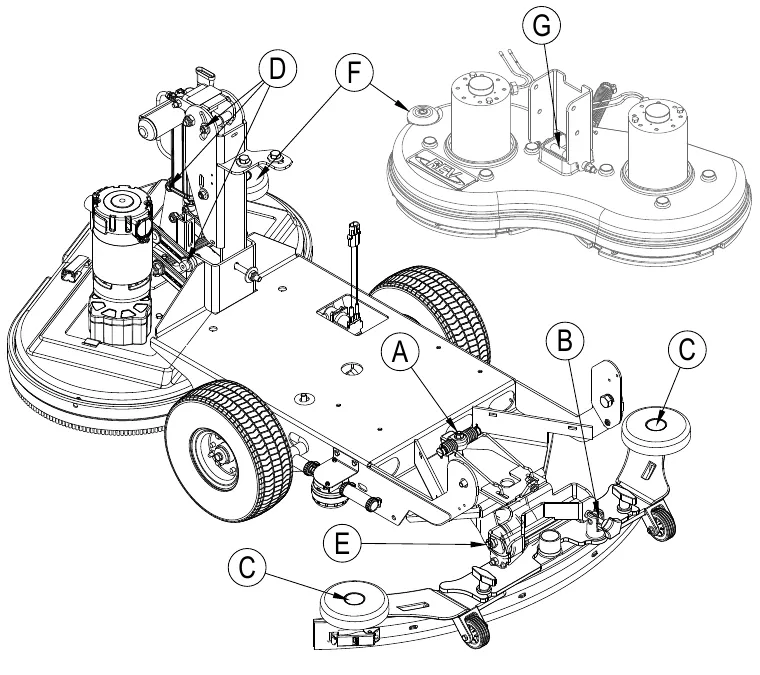
Once a month, apply light machine oil to lubricate the:
- General Pivot Points For the Squeegee Linkage (A).
- Squeegee mount angle adjustment knob threads (B).
- Squeegee Tool end wheels (C).
- General Pivot Points For the Brush Linkage (D).
- Pivot points on REV Deck (G).
- Scrub deck bumper wheels (F).
Once per quarter, Grease the following
- Rear Caster Wheel Swivels (E).
Charging wet batteries
SC750, SC800 - Charge the batteries each time the machine is used or when the Battery Indicator (F6) is reading less than full.
SC750 ST, SC800 ST - Charge the batteries each time the machine is used or when the Battery Indicator (E) is flashing RED.
When Servicing Batteries...
- Remove all jewelry
- Do not smoke
- Wear safety glasses, rubber gloves and a rubber apron
- Work in a well-ventilated area
- Do not allow tools to touch more than one battery terminal at a time
- ALWAYS disconnect the negative (ground) cable first when replacing batteries to prevent sparks.
- ALWAYS connect the negative cable last when installing batteries.
If your machine shipped with an onboard battery charger do the following: Turn the Key Switch (A) OFF. Unwind the electrical cord from the rear of the machine and plug it into a properly grounded outlet. Refer to the OEM product manual for more detailed operating instructions.
If your machine shipped without an onboard battery charger do the following: Disconnect the batteries from the machine and push the connector from the charger into the Battery Pack Connector (15). Follow the instructions on the battery charger.
Checking the battery water level
Check the water level of the batteries at least once a week. After charging the batteries, remove the vent caps and check the water level in each battery cell. Use distilled or demineralized water in a battery filling dispenser (available at most auto parts stores) to fill each cell to the level indicator (or to 0.4 in (10 mm) over the top of the separators). DO NOT over-fill the batteries!
Tighten the vent caps. Wash the tops of the batteries with a solution of baking soda and water (2 tablespoons of baking soda to about 1 quart (1 liter) of water).
Charging gel (VRLA) batteries
SC750, SC800 - Charge the batteries each time the machine is used or when the Battery Indicator (F6) is reading less than full.
SC750 ST, SC800 ST - Charge the batteries each time the machine is used or when the Battery Indicator (E) is flashing RED.
When Servicing Batteries...
- Remove all jewelry
- Do not smoke
- Wear safety glasses, rubber gloves and a rubber apron
- Work in a well-ventilated area
- Do not allow tools to touch more than one battery terminal at a time
- ALWAYS disconnect the negative (ground) cable first when replacing batteries to prevent sparks.
- ALWAYS connect the negative cable last when installing batteries.
If your machine shipped with an onboard battery charger do the following: Turn the Key Switch (A) OFF. Unwind the electrical cord from the rear of the machine and plug it into a properly grounded outlet. Refer to the OEM product manual for more detailed operating instructions.
If your machine shipped without an onboard battery charger do the following: Disconnect the batteries from the machine and push the connector from the charger into the Battery Pack Connector (15). Follow the instructions on the battery charger. SERVICE NOTE: Make sure you plug the battery charger into the connector with the handle attached to it.
IMPORTANT: Make sure you have an appropriate charger for use on Gel cell batteries. Use only “voltage-regulated” or “voltage-limited” chargers. Standard constant current or taper current chargers MUST NOT be used. A temperature-sensing charger is recommended, as manual adjustments are never accurate and will damage any VRLA battery.
Servicing the squeegee
If the squeegee leaves narrow streaks or water, the blades may be dirty or damaged. Remove the squeegee, rinse it under warm water and inspect the blades. Reverse or replace the blades if they are cut, torn, wavy or worn.
To reverse or replace the rear squeegee wiping blade...
- See Figure 6. Raise the squeegee tool off the floor, and then unsnap the Rear Squeegee Blade Removal Latch (20) on the squeegee tool.
- Remove the Tension Strap (19).
- Slip the rear blade off the Alignment Pins (21).
- The squeegee blade has 4 working edges. Turn the blade so a clean, undamaged edge points toward the front of the machine. Replace the blade if all 4 edges are nicked, torn or worn to a large radius.
- Install the blade, following the steps in reverse order and adjust the squeegee tilt.
To reverse or replace the front squeegee blade...
- Raise the squeegee tool off the floor, then loosen the (2) Thumb Nuts (22) on top of the squeegee tool. Disconnect the Recovery Hose (16) and remove the squeegee tool (12) from the mount.
- Loosen the Front Squeegee Blade Removal Knob (AA), then remove Tension Strap (AB) and blade..
- The squeegee blade has 4 working edges. Turn the blade so a clean, undamaged edge points toward the front of the machine. Replace the blade if all 4 edges are nicked, torn or worn to a large radius.
- Install the blade, following the steps in reverse order and adjust the squeegee tilt.
Adjusting the squeegee
Adjust the squeegee angle whenever a blade is reversed or replaced, or if the squeegee is not wiping the floor dry.
To adjust the squeegee angle...
- Park the machine on a flat, even surface and lower the squeegee.
- While moving the machine forward slowly, turn the Squeegee Adjustment Knob (23) until the rear squeegee blade folds over evenly across the entire width of the squeegee as shown below.
General machine troubleshooting
| Problem | Possible cause | Remedy |
|---|---|---|
| Poor water pick-up | Worn or torn squeegee blades | Reverse or replace |
| Squeegee out of adjustment | Adjust so blades touch floor evenly across entire width | |
| Recovery tank full | Empty recovery tank | |
| Recovery tank drain hose leak | Secure drain hose cap or replace | |
| Recovery tank cover gasket leak | Replace gasket / Seat cover properly | |
| Debris caught in squeegee | Clean squeegee tool | |
| Vacuum hose clogged | Remove debris | |
| Using too much solution | Adjust solution flow at control panel | |
| Foam filter cover not seated | Seat cover properly | |
| Poor scrubbing performance | Worn brush or pad | Rotate or replace brushes |
| Wrong brush or pad type | Consult Advance | |
| Wrong cleaning chemical | Consult Advance | |
| Moving machine too fast | Slow down | |
| Not using enough solution | Increase solution flow at control panel | |
| Inadequate solution flow or no solution | Solution tank empty | Fill solution tank |
| Solution lines, valves, filter or trough clogged | Flush lines, trough and clean solution filter | |
| Solution shutoff valve closed | Open solution shutoff valve | |
| Solution solenoid valve | Clean or replace valve | |
| Machine does not run | Battery connector disconnected | Reconnect battery connectors |
| Main system controller | Check error fault codes (see service manual) | |
| Tripped 10 Amp circuit breaker | Check for electrical short circuit & reset | |
| No FWD/REV wheel drive | Drive system speed controller | Check error fault codes (see service manual) |
| Tripped 30 Amp circuit breaker | Check for drive motor overload | |
| Emergency stop switch tripped | Reset the Emergency Stop Switch | |
| Vacuum shuts off and display shows “Recovery Tank FULL indicator” when recovery tank is not full | Plugged squeegee hose | Clear debris |
| Vacuuming large amounts of water at a high travel speed | Slow down or disable auto shut-off feature (see service manual) | |
| Poor Sweeping Performance (Cylindrical System) | Hopper Full | Empty and clean hopper |
| Brushes worn | Replace brushes | |
| Bristles have taken a set | Rotate brushes | |
| No Detergent Flow (EcoFlex models only) | Empty detergent cartridge | Fill detergent cartridge |
| Plugged or kinked detergent flow line | Purge system, straighten lines to remove any kinks | |
| Dry seal cap on detergent cartridge not sealed | Reseat dry seal cap | |
| Detergent pump wiring disconnected or backwards | Connect or reconnect wiring | |
| Variability of the Pad Rotation (REV System) | Pad changes rotation speed at various times | Dependent on floor substrate, Pad type and down pressure setting |
Technical specifications (as installed and tested on the unit)
Vibration values are printed in m/s²; the ft/s² figures are converted equivalents. Model names and numbers within a column are listed in the same order.
| Model | Unit | SC750-26D / SC750 ST-26D | SC750-28D / SC750-28C | SC750 ST-28D | SC750-28R |
|---|---|---|---|---|---|
| Model No. | 56112000 / 56112012 | 56112004 / 56112006 | 56112013 | 56112780 | |
| Voltage, Batteries | V | 24V | 24V | 24V | 24V |
| Battery Capacity | Ah | 312 | 312 | 312 | 312 |
| Protection Grade | IPX4 | IPX4 | IPX4 | N/A | |
| Sound Pressure Level (IEC 60704-1) | dB(A) | 61 | 61 | 61 | 64 |
| Sound Pressure Level (IEC 60704-1) Uncertainty | dB(A) | 3.0 | 3.0 | 3.0 | 3.0 |
| Gross Weight | lbs / kg | 942 / 427.3 | 942 / 427.3 | 942 / 427.3 | 969 / 439.5 |
| Transport Weight | lbs / kg | 932 / 422.7 | 932 / 422.7 | 932 / 422.7 | 959 / 435.0 |
| Maximum Wheel Floor Loading (right front) | psi / N/mm² | 59.08 / 0.407 | 59.08 / 0.407 | 59.08 / 0.407 | 56.88 / 0.392 |
| Maximum Wheel Floor Loading (left front) | psi / N/mm² | 60.10 / 0.414 | 60.10 / 0.414 | 60.10 / 0.414 | 69.61 / 0.480 |
| Maximum Wheel Floor Loading (center rear) | psi / N/mm² | 287.56 / 1.983 | 287.56 / 1.983 | 287.56 / 1.983 | 268.39 / 1.85 |
| Vibrations at the Hand Controls (ISO 5349-1) | ft/s² (m/s²) | Less than 8.2 (2.5) | Less than 8.2 (2.5) | Less than 8.2 (2.5) | Less than 8.2 (2.5) |
| Vibrations at the Hand Controls (ISO 5349-1) Uncertainty | ft/s² (m/s²) | 0.07 (0.02) | 0.07 (0.02) | 0.07 (0.02) | 0.07 (0.02) |
| Gradeability Transport | 2% (1.15º) | 2% (1.15º) | 2% (1.15º) | 2% (1.15º) | |
| Gradeability Cleaning | 2% (1.15º) | 2% (1.15º) | 2% (1.15º) | 2% (1.15º) |
| Model | Unit | SC800-26D / SC800 ST-26D / SC800-28D / SC800-28C / SC800 ST-28C | SC800-32C / SC800-34D | SC800 ST-34D | SC800-28R |
|---|---|---|---|---|---|
| Model No. | 56384871 / 56384870 / 56112016 / 56112018 / 56384869 | 56112024 / 56112028 | 56112032 | 56384872 | |
| Voltage, Batteries | V | 24V | 24V | 24V | 24V |
| Battery Capacity | Ah | 312 | 312 | 312 | 312 |
| Protection Grade | IPX4 | IPX4 | IPX4 | N/A | |
| Sound Pressure Level (IEC 60704-1) | dB(A) | 61 | 61 | 61 | 64 |
| Sound Pressure Level (IEC 60704-1) Uncertainty | dB(A) | 3.0 | 3.0 | 3.0 | 3.0 |
| Gross Weight | lbs / kg | 994 / 450.9 | 994 / 450.9 | 994 / 450.9 | 1021 / 463.1 |
| Transport Weight | lbs / kg | 984 / 446.3 | 984 / 446.3 | 984 / 446.3 | 1011 / 458.5 |
| Maximum Wheel Floor Loading (right front) | psi / N/mm² | 71.0 / 0.490 | 71.0 / 0.490 | 71.0 / 0.490 | 68.3 / 0.471 |
| Maximum Wheel Floor Loading (left front) | psi / N/mm² | 66.6 / 0.459 | 66.6 / 0.459 | 66.6 / 0.459 | 77.1 / 0.531 |
| Maximum Wheel Floor Loading (center rear) | psi / N/mm² | 287.6 / 1.983 | 287.6 / 1.983 | 287.6 / 1.983 | 268.4 / 1.850 |
| Vibrations at the Hand Controls (ISO 5349-1) | ft/s² (m/s²) | 0.30 (0.09) | 0.30 (0.09) | 0.30 (0.09) | 0.30 (0.09) |
| Vibrations at the Hand Controls (ISO 5349-1) Uncertainty | ft/s² (m/s²) | 0.07 (0.02) | 0.07 (0.02) | 0.07 (0.02) | 0.07 (0.02) |
| Gradeability Transport | 2% (1.15º) | 2% (1.15º) | 2% (1.15º) | 2% (1.15º) | |
| Gradeability Cleaning | 2% (1.15º) | 2% (1.15º) | 2% (1.15º) | 2% (1.15º) |
Material composition
| Material | LBS | KG |
|---|---|---|
| Aluminum | 13.58 | 6.16 |
| Rubber | 15.888 | 7.21 |
| Plastic | 23.037 | 10.45 |
| Polyethylene | 116.4 | 52.79 |
| Ferrous Metal & Copper | ||
| Transaxle | 23 | 10.43 |
| Brush Motor | 17.25 | 7.82 |
| Vac Motor | 6 | 2.72 |
| Other Electric | 19.41 | 8.80 |
This page is intentionally blank.
Advance is a trademark of Nilfisk, Inc. Southeastern Equipment & Supply is an independent dealer.