
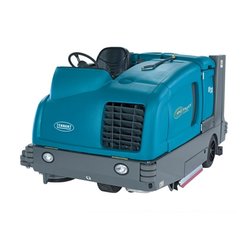
SC6500 instructions for use
Instructions For Use. Original Instructions. Also printed in Spanish (Instrucciones de uso), Portuguese (Manual de Utilização) and French (Mode d’ emploi).
2/2014 revised 1/2020 REV F
Form no. 56091095
Sections: A-English, B-Español, C-Português, D-Français. This reader covers section A, English.
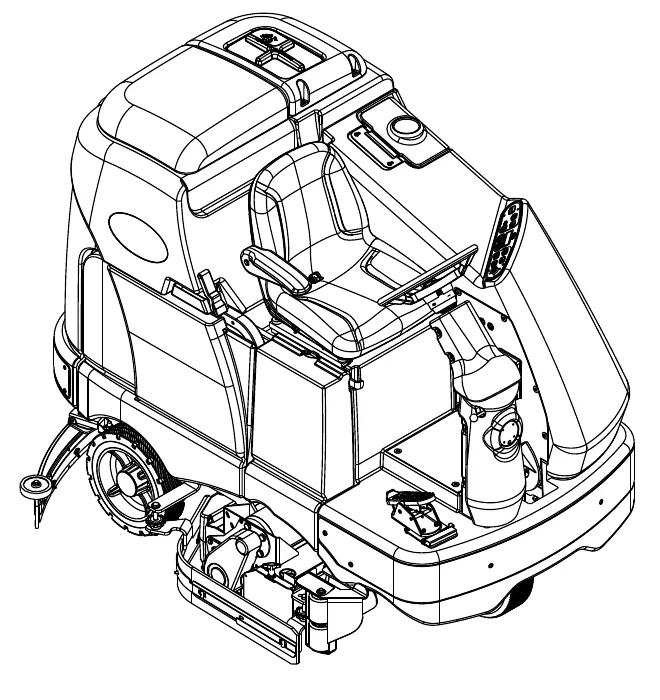
Active models
- 56414010 (40C)
- 56414012 (40D)
- 56414014 (45C)
- 56414016 (45D)
- 56414018 (48C)
- 56414020 (48D)
Obsolete models
- 56414011 (40C EcoFlex)
- 56414013 (40D EcoFlex)
- 56414015 (45C EcoFlex)
- 56414017 (45D EcoFlex)
- 56414019 (48C EcoFlex)
- 56414021 (48D EcoFlex)
This page is intentionally blank.
Table of contents
Page numbers in parentheses are the printed A-numbers. The links go to the matching page of this reader.
- Introduction (page A-3)
- Cautions and warnings (page A-4 – A-5)
- Know your machine (page A-6 – A-7)
- Control panel (page A-8)
Prepare the machine for use
- Install the batteries (page A-9)
- Install the brushes (page A-10 – A-11)
- Fill the solution tank (page A-12)
- Squeegee installation (page A-13)
- Detergent system (page A-14 – A-15)
- Operating the machine (page A-16 – A-17)
- Scrubbing (page A-16)
- Wet vacuuming (page A-17)
- After use (page A-18)
- Maintenance schedule (page A-18)
- Lubricating the machine (page A-18 – A-19)
- Charging the batteries (page A-20)
- Check the battery water level (page A-20)
- Squeegee maintenance (page A-21)
- Squeegee adjustment (page A-21)
- Side skirt maintenance (page A-22 – A-23)
- Side broom maintenance (page A-24)
- Troubleshooting (page A-25 – A-26)
- Technical specifications (page A-28 – A-29)
- Use extreme CAUTION when operating this machine. Be certain that you are thoroughly familiar with all operating instructions before using this machine. If you have any questions, contact your supervisor or your local Advance Industrial Dealer.
- If the machine malfunctions, do not try to correct the problem unless your supervisor directs you to do so. Have a qualified company mechanic or an authorized Advance Dealer service person make any necessary corrections to the equipment.
- Use extreme care when working on this machine. Loose clothing, long hair, and jewelry can get caught in moving parts. Turn the Key Switch OFF and remove the key before servicing the machine. Apply the parking brake before getting off of the machine. Use good common sense, practice good safety habits and pay attention to the yellow decals on this machine.
- Drive the machine slowly on inclines. Use the Brake Pedal (6) to control machine speed while descending inclines. DO NOT turn the machine on an incline; drive straight up or down.
- The maximum rated incline for scrubbing is 10%. The maximum rated incline during transport is 16%.
Introduction
This manual will help you get the most from your Advance Rider Scrubber. Read it thoroughly before operating the machine.
Note: Bold numbers in parentheses indicate an item illustrated on pages A-6 – A-8.
This product is intended for commercial use only.
Parts and service
Repairs, when required, should be performed by your Authorized Advance Service Center, who employs factory trained service personnel, and maintains an inventory of Advance original replacement parts and accessories.
Call the ADVANCE DEALER named below for repair parts or service. Please specify the Model and Serial Number when discussing your machine.
Modifications
Modifications and additions to the cleaning machine which affect capacity and safe operation shall not be performed by the customer or user without prior written approval from Nilfisk Inc. Unapproved modifications will void the machine warranty and make the customer liable for any resulting accidents.
Name plate
The Model Number and Serial Number of your machine are shown on the Nameplate on the machine. This information is needed when ordering repair parts for the machine. Use the space below to note the Model Number and Serial Number of your machine for future reference.
Model number: ____________________
Serial number: ____________________
Uncrate the machine
When the machine is delivered, carefully inspect the shipping packaging and the machine for damage. If damage is evident, save the shipping carton (if applicable) so that it can be inspected. Contact the Advance Customer Service Department immediately to file a freight damage claim. Refer to the unpacking instruction sheet included with the machine to remove the machine from the pallet.
Transporting the machine
- All access doors are latched securely.
- The machine is tied down securely - see Tie Down Point locations (30).
- The machine parking brake (6) is set.
Cautions and warnings
Symbols
Advance uses the symbols below to signal potentially dangerous conditions. Always read this information carefully and take the necessary steps to protect personnel and property.
This machine is for commercial use, for example in hotels, schools, hospitals, factories, shops and offices other than normal residential housekeeping purposes.
- DANGER! Is used to warn of immediate hazards that will cause severe personal injury or death.
- WARNING! Is used to call attention to a situation that could cause severe personal injury.
- CAUTION! Is used to call attention to a situation that could cause minor personal injury or damage to the machine or other property.
Read all instructions before using.
General safety instructions
Specific Cautions and Warnings are included to warn you of potential danger of machine damage or bodily harm.
- This machine shall be used only by properly trained and authorized persons.
- This machine is not intended for use by persons (including children) with reduced physical, sensory or mental capabilities, or lack of experience and knowledge.
- While on ramps or inclines, avoid sudden stops. Avoid abrupt sharp turns. Use low speed down ramps.
- Keep sparks, flame and smoking materials away from batteries. Explosive gases are vented during normal operation.
- Charging the batteries produces highly explosive hydrogen gas. Charge batteries only in well-ventilated areas, away from open flame. Do not smoke while charging the batteries.
- Remove all jewelry when working near electrical components.
- Turn the key switch off (O) and disconnect the batteries before servicing electrical components.
- Never work under a machine without safety blocks or stands to support the machine.
- Do not dispense flammable cleaning agents, operate the machine on or near these agents, or operate in areas where flammable liquids exist.
- Do not pressure wash operator control panel, circuit breaker panel or batteries.
- Only use the brushes provided with the appliance or those specified in the instruction manual. The use of other brushes may impair safety.
- Observe the Gross Vehicle Weight, GVW, of the machine when loading, driving, lifting or supporting the machine.
Cautions and warnings (continued)
- This machine is not approved for use on public paths or roads.
- This machine is not suitable for picking up hazardous dust.
- Do not use scarifier discs and grinding stones. Advance will not be held responsible for any damage to floor surfaces caused by scarifiers or grinding stones (can also cause damage to the brush drive system).
- When operating this machine, ensure that third parties, particularly children, are not endangered.
- Before performing any service function, carefully read all instructions pertaining to that function.
- Do not leave the machine unattended without first turning the key switch off (O), removing the key and applying the parking brake.
- Turn the key switch off (O) and remove the key, before changing the brushes, and before opening any access panels.
- Take precautions to prevent hair, jewelry, or loose clothing from becoming caught in moving parts.
- Use caution when moving this machine in below freezing temperature conditions. Any water in the solution, recovery or detergent tanks or in the hose lines could freeze, causing damage to valves and fittings. Flush with windshield washer fluid.
- The batteries must be removed from the machine before the machine is scrapped. The disposal of the batteries should be safely done in accordance with your local environmental regulations.
- Do not use on surfaces having a gradient exceeding that marked on the machine.
- All doors and covers are to be positioned as indicated in the instruction manual before using the machine.
SAVE THESE INSTRUCTIONS
Know your machine
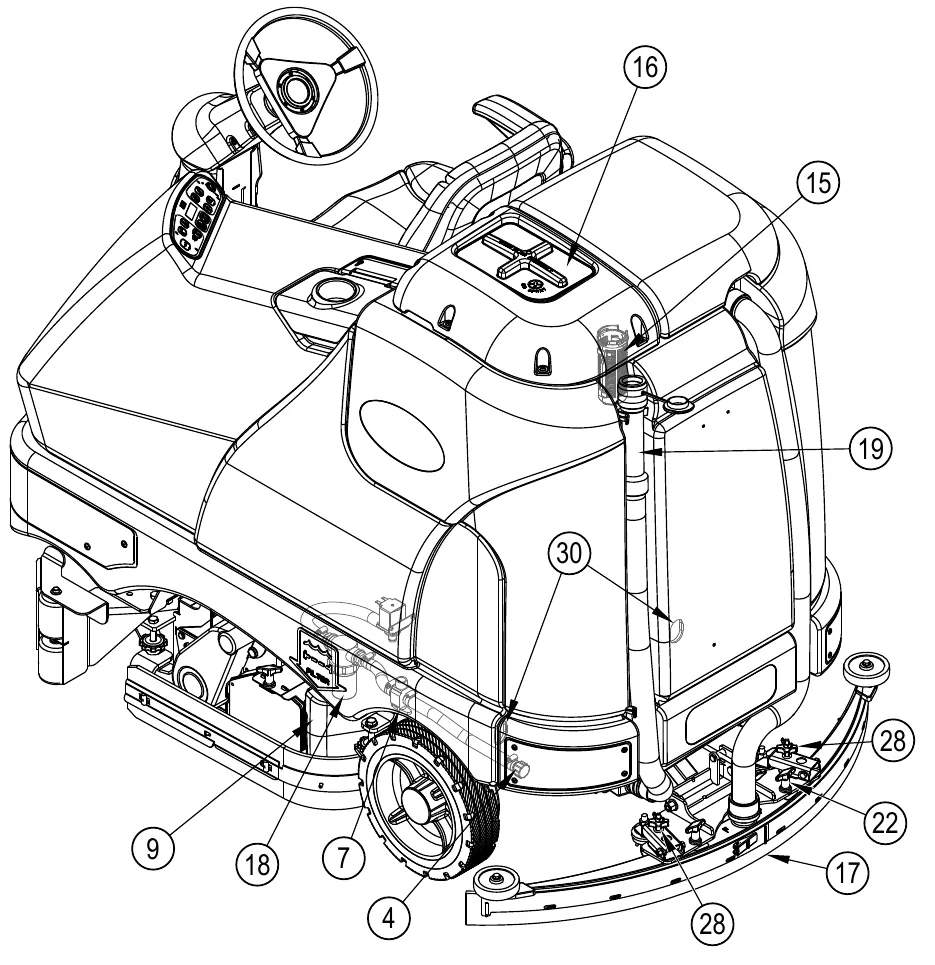
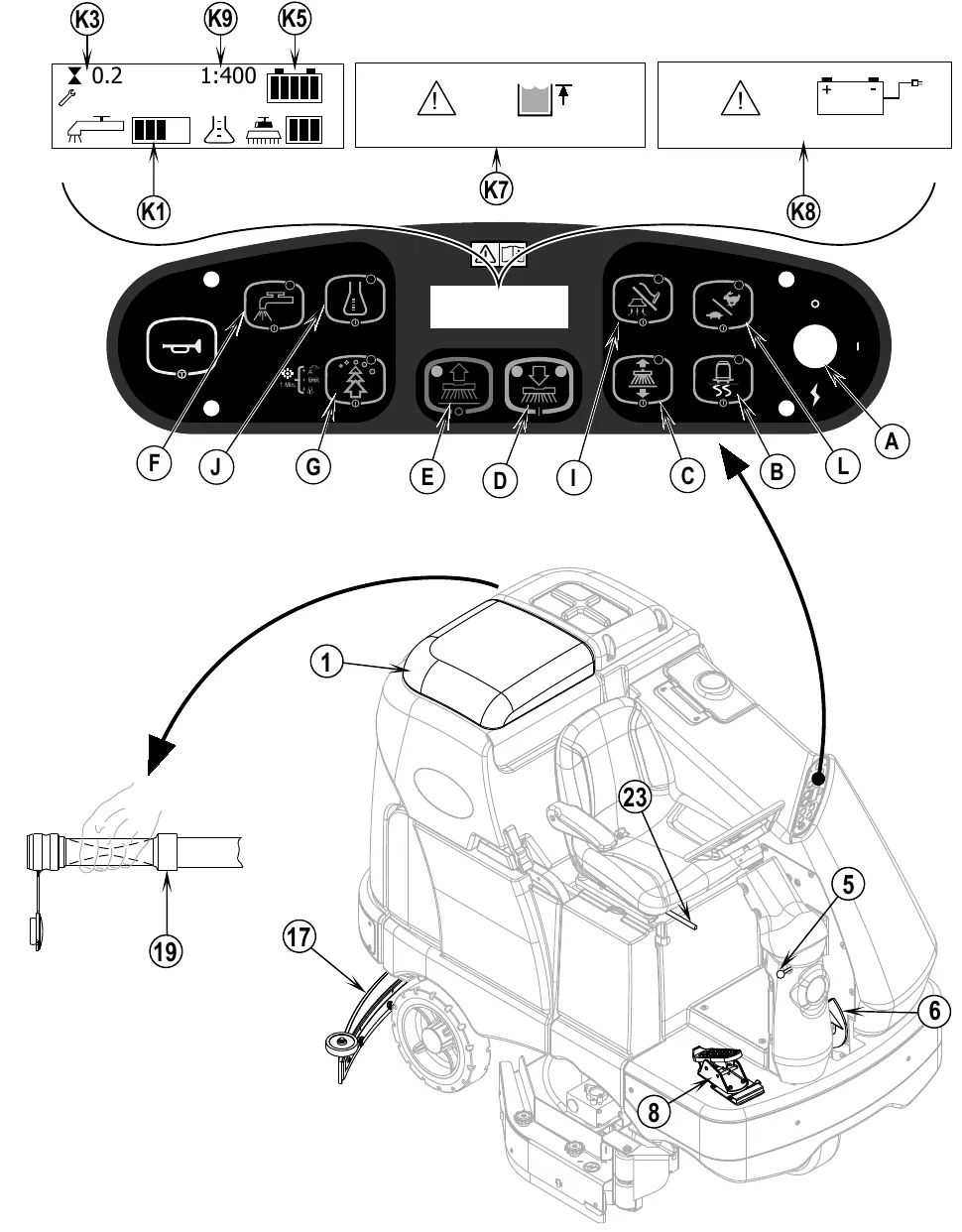
As you read this manual, you will occasionally run across a bold number or letter in parentheses - example: (2). These numbers refer to an item shown on these pages unless otherwise noted. Refer back to these pages whenever necessary to pinpoint the location of an item mentioned in the text. NOTE: Refer to the service manual for detailed explanations of each item illustrated on the next 3 pages.
| No. | Item |
|---|---|
| 1 | Recovery Tank Cover |
| 2 | Solution Tank Fill Cover |
| 3 | Operator’s Seat |
| 5 | Steering Wheel Tilt Adjust Knob |
| 6 | Parking Brake |
| 8 | Drive Pedal, Directional/Speed |
| 10 | Drive and Steer Wheel |
| 11 | Emergency Stop Switch / Battery Disconnect |
| 12 | Scrub Deck |
| 13 | Rear Wheel |
| 14 | Battery Compartment (under recovery tank) |
| 20 | Machine Battery Connector |
| 21 | Control Panel |
| 23 | Operator Seat Adjustment Lever |
| 24 | Control Circuit Breaker |
| 25 | Auxiliary Circuit Breaker |
| 26 | Side Broom Motor Circuit Breaker |
| 27 | Side Access Panel |
| 29 | Detergent Cartridge (EcoFlex models only) |
| 30 | Tie Down Locations |
| 31 | Side Brooms (not all models) |
| 32 | Recovery Tank Latch |
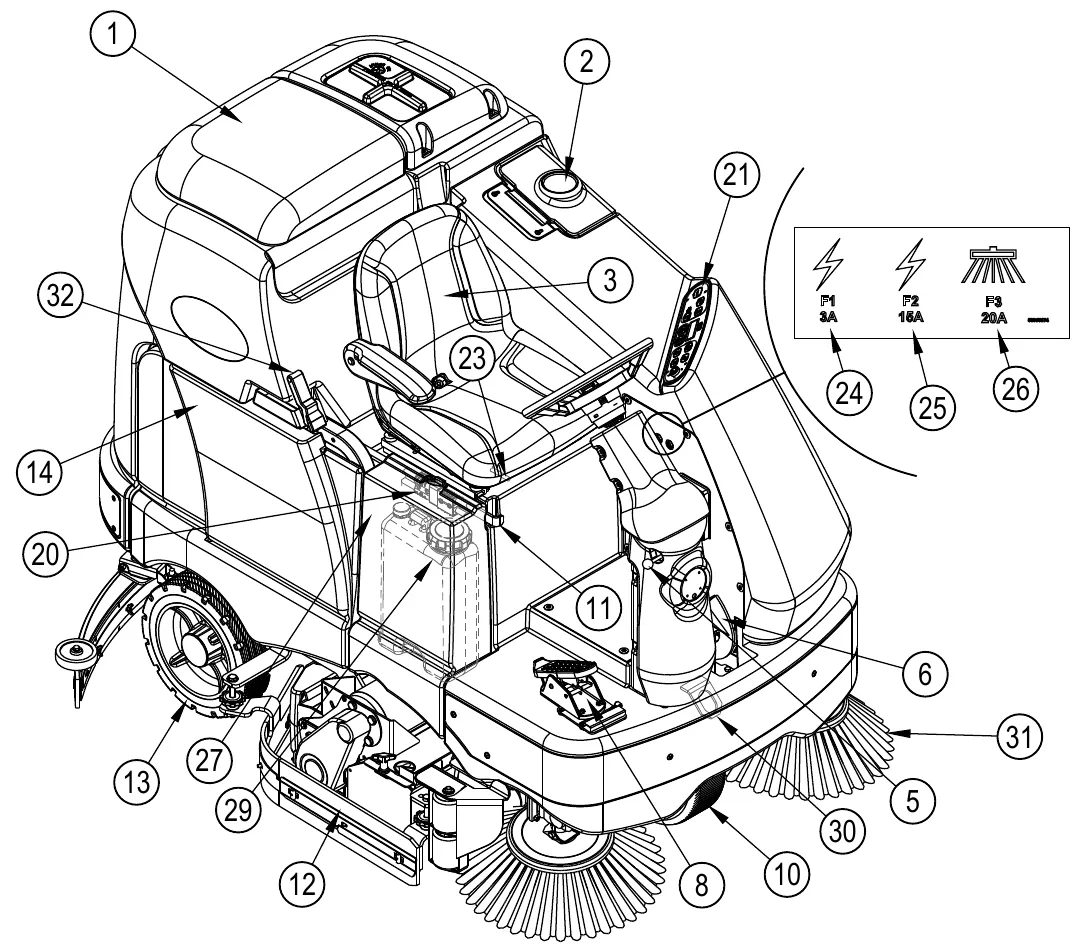
Circuit breaker decal shown in the figure: F1 3A (24), F2 15A (25), and F3 20A with a side broom symbol (26).
Know your machine (continued)
| No. | Item |
|---|---|
| 4 | Solution Tank Drain Hose |
| 7 | Solution Shut off Valve |
| 9 | Hopper (cylindrical models only) |
| 15 | Recovery Tank Shutoff Float |
| 16 | Vacuum Motor Filter Housing |
| 17 | Squeegee Assembly |
| 18 | Solution Filter |
| 19 | Recovery Tank Drain Hose |
| 22 | Squeegee Tilt Adjust Knob |
| 28 | Squeegee Height Adjust Knob |
| 30 | Tie Down Locations |
Control panel
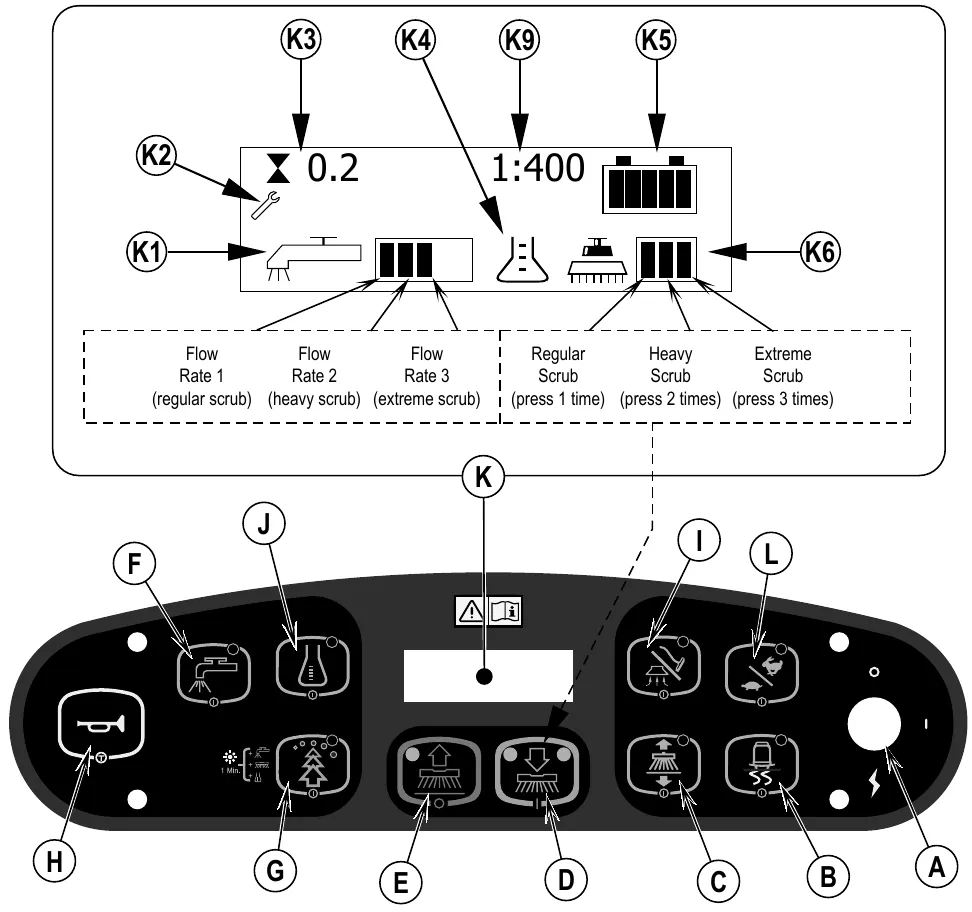
| Letter | Control |
|---|---|
| A | Key Switch |
| B | Traction Control Switch |
| C | Side Broom Switch (cylindrical models only) |
| D | Scrub ON / Scrub Mode Select |
| E | Scrub OFF |
| F | Solution Switch |
| G | Burst of Power Switch |
| H | Horn |
| I | Vacuum / Wand Switch |
| J | Detergent System (EcoFlex models only) |
| K | Display |
| L | Scrub Speed Switch |
Display indicators
| No. | Indicator |
|---|---|
| K1 | Solution Flow Indicator |
| K2 | Fault Indicator |
| K3 | Hour Meter |
| K4 | Detergent Indicator (if so equipped) |
| K5 | Battery Indicator |
| K6 | Scrub Pressure Indicator |
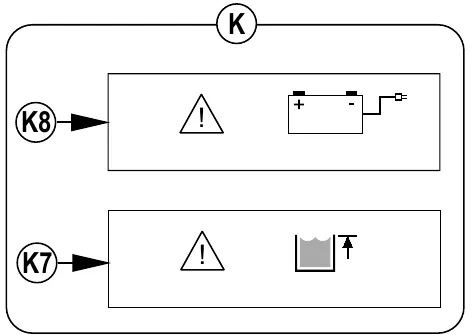
| K7 | Recovery Tank FULL Indicator |
| K8 | Battery Low Indicator |
| K9 | Detergent Ratio Indicator |
Display labels shown in the figure
- Solution flow (K1): Flow Rate 1 (regular scrub), Flow Rate 2 (heavy scrub), Flow Rate 3 (extreme scrub).
- Scrub pressure (K6): Regular Scrub (press 1 time), Heavy Scrub (press 2 times), Extreme Scrub (press 3 times).
- Example display readings shown: hour meter 0.2 (K3) and detergent ratio 1:400 (K9).
Install the batteries
When Servicing Batteries...
- Remove all jewelry
- Do not smoke
- Wear safety glasses, rubber gloves and a rubber apron
- Work in a well-ventilated area
- Do not allow tools to touch more than one battery terminal at a time
- ALWAYS disconnect the negative (ground) cable first when replacing batteries to prevent sparks.
- ALWAYS connect the negative cable last when installing batteries.
- Remove the batteries from their shipping crate and carefully inspect them for cracks or other damage. If damage is evident, contact the carrier that delivered them or the battery manufacturer to file a damage claim.
- Turn the Master Key Switch (A) OFF and remove the key.
- Remove the recovery tank from the machine. NOTE: Disconnect the tether and the vacuum motor wiring and lift the tank straight up and off the machine.
- Your machine comes from the factory with enough battery cables to install six 6 volt batteries. Using at least (2) people and an appropriate lifting strap, carefully lift the batteries into the battery compartment and arrange them exactly as shown in FIGURE 1. Secure the batteries as close to the front of the machine as possible. If installing a mono-block battery use an overhead hoist.
- Install the battery cables as shown. Position the cables so the battery caps can be easily removed for battery service.
- Carefully tighten the nut in each battery terminal until the terminal will not turn. Do not over-tighten the terminals, or they will be very difficult to remove for future service.
- Coat the terminals with spray-on battery terminal coating (available at most auto parts stores).
- Put one of the black rubber boots over each of the terminals and connect the Battery Pack Connector (20).
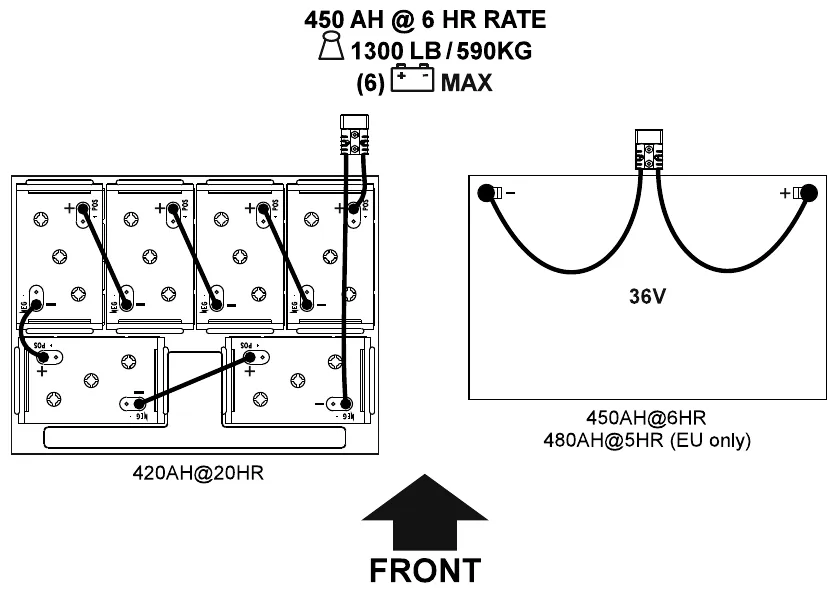
Battery information printed on Fig. 1
- 450 AH @ 6 HR rate, 1300 lb (590 kg), (6) batteries maximum.
- Six-battery layout: 420AH@20HR.
- 36V layout: 450AH@6HR, 480AH@5HR (EU only).
- An arrow marked FRONT shows the front of the machine.
Install the brushes (disc system)
- Make sure the Scrub Deck is in the RAISED position. Make sure the Key Switch (A) is off (O).
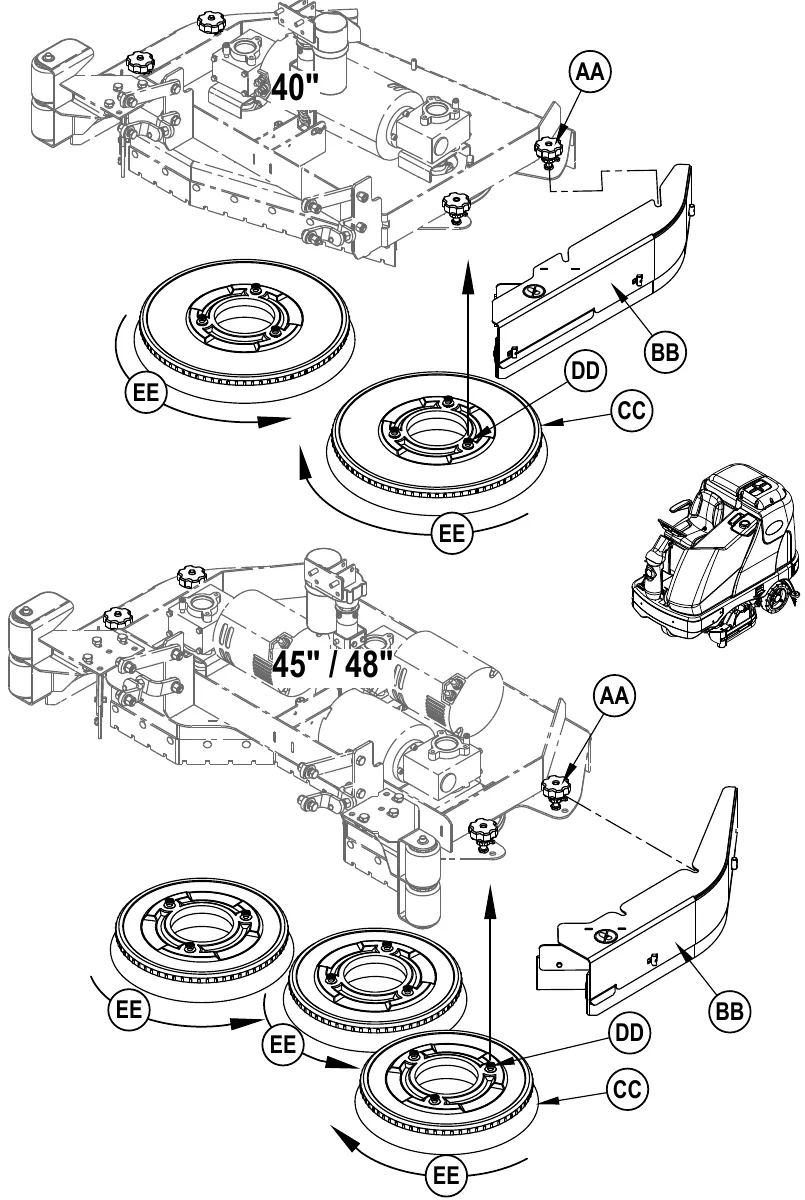
- See Figure 2. Remove both side skirt assemblies. NOTE: The skirts are held in place by two large Knobs (AA). Loosen these knobs and slide the Skirt Assemblies (BB) off of the Scrub Deck.
- To mount the Brushes (CC) (or pad holders) align the Lugs (DD) on the brush with the holes on the mounting plate and turn to lock in place (turn the outside edge of brush towards the front of machine as shown (EE)).
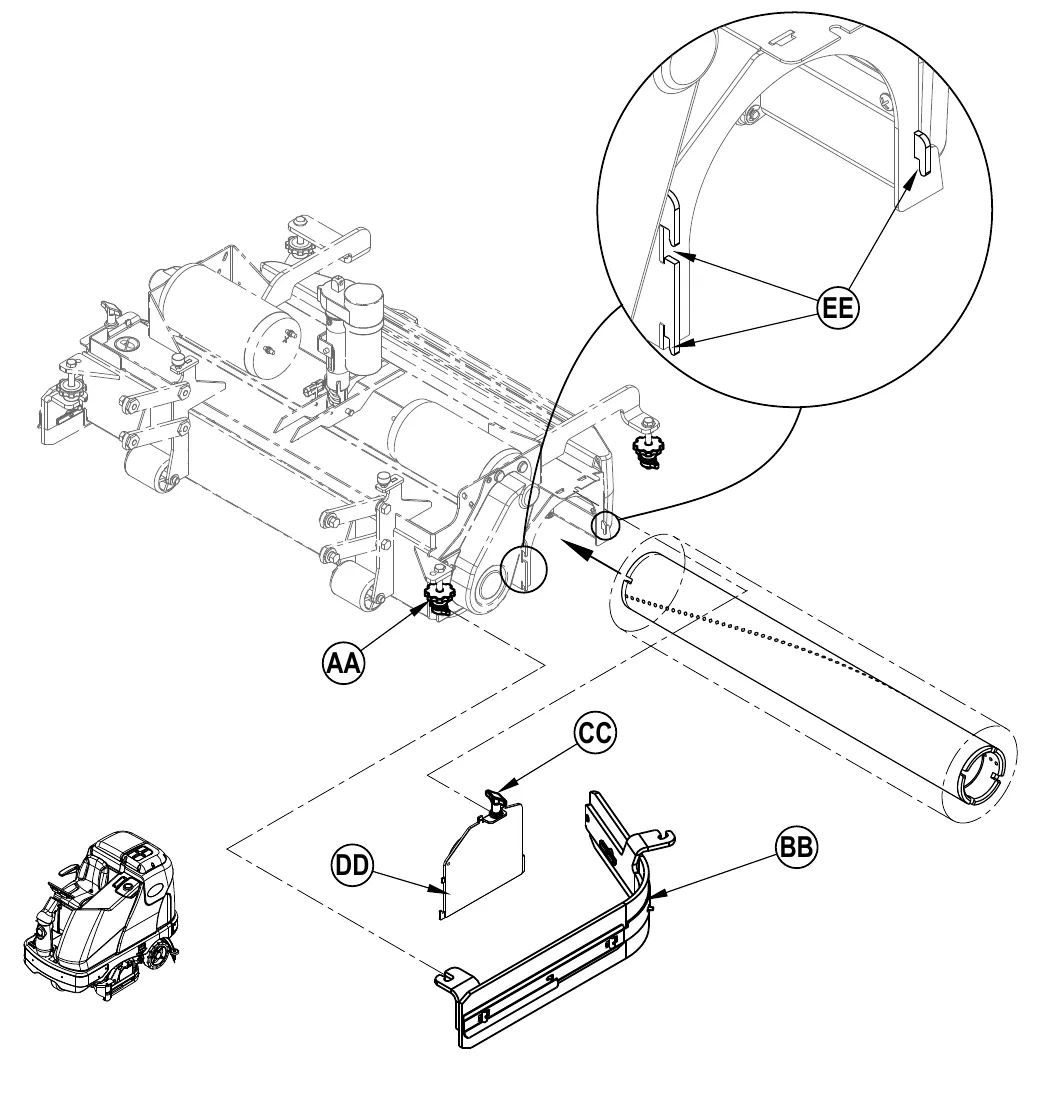
Install the brushes (cylindrical system)
- Make sure the Scrub Deck is in the RAISED position. Make sure the Key Switch (A) is off (O).
- See Figure 3. Remove both side skirt assemblies. NOTE: The skirts are held in place by two large Knobs (AA). Loosen these knobs, slide the Skirt Assemblies (BB) forward slightly and then off of the Scrub Deck.
- Loosen the Black Knobs (CC) on top of the Idler Assemblies (DD) until they drop down far enough to disengage from the Notches (EE) and remove.
- Slide the brush into the housing, lift slightly, push and turn until it seats. Re-install the Idler Assemblies (DD) and Skirt Assemblies (BB).
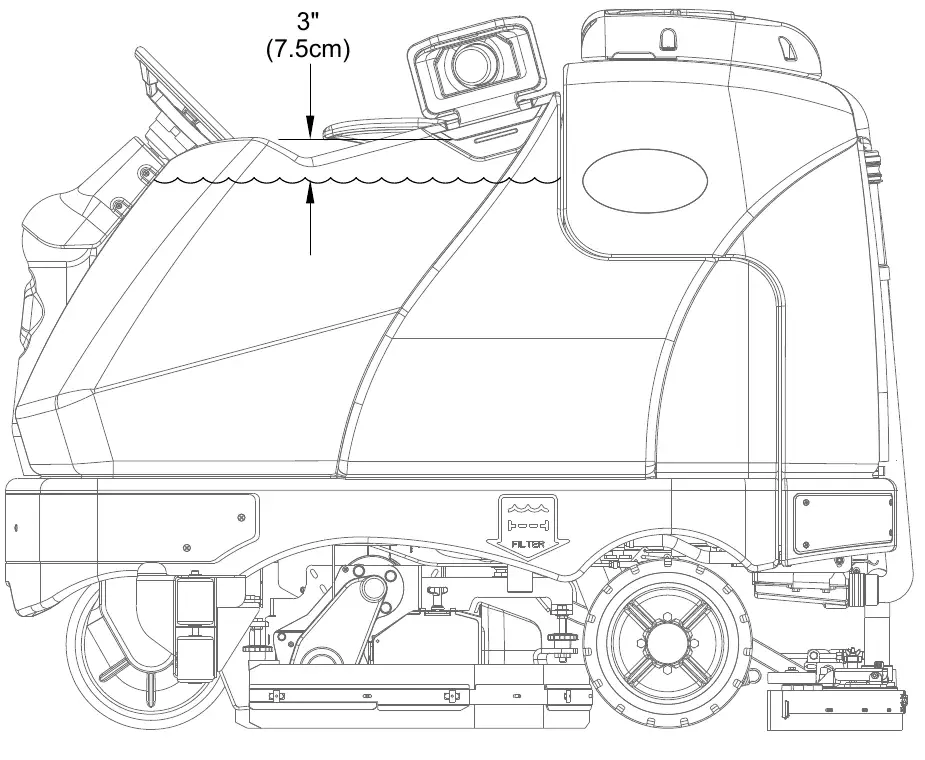
Filling the solution tank
Revised 10/2015 (as printed in the page header).
See Figure 4. Fill the solution tank with a maximum of 70 gal (264 L) of cleaning solution. Do not fill the solution tank above 3 in (7.5 cm) from the bottom of the Solution Fill (2). The solution should be a mixture of water and the proper cleaning chemical for the job. Always follow the dilution instructions on the chemical container label. NOTE: EcoFlex machines can either be used conventionally with detergent mixed in the tank or the detergent dispensing system can be used. When using the detergent dispensing do not mix detergent in the tank, plain water should be used.
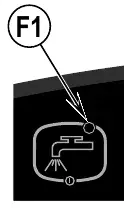
Solution system indicator (F1)
See Figure 4.1.
- The indicator will light when the solution system is enabled and/or is switched on.
- The indicator will be off when the solution system is off.
- The indicator will flash when the solution tank (liquid level) float switch senses a low solution level.
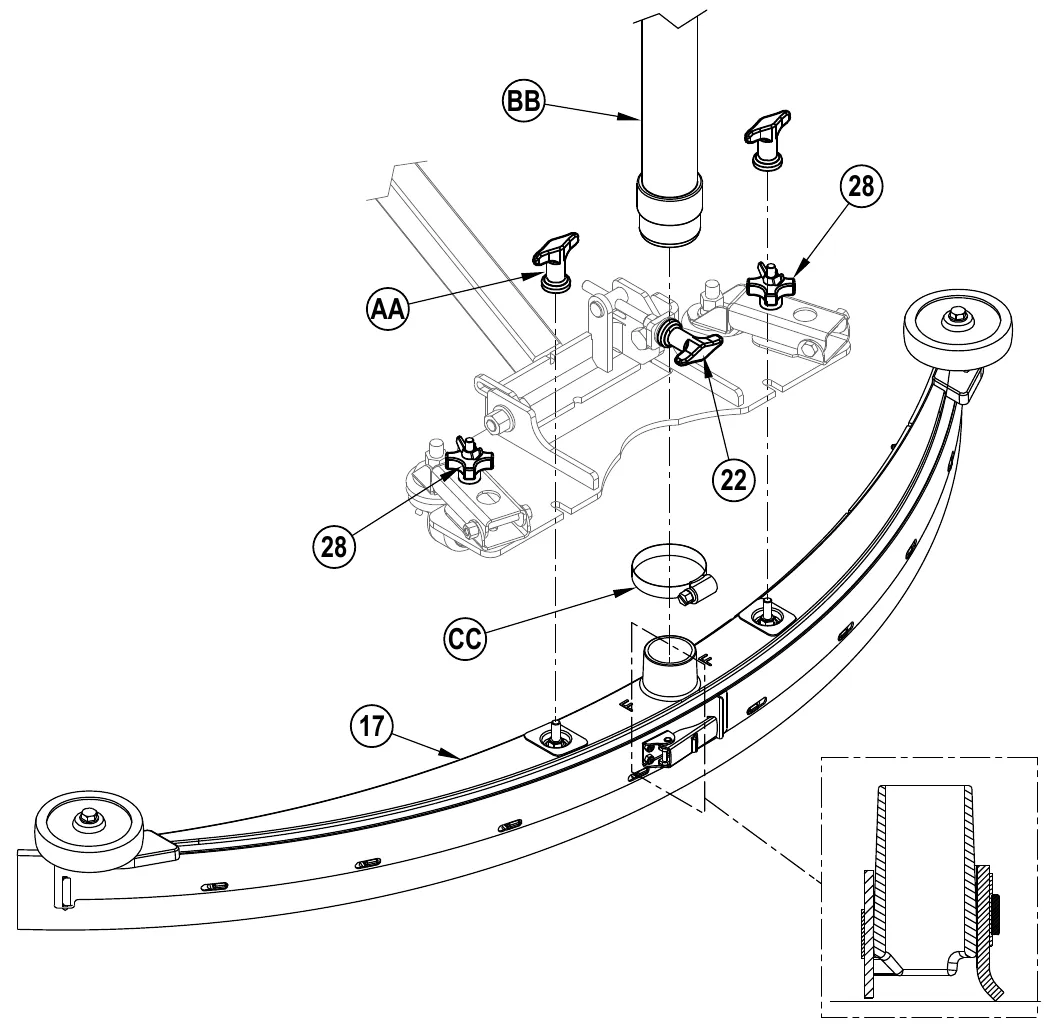
Squeegee installation
- See Figure 5. Slide the Squeegee Assembly (17) onto the squeegee mount bracket and tighten the Squeegee Mount Thumb Nuts (AA).
- Connect the Recovery Hose (BB) to the squeegee inlet using Hose Clamp (CC).
- Follow the steps in the “Squeegee Adjustment” section to properly adjust the squeegee height and angle.
Detergent system preparation and use (EcoFlex models only)
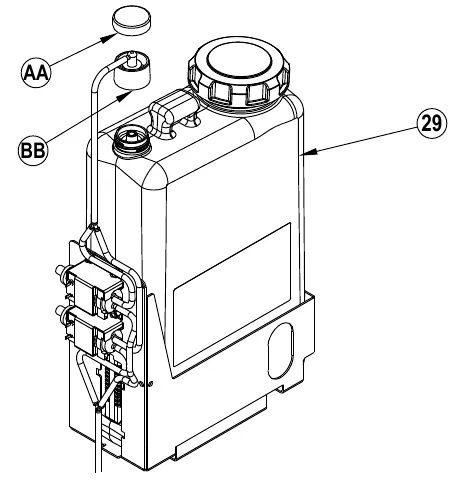
The Detergent Cartridge (29) is located behind the Side Access Panel (27). Fill the detergent cartridge with a maximum of 2.2 gal (8.32 L) of detergent.
SERVICE NOTE: Remove the detergent cartridge from the detergent box prior to filling to avoid spilling detergent on the machine.
It is recommended that a separate cartridge be used for each detergent you plan to use. The detergent cartridges have a white decal on them so you can write the detergent name on each cartridge to avoid mixing them up. The system should be purged of previous detergent when switching to a different detergent. When installing a new cartridge, remove the Cap (AA) and place the cartridge in the detergent box. Install the Dry Break Cap (BB) and detergent hose as shown.
The system should be purged of previous detergent when switching to a different detergent. SERVICE NOTE: Move machine over floor drain before purging because a small amount of detergent will be dispensed in the process.
To purge when changing detergents (scrub and solution systems must be off)
- Disconnect and remove the detergent cartridge.
- Turn the Key Switch (A) ON. Press and hold the Solution Switch (F) and the Detergent Switch (J) down for 3 seconds. Release the switches when the detergent purge icon (K10) appears on the display and the Detergent Switch Indicator (J1) starts flashing. NOTE: Once activated the purge process takes 10 seconds. See illustration on next page for Detergent System indicators. Normally one purge cycle is adequate to purge the system.
To purge weekly (scrub and solution systems must be off)
- Disconnect and remove the detergent cartridge. Install and connect a Cartridge filled with clean water.
- Turn the Key Switch (A) ON. Press and hold Solution Switch (F) and the Detergent Switch (J) down for 3 seconds. Release the switches when the detergent purge icon (K10) appears on the display and the Detergent Indicator (J1) starts flashing. NOTE: Once activated the purge process takes 10 seconds. See illustration on next page for Detergent System indicators. Normally one purge cycle is adequate to purge the system.
When the detergent level is nearing the bottom of the cartridge it is time to refill or replace the cartridge.
SERVICE NOTE: Follow the “To Purge Weekly” instructions above if the machine is going to be stored for an extended period of time or if you plan to discontinue use of the detergent system.
Detergent ratio (scrub system must be on)
No detergent is dispensed until the scrub and detergent systems are enabled and the Drive Pedal (8) pushed forward.
- The detergent icon (K4) will always be displayed when the detergent system is on.
There are 4 modes of EcoFlex operation:
- Plain Water Cleaning Mode - During scrubbing, the detergent system can be turned off at any time by pressing the Detergent ON/OFF Switch (J) to allow scrubbing with water only. Detergent Indicator (J1) will be OFF.
- Minimum Concentration Detergent Mode – Burst of Power Indicator (G1) ON (Activated by momentarily pressing Burst of Power Switch (G) when in maximum concentration detergent mode). See below the steps “To program the Minimum Detergent Level”.
- Maximum Concentration Detergent Mode – Burst of Power Indicator (G1) OFF (Activated by pressing and holding Burst of Power Switch (G) for 2 seconds). See below the steps “To program the Maximum Detergent Level”. Do not use a concentration level exceeding the detergent manufacturer’s recommendation.
- Burst of Power Cleaning Mode – Press the Burst of Power Switch (G) to increase the detergent ratio for one minute to the pre-programmed “maximum concentration” detergent level (as noted in programming instructions below). This will also cause the solution flow rate to increase to the next level and the scrub pressure to increase to the next level. Burst of Power Indicator (G1) will blink for one minute.
To program the maximum concentration detergent level
- Press the OneTouch™ Scrub switch (D) to activate the scrub system.
- Press and hold the Burst of Power Switch (G) for approximately 2 seconds until the indicator (G1) is OFF (maximum concentration detergent mode).
- Press and hold the detergent switch for approximately 2 seconds until the indicator (J1) flashes.
- While the indicator is flashing, pressing and releasing the detergent switch will cycle through the available ratios (400:1, 300:1, 256:1, 200:1, 150:1, 128:1, 100:1, 64:1, 50:1, 32:1).
- Once the desired ratio is displayed on the screen (K9), stop and it will save the setting after 3 seconds.
- Whenever the maximum concentration detergent setting is set to a lower concentration than the current minimum programmed concentration setting, the minimum concentration default setting will be equal to the maximum concentration setting until changed by the operator.
To program the minimum concentration detergent level
- Press the OneTouch™ Scrub switch (D) to activate the scrub system.
- Ensure the Burst of Power Indicator (G1) is ON (minimum concentration detergent mode).
- Press and hold the detergent switch for approximately 2 seconds until the indicator (J1) flashes.
- While the indicator is flashing, pressing and releasing the detergent switch will cycle through the available ratios (Note: only ratios that are a lower concentration or equal to the maximum detergent setting will be available.
- Once the desired ratio is displayed on the screen (K9), stop and it will save the setting after 3 seconds.
Once set, the detergent flow rate automatically increases and decreases with the solution flow rate, but the detergent ratio remains the same.
Detergent system preparation and use (EcoFlex models only)
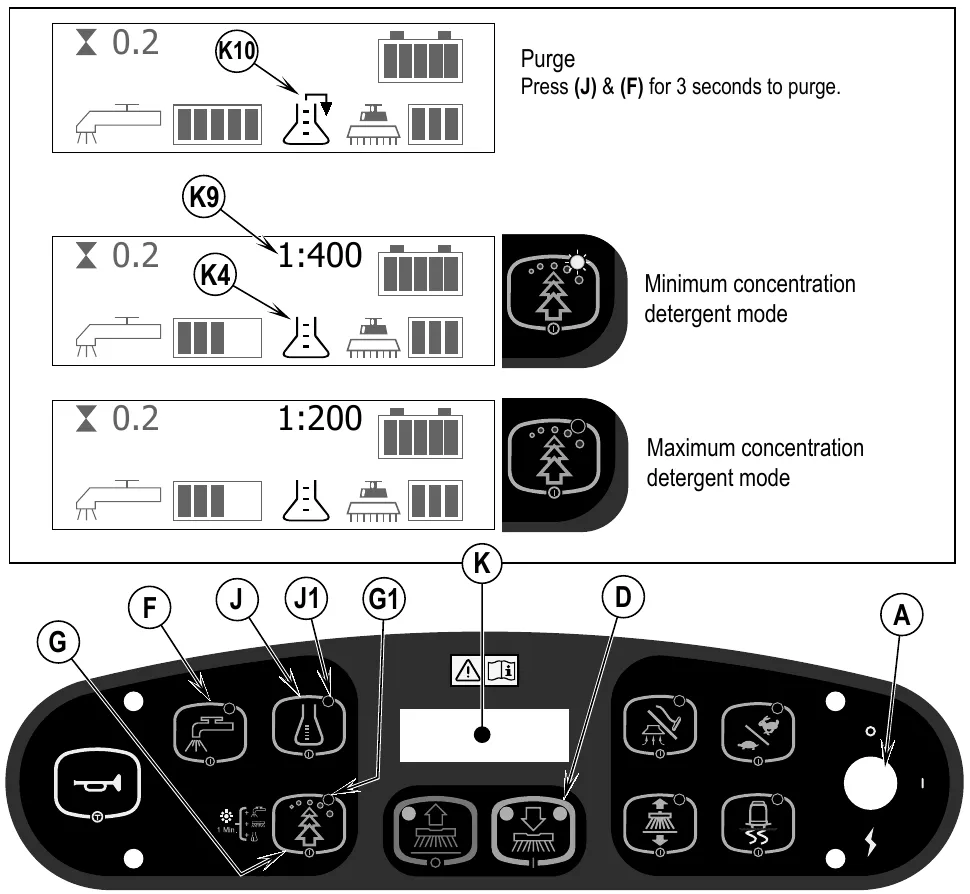
- Purge: Press (J) & (F) for 3 seconds to purge.
- Minimum concentration detergent mode: the display shows 1:400.
- Maximum concentration detergent mode: the display shows 1:200.
- In each display example the hour meter (K3 on the machine) reads 0.2.
Operating the machine
To scrub...
Follow the instructions in “preparing the machine for use” section of this manual.
- See Figure 8. While seated on the machine, adjust the seat and steering wheel to a comfortable operating position using the adjustment controls (23) and (5).
- Turn the Master Key Switch (A) ON (I). This will display the control panel indicator lights. Reference the Battery Condition Indicator (K5) and Hour Meter (K3) before proceeding.
- Release the Parking Brake (6). To transport the machine to the work area, apply even pressure with your foot on the front of the Drive Pedal (8) to go forward or the rear of the pedal for reverse. Vary the pressure on the foot pedal to obtain the desired speed.
- Press the Solution Switch (F) and hold for 5 seconds to pre-wet the floor. NOTE: This will help prevent scarring of the floor surface when starting to scrub with dry brushes. This must be done prior to pressing the Scrub ON Switch (D).
- Press the Scrub ON Switch (D) once for Regular Scrub, twice for Heavy Scrub or three times for Extreme Scrub mode. Both the solution flow and detergent (EcoFlex models) flow have 3 presets that coincide with the 3 scrub modes (see Control Panel).
NOTE: There is a solution flow rate override function if you wish to increase solution flow without increasing scrub pressure. Hold the Solution Switch (F) for 3 seconds (solution indicator will start flashing) and then let go. You then have 3 seconds to set a different flow rate by simply pressing the Solution Switch (F) repeatedly until the Solution Flow Indicator (K1) shows the rate you desire (1-5 / see Control Panel). Any subsequent scrub pressure adjustments will reset the solution flow rate to default.
- When the Scrub ON Switch (D) is selected, the brushes, squeegee and side brooms (cylindrical models) are automatically lowered to the floor. The scrub, solution, vacuum, detergent (EcoFlex models) and side brooms (cylindrical models) systems are all automatically enabled and will start when the Drive Pedal (8) is activated. Any individual system can be turned OFF or back ON by simply pressing its switch at any time during scrubbing.
NOTE: When operating the machine in reverse the squeegee automatically raises.
- Begin scrubbing by driving the machine forward in a straight line at a normal walking speed and overlap each path by 2-3 inches (50-75 mm). Adjust the machine speed and solution flow when necessary according to the condition of the floor.
NOTE: The maximum scrub speed can be increased by pressing the Scrub Speed Switch (L). The default maximum scrub speed is less than the maximum transport speed. Pressing this switch overrides this default and allows scrubbing at the maximum transport speed.
If scrubbing on a smooth floor surface or double-scrubbing turning on the Traction Control™ button (B) regulates the drive wheel torque providing increased control and enhanced traction on the floor.
The side broom height can be adjusted. See the “Side Broom Maintenance” section of this manual.
- When scrubbing, check behind the machine occasionally to see that all of the waste water is being picked up. If there is water trailing the machine, you may be dispensing too much solution, the recovery tank may be full, or the squeegee tool may require adjustment.
- The machine defaults to the last cleaning mode used Minimum or Maximum Concentration Detergent (if detergent is installed and was activated). Press the Burst of Power Switch (G) to override the current cleaning mode and temporarily increase scrub pressure, solution flow and the detergent ratio (unless in Maximum Concentration). This will cause the indicator to flash for one minute, solution flow rate will increase to the next level, scrub pressure will increase to the next level and the detergent ratio will be at the Maximum Concentration level (detergent system will be turned on if it was off).
NOTE: Pressing and holding the Burst of Power Switch (G) for 2 seconds changes between the Minimum and Maximum Concentration operating modes. The EcoFlex system will only function if the scrub system (D) has been enabled.
- For extremely dirty floors, a one-pass scrubbing operation may not be satisfactory and a “double-scrub” operation may be required. This operation is the same as a one-pass scrubbing except on the first pass the squeegee is in the up position (press the Vacuum/Wand Switch (I) to raise the squeegee). This allows the cleaning solution to remain on the floor to work longer. The final pass is made over the same area, with the squeegee lowered to pick up the accumulated solution.
- The recovery tank has a shut-off float (15) that causes ALL systems to turn OFF except the drive system when the recovery tank is full. When this float is activated, the recovery tank must be emptied. The machine will not pick up water or scrub with the float activated.
NOTE: All other indicators vanish and a “Recovery Tank FULL” Indicator (K7) appears on the Display Panel when the float is activated. If the control repeatedly gives a full indication when the tank is not full, the automatic shut-off feature can be disabled, have a qualified service technician refer to the service manual to perform this function.
- When the operator wants to stop scrubbing or the recovery tank is full, press the Scrub OFF Switch (E) once. This will automatically stop the scrub brushes and solution flow and the scrub deck will raise up. The squeegee will raise up after a brief delay and the vacuum will stop after a brief delay (this is to allow any remaining water to be picked up without turning the vacuum back on).
- Drive the machine to a designated waste water “DISPOSAL SITE” and empty the recovery tank. To empty, pull the Drain Hose (19) from its rear storage area, then remove the plug (hold the end of the hose above the water level in the tank to avoid sudden, uncontrolled flow of waste water). Refill the solution tank and continue scrubbing.
NOTE: Make sure the Recovery Tank Cover (1) and the Recovery Tank Drain Hose (19) cap are properly seated or the machine will not pick-up water correctly.
When the batteries require recharging the Battery LOW Indicator (K8) will come on, the scrub brushes and solution flow will stop and the scrub deck will raise up. The squeegee will raise up after a brief delay and the vacuum will stop after a brief delay. Transport the machine to a service area and recharge the batteries according to the instructions in the Battery section of this manual.
Wet vacuuming
Steps to follow in fitting the machine with optional attachments for wet vacuuming.
- Disconnect the recovery hose from the squeegee (17). Connect the coupler and hose from the wand kit to the recovery hose.
- Attach suitable wet pick-up tools to the hose. (An optional Wand Kit PN56413687 is available from Advance).
- Turn the Master Key Switch (A) ON and press the Vacuum/Wand Switch (I). The vacuum motor and the pump will run continuously until the switch is pressed again to turn it OFF. NOTE: The “Recovery Tank FULL” indicator is disabled when the wand mode is activated. The float will stop the flow into the recovery tank.
SERVICE NOTE: Refer to the service manual for detailed functional descriptions of all controls and optional programmability.
The display example in Figure 8 shows an hour meter reading of 0.2 and a detergent ratio of 1:400 (K9).
After use
- When finished scrubbing, press the Scrub Off Switch (E). This will automatically raise, retract and stop all the machine systems (brush, squeegee, vacuum, solution and detergent (EcoFlex models)). Then drive the machine to a service area for daily maintenance and review of other needed service up keep.
- To empty the solution tank, remove the Solution Drain Hose (4) from it’s storage clamp. Direct the hose to a designated “DISPOSAL SITE” and remove the plug. Rinse the tank with clean water.
- To empty the recovery tank, pull the Recovery Tank Drain Hose (19) from its storage area. Direct the hose to a designated “DISPOSAL SITE” and remove the plug (hold the end of the hose above the water level in the tank to avoid sudden, uncontrolled flow of waste water). The Recovery Tank Drain Hose can be squeezed to regulate the flow. Rinse the recovery tank with clean water. Inspect the recovery and vacuum hoses; replace if kinked or damaged.
- Remove the brushes or pad holders. Rinse the brushes or pads in warm water and hang up to dry.
- Remove the squeegee, rinse it with warm water and re-install on mount.
- Remove the hopper on cylindrical systems and clean thoroughly. Remove from either side of the machine by removing the skirt and tilting the hopper up and away from housing, then pull out.
- Check the maintenance schedule below and perform any required maintenance before storage.
Maintenance schedule
| Maintenance item | Daily | Weekly | Monthly | Yearly |
|---|---|---|---|---|
| Charge Batteries | X | |||
| Check/Clean Tanks & Hoses | X | |||
| Check/Clean/Rotate the Brushes/Pads | X | |||
| Check/Clean the Squeegee Parts › | X | |||
| Check/Clean Vacuum Shut-Off Float | X | |||
| Check/Clean the vacuum motor foam filter(s) | X | |||
| Clean Hopper on Cylindrical System | X | |||
| Check Each Battery Cell(s) Water Level | X | |||
| Inspect Scrub Housing Skirts | X | |||
| Inspect and clean Solution Filter | X | |||
| Check Foot/ Parking Brake For Wear & Adjustment | X | |||
| Clean Solution Trough on Cylindrical System | X | |||
| Purge Detergent System (EcoFlex only) | X | |||
| Side Broom Maintenance | X | |||
| Lubrication - Grease Fittings | X | |||
| * Check Carbon Brushes Parts › | X |
* Have Advance check the vacuum motor carbon motor brushes once a year or after 300 operating hours. The brush and drive motor carbon brushes check every 500 hours or once a year.
NOTE: Refer to the Service Manual for more detail on maintenance and service repairs.
- Store the machine indoors in a clean dry place. Keep from freezing. Leave the tanks open to air them out.
- Turn the Master Key Switch (A) OFF (O) and remove the key.
- Batteries are the most expensive replacement item on this machine. To protect your investment and to get as many cycles from the batteries as possible, remember the following:
- Batteries will last longer if kept fully charged.
- Batteries equipped with this machine will not develop a memory.
- Batteries will last longer and will deliver more cycles if they are opportunity charged.
- Battery chargers will not over or undercharge the batteries.
- Batteries will prematurely fail if stored in a discharged state.
- Every day after use, the battery charger must be plugged in and the charger must be allowed to run through a full charging sequence to fully charge the batteries.
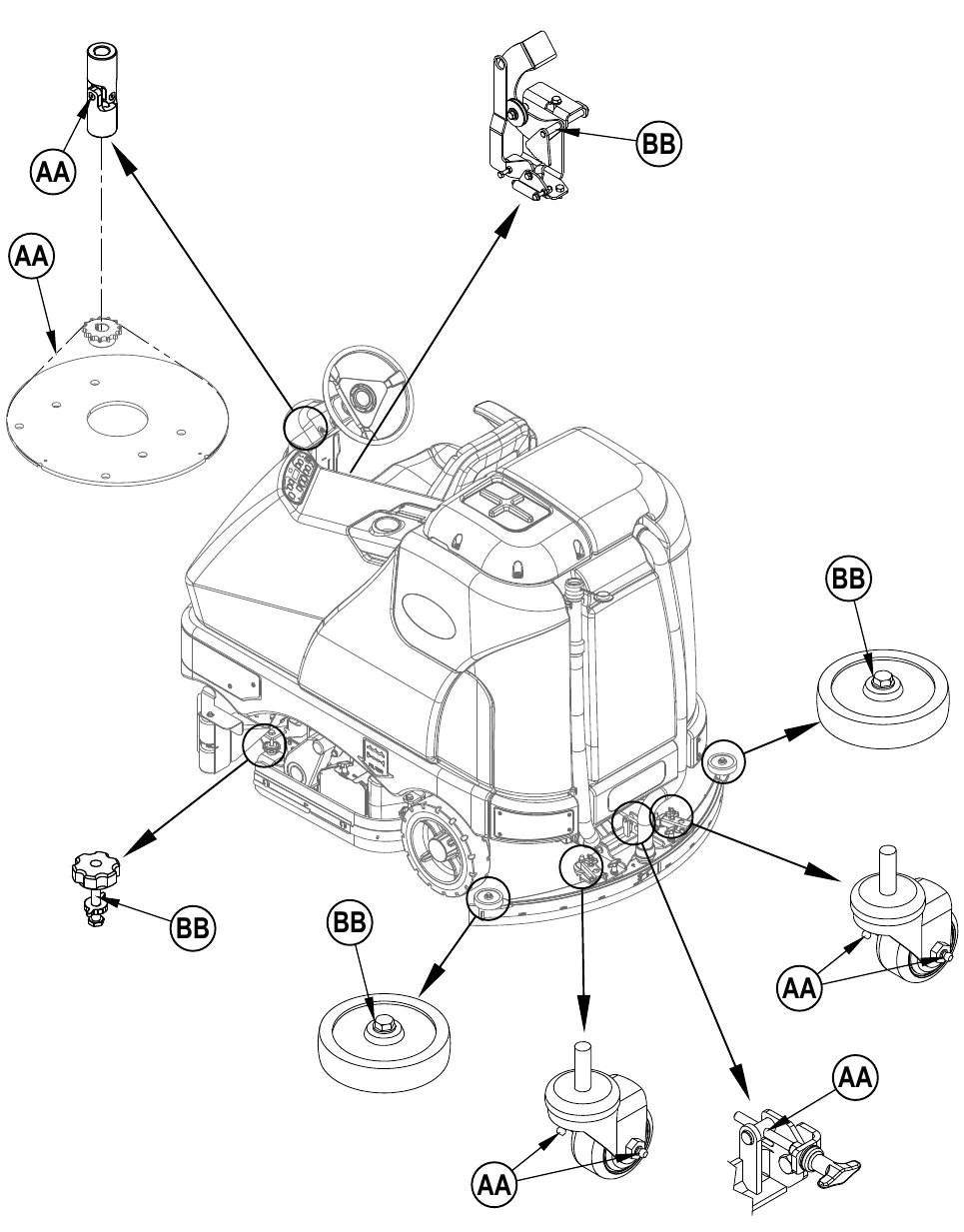
Lubricating the machine – Figure 9
Once a month, pump a small amount of grease into each grease fitting on the machine until grease seeps out around the bearings.
Grease fitting locations (or apply grease to) (AA):
- Squeegee Caster Wheel Axle and Pivot
- Steering Wheel Shaft Universal joint
- Steering Chain
- Squeegee mount angle adjustment knob threads
Once a month, apply light machine oil or synthetic lubricant spray to lubricate (BB):
- Squeegee tool end wheels
- Brake Pedal (parking brake) linkage
- Side Skirt Height Adjustment Knobs
Figure 9 is on page 20.
Grease points (AA) and oil points (BB) for the monthly lubrication on page 19.
Charging the batteries
Charge the batteries each time the machine is used or when the Battery Indicator (K5) is reading less than full.
To Charge the Batteries...
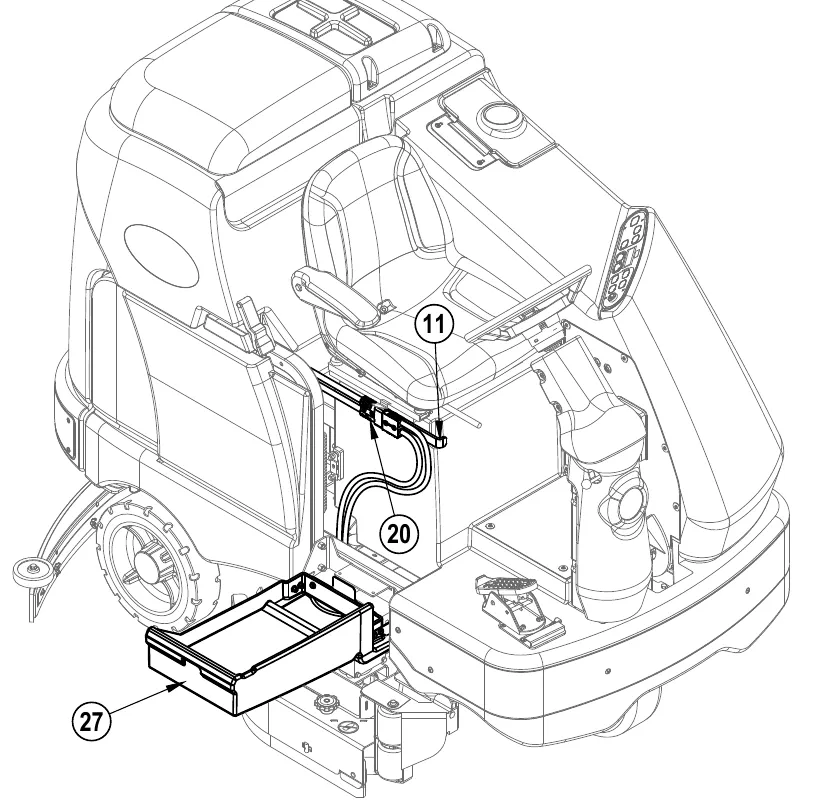
- See Figure 10. Depress the Battery Disconnect (11).
- Open Side Access Panel (27) and push the connector from the charger into the Battery Connector (20).
- Follow the instructions on the battery charger.
- After charging the batteries check the fluid level in all battery cells. Add distilled water, if necessary, to bring the fluid level up to the bottom of the filler tubes.
When servicing batteries...
- Remove all jewelry
- Do not smoke
- Wear safety glasses, rubber gloves and a rubber apron
- Work in a well-ventilated area
- Do not allow tools to touch more than one battery terminal at a time
- ALWAYS disconnect the negative (ground) cable first when replacing batteries to prevent sparks.
- ALWAYS connect the negative cable last when installing batteries.
Checking the battery water level
Check the water level of the batteries at least once a week. After charging the batteries, remove the vent caps and check the water level in each battery cell. Use distilled or demineralized water in a battery filling dispenser (available at most auto parts stores) to fill each cell to the level indicator (or to 0.4 in (10 mm) over the top of the separators). DO NOT over-fill the batteries!
Tighten the vent caps. Wash the tops of the batteries with a solution of baking soda and water (2 tablespoons of baking soda to 1 liter (about 1 quart) of water).
Squeegee maintenance
If the squeegee leaves narrow streaks or water, the blades may be dirty or damaged. Remove the squeegee, rinse it under warm water and inspect the blades. Reverse or replace the blades if they are cut, torn, wavy or worn.
To Reverse or Replace the Rear Squeegee Wiping Blade...
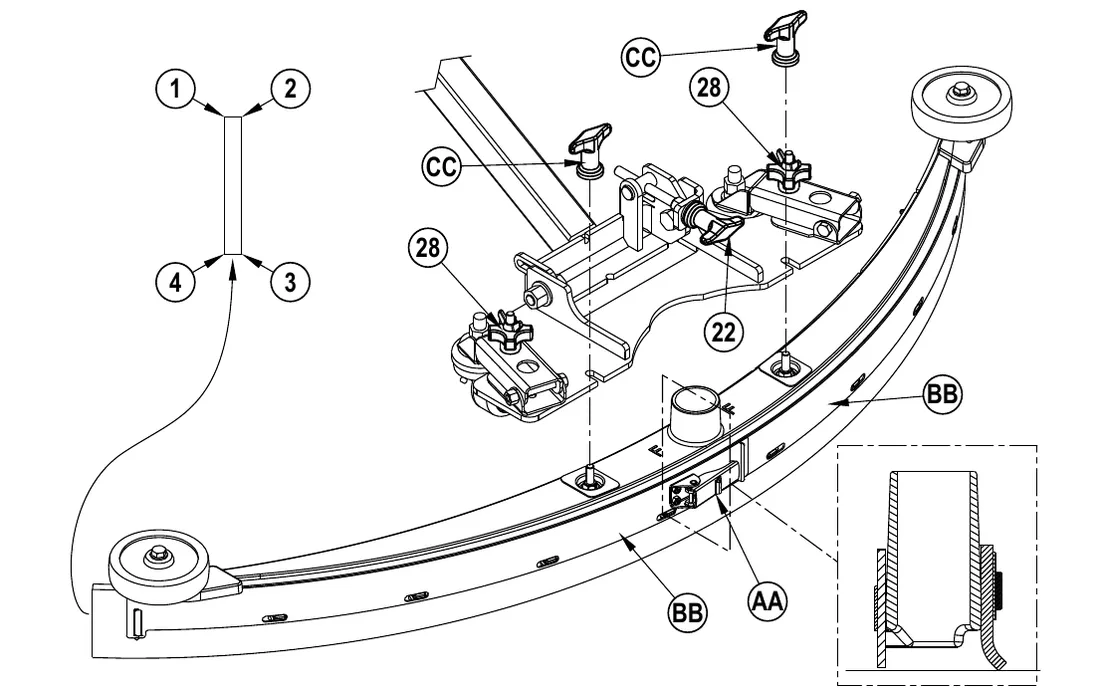
- See Figure 11. Raise the squeegee tool off the floor, then unsnap the Center Latch (AA) on the squeegee tool.
- Remove the Tension Straps (BB).
- Slip the rear blade off the alignment pins.
- The squeegee blade has 4 working edges as shown below. Turn the blade so a clean, undamaged edge faces toward the front of the machine. Replace the blade if all 4 edges are nicked, torn or worn to a large radius.
- Install the blade, following the steps in reverse order and adjust the squeegee tilt.
To Reverse or Replace the Front Squeegee Blade...
- Raise the squeegee tool off the floor, then loosen the (2) Thumb Nuts (CC) on top of the squeegee and remove the squeegee tool from the mount.
- Remove both rear Tension Straps first.
- Remove all the wing nuts that hold the front blade in place, then remove tension strap and blade.
- The squeegee blade has 4 working edges as shown below. Turn the blade so a clean, undamaged edge faces toward the front of the machine. Replace the blade if all 4 edges are nicked, torn or worn to a large radius.
- Install the blade, following the steps in reverse order and adjust the squeegee tilt.
Squeegee adjustment
There are two squeegee tool adjustments possible, angle and height.
Adjust the squeegee angle whenever a blade is reversed or replaced, or if the squeegee is not wiping the floor dry.
- Park the machine on a flat, even surface.
- Lower the squeegee, move the machine ahead slightly and adjust the squeegee tilt and height using the Squeegee Tilt Adjust Knob (22) and Squeegee Height Adjust Knobs (28) so that the rear squeegee blade touches the floor evenly across its entire width and is bent over slightly as shown in the squeegee cross section.
- Squeegee height is pre-set at the factory but may require periodic adjustment due to caster wear. Proper squeegee height is achieved when the front squeegee blade is in contact with the floor but not bent over. Use Height Adjust Knobs (28) to ensure blade position is uniform left to right.
- The Tilt Adjust Knob (22) is used to adjust the tool angle for uniform contact from center to tips of blade.
Side skirt maintenance
The side skirt’s function is to channel the waste water to the squeegee, helping contain the water within the machines cleaning path. During normal use the blades will wear in time. The operator will notice a small amount of water leaking out underneath the side skirts. A height adjustment can easily be made to lower the blades so that all the water can be pick-up by the squeegee.
To reverse or replace the scrub system side skirt(s) ...
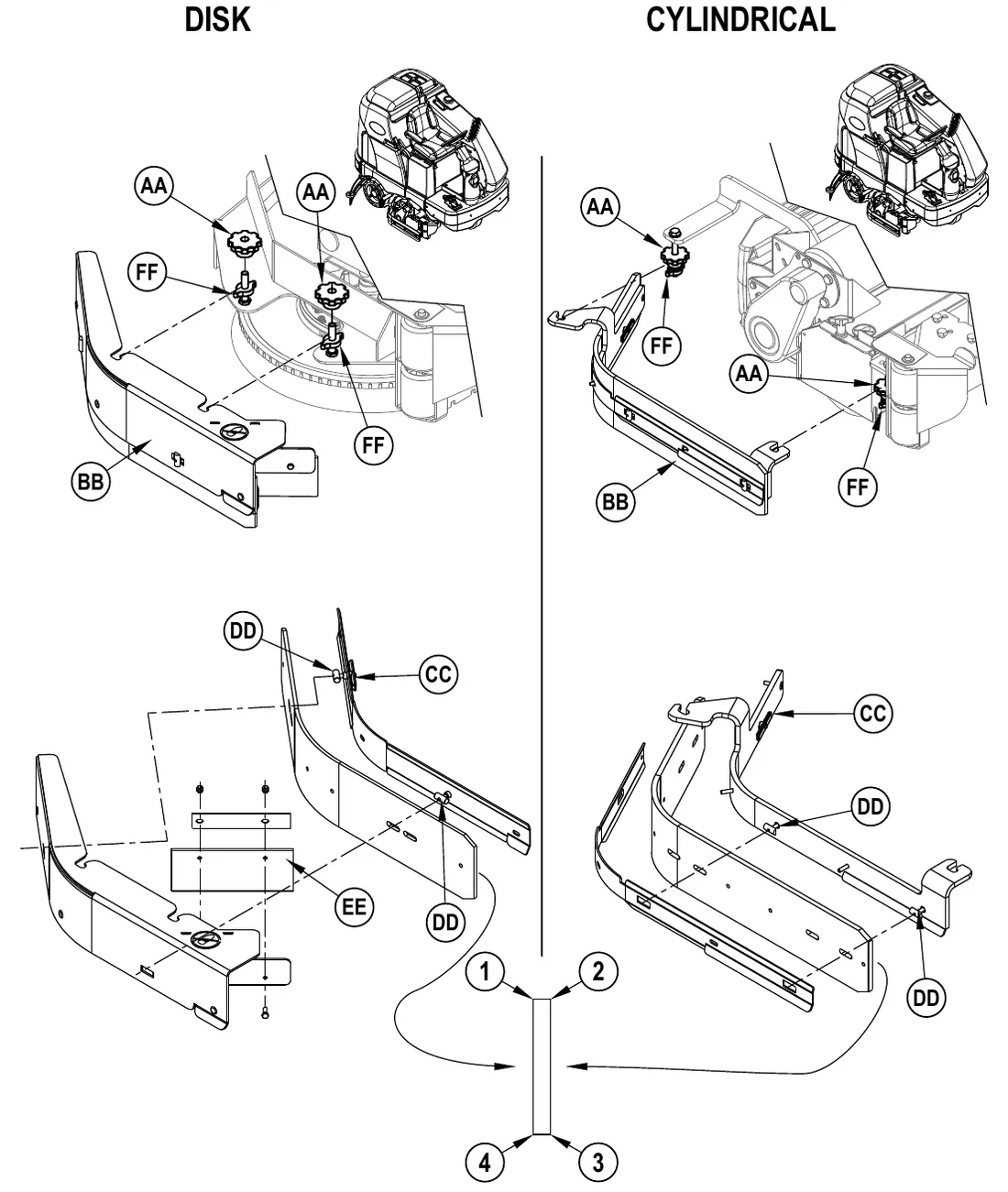
- See Figure 12. Loosen the (2) side skirt Retainer Knobs (AA) (2 per side) and remove the Skirt Assemblies (BB) from the scrub deck. NOTE: Remove the skirts by first sliding them forward and then pulling them off.
- Remove all the hardware that holds the blades to the skirt housings. NOTE: The main blade on each skirt housing is held on with Tool-less Retainers. Simply loosen the large Wing nuts (CC) and then turn the Knobs (DD) on the outside of the skirt housing until they are horizontal and push through the slots. The small inside Blade (EE) on disk models is held on by a plate and two screws and nuts, it has 2 working edges.
- The main skirt blade has 4 working edges as shown. Turn the blade so a clean, undamaged edge faces toward the center of the machine. Replace the blades as a set if all 4 edges are nicked, torn or worn beyond their ability to be adjusted.
- Reinstall the skirt housing assemblies onto the machine and adjust the blade for proper contact to the floor when the brush deck is placed in the scrub position.
Side skirt height adjustment
- The side skirt housing knob retainer screw studs have leveling Adjuster Collars (FF) that can be raised or lowered to compensate for blade wear.
- To adjust, remove the Skirt Assemblies (BB) from the scrub deck to access the Adjuster Collars (FF). Adjustment Tip: The skirts Retainer Knobs (AA) can be loosened with skirts left on and the Adjuster Collars (FF) rotated by reaching under the skirt housing.
- Turn the Adjuster Collars (FF) (Up or Down) to where the blades just fold over enough when scrubbing that all the waste water is contained inside the skirting. NOTE: Make small adjustments to obtain good blade wiping. Do not lower the blades too much to where they fold over excessively and cause unneeded blade wear.
Figure 12 is on page 24.
Side skirt maintenance
Steps for this figure are on page 23.
Side broom maintenance
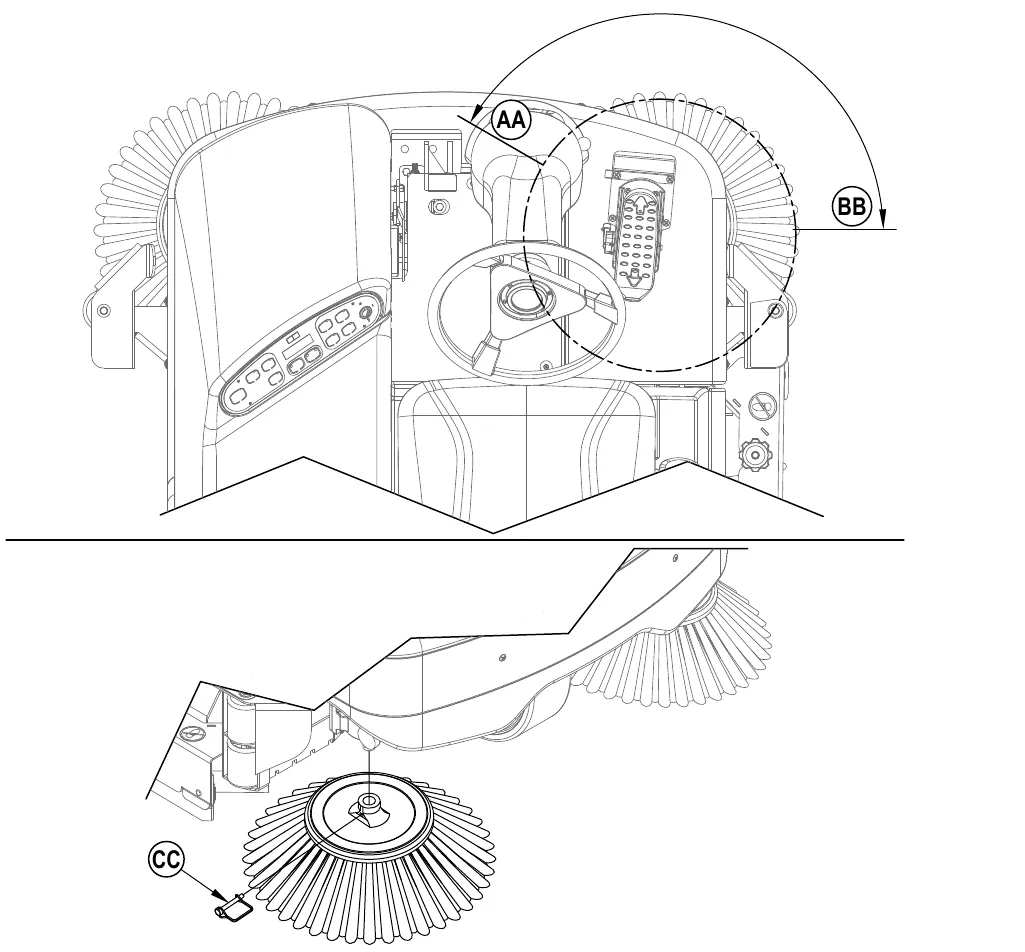
The side broom(s) move dirt and debris away from walls or curbs and into the path of the main broom. Adjust the side broom so that the bristles are contacting the floor from the 10 O’clock (AA) to the 3 O’clock (BB) area shown in Figure 13 when the broom is down and running.
The side brooms are adjusted through the adjust mode. To enter the “Adjust Mode” perform the following steps...
- Turn the Key Switch (A) to the OFF position (O).
- Press and hold the Side Broom Switch (C) and the Scrub Off Switch (E).
- While holding the switches (C & E), turn the key switch to the ON position (I).
- Continue to hold the switches for 2 seconds until side broom, scrub off and scrub on LED’s turn on.
- Release the switches. The Display (K) will now show “SIDE BROOM ADJUSTMENT”.
Once inside of the “Adjust Mode” perform the following steps to adjust the side broom...
- Press Scrub On Switch (D) to lower the side brooms and press the Side Broom Switch (C) to raise the side brooms until the desired height is reached.
- To save the side broom height position, press the Scrub Off Switch (E). The side brooms will raise to the up position and the display will show a key icon (indicating that the key switch should be cycled off and on).
- The machine has now been reprogrammed to use the new side broom height position.
NOTE: The machine should be stored with the Side Brooms in the raised position. The Side Brooms should be replaced when the bristles are worn to a length of 3 inches (7.62 cm) or they become ineffective.
To replace the Side Broom...
- Raise the Side Broom(s).
- Remove the large Pin (CC) holding the side broom on and remove the broom.
- Install the new broom by sliding it UP onto the shaft and re-installing the Pin (CC).
General machine troubleshooting
| Problem | Possible cause | Remedy |
|---|---|---|
| Poor water pick-up | Worn or torn squeegee blades | Reverse or replace |
| Squeegee out of adjustment | Adjust so blades touch floor evenly across entire width | |
| Recovery tank full | Empty recovery tank | |
| Recovery tank drain hose leak | Secure drain hose cap or replace | |
| Recovery tank cover gasket leak | Replace gasket / Seat cover properly | |
| Debris caught in squeegee | Clean squeegee tool | |
| Vacuum hose clogged | Remove debris | |
| Using too much solution | Reduce flow via control panel solution button | |
| Foam filter cover not seated | Seat cover properly | |
| Poor scrubbing performance | Worn brush or pad | Rotate or replace brushes |
| Wrong brush or pad type | Consult Advance | |
| Wrong cleaning chemical | Consult Advance | |
| Moving machine too fast | Slow down | |
| Not using enough solution | Increase flow via control panel solution button | |
| Scrub Motors Do Not Run | Tripped 20 Amp (F3) circuit breaker | Check for electrical short circuit & reset |
| Inadequate solution flow or no solution | Solution tank empty | Fill solution tank |
| Solution lines, valves, filter or trough clogged | Flush lines, trough and clean solution filter | |
| Solution turned OFF | Activate flow via control panel solution button | |
| Solution solenoid valve plugged or defective | Clean or replace valve (see service manual) | |
| Machine does not run | Emergency stop switch tripped | Reconnect battery connectors |
| Operator seat safety switch | Check for open circuit and replace | |
| Main system controller | Check error fault codes (see service manual) | |
| Tripped 3 Amp (F1) circuit breaker | Check for electrical short circuit & reset | |
| No FWD/REV wheel drive | Drive system speed controller | Check error fault codes (see service manual) |
| Emergency stop switch tripped | Reconnect battery connectors | |
| Vacuum shuts off and display shows “FULL” when recovery tank is not full | Plugged squeegee hose | Clear debris |
| Vacuuming large amounts of water at a high travel speed | Slow down or disable auto shut-off feature (see service manual) | |
| Poor Sweeping Performance (Cylindrical System) | Hopper Full | Empty and clean hopper |
| Brushes worn | Replace brushes | |
| Bristles have taken a set | Rotate brushes | |
| No Detergent Flow (EcoFlex models only) | Empty detergent cartridge | Fill detergent cartridge |
| Plugged or kinked detergent flow line | Purge system, straighten lines to remove any kinks | |
| Dry seal cap on detergent cartridge not sealed | Reseat dry seal cap | |
| Detergent pump wiring disconnected or backwards | Connect or reconnect wiring |
General machine troubleshooting
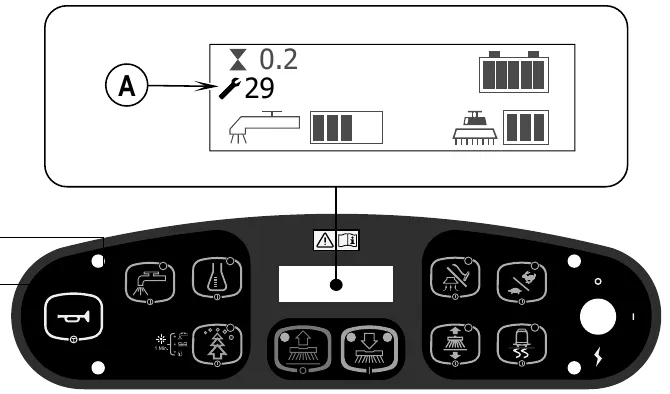
Error code display
Any error codes detected by A2 Control Board Assembly will be displayed on the control panel display as they occur. If more than one error exists, the display will sequence through the error codes at one-second intervals. The error (A) will display as a mechanical wrench symbol followed by a two-digit code. For example, [wrench symbol] 29 as shown in the adjacent drawing would be an open vacuum motor error.
| Display code | Error/Fault description |
|---|---|
| 01# | Scrub deck sense R2 resistor fault |
| 03# | Speed control fault |
| 04# | Scrub motor overload Note that some models use one, two or three scrub motors. |
| 05# | Left brush motor contactor coil overload Contactor K4 is for the left motor on the three-motor decks. |
| 06# | Center brush motor contactor coil overload Contactor K3 is for the center motor on three-motor decks. K3 is for the left motor on two-motor decks. |
| 07# | Right brush motor contactor coil overload Contactor K2 is for the right motor on two- or three-motor decks. K2 is the only contactor on single-motor decks. |
| 08# | Scrub deck actuator overload |
| 09# | Vacuum motor overload |
| 10# | K1 Vacuum motor contactor coil overload. |
| 11# | Squeegee actuator overload |
| 12# | L1 Solution solenoid overload |
| 13# | Solution control pump overload |
| 16# | K6 Side broom motor contactor coil overload |
| 17# | Side broom actuator overload |
| 18# | K5 Auxiliary contactor coil overload |
| 19# | Back-up alarm overload |
| 20# | Horn output fault |
| Display code | Error/Fault description |
|---|---|
| 21# | Scrub motor open |
| 22# | Left brush motor contactor coil open |
| 23# | Left brush motor contactor coil short to ground |
| 24# | Center brush motor contactor coil open |
| 25# | Center brush motor contactor coil short to ground |
| 26# | Right brush motor contactor coil open |
| 27# | Right brush motor contactor coil short to ground |
| 28# | Scrub deck actuator open |
| 29# | Vacuum motor open |
| 30# | Vacuum motor contactor coil open |
| 31# | K1 Vacuum motor contactor coil short to ground |
| 32# | Squeegee actuator open |
| 33# | L1 Solution solenoid open |
| 34# | L1 Solution solenoid short to ground |
| 35# | Solution control pump open |
| 36# | Side broom motor contactor coil open |
| 37# | K6 Side broom motor contactor coil short to ground |
| 38# | Side broom actuator motor open |
| 39# | Auxiliary motor contactor coil open |
| 40# | K5 Auxiliary motor contactor coil short to ground |
| 41# | Back-up alarm open |
| 42# | Back-up alarm short to ground |
Accessories / options
In addition to the standard components, the machine can be equipped with the following accessories/options, according to the machine specific use:
- Brushes with harder or softer bristles
- Solution Auto-Fill Kit
- Vacuum Motor Kit
- Warning Beacon Kit
- Deluxe Seat Kit
- Overhead Guard Kit
- Seat Belt Kit
- Battery Roll Out Kit
- Operator Foot Guard Kit
- Back-Up Alarm Kit
- Spray Wand Kit
- Headlight Kit
- Heavy Front Bumper Kit
- Floor Mat Kit
- Detergent Metering Kit
- Tube Front Bumper Kit
For further information about the above-mentioned accessories, contact an authorized Retailer.
Material composition and recyclability
| Type | % of machine weight | % recyclable |
|---|---|---|
| Aluminum | 2% | 100% |
| Electrical / motors / engines - misc. | 19% | 33% |
| Ferrous metals | 51% | 100% |
| Harnesses / cables | 2% | 81% |
| Liquids | 0% | 0% |
| Plastic - non-recyclable | 3% | 0% |
| Plastic - recyclable | 3% | 100% |
| Polyethylene | 21% | 92% |
| Rubber | 1% | 33% |
Solution flow rates
| Standard flow rates | Override flow rates | ||||
|---|---|---|---|---|---|
| 1 bar | 2 bars | 3 bars | 4 bars | 5 bars | |
| 40” Disc | .84 GPM | 1.00 GPM | 1.50 GPM | 2.00 GPM | 2.50 GPM |
| 40” Cylindrical | .70 GPM | .84 GPM | 1.00 GPM | 1.50 GPM | 2.50 GPM |
| 45”/48” Disc | 1.00 GPM | 1.50 GPM | 2.00 GPM | 2.25 GPM | 2.50 GPM |
| 45”/48” Cylindrical | .84 GPM | 1.00 GPM | 1.50 GPM | 2.00 GPM | 2.50 GPM |
Technical specifications (as installed and tested on the unit)
Revised 12/2014.
| Specification | SC6500 40C SC6500 40D | SC6500 45C SC6500 45D | SC6500 48C SC6500 48D |
|---|---|---|---|
| Model No. | 56414010 56414012 | 56414014 56414016 | 56414018 56414020 |
| Voltage, Batteries | 36V | 36V | 36V |
| Battery Capacity (max) (Ah) | 450 | 450 | 450 |
| Protection Grade | IPX3 | IPX3 | IPX3 |
| Sound Pressure Level - Cylindrical, IEC 60335-2-72: 2002 Amend. 1:2005, ISO 11201 (dB(A)/20 µPa) | 70 | 70 | 70 |
| Sound Pressure level - KpA (IEC 60335-2-72, ISO 11201) Uncertainty (dB(A)) | 3.0 | 3.0 | 3.0 |
| Sound Pressure Level - Disc, IEC 60335-2-72: 2002 Amend. 1:2005, ISO 11201 (dB(A)/20 µPa) | 70 | 70 | 70 |
| Sound Pressure level - KpA (IEC 60335-2-72, ISO 11201) Uncertainty (dB(A)) | 3.0 | 3.0 | 3.0 |
| Gross Weight* - Cylindrical | 3325 lb (1508 kg) | 3365 lb (1526 kg) | 3410 lb (1547 kg) |
| Transportation Weight** - Cylindrical | 2897 lb (1314 kg) | 2937 lb (1332 kg) | 2982 lb (1353 kg) |
| Gross Weight* - Disc | 3220 lb (1460 kg) | 3270 lb (1483 kg) | 3320 lb (1506 kg) |
| Transportation Weight** - Disc | 2792 lb (1266 kg) | 2842 lb (1289 kg) | 2892 lb (1312 kg) |
| Maximum Wheel Floor Loading (center front) | 116 psi (8.15 kg/cm²) | 116 psi (8.15 kg/cm²) | 116 psi (8.15 kg/cm²) |
| Maximum Wheel Floor Loading (right rear) | 81 psi (5.69 kg/cm²) | 81 psi (5.69 kg/cm²) | 81 psi (5.69 kg/cm²) |
| Maximum Wheel Floor Loading (left rear) | 86 psi (6.04 kg/cm²) | 86 psi (6.04 kg/cm²) | 86 psi (6.04 kg/cm²) |
| Vibrations at the Hand Controls (ISO 5349-1) | <3.67 ft/s² (<1.12 m/s²) | <3.67 ft/s² (<1.12 m/s²) | <3.67 ft/s² (<1.12 m/s²) |
| Vibrations at the Hand Controls (ISO 5349-1) Uncertainty | 0.36 ft/s² (.11 m/s²) | 0.36 ft/s² (.11 m/s²) | 0.36 ft/s² (.11 m/s²) |
| Vibrations at the Seat (EN 1032) | <1.15 ft/s² (<0.35 m/s²) | <1.15 ft/s² (<0.35 m/s²) | <1.15 ft/s² (<0.35 m/s²) |
| Vibrations at the Seat (EN 1032) Uncertainty | 0.11 ft/s² (0.035 m/s²) | 0.11 ft/s² (0.035 m/s²) | 0.11 ft/s² (0.035 m/s²) |
| Gradeability Transport | 16% (9°) | 16% (9°) | 16% (9°) |
| Gradeability Cleaning | 10.5% (6°) | 10.5% (6°) | 10.5% (6°) |
| Machine Length | 73.5 in (187 cm) | ||
| Machine Height | 58.5 in (148.6 cm) | ||
| Machine Height (w/overhead guard) | 84 in (213 cm) | ||
| Machine Width at Rollers - Cylindrical | 47.5 in (121 cm) | 53.5 in (136 cm) | 55.5 in (141 cm) |
| Machine Width at Rollers - Disc | 42.5 in (108 cm) | 51.5 in (131 cm) | 52.5 in (133 cm) |
| Machine Width with Squeegee | 49 in (125 cm) “F” | 54 in (137 cm) “G” | 57 in (145 cm) “H” |
| Minimum Aisle Turn Width | 84 in (214 cm) | ||
| Solution Tank Capacity | 70 gal (265 L) | ||
| Recovery Tank Capacity | 70 gal (265 L) | ||
| Transport Speed (Fwd. Maximum) | 6.0 mph (9.5 kph) | ||
| Transport Speed (Rev. Maximum) | 3.0 mph (5.0 kph) | ||
| Battery Compartment Size (approximate) | |||
| Height (maximum) | 19 in (48.2 cm) | ||
| Width (maximum) | 20 in (50.8 cm) | ||
| Length (maximum) | 31.75 in (80.6 cm) | ||
| Scrub brush size | |||
| Outside Scrub Brush Diameter - Cylindrical (inside core is 5 in (12.7 cm)) | 8.5 in (21.6 cm) | ||
| Scrub Brush Length - Cylindrical (two brushes per machine) | 38.37 in (97.4 cm) | 43.6 in (110.8 cm) | 46.6 in (118.4 cm) |
| Brush Diameter - Disc | (Quantity of 2) 20 in (50.8 cm) | (Quantity of 3) at 16 in (40.6 cm) | (Quantity of 3) at 17 in (43 cm) |
| Scrub Brush Speed - Cylindrical (RPM) | 630 RPM | ||
| Scrub Brush Speed - Disc (RPM) | 240 RPM | 225 RPM | 225 RPM |
| Hopper Capacity - Cylindrical | 0.40 ft³ (11 L) | 0.44 ft³ (12.5 L) | 0.50 ft³ (14 L) |
| Cleaning Path Width (scrubbing path) | 40 in (101 cm) | 45 in (114 cm) | 48 in (122 cm) |
| Sweeping Path with side brooms - Cylindrical | 57 in (145 cm) | ||
*Gross Weight: Standard machine without options, full solution tank and empty recovery tank, with removable scrub brushes and batteries installed.
**Transportation Weight: Standard machine without options, empty solution and recovery tanks, with batteries installed and no operator.
Technical specifications (as installed and tested on the unit)
Revised 12/2014.
| Specification | SC6500 40C (EcoFlex) SC6500 40D (EcoFlex) | SC6500 45C (EcoFlex) SC6500 45D (EcoFlex) | SC6500 48C (EcoFlex) SC6500 48D (EcoFlex) |
|---|---|---|---|
| Model No. | 56414011 56414013 | 56414015 56414017 | 56414019 56414021 |
| Voltage, Batteries | 36V | 36V | 36V |
| Battery Capacity (Ah) | 450 | 450 | 450 |
| Protection Grade | IPX3 | IPX3 | IPX3 |
| Sound Pressure Level - Cylindrical, IEC 60335-2-72: 2002 Amend. 1:2005, ISO 11201 (dB(A)/20 µPa) | 70 | 70 | 70 |
| Sound Pressure level - KpA (IEC 60335-2-72, ISO 11201) Uncertainty (dB(A)) | 3.0 | 3.0 | 3.0 |
| Sound Pressure Level - Disc, IEC 60335-2-72: 2002 Amend. 1:2005, ISO 11201 (dB(A)/20 µPa) | 70 | 70 | 70 |
| Sound Pressure level - KpA (IEC 60335-2-72, ISO 11201) Uncertainty (dB(A)) | 3.0 | 3.0 | 3.0 |
| Gross Weight* - Cylindrical | 3325 lb (1508 kg) | 3365 lb (1526 kg) | 3410 lb (1547 kg) |
| Transportation Weight** - Cylindrical | 2897 lb (1314 kg) | 2937 lb (1332 kg) | 2982 lb (1353 kg) |
| Gross Weight* - Disc | 3220 lb (1460 kg) | 3270 lb (1483 kg) | 3320 lb (1506 kg) |
| Transportation Weight** - Disc | 2792 lb (1266 kg) | 2842 lb (1289 kg) | 2892 lb (1312 kg) |
| Maximum Wheel Floor Loading (center front) | 116 psi (8.15 kg/cm²) | 116 psi (8.15 kg/cm²) | 116 psi (8.15 kg/cm²) |
| Maximum Wheel Floor Loading (right rear) | 81 psi (5.69 kg/cm²) | 81 psi (5.69 kg/cm²) | 81 psi (5.69 kg/cm²) |
| Maximum Wheel Floor Loading (left rear) | 86 psi (6.04 kg/cm²) | 86 psi (6.04 kg/cm²) | 86 psi (6.04 kg/cm²) |
| Vibrations at the Hand Controls (ISO 5349-1) | <3.67 ft/s² (<1.12 m/s²) | <3.67 ft/s² (<1.12 m/s²) | <3.67 ft/s² (<1.12 m/s²) |
| Vibrations at the Hand Controls (ISO 5349-1) Uncertainty | 0.36 ft/s² (.11 m/s²) | 0.36 ft/s² (.11 m/s²) | 0.36 ft/s² (.11 m/s²) |
| Vibrations at the Seat (EN 1032) | <1.15 ft/s² (<0.35 m/s²) | <1.15 ft/s² (<0.35 m/s²) | <1.15 ft/s² (<0.35 m/s²) |
| Vibrations at the Seat (EN 1032) Uncertainty | 0.11 ft/s² (0.035 m/s²) | 0.11 ft/s² (0.035 m/s²) | 0.11 ft/s² (0.035 m/s²) |
| Gradeability Transport | 16% (9°) | 16% (9°) | 16% (9°) |
| Gradeability Cleaning | 10.5% (6°) | 10.5% (6°) | 10.5% (6°) |
| Machine Length | 73.5 in (187 cm) | ||
| Machine Height | 58.5 in (148.6 cm) | ||
| Machine Height (w/overhead guard) | 84 in (213 cm) | ||
| Machine Width at Rollers - Cylindrical | 47.5 in (121 cm) | 53.5 in (136 cm) | 55.5 in (141 cm) |
| Machine Width at Rollers - Disc | 42.5 in (108 cm) | 51.5 in (131 cm) | 52.5 in (133 cm) |
| Machine Width with Squeegee | 49 in (125 cm) “F” | 54 in (137 cm) “G” | 57 in (145 cm) “H” |
| Minimum Aisle Turn Width | 84 in (214 cm) | ||
| Solution Tank Capacity | 70 gal (265 L) | ||
| Recovery Tank Capacity | 70 gal (265 L) | ||
| Transport Speed (Fwd. Maximum) | 6.0 mph (9.5 kph) | ||
| Transport Speed (Rev. Maximum) | 3.0 mph (5.0 kph) | ||
| Battery Compartment Size (approximate) | |||
| Height (maximum) | 19 in (48.2 cm) | ||
| Width (maximum) | 20 in (50.8 cm) | ||
| Length (maximum) | 31.75 in (80.6 cm) | ||
| Scrub brush size | |||
| Outside Scrub Brush Diameter - Cylindrical (inside core is 5 in (12.7 cm)) | 8.5 in (21.6 cm) | ||
| Scrub Brush Length - Cylindrical (two brushes per machine) | 38.37 in (97.4 cm) | 43.6 in (110.8 cm) | 46.6 in (118.4 cm) |
| Brush Diameter - Disc | (Quantity of 2) 20 in (50.8 cm) | (Quantity of 3) at 16 in (40.6 cm) | (Quantity of 3) at 17 in (43 cm) |
| Scrub Brush Speed - Cylindrical (RPM) | 630 RPM | ||
| Scrub Brush Speed - Disc (RPM) | 240 RPM | 225 RPM | 225 RPM |
| Hopper Capacity - Cylindrical | 0.40 ft³ (11 L) | 0.44 ft³ (12.5 L) | 0.50 ft³ (14 L) |
| Cleaning Path Width (scrubbing path) | 40 in (101 cm) | 45 in (114 cm) | 48 in (122 cm) |
| Sweeping Path with side brooms - Cylindrical | 57 in (145 cm) | ||
*Gross Weight: Standard machine without options, full solution tank and empty recovery tank, with removable scrub brushes and batteries installed.
**Transportation Weight: Standard machine without options, empty solution and recovery tanks, with batteries installed and no operator.
Advance is a trademark of Nilfisk, Inc. Southeastern Equipment & Supply is an independent dealer.