
SC500 service manual
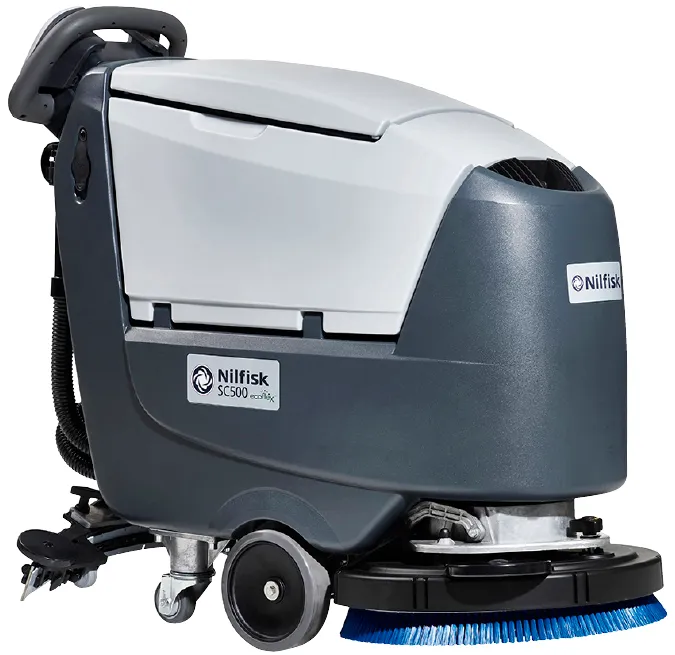
Advance model numbers:
- 9087352020 SC500 X20 B
- 9087353020 SC500 X20R B
- 9087354020 SC500 20D B
- 9087403020 SC500 X20 B V
- 9087405020 SC500 X20R B V
- 9087404020 SC500 20D B V
Nilfisk model numbers:
- 9087350020 SC500 53 B FULL PKG
- 9087351020 SC500 53 B
- 9087355020 SC500 53R B
- 9087400020 SC500 53 B FULL PKG V
- 9087401020 SC500 53 B V
- 9087402020 SC500 53R B V
English
01/2015 revised 06/2021 (G) Form No. 9099984000
Contents
- 03 - General Information – 6
- Machine General Description – 6
- Service Manual Purpose and Field of Application – 6
- Other Reference Manuals – 6
- Conventions – 7
- Name Plate – 7
- Safety – 8
- Lifting The Machine – 13
- Transporting The Machine – 13
- Technical Specifications – 14
- Maintenance Schedule – 16
- Know Your Machine – 17
- Control panel Disc deck (Model No.: 9087352020, 9087354020, 9087350020, 9087351020) – 17
- Control panel REV deck (Model No.: 9087353020, 9087355020) – 17
- Control panel Disc deck (Model No.: 9087403020, 9087404020, 9087400020,9087401020) – 18
- Control panel REV deck (Model No.: 9087405020, 9087402020) – 18
- Service and Diagnostic Equipment – 21
- Dimensions – 22
- 04 - Control System - models with key slot – 24
- Model No.: 9087352020, 9087354020, 9087350020, 9087351020, 9087353020, 9087355020 – 24
- Functional Description – 24
- Wiring Diagram – 25
- Component Locations – 26
- Troubleshooting – 27
- Main machine controller (EB1) Alarm Codes – 27
- Black-box: Recording of Alarms, Parameters (see pages 34-35), Partial Operating Time Counter – 32
- Display, Main Screen – 32
- Display, Alarms Log Screen – 33
- Display, Machine Settings Screen – 34
- Display, Operating Time Counter Screen – 36
- System for Flow Rate Regulation as Function of Speed – 37
- Removal and Installation – 38
- Specifications – 42
- Shop Measurements – 50
Contents (continued)
- 05 - Control System, Models with magnetic smart key – 61
- Model No.: 9087403020, 9087404020, 9087400020,9087401020, 9087405020, 9087402020 – 61
- Functional Description – 61
- Wiring Diagram – 62
- Component Locations – 63
- Troubleshooting – 64
- Main machine controller (EB1) Alarm Codes – 64
- Drive System Alarm Codes – 67
- On-Board Battery Charger Alarm Codes – 68
- Nilfisk Lithium-ion Battery Alarm Codes – 69
- Black-box: Recording of Alarms, Parameters (see pages 71-72), Partial Operating Time Counter – 71
- Display, Main Screen – 71
- Display, Alarms Log Screen – 73
- Display, Machine Settings Screen – 74
- Display, Operating Time Counter Screen – 76
- Display, Magnetic Smart Keys Management Screen – 77
- System for Flow Rate Regulation as Function of Speed – 78
- Removal and Installation – 79
- Specifications – 83
- Shop Measurements – 92
- 10 - Chassis System – 104
- 20 - Wheel System, Traction – 105
- 24 - Electrical System – 113
Contents (continued)
- Battery Charging - Conventional Lead/Acid Batteries – 121
- Removal and Installation – 123
- Troubleshooting – 130
- General Wiring Diagram - With key slot (Model No.: 9087352020, 9087354020, 9087350020, 9087351020, 9087353020, 9087355020) – 131
- General Wiring Diagram - with magnetic smart key and conventional batteries – 132
- General Wiring Diagram - with magnetic smart key and Lithium-Ion batteries – 133
- Specifications – 134
- 30 - Solution System – 135
- 34 - Scrub System, Disc – 151
- 34 - Scrub System, REV – 165
Contents (continued)
- Functional Description – 165
- Wiring Diagram – 166
- Brush Deck Actuator System – 167
- Component Locations – 168
- Maintenance and Adjustments – 170
- Troubleshooting – 171
- Removal and Installation – 173
- Specifications – 179
- 38 - Squeegee System – 180
- 40 - Recovery System – 188
- 90 - Options – 199
03 - General information
Machine general description
The SC500 is a “walk-behind” industrial machine designed to wash and dry floors in one pass. The machine is powered by on-board batteries, models can be equipped with EcoFlex system. The machine features variable floor pressure disc brush or REV system, controlled detergent solution dosing and a rear squeegee with rubber blades that vacuums and dries the floor.
Service manual purpose and field of application
The Service Manual is a technical resource intended to help service technicians when carrying out maintenance and repairs on the SC500, to guarantee the best cleaning performance and a long working life for the machine.
Please read this manual carefully before performing any maintenance and repair procedure on the machine.
Other reference manuals
| Model | Form No. |
|---|---|
| Instructions for Use, Advance Brand | 9099980000 |
| Instructions for Use, Nilfisk Brand | 9099974000 |
| Parts List, Advance Brand | 9099981000 |
| Parts List, Nilfisk Brand | 9099975000 |
| Nilfisk Lithium-Ion Battery Module Service Manual | 56043180 |
| Assembly Instructions | Instruction Code | Machines concerned |
|---|---|---|
| EcoFlex Kit | 9100000923 | SC500 Nilfisk |
| Battery charger kit | 9100000924 | SC500 Nilfisk |
| Vacuum system motor kit | 9100000753 | All SC500 |
| TrackClean | 9100000057 | All SC500 |
| Lithium-Ion Battery Module Kit | 9100003105 | SC500 with magnetic key |
These manuals are available at:
- Local Advance or Nilfisk retailer
- Advance website: www.advance-us.com
- Nilfisk website: www.nilfisk.com
- EZ-Data application
Conventions
Forward, backward, front, rear, left or right are intended with reference to the operator’s position, that is to say in driving position.
Name plate
Reference to Figure 1
The machine serial number and model name are marked on the plate (see the example to the side).
Model nuumber and year of production (Date code: A17, as January 2017) are marked on the same plate.
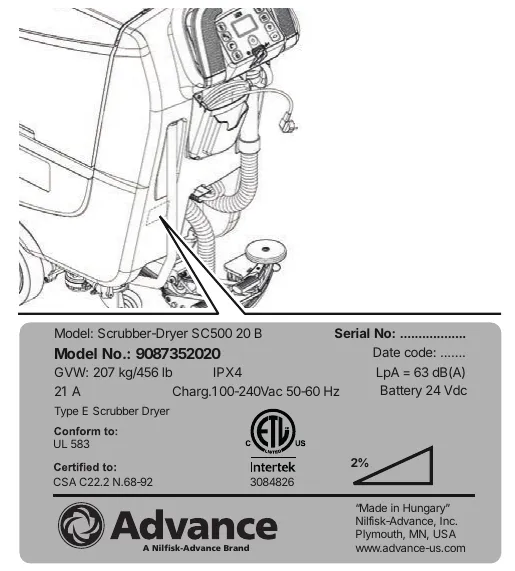
Name plate text as printed in the example: GVW 456 lb (207 kg). Slope limit 2%. Battery 24 Vdc. Charger input 100-240 Vac, 50-60 Hz. Rating 21 A.
Safety
The following symbols indicate potentially dangerous situations. Always read this information carefully and take all necessary precautions to safeguard people and property.
Visible symbols on the machine


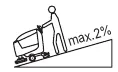
The maximum gradient when working is 2% (see page 14).
Symbols
The following symbols are used to help you recognize the information concerning the safety and the prevention of problems.
Note: Indicates an important informational message.
General safety instructions
Specific warnings and cautions to inform about potential damages to people and machine are shown below.
- This machine must be used by properly trained operators only.
- Do not wear jewels when working near electrical components.
- Do not work under the lifted machine without supporting it with safety stands.
- Do not operate the machine near toxic, dangerous, flammable and/or explosive powders, liquids or vapors: This machine is not suitable for collecting dangerous powders.
- When using lead (WET) batteries, keep sparks, flames and smoking materials away from the batteries. During the normal operation explosive gases are released.
- When using lead (WET) batteries, battery charging produces highly explosive hydrogen gas. During battery charging, lift the recovery tank and perform this procedure in well-ventilated areas and away from naked flames.
- The machine ignition key has a built-in magnet. Do not place objects having magnetic bands (such as credit cards, electronic keys, phone cards) near the key. The built-in magnet can damage or erase the data stored on the magnetic bands.
- Before using the battery charger, ensure that frequency and voltage values, indicated on the machine serial number plate, match the electrical mains voltage.
- Do not pull or carry the machine by the battery charger cable and never use the battery charger cable as a handle. Do not close a door on the battery charger cable, or pull the battery charger cable around sharp edges or corners. Do not run the machine on the battery charger cable.
- Keep the battery charger cable away from heated surfaces.
- Do not charge the batteries if the battery charger cable or the plug are damaged.
- To reduce the risk of fire, electric shock, or injury, do not leave the machine unattended when it is plugged in. Before performing any maintenance procedure, disconnect the battery charger cable from the electrical mains.
- Do not smoke while charging the batteries.
- To avoid any unauthorized use of the machine, remove the ignition key.
- Do not leave the machine unattended without being sure that it cannot move independently.
- Always protect the machine against the sun, rain and bad weather, both under operation and inactivity condition. Store the machine indoors, in a dry place: This machine must not be used or stored outdoors in wet conditions.
- Before using the machine, close all doors and/or covers as shown in the User Manual.
- This machine is not intended for use by persons (including children) with reduced physical, sensory or mental capabilities, or lack of experience and knowledge, unless they have been given supervision or instruction concerning use of the machine by a person responsible for they safety.
- Children should be supervised to ensure that they do not play with the machine.
- Close attention is necessary when used near children. Use only as shown in this Manual. Use only Nilfisk or Advance recommended accessories.
- Check the machine carefully before each use, always check that all the components have been properly assembled before use. If the machine is not perfectly assembled it can cause damages to people and properties.
- Take all necessary precautions to prevent hair, jewels and loose clothes from being caught by the machine moving parts.
- Do not use the machine on incline.
- Do not tilt the machine more than the angle indicated on the machine itself, in order to prevent instability.
- Do not use the machine in particularly dusty areas.
- Use the machine only where a proper lighting is provided.
- While using this machine, take care not to cause damage to people or objects.
- Do not bump into shelves or scaffoldings, especially where there is a risk of falling objects.
- Do not lean liquid containers on the machine, use the relevant can holder.
- The machine operating temperature must be between 32 °F and 104 °F (0 °C and +40 °C).
- The machine storage temperature must be between 32 °F and 104 °F (0 °C and +40 °C).
- The humidity must be between 30% and 95%.
- When using floor cleaning detergents, follow the instructions on the labels of the detergent bottles.
- To handle floor cleaning detergents, wear suitable gloves and protections.
- Do not use the machine as a means of transport.
- Do not allow the brush/pad to operate while the machine is stationary to avoid damaging the floor.
- In case of fire, use a powder fire extinguisher, not a water one.
- Do not tamper with the machine safety guards and follow the ordinary maintenance instructions scrupulously.
- Do not allow any object to enter into the openings. Do not use the machine if the openings are clogged. Always keep the openings free from dust, hairs and any other foreign material which could reduce the air flow.
- Do not remove or modify the plates affixed to the machine.
- When the machine is to be pushed for service reasons (missing or discharged batteries, etc.), the speed must not exceed 2.5 mi/h (4 km/h).
- This machine cannot be used on roads or public streets.
- Pay attention during machine transportation when temperature is below freezing point. The water in the recovery tank or in the hoses could freeze and seriously damage the machine.
- Use brushes and pads supplied with the machine or those specified in the User Manual. Using other brushes or pads could reduce safety.
- In case of machine malfunctions, ensure that these are not due to lack of maintenance. If necessary, request assistance from the authorised personnel or from an authorised Service Center.
- If parts must be replaced, require ORIGINAL spare parts from an Authorised Dealer or Retailer.
- To ensure machine proper and safe operation, the scheduled maintenance shown in the relevant chapter of this Manual, must be performed by the authorised personnel or by an authorised Service Center.
- Do not wash the machine with direct or pressurised water jets, or with corrosive substances.
- The machine must be disposed of properly, because of the presence of toxic-harmful materials (batteries, etc.), which are subject to standards that require disposal in special centres.
Lithium-ion battery module safety instructions
Specific warnings and cautions to inform about potential damages to people and machine are shown below.
- Do not wear jewelry when working near electrical components.
- Read all safety warnings and all instructions. Failure to follow the warnings and instructions may result in electrical shock, fire and/or serious injury.
- Do not use any other type of batteries; only use the one supplied with the machine or its original spare part.
- Before each use, check if it’s damaged.
- Do not soak in liquids.
- Recharge only with the charger specified by the manufacturer. A charger that is suitable for one type of battery pack may create a risk of fire when used with another battery pack.
- Under abusive conditions, liquid may be ejected from the battery; avoid contact. If contact accidentally occurs, flush with water. lf liquid contacts eyes, additionally seek medical help. Liquid ejected from the battery may cause irritation or burns.
- When battery pack is not in use, keep it away from other metal objects, like paper clips, coins, keys, nails, screws or other small metal objects that can make a connection from one terminal to another. Shorting the battery terminals together may cause burns or a fire.
- Do not use a battery pack or appliance that is damaged or modified. Damaged or modified batteries may exhibit unpredictable behavior resulting in fire, explosion or risk of injury. Follow all charging instructions and do not charge the battery pack or appliance outside of the temperature range specified in the instructions. Charging improperly or at temperatures outside of the specified range may damage the battery and increase the risk of fire.
- Do not expose a battery pack or appliance to fire or excessive temperature. Exposure to fire or temperature above 266 °F (130 °C) may cause explosion.
- Have servicing performed by a qualified repair person using only identical replacement parts. This will ensure that the safety of the product is maintained.
- Do not modify or attempt to repair the the battery pack.
- Do not store, use or recharge in environments with a temperature higher than 113 °F (45 °C).
- Do not recharge with temperatures lower than 32 °F (0 °C).
- Due to the risk of short-circuit, do not store the battery with metal objects.
- If the battery is damaged, take it to a Nilfisk Service Centre.
- Before decommissioning the machine, remove the battery.
- Store the battery charger in a dry place.
- If the battery charger or the cable are wet, do not use it.
- Do not use the battery charger in environments where there are flammable powders and/or explosive materials.
- Only handle the loose battery charger by its lifting handle.
- Do not cover the battery charger.
- Always use the battery charger supplied with the machine or the original spare part.
- Disconnect the battery pack from the appliance before making any adjustments, changing accessories, or storing appliance. Such preventive safety measures reduce the risk of starting the appliance accidentally.
- Use appliances only with specifically designated battery packs. Use of any other battery packs may create a risk of injury and fire.
- Keep the battery pack, including the ventilation channels and contact areas clean from dirt and moisture. Avoid that dirt and moisture is getting inside the battery pack during cleaning.
Lifting the machine
Transporting the machine
- All covers are closed.
- The recovery tank and the detergent tank are empty.
- The batteries are disconnected.
- The ignition key is removed.
- The machine is securely fastened to the means of transport.
Technical specifications
Specifications continue on page 15. Where a row spans both columns the value is the same for the disc (DISC) and REV versions.
| Description / Model | SC500 | |
|---|---|---|
| DISC | REV | |
| Solution tank capacity | 12 US gal (45 liters) | |
| Recovery tank capacity | 12 US gal (45 liters) | |
| Machine length | 50.3 in (1277 mm) | 51.2 in (1302 mm) |
| Machine width with squeegee | 28.3 in (720 mm) | |
| Machine width without squeegee | 21 in (532 mm) | 21.2 in (538 mm) |
| Machine height | 41.8 in (1063 mm) | |
| Cleaning width | 20 in (530 mm) | |
| Driving wheel diameter | 7.8 in (200 mm) | |
| Driving wheel specific pressure on the floor (*) | 101 psi (0.7 N/mm2) | |
| Rear wheel diameter | 3.1 in (80 mm) | |
| Rear wheel specific pressure on the floor (*) | 304 psi (2.1 N/mm2) | |
| Brush/pad diameter | 20 in (530/508 mm) | |
| Brush pressure with extra-pressure function turned off | 33 lb (15 kg) | 49 lb (22 kg) |
| Brush pressure with extra-pressure function turned on | 66 lb (30 kg) | 66 lb (30 kg) |
| Solution flow values | 0.75 cl/m (0.077 fl oz/ft) / 1.5 cl/m (0.155 fl oz/ft) 3.0 cl/m (0.31 fl oz/ft) / 0.74 gal/min (2.8 l/min) | 0.38 cl/m (0.039 fl oz/ft) / 0.75 cl/m (0.077 fl oz/ft) 1.5 cl/m (0.155 fl oz/ft) / 0.74 gal/min (2.8 l/min) |
| EcoFlex system detergent percentage | Ratio 1:400 ÷ 1:33 (0.25% ÷ 3%) | |
| Sound pressure level at workstation (ISO 11201, ISO 4871, EN 60335-2-72) (LpA) | 63 ± 3 dB(A) | 65 ± 3 dB(A) |
| Sound pressure level at workstation in silent mode (LpA) | 60 ± 3 dB(A) | 61 ± 3 dB(A) |
| Machine sound power level (ISO 3744, ISO 4871, EN 60335-2-72) (LwA) | 81 dB(A) | 83 dB(A) |
| Vibration level at the operator’s arms (ISO 5349-1, EN 60335-2-72) | < 98.4 in/s2 (< 2.5 m/s2) | |
| Maximum gradient when working | 2% | |
| Drive system motor power | 0.27 hp (200 W) | |
| Drive speed (variable) | 0 - 3.1 mi/h (0 - 5 km/h) | |
| Vacuum system motor power | 0.37 hp (280 W) | |
| Vacuum system circuit capacity | 29.9 in H2O (760 mm H2O) | |
| Brush motor power | 0.6 hp (450 W) | 0.9 HP (670 W) |
| Brush rotation speed | 155 rpm | - |
| Total power draw (EN 60335-2-72) | 0.7 hp (500 W) | |
| IP protection class | X4 | |
| Protection class (electric) | III (I for the battery charger) | |
Technical specifications (continued)
| Description / Model | SC500 | |
|---|---|---|
| DISC | REV | |
| Battery compartment size | 13.7x13.7x10.2 in (350x350x260 mm) | |
| System Nominal Voltage | 24V | |
| Standard batteries (2) | 12V 105 AhC5 | |
| Lithium Ion battery (1- 3 modules) | 24V,64 Ah, 1554 Wh (Each module) | |
| Battery charger | 24V 13A | |
| Operating time (standard batteries) (EN 60335-2-72) | 3.5 hour | |
| Operating time (Lithium-Ion batteries) | 3 hours and 30 mins /module | |
| Weight without batteries and with empty tanks | 187 lb (85 kg) | 194 lb (88 kg) |
| Gross vehicle weight (GVW) (standard batteries) | 456 lb (207 kg) | 463 lb (210 kg) |
| Weight of Lithium Ion battery kit with one module | 92.6 lb (42 kg) | |
| Shipping weight (standard batteries) | 256 lb (116 kg) | 262 lb (119 kg) |
| Shipping weight (Lithium-Ion batteries) | 280 lb (127 kg) | 287 lb (130 kg) |
(*) Machines have been tested under the following conditions:
- Battery maximum size
- Maximum brush and squeegee size
- Full detergent tank
- Optional equipment installed
- Wheel weight checked
- Print on the floor checked on cement for each single wheel
- Result expressed as maximum value for both front and rear wheels
Maintenance schedule
In the printed table a shaded cell marks how often each procedure is done. The interval for each row is listed in the last column below.
| Procedure | Daily, after use | Weekly/ Monthly | Every 6 Months | Annually | Interval |
|---|---|---|---|---|---|
| Battery charging | ● | Daily, after use | |||
| Squeegee cleaning | ● | Daily, after use | |||
| Brush/pad cleaning | ● | Daily, after use | |||
| Recovery tank and debris tray cleaning, and cover gasket check | ● | Daily, after use | |||
| EcoFlex system cleaning and draining | ● | Weekly/Monthly | |||
| Squeegee blade check | ● | Weekly/Monthly | |||
| Solution Filter Cleaning | ● | Weekly/Monthly | |||
| Battery (WET) fluid level check | ● | Weekly/Monthly | |||
| Squeegee blade replacement Parts › | ● | Every 6 Months | |||
| Brush motor carbon brush check or replacement Parts › | ● | Annually | |||
| Drive system motor carbon brush check or replacement | ● | Annually | |||
| Brush deck vibration-damper replacement (only for REV version) | ● | Annually |
Know your machine
Control panel Disc deck (Model No.: 9087352020, 9087354020, 9087350020, 9087351020)
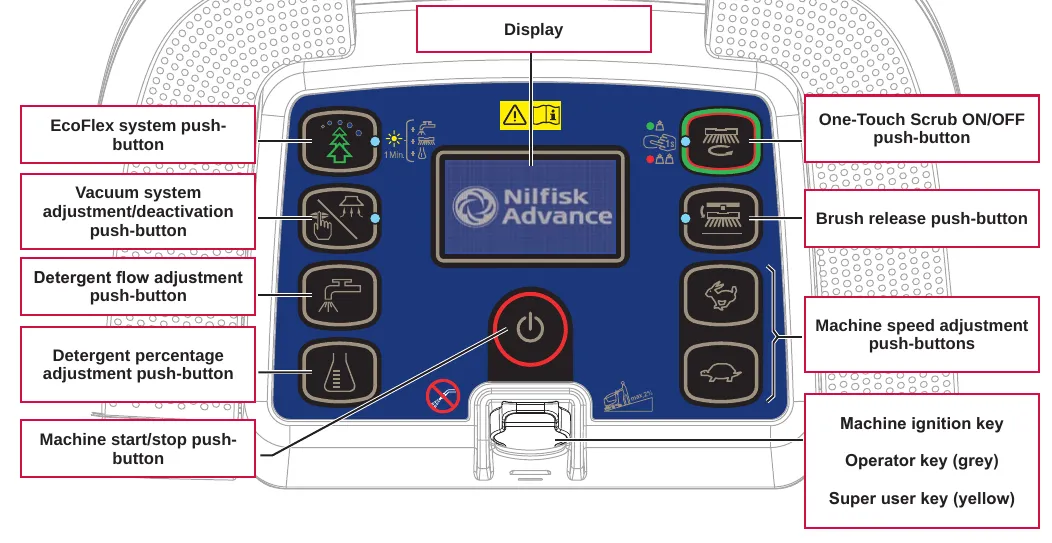
Labels on Fig. 2:
- Display
- EcoFlex system push-button
- Vacuum system adjustment/deactivation push-button
- Detergent flow adjustment push-button
- Detergent percentage adjustment push-button
- Machine start/stop push-button
- One-Touch Scrub ON/OFF push-button
- Brush release push-button
- Machine speed adjustment push-buttons
- Machine ignition key
- Operator key (grey)
- Super user key (yellow)
Control panel REV deck (Model No.: 9087353020, 9087355020)
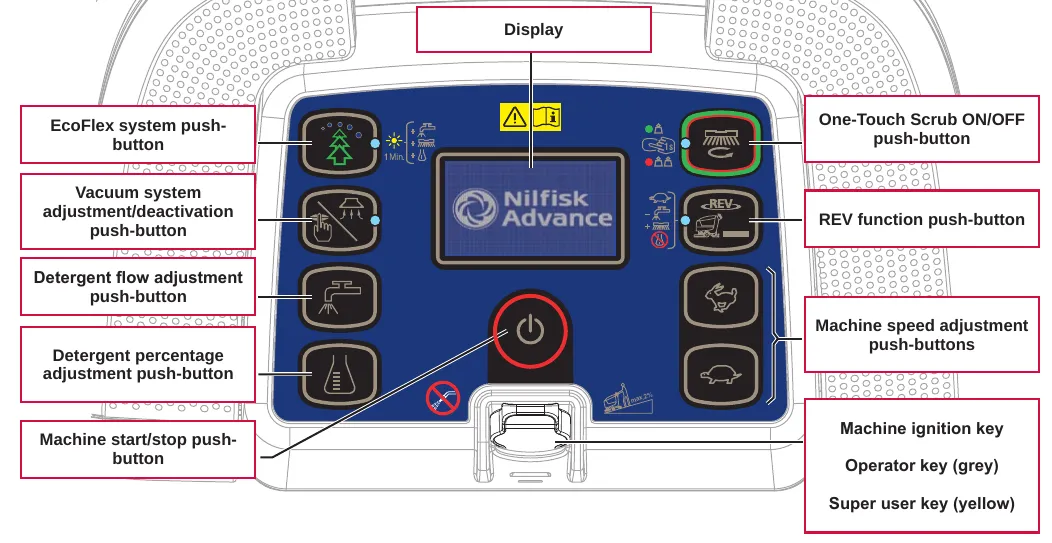
Labels on Fig. 3:
- Display
- EcoFlex system push-button
- Vacuum system adjustment/deactivation push-button
- Detergent flow adjustment push-button
- Detergent percentage adjustment push-button
- Machine start/stop push-button
- One-Touch Scrub ON/OFF push-button
- REV function push-button
- Machine speed adjustment push-buttons
- Machine ignition key
- Operator key (grey)
- Super user key (yellow)
Control panel Disc deck (Model No.: 9087403020, 9087404020, 9087400020,9087401020)
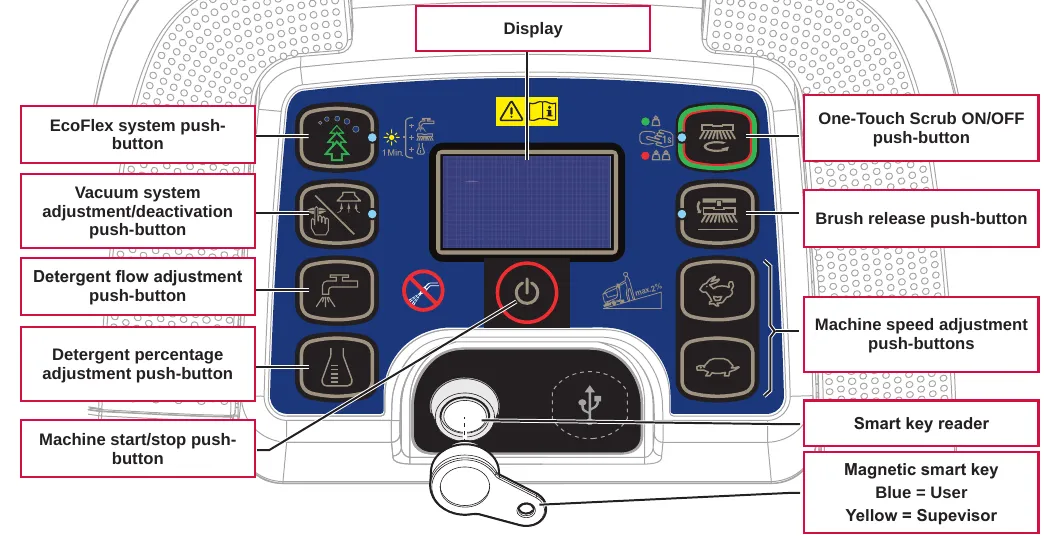
Labels on Fig. 4:
- Display
- EcoFlex system push-button
- Vacuum system adjustment/deactivation push-button
- Detergent flow adjustment push-button
- Detergent percentage adjustment push-button
- Machine start/stop push-button
- One-Touch Scrub ON/OFF push-button
- Brush release push-button
- Machine speed adjustment push-buttons
- Smart key reader
- Magnetic smart key (Blue = User, Yellow = Supervisor)
Control panel REV deck (Model No.: 9087405020, 9087402020)
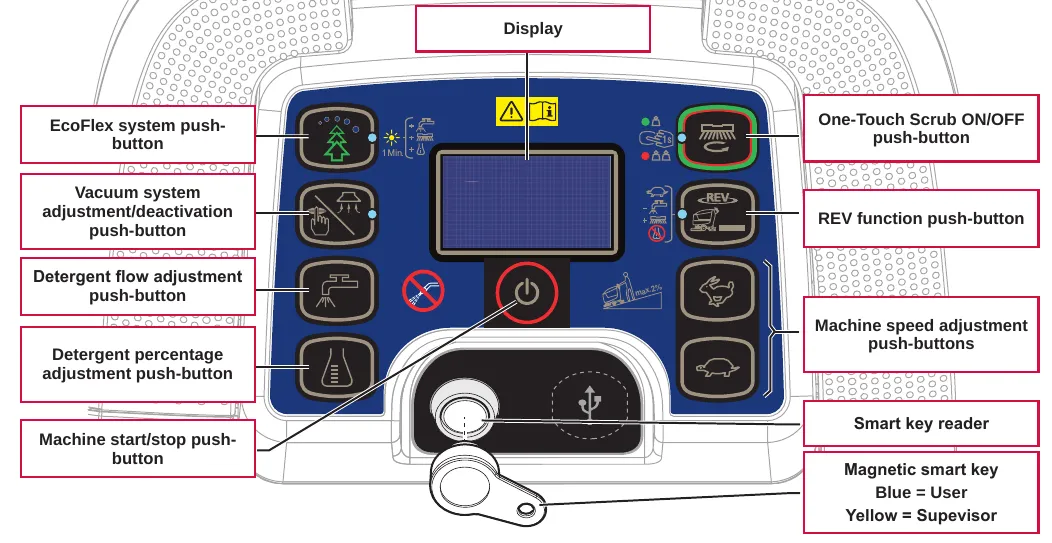
Labels on Fig. 5:
- Display
- EcoFlex system push-button
- Vacuum system adjustment/deactivation push-button
- Detergent flow adjustment push-button
- Detergent percentage adjustment push-button
- Machine start/stop push-button
- One-Touch Scrub ON/OFF push-button
- REV function push-button
- Machine speed adjustment push-buttons
- Smart key reader
- Magnetic smart key (Blue = User, Yellow = Supervisor)
Know your machine (continued)
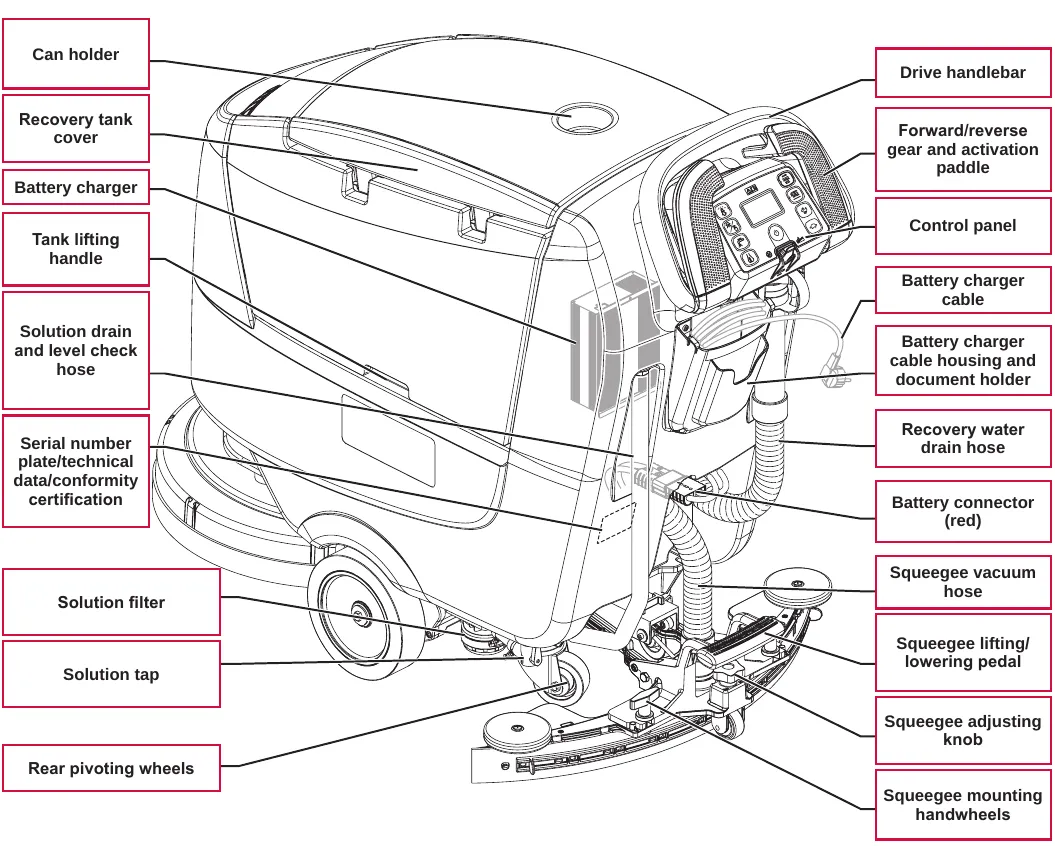
Labels on Fig. 6, left side:
- Can holder
- Recovery tank cover
- Battery charger
- Tank lifting handle
- Solution drain and level check hose
- Serial number plate/technical data/conformity certification
- Solution filter
- Solution tap
- Rear pivoting wheels
Labels on Fig. 6, right side:
- Drive handlebar
- Forward/reverse gear and activation paddle
- Control panel
- Battery charger cable
- Battery charger cable housing and document holder
- Recovery water drain hose
- Battery connector (red)
- Squeegee vacuum hose
- Squeegee lifting/lowering pedal
- Squeegee adjusting knob
- Squeegee mounting handwheels
Know your machine (continued)
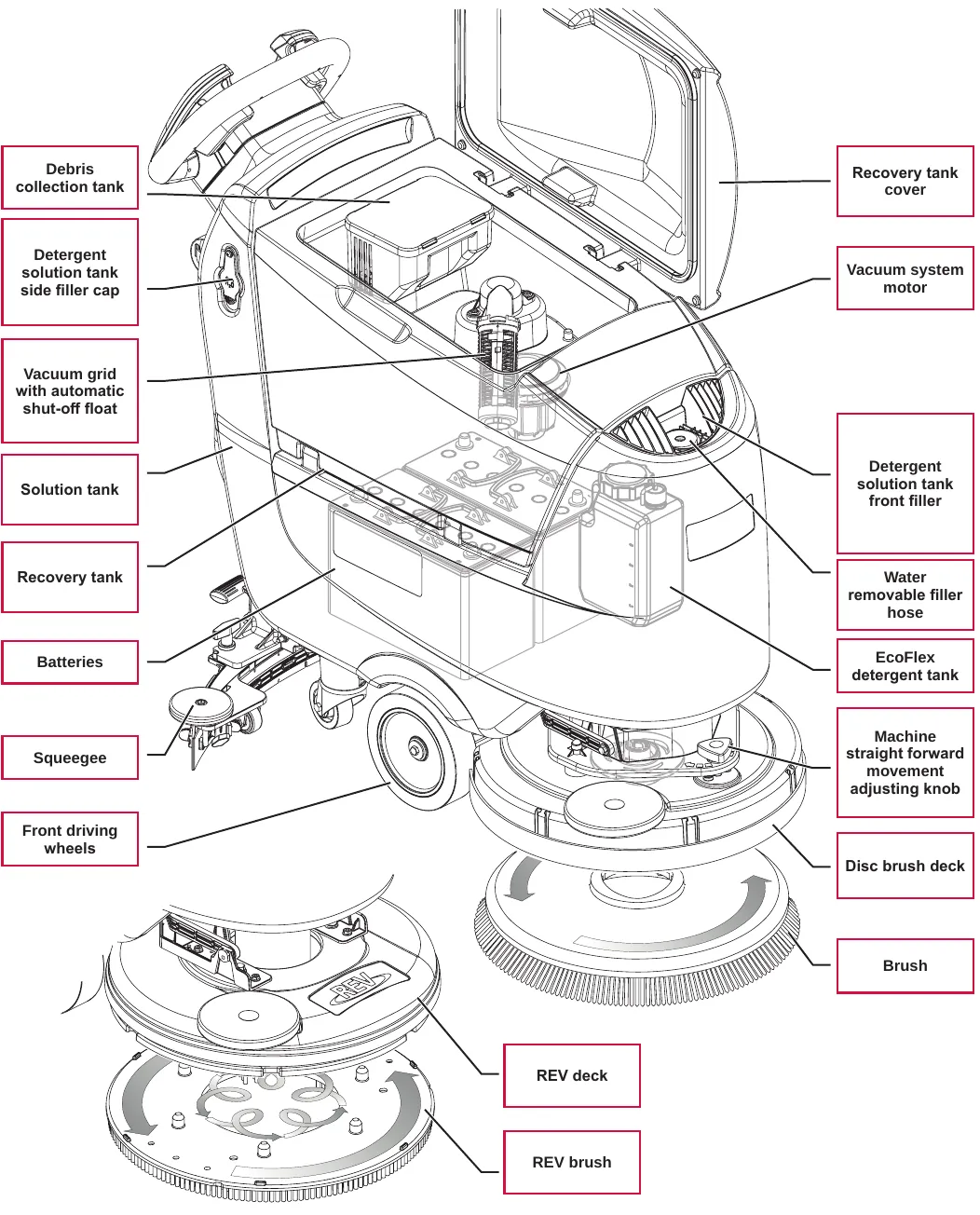
Labels on Fig. 7, left side:
- Debris collection tank
- Detergent solution tank side filler cap
- Vacuum grid with automatic shut-off float
- Solution tank
- Recovery tank
- Batteries
- Squeegee
- Front driving wheels
Labels on Fig. 7, right side:
- Recovery tank cover
- Vacuum system motor
- Detergent solution tank front filler
- Water removable filler hose
- EcoFlex detergent tank
- Machine straight forward movement adjusting knob
- Disc brush deck
- Brush
Labels on Fig. 7, bottom:
- REV deck
- REV brush
Service and diagnostic equipment
Besides a complete set of standard meters, the following instruments are necessary to perform fast checks and repairs on Nilfisk machines:
- Laptop computer charged with the current version of EzParts, Adobe Reader and (if possible) Internet connection
- Digital Volt Meter (DVM)
- Amp clamp with possibility of making DC measurements
- Hydrometer
- Battery charge tester to check 12V batteries
- Static control wrist strap
- Dynamometric wrench set
- A copy of the Instructions for Use Manual and Spare Parts List of the machine to be serviced (provided with the machine or available at www.advance-us.com or other Nilfisk websites).
The following equipment is also available at Nilfisk or Advance Centers:
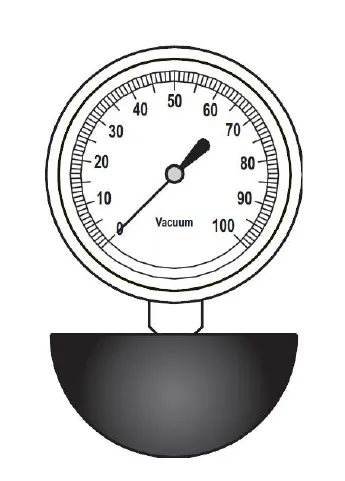
- Vacuum water lift gauge, P/N 56205281
Dimensions
SC500 Disc
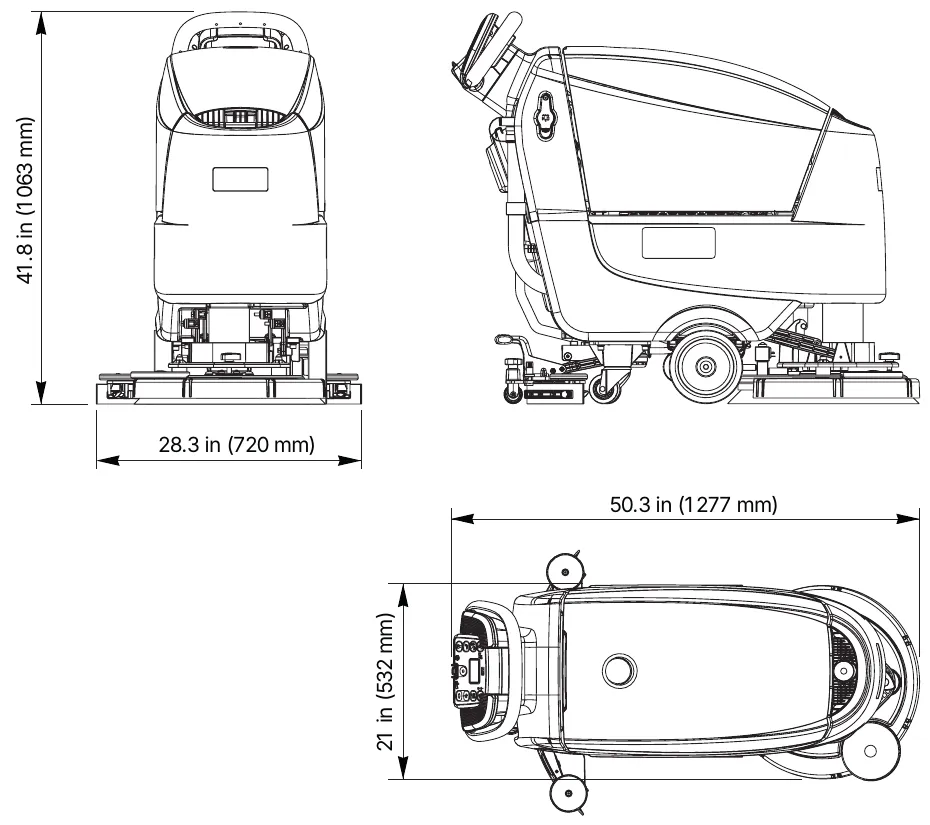
- Height: 41.8 in (1063 mm)
- Width: 28.3 in (720 mm)
- Length: 50.3 in (1277 mm)
- Width across top view: 21 in (532 mm)
SC500 REV
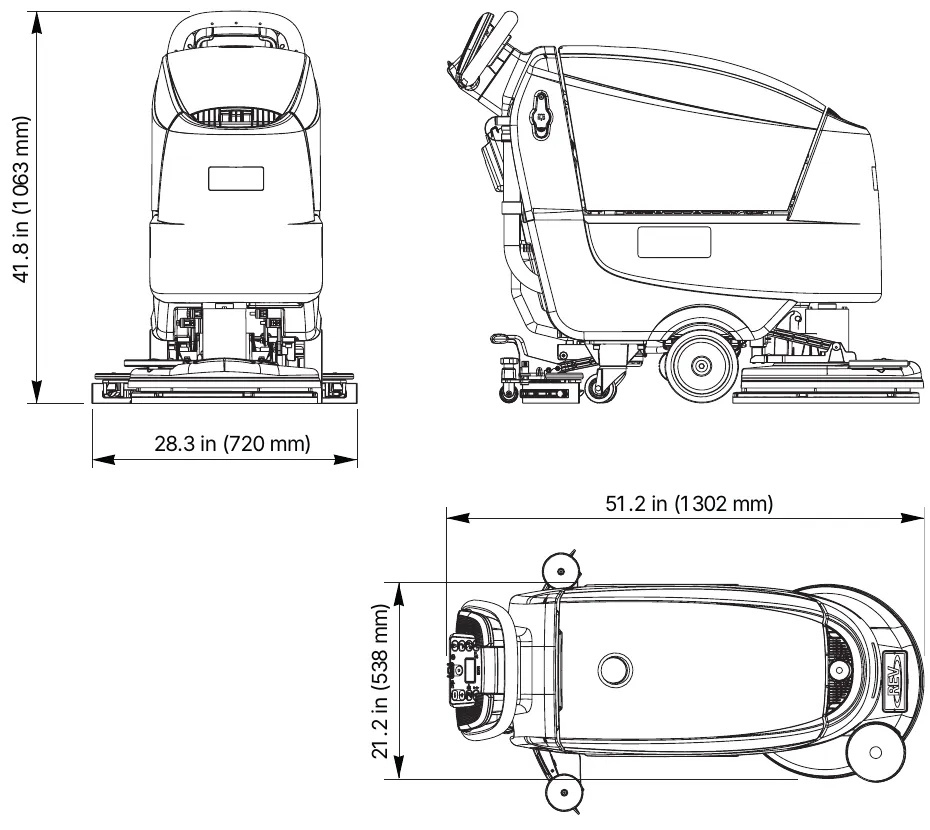
- Height: 41.8 in (1063 mm)
- Width: 28.3 in (720 mm)
- Length: 51.2 in (1302 mm)
- Width across top view: 21.2 in (538 mm)
04 - Control system - models with key slot
Model No.: 9087352020, 9087354020, 9087350020, 9087351020, 9087353020, 9087355020
Functional description
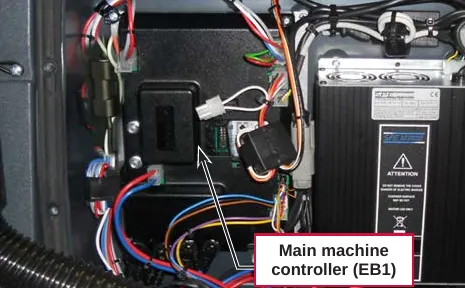
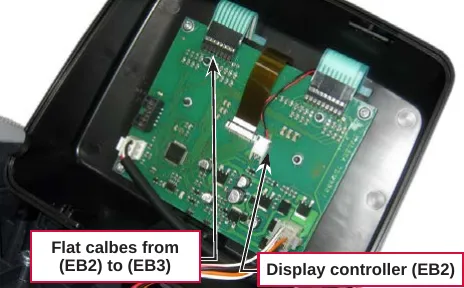
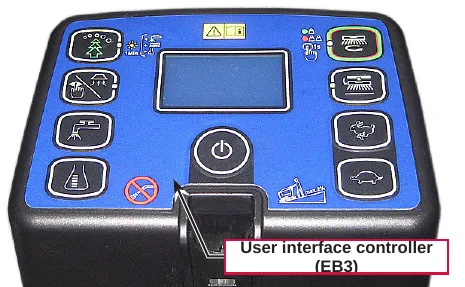
The architecture of the electronic control system for the machine’s electrical components is composed of a Main machine controller (EB1) and a Display controller (EB2), in turn connected to a User interface controller (EB3) which represents the main user interface.
The Main machine controller (EB1) manages all components and drives the following components directly:
- Drive system motor (M3)
- Vacuum system motor (M2)
- Deck actuator (M5)
- Brush motor (M6)
- Solution flow solenoid valve (EV1)
- Detergent pump (M4)
The Display controller (EB2) serves mainly as an aggregator for all input signals (buttons) and outputs (LEDs) from the User interface controller (EB3), which it is connected to via 2 flat cables.
Mounted on the Display controller (EB2) is also the LCD display and the 2 sensors which detect the presence and type of magnetic key inserted in the Main machine controller.
The Display controller (EB2) sends all the input and output signals of these components to the Main machine controller (EB1) using 2-wire 2-way serial communications protocol.
The system is completed by the on-board battery charger which also uses a proprietary serial protocol to communicate with the Main machine controller (EB1), in order to display its operating status (charging phase) to the operator on the LCD display.
Wiring diagram
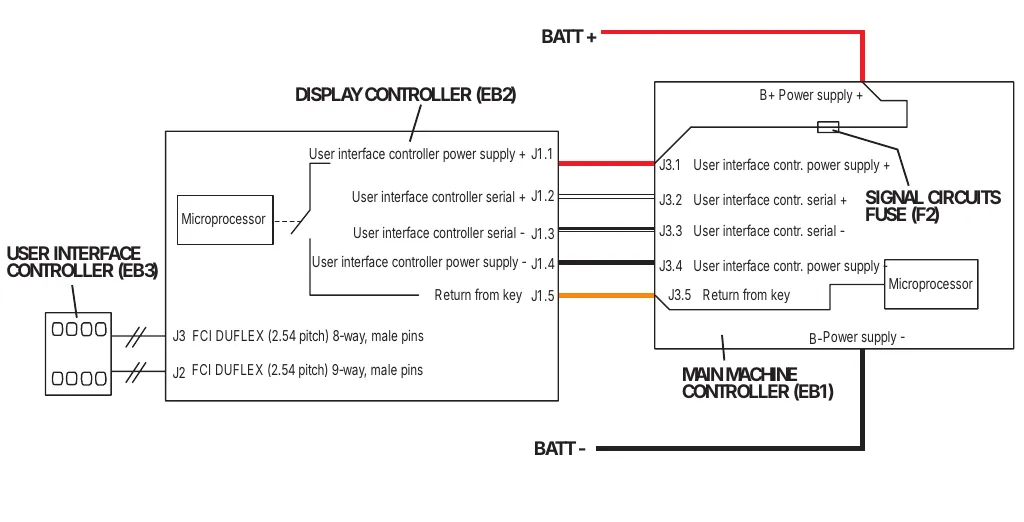
Legend, as printed on the drawing:
| Label on drawing | Connector |
|---|---|
| Display controller (EB2) | |
| User interface controller power supply + | J1.1 |
| User interface controller serial + | J1.2 |
| User interface controller serial - | J1.3 |
| User interface controller power supply - | J1.4 |
| Return from key | J1.5 |
| J3 FCI DUFLEX (2.54 pitch) 8-way, male pins | J3 |
| J2 FCI DUFLEX (2.54 pitch) 9-way, male pins | J2 |
| Main machine controller (EB1) | |
| B+ Power supply + | B+ |
| User interface contr. power supply + | J3.1 |
| User interface contr. serial + | J3.2 |
| User interface contr. serial - | J3.3 |
| User interface contr. power supply - | J3.4 |
| Return from key | J3.5 |
| B- Power supply - | B- |
| SIGNAL CIRCUITS FUSE (F2) | F2 |
| Other labels | |
| BATT + | |
| BATT - | |
| USER INTERFACE CONTROLLER (EB3) | |
| Microprocessor | |
Component locations
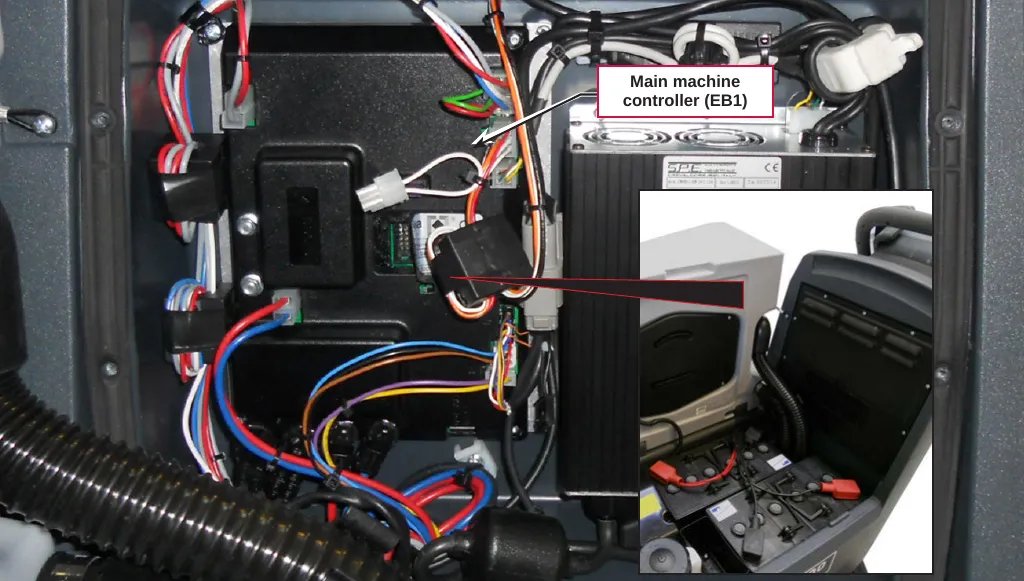
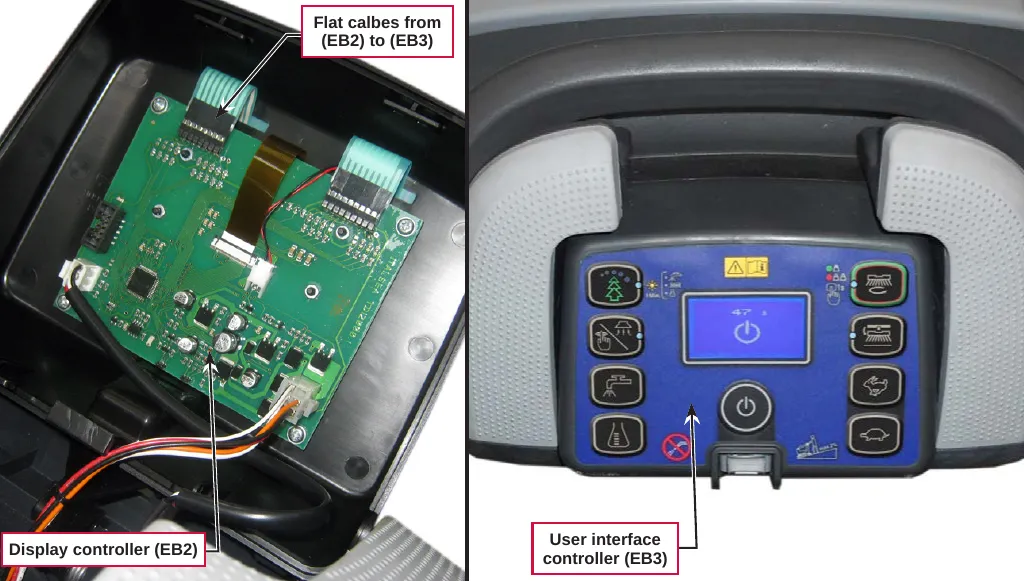
Troubleshooting
Main machine controller (EB1) Alarm Codes
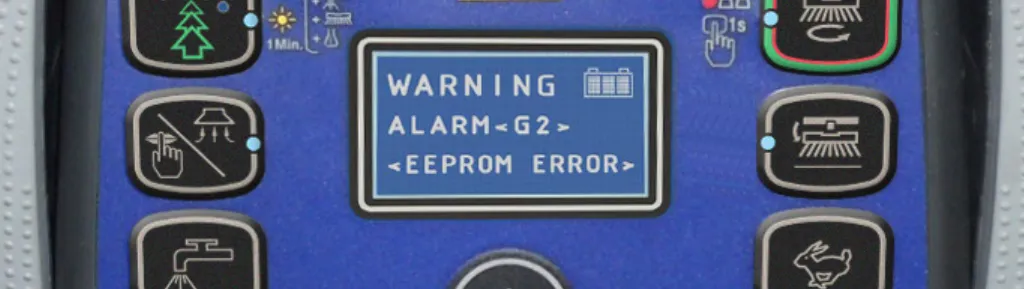
The Main machine controller indicates a series of alarms in case of malfunction of one or more systems, and in case of abnormal conditions detected in the input signals.
The alarms are shown on the display in the following format: ALARM <XX> <DESCRIPTION> (Figure 4).
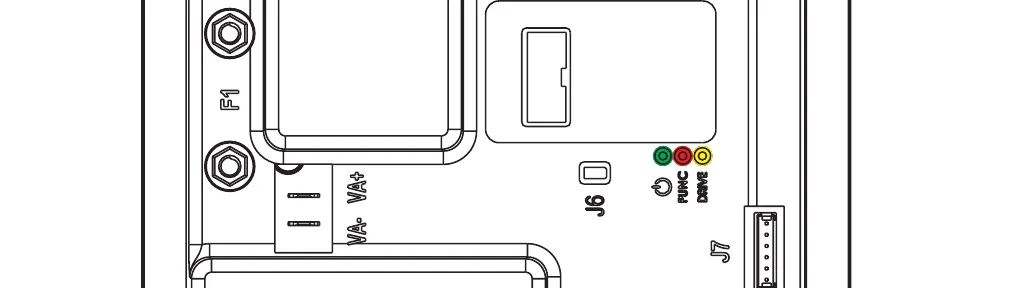
In case the display is malfunctioning, the alarms are also repeated by the yellow and red diagnostic LEDs (Figure 5) on the Main machine controller (EB1), as indicated in the following tables.
General alarms
Alarm on Main machine controller - FLASHING YELLOW + RED LEDS
| Alarm code / Description | No. Flashes | Meaning | Condition | Effect | Service Suggestions |
|---|---|---|---|---|---|
| G2# EEPROM ERROR | 2 | EEPROM error | EEPROM error | Function block + Default setting reset | If the machine continues to function after G2 has been displayed, this may have been caused by a significant external electromagnetic disturbance.
|
General alarms
Alarm on Main machine controller - FLASHING YELLOW + RED LEDS
| Alarm code / Description | No. Flashes | Meaning | Condition | Effect | Service Suggestions |
|---|---|---|---|---|---|
| G3# MAIN FUSE FAILURE | 3 | Blown F1 fuse. | Blown F1 fuse. | Function block. | F1 is a safety fuse primarily included to prevent a short circuit or serious damage to the Main machine controller causing currents such as to melt cables and/or cause smoke or fire. If F1 has blown, this is usually indicative of serious damage to the Main machine controller.
|
| Broken battery. | It could happen also if a battery is broken: Check the battery voltage under load. | ||||
| G4# BATTERY LOW VOLTAGE | 4 | Undervoltage. | The battery voltage remains below 18.4V for over 10 seconds (for WET CELL batteries, 19.6V for GEL-AGM batteries). | Function block. |
|
| G5# BATTERY OVERVOLTAGE | 5 | Excessive battery voltage. | Battery voltage over 32V. | Function block. | Check the voltage of the installed batteries and that the terminals are correctly tightened. |
| G6# HARDWARE FAILURE | 6 | Serial communication error with the User interface controller. | No signal or error in communications decoding between the Main machine controller (EB1) and the Display controller (EB2). | No block. |
|
| G7# HARDWARE FAILURE | 7 | General relay fault. | Relay closes or closed at start-up. | Function block. | Replace the Main machine controller. |
Main machine controller alarms
Alarm on Main machine controller - FLASHING RED LED
| Alarm code / Description | No. flashes | Meaning | Condition | Effect | Service Suggestions |
|---|---|---|---|---|---|
| F2# BRUSH MOTOR OVERLOAD | 2 | BRUSH motor amperometric protection. | The motor current is greater than the value of the parameter (see page 35) VS1 | Brush motor output stop. | Check the current draw of the brush motor. It should remain below the value set in the parameter “VS1” during operation. |
| F3# VACUUM MOTOR OVERLOAD | 3 | VACUUM SYSTEM amperometric protection. | The current draw of the vacuum motor is greater than 30A for over 10 seconds. | Vacuum system block. |
|
| F4# DECK ACTUATOR FAILURE | 4 | DECK ACTUATOR overcurrent. | Current greater than 4A detected for more than 1 second. | Brush function block. |
|
| F5# HARDWARE FAILURE | 5 | Short circuit on the vacuum or brush motor drive MOSFET. | MOSFET short circuit. | Function block. |
|
| F6# PRESSURE GAUGE FAILURE | 6 | PRESSURE GAUGE FAILURE (Not used) | - | - | - |
| F7# OVERHEATING | 7 | Motor drive section thermal cut-out. | The heatsink on the Main machine controller has reached a temperature of 194°F (90°C). | Function block. | Check the vacuum and brush motor power draw and that the openings of the electrical compartment are not blocked. |
| F8# BRUSH MOTOR FAILURE | 8 | Brush motor output short circuit. | I > 150A for 20µsec. | Function block. | Check for short circuits in the wiring or motor. |
| F9# VACUUM MOTOR FAILURE | 9 | Vacuum motor output overcurrent. | I > 150A for 20µsec. | Function block. | Check for short circuits in the wiring or motor. |
Drive system alarms
Alarm on Main machine controller - FLASHING YELLOW LED
| Alarm code / Description | No. flashes | Meaning | Condition | Effect | Service Suggestions |
|---|---|---|---|---|---|
| T2# DRIVE MOTOR OVERLOAD | 2 | Amperometric protection intervention. | Drive motor current draw greater than the parameter (see page 35) “INOM” for more than the parameter (see page 35) “TMAX”. | Drive blocked. | Check the current draw of the drive motor (this should be around 6-8amps without load and remain below 10-12amps during operation). |
| T3# RELEASE THE PADDLE ! | 3 | Paddle not in rest position when the machine is turned on. | Voltage on J1.2 of the Display controller (EB2) out of range 1.29V - 1.49V with respect to - BAT. | Drive blocked. | Check that the paddle moves correctly, lubricating if necessary; check the linkage and potentiometer. |
| T4# PADDLE INPUT FAILURE | 4 | Incorrect voltage measured at the paddle potentiometer input. | Voltage on J1.2 of the Display controller (EB2) above 3V. | Drive blocked. |
|
| T5# HARDWARE FAILURE | 5 | Drive system power section damage | MOSFET short circuit. | Drive blocked. | Disconnect M1 and M2 from controller, press the pedal
|
| T6# DRIVE MOTOR FAILURE | 6 | Overcurrent (motor D.C.) | Drive motor current draw greater than 1.5 times the value of the parameter (see page 35) “IMAX”. | Drive blocked. |
|
| T7# OVERHEATING | 7 | Drive motor drive section thermal cut-out. | The heatsink on the Main machine controller has reached a temperature of 194°F (90°C). | Drive blocked. |
|
All alarms of the drive system operate by cutting the power supply to the gear motor unit motor until the KEY input is reset (with the exception of alarm T3 which is reset as soon as the input voltage of the paddle potentiometer returns within the values corresponding to “machine stopped”). In case of simultaneous errors, the one with greater priority is shown first (priority order is opposite to the number of flashes).
On-board Battery Charger Alarms
| Alarm code / Description | Meaning | Condition | Effect | Service Suggestions |
|---|---|---|---|---|
| C1# CHARGER COMMUNICAT. | Communication problem between the battery charger and the Main machine controller. | No signal from battery charger via gate J4.4 for over 3 seconds. | The battery charger is performing the standard recharging cycle for generic GEL/AGM batteries. | Check the wiring between the battery charger and the Main machine controller. |
| C2# BATTERY OVERVOLTAGE | Battery overvoltage. | Battery voltage over 32V. | Battery charger block. |
|
| C4# CHARGING TIME I EXPIRED | Charging phase I expired. | Battery excessively discharged or at end of life cycle. | Battery charger block. | If the problem persists, replace the batteries. |
| C5# CHARGING TIME II EXPIRED | Charging phase II expired. | Battery excessively discharged or at end of life cycle. | Battery charger block. | If the problem persists, replace the batteries. |
| C6# CHARGER FAULT | Battery charger internal short circuit. | Battery charger internal short circuit. | Battery charger block. | Replace the battery charger. |
Black-box: Recording of Alarms, Parameters (see pages 34-35), Partial Operating Time Counter
The alarms activated during normal machine operation are stored and can be read in the corresponding log (Alarm Log Screen).
Display, Main Screen
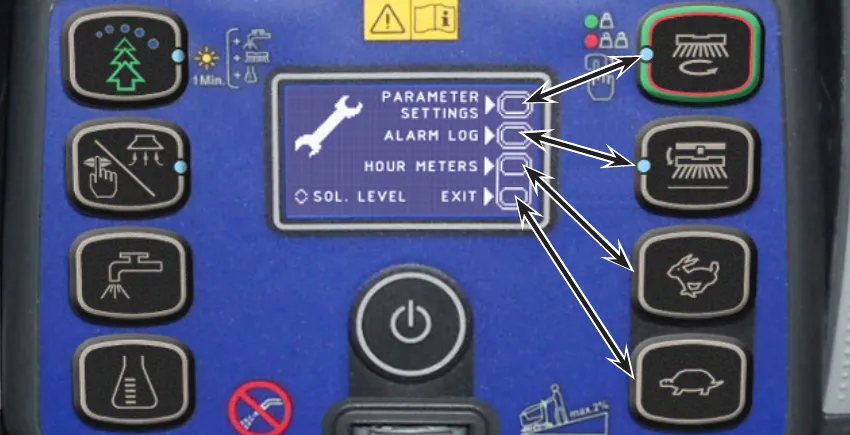
- Insert the Super User (yellow) key in place of the operator (grey) key (Figure 6) to access the main screen (Figure 7) of the display.

- Press the [One-Touch] push-button to change the machine settings (see Machine Settings Screen section).
- Press the [brush release] button or [REV] button to check for any stored machine alarms (see Alarms Log Screen section).
- Press the “hare” button to check the machine’s hours of operation (see Operating Time Counter Screen section).
- Press the “tortoise” button to exit service mode and return to operator mode.
Display, Alarms Log Screen
The alarms log screen (Figure 8) function allows you to check any alarms stored on the machine.
To return to the main screen (Figure 6), press the [One-Touch] button repeatedly.
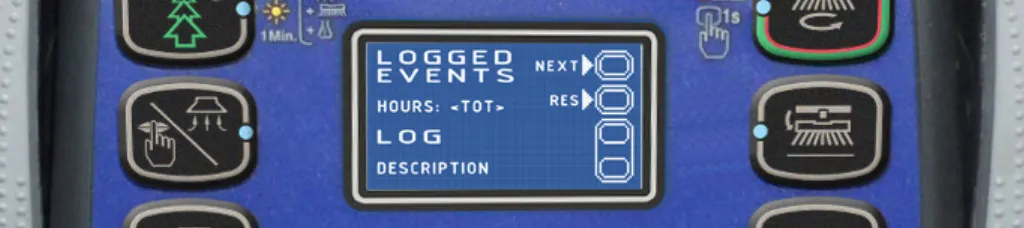
Each alarm (See table of alarms in the Main machine controller Alarm Codes section) is stored along with the working hour (machine operating time counter) at which it occurred and all alarms are recorded in the order in which they occurred, from the most recent to the oldest.
The memory holds up to 20 alarm records, after which the oldest are overwritten when new alarms occur.
Improper uses of the batteries or battery charger are also recorded, as in the following table:
On-board Battery Charger Alarms
| Alarm code / Description | Meaning | Condition | Effect |
|---|---|---|---|
| GB-N CONTINUOUS LOW BATTERY VOLTAGE | Time of continuous use with discharged batteries | “N” is the number of hours from key on to off when the battery level is below 20.4V for WET CELL (21.6 for AGM) batteries. This event is not recorded if the usage time is below 10 minutes. | Incorrect use by customer. Risk of reduced battery life. |
| GC CHARGER DISCONN BEFORE END CYCLE | Charging cycle interrupted before completion | Disconnection of battery charger before stage IV = battery symbol with 3 segments lit steadily. | Incorrect use by customer. Risk of reduced battery life. |
| GD-N CHARGING TIME LESS THAN 4 HOURS | Charging phase duration | N = Number of hours from battery charger connection to completion of PHASE II (red LED on) if < 4 | Incorrect use by customer. Risk of reduced battery life. |
Display, Machine Settings Screen
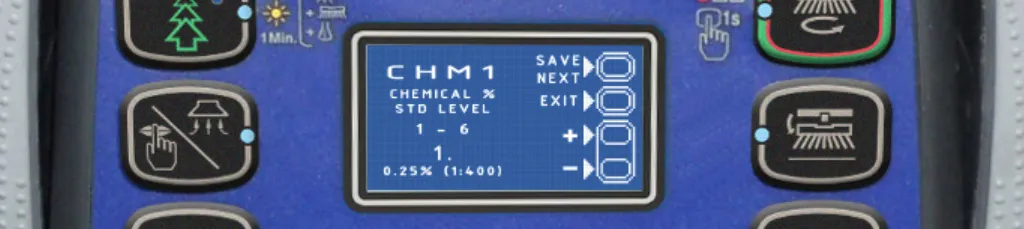
The machine settings screen (Figure 9) functions allow you to customise some parameters described in the following table of modifiable parameters.
- Press the “hare” button [hare] to increase the value of the current parameter.
- Press the “tortoise” button [tortoise] to decrease the value of the current parameter.
- Press the [One-Touch] button to move to the next parameter.
- To return to the main screen (Figure 6), press the brush release button [brush release].
Modifiable Parameters
| Code | Description | Min. Value | Factory Setting | Max. Value |
|---|---|---|---|---|
| CHM1 | Detergent concentration level 1 | 1:400 (0.25 %) | 1:400 (0.25 %) | 1:33 (3 %) |
| CHM2 | Detergent concentration level 2 | 1:400 (0.25 %) | 1:125 (0.80 %) | 1:33 (3 %) |
| P1/P3 | Level 1 solution flow rate in relation to level 3 (see section “System for Flow Rate Regulation as Function of Speed”) | 0 % | 25 % | 100 % |
| P2/P3 | Level 2 solution flow rate in relation to level 3 (see section “System for Flow Rate Regulation as Function of Speed”) | 0 % | 50 % | 100 % |
| P3 | Level 3 solution flow rate - DISC | 0.103 fl oz/ft (1.0 cl/m) | 0.309 fl oz/ft (3.0 cl/m) | 0.515 fl oz/ft (5.0 cl/m) |
| Level 3 solution flow rate - REV | 0.103 fl oz/ft (1.0 cl/m) | 0.155 fl oz/ft (1.5 cl/m) | 0.515 fl oz/ft (5.0 cl/m) | |
| P4 | Level 4 solution flow enabling (0.74 gal/min (2.8 l/min) regardless of speed) | OFF | OFF | ON |
| SPT | EcoFlex function timer | 0 (disabled) | 60 sec. | 300 sec. |
| XPRES | Brush deck extra pressure enable | OFF | ON | ON |
| FVMIN | Minimum forward speed | 0 % | 25 % | 100 % |
| FVMAX | Maximum forward speed | 10 % | 100 % | 100 % |
| RVMAX | Maximum reverse speed | 10 % | 30 % | 50 % |
| BAT | Installed battery type | 0 | 1 | 5 |
| TOFF | Automatic shut-off time | 0 (disabled) | 300 sec. | 600 sec. |
| BRGH | Display contrast | 5 | 20 | 50 |
| VRID | Vacuum power in silent mode | 1 | 1 | 5 |
| RPM (*) | Reduced brush rpm activation threshold | 5 | 9 | 20 |
| RESET (**) | Restore factory settings for all parameters | OFF | OFF | ON |
(*) Increase the value of this parameter to reduce the brush motor speed in a wider range of applications and vice versa
(**) The RESET function acts only on “MODIFIABLE PARAMETERS” and not on “HIDDEN PARAMETERS”.
The following parameters are displayed only when, on reaching the last parameter RESET, the [One-Touch] button is pressed together with the [EcoFlex] and [vacuum] buttons.
If the [One-Touch] button is not pressed, the system will return to the first parameter CHM1.
Hidden Parameters
| Code | Description | Min. Value | Factory Setting | Max. Value | Meaning |
|---|---|---|---|---|---|
| TSERV | Service advisory timer | 0 | 0 | 1000 | Set to a value X greater than 0 if you wish the “Service Advisory” icon to be displayed every X hours of machine running time (according to the main operating time counter). To reset the hour counter for the icon display countdown (until the next service advisory), press the BURST and vacuum buttons for 10 seconds with the display on the “SERVICE MENU” page. |
| AR | Maximum acceleration ramp (sec.) | 0.5 sec. | 1.5 sec. | 5 sec. | Increase to obtain a less abrupt response when accelerating, and vice versa. |
| DR | Maximum deceleration ramp (sec.) - DISC | 0.5 sec. | 1.5 sec. | 8 sec. | Increase to obtain a less abrupt response when decelerating, and vice versa. WARNING: increasing this value increases the braking distance. |
| Maximum deceleration ramp (sec.) - REV | 0.5 sec. | 2.5 sec. | 8 sec. | ||
| IR | Maximum deceleration ramp in reverse (sec.) | 0.5 sec. | 0.5 sec. | 5 sec. | This is the maximum current which can be supplied to the disc brush deck. WARNING: increasing this value increases the risk of the motors overheating. |
| VS1 | Brush 1 motor protection threshold | 20A | 30A | 50A | This is the maximum current which can be supplied to the disc brush deck. WARNING: increasing this value increases the risk of the motors overheating. |
| VS2 | Brush 2 motor protection threshold | 20A | 40A | 50A | This is the maximum current which can be supplied to the cylindrical brush deck. WARNING: increasing this value increases the risk of the motors overheating. |
| VDEAD | Paddle potentiometer dead zone | 0.0V | 0.1V | 1.0V | Increase if the alarm T3 appears in the rest position and it is not possible to adjust the system’s mechanics. (Speed regulation will, however, be more difficult to modulate) |
| INOM | Nominal drive current | 10A | 15A | 15A | This is the maximum continuous current which can be supplied to the electric wheel drive unit. WARNING: increasing this value increases the risk of the motor overheating. |
| IMAX | Maximum drive current | 10A | 45A | 45A | This is the maximum instantaneous current which can be supplied to the electric wheel drive unit. WARNING: increasing this value increases the risk of the motor overheating. |
| TMAX | Protection trip time for IMAX | 0 sec. | 12 sec. | 60 sec. | This is the reaction time of the electric wheel drive unit protection device when overloaded: this parameter is used in conjunction with IMAX to obtain the most appropriate response curve for the overload protection motor actuation system. WARNING: increasing this value increases the risk of the motor overheating. |
Display, Operating Time Counter Screen
The operating time counter screen (Figure 10) function allows you to check the total accumulated hours of work for each machine subsystem:
- (A) TOTAL counter (machine running time): same counter display on screen after starting machine.
- (B) DRIVE counter (drive system usage time).
- (C) BRUSH counter (brush rotation system usage time).
- (D) VACUUM counter (vacuum system usage time).
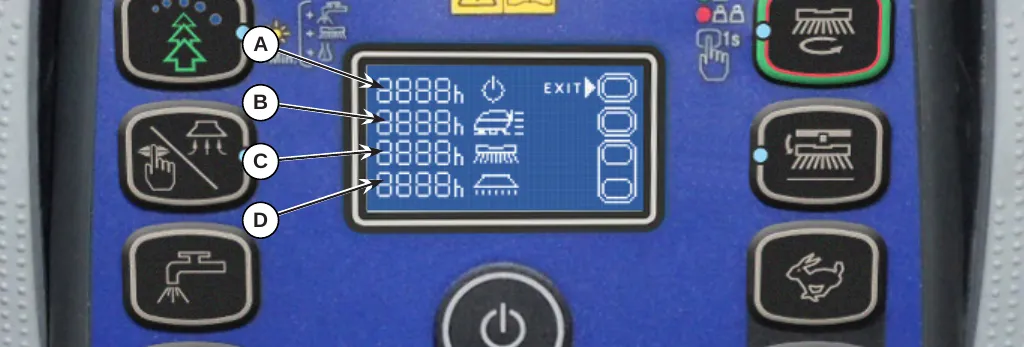
Time Counter Reset
To reset the time counter see the table below for the procedure:
| PUSH-BUTTON (> 10 SEC.) | TIME COUNTER RESET |
|---|---|
| [EcoFlex] button (tree symbol) | (A) TOTAL counter (*) |
| [Vacuum] button (hand and crossed-out spray symbol) | (B) DRIVE counter |
| Tap symbol button | (C) BRUSH counter |
| Flask symbol button | (D) VACUUM counter |
(*) When the TOTAL counter is reset, it is automatically reset also all partial ones (B, C, D) and deleted all LOG memory.
To return to the main screen (Figure 7), press the [One-Touch] button.
System for Flow Rate Regulation as Function of Speed
Solution flow levels 1, 2 and 3 regulate the flow of detergent solution on the basis of the machine speed so as to keep the quantity of solution dispensed per square foot (square metre) of floor treated constant.
The reference flow level is level 3: based on the setting of the corresponding parameter P3, the opening time of the solenoid valve (and of the detergent pump when fitted) is regulated so that the quantity of solution in fluid ounces per foot (centiliters per metre) travelled by the machine is constant and equal to the value set in the parameter.
For example, for P3 = 3.0, the machine will dispense 0.31 fl oz per foot (3 centiliters per metre) travelled, which equates (for the standard deck width of 20.9 in (530 mm)) to 0.18 fl oz per square foot (5.7 centiliters per square metre) of floor treated.
Levels 1 and 2 are defined via the corresponding parameters P1 and P2 as a % of level 3.
For example, for P1 = 25 and P2 = 50, P1 and P2 are respectively ¼ (25%) and ½ (50%) of the reference flow rate P3.
The default values (the same as in the example above) are summarized in the table, with the corresponding flow rate values in gallons per minute (liters per minute), dependent on machine speed, given as a reference.
| SC500 DISC detergent flow (as a function of speed) (standard setting) | |||
|---|---|---|---|
| Level 1 | Level 2 | Level 3 | |
| Gallons (liters) per minute @ 0.6 mph (1 km/h) | 0.05 (0.2) | 0.08 (0.3) | 0.13 (0.5) |
| Gallons (liters) per minute @ 1.9 mph (3 km/h) | 0.11 (0.4) | 0.21 (0.8) | 0.40 (1.5) |
| Gallons (liters) per minute @ 3.1 mph (5 km/h) | 0.16 (0.6) | 0.34 (1.3) | 0.66 (2.5) |
| Fluid ounces per foot cleaned, constant (centiliters per metre) | 0.077 (0.75) | 0.155 (1.5) | 0.309 (3) |
| Fluid ounces per square foot cleaned, Ø20.9 in (530 mm) deck (centiliters per square metre) | 0.044 (1.4) | 0.088 (2.8) | 0.179 (5.7) |
Level 4 (when enabled) is independent of any parameter and supplies the maximum possible quantity of solution as it keeps the solenoid valve of the supply system constantly open (with the brush rotating).
| SC500 DISC detergent flow rate | |
|---|---|
| Level 4 | |
| Gallons (liters) per minute - Tank full | 0.92 (3.5) |
| Gallons (liters) per minute - Average | 0.66 (2.5) |
Removal and Installation
Main machine controller (EB1)
- Drive the machine on a level floor, remove the ignition key, and disconnect the red battery connector.
- Lift the recovery tank.
- Remove the 7 screws and remove the electronic component compartment cover.
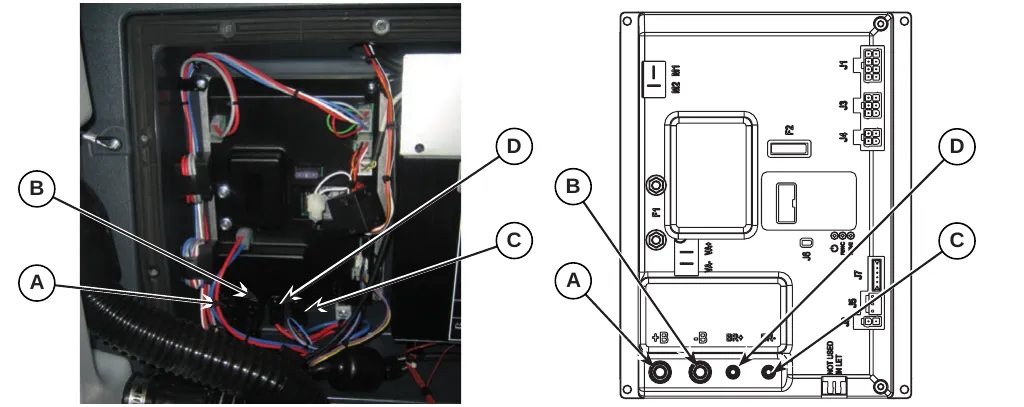
- Disconnect the following connections sequentially (Figure 11):
- (A) and (B) Main machine controller power supply connection (B+) and (B-).
- (C) and D) Brush motor connection (BR+) and (BR-).
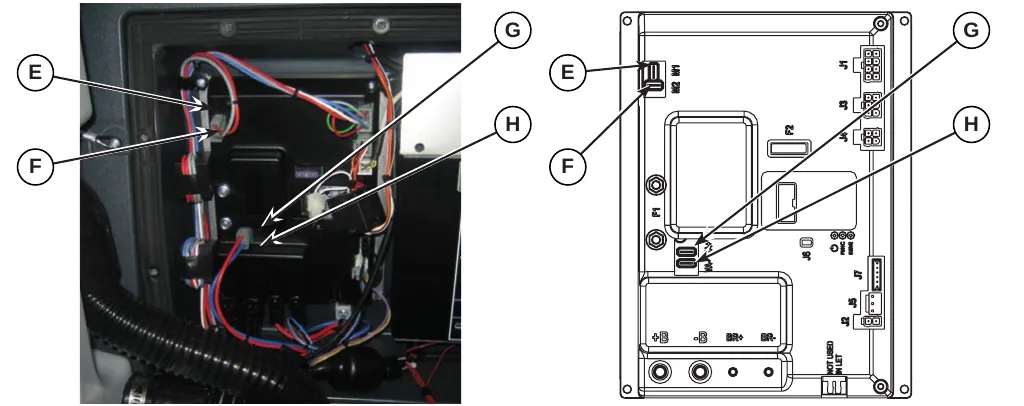
- Disconnect the following connections sequentially (Figure 12):
- (E) and (F) Drive system motor connection (M1) and (M2).
- (G) and (H) Vacuum motor connection (VA+) and (VA-).
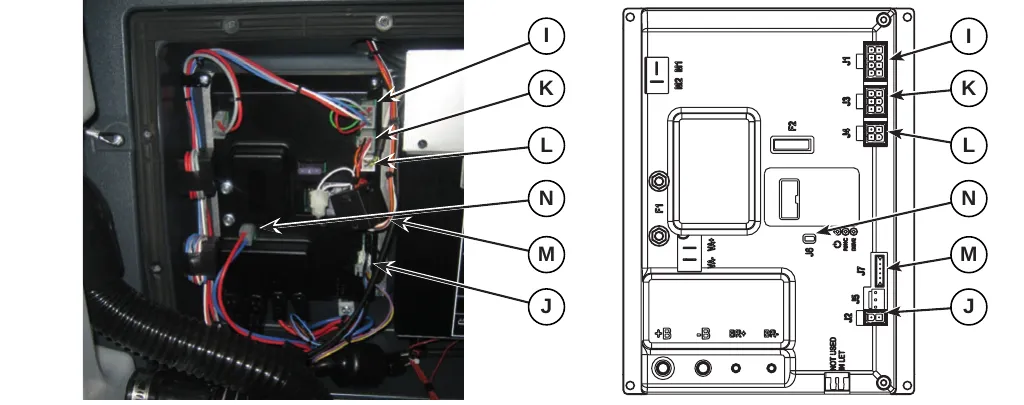
- Disconnect the following connections sequentially (Figure 13):
- (I) Deck actuator and detergent pump connection (J1).
- (J) Solenoid valve connection (J2).
- (K) Display controller connection (J3).
- (L) Battery charger connection (J4).
- (M) Detergent level sensor connection (J5).
- (N) Connection (J6).
- Unscrew the 4 retaining screws (O) and carefully remove the Main machine controller (Figure 14).
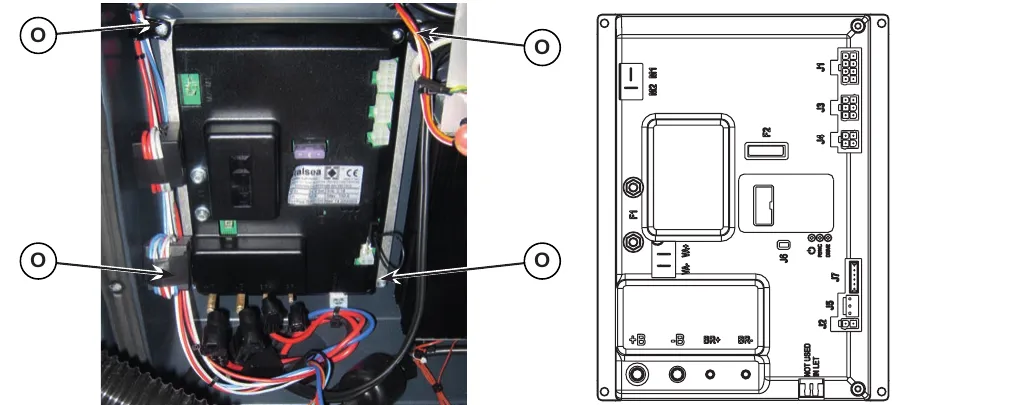
- Assemble the components in the reverse order of disassembly.
Display Controller (EB2) and User interface controller (EB3)
Display Controller (EB2)
- Drive the machine on a level floor.
- Remove the ignition key.
- Disconnect the red battery connector.
- Unscrew the 2 screws (A) (Figure 15).
- Release the retaining tab (B), then lift up and remove the Main machine controller cover (C).
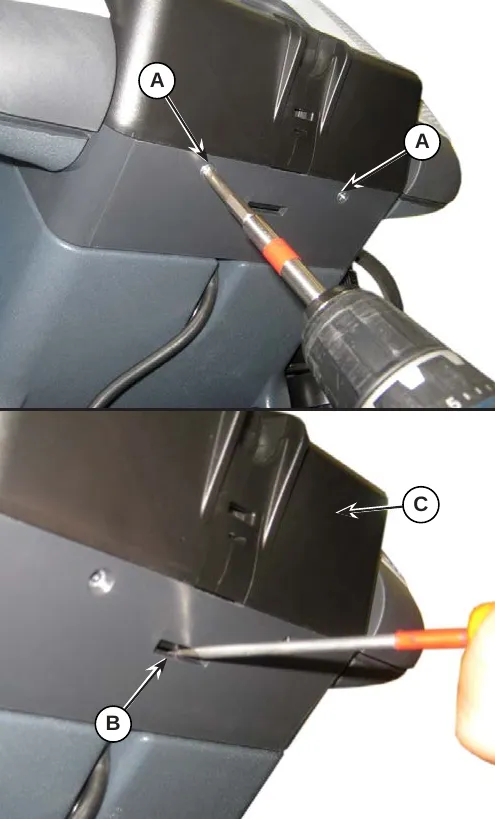
- Disconnect the following connections sequentially (Figure 16):
- (A) Speed potentiometer connection (J4).
- (B) Display controller power supply connection (J1).
- (C) Flat connection (J2).
- (D) Flat connection (J3).
- Unscrew the 4 screws (E), then remove the display controller (F).
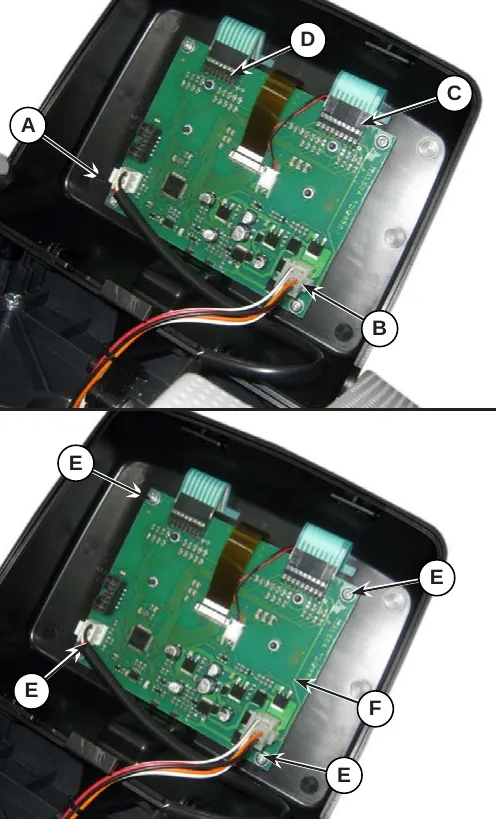
User interface controller (EB4)
- Perform points 1 to 5 for removal of the display controller.
- Disconnect the following connections sequentially (Figure 17):
- (A) Flat connection J2.
- (B) Flat connection J3.
- Carefully raise the User interface controller (C), detaching it from the cover (D).
Assembly
- Assemble the components in the reverse order of disassembly and note the following:
- Before fastening the User interface controller (C), ensure that the flat connections (A) and (B) are correctly run through the slots in the cover (D), then glue the User interface controller to the cover itself.
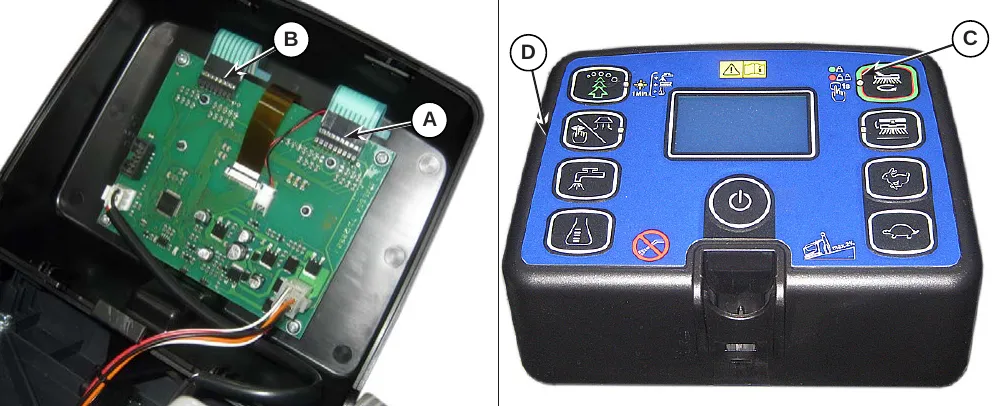
Specifications
Main machine controller (EB1) Connectors
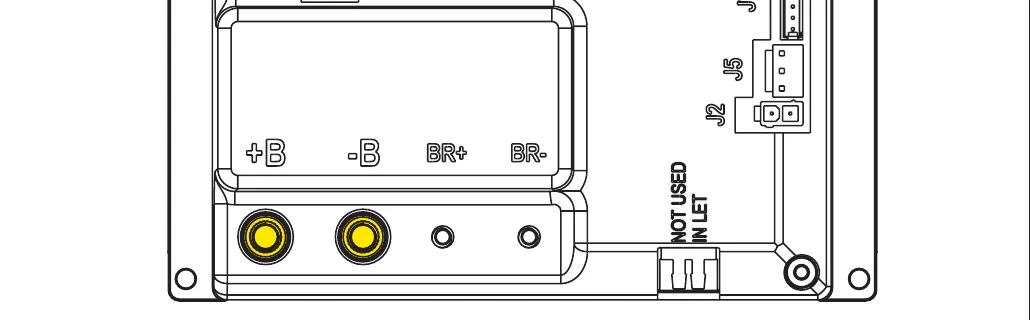
(Figure 18) Power connections (Ø0.24 in (6 mm) male RADSOK terminals - AMPHENOL SK 200800532 101 or equivalent)
| Ref. | Description | Controller in/out | V ref. | I max. | Connected to |
|---|---|---|---|---|---|
| B+ | Main machine controller power supply + | in | 24V | 125A | BAT+ |
| B- | Main machine controller power supply - | in | 24V | 125A | BAT- |
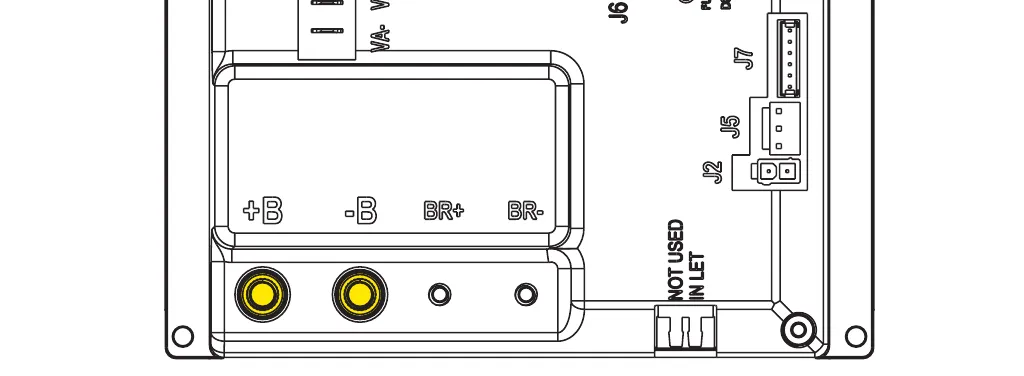
(Figure 19) Drive connections (Ø0.14 in (3.6 mm) male RADSOK terminals - AMPHENOL P/N N01 036 6501 001 or equivalent)
| Ref. | Description | Controller in/out | V ref. | I max. | Connected to |
|---|---|---|---|---|---|
| BR+ | Brush motor + | out | 24V | 50A | M1+ |
| BR- | Brush motor - | out | 24V | 50A | M1- |
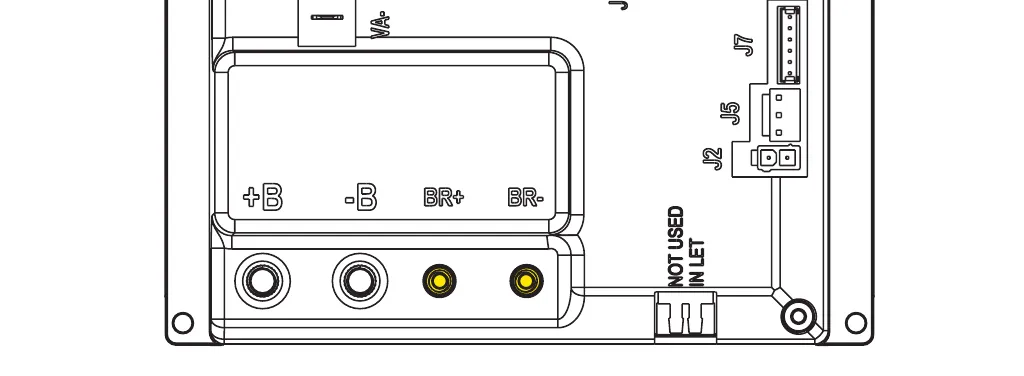
Drive connections
2-way male faston T-connectors, 6.3x0.8 – spacing 0.29 in (7.4 mm)
| Ref. | Description | Controller in/out | V ref. | I max. | Connected to |
|---|---|---|---|---|---|
| M1 | Drive system motor + | out | 0-24V | 45A | M3+ |
| M2 | Drive system motor - | out | 0-24V | 45A | M3- |
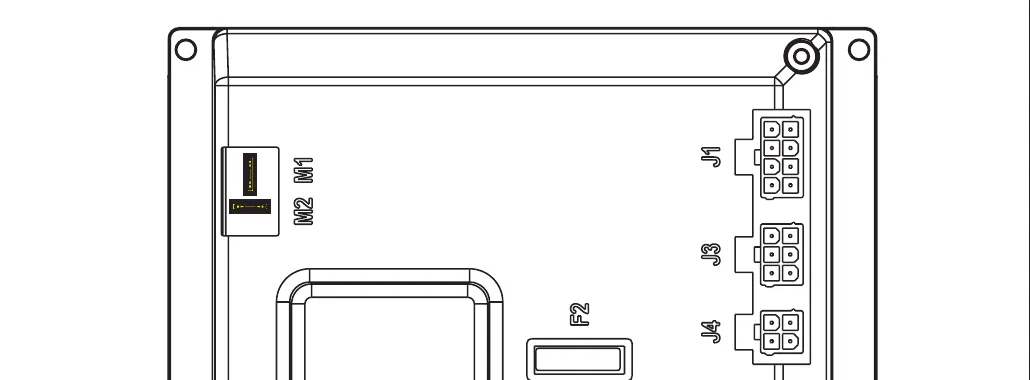
Vacuum connections
2-way male parallel faston connectors, 6.3x0.8 – spacing 0.26 in (6.5 mm)
| Ref. | Description | Controller in/out | V ref. | I max. | Connected to |
|---|---|---|---|---|---|
| VA+ | Vacuum system power supply + | out | 10-24V | 30A | M2+ |
| VA- | Vacuum system power supply - | out | 0V | 30A | M2- |
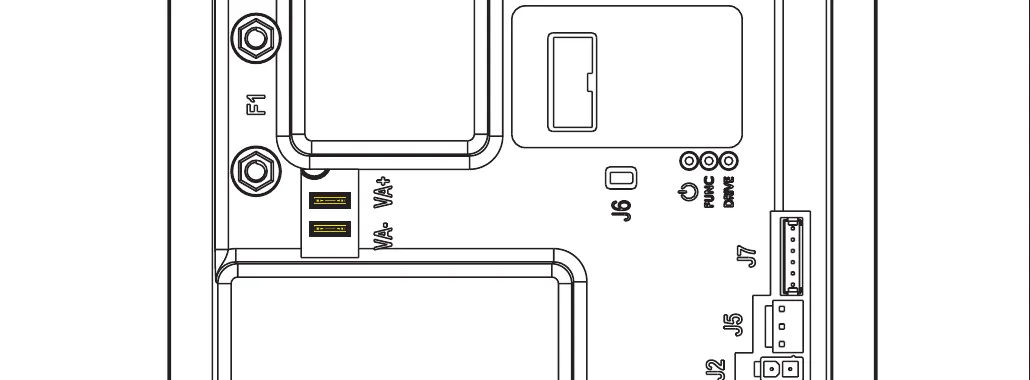
J1: MOLEX MINIFIT type, 8-ways vertical
| Pin | Description | Controller in/out | V ref. | I max. | Connected to |
|---|---|---|---|---|---|
| 1 | Detergent pump power supply + | out | 24V | <1A | M4 |
| 2 | Detergent pump power supply - | out | 0V | <1A | M4 |
| 3 | Deck actuator power supply +/- | out | 0/24V | 8A | M5 |
| 4 | Deck actuator power supply -/+ | out | 0/24V | 8A | M5 |
| 5 | Power supply for ADV versions configurator | out | 0V | <1A | J1.6 |
| 6 | ADV versions configurator return | in | 0V | <1A | J1.5 |
| 7 | Power supply for deck configurator | out | 0V | <1A | J1.8 |
| 8 | Deck configurator return | in | 0V | <1A | J1.7 |
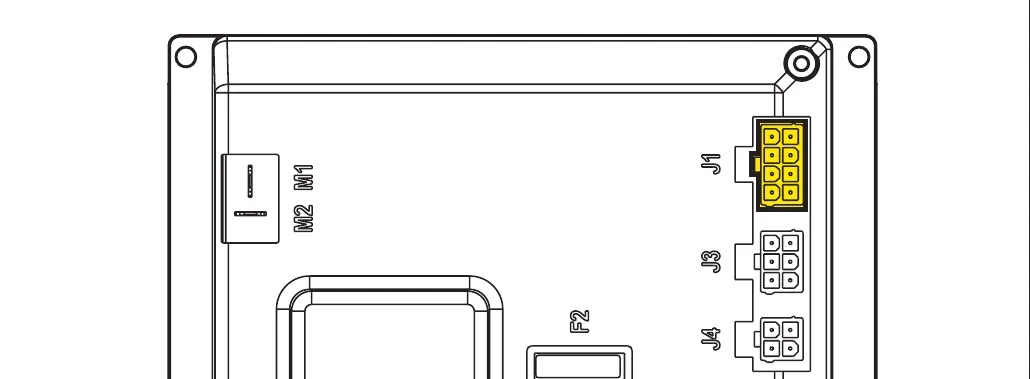
J2: MOLEX MINIFIT type, 2-ways vertical
| Pin | Description | Controller in/out | V ref. | I max. | Connected to |
|---|---|---|---|---|---|
| 1 | Solenoid valve power supply + | out | 24V | 1A | EV1 |
| 2 | Solenoid valve power supply - | out | 0V | 1A | EV1 |
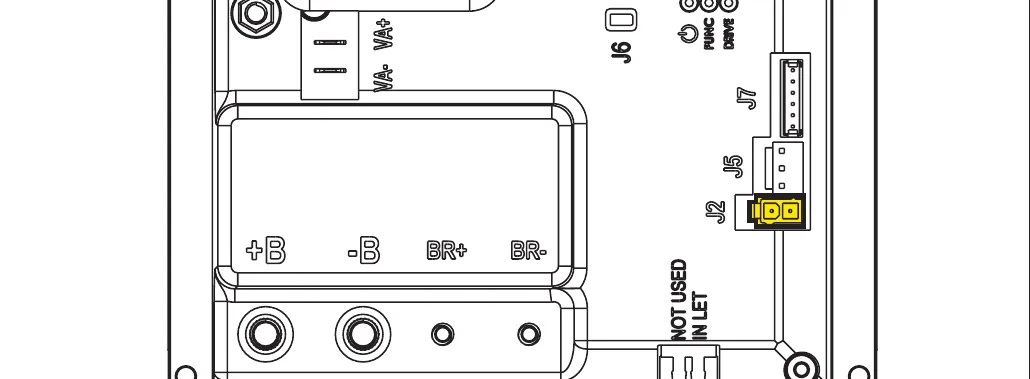
J3: MOLEX MINIFIT type, 6-ways vertical
| Pin | Description | Controller in/out | V ref. | I max. | Connected to |
|---|---|---|---|---|---|
| 1 | User interface controller power supply + | out | 24V | <1A | EB2.1 |
| 2 | User interface controller serial + | in/out | 5V | <1A | EB2.2 |
| 3 | User interface controller serial - | in/out | 0V | <1A | EB2.3 |
| 4 | User interface controller power supply - | out | 0V | <1A | EB2.4 |
| 5 | Return from key | in | 24V | <1A | EB2.5 |
| 6 | Return from key (repetition) | out | 24V | <1A | - |
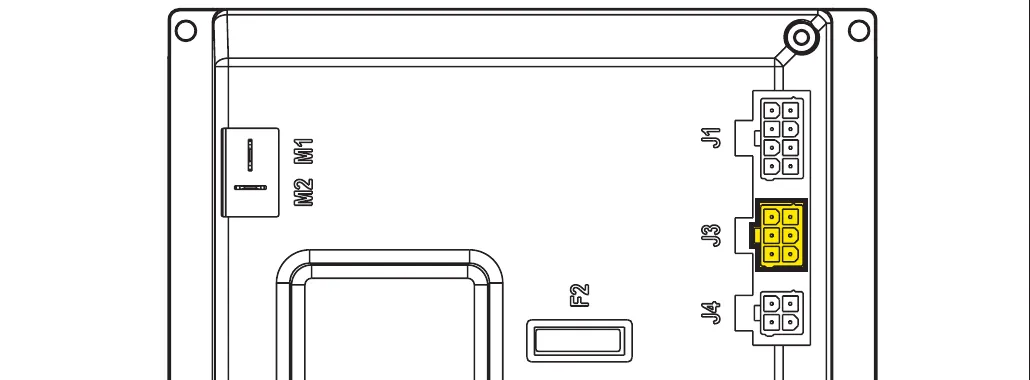
J4: MOLEX MINIFIT type, 4-ways vertical
| Pin | Description | Controller in/out | V ref. | I max. | Connected to |
|---|---|---|---|---|---|
| 1 | Enabling from battery charger | in | 24V | <1A | CH.1 |
| 2 | Power supply from battery charger | in | 24V | <1A | CH.2 |
| 3 | Battery charger enabling power supply | out | 24V | <1A | CH.3 |
| 4 | Battery charger data communication | In/out | 5V | <1A | CH.4 |
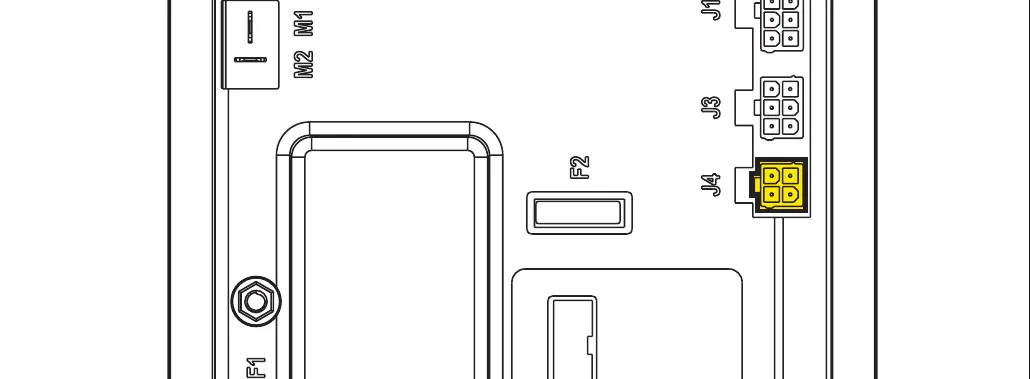
J5: JST VHR-3N vertical 3-way
| Pin | Description | Controller in/out | V ref. | I max. | Connected to |
|---|---|---|---|---|---|
| 1 | Power supply for water level sensor + | out | 24V | <1A | S1.1 |
| 2 | Water level sensor return | in | 0V | <1A | S1.2 |
| 3 | Power supply for water level sensor - | out | 0V | <1A | S1.3 |
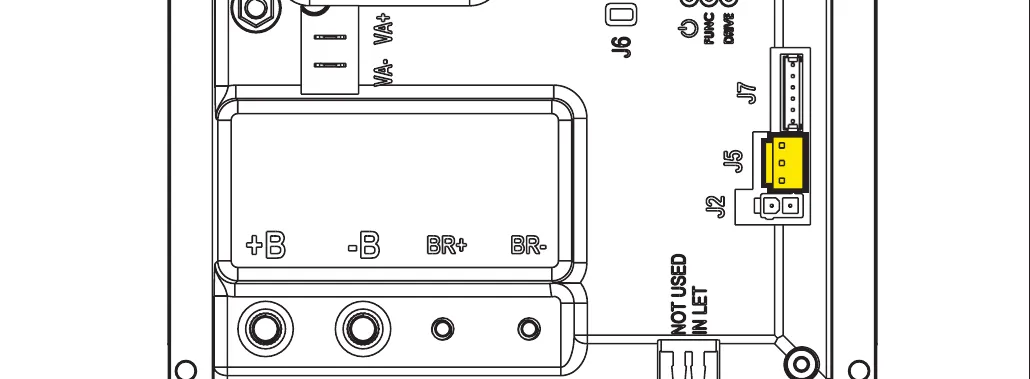
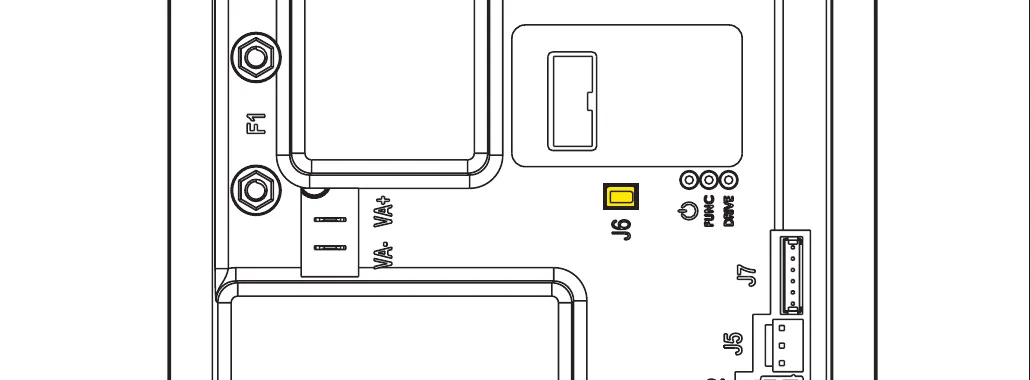
J6: JUMPER, 2-ways vertical
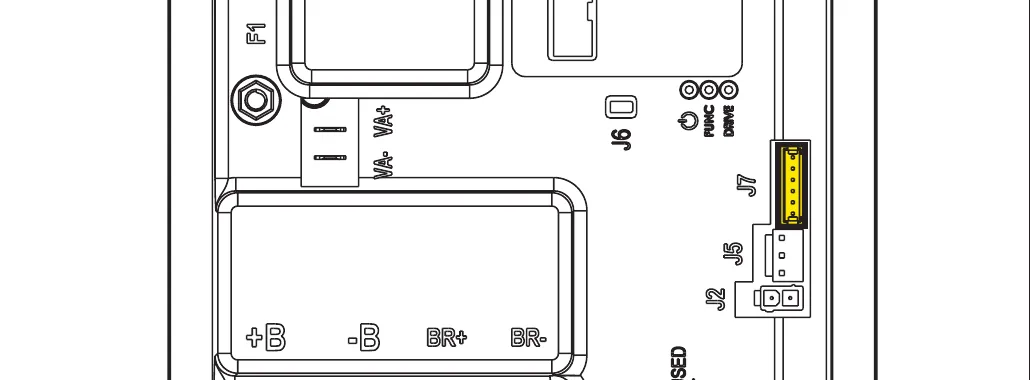
J7: TYCO MODU II vertical 6-way
| Pin | Description | Controller in/out | V ref. | I max. | Connected to |
|---|---|---|---|---|---|
| 1 | +24V power supply | out | 24V | <1A | TRK.RD |
| 2 | +5V power supply | out | 5V | <1A | - |
| 3 | iButton input (CAN H channel) | In (Out) | 0V (0-5V) | <1A | TRK.YE |
| 4 | Ext. operating time counter enable (CAN L channel) | (In) Out | 0V (0-24V) | <1A | TRK.WH |
| 5 | Power supply - | out | 0V | <1A | TRK.BU |
| 6 | Machine on signal | out | 24V | <1A | TRK.BN |
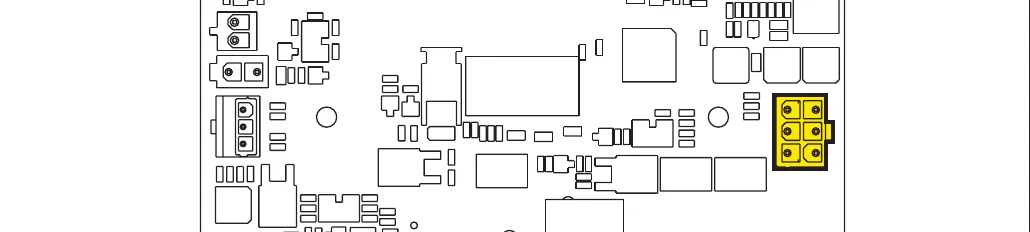
Connectors of the display controller (EB2)
J1: MOLEX MINIFIT type, 6-ways vertical
| Ref. | Description | Controller in/out | V ref. | I max. | Connected to |
|---|---|---|---|---|---|
| 1 | Power supply + | in/out | 24V | <1A | CFD12.J3.1 |
| 2 | Main machine controller serial + | in/out | 5V | <1A | CFD12.J3.2 |
| 3 | Main machine controller serial - | in | 0V | <1A | CFD12.J3.3 |
| 4 | Power supply - | out | 0V | <1A | CFD12.J3.4 |
| 5 | Key signal return (KEY0) | out | 24V | <1A | CFD12.J3.5 |
| 6 | Key signal return (KEY0) | in | 24V | <1A | - |
J2: FCI DUFLEX (2.54 pitch) 9-way, male pins
| Ref. | Description | Controller in/out | V ref. | I max. |
|---|---|---|---|---|
| 1 | Power supply - common | out | 0V | <1A |
| 2 | ON/OFF button (P0) | in | 0V | <1A |
| 3 | DETERGENT MIX button (P4) | in | 0V | <1A |
| 4 | EDS button (P3) | in | 0V | <1A |
| 5 | VACUUM button (P2) | in | 0V | <1A |
| 6 | VACUUM function LED (LD2) | out | 5V | <1A |
| 7 | SPOT function LED (LD1) | out | 5V | <1A |
| 8 | SPOT button (P1) | in | 0V | <1A |
| 9 | DS versions configurator | in | 0V | <1A |
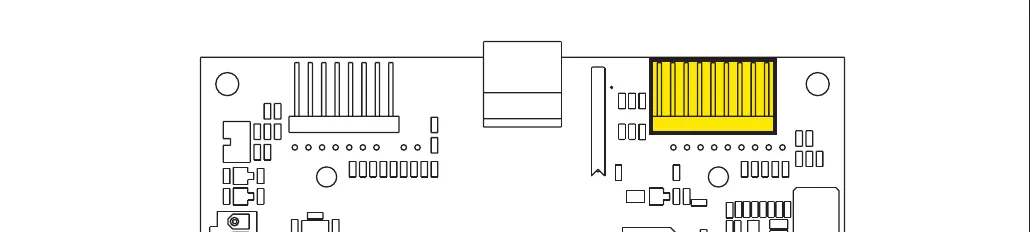
J3: FCI DUFLEX (2.54 pitch) 8-way, male pins
| Ref. | Description | Controller in/out | V ref. | I max. |
|---|---|---|---|---|
| 1 | Power supply - common | out | 0V | <1A |
| 2 | SP / EXTRAPR function LED (red) (LD3R) | out | 5V | <1A |
| 3 | SP / EXTRAPR function LED (green) (LD3V) | out | 5V | <1A |
| 4 | BRUSH RELEASE function LED (LD4) | out | 5V | <1A |
| 5 | BRUSH RELEASE switch (P6) | in | 0V | <1A |
| 6 | INCREASE SPEED button (P7) | in | 0V | <1A |
| 7 | DECREASE SPEED button (P8) | in | 0V | <1A |
| 8 | ONETOUCH / EXTRAPR. button (P5) | in | 0V | <1A |
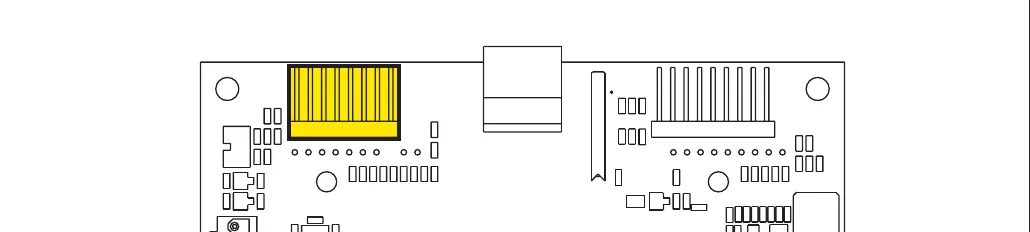
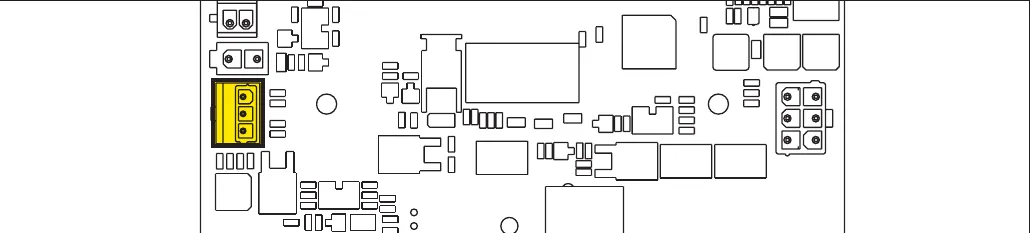
J4: JST VH vertical, 3-way (B 3P-VH)
| Pin | Description | Controller in/out | V ref. | I max. | Connected to |
|---|---|---|---|---|---|
| 1 | VR1 potentiometer power supply + | Out | 3V | <1A | VR1.1 |
| 2 | VR1 potentiometer return | In | 0-3V | <1A | VR1.2 |
| 3 | VR1 potentiometer power supply - | out | 0V | <1A | VR1.3 |
Shop measurements
The following tables contain some “real world” shop voltage measurements to help you recognize what “normal” looks like. All voltage values were measured with the black (Negative) voltmeter lead connected to the main battery negative unless otherwise specified.
Shop measurements - Main machine controller (EB1)
Battery volts at battery, key on = 25.03V
Power supply
| Pin | Color | Description | Measured | Comments |
|---|---|---|---|---|
| B+ | Red | Main machine controller power supply + | 24.5v | Vacuum on |
| B- | Black | Main machine controller power supply - | 0.035vV | Vacuum on |
Brush motor
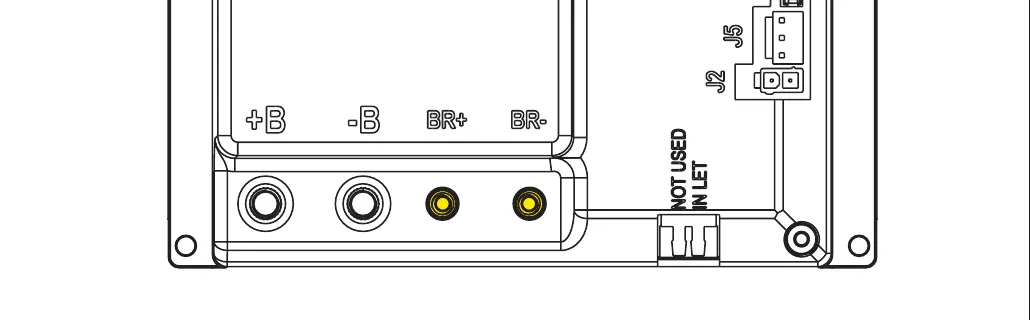
| Pin | Color | Description | Measured | Comments |
|---|---|---|---|---|
| BR+ | Red | Brush motor + | 24.4V (off), 24.2V (on) | Constant Positive |
| BR- | Blue | Brush motor - | 24.4V (off), 0.15v (on without RPM control activated) 5.8v (on with RPM Control Active – set at 20) | PWM Battery Negative |
Drive system motor
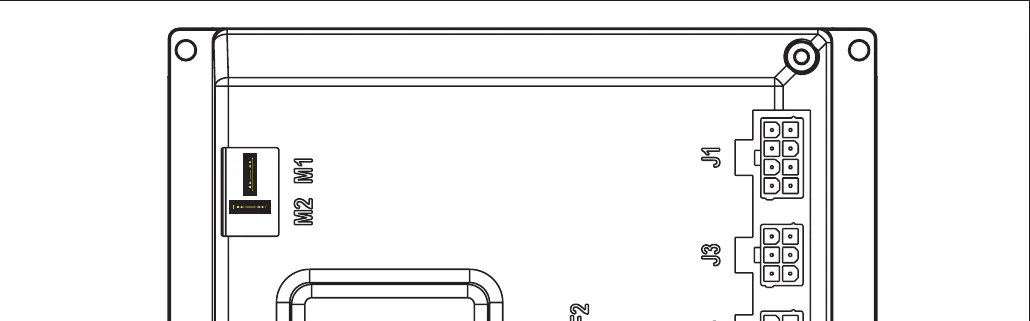
| Pin | Color | Circuit description | Measured | ||||
|---|---|---|---|---|---|---|---|
| Neutral | Fwd - Initial | Reverse - Initial | FWD Max | REV Max | |||
| M1 | Red | Drive system motor + | 5.62v | 12.7v | 10.9v | 21.8v | 8.7v |
| M2 | Gray | Drive system motor - | 5.61 | 1.95 | 16.00 | 8.9v | 13.5v |
| M1 to M2 | 0.001v | 6.1v | -2.5v | 22.6 | -7.4 | ||
Vacuum motor
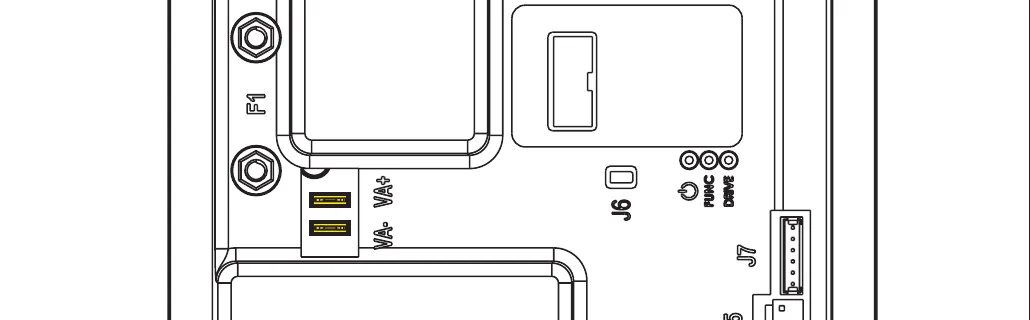
| Pin | Color | Description | Measured | Comments |
|---|---|---|---|---|
| VA+ | Red | Vacuum system power supply + | 24.8v (off) 24.4v (on) | Constant Positive |
| VA- | Blue | Vacuum system power supply - | 24.56 (off) 1.36v (on High) 9.69v (on Quiet mode VRID parameter = 1) | 1.02 Running, 9.56 Quiet Mode |
J1 - 8 ways
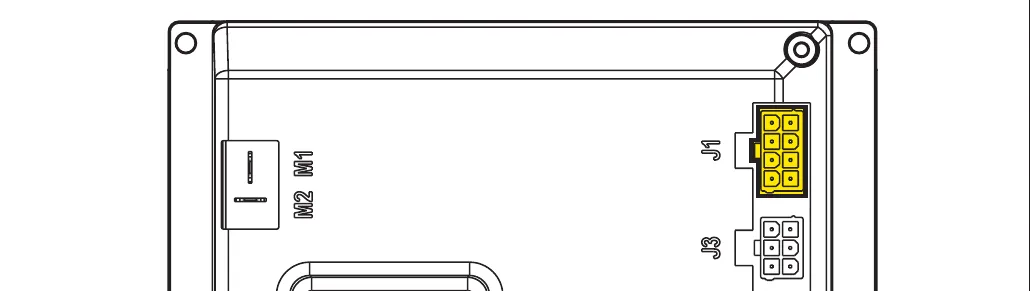
| Pin | Color | Circuit description | Measured | Comments |
|---|---|---|---|---|
| 1 | Red | Detergent pump power supply + | 24.9v (off) | No change seen on voltmeter when the pump pulsed. |
| 2 | Gray | Detergent pump power supply - | 24.9v (off) Momentary drop to 0 when on. | Voltmeter reading momentarily jumped. Too fast to settle into a range and value. |
| 3 | White | Deck actuator power supply +/- | 24.8v (Stationary) 0.18v (going up) 12v (going up near top) 24.8v (going down to scrub or Ex press) 12.6v (Reset Up) | |
| Stationary: 0v Transport to Scrub: 24.8v Scrub to Ex Press: 24.8v then 12v near end of travel. Ex Press to Scrub: -24.8v Scrub to Transport: -24.8v then -12v near end of travel Reset to transport:-12.5v entire range | Reference to J1.3 | |||
| 4 | Blue | Deck actuator power supply -/+ | 24.8v (stationary) 0.03v (Transport to scrub) Scrub to EX Press – Initial 0.03v then 12v near bottom 24.8v( Ex press to scrub) Scrub to Transport – 24.8v | |
| 5 | Green | Power supply for ADV versions configurator | 0.001 | |
| 6 | Green | ADV versions configurator return | 0.001 (Loop not cut) 4.98v (Open loop) | Loop not cut |
| 7 | Red | Power supply for deck configurator | 0.001 | |
| 8 | Red | Deck configurator return | 0.001 (Loop not cut) 4.98v (Open loop) | Loop not cut |
J2 - 2 ways
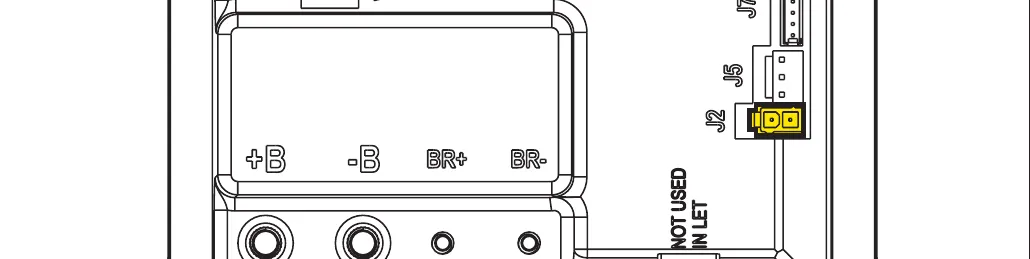
| Pin | Color | Circuit description | Measured | Comments |
|---|---|---|---|---|
| 1 | Yellow | Solenoid valve power supply + | 24.4 (Off and On) | |
| 2 | Purple | Solenoid valve power supply - | 24.4 (off) Momentary drop (on) | Momentarily drops to 0v when on but it is too fast for a DVOM to read. The value just momentarily changes. |
J3 - 6 ways
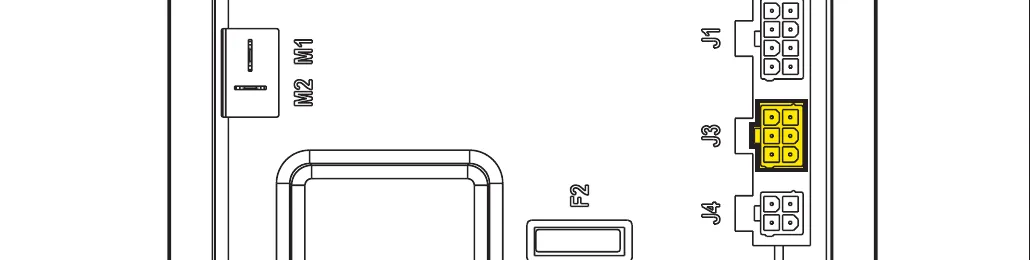
| Pin | Color | Circuit description | Measured | Comments |
|---|---|---|---|---|
| 1 | Red | Main machine controller power supply + | 24.9v | On or Off |
| 2 | White | Main machine controller serial + | 4.62v key on 0v key off | |
| 3 | Blk/Wh | Main machine controller serial - | 4.13v key on 0v key off | |
| 4 | Black | Main machine controller power supply - | 0.001v key on | |
| 5 | Orange | Return from key | 24.3v key inserted and power “on” | Either the yellow or gray key has the same result. Note: if no key, jumping +24v here turns the machine on. |
| 6 | Empty |
J4 - 4 ways
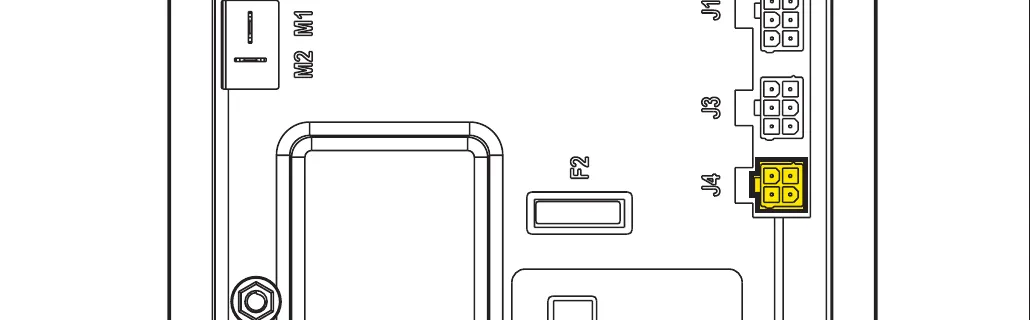
| Pin | Color | Circuit description | Measured | Comments |
|---|---|---|---|---|
| 1 | White | Enabling from battery charger | 24.8v Not Charging | May see residual voltage back-feeding from the main controller here when charging. |
| 2 | Yellow | Power supply from battery charger | 0.136v Not charging 26.1v Charging | |
| 3 | Brown | Battery charger enabling power supply | 24.8v key on or off | Constant power whether charging or not. Key on or off. |
| 4 | Green | Battery charger data communication | 4.98v when charger is first plugged in. Then dropped to 4.6 |
J5 - 3 ways
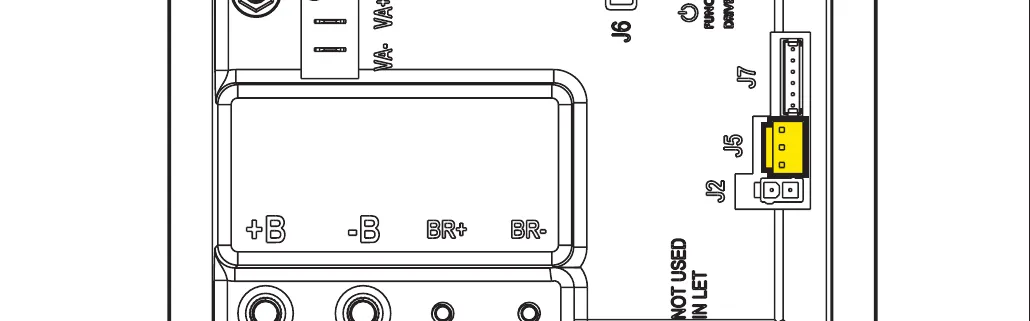
| Pin | Color | Circuit description | Measured | Comments |
|---|---|---|---|---|
| 1 | Brown | Power supply for water level sensor + | 24.7v | Key on |
| 2 | Black | Water level sensor return | 4.98 0.03v | Tank < ½ full Tank > ½ full |
| 3 | Blue | Power supply for water level sensor - | 0.001 |
J6
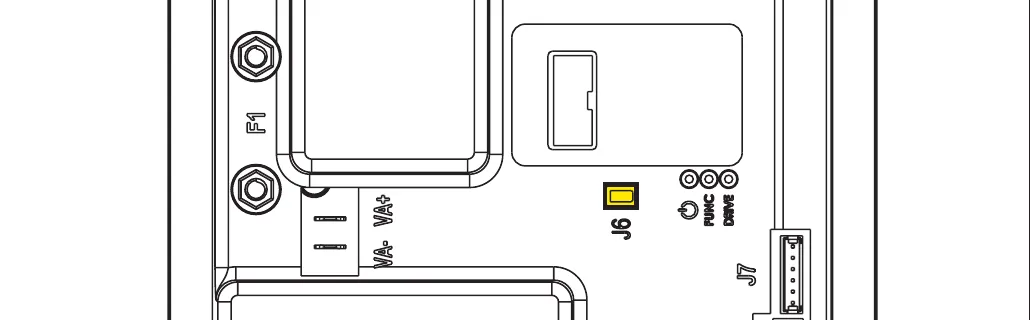
Two way vertical jumper.
- What is this for? The J6 Jumper is used to configure the Main machine controller for the EcoFlex option.
- What does it mean if it is jumped? The Main machine controller is set for no EcoFlex
- What does it mean if it is open? The Main machine controller is set for EcoFlex
- Is there a measurable voltage on either of the pins when not jumped? Yes. 4.98v on pin near the LEDS on the Main machine controller.
J7 - 6 ways
Measured machine did not have a wiring connector. Measurements were taken at each pin on the Main machine controller.
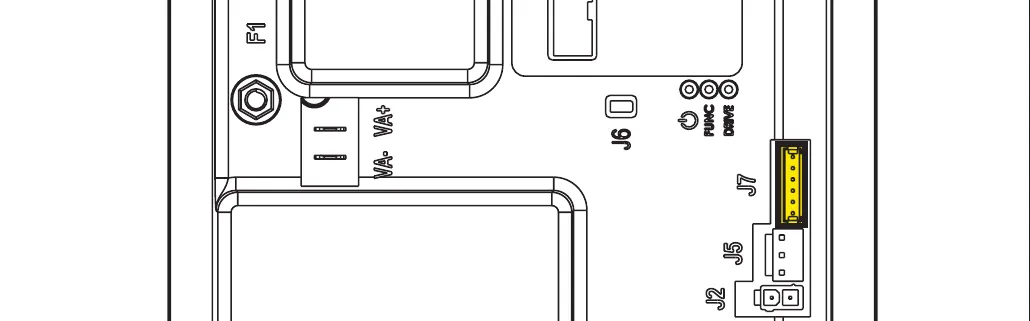
| Pin | Color | Circuit description | Measured | Comments |
|---|---|---|---|---|
| 1 | +24V power supply | 24.6 | ||
| 2 | +5V power supply | 5.00 | ||
| 3 | iButton input (CAN H channel) | 4.98 | ||
| 4 | Ext. operating time counter enable (CAN L channel) | 24.6 | ||
| 5 | Power supply - | 0.001 | ||
| 6 | Machine on signal | 23.68 |
Shop measurements - Display controller (EB2)
Measure and record the voltage at each of the Main machine controller pins. Always use battery negative as your reference point for your black voltmeter lead.
J1 - 6 ways
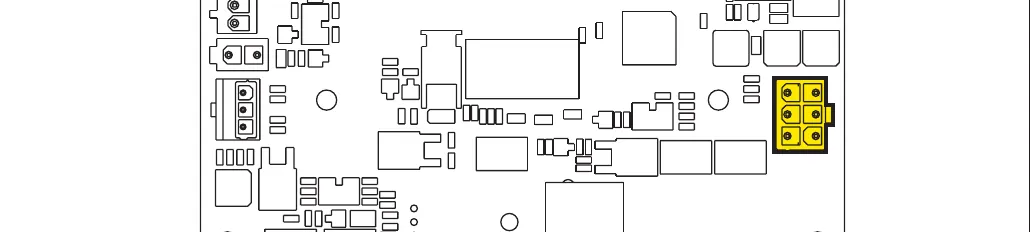
| Pin | Color | Circuit description | Measured | Comments |
|---|---|---|---|---|
| 1 | Red | Power supply + | 24.6 | |
| 2 | White | Main machine controller serial + | 4.62 | |
| 3 | Blk/Wh | Main machine controller serial - | 4.12 | |
| 4 | Black | Power supply - | 0.003 | |
| 5 | Orange | Key signal return (KEY0) | 24.23 | |
| 6 |
J2 - 9 way ribbon connector
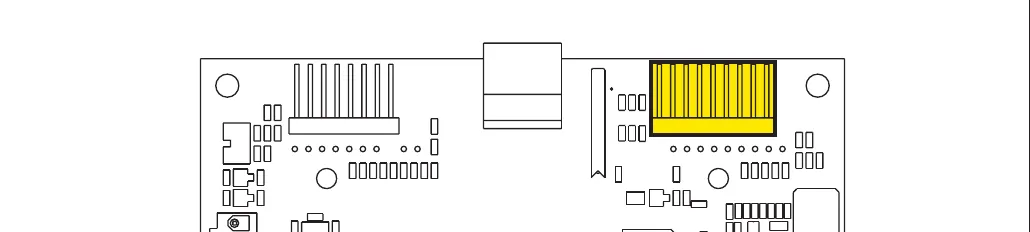
| Pin | Color | Circuit description | Measured | Comments |
|---|---|---|---|---|
| 1 | Power supply - common | 0.003v | ||
| 2 | ON/OFF button (P0) | 24.2v | Key off or key on | |
| 3 | DETERGENT MIX button (P4) | 3.14v Not pressed 0.02v pressed | ||
| 4 | EDS button (P3) (Solution Button) | 3.14v Not pressed 0.02v pressed | ||
| 5 | VACUUM button (P2) | 3.14v not pressed 0.05v pressed | ||
| 6 | VACUUM function LED (LD2) | 0.007v LED off | ||
| 7 | SPOT function LED (LD1) | 0.007v LED off | ||
| 8 | SPOT button (P1) (EcoFlex – Burst of power) | 3.14v Not pressed 0.02v pressed | ||
| 9 | DS versions configurator | 3.14v |
J3 - 8 ways ribbon connector
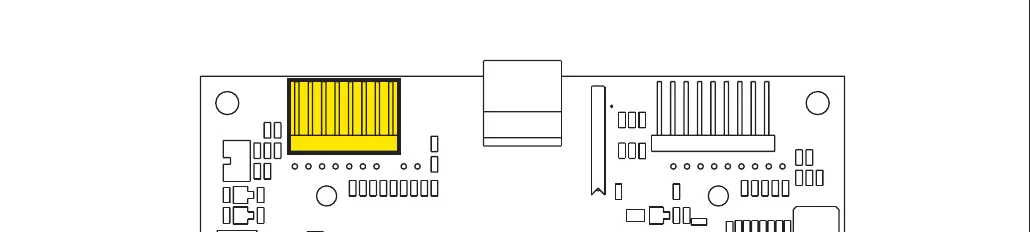
| Pin | Color | Circuit description | Measured | Comments |
|---|---|---|---|---|
| 1 | Power supply - common | 0.003v | ||
| 2 | SP / EXTRAPR function LED (red)(LD3R) | 1.78v Red LED on 0.032v Red LED off | ||
| 3 | SP / EXTRAPR function LED (green) (LD3V) | 1.95v Grn LED on 0.032v Grn LED off | ||
| 4 | BRUSH RELEASE function LED (LD4) | 0.07v LED off Pulsing when flashing | ||
| 5 | BRUSH RELEASE switch (P6) | 3.14v not pressed 0.03v pressed | ||
| 6 | INCREASE SPEED button (P7) | 3.14v not pressed 0.02v pressed | ||
| 7 | DECREASE SPEED button (P8) | 3.14v not pressed 0.02v pressed | ||
| 8 | ONETOUCH / EXTRAPR. button (P5) | 3.16v not pressed 0.04v pressed |
J4 - 3 ways potentiometer connector
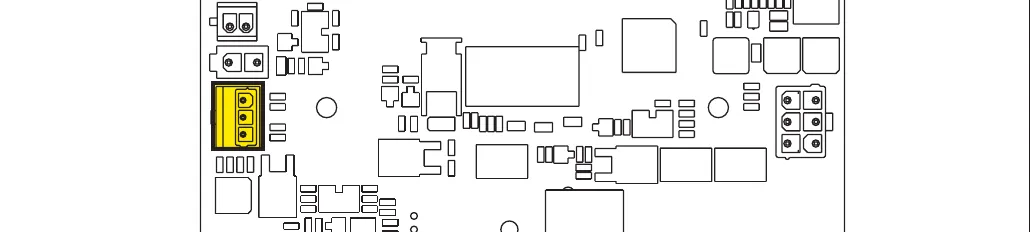
| Pin | Color | Circuit description | Measured | Comments |
|---|---|---|---|---|
| 1 | Red | VR1 potentiometer power supply + | 2.675 | |
| 2 | White | VR1 potentiometer return | 1.45 (Neutral) | 2.48 (Full Fwd Pin 2), 0.44 (Full Rev Pin 2) |
| 3 | Black | VR1 potentiometer power supply - | 0.41 (Ground) |
05 - Control system, models with magnetic smart key
Model No.: 9087403020, 9087404020, 9087400020, 9087401020, 9087405020, 9087402020
Functional description
The architecture of the electronic control system for the machine’s electrical components is composed of a Main machine controller (EB1) and a Display controller (EB2), in turn connected to the User interface controller (EB3) which represents the main user interface.
The Main machine controller (EB1) manages all components and drives the following components directly:
- Drive system motor (M3)
- Vacuum system motor (M2)
- Deck actuator (M5)
- Brush motor (M6)
- Solution flow solenoid valve (EV1)
- Detergent pump (M4)
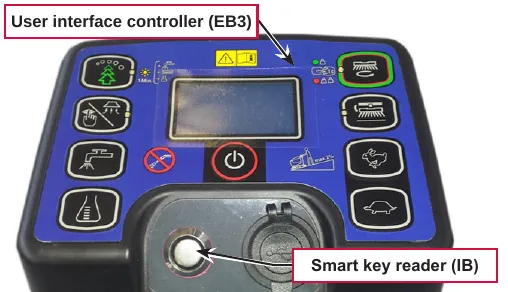
The Display controller (EB2) serves mainly as an aggregator for all input signals (buttons) and outputs (LEDs) from the User interface controller (EB3), which it is connected to via 2 flat cables.
The Magnetic key reader (IB) is connected to the Display controller (EB2). The display controller (EB2) check the presence of the Magnetic smart key and drive the switch on/off of the system accordingly.
The Display controller (EB2) sends all the input and output signals of these components to the Main machine controller (EB1) using 2-wire 2-way serial communications protocol.
The system is completed by the on-board battery charger which also uses a proprietary serial protocol to communicate with the Main machine controller (EB1), in order to display its operating status (charging phase) to the operator on the LCD display.
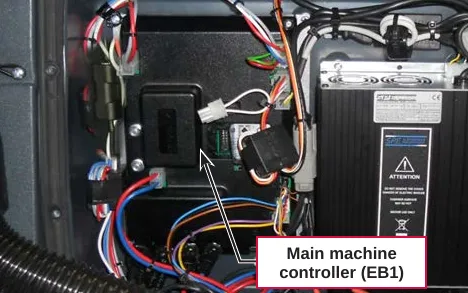
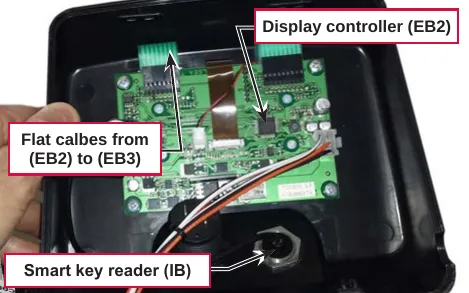
Wiring diagram
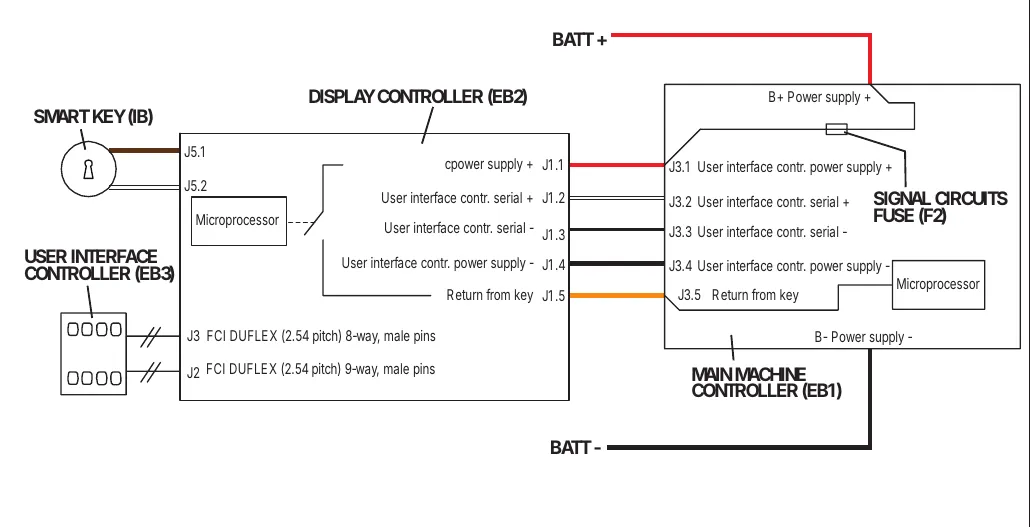
Labels printed on the drawing:
| Item | Printed label |
|---|---|
| Battery | BATT + ; BATT - |
| J5.1 ; J5.2 (printed at the EB2 edge next to the smart key) | J5.1 ; J5.2 ; Microprocessor |
| Display controller (EB2) to EB1 | cpower supply + J1.1 ; User interface contr. serial + J1.2 ; User interface contr. serial - J1.3 ; User interface contr. power supply - J1.4 ; Return from key J1.5 |
| Display controller (EB2) to EB3 | J3 FCI DUFLEX (2.54 pitch) 8-way, male pins ; J2 FCI DUFLEX (2.54 pitch) 9-way, male pins |
| Main machine controller (EB1) | B+ Power supply + ; J3.1 User interface contr. power supply + ; J3.2 User interface contr. serial + ; J3.3 User interface contr. serial - ; J3.4 User interface contr. power supply - ; J3.5 Return from key ; Microprocessor ; B- Power supply - |
| Fuse | SIGNAL CIRCUITS FUSE (F2) |
| Block names | SMART KEY (IB) ; DISPLAY CONTROLLER (EB2) ; USER INTERFACE CONTROLLER (EB3) ; MAIN MACHINE CONTROLLER (EB1) |
Component locations
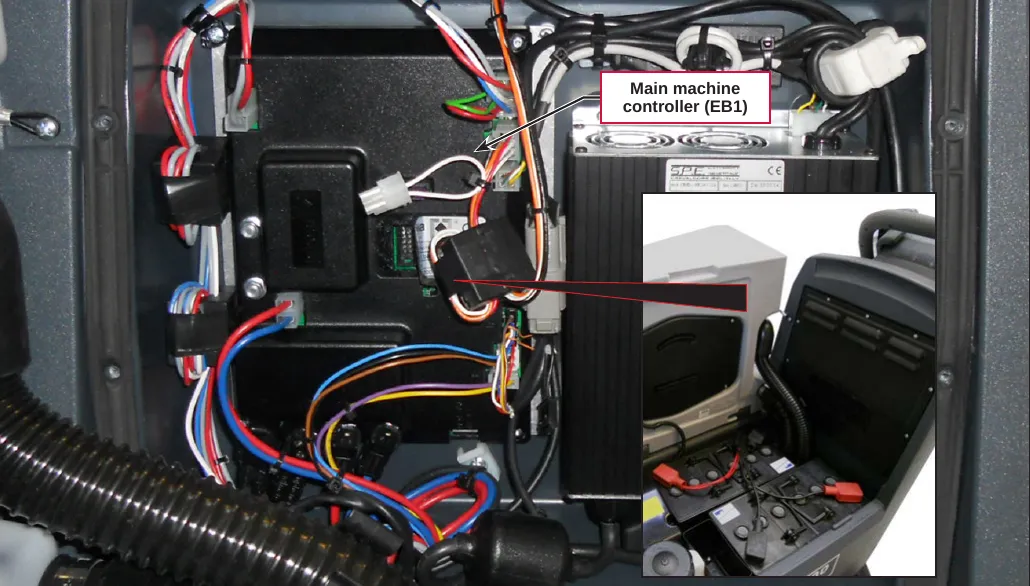
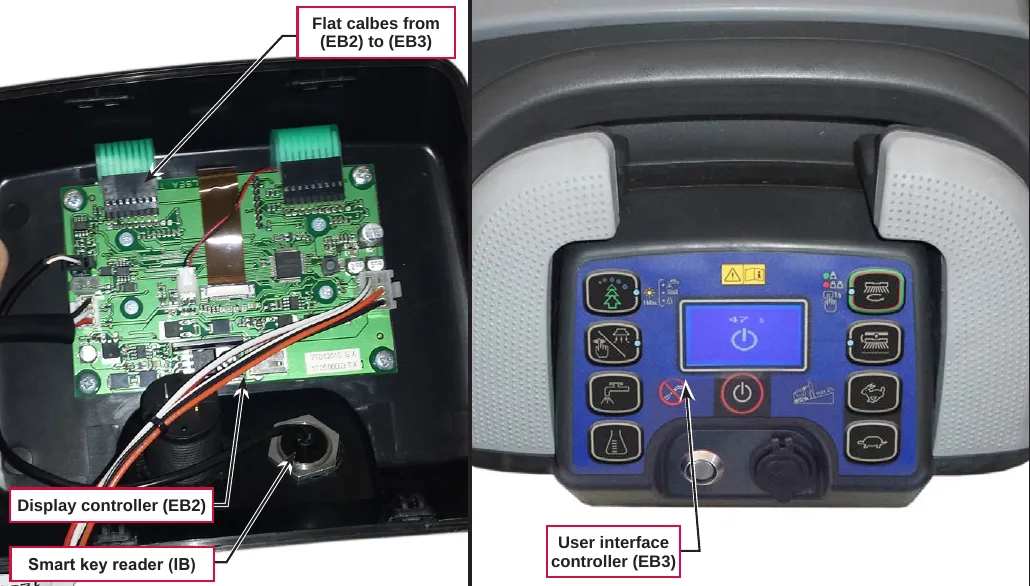
Troubleshooting
Main machine controller (EB1) alarm codes
The Main machine controller (EB1) indicates a series of alarms in case of malfunction of one or more systems, and in case of abnormal conditions detected in the input signals.
The alarms are shown on the display in the following format: ALARM <XX> <DESCRIPTION> (Figure 4).
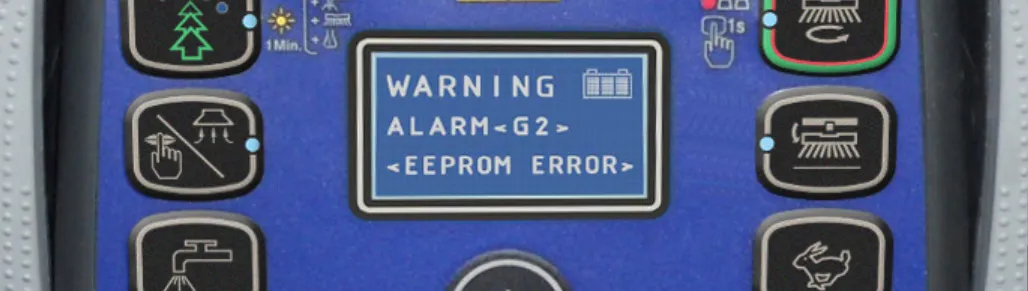
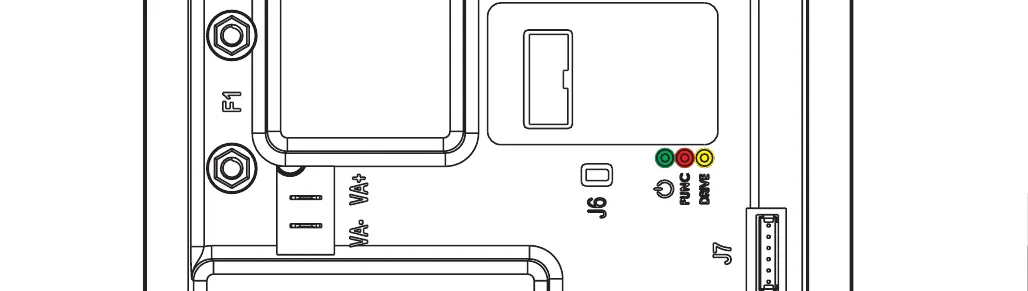
In case the display is malfunctioning, the alarms are also repeated by the yellow and red diagnostic LEDs (Figure 5) on the Main machine controller (EB1), as indicated in the following tables.
| General alarms – Alarm on Main machine controller - FLASHING YELLOW + RED LEDS | ||||||
|---|---|---|---|---|---|---|
| Alarm code | Description | No. flashes | Meaning | Condition | Effect | Service suggestions |
| G2# | EEPROM ERROR | 2 | EEPROM error | EEPROM error | Function block + Default setting reset | If the machine continues to function after G2 has been displayed, this may have been caused by a significant external electromagnetic disturbance.
|
| General alarms – Alarm on Main machine controller - FLASHING YELLOW + RED LEDS | ||||||
|---|---|---|---|---|---|---|
| Alarm code | Description | No. flashes | Meaning | Condition | Effect | Service suggestions |
| G3# | MAIN FUSE FAILURE | 3 | Blown F1 fuse. | Blown F1 fuse. | Function block. | F1 is a safety fuse primarily included to prevent a short circuit or serious damage to the Main machine controller causing currents such as to melt cables and/or cause smoke or fire. If F1 has blown, this is usually indicative of serious damage to the Main machine controller.
|
| Broken battery. | It could happen also if a battery is broken: Check the battery voltage under load. | |||||
| G4# | BATTERY LOW VOLTAGE | 4 | Undervoltage. | The battery voltage remains below 18.4V for over 10 seconds (for WET CELL batteries, 19.6V for GEL-AGM batteries). | Function block. |
|
| G5# | BATTERY OVERVOLTAGE | 5 | Excessive battery voltage. | Battery voltage over 32V. | Function block. | Check the voltage of the installed batteries and that the terminals are correctly tightened. |
| G6# | HARDWARE FAILURE | 6 | Serial communication error with User interface controller. | No signal or error in communications decoding between the Main machine controller (EB1) and the Display controller (EB2). | No block. |
|
| G7# | HARDWARE FAILURE | 7 | General relay fault. | Relay closes or closed at start-up. | Function block. | Replace the Main machine controller. |
| Main machine controller alarms – Alarm on Main machine controller - FLASHING RED LED | ||||||
|---|---|---|---|---|---|---|
| Alarm code | Description | No. flashes | Meaning | Condition | Effect | Service suggestions |
| F2# | BRUSH MOTOR OVERLOAD | 2 | BRUSH motor amperometric protection. | The motor current is greater than the value of the parameter (see page 72) VS1 | Brush motor output stop. | Check the current draw of the brush motor. It should remain below the value set in the parameter “VS1” during operation. |
| F3# | VACUUM MOTOR OVERLOAD | 3 | VACUUM SYSTEM amperometric protection. | The current draw of the vacuum motor is greater than 30A for over 10 seconds. | Vacuum system block. |
|
| F4# | DECK ACTUATOR FAILURE | 4 | DECK ACTUATOR overcurrent. | Current greater than 4A detected for more than 1 second. | Brush function block. |
|
| F5# | HARDWARE FAILURE | 5 | Short circuit on the vacuum or brush motor drive MOSFET. | MOSFET short circuit. | Function block. |
|
| F6# | PRESSURE GAUGE FAILURE | 6 | PRESSURE GAUGE FAILURE (Not used) | - | - | - |
| F7# | OVERHEATING | 7 | Motor drive section thermal cut-out. | The heatsink on the Main machine controller has reached a temperature of 194°F (90°C). | Function block. | Check the vacuum and brush motor power draw and that the openings of the electrical compartment are not blocked. |
| F8# | BRUSH MOTOR FAILURE | 8 | Brush motor output short circuit. | I > 150A for 20µsec. | Function block. | Check for short circuits in the wiring or motor. |
| F9# | VACUUM MOTOR FAILURE | 9 | Vacuum motor output overcurrent. | I > 150A for 20µsec. | Function block. | Check for short circuits in the wiring or motor. |
Drive system alarm codes
| Drive system alarms – Alarm on Main machine controller - FLASHING YELLOW LED | ||||||
|---|---|---|---|---|---|---|
| Alarm code | Description | No. flashes | Meaning | Condition | Effect | Service suggestions |
| T2# | DRIVE MOTOR OVERLOAD | 2 | Amperometric protection intervention. | Drive motor current draw greater than the parameter (see page 72) “INOM” for more than the parameter (see page 72) “TMAX”. | Drive blocked. | Check the current draw of the drive motor (this should be around 6-8amps without load and remain below 10-12amps during operation). |
| T3# | RELEASE THE PADDLE ! | 3 | Paddle not in rest position when the machine is turned on. | Voltage on J1.2 of the Display controller (EB2) out of range 1.29V - 1.49V with respect to - BAT. | Drive blocked. | Check that the paddle moves correctly, lubricating if necessary; check the linkage and potentiometer. |
| T4# | PADDLE INPUT FAILURE | 4 | Incorrect voltage measured at the paddle potentiometer input. | Voltage on J1.2 of the Display controller (EB2) above 3V. | Drive blocked. |
|
| T5# | HARDWARE FAILURE | 5 | Drive system power section damage | MOSFET short circuit. | Drive blocked. | Disconnect M1 and M2 from controller, press the pedal
|
| T6# | DRIVE MOTOR FAILURE | 6 | Overcurrent (motor D.C.) | Drive motor current draw greater than 1.5 times the value of the parameter (see page 72) “IMAX”. | Drive blocked. |
|
| T7# | OVERHEATING | 7 | Drive motor drive section thermal cut-out. | The heatsink on the Main machine controller has reached a temperature of 194°F (90°C). | Drive blocked. |
|
All alarms of the drive system operate by cutting the power supply to the gear motor unit motor until the KEY input is reset (with the exception of alarm T3 which is reset as soon as the input voltage of the paddle potentiometer returns within the values corresponding to “machine stopped”). In case of simultaneous errors, the one with greater priority is shown first (priority order is opposite to the number of flashes).
On-board battery charger alarm codes
SPE charger
| On-board Battery Charger Alarms - SPE Charger | |||||
|---|---|---|---|---|---|
| Alarm code | Description | Meaning | Condition | Effect | Service suggestions |
| C1# | CHARGER COMMUNICAT. | Communication problem between the battery charger and the Main machine controller. | No signal from battery charger via gate J4.4 for over 3 seconds. | The battery charger is performing the standard recharging cycle for generic GEL/AGM batteries. | Check the wiring between the battery charger and the Main machine controller (EB1). |
| C2# | BATTERY OVERVOLTAGE | Battery overvoltage. | Battery voltage over 32V. | Battery charger block. |
|
| C4# | CHARGING TIME I EXPIRED | Charging phase I expired. | Battery excessively discharged or at end of life cycle. | Battery charger block. | If the problem persists, replace the batteries. |
| C5# | CHARGING TIME II EXPIRED | Charging phase II expired. | Battery excessively discharged or at end of life cycle. | Battery charger block. | If the problem persists, replace the batteries. |
| C6# | CHARGER FAULT | Battery charger internal short circuit. | Battery charger internal short circuit. | Battery charger block. | Replace the battery charger. |
DeltaQ chargers - IC650 and RC1000?
| On-board Battery Charger Alarms - Delta-Q IC and RC series | |||
|---|---|---|---|
| Alarm code | Description | Cause | User action |
| D1# | charger int. error | Internal charger fault. | Disconnect the AC and turn off the battery (remove the iButton key) for minimum 30 seconds. If the error comes again, please contact Nilfisk service. |
| D2# | battery overvoltage | Battery voltage is too high. | Check the battery status LED, disconnect the AC, turn off the battery (remove the iButton key) and check the accessible battery cable connections. If the error comes again, please contact Nilfisk service. |
| On-board Battery Charger Alarms - Delta-Q IC and RC series | |||
|---|---|---|---|
| Alarm code | Description | Cause | User action |
| D3# | charge timeout | Charge time limit exceeded. | Check the battery status LED, disconnect the AC, turn off the battery (remove the iButton key) and check the accessible battery cable connections. If the error comes again, please contact Nilfisk service. |
| D4# | battery conn. error | Insufficient battery DC connection | Disconnect the AC, turn off the battery (remove the iButton key) and check the accessible battery cable connections. If the error comes again, please contact Nilfisk service. |
| D5# | AC overvoltage | The AC voltage is too high | Disconnect the AC and check the AC connections and the power grid. Please be aware that the charger works in 85-270V AC range. |
| D6# | AC undervoltage | The AC voltage is too low. | Disconnect the AC and check the AC connections and the power grid. Please be aware that the charger works in 85-270V AC range. |
| D7# | charger comm. error | Communication error between the charger and the battery. | Disconnect the AC, turn off the battery (remove the iButton key) and check the accessible communication cable connections. If the error comes again, please contact Nilfisk service. |
| D8# | charger fan error | The fan of the charger is blocked or broken. Only related to RC1000 charger. | Check the condition and clogging of the fan. If necessary, clean it with compressed air and/or fine brush. If the error comes again, please contact Nilfisk service. |
Nilfisk lithium-ion battery alarm codes
Note: Machines with 1 module: In some battery-related error conditions, the output of the module is disabled and the machine will switch off, error messages will not appear on the display. Please check the LEDs on the battery modules. RED LED = battery output disabled Refer to the “Nilfisk Lithium-Ion Battery Module” service manual form number 56043180.
Note: Machines with more than 1 module installed: If the conditions allow, only the defective module(s) will switch off. The other modules can supply the voltage for the machine and it can continue to operate or show the error messages.
| Nilfisk Lithium-ion Battery Module Alarms | |||||
|---|---|---|---|---|---|
| Alarm code | Description | Cause | Machine action during use | Machine action during charging | User action |
| L2# | Battery temp error | Over- or under temperature warning during charging or discharging. | Error message flashes, the machine switches off after 5 seconds | The charging will be stopped and will be automatically resumed when the temperature is within specified limits. | When the machine is in use, try to reduce the load. Pay attention to the normal operation temperatures. Check the cooling fan inlet of the battery and clean if it necessary. |
| L3# | Recuperation Alarm | Too much regenerative charge during dynamic braking on a slope with fully charged batteries. | Error message flashing, traction disabled, other functions (brush, vacuum) can work. SC2000: the magnetic brake activated. | Not applicable | Use the machine only on the allowed slope and don’t push it manually. If possible, turn on the brush and vacuum to consume some charge. The error is latching, machine reset required after the conditions normalized. |
| L4# | CAN error/fail | CAN wiring/contact error or bad Node-ID configuration | Error message flashing, machine completely disabled | Error message flashing. If the CAN connection between the battery and charger is functioning, the charging can be continued. | Turn off the machine, check the accessible wires/connections. In other case, contact Nilfisk service. |
| L8# | over current error | Overcurrent detected | Error message flashes, machine disabled. In the overcurrent condition, the battery will disable its output after 5 seconds and the machine will switched OFF. SC2000: magnetic brake activated. | Charging stopped. | Turn off the machine, check the accessible wires/connections. Reduce the load, check the free rotation of the wheels and brush. Please do a “Battery reset”. If this error comes again, contact Nilfisk service. |
| L9# | undercharge error | Battery is undercharged. | Error message flashes, machine disabled. In the undercharge condition, the battery will disable its output after 5 seconds and the machine will switched OFF. SC2000: magnetic brake activated. | Not applicable. | Turn off the machine and recharge the batteries. |
| L11# | module defect error | One or more modules defective. | Error message flashes, no other action on machine side. If the battery module have a serious error, the output of the whole battery pack can be disabled, in this case the machine is OFF. SC2000: magnetic brake activated. | The charging of the operational modules can continue. | Please do a “Battery reset”. If the error exists, contact Nilfisk service. Note: If the machine is equipped with more than 1 modules and they are fully operational, you can use the machine but the error message is always on the LCD. |
Black-box: Recording of Alarms, Parameters (see pages 71-72), Partial Operating Time Counter
The alarms activated during normal machine operation are stored and can be read in the corresponding log (Alarm Log Screen).
Display, main screen
- Place the Supervisor key (yellow) (Figure 6), then press the button [Power] to access the main screen (Figure 7) of the display.

Figure 6 - Press [One-Touch] push-button to change the machine settings (see Machine Settings Screen section).
- Press the [Brush release] button or [REV] button to check for any stored machine alarms (see Alarms Log Screen section).
- Press the “hare” button [Hare] to check the machine’s hours of operation (see Operating Time Counter Screen section).
- Press the “tortoise” button [Tortoise] to manage the magnetic smart keys.
Corrected an obvious misprint: “Supevisor” printed as “Supervisor” and “the the button” printed as “the button” (the key is called the supervisor key on page 77).
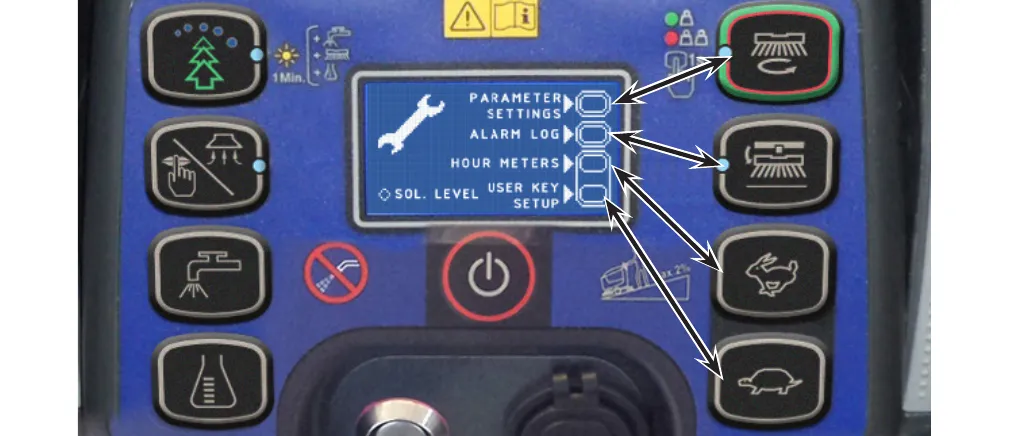
The arrows in Figure 7 connect each menu choice on the screen to a button:
- PARAMETER SETTINGS: [One-Touch] button (top right).
- ALARM LOG: [Brush release] button.
- HOUR METERS: [Hare] button.
- USER KEY SETUP: [Tortoise] button.
Display, alarms log screen
The alarms log screen (Figure 8) function allows you to check any alarms stored on the machine.
To return to the main screen (Figure 6), press the [One-Touch] button repeatedly.
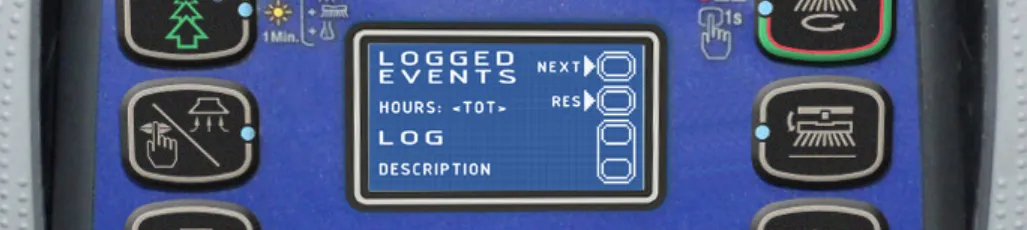
Each alarm (See table of alarms in the Main machine controller Alarm Codes section) is stored along with the working hour (machine operating time counter) at which it occurred and all alarms are recorded in the order in which they occurred, from the most recent to the oldest.
The memory holds up to 20 alarm records, after which the oldest are overwritten when new alarms occur.
Improper uses of the batteries or battery charger are also recorded, as in the following table:
| On-board Battery Charger Alarms | ||||
|---|---|---|---|---|
| Alarm code | Description | Meaning | Condition | Effect |
| GB-N# | CONTINUOUS LOW BATTERY VOLTAGE | Time of continuous use with discharged batteries | “N” is the number of hours from key on to off when the battery level is below 20.4V for WET CELL (21.6 for AGM) batteries. This event is not recorded if the usage time is below 10 minutes. | Incorrect use by customer. Risk of reduced battery life. |
| GC# | CHARGER DISCONN BEFORE END CYCLE | Charging cycle interrupted before completion | Disconnection of battery charger before stage IV = battery symbol with 3 segments lit steadily. | Incorrect use by customer. Risk of reduced battery life. |
| GD-N# | CHARGING TIME LESS THAN 4 HOURS | Charging phase duration | N = Number of hours from battery charger connection to completion of PHASE II (red LED on) if < 4 | Incorrect use by customer. Risk of reduced battery life. |
Display, machine settings screen
The machine settings screen (Figure 9) functions allow you to customise some parameters described in the following table of modifiable parameters.
- Press the “hare” button [Hare] to increase the value of the current parameter.
- Press the “tortoise” button [Tortoise] to decrease the value of the current parameter.
- Press the [One-Touch] button to move to the next parameter.
- To return to the main screen (Figure 6), press the brush release button [Brush release].
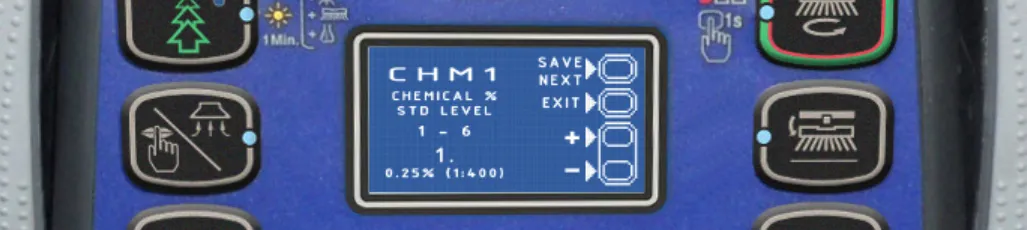
| Modifiable Parameters | |||||
|---|---|---|---|---|---|
| Code | Description | Min. value | Factory setting | Max. value | |
| CHM1 | Detergent concentration level 1 | 1:400 (0.25 %) | 1:400 (0.25 %) | 1:33 (3 %) | |
| CHM2 | Detergent concentration level 2 | 1:400 (0.25 %) | 1:125 (0.80 %) | 1:33 (3 %) | |
| P1/P3 | Level 1 solution flow rate in relation to level 3 (see section “System for Flow Rate Regulation as Function of Speed”) | 0 % | 25 % | 100 % | |
| P2/P3 | Level 2 solution flow rate in relation to level 3 (see section “System for Flow Rate Regulation as Function of Speed”) | 0 % | 50 % | 100 % | |
| P3 | Level 3 solution flow rate | DISC | 0.10 fl oz/ft (1.0 cl/m) | 0.31 fl oz/ft (3.0 cl/m) | 0.52 fl oz/ft (5.0 cl/m) |
| REV | 0.10 fl oz/ft (1.0 cl/m) | 0.15 fl oz/ft (1.5 cl/m) | 0.52 fl oz/ft (5.0 cl/m) | ||
| P4 | Level 4 solution flow enabling (0.74 gal/min (2.8 L/min) regardless of speed) | OFF | OFF | ON | |
| SPT | EcoFlex function timer | 0 (disabled) | 60 sec. | 300 sec. | |
| XPRES | Brush deck extra pressure enable | OFF | ON | ON | |
| FVMIN | Minimum forward speed | 0 % | 25 % | 100 % | |
| FVMAX | Maximum forward speed | 10 % | 100 % | 100 % | |
| RVMAX | Maximum reverse speed | 10 % | 30 % | 50 % | |
| BAT | Installed battery type | 0 | 1 | 7 | |
| TOFF | Automatic shut-off time | 0 (disabled) | 300 sec. | 600 sec. | |
| BRGH | Display contrast | 5 | 20 | 50 | |
| VRID | Vacuum power in silent mode | 1 | 1 | 5 | |
| RPM (*) | Reduced brush rpm activation threshold | 5 | 9 | 20 | |
| RESET (**) | Restore factory settings for all parameters | OFF | OFF | ON | |
- (*) Increase the value of this parameter to reduce the brush motor speed in a wider range of applications and vice versa
- (**) The RESET function acts only on “MODIFIABLE PARAMETERS” and not on “HIDDEN PARAMETERS”.
The following parameters are displayed only when, on reaching the last parameter RESET, the [One-Touch] button is pressed together with the [EcoFlex] and [Vacuum] buttons.
If only the [One-Touch] button is pressed, the system will return to the first parameter CHM1.
| Hidden Parameters | ||||||
|---|---|---|---|---|---|---|
| Code | Description | Min. value | Factory setting | Max. value | Meaning | |
| TSERV | Service advisory timer | 0 | 0 | 1000 | Set to a value X greater than 0 if you wish the “Service Advisory” icon to be displayed every X hours of machine running time (according to the main operating time counter). To reset the hour counter for the icon display countdown (until the next service advisory), press the BURST and vacuum buttons for 10 seconds with the display on the “SERVICE MENU” page. | |
| AR | Maximum acceleration ramp (sec.) | 0.5 sec. | 1.5 sec. | 5 sec. | Increase to obtain a less abrupt response when accelerating, and vice versa. | |
| DR | Maximum deceleration ramp (sec.) | DISC | 0.5 sec. | 1.5 sec. | 8 sec. | Increase to obtain a less abrupt response when decelerating, and vice versa. WARNING: increasing this value increases the braking distance. |
| REV | 0.5 sec. | 2.5 sec. | 8 sec. | |||
| IR | Maximum deceleration ramp in reverse (sec.) | 0.5 sec. | 0.5 sec. | 5 sec. | This is the maximum current which can be supplied to the disc brush deck. WARNING: increasing this value increases the risk of the motors overheating. | |
| VS1 | Brush 1 motor protection threshold | 20A | 30A | 50A | This is the maximum current which can be supplied to the disc brush deck. WARNING: increasing this value increases the risk of the motors overheating. | |
| VS2 | Brush 2 motor protection threshold | 20A | 40A | 50A | This is the maximum current which can be supplied to the cylindrical brush deck. WARNING: increasing this value increases the risk of the motors overheating. | |
| VDEAD | Paddle potentiometer dead zone | 0.0V | 0.1V | 1.0V | Increase if the alarm T3 appears in the rest position and it is not possible to adjust the system’s mechanics. (Speed regulation will, however, be more difficult to modulate) | |
| INOM | Nominal drive current | 10A | 15A | 15A | This is the maximum continuous current which can be supplied to the electric wheel drive unit. WARNING: increasing this value increases the risk of the motor overheating. | |
| IMAX | Maximum drive current | 10A | 45A | 45A | This is the maximum instantaneous current which can be supplied to the electric wheel drive unit. WARNING: increasing this value increases the risk of the motor overheating. | |
| TMAX | Protection trip time for IMAX | 0 sec. | 12 sec. | 60 sec. | This is the reaction time of the electric wheel drive unit protection device when overloaded: this parameter is used in conjunction with IMAX to obtain the most appropriate response curve for the overload protection motor actuation system. WARNING: increasing this value increases the risk of the motor overheating. | |
Display, operating time counter screen
The operating time counter screen (Figure 10) function allows you to check the total accumulated hours of work for each machine subsystem:
- (A) TOTAL counter (machine running time): same counter display on screen after starting machine.
- (B) DRIVE counter (drive system usage time).
- (C) BRUSH counter (brush rotation system usage time).
- (D) VACUUM counter (vacuum system usage time).
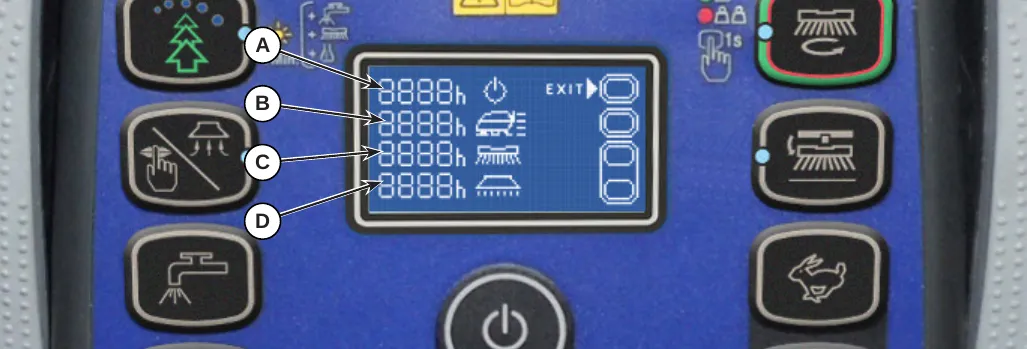
Time counter reset
To reset the time counter see the table below for the procedure:
| Push-button (> 10 sec.) | Time counter reset |
|---|---|
| [EcoFlex] button (tree icon) | (A) TOTAL counter (*) |
| [Vacuum] button (hand and crossed-out spray icon) | (B) DRIVE counter |
| Button with water faucet icon | (C) BRUSH counter |
| Button with flask icon | (D) VACUUM counter |
(*) When the TOTAL counter is reset, it is automatically reset also all partial ones (B, C, D) and deleted all LOG memory.
To return to the main screen (Figure 7), press the [One-Touch] button.
Display, magnetic smart keys management screen
The Magnetic Smart Keys Management Screen (Figure 11) allows you to define if the machine can be used with whatever user key (factory setting) or only with one or more specific user keys.
To switch on the operator mode press the “hare” button [Hare].
Identify a specific user key to be used for the machine
- Remove the supervisor key (if present) from the key reader.
- Place the user key on the key reader, then press the [One-Touch] button.
Remove a specific user key from the list of the keys to be used for the machine
- Remove the supervisor key (if present) from the key reader.
- Place the user key on the key reader, then press the brush release button [Brush release].
Replace the factory setting (whatever user key can be used for the machine)
- Remove the supervisor key (if present) from the key reader.
- Press the brush release button [Brush release].
- Confirm the command pressing the [One-Touch] button.
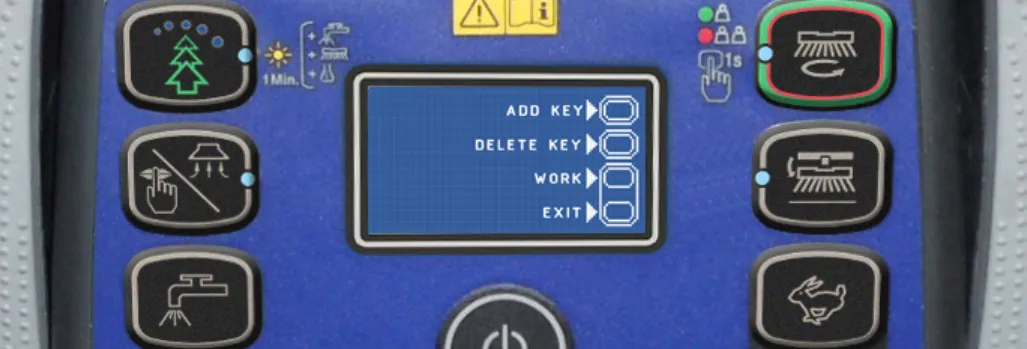
To return to the main screen (Figure 7), press the “tortoise” button [Tortoise].
System for flow rate regulation as function of speed
Solution flow levels 1, 2 and 3 regulate the flow of detergent solution on the basis of the machine speed so as to keep the quantity of solution dispensed per square foot (square metre) of floor treated constant.
The reference flow level is level 3: based on the setting of the corresponding parameter P3, the opening time of the solenoid valve (and of the detergent pump when fitted) is regulated so that the quantity of solution in centiliters per metre (fluid ounces per foot) travelled by the machine is constant and equal to the value set in the parameter (centiliters per metre).
For example, for P3 = 3.0, the machine will dispense 0.31 fl oz of solution per foot (3 centiliters per metre) travelled, which equates (for the standard deck width of 20.9 in (530 mm)) to 0.18 fl oz per square foot (5.7 centiliters per square metre) of floor treated.
Levels 1 and 2 are defined via the corresponding parameters P1 and P2 as a % of level 3.
For example, for P1 = 25 and P2 = 50, P1 and P2 are respectively ¼ (25%) and ½ (50%) of the reference flow rate P3.
The default values (the same as in the example above) are summarized in the table, with the corresponding flow rate values in gallons per minute (liters per minute), dependent on machine speed, given as a reference.
| SC500 DISC detergent flow (as a function of speed) (standard setting) | |||
|---|---|---|---|
| Level 1 | Level 2 | Level 3 | |
| Gallons/minute (liters/minute) @ 0.6 mph (1 km/h) | 0.05 (0.2) | 0.08 (0.3) | 0.13 (0.5) |
| Gallons/minute (liters/minute) @ 1.9 mph (3 km/h) | 0.11 (0.4) | 0.21 (0.8) | 0.40 (1.5) |
| Gallons/minute (liters/minute) @ 3.1 mph (5 km/h) | 0.16 (0.6) | 0.34 (1.3) | 0.66 (2.5) |
| Fluid ounces per foot cleaned (centiliters per metre cleaned) (constant) | 0.08 (0.75) | 0.15 (1.5) | 0.31 (3) |
| Fluid ounces per square foot cleaned (centiliters per meter² cleaned) (Ø20.9 in (530 mm) deck) | 0.044 (1.4) | 0.088 (2.8) | 0.18 (5.7) |
Level 4 (when enabled) is independent of any parameter and supplies the maximum possible quantity of solution as it keeps the solenoid valve of the supply system constantly open (with the brush rotating).
| SC500 DISC detergent flow rate | |
|---|---|
| Level 4 | |
| Gallons/minute (liters/minute) - Tank full | 0.92 (3.5) |
| Gallons/minute (liters/minute) - Average | 0.66 (2.5) |
Removal and installation
Main machine controller (EB1)
- Drive the machine on a level floor, remove the ignition key, and disconnect the red battery connector.
- Lift the recovery tank.
- Remove the 7 screws and remove the electronic component compartment cover.
- Disconnect the following connections sequentially (Figure 12):
- (A) and (B) Board power supply connection (B+) and (B-).
- (C) and D) Brush motor connection (BR+) and (BR-).
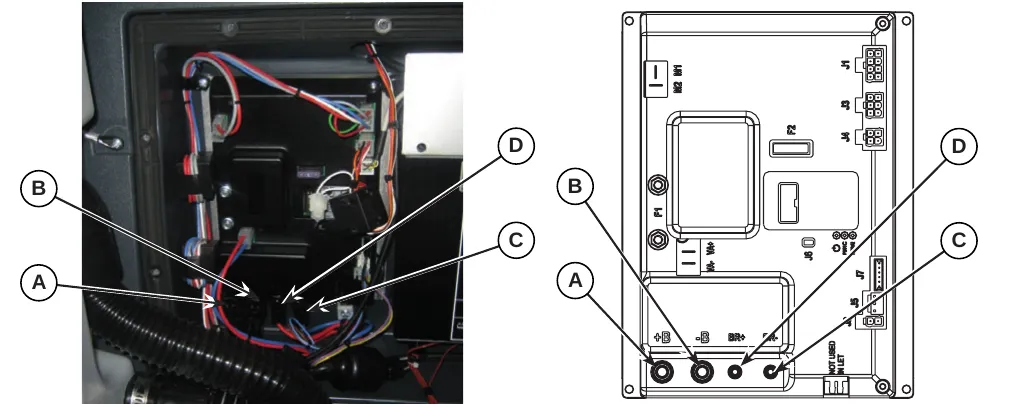
- Disconnect the following connections sequentially (Figure 13):
- (E) and (F) Drive system motor connection (M1) and (M2).
- (G) and (H) Vacuum motor connection (VA+) and (VA-).
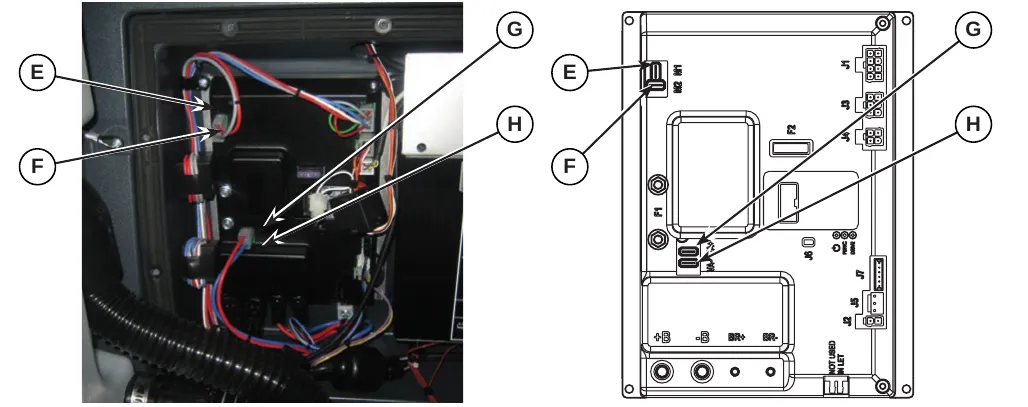
- Disconnect the following connections sequentially (Figure 14):
- (I) Deck actuator and detergent pump connection (J1).
- (J) Solenoid valve connection (J2).
- (K) Display controller connection (J3).
- (L) Battery charger connection (J4).
- (M) Detergent level sensor connection (J5).
- (N) Connection (J6).
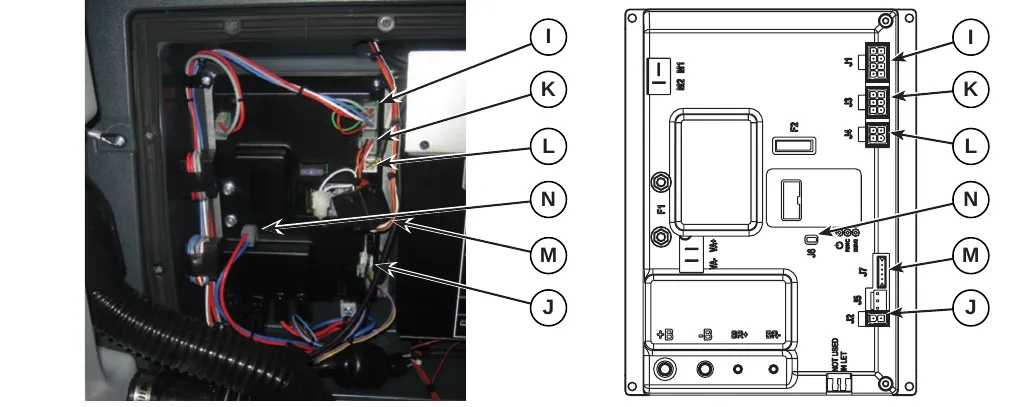
- Unscrew the 4 retaining screws (O) and carefully remove the Main machine controller (Figure 15).
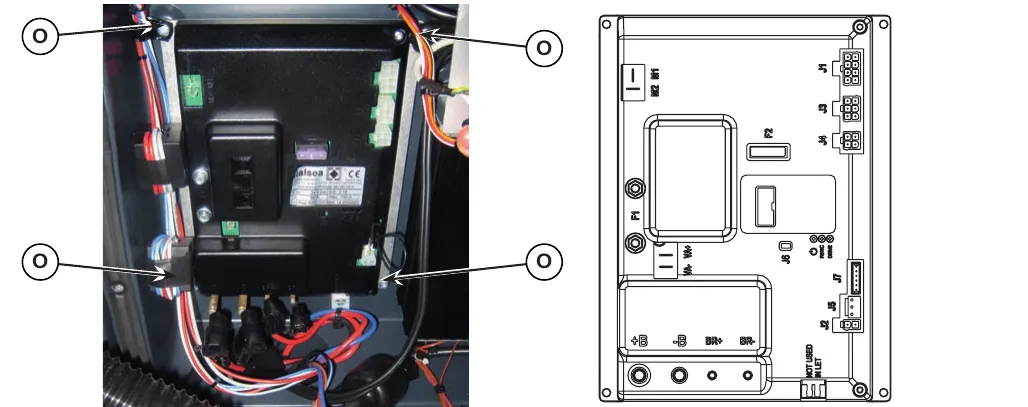
- Assemble the components in the reverse order of disassembly.
Display controller (EB2), user interface controller (EB3) and smart key reader (IB)
Display controller (EB2)
- Drive the machine on a level floor.
- Remove the ignition key.
- Disconnect the red battery connector.
- Unscrew the 2 screws (A) (Figure 16).
- Lift up and remove the User interface controller cover (B).
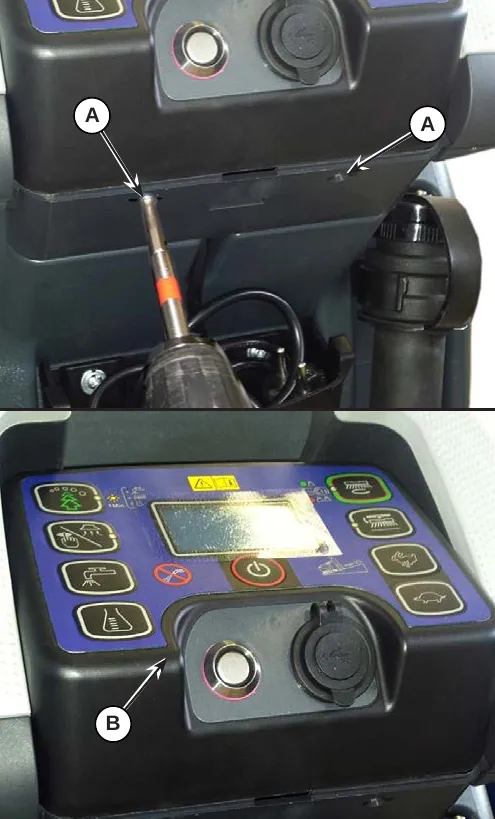
- Disconnect the following connections sequentially (Figure 17):
- (A) Speed potentiometer connection J4.
- (B) Display controller power supply connection J1.
- (C) Smart key connection J6.
- (D) Flat connection J2.
- (E) Flat connection J3.
- Unscrew the 4 screws (F), then remove the Display controller (G).
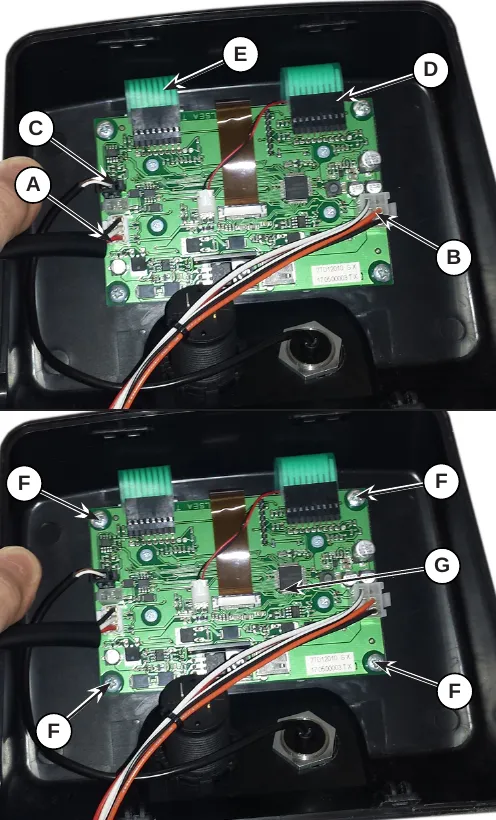
Corrected an obvious misprint: “ingition” printed as “ignition” (step 2).
User interface controller (EB4)
- Perform points 1 to 5 for removal of the Display controller.
- Disconnect the following connections sequentially (Figure 18):
- (A) Flat connection J2.
- (B) Flat connection J3.
- Carefully raise the User interface controller (C), detaching it from the cover (D).
Smart key reader (IB)
- Perform points 1 to 5 for removal of the Display controller.
- Disconnect the Smart key reader connection J6 (E).
- Loosen the hexagon (F) then remove the Smart key reader (G).
Assembly
- Assemble the components in the reverse order of disassembly and note the following:
- Before fastening the User interface controller (C), ensure that the flat connections (A) and (B) are correctly run through the slots in the cover (D), then glue the User interface controller to the cover itself.
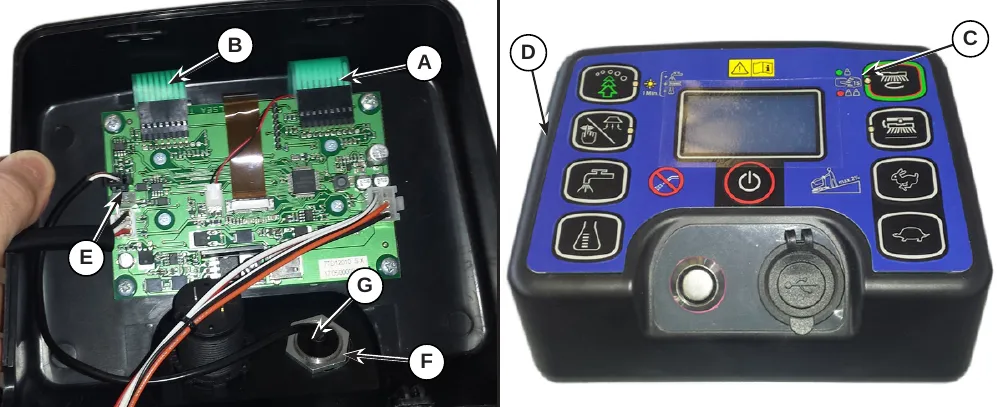
Corrected an obvious misprint: “exagon” printed as “hexagon” (step 13).
Specifications
Main machine controller (EB1) connectors
| (Figure 18) Power connections (Ø0.24 in (6 mm) male RADSOK terminals - AMPHENOL SK 200800532 101 or equivalent) | |||||
|---|---|---|---|---|---|
| Ref. | Description | Controller in/out | V ref. | I max. | Connected to |
| B+ | Main machine controller power supply + | in | 24V | 125A | BAT+ |
| B- | Main machine controller power supply - | in | 24V | 125A | BAT- |
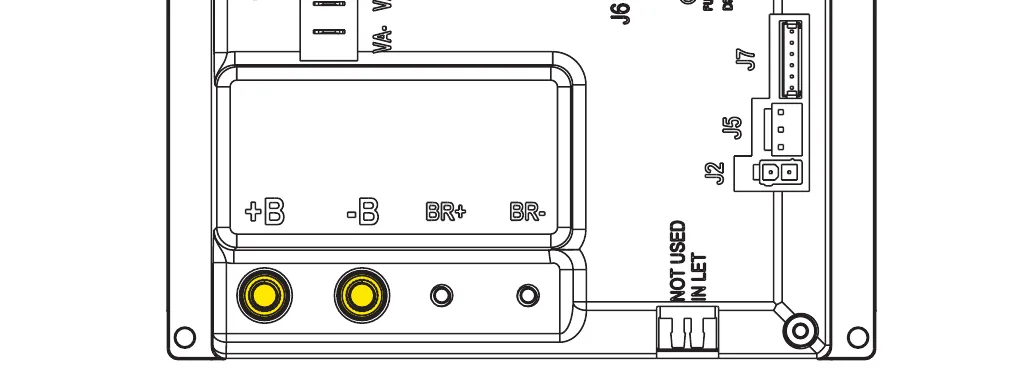
| (Figure 19) Drive connections (Ø0.14 in (3.6 mm) male RADSOK terminals - AMPHENOL P/N N01 036 6501 001 or equivalent) | |||||
|---|---|---|---|---|---|
| Ref. | Description | Controller in/out | V ref. | I max. | Connected to |
| BR+ | Brush motor + | out | 24V | 50A | M1+ |
| BR- | Brush motor - | out | 24V | 50A | M1- |
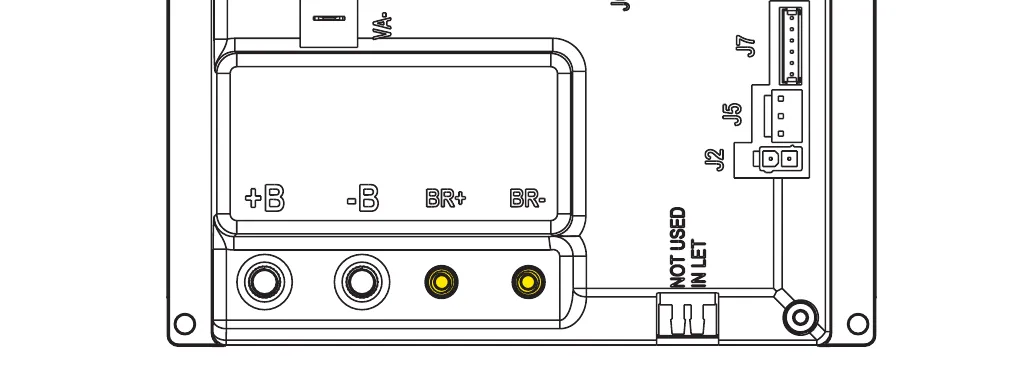
| (Figure 20) Drive connections (2-way male faston T-connectors, 0.25 x 0.03 in (6.3x0.8 mm) – spacing 0.29 in (7.4 mm)) | |||||
|---|---|---|---|---|---|
| Ref. | Description | Controller in/out | V ref. | I max. | Connected to |
| M1 | Drive system motor + | out | 0-24V | 45A | M3+ |
| M2 | Drive system motor - | out | 0-24V | 45A | M3- |
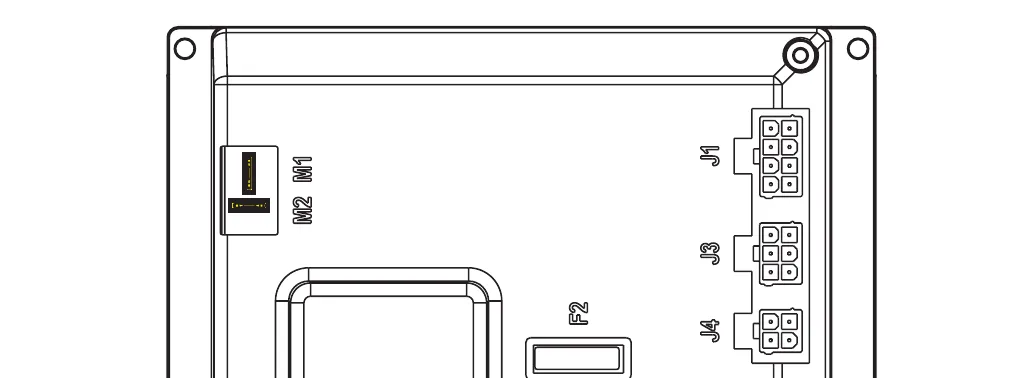
| (Figure 21) Vacuum connections (2-way male parallel faston connectors, 0.25 x 0.03 in (6.3x0.8 mm) – spacing 0.26 in (6.5 mm)) | |||||
|---|---|---|---|---|---|
| Ref. | Description | Controller in/out | V ref. | I max. | Connected to |
| VA+ | Vacuum system power supply + | out | 10-24V | 30A | M2+ |
| VA- | Vacuum system power supply - | out | 0V | 30A | M2- |
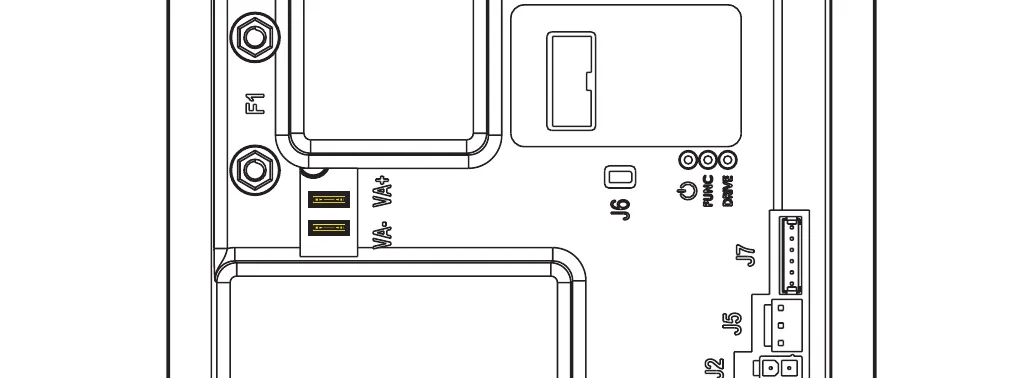
(Figure 22) J1: MOLEX MINIFIT type, 8-ways vertical
| PIN | Description | Controller in/out | V ref. | I max. | Connected to |
|---|---|---|---|---|---|
| 1 | Detergent pump power supply + | out | 24V | <1A | M4 |
| 2 | Detergent pump power supply - | out | 0V | <1A | M4 |
| 3 | Deck actuator power supply +/- | out | 0/24V | 8A | M5 |
| 4 | Deck actuator power supply -/+ | out | 0/24V | 8A | M5 |
| 5 | Power supply for ADV versions configurator | out | 0V | <1A | J1.6 |
| 6 | ADV versions configurator return | in | 0V | <1A | J1.5 |
| 7 | Power supply for deck configurator | out | 0V | <1A | J1.8 |
| 8 | Deck configurator return | in | 0V | <1A | J1.7 |
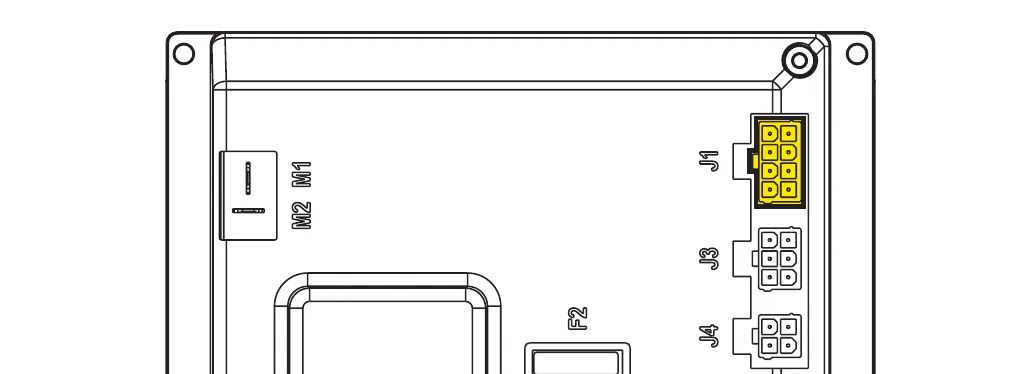
(Figure 23) J2: MOLEX MINIFIT type, 2-ways vertical
| PIN | Description | Controller in/out | V ref. | I max. | Connected to |
|---|---|---|---|---|---|
| 1 | Solenoid valve power supply + | out | 24V | 1A | EV1 |
| 2 | Solenoid valve power supply - | out | 0V | 1A | EV1 |
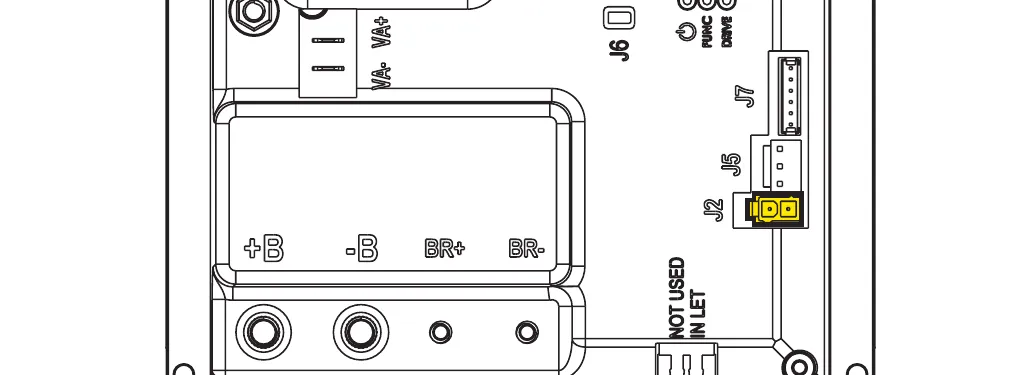
(Figure 24) J3: MOLEX MINIFIT type, 6-ways vertical
| PIN | Description | Controller in/out | V ref. | I max. | Connected to |
|---|---|---|---|---|---|
| 1 | User interface controller power supply + | out | 24V | <1A | EB2.1 |
| 2 | User interface controller serial + | in/out | 5V | <1A | EB2.2 |
| 3 | User interface controller serial - | in/out | 0V | <1A | EB2.3 |
| 4 | User interface controller power supply - | out | 0V | <1A | EB2.4 |
| 5 | Return from key | in | 24V | <1A | EB2.5 |
| 6 | Return from key (repetition) | out | 24V | <1A | - |
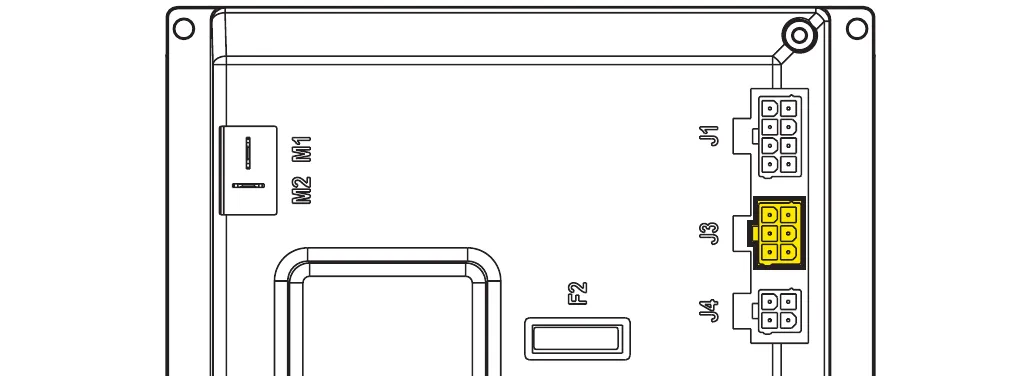
(Figure 25) J4: MOLEX MINIFIT type, 4-ways vertical
| PIN | Description | Controller in/out | V ref. | I max. | Connected to |
|---|---|---|---|---|---|
| 1 | Enabling from battery charger | in | 24V | <1A | CH.1 |
| 2 | Power supply from battery charger | in | 24V | <1A | CH.2 |
| 3 | Battery charger enabling power supply | out | 24V | <1A | CH.3 |
| 4 | Battery charger data communication | In/out | 5V | <1A | CH.4 |
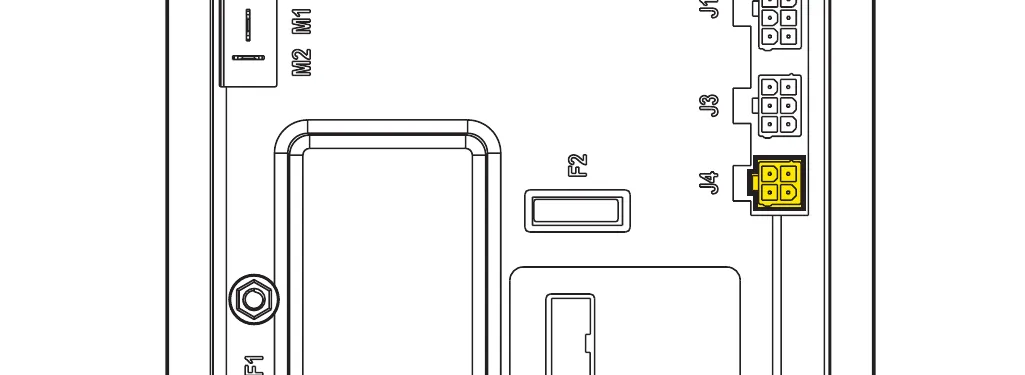
(Figure 26) J5: JST VHR-3N vertical 3-way
| PIN | Description | Controller in/out | V ref. | I max. | Connected to |
|---|---|---|---|---|---|
| 1 | Power supply for water level sensor + | out | 24V | <1A | S1.1 |
| 2 | Water level sensor return | in | 0V | <1A | S1.2 |
| 3 | Power supply for water level sensor - | out | 0V | <1A | S1.3 |
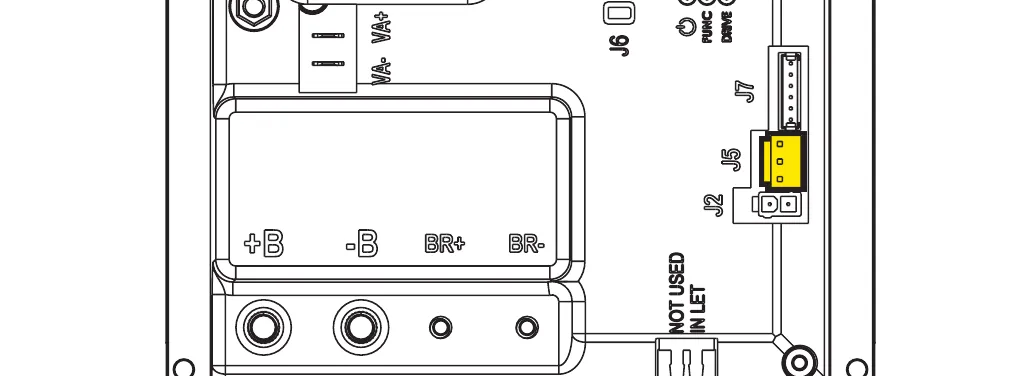
(Figure 27) J6: JUMPER, 2-ways vertical
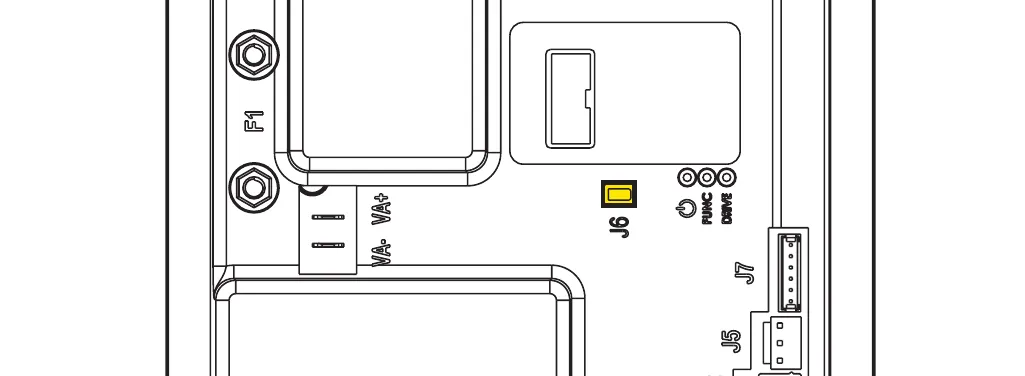
(Figure 28) J7: TYCO MODU II vertical 6-way
| PIN | Description | Controller in/out | V ref. | I max. | Connected to |
|---|---|---|---|---|---|
| 1 | +24V power supply | out | 24V | <1A | TRK.RD |
| 2 | +5V power supply | out | 5V | <1A | - |
| 3 | iButton input (CAN H channel) | In (Out) | 0V (0-5V) | <1A | TRK.YE |
| 4 | Ext. operating time counter enable (CAN L channel) | (In) Out | 0V (0-24V) | <1A | TRK.WH |
| 5 | Power supply - | out | 0V | <1A | TRK.BU |
| 6 | Machine on signal | out | 24V | <1A | TRK.BN |
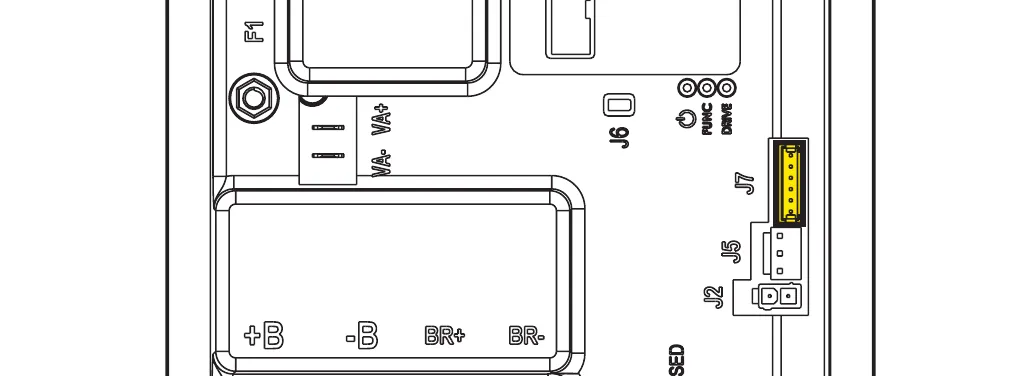
Connectors of the display controller (EB2)
(Figure 29) J1: MOLEX MINIFIT type, 6-ways vertical
| Ref. | Description | Controller in/out | V ref. | I max. | Connected to |
|---|---|---|---|---|---|
| 1 | Power supply + | in/out | 24V | <1A | CFD12.J3.1 |
| 2 | Main machine controller serial + | in/out | 5V | <1A | CFD12.J3.2 |
| 3 | Main machine controller serial - | in | 0V | <1A | CFD12.J3.3 |
| 4 | Power supply - | out | 0V | <1A | CFD12.J3.4 |
| 5 | Key signal return (KEY0) | out | 24V | <1A | CFD12.J3.5 |
| 6 | Key signal return (KEY0) | in | 24V | <1A | - |
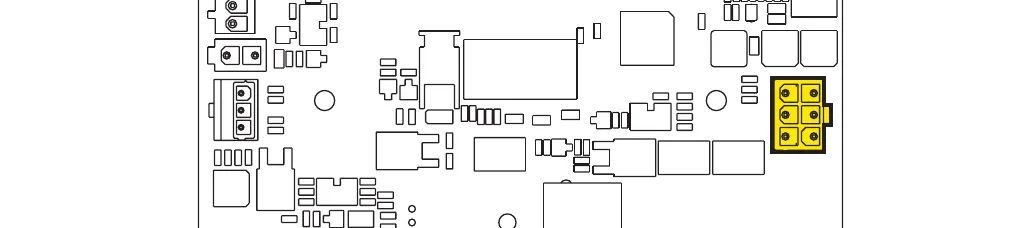
(Figure 30) J2: FCI DUFLEX (2.54 pitch) 9-way, male pins
| Ref. | Description | Controller in/out | V ref. | I max. |
|---|---|---|---|---|
| 1 | Power supply - common | out | 0V | <1A |
| 2 | ON/OFF button (P0) | in | 0V | <1A |
| 3 | DETERGENT MIX button (P4) | in | 0V | <1A |
| 4 | EDS button (P3) | in | 0V | <1A |
| 5 | VACUUM button (P2) | in | 0V | <1A |
| 6 | VACUUM function LED (LD2) | out | 5V | <1A |
| 7 | SPOT function LED (LD1) | out | 5V | <1A |
| 8 | SPOT button (P1) | in | 0V | <1A |
| 9 | DS versions configurator | in | 0V | <1A |
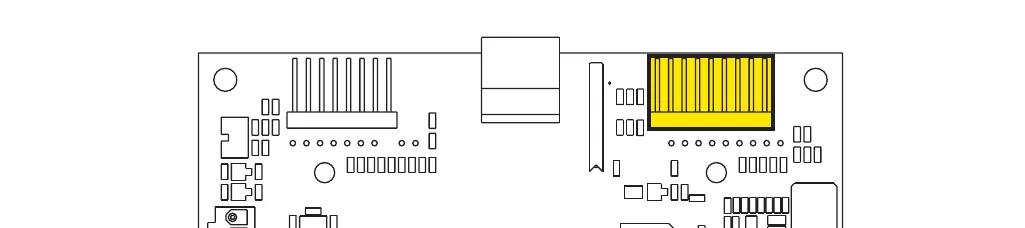
(Figure 31) J3: FCI DUFLEX (2.54 pitch) 8-way, male pins
| Ref. | Description | Controller in/out | V ref. | I max. |
|---|---|---|---|---|
| 1 | Power supply - common | out | 0V | <1A |
| 2 | SP / EXTRAPR function LED (red) (LD3R) | out | 5V | <1A |
| 3 | SP / EXTRAPR function LED (green) (LD3V) | out | 5V | <1A |
| 4 | BRUSH RELEASE function LED (LD4) | out | 5V | <1A |
| 5 | BRUSH RELEASE switch (P6) | in | 0V | <1A |
| 6 | INCREASE SPEED button (P7) | in | 0V | <1A |
| 7 | DECREASE SPEED button (P8) | in | 0V | <1A |
| 8 | ONETOUCH / EXTRAPR. button (P5) | in | 0V | <1A |
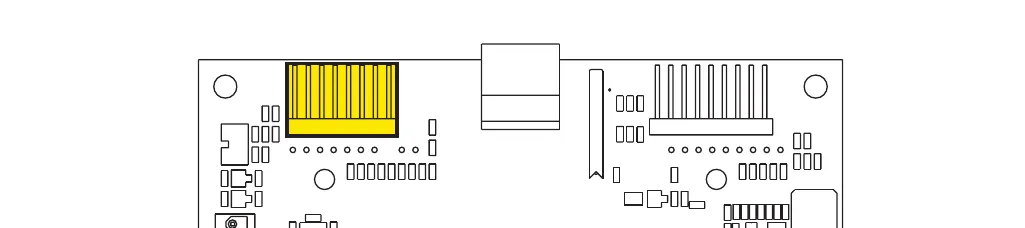
(Figure 32) J4: JST VH vertical, 3-way (B 3P-VH)
| PIN | Description | Controller in/out | V ref. | I max. | Connected to |
|---|---|---|---|---|---|
| 1 | VR1 potentiometer power supply + | Out | 3V | <1A | VR1.1 |
| 2 | VR1 potentiometer return | In | 0-3V | <1A | VR1.2 |
| 3 | VR1 potentiometer power supply - | out | 0V | <1A | VR1.3 |
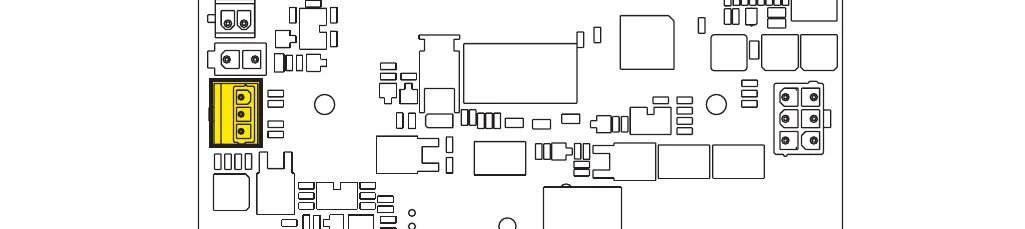
(Figure 34) J5: MOLEX MICROFIT vertical, 2 ways
| PIN | Description | Controller in/out | V ref. | I max. | Connected to |
|---|---|---|---|---|---|
| 1 | Smart Key reader signal GND | In/Out | 0V | <1A | KEY.1 |
| 2 | Smart key reader signal IN/OUT | In/Out | 0-3V | <1A | KEY.2 |
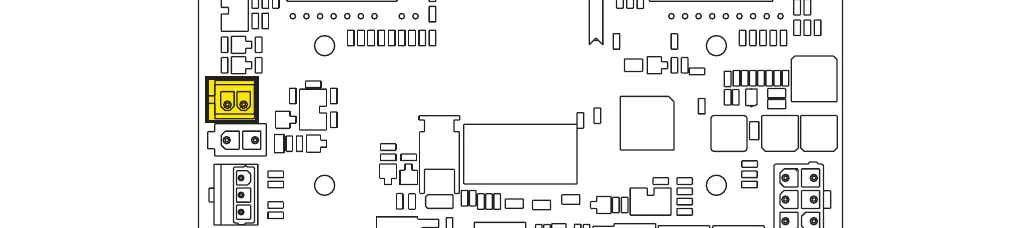
(Figure 35) J6: MOLEX MINIFIT vertical, 2 ways
| PIN | Description | Controller in/out | V ref. | I max. | Connected to |
|---|---|---|---|---|---|
| 1 | CAN H | In/Out | 0-5V | <1A | TRACK.WH |
| 2 | CAN L | In/Out | 0-5V | <1A | TRACK.PK |
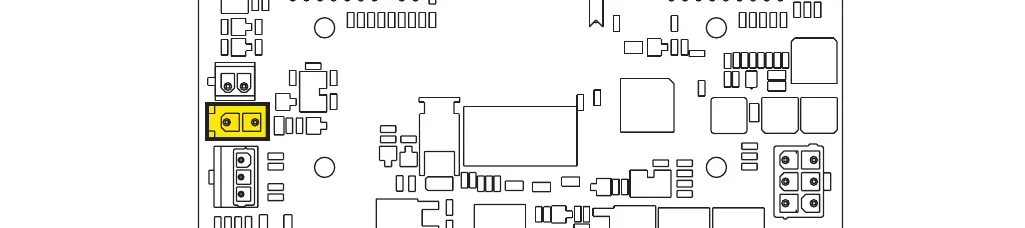
Shop measurements
The following tables contain some “real world” shop voltage measurements to help you recognize what “normal” looks like. All voltage values were measured with the black (Negative) voltmeter lead connected to the main battery negative unless otherwise specified.
Shop measurements - Main machine controller (EB1)
Battery volts at battery, key on = 25.03V
Power supply
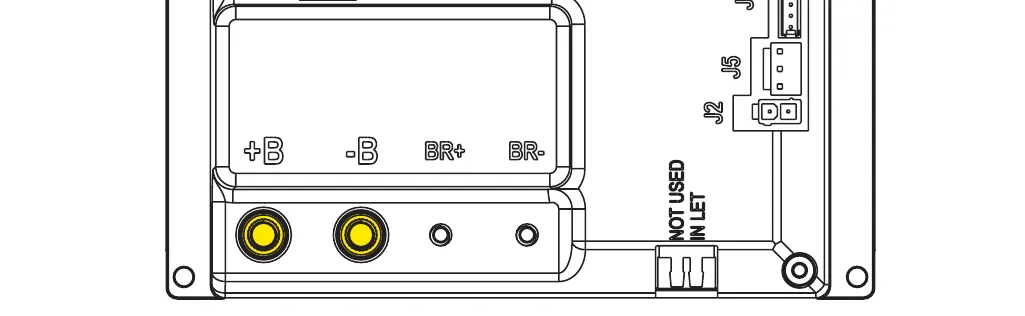
| PIN | Color | Description | Measured | Comments |
|---|---|---|---|---|
| B+ | Red | Main machine controller power supply + | 24.5v | Vacuum on |
| B- | Black | Main machine controller power supply - | 0.035vV | Vacuum on |
Brush motor
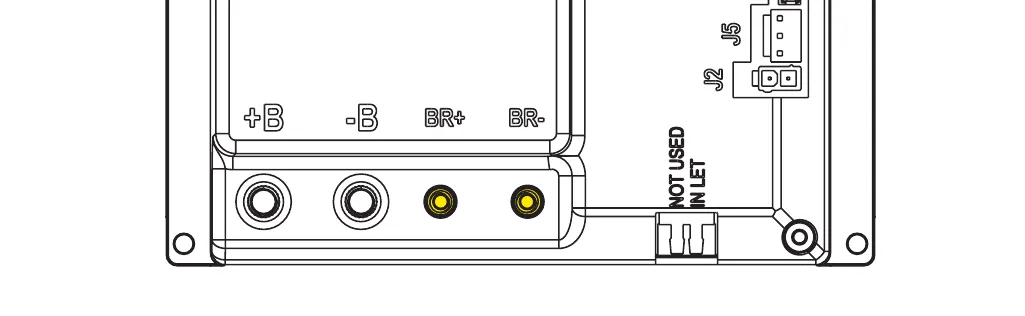
| PIN | Color | Description | Measured | Comments |
|---|---|---|---|---|
| BR+ | Red | Brush motor + | 24.4V (off), 24.2V (on) | Constant Positive |
| BR- | Blue | Brush motor - | 24.4V (off), 0.15v (on without RPM control activated) 5.8v (on with RPM Control Active – set at 20) | PWM Battery Negative |
Drive system motor
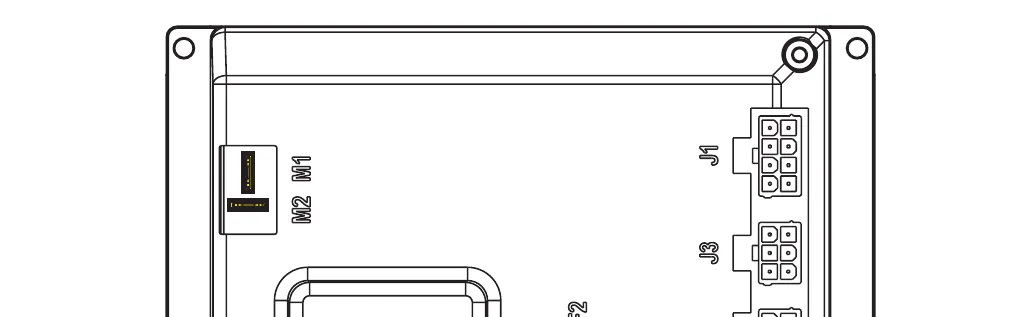
| PIN | Color | Circuit Description | Measured | ||||
|---|---|---|---|---|---|---|---|
| Neutral | Fwd - Initial | Reverse - Initial | FWD Max | REV Max | |||
| M1 | Red | Drive system motor + | 5.62v | 12.7v | 10.9v | 21.8v | 8.7v |
| M2 | Gray | Drive system motor - | 5.61 | 1.95 | 16.00 | 8.9v | 13.5v |
| M1 to M2 | 0.001v | 6.1v | -2.5v | 22.6 | -7.4 | ||
Vacuum motor
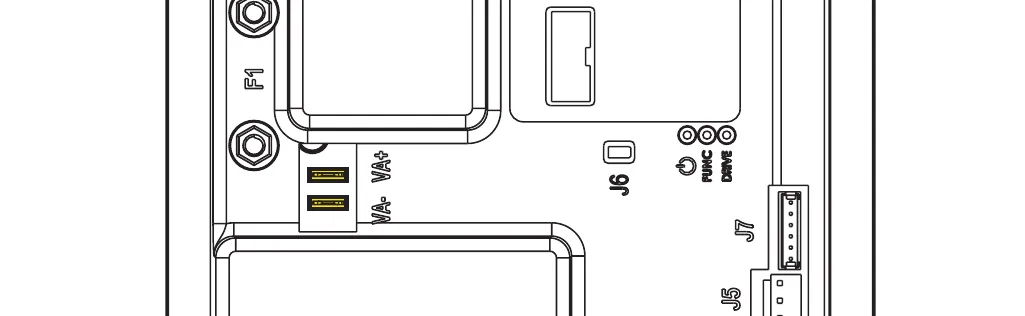
| PIN | Color | Description | Measured | Comments |
|---|---|---|---|---|
| VA+ | Red | Vacuum system power supply + | 24.8v (off) 24.4v (on) | Constant Positive |
| VA- | Blue | Vacuum system power supply - | 24.56 (off) 1.36v (on High) 9.69v (on Quiet mode VRID parameter = 1) | 1.02 Running, 9.56 Quiet Mode |
J1 - 8 ways
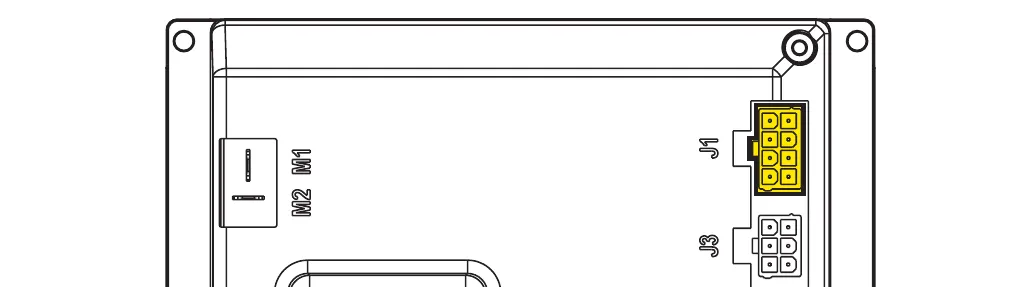
| PIN | Color | Circuit Description | Measured | Comments |
|---|---|---|---|---|
| 1 | Red | Detergent pump power supply + | 24.9v (off) | No change seen on voltmeter when the pump pulsed. |
| 2 | Gray | Detergent pump power supply - | 24.9v (off) Momentary drop to 0 when on. | Voltmeter reading momentarily jumped. Too fast to settle into a range and value. |
| 3 | White | Deck actuator power supply +/- | 24.8v (Stationary) 0.18v (going up) 12v (going up near top) 24.8v (going down to scrub or Ex press) 12.6v (Reset Up) | |
Stationary: 0v Transport to Scrub: 24.8v Scrub to Ex Press: 24.8v then 12v near end of travel. Ex Press to Scrub: -24.8v Scrub to Transport: -24.8v then -12v near end of travel Reset to transport:-12.5v entire range | Reference to J1.3 | |||
| 4 | Blue | Deck actuator power supply -/+ | 24.8v (stationary) 0.03v (Transport to scrub) Scrub to EX Press – Initial 0.03v then 12v near bottom 24.8v( Ex press to scrub) Scrub to Transport – 24.8v | |
| 5 | Green | Power supply for ADV versions configurator | 0.001 | |
| 6 | Green | ADV versions configurator return | 0.001 (Loop not cut) 4.98v (Open loop) | Loop not cut |
| 7 | Red | Power supply for deck configurator | 0.001 |
| PIN | Color | Circuit Description | Measured | Comments |
|---|---|---|---|---|
| 8 | Red | Deck configurator return | 0.001 (Loop not cut) 4.98v (Open loop) | Loop not cut |
J2 - 2 ways
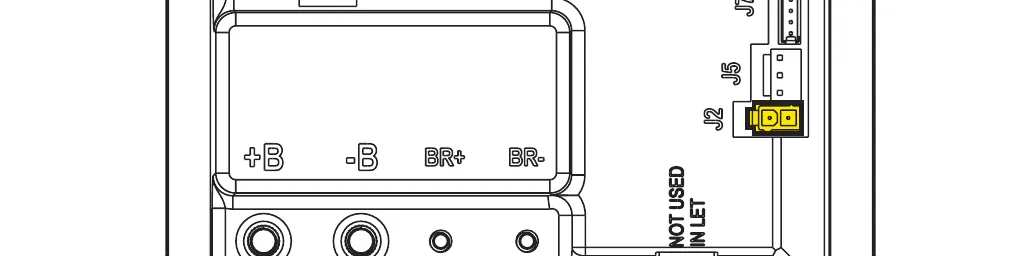
| PIN | Color | Circuit Description | Measured | Comments |
|---|---|---|---|---|
| 1 | Yellow | Solenoid valve power supply + | 24.4 (Off and On) | |
| 2 | Purple | Solenoid valve power supply - | 24.4 (off) Momentary drop (on) | Momentarily drops to 0v when on but it is too fast for a DVOM to read. The value just momentarily changes. |
J3 - 6 ways
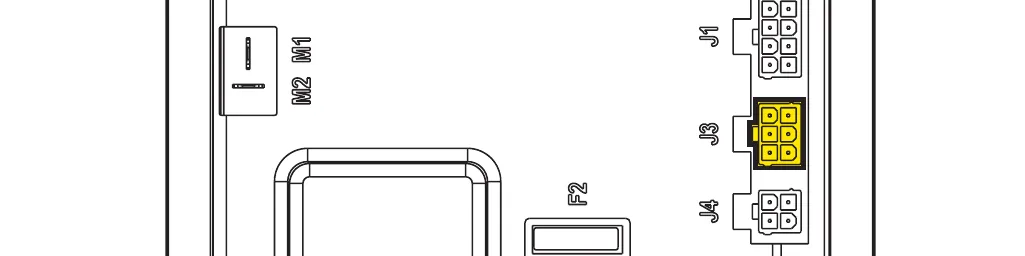
| PIN | Color | Circuit Description | Measured | Comments |
|---|---|---|---|---|
| 1 | Red | Main machine controller power supply + | 24.9v | On or Off |
| 2 | White | Main machine controller serial + | 4.62v key on 0v key off | |
| 3 | Blk/Wh | Main machine controller serial - | 4.13v key on 0v key off | |
| 4 | Black | Main machine controller power supply - | 0.001v key on |
| PIN | Color | Circuit Description | Measured | Comments |
|---|---|---|---|---|
| 5 | Orange | Return from key | 24.3v key inserted and power “on” | Either the yellow or gray key has the same result. Note: if no key, jumping +24v here turns the machine on. |
| 6 | Empty |
J4 - 4 ways
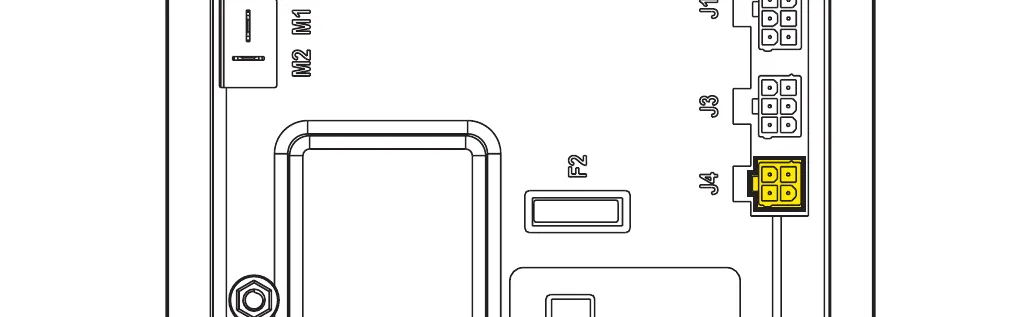
| PIN | Color | Circuit Description | Measured | Comments |
|---|---|---|---|---|
| 1 | White | Enabling from battery charger | 24.8v Not Charging | May see residual voltage back-feeding from the main controller here when charging. |
| 2 | Yellow | Power supply from battery charger | 0.136v Not charging 26.1v Charging | |
| 3 | Brown | Battery charger enabling power supply | 24.8v key on or off | Constant power whether charging or not. Key on or off. |
| 4 | Green | Battery charger data communication | 4.98v when charger is first plugged in. Then dropped to 4.6 |
J5 - 3 ways
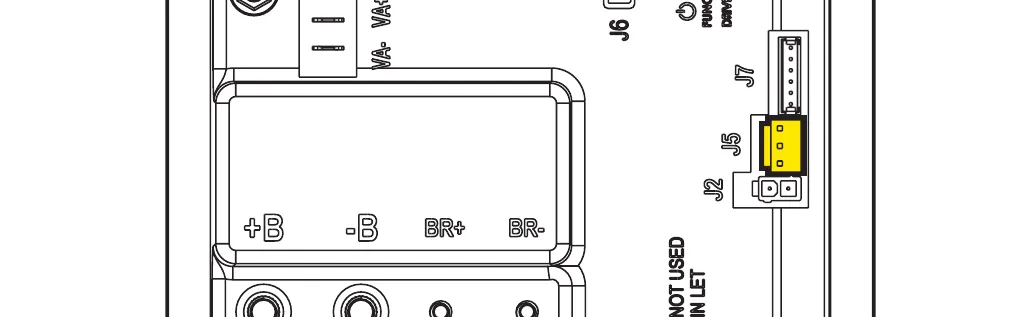
| PIN | Color | Circuit Description | Measured | Comments |
|---|---|---|---|---|
| 1 | Brown | Power supply for water level sensor + | 24.7v | Key on |
| 2 | Black | Water level sensor return | 4.98 0.03v | Tank < ½ full Tank > ½ full |
| 3 | Blue | Power supply for water level sensor - | 0.001 |
J6
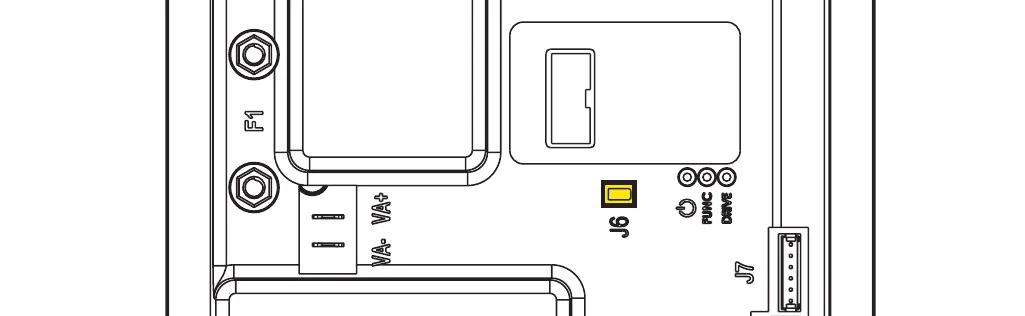
Two way vertical jumper.
- What is this for? The J6 Jumper is used to configure the Main machine controller for the EcoFlex option.
- What does it mean if it is jumped? The Main machine controller is set for no EcoFlex
- What does it mean if it is open? The Main machine controller is set for EcoFlex
- Is there a measurable voltage on either of the pins when not jumped? Yes. 4.98v on pin near the LEDS on the Main machine controller.
J7 - 6 ways
Measured machine did not have a wiring connector. Measurements were taken at each pin on the Main machine controller.
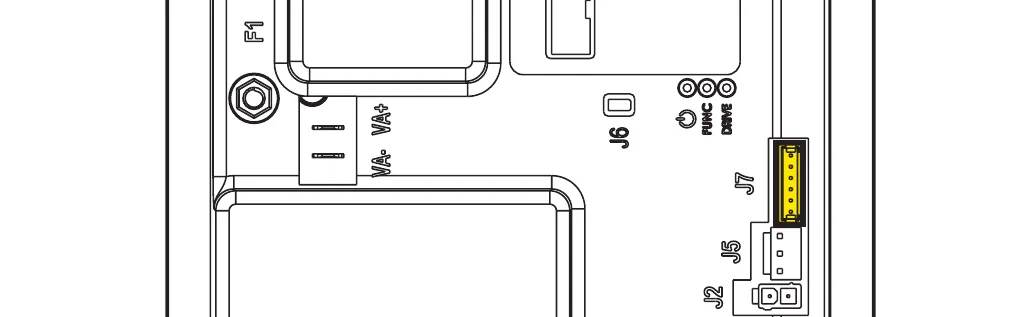
| PIN | Color | Circuit Description | Measured | Comments |
|---|---|---|---|---|
| 1 | +24V power supply | 24.6 | ||
| 2 | +5V power supply | 5.00 | ||
| 3 | iButton input (CAN H channel) | 4.98 | ||
| 4 | Ext. operating time counter enable (CAN L channel) | 24.6 | ||
| 5 | Power supply - | 0.001 | ||
| 6 | Machine on signal | 23.68 |
Shop measurements - Display controller (EB2)
Measure and record the voltage at each of the Main machine controller pins. Always use battery negative as your reference point for your black voltmeter lead.
J1 - 6 ways
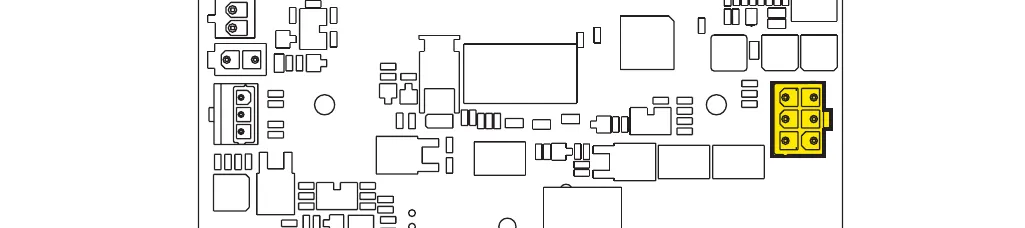
| PIN | Color | Circuit Description | Measured | Comments |
|---|---|---|---|---|
| 1 | Red | Power supply + | 24.6 | |
| 2 | White | Main machine controller serial + | 4.62 | |
| 3 | Blk/Wh | Main machine controller serial - | 4.12 | |
| 4 | Black | Power supply - | 0.003 | |
| 5 | Orange | Key signal return (KEY0) | 24.23 | |
| 6 |
J2 - 9 way ribbon connector
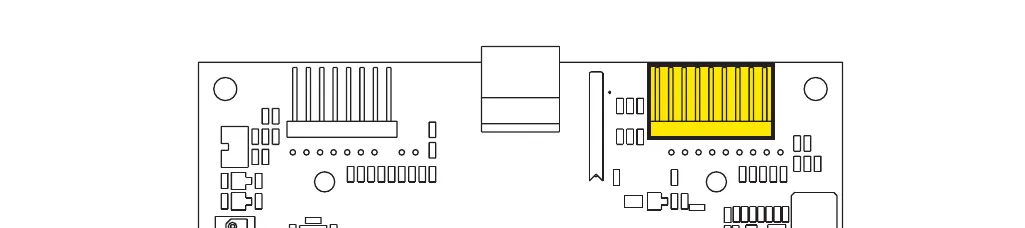
| PIN | Color | Circuit Description | Measured | Comments |
|---|---|---|---|---|
| 1 | Power supply - common | 0.003v | ||
| 2 | ON/OFF button (P0) | 24.2v | Key off or key on | |
| 3 | DETERGENT MIX button (P4) | 3.14v Not pressed 0.02v pressed | ||
| 4 | EDS button (P3) (Solution Button) | 3.14v Not pressed 0.02v pressed | ||
| 5 | VACUUM button (P2) | 3.14v not pressed 0.05v pressed | ||
| 6 | VACUUM function LED (LD2) | 0.007v LED off | ||
| 7 | SPOT function LED (LD1) | 0.007v LED off | ||
| 8 | SPOT button (P1) (EcoFlex – Burst of power) | 3.14v Not pressed 0.02v pressed | ||
| 9 | DS versions configurator | 3.14v |
J3 - 8 way ribbon connector
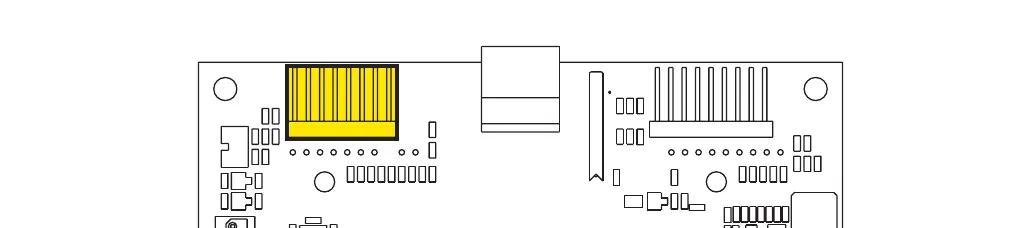
| PIN | Color | Circuit Description | Measured | Comments |
|---|---|---|---|---|
| 1 | Power supply - common | 0.003v | ||
| 2 | SP / EXTRAPR function LED (red)(LD3R) | 1.78v Red LED on 0.032v Red LED off | ||
| 3 | SP / EXTRAPR function LED (green) (LD3V) | 1.95v Grn LED on 0.032v Grn LED off | ||
| 4 | BRUSH RELEASE function LED (LD4) | 0.07v LED off Pulsing when flashing | ||
| 5 | BRUSH RELEASE switch (P6) | 3.14v not pressed 0.03v pressed | ||
| 6 | INCREASE SPEED button (P7) | 3.14v not pressed 0.02v pressed | ||
| 7 | DECREASE SPEED button (P8) | 3.14v not pressed 0.02v pressed | ||
| 8 | ONETOUCH / EXTRAPR. button (P5) | 3.16v not pressed 0.04v pressed |
J4 - 3 ways potentiometer connector
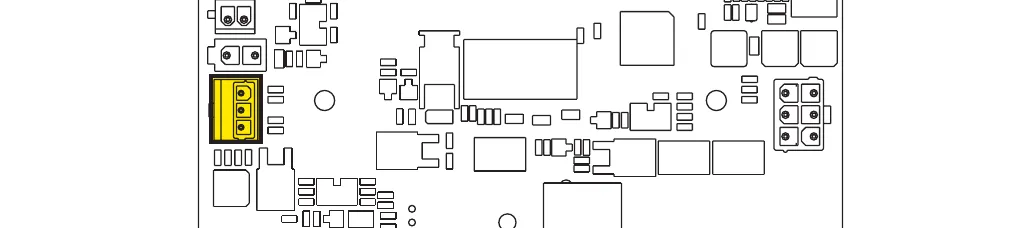
| PIN | Color | Circuit Description | Measured | Comments |
|---|---|---|---|---|
| 1 | Red | VR1 potentiometer power supply + | 2.675 | |
| 2 | White | VR1 potentiometer return | 1.45 (Neutral) | 2.48 (Full Fwd Pin 2), 0.44 (Full Rev Pin 2) |
| 3 | Black | VR1 potentiometer power supply - | 0.41 (Ground) |
10 - Chassis system
Chassis (main parts)
The chassis function is primarily performed by the solution tank, the support housings for the wheels and working mechanisms are integrated in the gear motor unit and the rear frame.
Reference to Figure 1
Deck raising levers (see also Brush System, Disc and Brush System, REV)
Frame integrated in the drive motor (see also Wheels System, Drive)
Rear pivoting wheels support frame with squeegee raising/lowering system (see also Squeegee System)
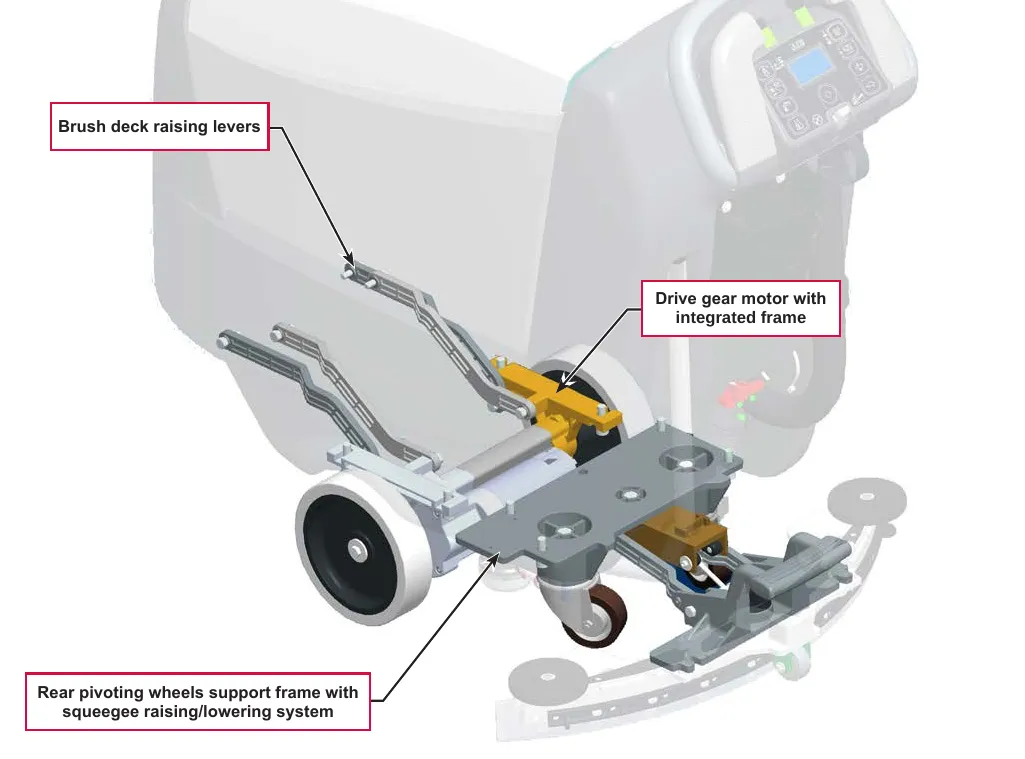
20 - Wheel system, traction
Functional description
Machine movement is provided by the gear motor unit (M3).
The gear motor unit (M3) also functions as the main support of the machine, and is composed of an electric motor, the reduction unit with differential and the drive wheels.
The operator regulates the transfer speed, the working speed and reverse via the paddles, which are connected directly to the speed potentiometer (RV1). Reversing is performed by pressing the back paddle.
The Main machine controller (EB1) checks that the paddles are not pressed when the machine is started; if they are, an alarm is generated (see section “Main machine controller Alarm Codes” in the “Control System” chapter) and the drive system is inhibited.
Once the paddles are returned to the rest position, the alarm will stop automatically (without the need to turn the machine on and off).
When the paddles are pressed, the Main machine controller (EB1) supplies a voltage to the motor proportional to the position of the paddles themselves. The acceleration ramps and maximum speed can be set via the corresponding parameters (see section “Displaying and Modifying User Modifiable Parameters” in the “Control System” chapter).
Regulation of the maximum speed can be set with the buttons (hare / tortoise) on the User interface controller (EB3).
Wiring diagram
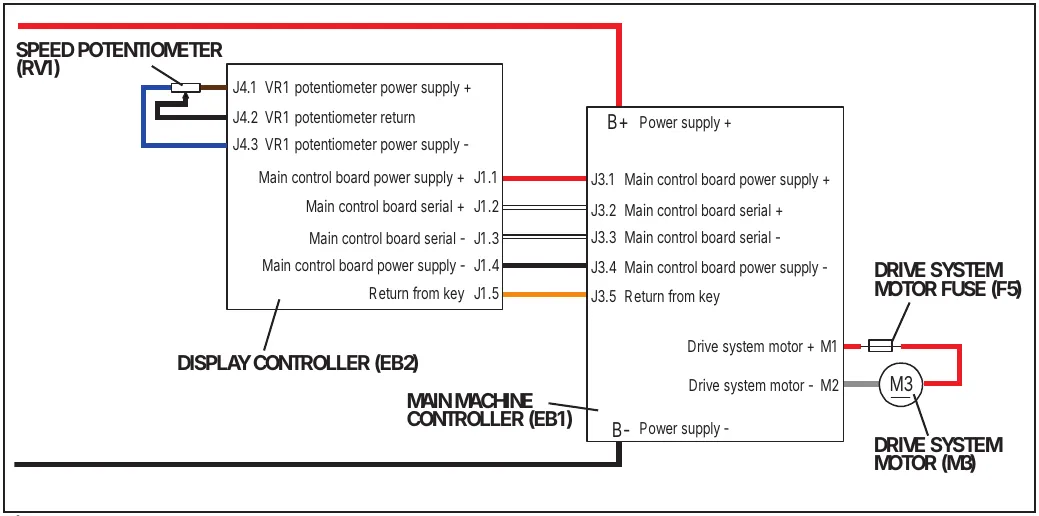
Legend
| Component | Terminal | Printed label |
|---|---|---|
| Speed potentiometer (RV1) | — | SPEED POTENTIOMETER (RV1) |
| Display controller (EB2) | J4.1 | VR1 potentiometer power supply + |
| Display controller (EB2) | J4.2 | VR1 potentiometer return |
| Display controller (EB2) | J4.3 | VR1 potentiometer power supply - |
| Display controller (EB2) | J1.1 | Main control board power supply + |
| Display controller (EB2) | J1.2 | Main control board serial + |
| Display controller (EB2) | J1.3 | Main control board serial - |
| Display controller (EB2) | J1.4 | Main control board power supply - |
| Display controller (EB2) | J1.5 | Return from key |
| Main machine controller (EB1) | B+ | Power supply + |
| Main machine controller (EB1) | J3.1 | Main control board power supply + |
| Main machine controller (EB1) | J3.2 | Main control board serial + |
| Main machine controller (EB1) | J3.3 | Main control board serial - |
| Main machine controller (EB1) | J3.4 | Main control board power supply - |
| Main machine controller (EB1) | J3.5 | Return from key |
| Main machine controller (EB1) | M1 | Drive system motor + |
| Main machine controller (EB1) | M2 | Drive system motor - |
| Main machine controller (EB1) | B- | Power supply - |
| Drive system motor fuse (F5) | — | DRIVE SYSTEM MOTOR FUSE (F5) |
| Drive system motor (M3) | M3 | DRIVE SYSTEM MOTOR (M3) |
Component locations
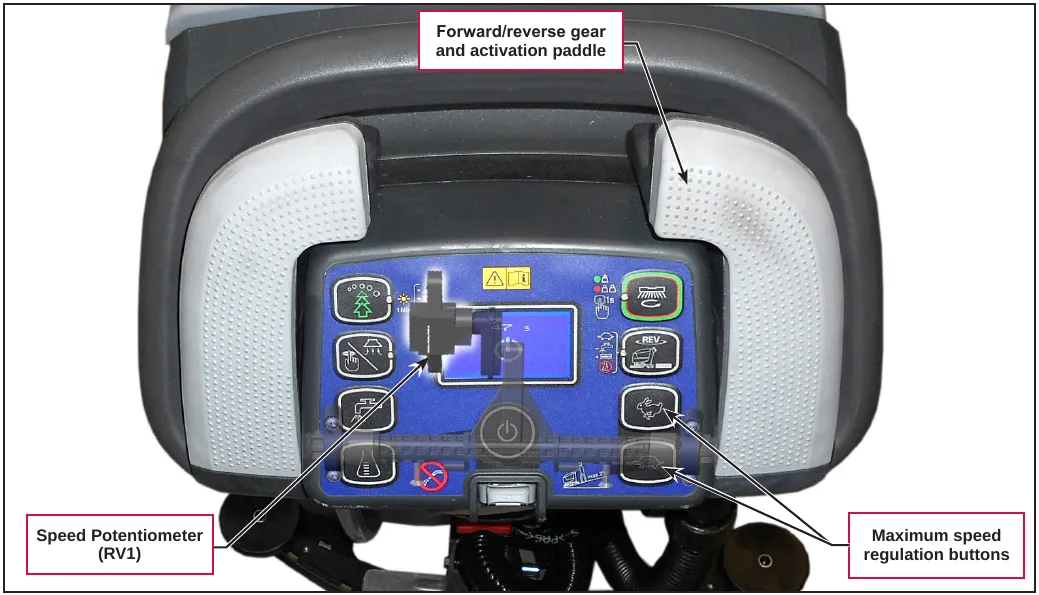
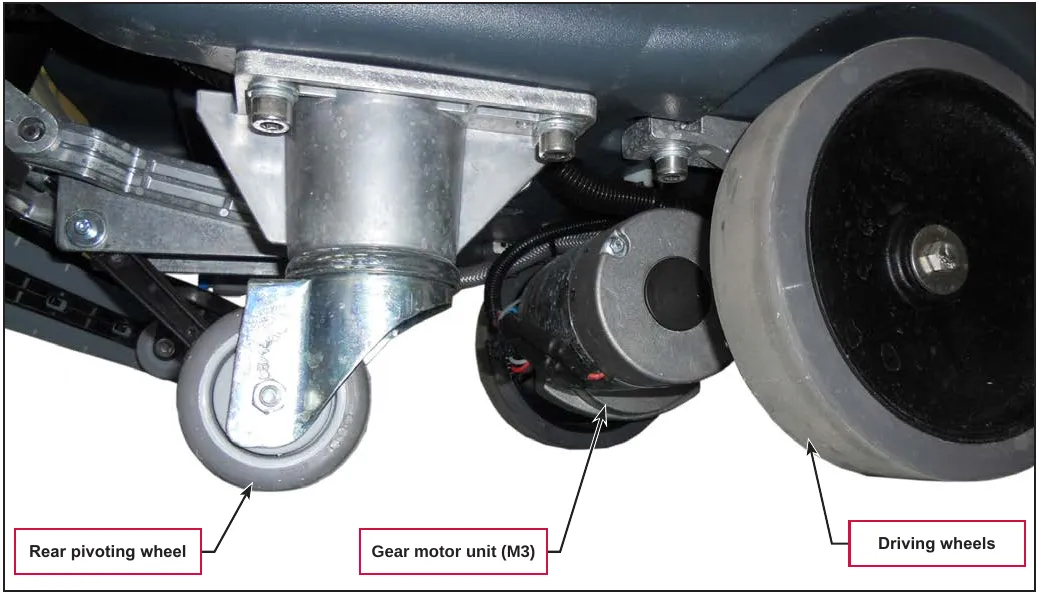
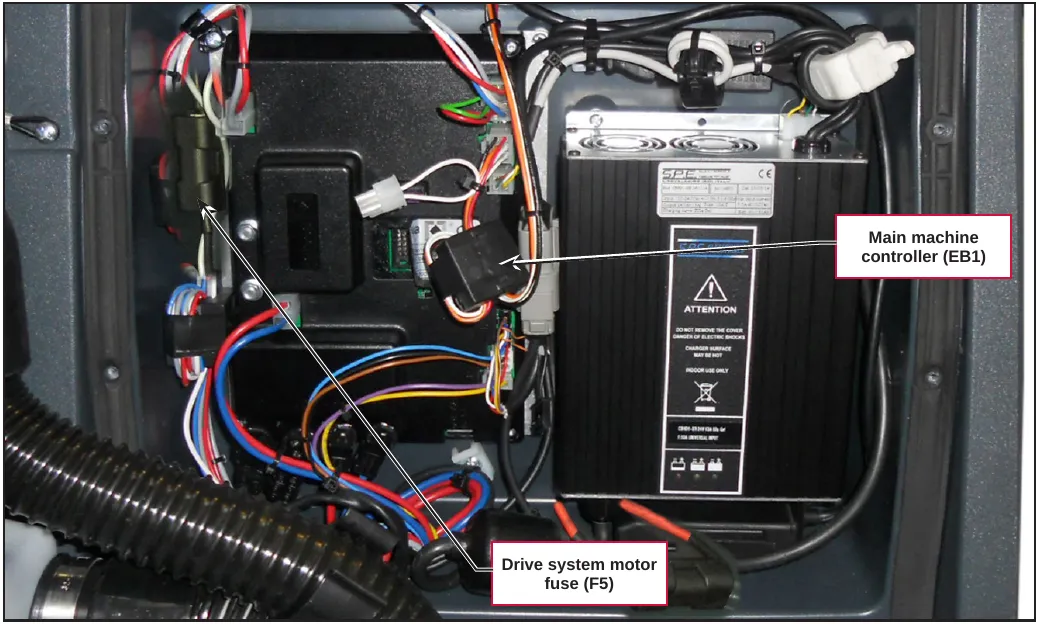
Troubleshooting
| Trouble | Possible Causes | Remedy |
|---|---|---|
| The machine does not move | Battery voltage too low | Charge the battery |
| Drive system motor fuse (F5) broken | Replace | |
| Speed potentiometer (RV1) incorrectly regulated or broken | Replace | |
| Main machine controller (EB1) faulty | Replace | |
| Wiring damaged | Check all connections inside the electrical component compartment, included those of the Main machine controller (EB1) | |
| Drive system motor (M3) carbon brushes worn | Replace | |
| Drive system motor (M3) faulty | Replace |
Drive system gear motor current draw test
- Drive the machine on a level floor.
- Use a suitable chock to raise one side of the machine approximately 0.8 in (2 cm) from the floor and allow one drive wheel to turn freely.
- Lift the recovery tank.
- Apply the amp clamp on the positive cable (red) of the battery wiring harness.
- Turn on the machine and activate forward drive at maximum speed via the paddle, checking that the current draw falls within the following values:
- Between 3 and 7 A at 24 V for AMER gear motor
- Between 4 and 8 A at 24 V for TEKNO gear motor.
- Release the paddle.
- Switch off the machine and remove the amperometric clamp.
- If the amperage is higher, perform the following procedures to detect and correct the abnormal amperage:
- Check if there is dust or debris preventing the wheel rotation.
- If necessary, check the motor carbon brushes.
- If necessary, disassembly the Drive motor, and check the condition of all its components.
- If the above-mentioned procedures do not lead to a correct amperage, the gearmotor must be replaced.
Removal and installation
Speed potentiometer
- Drive the machine on a level floor, remove the key, and disconnect the red battery connector.
- Unscrew the 2 screws (A) (Figure 4).
- Release the retaining tab (B), then lift up and remove the User interface controller cover (C).
- Disconnect the following connections:
- (D) Speed potentiometer connection (J4).
- (E) Display controller power supply connection (J1).
- Unscrew the two hex screws (F), then remove the potentiometer (G).
- Remove and retain the connecting rod (H).
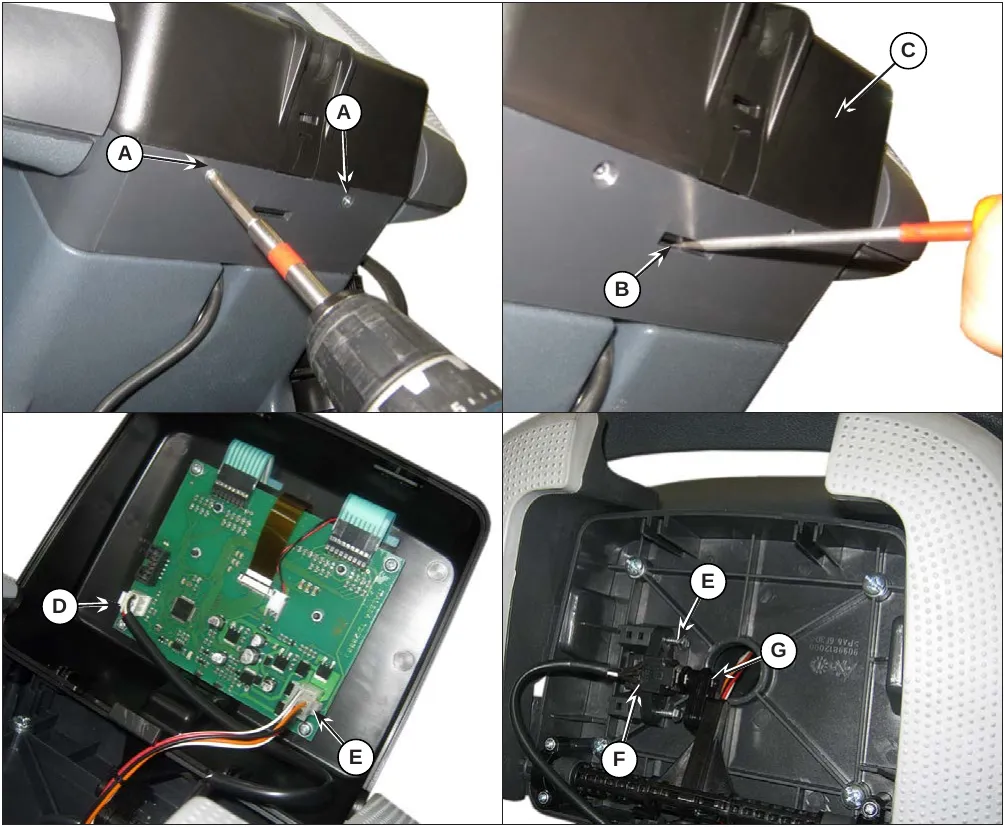
Specifications
| Description / Model | SC500 | ||
|---|---|---|---|
| DISC | REV | ||
| Driving wheel diameter | 7.8 in (200 mm) | ||
| Driving wheel specific pressure on the floor (*) | 101 psi (0.7 N/mm2) | ||
| Rear wheel diameter | 3.1 in (80 mm) | ||
| Rear wheel specific pressure on the floor (*) | 304 psi (2.1 N/mm2) | ||
| AMER electric wheel drive unit technical data | Power | 0.27 hp (200 W) | |
| Voltage | 24V | - | |
| Transmission ratio | 13:1 | - | |
| Protection class | IP44 | - | |
| Insulation class | F | - | |
| TEKNO electric wheel drive unit technical data | Power | - | 0.27 hp (200 W) |
| Voltage | - | 24V | |
| Transmission ratio | - | 11:4 | |
| Protection class | - | IP44 | |
| Insulation class | - | F | |
| Drive speed (variable) | 0 - 3.1 mi/h (0 - 5 km/h) | ||
| Maximum gradient when working | 2% (1.14°) | ||
(*) Machines have been tested under the following conditions:
- Battery maximum size
- Maximum brush and squeegee size
- Full detergent tank
- Optional equipment installed
- Wheel weight checked
- Print on the floor checked on cement for each single wheel
- Result expressed as maximum value for both front and rear wheels
24 - Electrical system
Functional description
With conventional lead/acid batteries
The batteries (2 x 12 V) are connected together in series by the cables.
The battery charger (CH) is connected to the machine by two connectors (C) (power connection to the batteries) and C3 (4-way signal connection).
The grey and white cables (1 and 2 of connector C3) are short circuited inside the battery charger CH when this is not connected to the mains. If this connection is not made, all machine functions are disabled.
If the optional battery charger has not been installed, the relevant bridge must be used on connector C3.
The “bridge” is installed at the Main machine controller J4 location as shown in a photo below.
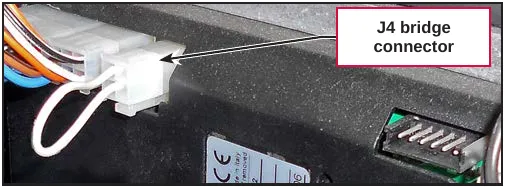
The green cable (terminal 4 of connector C3) is the data cable between the Main machine controller (EB1) and battery charger (CH).
This connection allows the battery charger charging curve to be set directly from the User interface controller and to view the operational state of the battery charger during charging directly on the Display controller.
With lithium-ion batteries
One to three, 24 volt Nilfisk Lithium-Ion battery modules may be installed in the machine to replace the conventional lead/acid batteries. These Lithium-ion battery modules can only be installed as part of an authorized Nilfisk kit or by the Nilfisk factory as changes are extensive and go beyond simply replacing the batteries. The modules themselves are more than just a chemical energy storage cell. They also contain a Batttery Management System (BMS) that is responsible for connecting the internal battery source to the external power terminals when it is safe to do so. See the NiIfisk Lithium-Ion Battery Module service manual 56043180 for more information on the battery modules.
Powering on the machine
The battery modules must power on before the machine can be powered on. To power on the battery modules the on/off circuit of one of the modules must be connected to ground. The battery module sends 24 V through a pull up resistor, out of pin 3 of the M12 round connector, to a reed switch located behind the magnetic key reader. When the key is inserted in the reader, the reed switch closes to connect the 24 V on the line to ground, which causes the voltage to drop to 0 V. This is the signal for the battery module(s) to turn on. Once the battery module(s) are active, power is supplied to the EB1 Main Control Board.
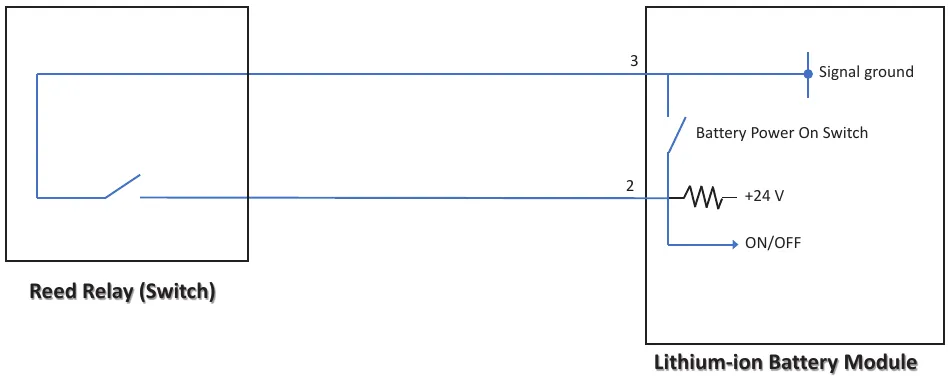
| Group (as arranged here) | Printed label |
|---|---|
| Reed Relay (Switch) | Reed Relay (Switch) |
| Lithium-ion Battery Module | 3 |
| Lithium-ion Battery Module | Signal ground |
| Lithium-ion Battery Module | Battery Power On Switch |
| Lithium-ion Battery Module | 2 |
| Lithium-ion Battery Module | +24 V |
| Lithium-ion Battery Module | ON/OFF |
Battery charger
With conventional lead/acid batteries
When the battery charger (CH) is connected to the power supply, it removes power from J4.1 and provides a + 24 V on J4.2: in this condition the Main machine controller (EB1) disables all the control and functions except the battery status indicator on the Display controller (EB3).
With lithium-ion batteries
When Lithium-ion battery modules are installed, they are installed with the properly matched on-board battery charger. No other battery charger may be used.
The battery charger has an internal interlock circuit which is used to control an external relay which is added to the machine as part of the Lithium-Ion Battery kit The additional external relay carries the current rather than the relay contacts inside the charger. A simplified schematic is shown below. When the external relay is not energized, positive battery power flows out J4.3 to the relay common terminal. It then flows out the relay’s normally closed contact to J4.1. This “enables” normal machine operation. When the battery charger is plugged in, the battery positive “enable power supply” is used to energize the external relay. When this happens battery positive power is removed from J4.1 and transferred to J4.2 which will disable the machine operation so that it cannot propel itself when the battery charger is plugged in. The power in J4.2 allows the control panel display to be on to communicate charging status information.
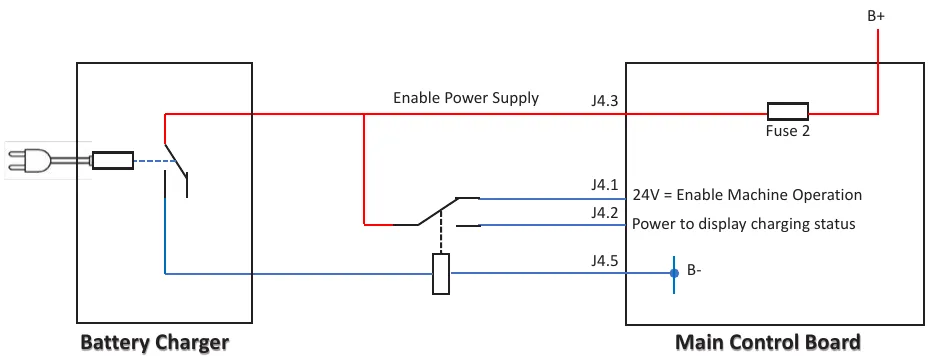
| Group (as arranged here) | Printed label |
|---|---|
| Battery Charger | Battery Charger |
| Main Control Board | Main Control Board |
| Main Control Board | B+ |
| Main Control Board | Enable Power Supply |
| Main Control Board | J4.3 |
| Main Control Board | Fuse 2 |
| Main Control Board | J4.1 — 24V = Enable Machine Operation |
| Main Control Board | J4.2 — Power to display charging status |
| Main Control Board | J4.5 — B- |
Low voltage cut out
With conventional lead/acid batteries
The Main machine controller (EB1) shuts off electrical loads to protect the batteries from damage caused by over discharging.
The voltage threshold where loads are turned off depends on the battery type. See table below.
Significant levels for machine operation
| Indication | Transition threshold (volt) | Consequence | ||
|---|---|---|---|---|
| WET | GEL | |||
| 1 |  | 22V | 22.2V | Little remaining run time, no block. |
| 2 |  | 20.4V | 21.6V | Brush OFF |
| 3 | 19.4V | 20.6V | Vacuum system OFF | |
| 4 | 18.4V | 19.6V | Drive system OFF | |
With lithium-ion batteries
The Battery Management System, which is and internal part of the Lithium-ion battery module, monitors the battery state of charge and will disconnect the internal battery cell block from the external power terminals to prevent damage from over discharging. If all battery modules shut down due to low voltage, the machine will be powered off and there will be no indication on the control panel.
Wiring diagram
Battery charger circuits with conventional lead/acid batteries
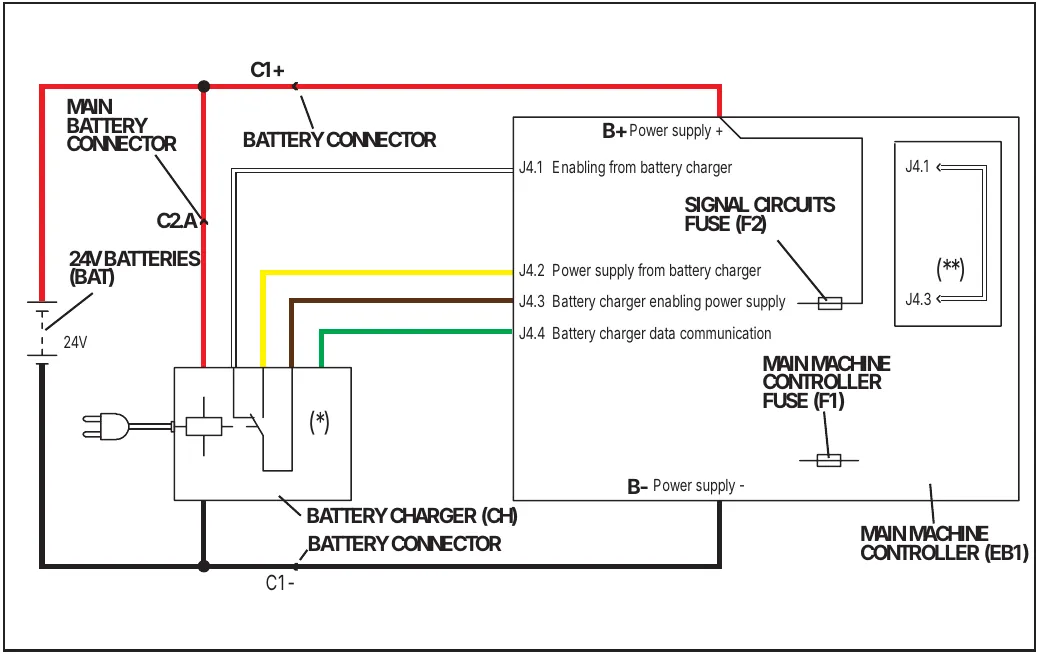
Legend
| Printed label | Text |
|---|---|
| C1+ | BATTERY CONNECTOR |
| C1- | BATTERY CONNECTOR |
| C2.A | MAIN BATTERY CONNECTOR |
| BAT | 24V BATTERIES (BAT), 24V |
| CH | BATTERY CHARGER (CH), (*) |
| EB1 | MAIN MACHINE CONTROLLER (EB1) |
| B+ | Power supply + |
| J4.1 | Enabling from battery charger |
| J4.2 | Power supply from battery charger |
| J4.3 | Battery charger enabling power supply |
| J4.4 | Battery charger data communication |
| F2 | SIGNAL CIRCUITS FUSE (F2) |
| F1 | MAIN MACHINE CONTROLLER FUSE (F1) |
| B- | Power supply - |
| J4.1 / J4.3 (separate box) | (**) |
(*) Optional for BASIC version
(**) Version without on-board battery charger
Battery charger circuits with lithium-ion batteries
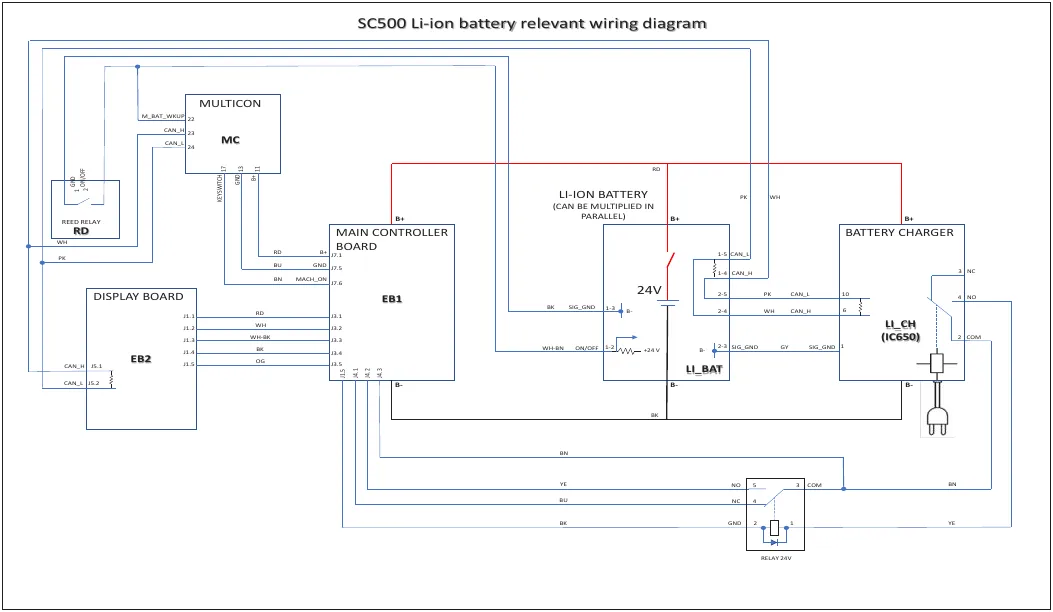
Legend
| Block | Printed terminals and labels |
|---|---|
| Reed relay RD | 1 GND; 2 ON/OFF |
| Multicon MC | 22 M_BAT_WKUP; 23 CAN_H; 24 CAN_L; 17 KEY SWITCH; 13 GND; 11 B+ |
| Main controller board EB1 | B+; J7.1 B+ (RD); J7.5 GND (BU); J7.6 MACH_ON (BN); J3.1 to J3.5 (RD, WH, WH-BK, BK, OG); J1.5, J4.1, J4.2, J4.3; B- |
| Display board EB2 | J1.1 (RD); J1.2 (WH); J1.3 (WH-BK); J1.4 (BK); J1.5 (OG); J5.1 CAN_H; J5.2 CAN_L |
| Li-ion battery LI_BAT (can be multiplied in parallel) | 24V; B+; B-; 1-3 SIG_GND (BK); 1-2 ON/OFF (WH-BN) +24 V; 1-5 CAN_L; 1-4 CAN_H; 2-5 (PK); 2-4 (WH); 2-3 SIG_GND (GY) |
| Battery charger LI_CH (IC650) | B+; B-; 10 CAN_L (PK); 6 CAN_H (WH); 1 SIG_GND (GY); 3 NC; 4 NO; 2 COM |
| Relay 24V | 5 NO; 4 NC; 3 COM; 2 GND; 1 |
| Wire color labels near relay and charger | BN; YE; BU; BK; BN; YE |
| Main wires | RD (B+); BK (B-) |
Component locations
With conventional lead/acid batteries
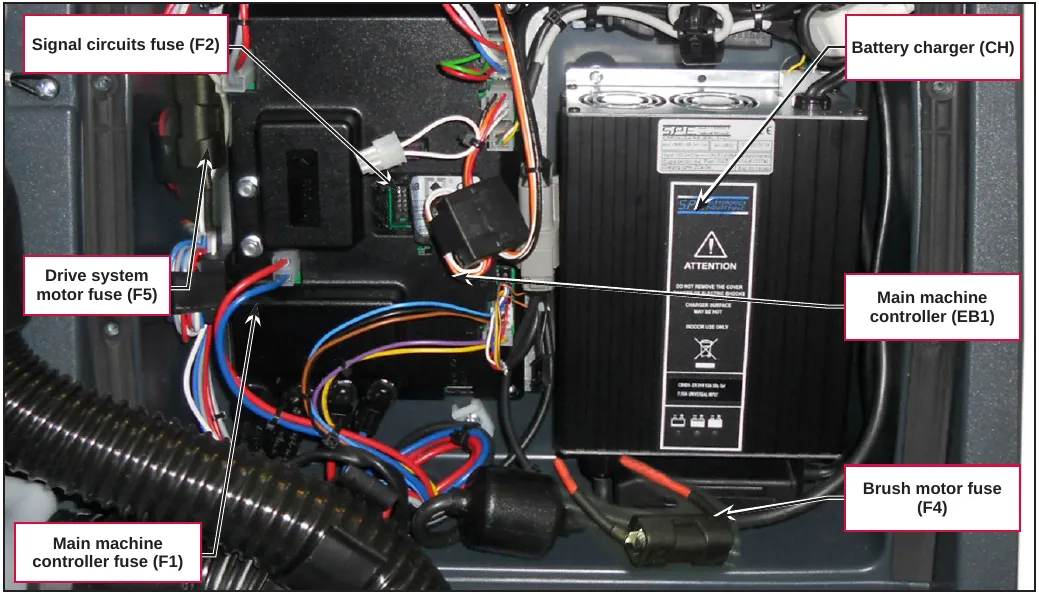
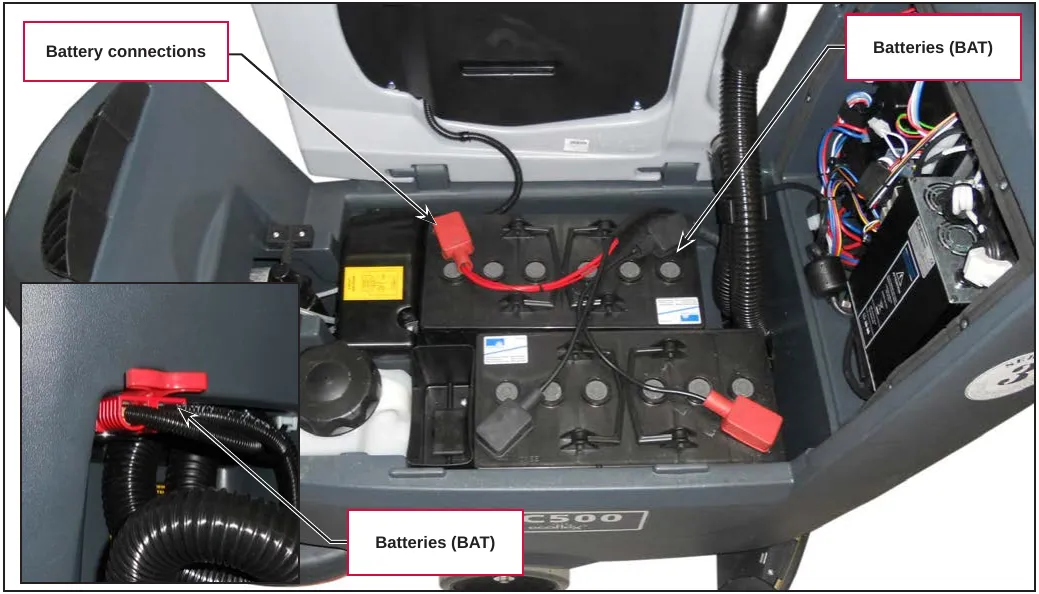
With lithium-ion batteries
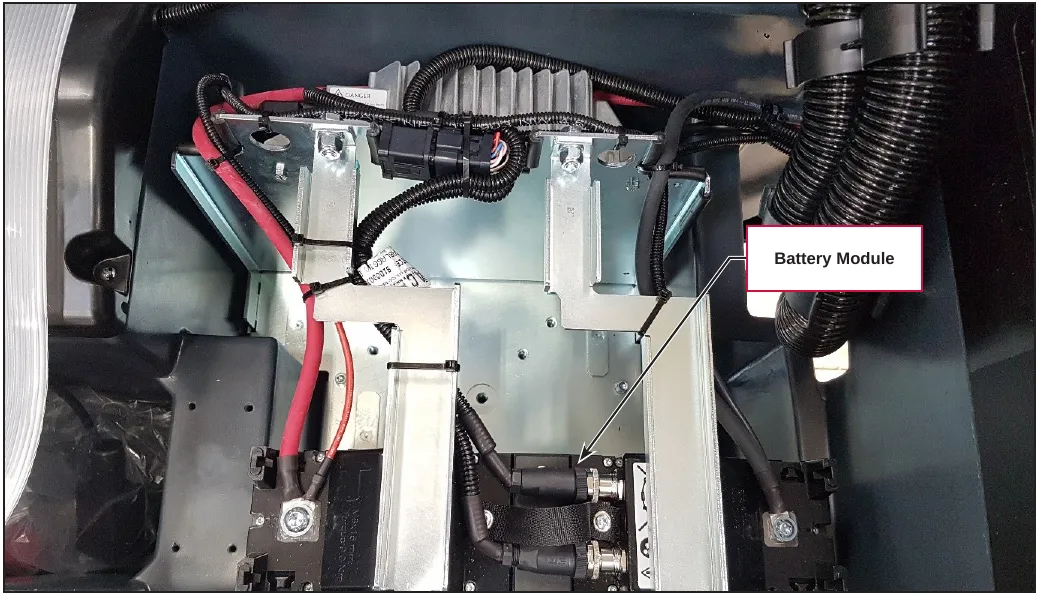
Maintenance and adjustments
Setting the installed battery type
Set the machine and the on-board battery charger (where fitted) on the basis of the type of battery to be installed by modifying the BAT parameter as indicated.
- Insert the “Supervisor” key (grey) in place of the “User” key (blue) to access the main screen (Figure 4) of the display.
- Press the One-Touch button to continue to the machine settings screen (Figure 5).
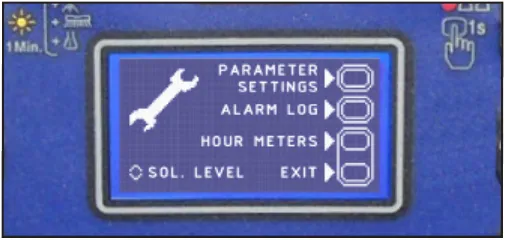
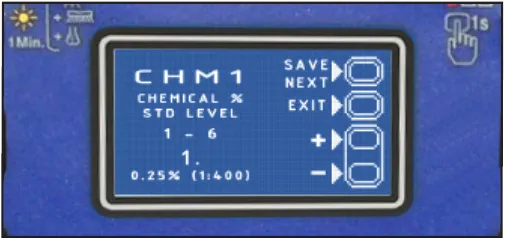
- Press the One-Touch button until you reach the BAT parameter.
| Code | Description | Min. Value | Factory Setting | Max. Value |
|---|---|---|---|---|
| BAT | Installed battery type | 0 | 1 | 6 |
- Press the “hare” or “tortoise” button to modify the value of the BAT parameter as per the following table:
| Code BAT | ||
|---|---|---|
| Value | Installed battery type | Note |
| 0 | WET Wet cell batteries | |
| 1 | GEL / AGM Generic GEL or AGM batteries | |
| 2 | GEL DISCOVER DISCOVER® brand GEL batteries | |
| 3 | GEL OPTIMA OPTIMA brand GEL batteries | |
| 4 | GEL EXIDE EXIDE®/SONNENSHINE brand GEL batteries | |
| 5 | GEL FULLRIVER FULLRIVER® brand GEL batteries | |
| 6 | NEXSYS NEXSYS® type batteries ENERSYS® brand | Starting from S/N XXXXXXXXXXX |
| 7 | LiIon Nilfisk Lithium-ion battery module(s) | |
- Press the brush release button to confirm the chosen parameter and return to the main screen.
Disconnect/connect lithium-ion batteries
Disconnection
- Power off the machine
- Turn off battery modules
- Separate the machine power connector
- Disconnect the Battery Positive Cable
- Disconnect the M12 round communication connection
- Disconnect the Battery Negative Cable
- Remove the termination resistor connector if present.
Connection
- Connect the Battery Negative cable
- Connect the M12 round communication connection
- Connect the Battery Positive cable
- Install the termination resistor connector if required
- Connect the machine power connector
- Power on the battery modules
- Power on the machine
Battery charging - conventional lead/acid batteries
Note: Charge the batteries when there is only one flashing segment displayed in the battery symbol, or at the end of each shift. Keeping the batteries charged make their life last longer.
- (For WET CELL batteries only) Check the level of electrolyte inside the batteries. If necessary, unscrew the caps and top up.
- When the correct level is restored, close the caps and clean the tops of the batteries.
Charging conventional lead/acid batteries with an external battery charger
- Check that the external battery charger is suitable by referring to the relevant Manual. The battery charger voltage rating must be 24 V.
- Disconnect the red battery connector with handle and connect it to the external battery charger.
- Connect the battery charger to the electrical mains.
- After charging, disconnect the battery charger from the electrical mains and from the battery red connector.
- Connect the battery connector to the machine.
- Carefully lower the recovery tank.
Charging conventional lead/acid batteries with an on-board battery charger
- Plug the battery charger into the mains electricity supply (the mains voltage and frequency must be compatible with the battery charger values shown on the machine serial number plate).
Note: When the battery charger is connected to the electrical mains, all machine functions are automatically cut off.
- When the first or second segment from the left in the battery symbol is flashing, this means that the battery charger is charging the batteries.
- When the third segment from the left in the battery symbol is flashing, this means that the battery charger is finishing the battery charging cycle.
- When all segments of the battery symbol are steadily lit, the battery charging cycle is complete.
- Disconnect the battery charger plug from the mains and place it in its holder.
- Carefully lower the recovery tank.
Note: For further information about the operation of the battery charger, see the relevant Manual.
Removal and installation
Conventional lead/acid batteries
- Remove the ignition key, and disconnect the red battery connector.
- Lift the recovery tank cover and check that it is empty; if not, empty it using the drain hose.
- Grasp the handle and carefully lift the recovery tank.
- The machine is supplied with cables suitable to install 2 12 V batteries.
- Carefully lift the batteries until the relevant compartment, then place them properly.
- Route and install the battery cable as shown in the diagram (Figure 6), then carefully tighten the nut on each battery terminal.
- Place the protection cap on each terminal, then connect the red battery connector.
- Perform a complete battery charging cycle.
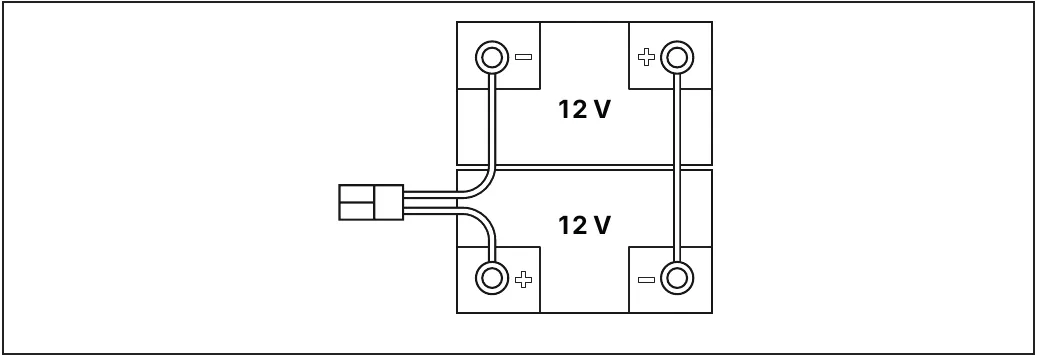
Lithium-ion batteries
Removal of a lithium-ion battery module
- Identify and mark the battery module to be removed.
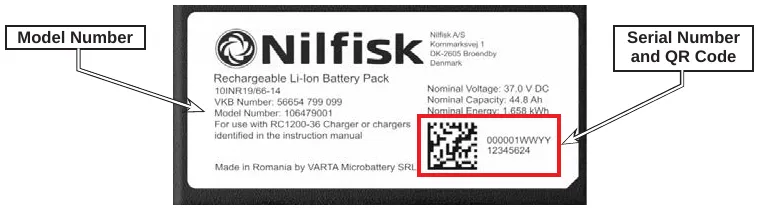
- Shutdown the machine and verify that all the module indicator lights are extinguished. The extinguished indicators mean that there is no voltage at the terminals and the modules are safe to handle.
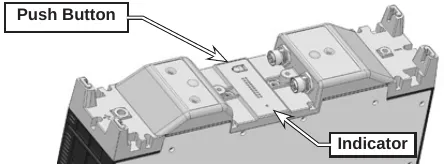
- Before disconnection, become familiar with the cabling arrangement of the module, block, or system pack, as well as the ventilation spacing and any securing foam holding the batteries in place (see example below). Make a sketch or take a photo for reference if a diagram does not already exist.
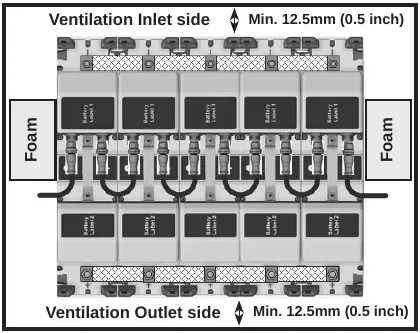
- Separate the machine power connector
- Disconnect the Battery Positive Cable
- Disconnect the M12 round communication connection
- Disconnect the Battery Negative Cable
- Remove the termination resistor connector if present.
- Remove the dog bone mechanical connectors between the modules in the block with the marked modules.
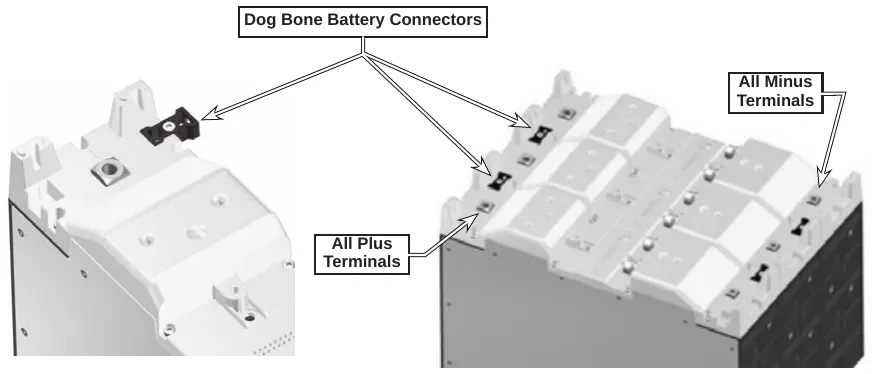
- Remove the faulty module(s). The remaining modules in the block can be pushed together and mechanically re-fastened with the dog bone connectors. The specific order of modules in a block does not matter.
- If the removed module(s) will be replaced with an equal number of modules (in the same places), continue with Installation of a Replacement Battery Module.
- If new, additional modules will be added to the pack:
- See the Battery Block/Pack Guidelines section for guidelines about how to safely add new battery modules to an existing system pack.
- Follow the general procedure in Installation of a Replacement Battery Module to install the new module(s).
Installation of a replacement lithium-ion battery module
Note: When installing the battery, do not mount the Lithium-Ion Battery upside down or on the sides for air-flow. Do not cover or block the fan or air outlet to ensure the battery does not overheat.
- Before the install of a new battery module, verify that the module does not have any conditions that may prevent normal operation. Press the push button on the stand-alone module. After startup, the indicator should display steady green. If the indicator displays blinking red, the module has an irreversible condition and cannot be used.
- Verify that the new module’s communication baud rate is compatible with the machine. Follow the Adjust Battery Baud Rate procedure in the Functional Description chapter to determine and adjust the new module’s baud rate. (New battery modules a shipped with the Baud rate set to 250 kbps and Nilfisk machines usually use a 250 kbps baud rate except the SC50, which uses a 500 kbps rate.) If desired, check the baud rate of an existing module to verify the correct rate.
- Before battery disconnection, become familiar with the cabling arrangement of the module, block, or system pack, as well as the ventilation spacing and any securing foam holding the batteries in place (see example below). Make a sketch or take a photo for reference if one does not already exist, including termination resistors.
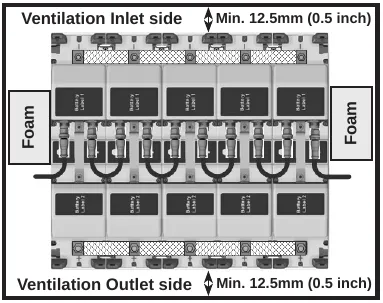
- Verify that the machine, all the already-installed battery modules, and the new modules are powered down. When the modules are powered down the indicator light in the top, center of them are extinguished. This means there isn’t any voltage at the terminals and the modules are safe to handle.
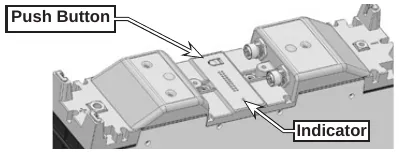
- Place the replacement module alongside the block that had an old module removed and use the dog bone mechanical connectors that came with the module to fasten it to the block. The specific order of modules in a block does not matter.
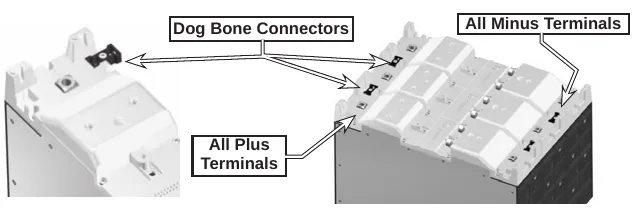
- Connect the cabling in the following order:
- Connect the Battery Negative cable. Use a torque wrench to tighten the negative terminal M6 bolts to 2.9 lbf-ft (3.9 N·m).
- Connect the M12 round communication connection
- Connect the Battery Positive cable. Use a torque wrench to tighten the positive (+) terminal M8 bolts supplied with the module to 6.6 lbf-ft
- Install the termination resistor connector if required
- Connect the machine power connector
- Power on the battery modules
- Power on the machine
Note: The power cabling must be connected diagonally across the blocks as shown below.
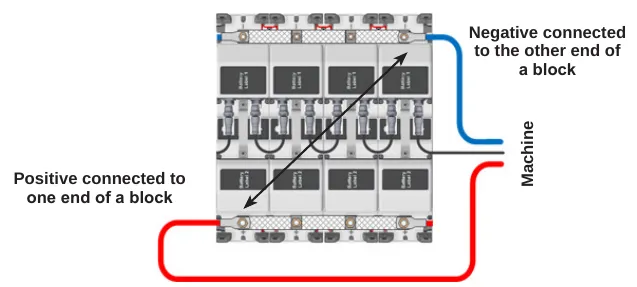
- Start up the machine.
- Verify that the battery pack is in node ID configuration mode. All the module indicators will display as shown below.
Row Printed sequence Led green, off, green, off, green, off, red, off, red, off, red, … Sec. 0.3, 0.3 (first two cells); 0.6 (last cell) - When the node ID configuration process is complete, verify that the module’s indicators all display in steady green (active mode) and are ready for use.
Checking/replacing fuses
- Drive the machine on a level floor.
- Remove the ignition key and disconnect the red battery connector.
- Lift the recovery tank.
- Remove the 7 screws and remove the electronic component compartment cover.
- Check/replace the following fuses (Figure 7):
- (F1) 100A midi fuse - Main machine controller (A).
- (F2) 3A blade fuse - Signal circuits (B).
- Place the Main machine controller assembly in its housing, tighten the mounting screws and install the electronic component compartment cover.
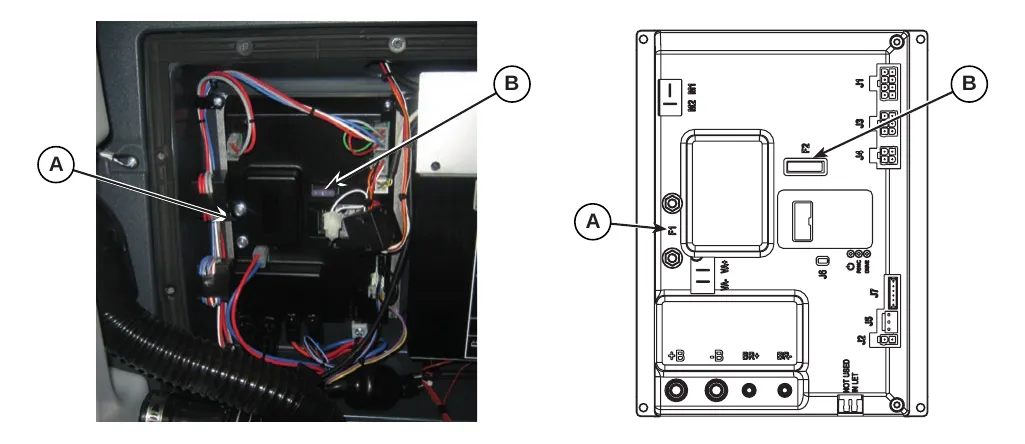
- Remove the protection cover of its fuseholder, then check/replace the following fuses (Figure 8):
- (F4) 50A midi fuse - brush motor (C).
- (F5) 30A midi fuse - Drive system motor (D).
- Place the Main machine controller assembly in its housing, tighten the mounting screws and install the electronic component compartment cover.
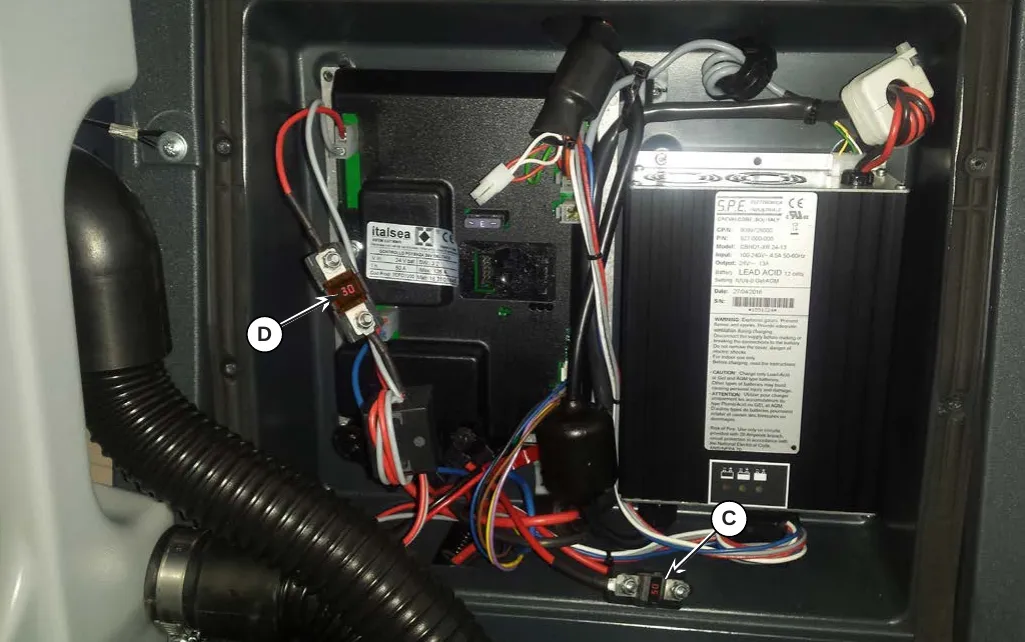
Troubleshooting
With conventional lead/acid batteries
See the other chapters for previously provided instructions for other electrical system components.
| Trouble | Possible causes | Remedy |
|---|---|---|
| The machine does not power on | Batteries (BAT) flat or connections faulty | Charge the batteries or clean the connections |
| The batteries (BAT) are broken | Check the battery no-load voltage | |
| The battery charger (CH) is broken | Replace | |
| The wiring harness is cut or pressed or short circuited | Repair |
Note: A damage to the battery charger or its connections can prevent the machine from operating properly.
With lithium-ion batteries
See the other chapters for previously provided instructions for other electrical system components.
| Trouble | Possible causes | Remedy |
|---|---|---|
| The machine does not power on | Li-ion battery modules not powering on | Use the power switch on a battery module to attempt to power on the modules. |
| Reed Switch behind key reader is not closing when magnetic key is inserted | Use the power switch on a battery module to attempt to power on the modules. If they power on using a battery module switch, check the reed relay switch and its related wiring. | |
| The battery charger (CH) normally closed interlock relay contact is open. | Replace the charger | |
| The wiring harness has an open circuit | Repair |
General wiring diagram - with key slot
(Model No.: 9087352020, 9087354020, 9087350020, 9087351020, 9087353020, 9087355020)
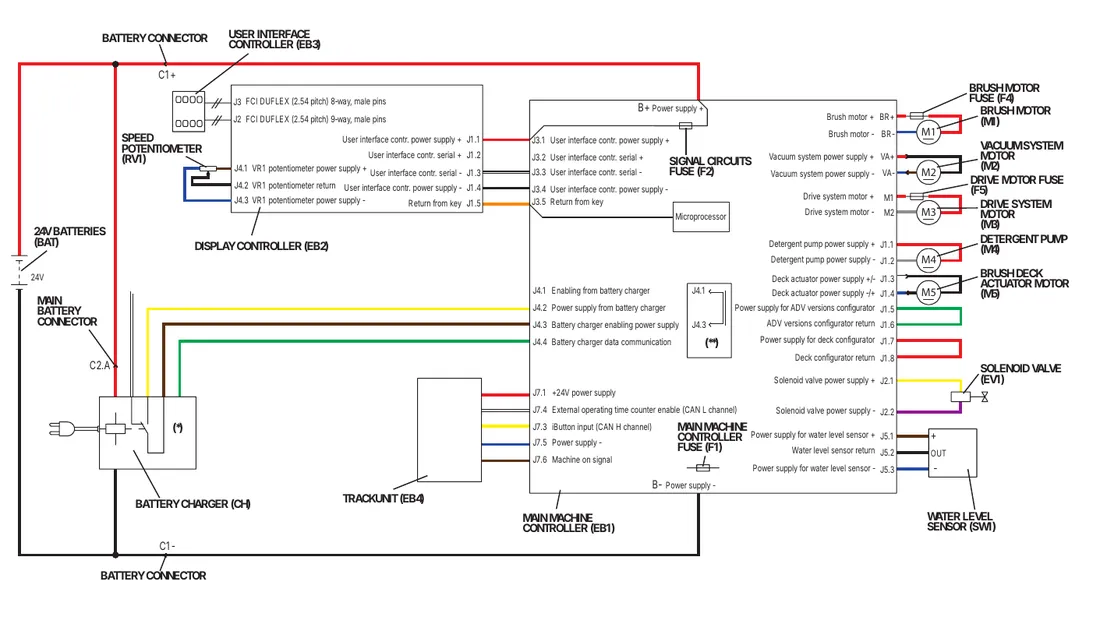
(*) Optional for BASIC version
(**) Version without on-board battery charger
Terminals printed on the diagram
| Terminal | Printed label |
|---|---|
| J1.1 | User interface contr. power supply + |
| J1.2 | User interface contr. serial + |
| J1.3 | User interface contr. serial - |
| J1.4 | User interface contr. power supply - |
| J1.5 | Return from key |
| J4.1 | VR1 potentiometer power supply + |
| J4.2 | VR1 potentiometer return |
| J4.3 | VR1 potentiometer power supply - |
| Terminal | Printed label |
|---|---|
| Left side of the main machine controller (EB1) | |
| J3.1 | User interface contr. power supply + |
| J3.2 | User interface contr. serial + |
| J3.3 | User interface contr. serial - |
| J3.4 | User interface contr. power supply - |
| J3.5 | Return from key |
| B+ | Power supply + |
| B- | Power supply - |
| Battery charger side | |
| J4.1 | Enabling from battery charger |
| J4.2 | Power supply from battery charger |
| J4.3 | Battery charger enabling power supply |
| J4.4 | Battery charger data communication |
| Trackunit side | |
| J7.1 | +24V power supply |
| J7.4 | External operating time counter enable (CAN L channel) |
| J7.3 | iButton input (CAN H channel) |
| J7.5 | Power supply - |
| J7.6 | Machine on signal |
| Right side of the main machine controller (EB1) | |
| BR+ | Brush motor + |
| BR- | Brush motor - |
| VA+ | Vacuum system power supply + |
| VA- | Vacuum system power supply - |
| M1 | Drive system motor + |
| M2 | Drive system motor - |
| J1.1 | Detergent pump power supply + |
| J1.2 | Detergent pump power supply - |
| J1.3 | Deck actuator power supply +/- |
| J1.4 | Deck actuator power supply -/+ |
| J1.5 | Power supply for ADV versions configurator |
| J1.6 | ADV versions configurator return |
| J1.7 | Power supply for deck configurator |
| J1.8 | Deck configurator return |
| J2.1 | Solenoid valve power supply + |
| J2.2 | Solenoid valve power supply - |
| J5.1 | Power supply for water level sensor + |
| J5.2 | Water level sensor return |
| J5.3 | Power supply for water level sensor - |
Other labels printed on the diagram
| Item | Printed label |
|---|---|
| Battery connector | C1+ and C1- |
| Main battery connector | C2.A |
| 24V batteries | (BAT), 24V |
| Battery charger | (CH), marked (*) |
| Speed potentiometer | (RV1); J4.1 VR1 potentiometer power supply +, J4.2 VR1 potentiometer return, J4.3 VR1 potentiometer power supply - |
| Display controller | (EB2) |
| User interface controller | (EB3); J3 FCI DUFLEX (2.54 pitch) 8-way, male pins; J2 FCI DUFLEX (2.54 pitch) 9-way, male pins |
| Main machine controller fuse | (F1) |
| Signal circuits fuse | (F2) |
| Brush motor fuse | (F4) |
| Drive motor fuse | (F5) |
| Brush motor | (M1) |
| Vacuum system motor | (M2) |
| Drive system motor | (M3) |
| Detergent pump | (M4) |
| Brush deck actuator motor | (M5) |
| Solenoid valve | (EV1) |
| Water level sensor | (SW1); terminals +, OUT, - |
| Trackunit | (EB4) |
| Microprocessor | inside the main machine controller (EB1) |
| (**) box | J4.1 and J4.3, version without on-board battery charger |
General wiring diagram - with magnetic smart key and conventional batteries
(Model No.: 9087403020, 9087404020, 9087400020,9087401020, 9087405020, 9087402020)
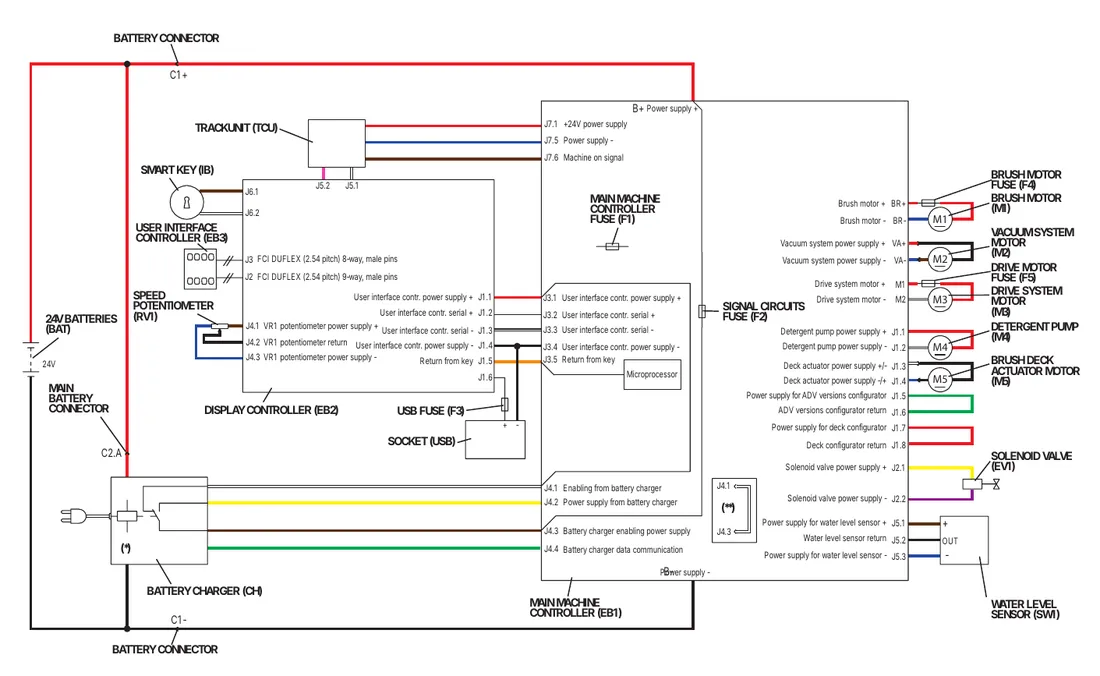
(*) Optional for BASIC version
(**) Version without on-board battery charger
Terminals printed on the diagram
| Terminal | Printed label |
|---|---|
| J1.1 | User interface contr. power supply + |
| J1.2 | User interface contr. serial + |
| J1.3 | User interface contr. serial - |
| J1.4 | User interface contr. power supply - |
| J1.5 | Return from key |
| J1.6 | (no label printed) |
| J5.1 | (no label printed) |
| J5.2 | (no label printed) |
| J6.1 | (no label printed) |
| J6.2 | (no label printed) |
| J4.1 | VR1 potentiometer power supply + |
| J4.2 | VR1 potentiometer return |
| J4.3 | VR1 potentiometer power supply - |
| Terminal | Printed label |
|---|---|
| Left side of the main machine controller (EB1) | |
| J3.1 | User interface contr. power supply + |
| J3.2 | User interface contr. serial + |
| J3.3 | User interface contr. serial - |
| J3.4 | User interface contr. power supply - |
| J3.5 | Return from key |
| B+ | Power supply + |
| B- | Power supply - |
| Battery charger side | |
| J4.1 | Enabling from battery charger |
| J4.2 | Power supply from battery charger |
| J4.3 | Battery charger enabling power supply |
| J4.4 | Battery charger data communication |
| Top of the main machine controller (EB1) | |
| J7.1 | +24V power supply |
| J7.5 | Power supply - |
| J7.6 | Machine on signal |
| Right side of the main machine controller (EB1) | |
| BR+ | Brush motor + |
| BR- | Brush motor - |
| VA+ | Vacuum system power supply + |
| VA- | Vacuum system power supply - |
| M1 | Drive system motor + |
| M2 | Drive system motor - |
| J1.1 | Detergent pump power supply + |
| J1.2 | Detergent pump power supply - |
| J1.3 | Deck actuator power supply +/- |
| J1.4 | Deck actuator power supply -/+ |
| J1.5 | Power supply for ADV versions configurator |
| J1.6 | ADV versions configurator return |
| J1.7 | Power supply for deck configurator |
| J1.8 | Deck configurator return |
| J2.1 | Solenoid valve power supply + |
| J2.2 | Solenoid valve power supply - |
| J5.1 | Power supply for water level sensor + |
| J5.2 | Water level sensor return |
| J5.3 | Power supply for water level sensor - |
Other labels printed on the diagram
| Item | Printed label |
|---|---|
| Battery connector | C1+ and C1- |
| Main battery connector | C2.A |
| 24V batteries | (BAT), 24V |
| Battery charger | (CH), marked (*) |
| Speed potentiometer | (RV1); J4.1 VR1 potentiometer power supply +, J4.2 VR1 potentiometer return, J4.3 VR1 potentiometer power supply - |
| Display controller | (EB2); J1.6 (no label printed) |
| User interface controller | (EB3); J3 FCI DUFLEX (2.54 pitch) 8-way, male pins; J2 FCI DUFLEX (2.54 pitch) 9-way, male pins |
| Main machine controller fuse | (F1) |
| Signal circuits fuse | (F2) |
| Brush motor fuse | (F4) |
| Drive motor fuse | (F5) |
| Brush motor | (M1) |
| Vacuum system motor | (M2) |
| Drive system motor | (M3) |
| Detergent pump | (M4) |
| Brush deck actuator motor | (M5) |
| Solenoid valve | (EV1) |
| Water level sensor | (SW1); terminals +, OUT, - |
| Trackunit | (TCU); its lines run to J5.2 and J5.1, printed on the display controller (EB2) edge |
| Smart key | (IB); its lines run to J6.1 and J6.2, printed on the display controller (EB2) edge |
| USB fuse | (F3) |
| Socket | (USB), terminals + and - |
| Microprocessor | inside the main machine controller (EB1) |
| (**) box | J4.1 and J4.3, version without on-board battery charger |
General wiring diagram - with magnetic smart key and lithium-ion batteries
(Model No.: 9087403020, 9087404020, 9087400020,9087401020, 9087405020, 9087402020)
Currently, there is not an updated complete machine wiring diagram integrated with the lithium ion battery kit. Use the General Wiring Diagram for conventional batteries along with this diagram showing the circuits relevant to the Lithium-Ion battery.
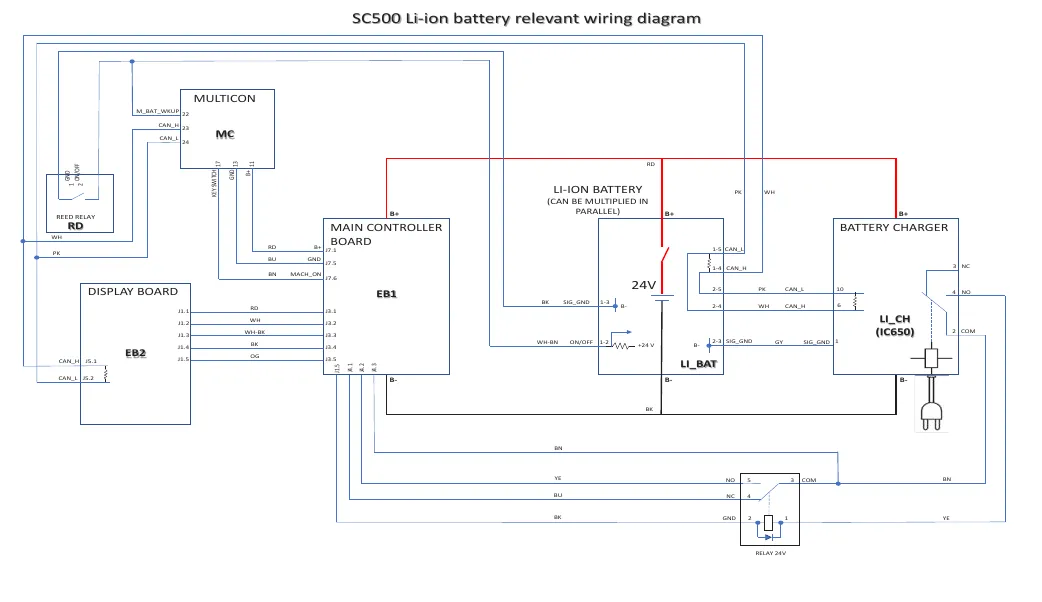
Labels printed on the diagram
| Component | Terminal | Printed label | Wire code printed on the line |
|---|---|---|---|
| Multicon (MC) | |||
| Multicon | 22 | M_BAT_WKUP | |
| Multicon | 23 | CAN_H | |
| Multicon | 24 | CAN_L | |
| Multicon | 17 | KEY SWITCH | |
| Multicon | 13 | GND | |
| Multicon | 11 | B+ | |
| Reed relay (RD) | |||
| Reed relay | 1 | GND | |
| Reed relay | 2 | ON/OFF | |
| Reed relay | WH, PK (printed near the reed relay) | ||
| Main controller board (EB1) | |||
| EB1 | J7.1 | B+ | RD |
| EB1 | J7.5 | GND | BU |
| EB1 | J7.6 | MACH_ON | BN |
| EB1 | J3.1 | RD | |
| EB1 | J3.2 | WH | |
| EB1 | J3.3 | WH-BK | |
| EB1 | J3.4 | BK | |
| EB1 | J3.5 | OG | |
| EB1 | J1.5, J4.1, J4.2, J4.3 | (bottom edge) | |
| EB1 | B+ and B- | ||
| Display board (EB2) | |||
| EB2 | J1.1 | RD | |
| EB2 | J1.2 | WH | |
| EB2 | J1.3 | WH-BK | |
| EB2 | J1.4 | BK | |
| EB2 | J1.5 | OG | |
| EB2 | J5.1 | CAN_H | |
| EB2 | J5.2 | CAN_L | |
| Li-ion battery (LI_BAT), can be multiplied in parallel | |||
| LI_BAT | 1-5 | CAN_L | |
| LI_BAT | 1-4 | CAN_H | |
| LI_BAT | 2-5 | PK | |
| LI_BAT | 2-4 | WH | |
| LI_BAT | 1-3 | SIG_GND | BK |
| LI_BAT | 1-2 | ON/OFF | WH-BN |
| LI_BAT | 2-3 | SIG_GND | GY |
| LI_BAT | 24V, +24 V, B+, B- | RD, BK (printed on the B+ and B- lines) | |
| Battery charger (LI_CH, IC650) | |||
| LI_CH | 10 | CAN_L | PK |
| LI_CH | 6 | CAN_H | WH |
| LI_CH | 1 | SIG_GND | GY |
| LI_CH | 3 | NC | |
| LI_CH | 4 | NO | |
| LI_CH | 2 | COM | |
| LI_CH | B+, B- | ||
| Relay 24V | |||
| Relay 24V | 5 | NO | YE |
| Relay 24V | 4 | NC | BU |
| Relay 24V | 3 | COM | BN |
| Relay 24V | 2 | GND | BK |
| Relay 24V | 1 | YE | |
Specifications
| Description / Model | SC500 | ||
|---|---|---|---|
| DISC | REV | ||
| Battery compartment size (length x width x height) | 13.7x13.7x10.2 in (350x350x260 mm) | ||
| Standard batteries (2) | 12V 105 AhC5 | ||
| Standard battery run time (capacity) | 3.5 h | ||
| Battery charger | Model | 24V 13A | |
| Input voltage | 85Vac÷264Vac, 50Hz÷60Hz | ||
| Charging procedure | by microprocessor | ||
| Efficiency | > 85% | ||
| Environmental protection class | IP30 | ||
30 - Solution system
Functional description
The solution system supplies water and detergent to the brush when cleaning the floor. The solution tank is also the main machine body. There is a manual valve on the left side of the tank to close the water supply whenever maintenance must be performed on the machine. The solution flows from the tank to the tap, through the filter and solenoid valve (EV1) and then to the brush deck.
The detergent pump (M4), present only on EcoFlex systems, controls the flow of detergent from the EcoFlex tank which is then transported to the flow in the main tube just before the solution enters the brush deck.
The EcoFlex system can be selected with the specific button on the User interface controller (EB3).
The quantity of detergent is defined by the operator via the buttons on the User interface controller (EB3).
Solution flow levels 1, 2 and 3 regulate the flow of detergent solution on the basis of the machine speed so as to keep the quantity of solution dispensed per 10.8 sq ft (1 m²) of floor treated constant (for further details and modifications, see the corresponding section in the chapter Control System).
Located centrally, below the tank, there is also a hole for draining any liquid in the battery compartment.
The solution flow is regulated by various timed ON / OFF cycles, according to:
- Water flow rate regulation (0 - 4)
- Solution tank level
Both the solenoid valve and detergent pump (when the EcoFlex system is enabled) follow the same timings.
The solenoid valve and detergent pump operate only with the following inputs/conditions:
- Brush function on
- Forward paddle pressed
- Battery level not in condition with flashing segments.
Water level sensor operation
The water level sensor (SW1) is positioned about half the height of the solution tank so as to provide the information to the electronic system on the level of water present in the tank (more than half, less than half).
Through this information the times of opening of the solenoid valve (EV1) and the detergent pump (M4) are adjusted to maintain this flow more constant (Figure 1).
The water level sensor is capacitive with NPN output (output 0 Volt with water, floating without water).
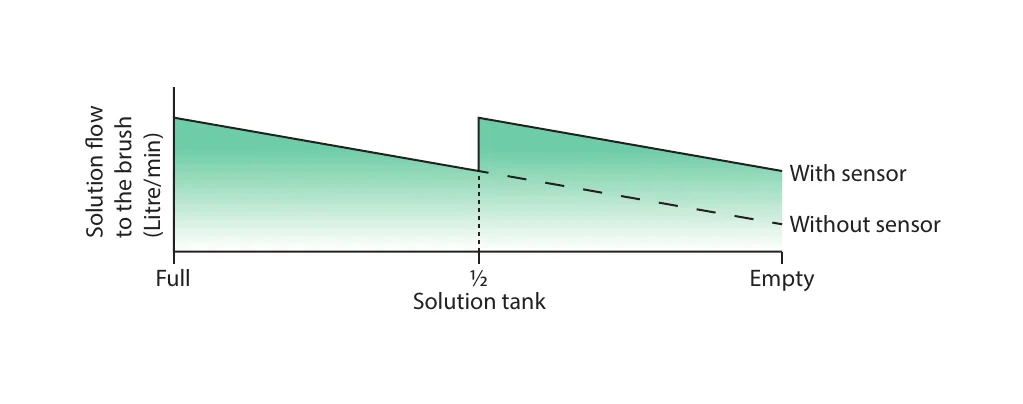
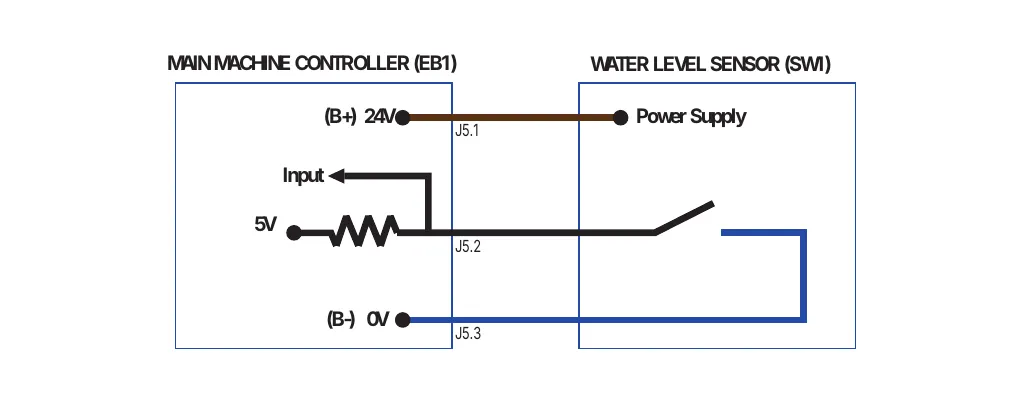
Figure 2 labels as printed: main machine controller (EB1) with (B+) 24V at J5.1, Input and 5V at J5.2, (B-) 0V at J5.3; water level sensor (SW1) with Power Supply.
Wiring diagram
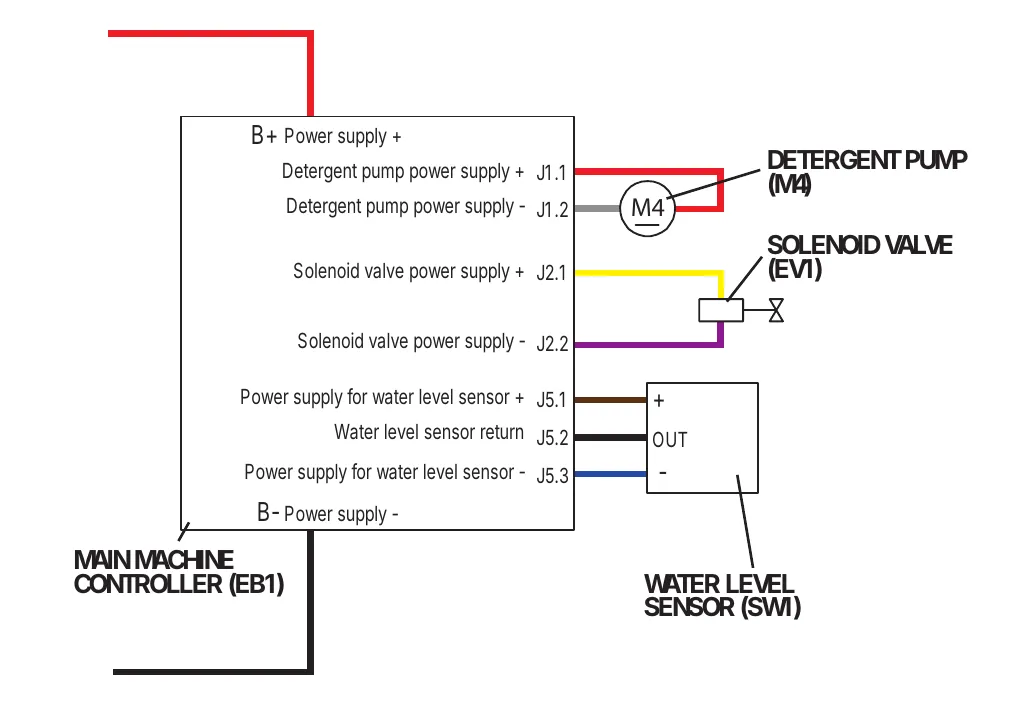
| Terminal | Printed label | Goes to (as drawn) |
|---|---|---|
| (top) | B+ Power supply + | |
| J1.1 | Detergent pump power supply + | Detergent pump (M4) |
| J1.2 | Detergent pump power supply - | Detergent pump (M4) |
| J2.1 | Solenoid valve power supply + | Solenoid valve (EV1) |
| J2.2 | Solenoid valve power supply - | Solenoid valve (EV1) |
| J5.1 | Power supply for water level sensor + | Water level sensor (SW1) terminal + |
| J5.2 | Water level sensor return | Water level sensor (SW1) terminal OUT |
| J5.3 | Power supply for water level sensor - | Water level sensor (SW1) terminal - |
| (bottom) | B- Power supply - |
Component locations
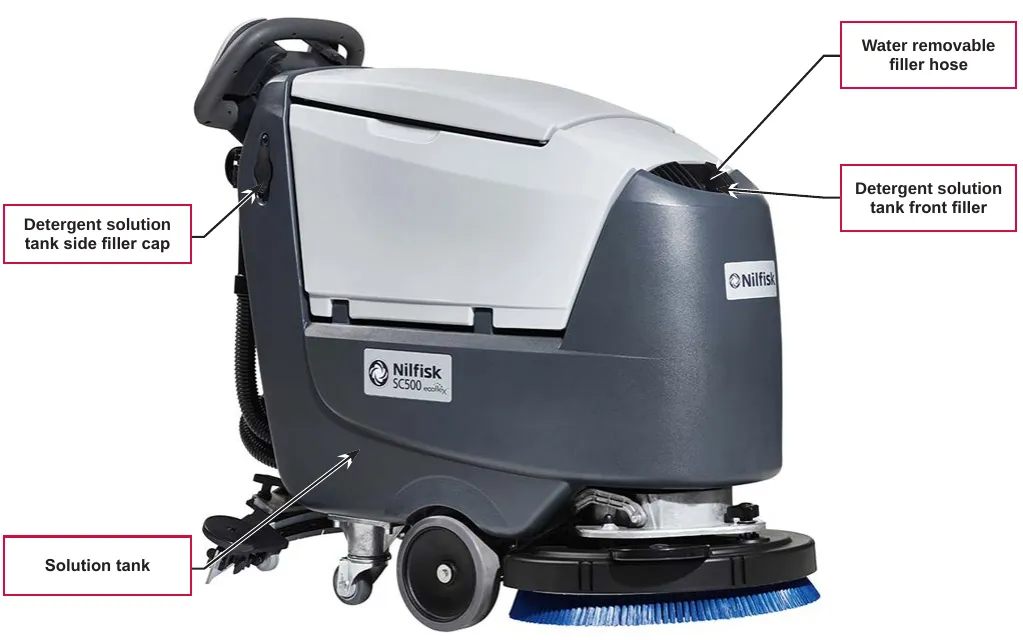
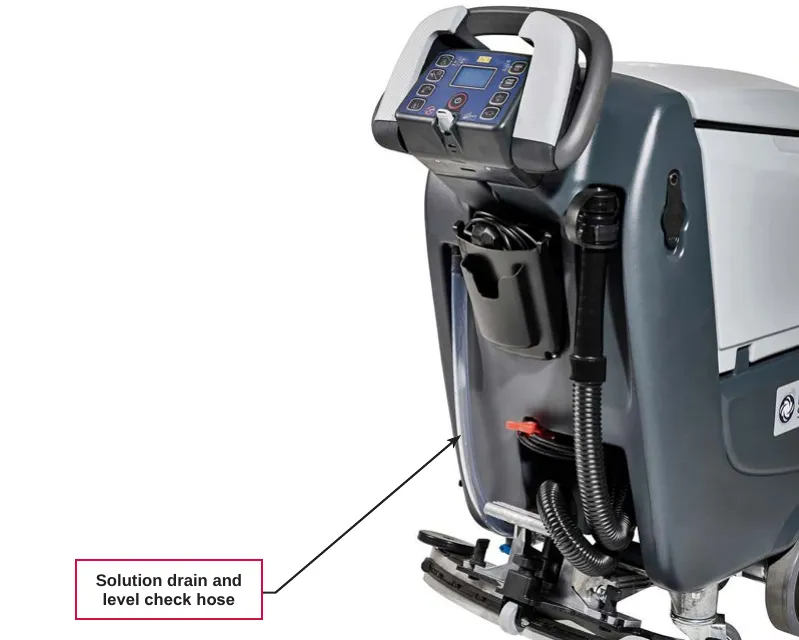
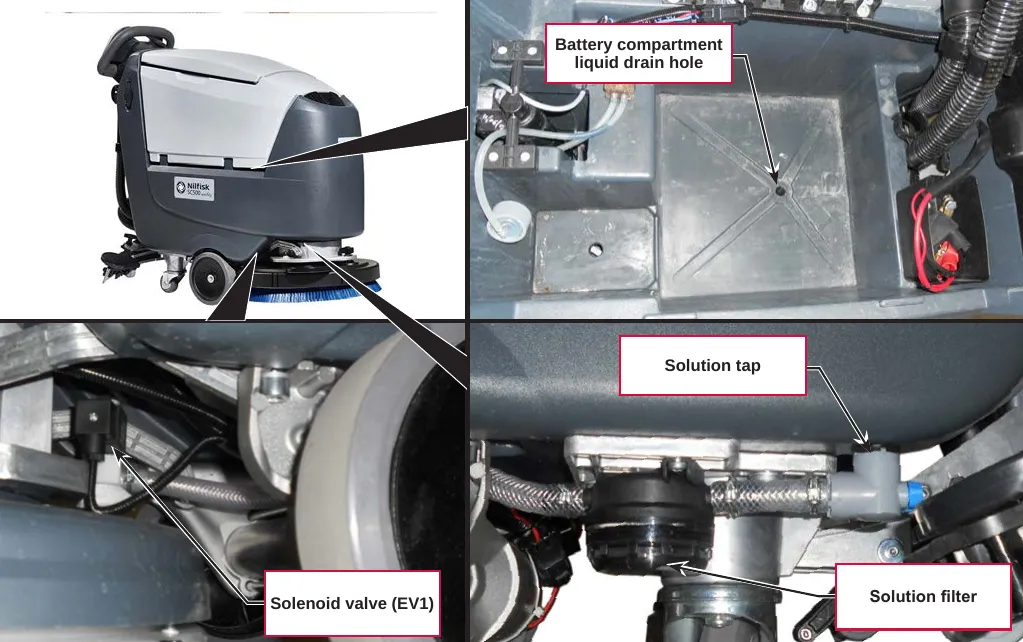
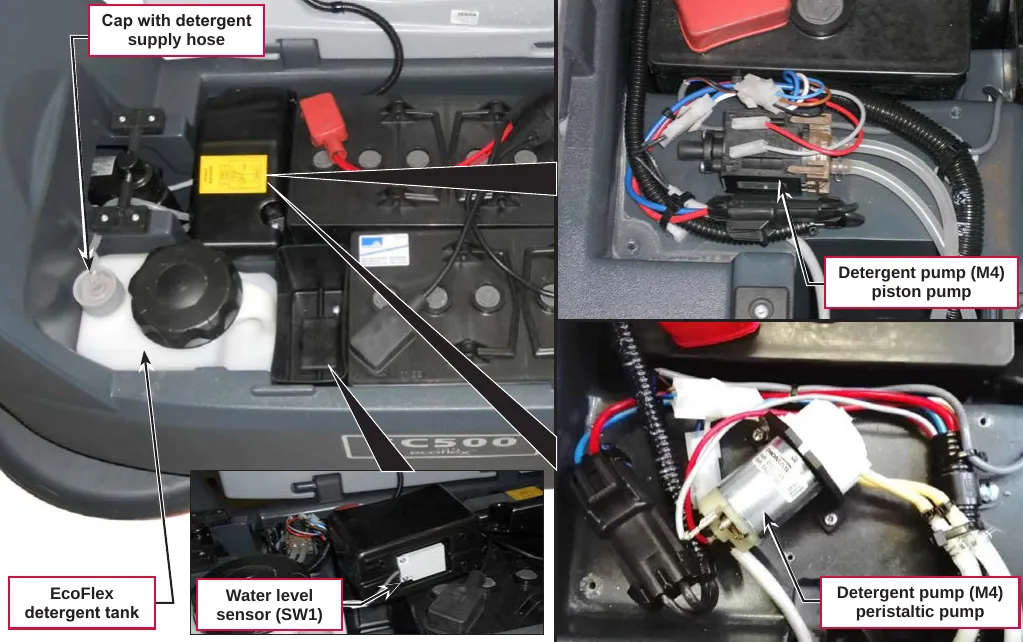
Maintenance and adjustments
Cleaning the detergent solution tank and filter
- Drive the machine on a level floor.
- Ensure that the machine is off and the ignition key has been removed.
- Drain the detergent solution tank with the level hose. Then, rinse the tank with clean water.
- Close the detergent solution valve (A) (Figure 8). The valve (A) is closed when it is in position (B) and it is open when it is in position (C).
- Remove the transparent cover (D) and the gasket (E), then remove the filter strainer (F). Wash and rinse them, then refit them carefully onto the filter support (G).
- Open the valve (A).
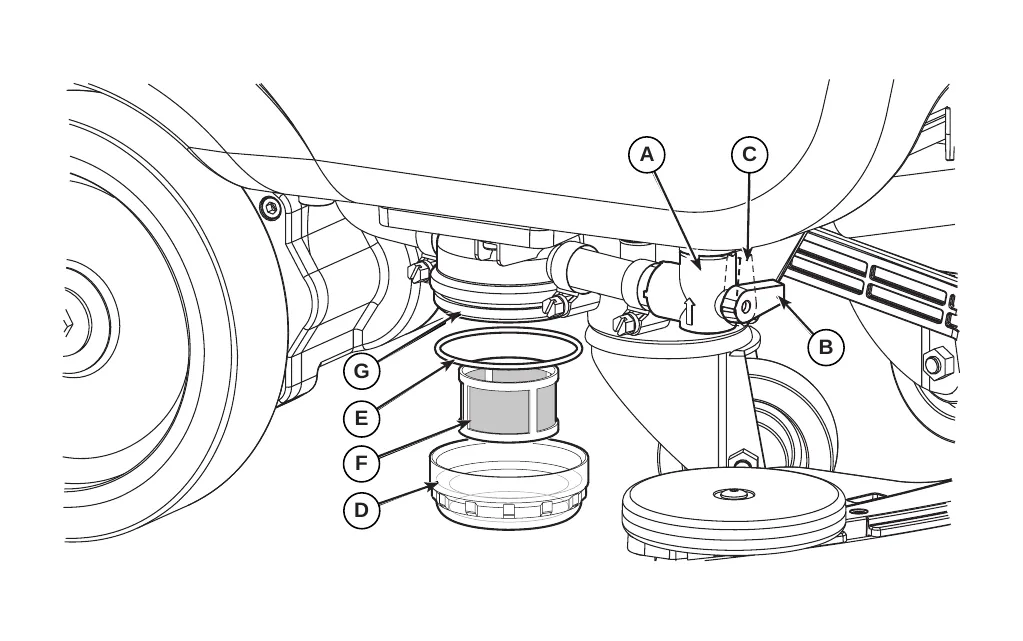
Cleaning the EcoFlex detergent tank
Clean the detergent tank as follows.
- Drive the machine to the appointed disposal area.
- Ensure that the machine is off and the ignition key has been removed.
- Lift the recovery tank cover by opening it with the handle and check that the tank is empty; if not, empty it using the drain hose.
- Close the recovery tank cover until the handle clicks.
- Grasp the handle and carefully lift the recovery tank.
- Unscrew the cap (A) (Figure 9) from the detergent tank (B).
- Remove the tank.
- Rinse and wash out the tank in the appointed disposal area.
- Replace the detergent tank (B) as shown in the figure, then refit the cap (A).
- When the detergent tank has been drained, it may be necessary to drain the EcoFlex system too (see procedure in the section Draining the EcoFlex System).
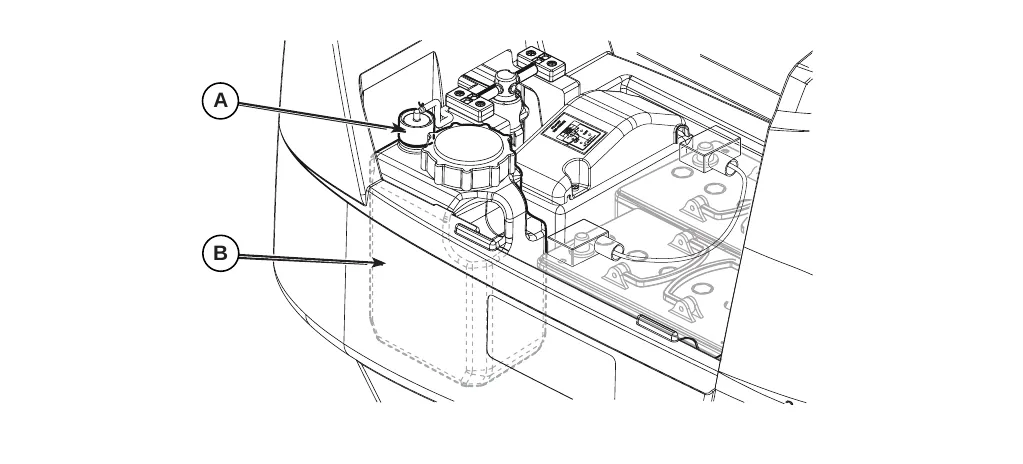
Draining the EcoFlex system
Clean the detergent tank following the procedure in the previous section.
To remove residual detergent from the detergent hoses and pump, proceed as follows.
- Turn on the machine by the key and the [Power] button.
- Press the [One-Touch] button. Check that the detergent quantity indicator on the display has at least one segment lit.
- Press the detergent flow rate adjustment button [Detergent flow rate] and the detergent percentage adjustment button [Detergent percentage] together, until the EcoFlex system drain activation screen appears on the display (after approximately 5 seconds).
EcoFlex system drain activation screen - Release the buttons [Detergent flow rate] and [Detergent percentage] and wait for the countdown timer on the display to finish and the vacuum to be activated.
- Collect the detergent remained on the floor.
- Remove the ignition key.
- Lift the recovery tank, then check that the detergent tank hose is empty, otherwise perform steps 3 to 7 again.
Note: The draining cycle lasts about 30 seconds, then the vacuum function automatically turns on, which allows to remove the detergent remained. The draining cycle can also be performed with the detergent tank full of water, thus cleaning the system thoroughly. It is advisable to perform this type of draining to clean the EcoFlex system from dirt and deposits if the machine has not been used/cleaned for a long time. The draining cycle can also be performed to quickly fill the detergent supply hose when the tank is full but the system is still empty. If necessary, the draining cycle can be performed several times in succession.
Troubleshooting
| Trouble | Possible causes | Remedy |
|---|---|---|
| Small amount of solution or no solution reaches the brush | The solution filter is clogged/dirty | Clean the filter |
| Solution supply valve locked in (semi) closed position | Replace the valve | |
| Solenoid valve (EV1) broken or electrical connection interrupted | Replace the solenoid valve/repair the electrical connection Parts › | |
| Presence of debris in detergent solution tank blocking the outlet hole | Clean the tank | |
| Presence of debris in the detergent solution hose, blocking the passage of the liquid | Clean the hoses | |
| Main machine controller (EB1) faulty | Replace | |
| Display controller (EB2) faulty | Replace | |
| User interface controller (EB3) faulty | Replace | |
| The solution reaches the brush also when the machine is off | Presence of dirt or scale in solenoid valve (EV1) | Clean the solenoid valve |
| Solenoid valve (EV1) broken | Replace the solenoid valve | |
| The EcoFlex system detergent is not reaching the brush, or is not arriving in sufficient quantity On the brush comes only water | The detergent flow percentage is too low | Check/change the percentage |
| The hydraulic circuit upstream of the detergent pump is not triggered | Check if the hose is filled and, if necessary, perform one or more draining cycles | |
| The detergent pump (M4) is broken or there is an open in the electrical connection | Replace the pump/repair the electrical connection Parts › | |
| The detergent pump (M4, piston pump) is broken | Replace the detergent pump | |
| The head of the detergent pump (M4, peristaltic pump) is exhausted | Replace the head of the detergent pump | |
| The motor of the detergent pump (M4, peristaltic pump) is broken | Replace the detergent pump | |
| There is foreign material/debris in the detergent tank clogging the output hole | Clean the tank | |
| There is debris in the detergent hoses clogging the detergent flow | Clean the hoses | |
| The detergent flow regulation button [Detergent percentage] is not working correctly | Replace the User interface controller (EB3) | |
| Main machine controller (EB1) faulty | Replace | |
| Display controller (EB2) faulty | Replace | |
| User interface controller (EB3) faulty | Replace |
| Trouble | Possible causes | Remedy |
|---|---|---|
| The EcoFlex system will not activate and the LED does not come on | User interface controller (EB3) faulty | Replace |
| The Main machine controller (EB1) has not been set for operation with the EcoFlex system | If present, remove the jumper (J6) (Figure 10) on the rear of the Main machine controller (EB1) | |
| The symbol [asterisk on the display] is displayed when the solution tank is empty | Humid fouling inside the solution tank | Washing the solution tank with clean water |
| Presence of water between the water level sensor and the outer wall of the solution tank | Dry the area | |
| Water level sensor broken | Replace the sensor Parts › | |
| The symbol [circle on the display] is displayed when the solution tank is full | Excessive distance between the water level sensor and the wall of the solution tank | Check the proper installation of the sensor |
| Discontinued wiring harness | Check the wiring harness between the sensor and the Main machine controller (EB1) | |
| Water level sensor broken | Replace the sensor |
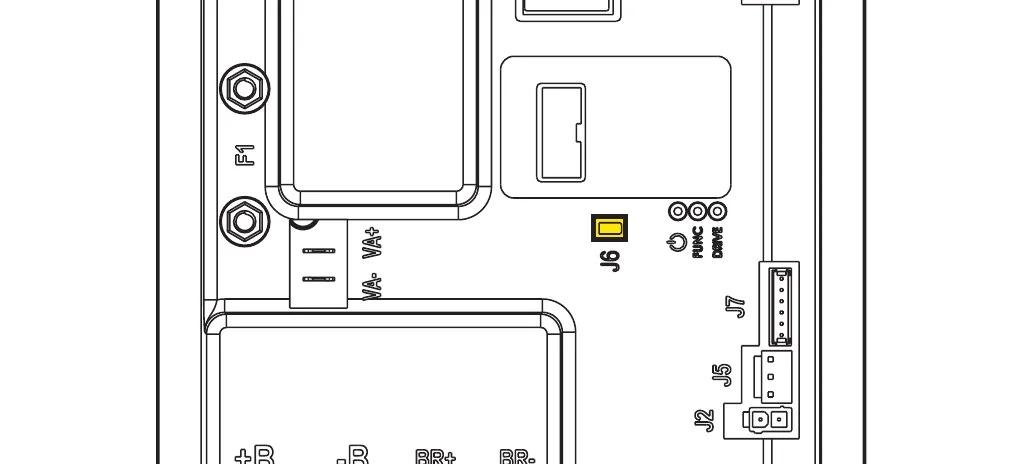
Removal and installation
Solenoid valve
Remove
- Drive the machine on a level floor or on a hoisting system to facilitate the disassembly procedures.
- Turn on the machine by the key and the [Power] button.
- Lower the brush deck by pressing the [One-Touch] button.
- Switch off the machine and disconnect the battery connector.
- Unscrew and disconnect the connection (A) (Figure 11) on the solenoid valve (B).
- Disconnect the detergent supply hose (C) from the solenoid valve.
- Unscrew the two screws (D), disconnect the hose (E), then remove the solenoid valve (B).
Installation
- Assemble the components in the reverse order of disassembly.
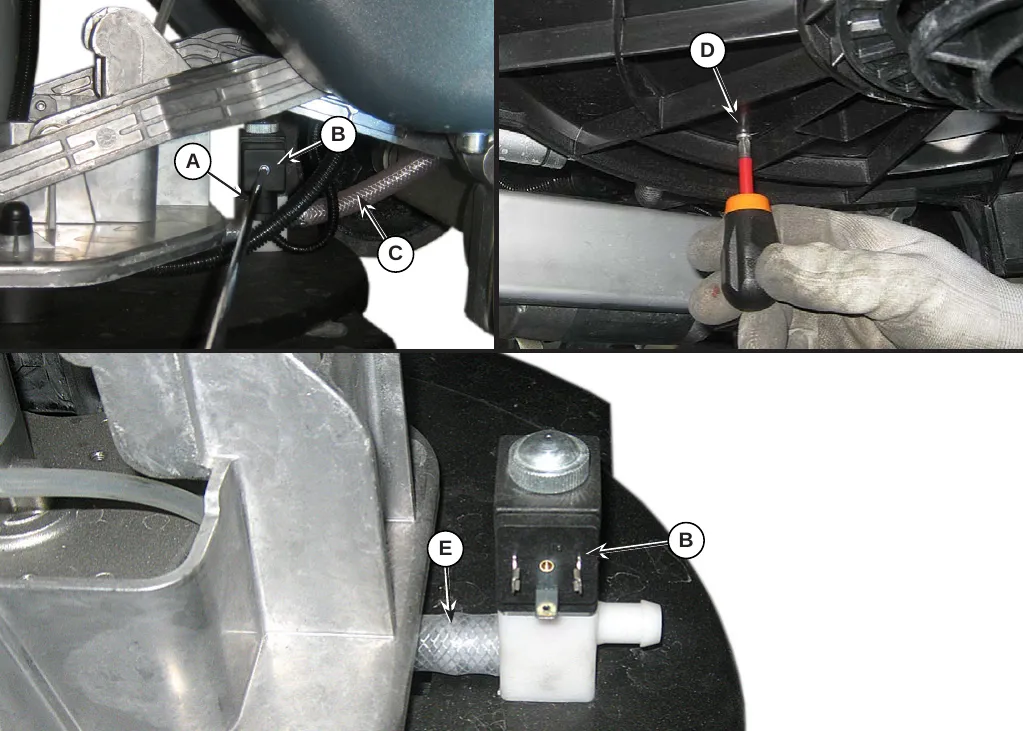
Detergent pump (piston pump)
(Model No.: 9087352020, 9087354020, 9087350020, 9087351020, 9087353020, 9087355020)
Remove
- Drive the machine on a level floor.
- Switch off the machine and disconnect the battery connector.
- Lift the recovery tank.
- Unscrew the two screws (A) (Figure 12) and remove the cover (B).
- Disconnect the connectors (C) and the tank hose (D) and brush hose (E).
- Unscrew the two screws (F) and remove the detergent pump (G).
Installation
- Assemble the components in the opposite order to that they were removed in, ensuring the supply hoses (D) and (E) are correctly fitted on the detergent pump.
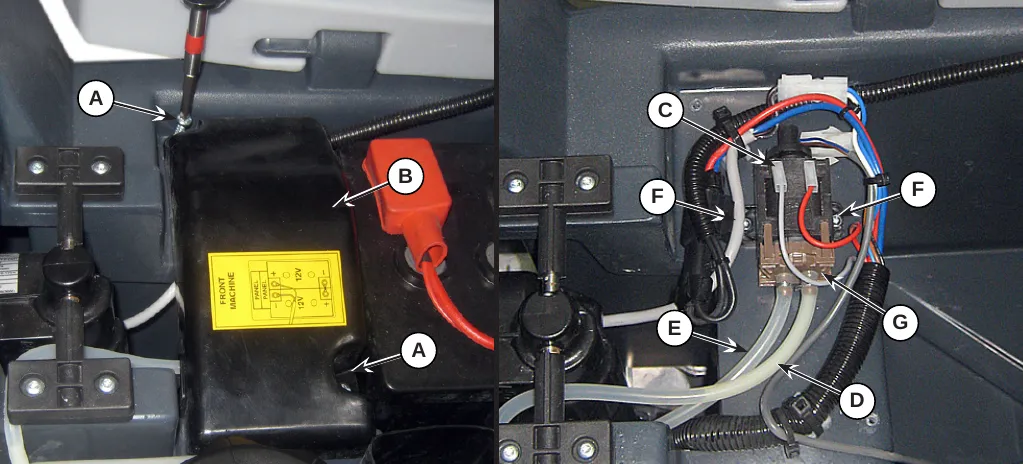
Detergent pump (peristaltic pump)
(Model No.: 9087403020, 9087404020, 9087400020,9087401020, 9087405020, 9087402020)
Remove
- Drive the machine on a level floor.
- Switch off the machine and disconnect the battery connector.
- Lift the recovery tank.
- Unscrew the two screws (A) (Figure 13) and remove the cover (B).
- For remove only the head of the detergent pump:
- Disconnect the tank hose (C) and brush hose (D).
- Remove the head of the detergent pump (E) to the detergent pump motor.
- For remove the detergent pump:
- Disconnect the connectors (F) and the tank hose (C) and brush hose (D).
- Unscrew the two screws (G) and remove the detergent pump (H).
Installation
Assemble the components in the opposite order to that they were removed in, ensuring the supply hoses (C) and (D) are correctly fitted on the detergent pump.
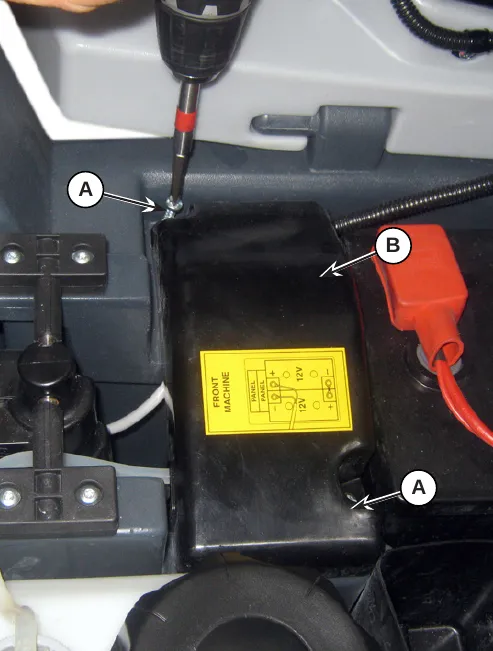
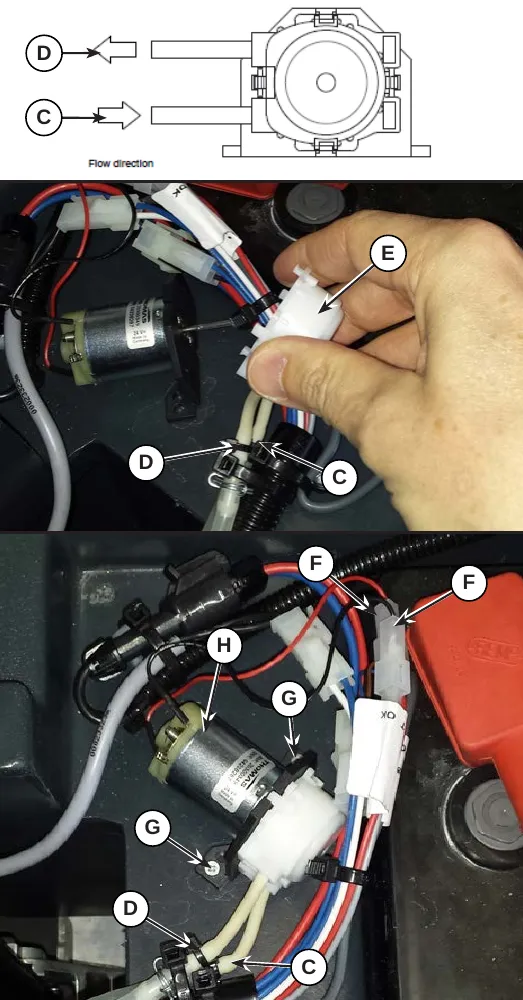
Checking the water level sensor operation
- Insert the Supervisor key (yellow) in place of the User key (grey or blue) to access the main screen (Figure 14) of the multifunction display.
- With the solution tank more than half full, the symbol displayed is (A).
- With the solution tank less than half full, the symbol displayed is (B).
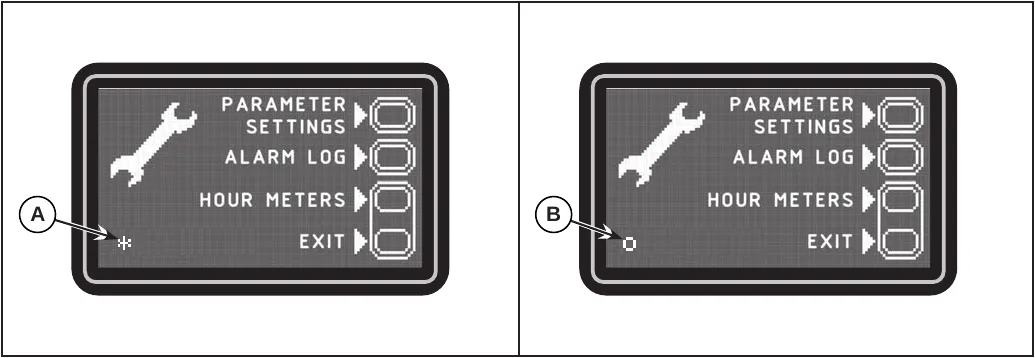
Water level sensor
Remove
- Drive the machine on a level floor.
- Switch off the machine and disconnect the battery connector.
- Lift the recovery tank.
- Unscrew the two screws (A) (Figure 15) and remove the cover (B).
- Unscrew the two screws (C) and lift the tank (D).
- Disconnect the connector (E).
- Disassemble and remove the water level sensor (F).
Assembly
- Assemble the components in the reverse order of disassembly.
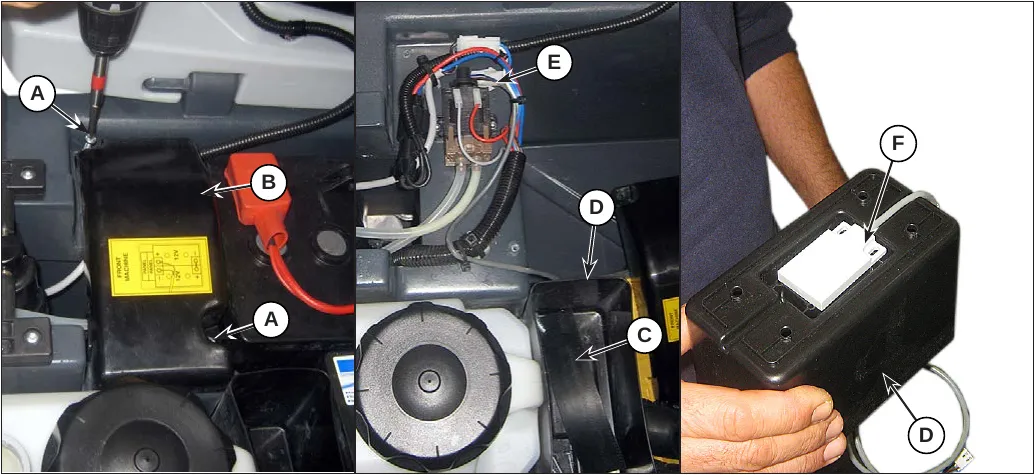
Specifications
| Description / Model | SC500 | |
|---|---|---|
| DISC | REV | |
| Solution tank capacity | 12 US gal (45 liters) | |
| Solution flow values | 0.25 fl oz per 3.3 ft (0.75 cl/m) / 0.51 fl oz per 3.3 ft (1.5 cl/m) 1.01 fl oz per 3.3 ft (3.0 cl/m) / 0.74 gal/min (2.8 l/min) | 0.13 fl oz per 3.3 ft (0.38 cl/m) / 0.25 fl oz per 3.3 ft (0.75 cl/m) 0.51 fl oz per 3.3 ft (1.5 cl/m) / 0.74 gal/min (2.8 l/min) |
| EcoFlex kit tank capacity | 1.3 US gal (5 L) | |
| EcoFlex kit detergent percentage setting | Ratio 1:400 ÷ 1:33 (0.25% ÷ 3%) | |
34 - Scrub system, disc
Functional description
The disc brush system can be started by the operator.
The disc brush turn counter-clockwise.
The rotating brush system cleans the surface of the floor. The main component of the brush system is the deck where the brush or the pad holder with pad suitable for the type of surface to be cleaned is installed.
The brush deck is installed on a frame to which the electrical actuator and the four levers for connection to the frame integrated with the brush motor is coupled.
The electrical actuator (M5) lifts and lowers the deck. The operating and washing pressure depends on the weight of the deck. The actuator also permits the extra pressure function. Extra pressure is selected via the button on the User interface controller.
Brush rotation occurs only when the brush motor (M1) is driven by the Main machine controller (EB1) following activation of the paddle.
The brush system uses the solution to wash the floor.
In case of brush motor overload, a safety system stops the brush to prevent continuous overload.
If the overload takes place when the extra pressure function is on, the system automatically turns the extra pressure function off. If the overload persists, the brush stops.
The overload is detected by monitoring the current flow on the brush motor. If the motor current reaches the value stored in the parameter “VS1” and the overload persists, the brush motor will stop following a delay which varies on the basis of the extent of the overload.
To start scrubbing again after a brush stop due to overload, turn the machine off. Then restart the machine.
To work properly, the brush motor (M1) needs the following:
- Brush function on
- Forward paddle pressed
- Battery level not in critical condition with flashing segments.
Brush release system
In order to release the brush from its hub, the brush motor starts up and then stops rapidly. The brush’s inertia thus causes it to disengage from the hub.
Wiring diagram
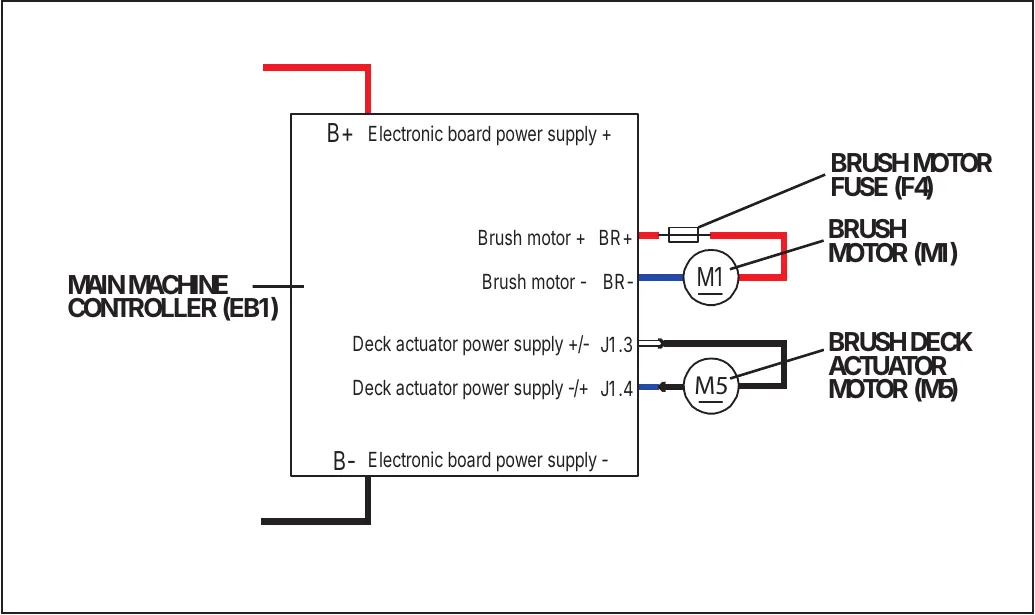
| Label on drawing | Terminal |
|---|---|
| Electronic board power supply + | B+ |
| Brush motor + | BR+ |
| Brush motor - | BR- |
| Deck actuator power supply +/- | J1.3 |
| Deck actuator power supply -/+ | J1.4 |
| Electronic board power supply - | B- |
- MAIN MACHINE CONTROLLER (EB1)
- BRUSH MOTOR FUSE (F4)
- BRUSH MOTOR (M1)
- BRUSH DECK ACTUATOR MOTOR (M5)
Brush deck actuator system
The brush deck actuator of SC500 is a new generation actuator developed by SIR and ITALSEA and it is controlled directly by the Main machine controller (EB1) without electromechanical limit switches. ITALSEA patented the system to control the actuator. Basically the system uses deeply measurements of the current flow in the actuator to know its position in real time.
The actuator is mechanically proof of the end of stroke because of it reaches the end of stroke with limited voltage applied and so with a limited speed and force.
The actuator moves and stops in 3 defined positions:
- RETRACTED: fully retracted end of stroke (deck lifted)
- WORK: intermediate position (deck on the floor, normal work condition)
- EXTRAPRESSURE: fully extended end of stroke (deck on the floor with extrapressure given pressing the actuator integrated spring)
The actuator is powered at 50% PWM (about 12Vdc) near the end of strokes or during the machine switch-on reset feature, otherwise at 100% PWM (24Vdc)
The machine switch-on reset feature moves the actuator from the position where it was the last time the machine was switched off to the RETRACTED position.
The quotes of the actuator strokes, with a tolerance of ±0.08 in (±2 mm) are: stroke RETRACTED-WORK = 3.3 in (85 mm), stroke RETRACTED-EXTRAPRESSURE (end to end) = 4.7 in (120 mm).
There are time out limits and amperometric limits related to the different phases of the movement as follow:
| Movement from: | To: | PWM | AMP limit | Alarm if AMP limit reached | Timeout |
|---|---|---|---|---|---|
| Extrapressure | Work | 100% (=24Vdc) | 4A per Time>1sec. | Yes | 7.5 sec. |
| Work | Retracted – 0.4 in (10 mm) | 100%(=24Vdc) | 4A per Time>1sec. | Yes | 15 sec. |
| Retracted – 0.4 in (10 mm) | Retracted | 50%(=12Vdc) | 2A per Time>1sec. | Not (Main machine controller assumes the actuator reaches the end of stroke) | |
| Reset (during machine switch on) | 50%(=12Vdc) | 2A per Time>1sec. | Not (Main machine controller assumes the actuator reaches the end of stroke) | 25 sec. | |
Component locations
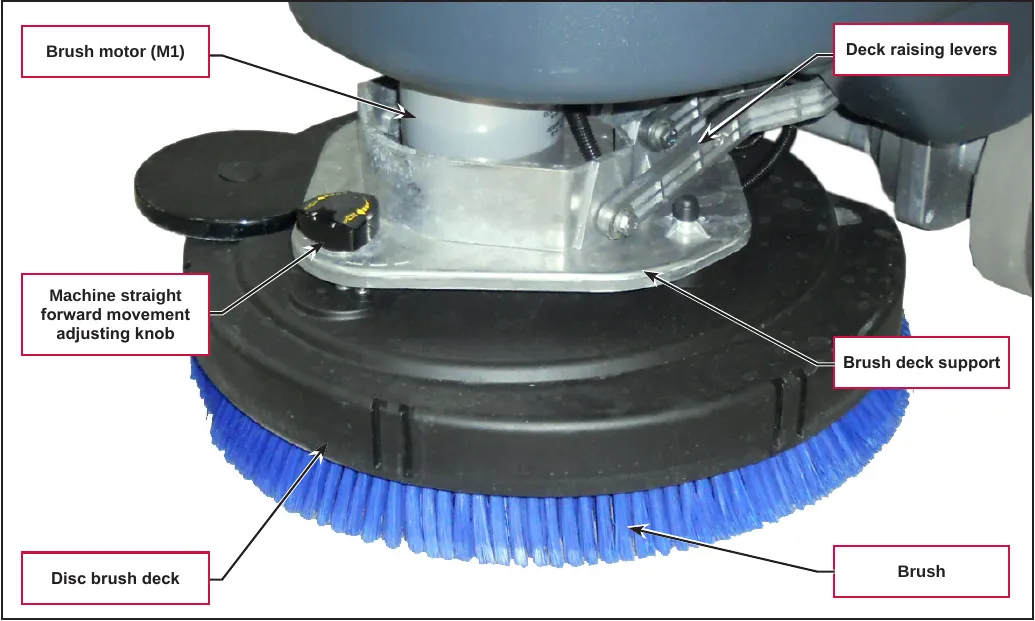
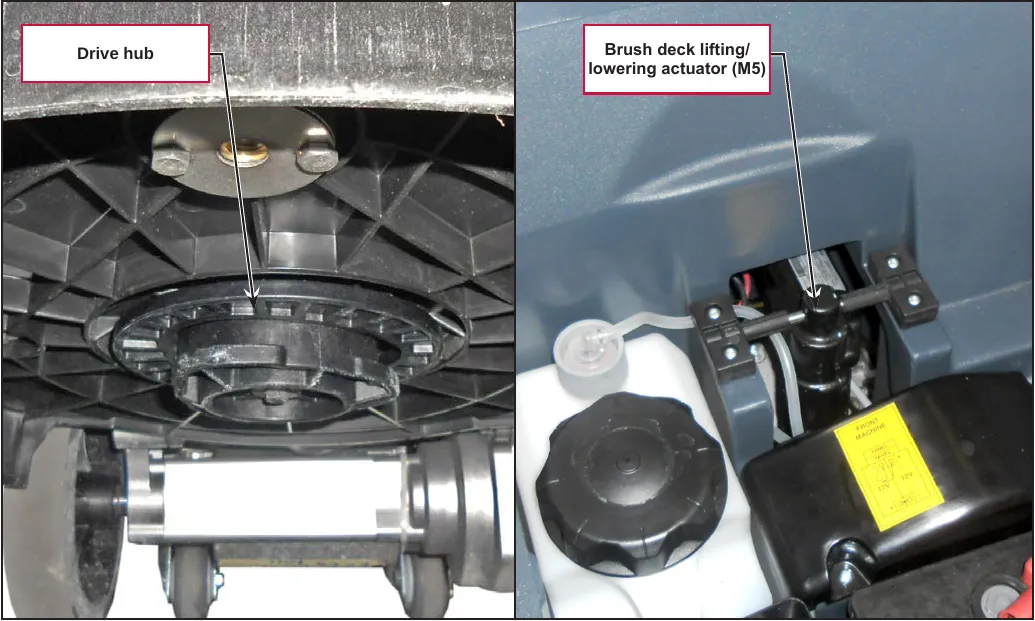
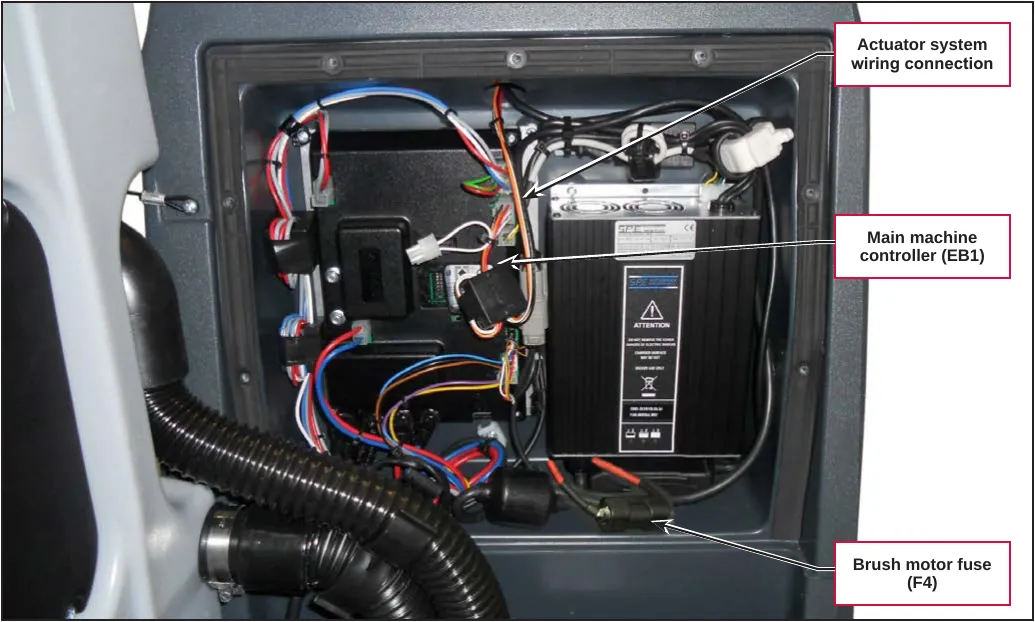
Maintenance and adjustments
Brush installation/removal
- According to the kind of cleaning to be performed, the machine can be equipped either with the brush (A) (Figure 5) or the pad-holder (B) with pad (C) together with the appropriate deck.
- Turn on the machine by the key and the button [Power].
- Bring the machine speed to minimum by pressing the tortoise [Tortoise] machine speed adjustment button.
- With the brush deck raised, position the brush (A) or pad-holder (B) under the deck.
- Press the One-Touch button [One-Touch] to lower the deck onto the brush.
- To engage the brush, press the paddle (2), then release it. If necessary, repeat the procedure until the brush is engaged.
- To remove the brush, the deck must be lifted by pressing the One-Touch button [One-Touch], then press the brush release button [Brush release]. When the display shows the brush release icon, wait until the brush is lowered onto the floor.
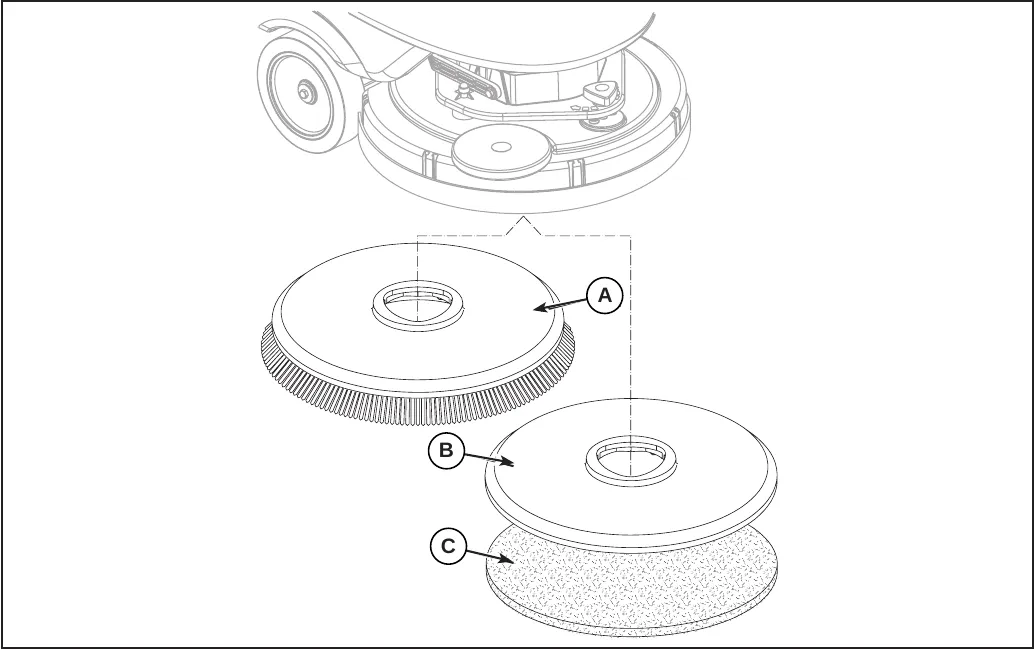
Troubleshooting
| Trouble | Possible Causes | Remedy |
|---|---|---|
| The brush does not clean properly | The brush is excessively worn | Replace |
| The brush does not turn | See the chapter Control System, Main machine controller (EB1) Error Codes | |
| Brush motor fuse (F4) broken | Replace | |
| Brush motor carbon brushes worn | Replace | |
| Presence of bulky debris or string around the brush or between the brush and attachment flange | Remove the brush and clean it | |
| Faulty brush motor | Repair or replace | |
| Wiring damaged | Repair | |
| It is not possible to raise/lower the brush | See the chapter Control System, Main machine controller (EB1) Error Codes | |
| Deck raising/lowering actuator (M5) broken | Replace | |
| Break in actuator wiring | Check the connections according to the instructions in the Electrical System chapter, Troubleshooting paragraph | |
| Main machine controller (EB1) damaged | Replace | |
| The brush disengagement system does not work | Main machine controller (EB1) faulty | Replace |
Brush motor current draw test
- Drive the machine on a level floor.
- Remove the brush.
- Disconnect the drive system connector (A) (Figure 6) on the Main machine controller (B) to disable machine movement.
- Turn on the machine by the key and the button [Power].
- Press the One-Touch button [One-Touch] to lower the brush deck.
- Apply the amperometric clamp (C) to an electrical cable (D) of the brush motor.
- Activate the brush by pressing the paddle, then check that the brush motor current draw is between 3 and 4A at 20V(*).
- Deactivate the brush by releasing the paddle and raise the brush deck by pressing the One-Touch button [One-Touch].
- Remove the Amp clamp (C).
- If the amperage is higher, perform the following procedures to detect and correct the abnormal amperage:
- Check the brush motor carbon brushes.
- Remove the brush motor then check the condition of its components.
- If the above-mentioned procedures do not lead to a correct amperage, it is necessary to replace the brush motor.
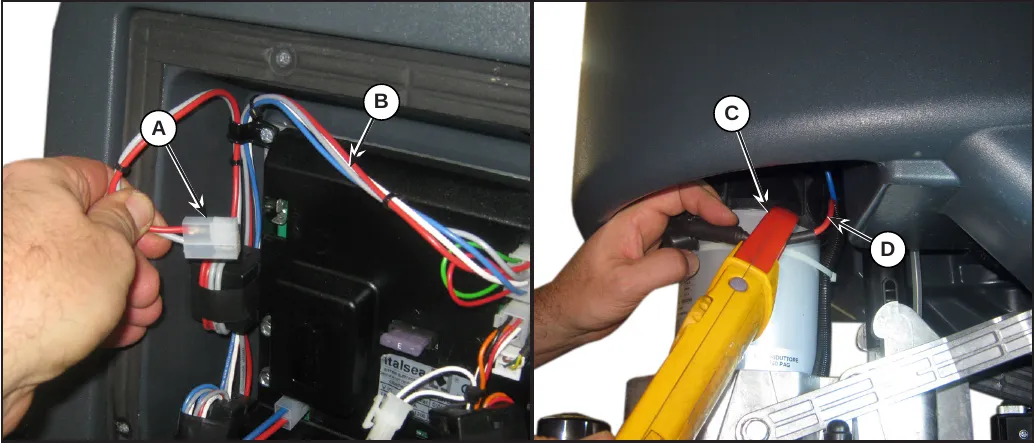
(*) Voltage value supplied by the Main machine controller to the brush gear motor when the gear motor current draw is less than the value of the RPM parameter.
Removal and installation
Brush deck
Disassembly
- Drive the machine on a level floor or on a hoisting system to facilitate the disassembly procedures.
- Remove the brush.
- Turn on the machine by the key and the button [Power].
- Lower the brush deck by pressing the One-Touch button [One-Touch].
- Switch off the machine and disconnect the battery connector.
- Undo the screw (A) (Figure 7) on the pin of the actuator (B); retain the bushing.
- Unscrew and disconnect the connection (C) on the solenoid valve (D).
- Disconnect the detergent supply hose (E) from the solenoid valve.
- Remove the cover (F) (Figure 8), then disconnect the hose (G) from the detergent pump (H).
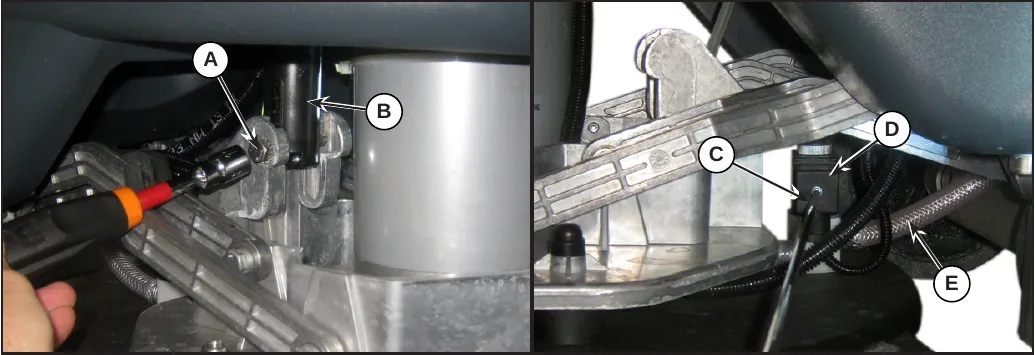
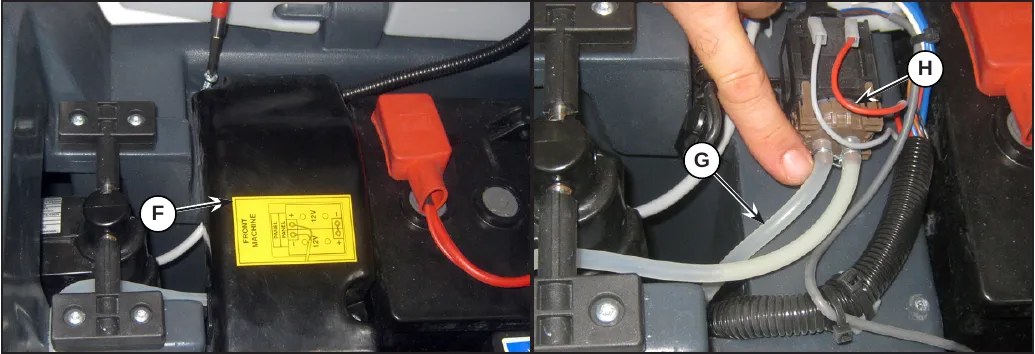
- Remove the 4 screws (I) (Figure 9) fastening the deck raising levers (J), retaining the bushings and washers.
- Unscrew the 2 retaining nuts (K) and disconnect the brush motor power supply cables (L).
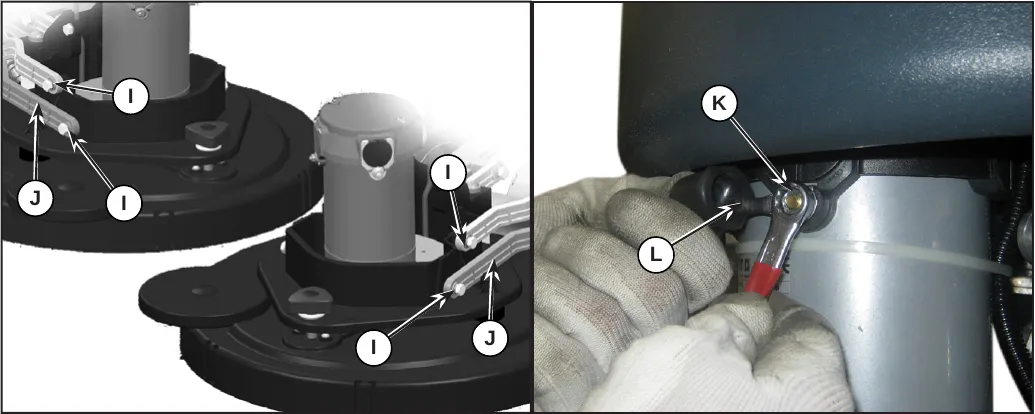
- Extract the brush deck (M) (Figure 10) from beneath the solution tank.
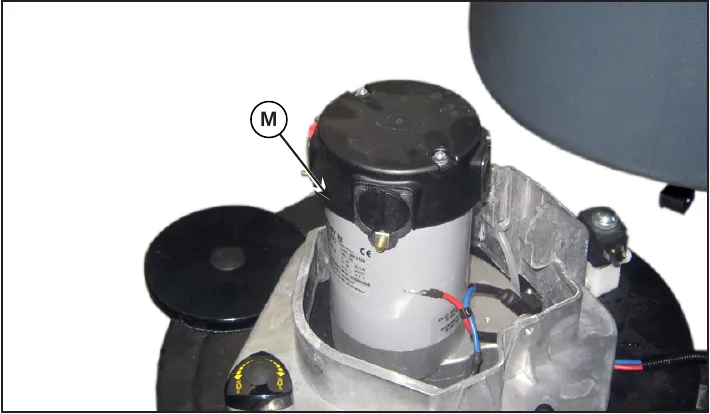
Assembly
- Assemble the components in the opposite order they were removed in, ensuring the brush motor power supply cable polarities are correct.
Checking/replacing brush motor carbon brushes
Check
- Remove the brush deck.
- Remove any dust and dirt from around the brush motor carbon brushes.
- Remove the four protective covers (A) (Figure 11) by disconnecting the clips.
- Remove the carbon brush nuts (B) with the lead-in wires.
- Disengage the tabs (C) and remove the carbon brushes (D).
- Check the carbon brushes (D) for wear. The carbon brushes are worn out when:
- They do not make sufficient contact with the armature of the brush motor due to their wear
- When their contact surface is not intact
- When the residual stroke is below 0.12 in (3 mm)
- When the thrust spring etc. is broken
- Replace the carbon brushes as an assembly.
Reassembly
- Assemble the components in the reverse order of disassembly.
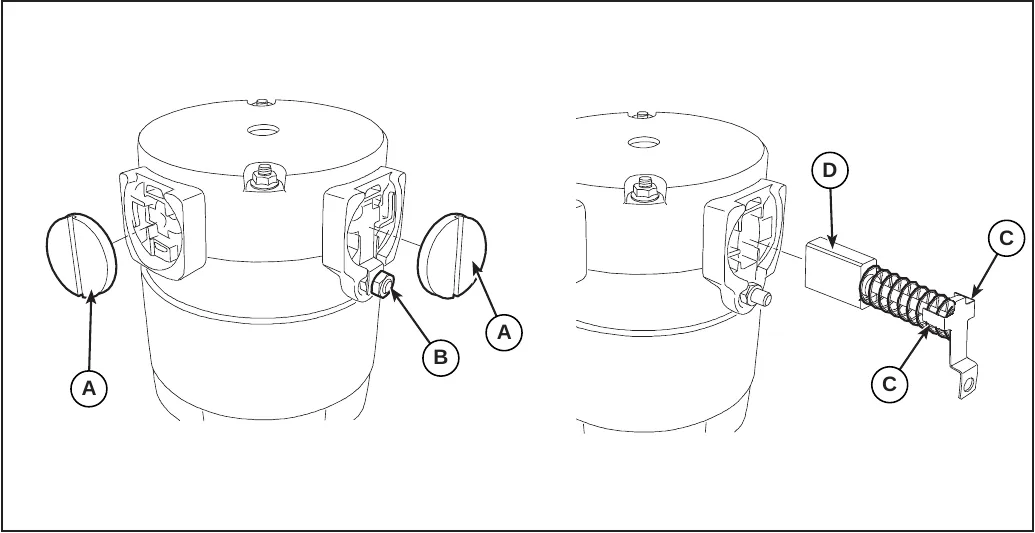
Brush motor disassembly/assembly
Disassembly
- Remove the brush deck.
- Working at the bench, remove the screw (A) (Figure 12) of the brush motor.
- Use a puller to remove the brush hub (B).
- Remove the screws (C).
- Remove the brush motor (D).
- Recover the key (E).
Assembly
- Assemble the components in the reverse order of disassembly.
Note: For further information on deck components see the Spare Parts List.
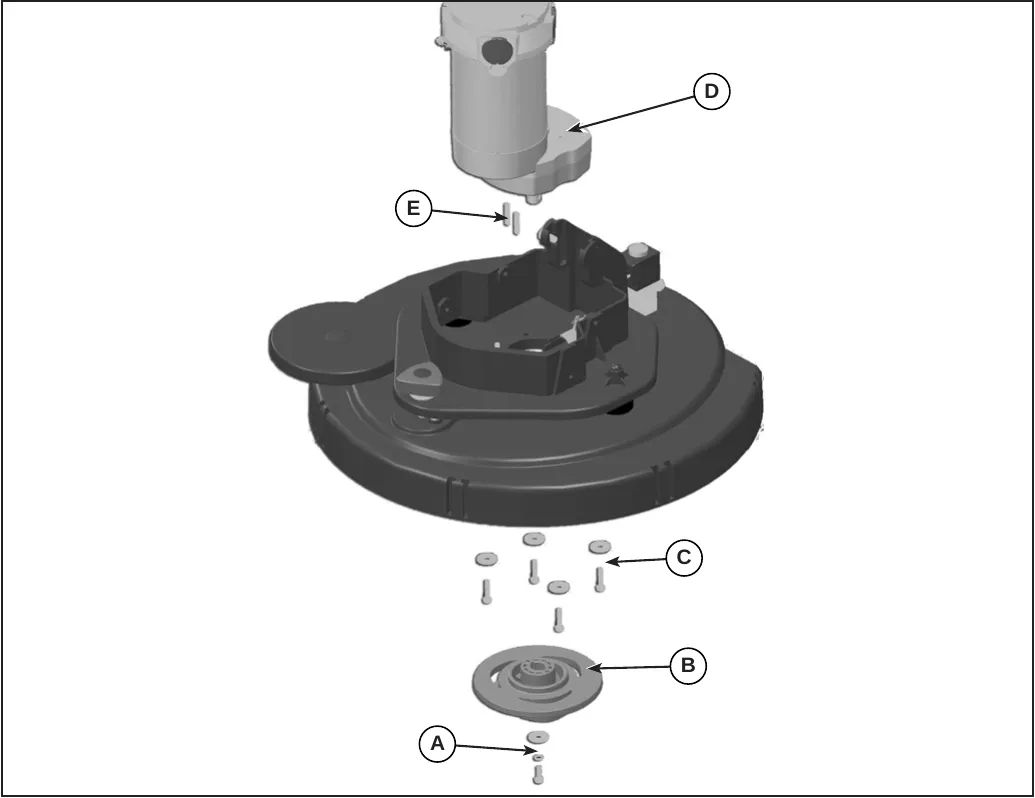
Brush deck actuator
Remove
- Lower the brush deck.
- Switch off the machine and disconnect the battery connector.
- Remove the cover and disconnect the actuator connector (A) (Figure 13).
- Unscrew the screw (B) of the lower pin, retaining the bushings.
- Remove the screws (C), retaining the plates (D).
- Remove the actuator (E).
Installation
- Assemble the components in the reverse order of disassembly.
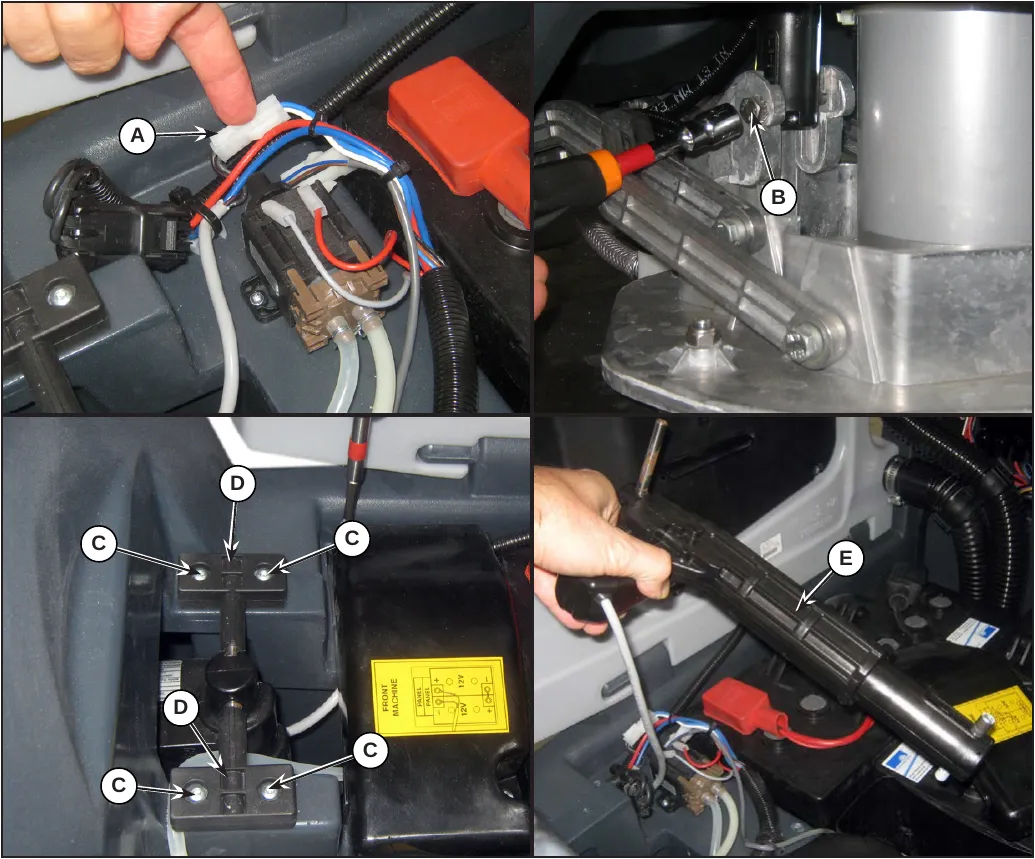
Specifications
| Description / Model | SC500 | ||
|---|---|---|---|
| DISC | REV | ||
| Cleaning width | 20 in (530 mm) | ||
| Brush/pad diameter | 20 in (530/508 mm) | ||
| Brush pressure with extra-pressure function turned off | 33 lb (15 kg) | ||
| Brush pressure with extra-pressure function turned on | 66 lb (30 kg) | ||
| Brush deck right/left offset | 2.5 / 0.6 in (65 / 15 mm) | ||
| Brush distance from the floor (when lifted) | 1.6 in (40 mm) | ||
| Brush motor power | 0.6 hp (450 W) | ||
| Brush rotation speed | 155 rpm | ||
| Protection class | IP 20 | ||
| Insulation class | F | ||
| Actuator technical data | Strength | 67 lbf (300 N) | |
| Maximum load | 135 lbf (600 N) | ||
| Regulated travel | 3.3 in (85 mm) | ||
| Total travel | 4.7 in (120 mm) | ||
| Maximum speed | 0.63 in/s (16 mm/s) | ||
| Voltage | 24V | ||
| Protection class | IP 44 | ||
| Insulation class | B | ||
| No-load current draw | 0.5A | ||
| Full-load current draw | 3A | ||
34 - Scrub system, REV
Functional description
The REV brush system can be operated by the operator.
The REV brush has a movement with distinctive orbital movements and anticlockwise rotation.
The REV allows the surface concerned to be washed/cleaned by the movement of the brush. The main component of the system is the deck where the brush or the pad suitable for the type of surface to be cleaned is installed.
The brush deck is fixed to the machine with a support to which the electrical actuator and two anchor levers are applied.
The electrical actuator (M5) lifts and lowers the deck. The operating and washing pressure depends on the weight of the deck. The actuator also permits the extra pressure function. Extra pressure is selected via the button on the User interface controller.
Brush rotation occurs only when the REV motor (M1) is driven by the Main machine controller (EB1) following activation of the paddle.
Transmission of motion from the gear motor to the brush occurs via an eccentric system which provides the orbital movement.
The system, once activated, uses the solution coming form the solution system, to wash the floor.
In case of REV motor overload, a safety system stops the brush to prevent continuous overload.
If the overload takes place when the extra pressure function is on, the system automatically turns the extra pressure function off. If the overload persists, the brush stops.
The overload is detected by monitoring the current flow sum on the REV motor. If the motor current reaches the value stored in the parameter “VS1” and if the overload persists, the REV motor will stop following a delay which varies on the basis of the extent of the overload.
To start scrubbing again after a brush stop due to overload, turn the machine off. Then restart the machine.
In summary, operation of the REV motor (M1) requires the following conditions/inputs:
- Brush function on
- Forward paddle pressed
- Battery level not in critical condition with flashing segments.
Wiring diagram
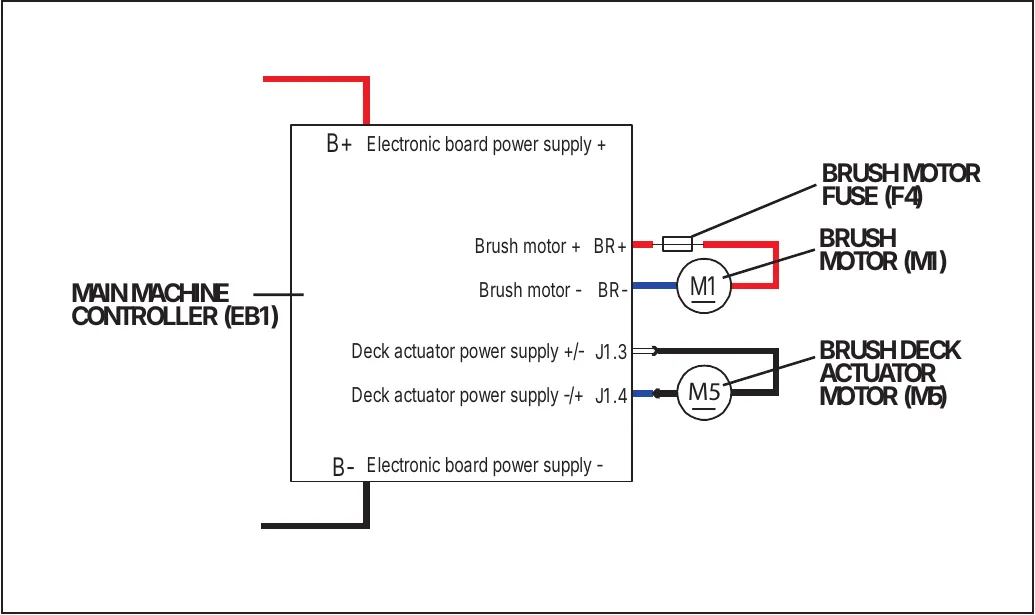
| Label on drawing | Terminal |
|---|---|
| Electronic board power supply + | B+ |
| Brush motor + | BR+ |
| Brush motor - | BR- |
| Deck actuator power supply +/- | J1.3 |
| Deck actuator power supply -/+ | J1.4 |
| Electronic board power supply - | B- |
- MAIN MACHINE CONTROLLER (EB1)
- BRUSH MOTOR FUSE (F4)
- BRUSH MOTOR (M1)
- BRUSH DECK ACTUATOR MOTOR (M5)
Brush deck actuator system
The brush deck actuator of SC500 is a new generation actuator developed by SIR and ITALSEA and it is controlled directly by the Main machine controller (EB1) without electromechanical limit switches. ITALSEA patented the system to control the actuator. Basically the system uses deeply measurements of the current flow in the actuator to know its position in real time.
The actuator is mechanically proof of the end of stroke because of it reaches the end of stroke with limited voltage applied and so with a limited speed and force.
The actuator moves and stops in 3 defined positions:
- RETRACTED: fully retracted end of stroke (deck lifted)
- WORK: intermediate position (deck on the floor, normal work condition)
- EXTRAPRESSURE: fully extended end of stroke (deck on the floor with extrapressure given pressing the actuator integrated spring)
The actuator is powered at 50% PWM (about 12Vdc) near the end of strokes or during the machine switch-on reset feature, otherwise at 100% PWM (24Vdc)
The machine switch-on reset feature moves the actuator from the position where it was the last time the machine was switched off to the RETRACTED position.
The quotes of the actuator strokes, with a tolerance of ±0.08 in (±2 mm) are: stroke RETRACTED-WORK = 2.5 in (63 mm), stroke RETRACTED-EXTRAPRESSURE (end to end) = 3.8 in (98 mm).
There are time out limits and amperometric limits related to the different phases of the movement as follow:
| Movement from: | To: | PWM | AMP limit | Alarm if AMP limit reached | Timeout |
|---|---|---|---|---|---|
| Extrapressure | Work | 100% (=24Vdc) | 4A per Time>1sec. | Yes | 7.5 sec. |
| Work | Retracted – 0.4 in (10 mm) | 100%(=24Vdc) | 4A per Time>1sec. | Yes | 15 sec. |
| Retracted – 0.4 in (10 mm) | Retracted | 50%(=12Vdc) | 2A per Time>1sec. | Not (Main machine controller assumes the actuator reaches the end of stroke) | |
| Reset (during machine switch on) | 50%(=12Vdc) | 2A per Time>1sec. | Not (Main machine controller assumes the actuator reaches the end of stroke) | 25 sec. | |
Component locations
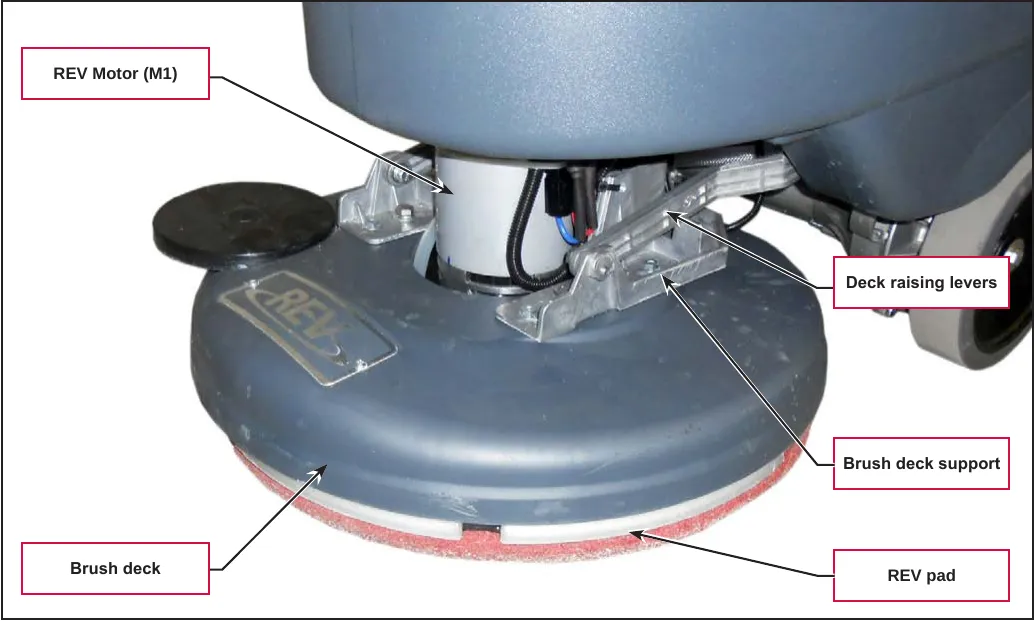
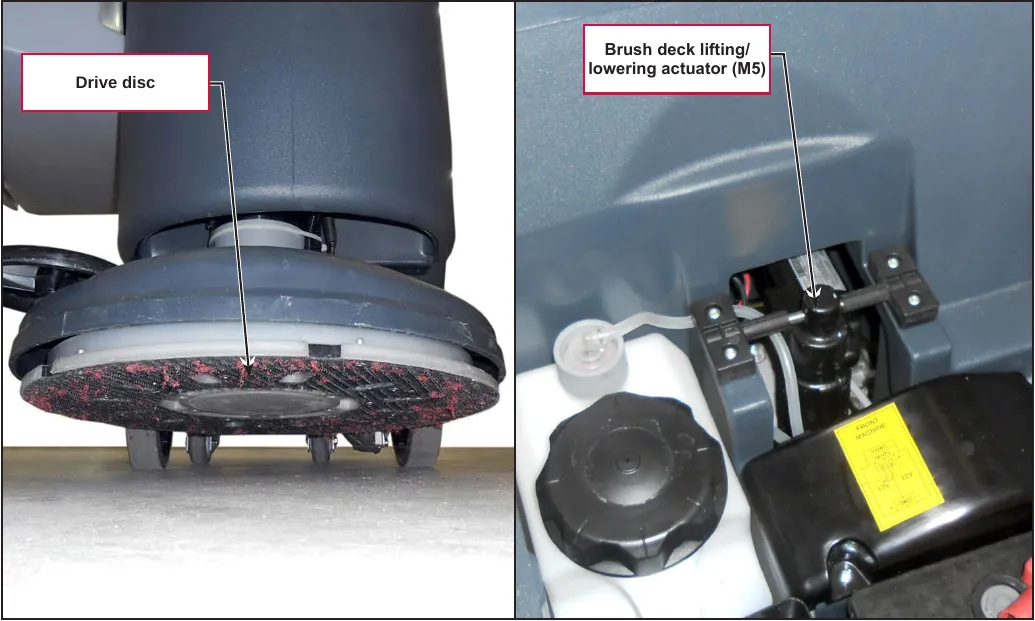
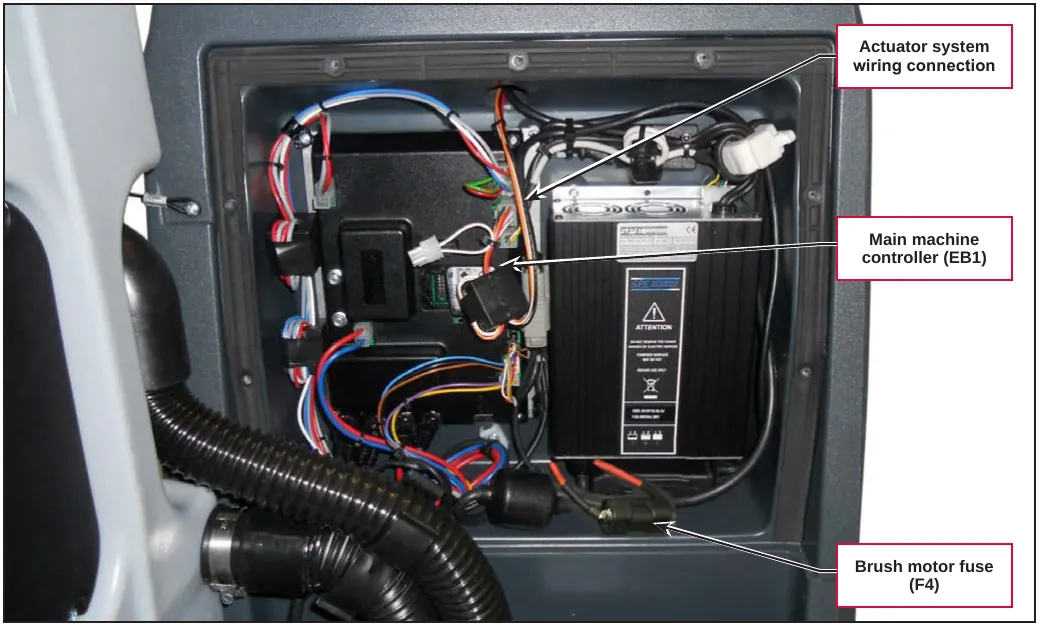
Maintenance and adjustments
Brush installation/removal
- With the REV deck raised, install the pad (A) (Figure 5) or the brush (C), depending on the type of treatment to be performed:
- Place the pad (A) under the deck and press it until it is fastened with the Velcro of the drive disc (B).
- Place the brush (C, optional) under the deck, and then match the centering pins (D) to the respective holes of the drive disc (B), and then engage the brush with the mounting screws (E).
- To remove the pad or brush, proceed in the reverse order.
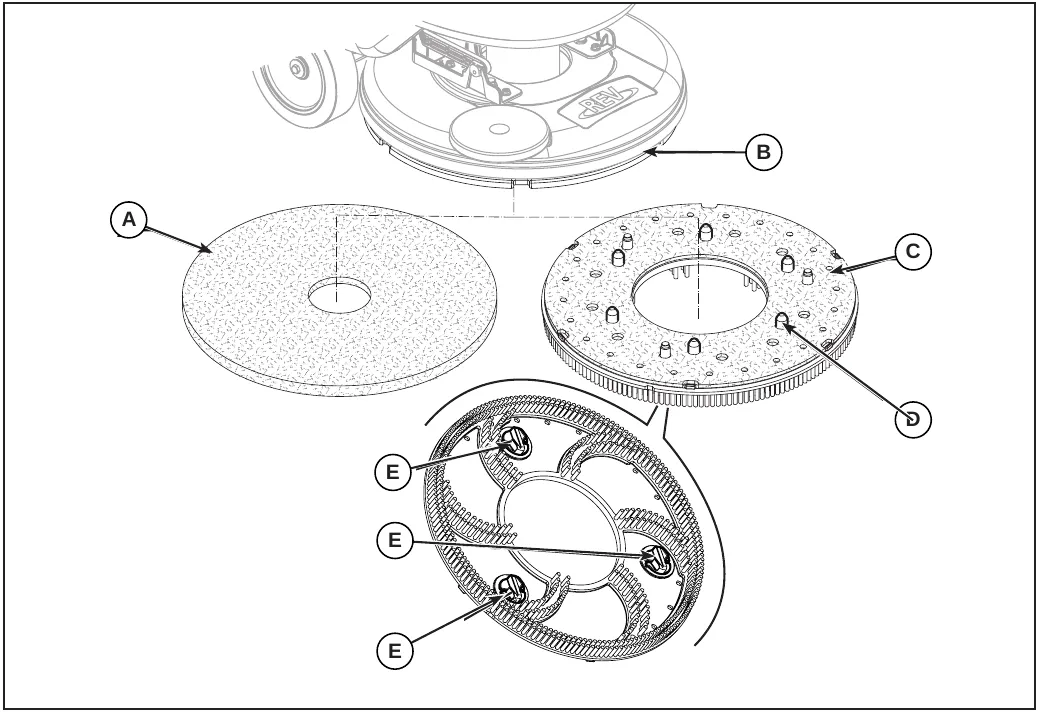
Troubleshooting
| Trouble | Possible Causes | Remedy |
|---|---|---|
| The brush does not clean properly | The brush is excessively worn | Replace |
| The brush does not turn | See the chapter Control System, Main machine controller (EB1) Error Codes | |
| Brush motor fuse (F4) broken | Replace | |
| REV motor carbon brushes worn | Replace | |
| Faulty REV motor | Repair or replace | |
| Wiring damaged | Repair | |
| It is not possible to raise/lower the brush | See the chapter Control System, Main machine controller (EB1) Error Codes | |
| Deck raising/lowering actuator (M5) broken | Replace | |
| Break in actuator wiring | Check the connections according to the instructions in the Electrical System chapter, Troubleshooting paragraph | |
| Main machine controller (EB1) damaged | Replace | |
| The deck is transmitting too much vibration to the machine | Deck vibration dampers worn. | Replace. |
REV motor current draw test
- Drive the machine on a level floor.
- Remove the brush.
- Lift the machine so that the deck no longer touches the floor once lowered.
- Disconnect the drive system connector (A) (Figure 6) on the Main machine controller (B) to disable machine movement.
- Turn on the machine by the key and the button [Power].
- Press the One-Touch button [One-Touch] to lower the brush deck.
- Apply the amperometric clamps (C) to an electrical wire (D) of the motor.
- Activate the brush by pressing the paddle, then check that the REV motor current draw is between 3 and 4A at 24V.
- Deactivate the brush by releasing the paddle and raise the brush deck by pressing the One-Touch button [One-Touch].
- Remove the Amp clamp (C).
- If the amperage is higher, perform the following procedures to detect and correct the abnormal amperage:
- Check the REV motor carbon brushes.
- Remove the REV motor then check the condition of its components.
- If the above-mentioned procedures do not lead to a correct amperage, it is necessary to replace the motor.
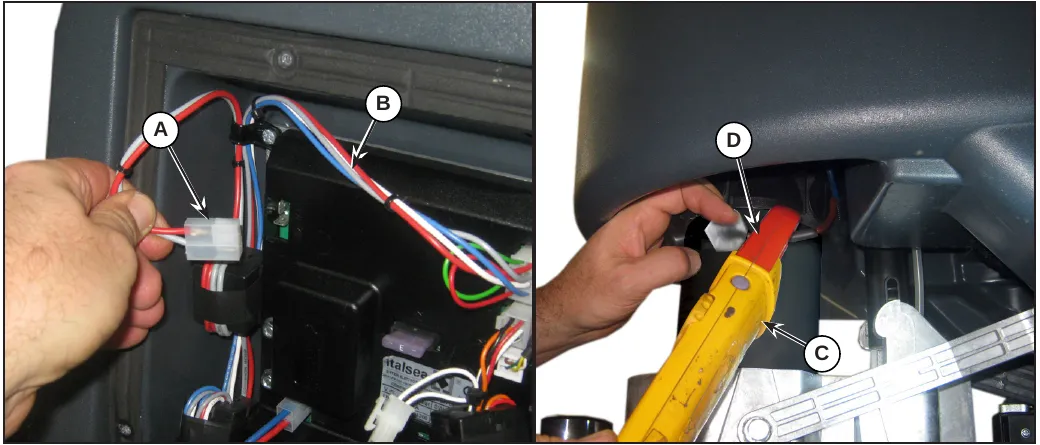
REV deck
Disassembly
- Drive the machine on a level floor or on a hoisting system to facilitate the disassembly procedures.
- Turn on the machine by the key and the button [Power].
- Lower the brush deck by pressing the One-Touch button [One-Touch].
- Switch off the machine and disconnect the battery connector.
- Undo the screw (A) (Figure 7) on the pin of the actuator (B); retain the bushing.
- Unscrew and disconnect the connection (C) on the solenoid valve (D).
- Disconnect the detergent supply hose (E) from the solenoid valve.
- Remove the cover (F) (Figure 8), then disconnect the hose (G) from the detergent pump (H).
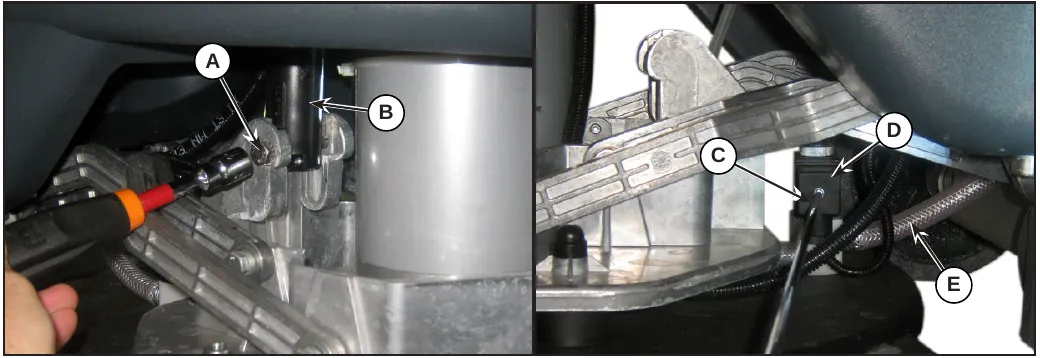
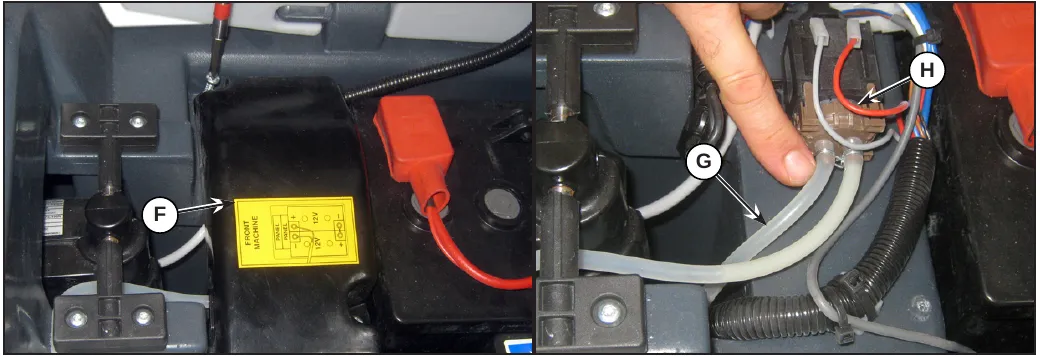
- Remove the 2 screws (I) (Figure 9) fastening the deck raising levers (J), retaining the bushings and washers.
- Disconnect the REV motor power supply connections (K).
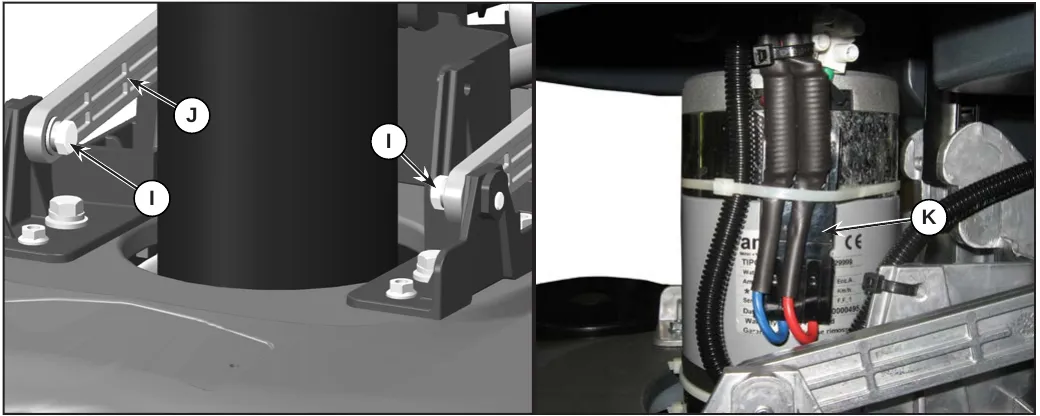
- Extract the REV deck (L) (Figure 10) from beneath the solution tank.
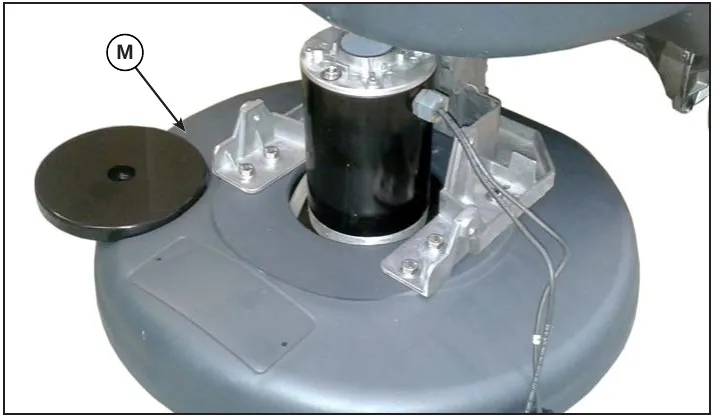
Assembly
- Assemble the components in the opposite order they were removed in, ensuring the REV motor power supply cable polarities are correct.
Checking/replacing REV motor carbon brushes
- Remove the REV deck.
- Place the deck on a workbench.
Note: The motor cannot be removed with the REV deck fitted to the machine.
- Remove the connector holder.
- Remove the wire mounting nut and the rubber gasket.
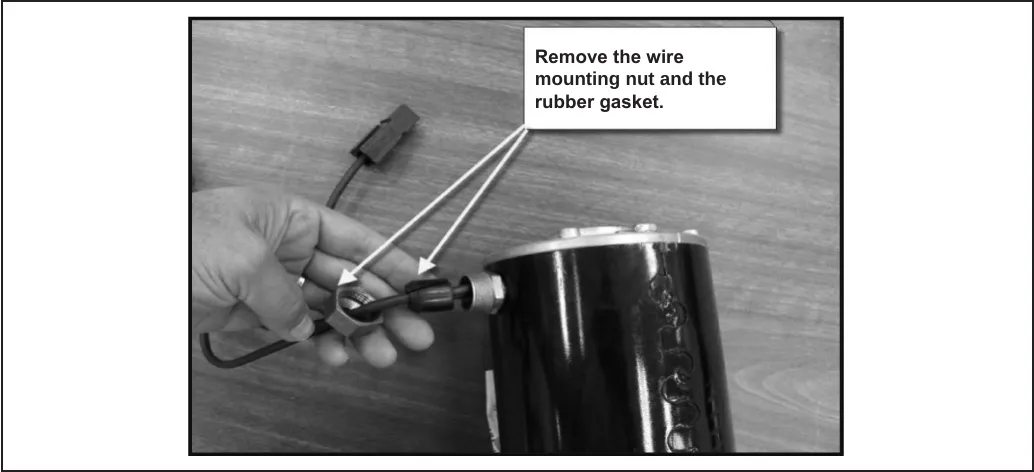
- Remove both nuts.
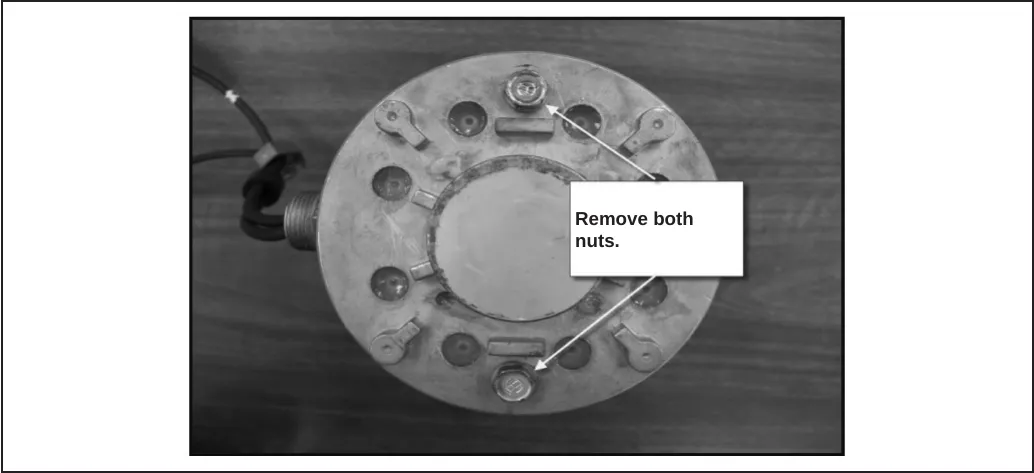
- Remove the top cover.
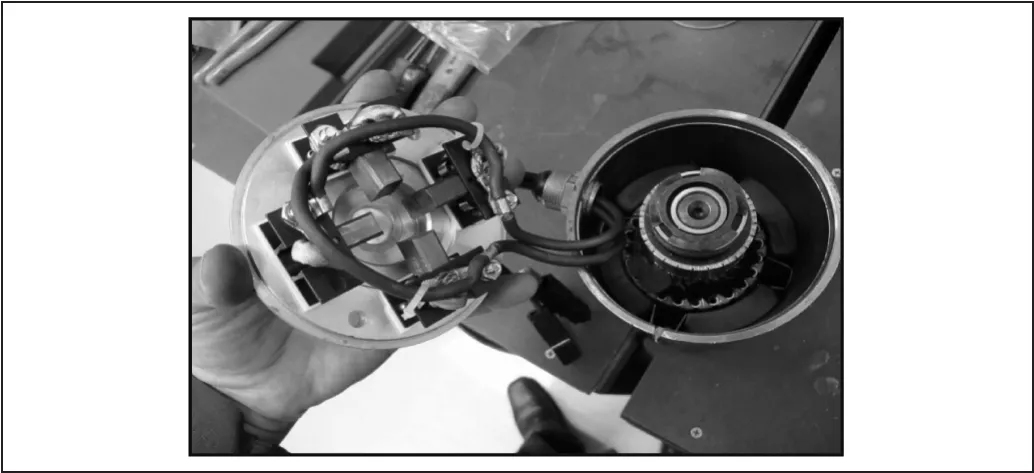
- Replace the carbon brushes.
- Before disassembly, note the spring position when the carbon brush is being pushed back.
- Remove the carbon brush and the spring.
- Install the new carbon brush and the spring in the proper carbon brush housing. Route the wire through the carbon brush housing. Place the rear end of the carbon brush in the spring “cup” so that the spring unrolls with the carbon brush pushed back once installed.
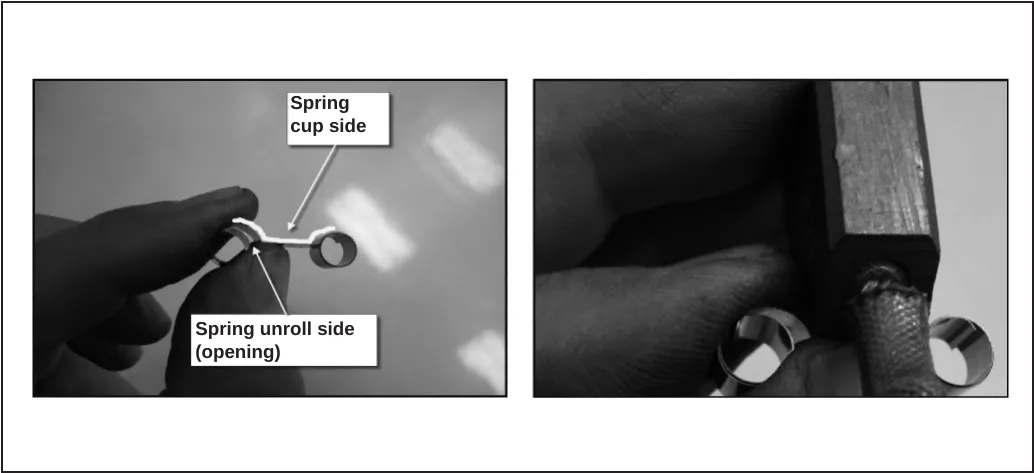
- Push the carbon brush back against the spring and insert a paper clip through the access hole in the deck. (Remove the silicone sealant from the holes). The wire must pass through the holes of the brush holder in front of the brush to press the carbon brush against the spring.
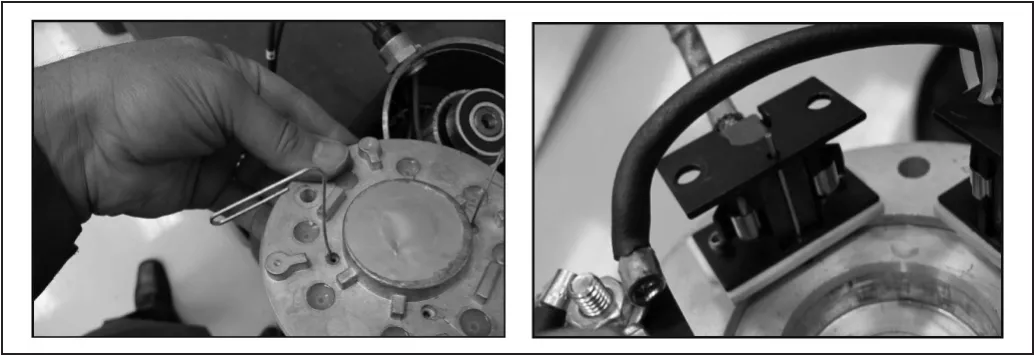
- Install the other three carbon brushes.
- Install the wave washer.
- Install the top cover.
- Install it far enough so that the carbon brushes make contact with the collector when the temporary support wires are removed. Then remove the temporary wires.
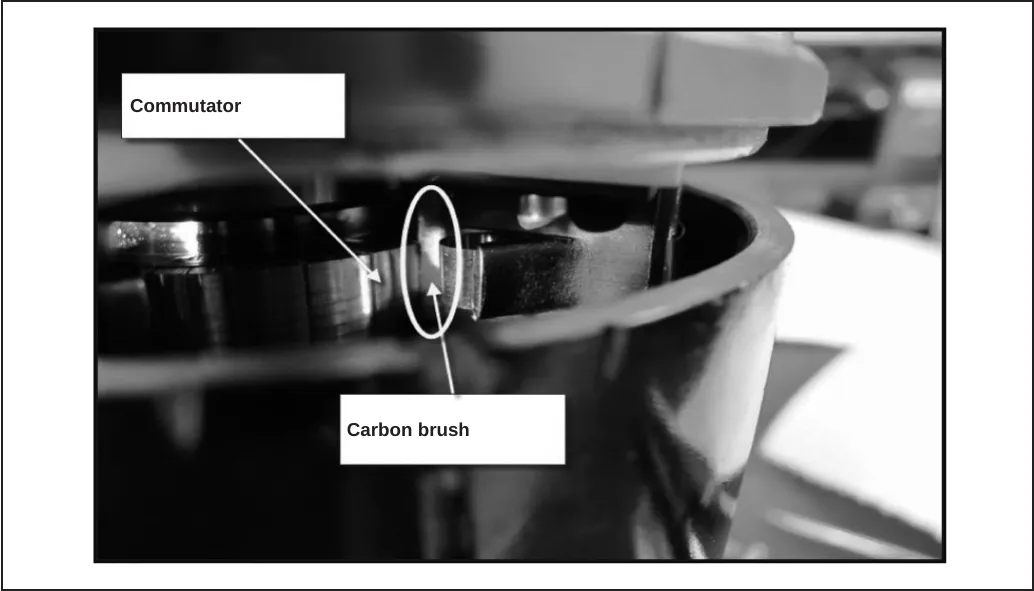
- Install the top cover.
- Install the nuts.
- Seal the wire mounting holes with silicone sealant.
Brush deck actuator
Remove
- Lower the brush deck.
- Switch off the machine and disconnect the battery connector.
- Remove the cover and disconnect the actuator connector (A) (Figure 17).
- Unscrew the screw (B) of the lower pin, retaining the bushings.
- Remove the screws (C), retaining the plates (D).
- Remove the actuator (E).
Installation
- Assemble the components in the reverse order of disassembly.
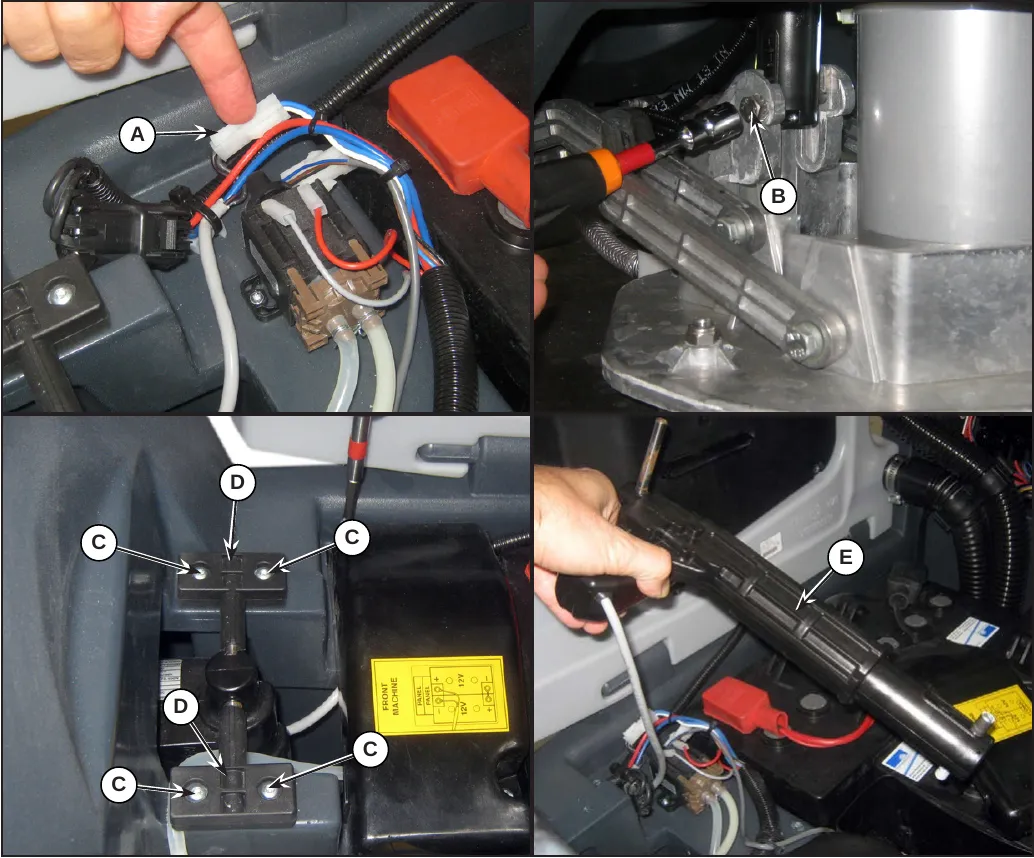
Specifications
| Description / Model | SC500 | ||
|---|---|---|---|
| DISC | REV | ||
| Cleaning width | 20 in (530 mm) | ||
| Brush/pad diameter | 20 in (530/508 mm) | ||
| Brush pressure with extra-pressure function turned off | 49 lb (22 kg) | ||
| Brush pressure with extra-pressure function turned on | 66 lb (30 kg) | ||
| Brush deck right/left offset | 3.9 / 1 in (100 / 25 mm) | ||
| Brush distance from the floor (when lifted) | 1.9 in (48 mm) | ||
| REV motor power | 0.9 HP (670 W) | ||
| Rotation speed | 2200 RPM | ||
| Insulation class | H | ||
| Insulation class | F | ||
| Actuator technical data | Strength | 67 lbf (300 N) | |
| Maximum load | 135 lbf (600 N) | ||
| Regulated travel | 2.5 in (63 mm) | ||
| Total travel | 3.8 in (98 mm) | ||
| Maximum speed | 24V | ||
| Voltage | IP 44 | ||
| Protection class | B | ||
| Insulation class | 0.5A | ||
| No-load current draw | 3A | ||
| Full-load current draw | 3A | ||
Printed this way in the manual. The printed table appears shifted by one row from “Maximum speed” down; it is kept as printed. Call us at 800-440-6723 to confirm before relying on these values.
38 - Squeegee system
Functional description
The squeegee system cleans the liquid off the floor, which is then collected by the recovery system. The squeegee is mounted on castors and the weight of the system presses it down on the floor.
The squeegee is attached with two quick-fastening handwheels which fit in the slots of the squeegee support. In case of fixed obstacles, the quick-fit system allows for squeegee immediate removal.
The squeegee can be raised and lowered by the operator using just their foot on the squeegee support footrest thanks to a mechanism consisting of two levers and a gas spring.
The angle of the squeegee and the correct adherence of the blades on the floor can be adjusted with a knob.
The front blade has an opening in the bottom edge so the squeegee can collect the water on the floor. The design and the central duct make it easy for the squeegee to clear the water. The bottom edge of the blade is smooth.
All 4 functional edges of each blade can be used before it needs replacing.
Component locations
(Model No.: 9087352020, 9087354020, 9087350020, 9087351020, 9087353020, 9087355020)
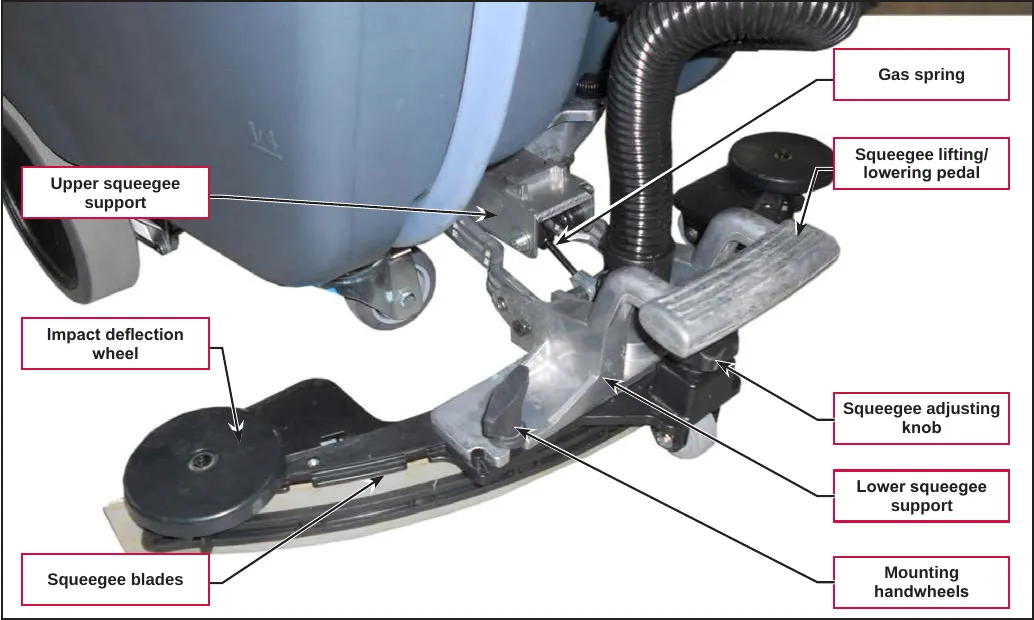
(Model No.: 9087403020, 9087404020, 9087400020,9087401020, 9087405020, 9087402020)
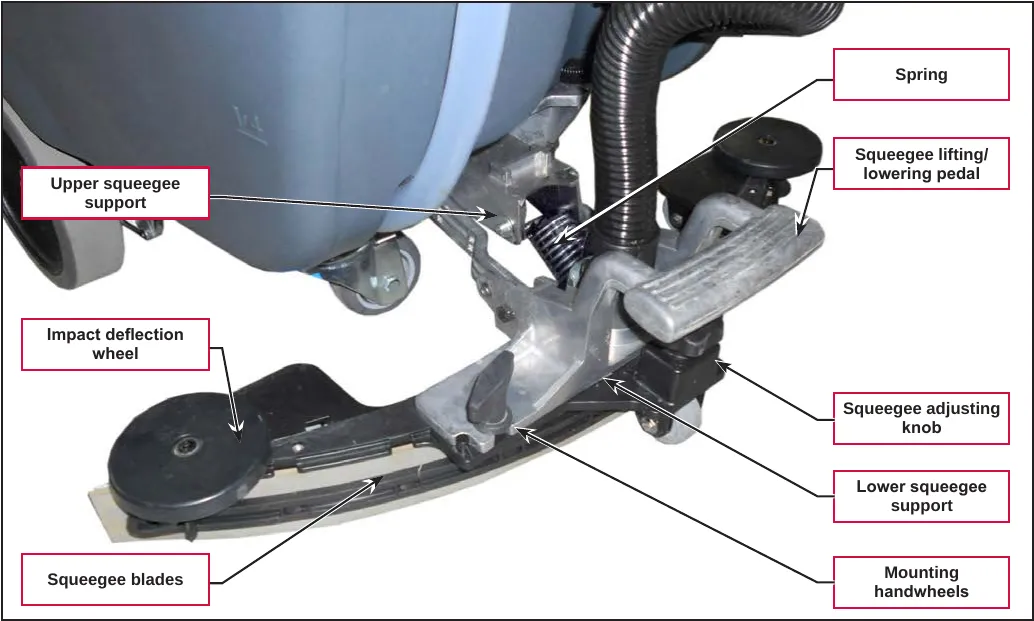
Maintenance and adjustments
Squeegee cleaning
Note: The squeegee must be clean and its blades must be in good conditions in order to get a good drying.
- Drive the machine on a level floor.
- Ensure that the machine is off and the ignition key has been removed.
- Loosen the handwheels and remove the squeegee.
- Wash and clean the squeegee. In particular, clean the compartments (A) (Figure 2) and the vacuum hole (B). Check that the front blade (C) and the rear blade (D) are integral and free from cuts and lacerations; if necessary replace them.
- Assemble in the reverse order of disassembly.
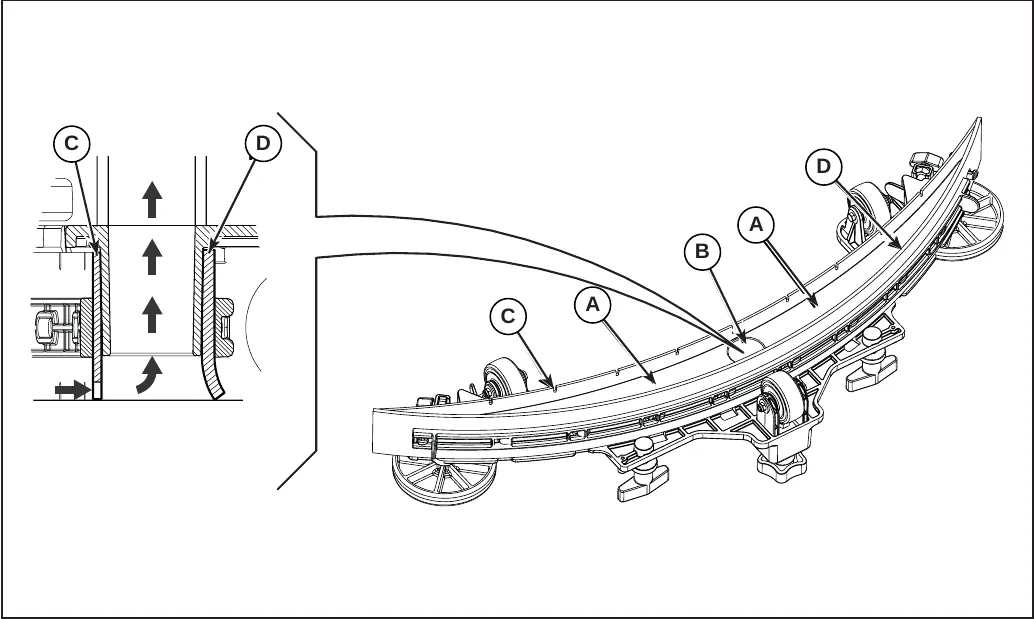
Step 4 is printed with the reference “Figure 2”; the drawing on this page is Figure 3.
Checking/replacing the squeegee blades
Note: The squeegee must be clean and its blades must be in good conditions in order to get a good drying.
- Clean the squeegee as shown in the previous paragraph.
- Check the condition of the front (C) (Figure 3) and rear (D) blades, ensuring there are no cuts and tears; if necessary, replace them as shown below. Check that the front corner (E) of the rear blade is not worn; otherwise, turn the blade to replace the worn corner with one of the three remaining intact corners. If the other corners are worn too, replace the blade according to the following procedure:
- Using the tab (F), release and remove the elastic strap (G) from the fasteners (H), then turn or replace the rear blade (D).
- Install the blade in the reverse order of removal. Fix the elastic strap (G) to the fasteners (H) starting from one side. Constrain to the fastener one by one, with the hand (M) blocking the elastic strap before the fastener and pulling with the other hand (N) for fixing
- Unscrew the handwheels (I) and remove the strap (J), then turn or replace the front blade (C).
- Install the blade in the reverse order of removal.
- Install the squeegee on the support and screw down the handwheels.
- Lower the squeegee to the floor to check the height of the blades, proceeding as follows:
- Check that the lip (K) of the front blade (C) and the lip (L) of the rear blade (D) are resting as shown in the figure.
- Use the knob to make adjustments.
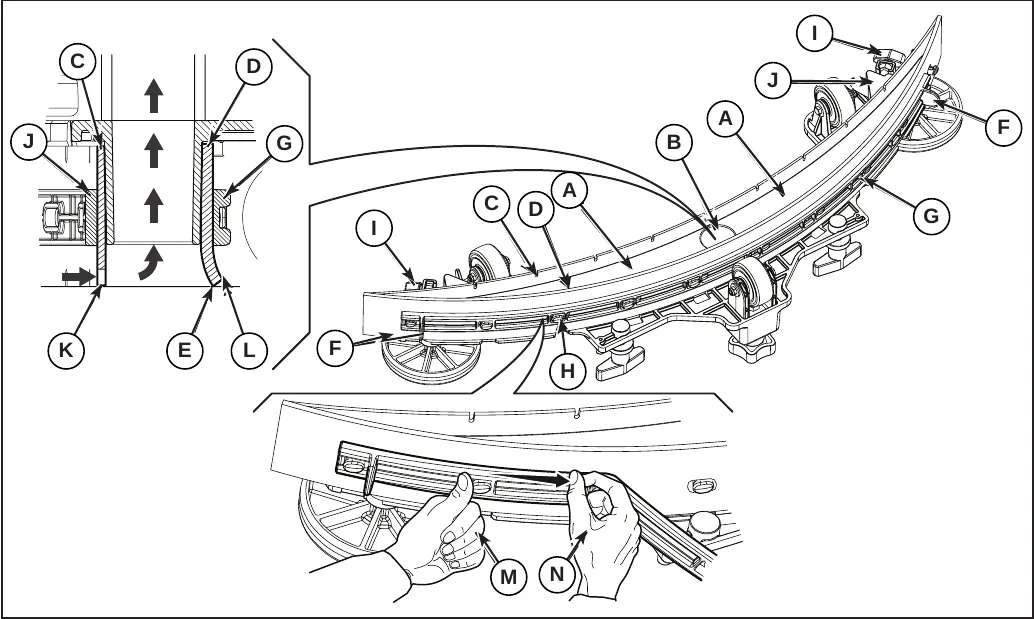
Troubleshooting
| Trouble | Possible Causes | Remedy |
|---|---|---|
| Suction of dirty water is insufficient or non-existent | Squeegee or vacuum hose blocked or damaged | Clean or repair/replace |
| The squeegee leaves lining on the floor or does not collect water | There is debris under the blade | Remove |
| Squeegee blade lips damaged or worn Parts › | Replace | |
| Squeegee not balanced | Adjust with the relevant handwheel | |
| Squeegee will not raise | Gas spring worn out. | Replace. |
Removal and installation
Gas spring on the squeegee support
(Model No.: 9087352020, 9087354020, 9087350020, 9087351020, 9087353020, 9087355020)
- Drive the machine on a level floor or on a hoisting system to facilitate the disassembly procedures.
- Lower the squeegee and remove it from the support.
- Unscrew the nut (A) (Figure 4), retaining the bushings, washers and spacers (B).
- Unscrew the screw (C), retaining the nut, washers and spacers (D).
- Unscrew the screw (E), retaining the nut and washers.
- Remove and replace the gas spring (F).
Assembly
- Assemble the components in the reverse order of disassembly.
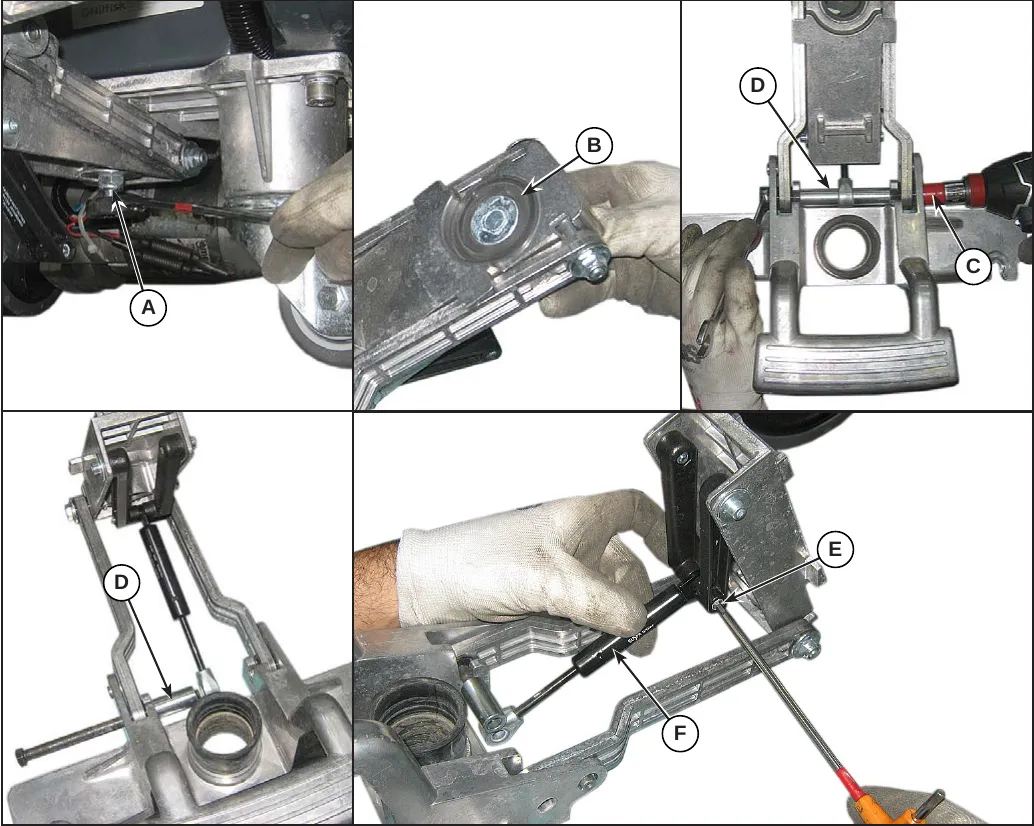
Step 3 is printed with the reference “Figure 4”; the figure on this page is Figure 5.
Spring on the squeegee support
(Model No.: 9087403020, 9087404020, 9087400020,9087401020, 9087405020, 9087402020)
- Drive the machine on a level floor or on a hoisting system to facilitate the disassembly procedures.
- Remove the squeegee from the squeegee support (A), then lower the squeegee support by slowly to the floor.
- Press lighly the spring (B) then remove it with its pair of terminals.
Assembly
- Assemble the components in the reverse order of disassembly and note the following:
- Mount the spring with its pair of terminals as shown of the picture (C).
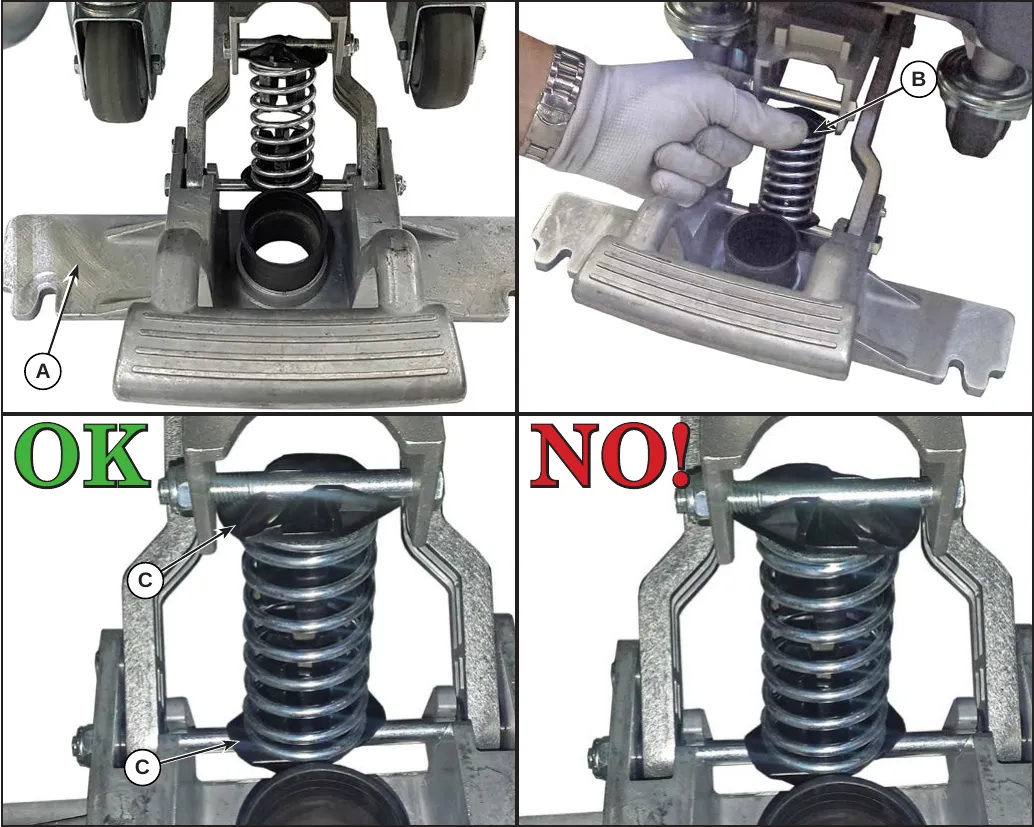
In the figure, the bottom-left photo is marked OK and the bottom-right photo is marked NO!
Corrected an obvious misprint: “squeege” printed as “squeegee” (step 2). Other wording is as printed.
Specifications
| Description / Model | SC500 | |
|---|---|---|
| DISC | REV | |
| Squeegee width | 28.3 in (720 mm) | |
| Gas spring | 67 lbf (300 N) | |
40 - Recovery system
Functional description
The recovery system removes the dirty water from the floor and pipes it to a recovery tank. When the machine is running, the dirty water on the floor is collected by the squeegee blades and collected through the slots in the same, piped through the vacuum hose and into the tank by the airflow created by vacuum motor (M2). The dirty water is piped into the recovery tank, while the airflow continues to the vacuum fan.
A tank with a grid collects the largest debris going through the recovery tank hose.
The automatic float in the vacuum grid stops vacuum system motor (M2) from collecting any liquids.
When the automatic float closes and shuts down the vacuum system, the vacuum system motor noise will increase and the floor will not be dried.
The vacuum system is activated automatically with the One-Touch button [One-Touch]. It can then be managed independently via the vacuum button [Vacuum]. The vacuum system is activated in full power or silent mode depending on the last mode in use before the machine was switched off. This mode can be changed by repeatedly pressing the vacuum button [Vacuum]. The various vacuum modes are also displayed on the multifunction display.
When the recovery tank is full it can be emptied through the drain hose.
Wiring diagram
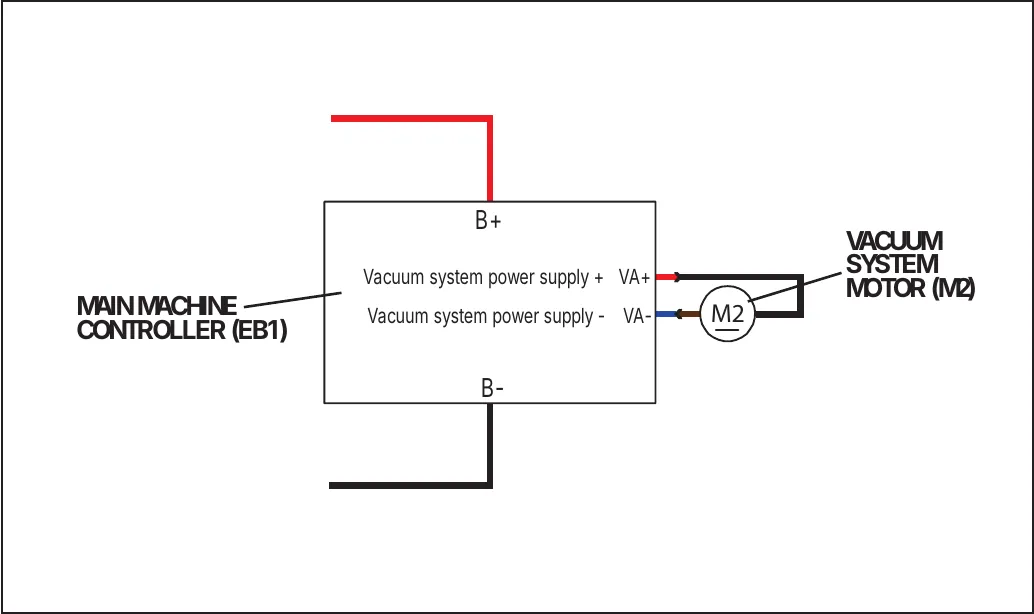
| Block | Terminal | Label printed on drawing |
|---|---|---|
| Main machine controller (EB1) | B+ | (no text printed) |
| Main machine controller (EB1) | VA+ | Vacuum system power supply + |
| Main machine controller (EB1) | VA- | Vacuum system power supply - |
| Main machine controller (EB1) | B- | (no text printed) |
| Vacuum system motor (M2) | M2 | Connected to VA+ and VA- |
Component locations
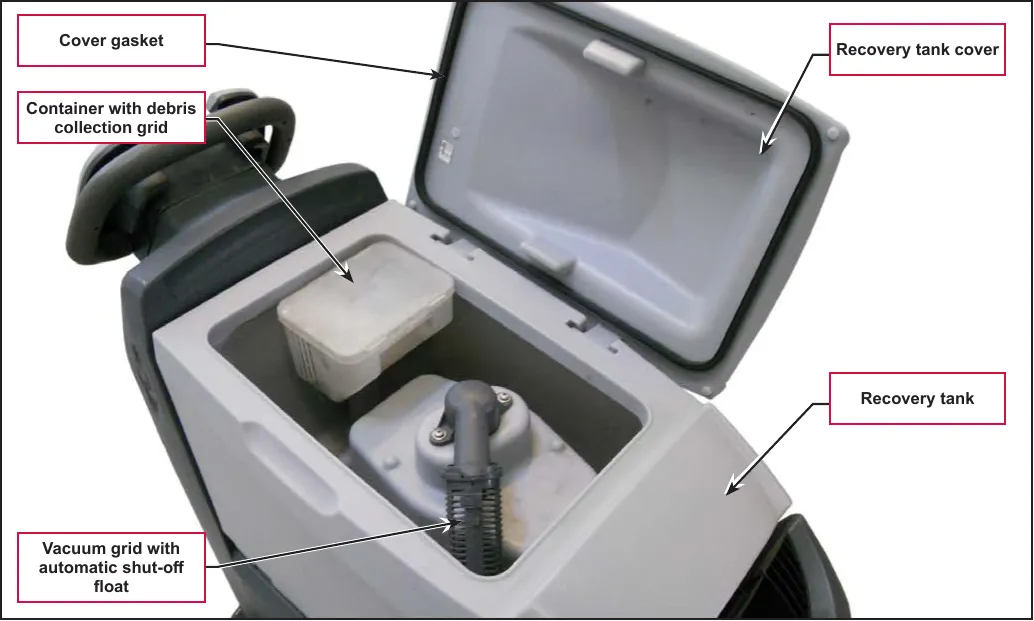
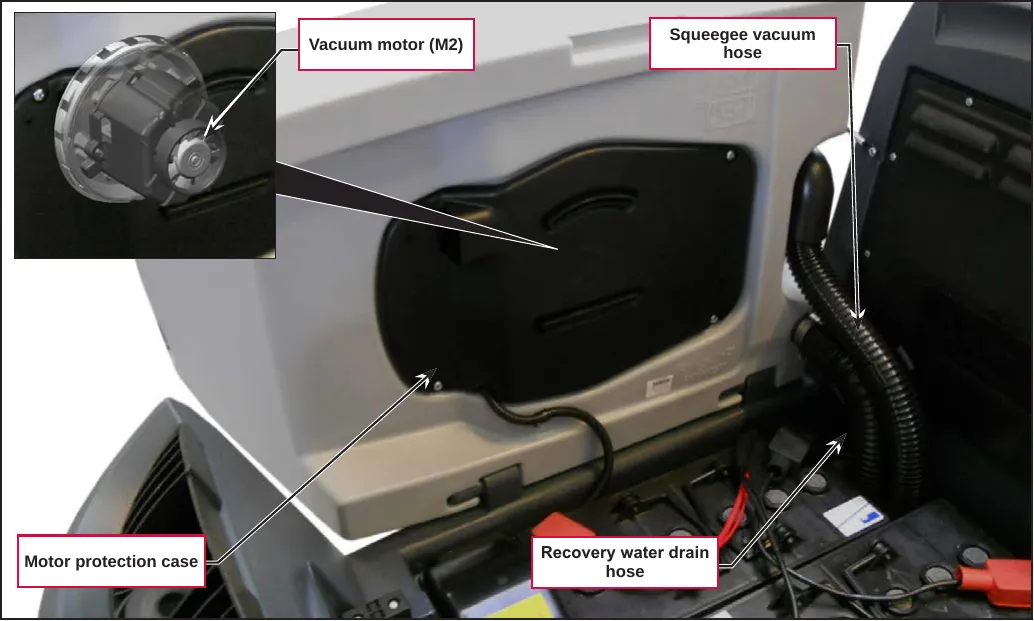
Maintenance and adjustments
Recovery tank cleaning
- Drive the machine to the appointed disposal area.
- Drain the water from the tank using the drain hose.
- Lift the recovery tank cover.
- Clean the vacuum grid (B) (Figure 4), release the fasteners (A), open the grid (B) and recover the float (C), then clean carefully and reinstall.
- Remove the debris collection tank (D) and open its cover, then clean it carefully.
- Reinstall it on the vacuum hose.
- Reinstall the debris collection tank on the rigid tube in the tank.
- Check the condition of the tank cover gasket (E).
Note: The gasket (E) creates the vacuum in the tank that is necessary to vacuum up the recovery water.
- If necessary, replace the gasket (E) by removing it from its housing (F). When fitting the new gasket, position the joint (G) in the area shown in the figure.
- Check that the seating surface (H) of the gasket (E) is in good condition, clean and suitable to form a seal with the gasket itself.
- Close the cover.
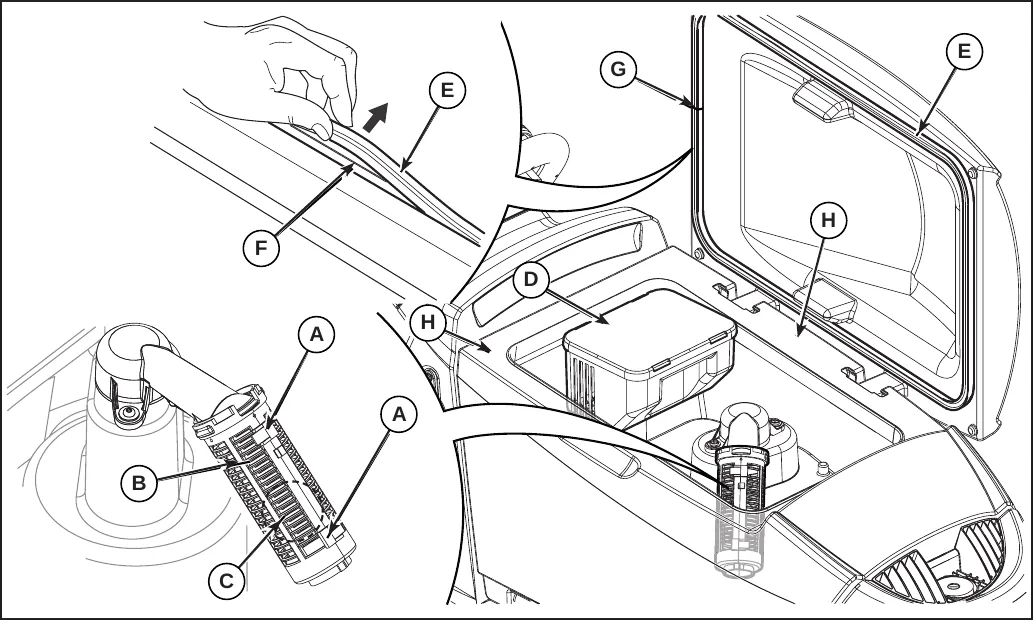
Troubleshooting
| Trouble | Possible causes | Remedy |
|---|---|---|
| The vacuum motor will not turn on | Wiring between Main machine controller (EB1) and vacuum motor (M2) damaged | Repair |
| User interface controller (EB3) faulty | Replace | |
| Vacuum motor faulty | Check the amperage Parts › | |
| Suction of dirty water is insufficient or non-existent | Activation of automatic float shut-off | Drain the recovery tank |
| Debris collection filter dirty | Clean | |
| Vacuum grid with automatic float shut-off dirty | Clean | |
| Tank cover not correctly positioned | Adjust | |
| Tank cover seal damaged or not working correctly | Clean or replace Parts › | |
| Vacuum motor container dirty | Clean | |
| Vacuum seals damaged or not working correctly | Repair or replace Parts › |
Vacuum motor current draw test
- Apply the amperometric clamp (A) to a cable (B) of the batteries (Figure 5).
- Turn on the machine by the key and the button [Power].
- Activate the vacuum by pressing the vacuum button [Vacuum].
- Activate the vacuum and check that the current draw of the vacuum motor is between 13 and 17A at 24V.
Stop the vacuum.
Remove the amp clamp (A).
If the amperage is higher, perform the following procedures to detect and correct the abnormal amperage:- Remove the vacuum motor (see the procedure in the Vacuum Motor paragraph), and check the condition of all its components.
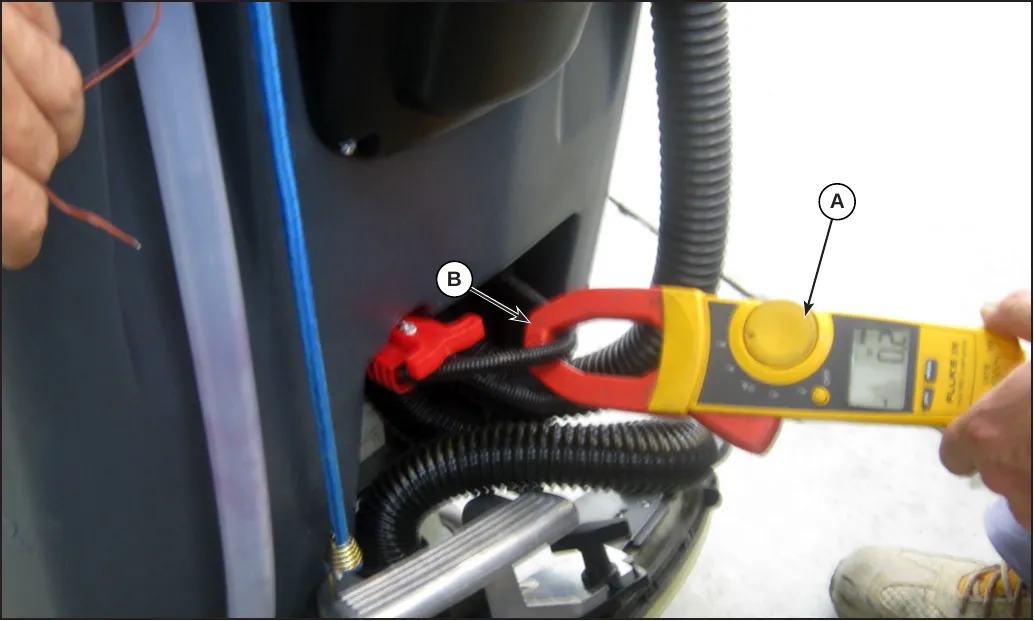
Removal and installation
Vacuum motor unit
Removal
- Remove the ignition key.
- Disconnect the red battery connector.
- If present, drain the recovery tank, then lift it.
- Remove the cover (A) (Figure 6), then disconnect the connector (B).
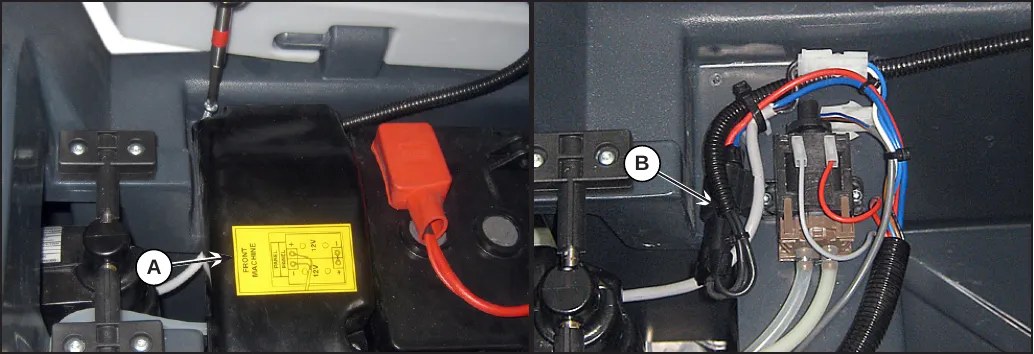
- Unscrew the 4 screws (C) (Figure 7) and remove the case (D).
- Unscrew the screw (E) holding the vacuum motor wiring.
- Unscrew the 4 screws (F) and remove the vacuum motor unit (G).
Installation
- Assemble the components in the reverse order of disassembly.
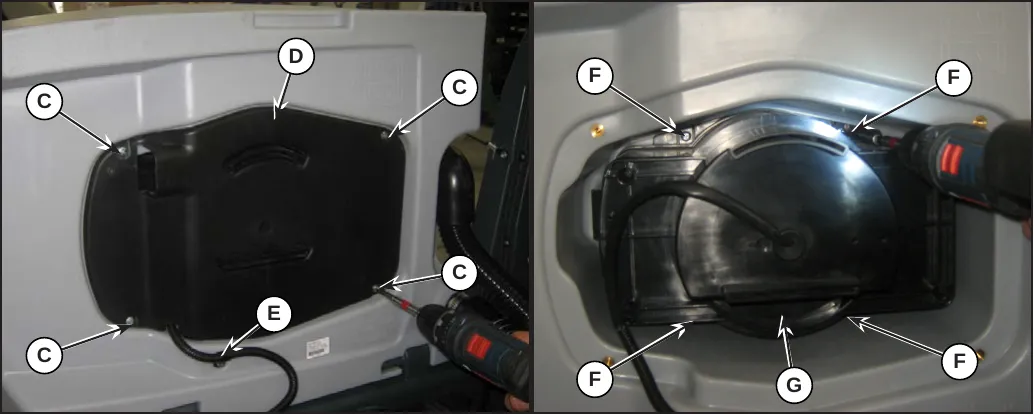
Container and vacuum motor disassembly/assembly
Disassembly
- Remove the ignition key.
- Disconnect the red battery connector.
- If present, drain the recovery tank, then lift it.
- Unscrew the 4 screws (A) (Figure 8) and remove the case (B).
- Unscrew the screw (C) holding the vacuum motor wiring.
- Unscrew the 4 screws (D) and remove the vacuum motor unit (E).
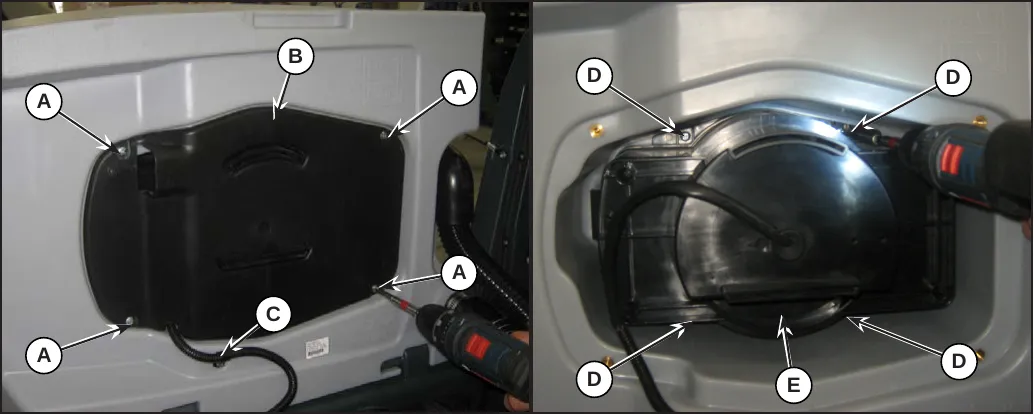
- Unscrew the 4 screws (F) and cut the retaining strap (G) (Figure 9).
- Remove the external soundproofing support (H) from the internal soundproofing support (I).
- Clean any dirt from the space between the two containers.
- Remove the seal (J) and the internal support (K).
- Clean any dirt from the space between the container and the motor.
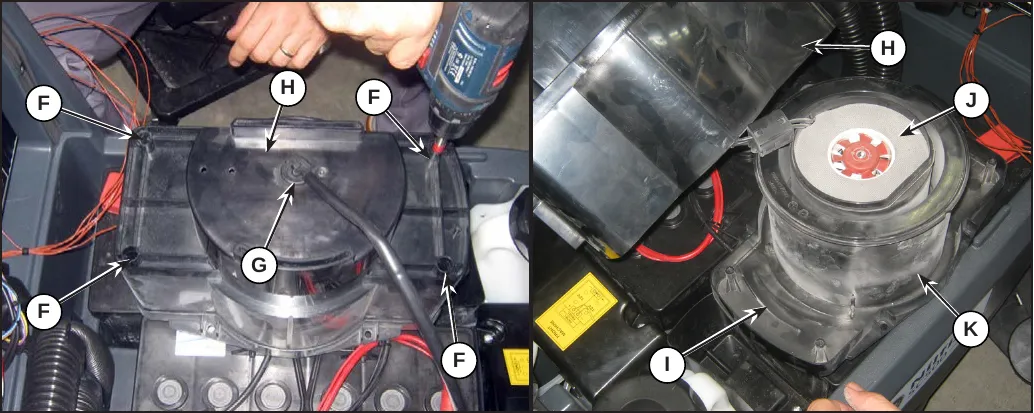
- Cut the strap (L) and disconnect the power supply (M) (Figure 10).
- Remove the motor (N).
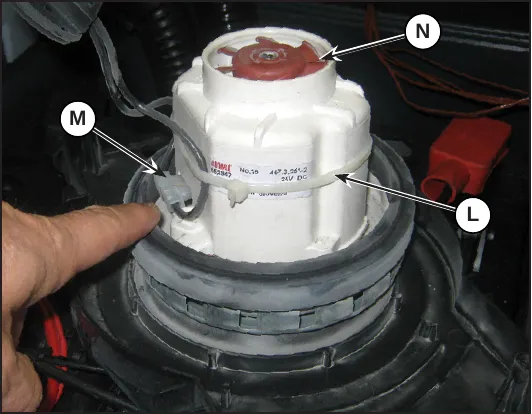
- Clean and check the condition of all seals (O) (Figure 11); replace them if necessary.
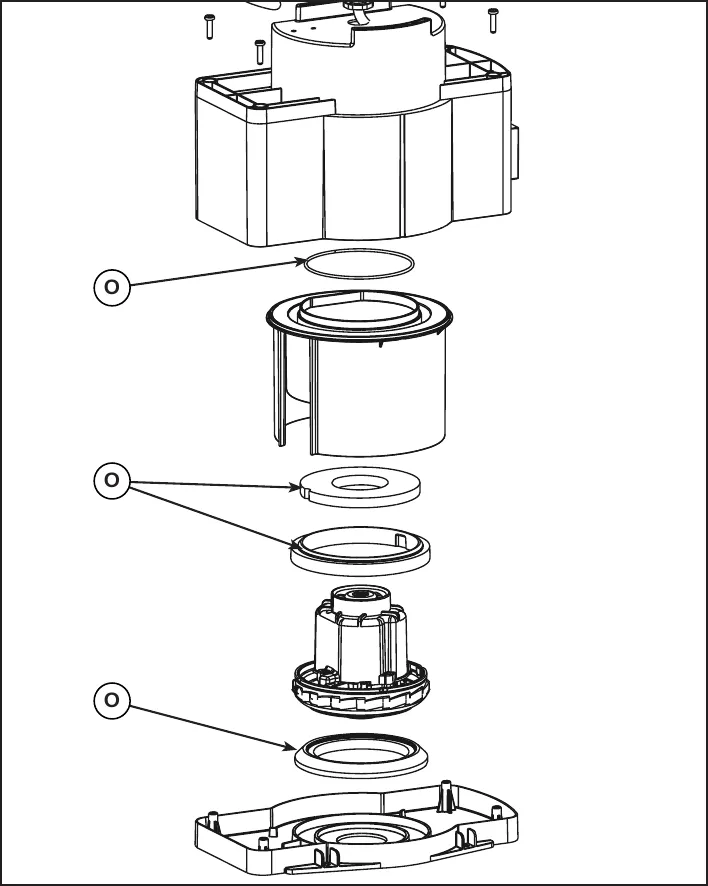
Assembly
- Check that all components are reassembled with the correct polarity and orientation.
- Assemble the components in the reverse order of disassembly.
Specifications
| Description / Model | SC500 | |
|---|---|---|
| DISC | REV | |
| Recovery tank capacity | 12 US gal (45 L) | |
| Vacuum motor technical data | 0.37 hp (280 W) | |
| 20.8A VDC 24V | ||
| Vacuum circuit capacity | 29.9 in H2O (760 mm H2O) | |
90 - Options
| Description | Illustration |
|---|---|
| Ecoflex kit (EU model only) | |
|
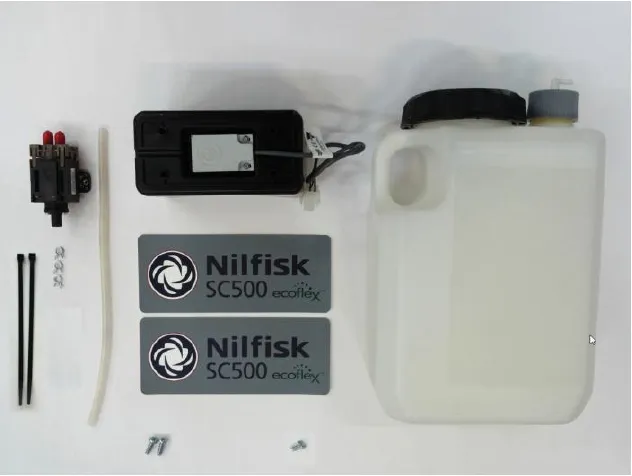
| Battery charger kit (EU model only) |
|---|
|
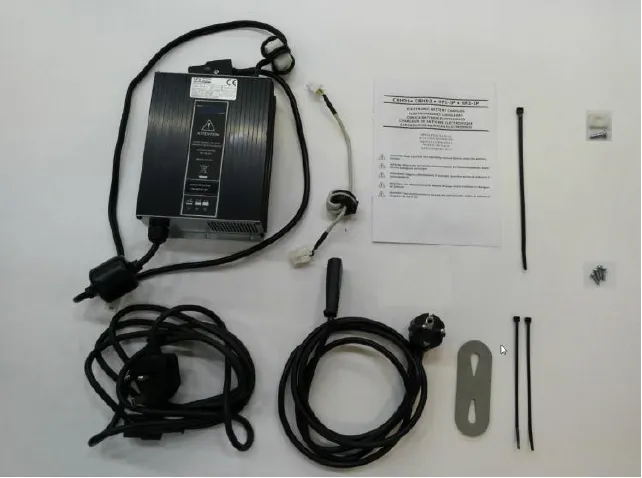
Vacuum system motor kit (all version)
- Vacuum motor group
- Tie cable
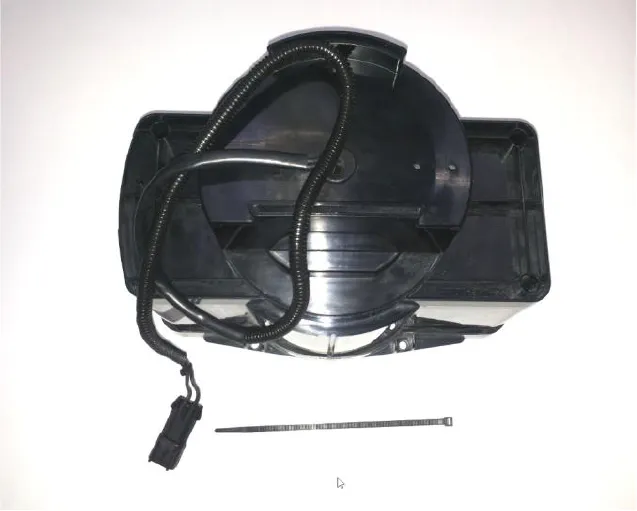
USB kit
Model No.: 9087412020, 9087411020, 9087410020
- USB cable
- Plate
- Hardware
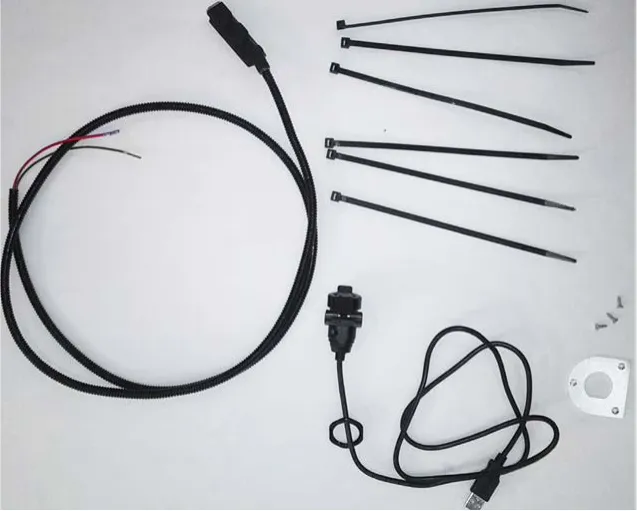
Trackclean kit-US (Advance)
- Kit-US with reader
- Kit-US without reader
Trackclean kit-EU (Nilfisk)
- Kit-EU with reader
- Kit-EU without reader
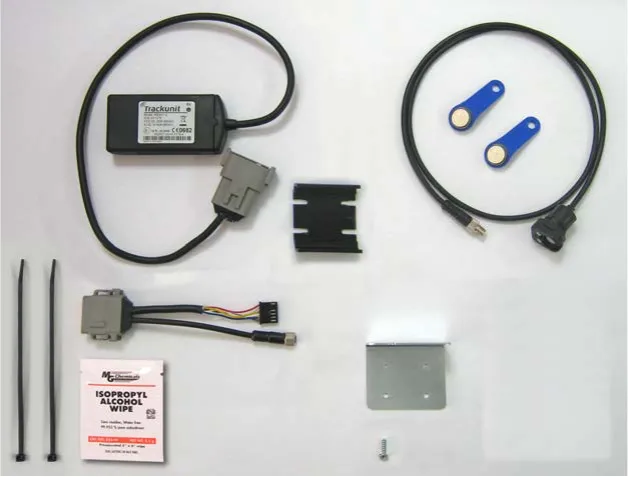
Advance is a trademark of Nilfisk, Inc. Southeastern Equipment & Supply is an independent dealer.