
Service Manual SC450
Advance SC450, 9087331020
Nilfisk SC450, 9087330020 - 9087370020
Nilfisk SC450, 9087332020 - 9087372020
English
Form No. 9099600000
11-12 - Revised 4-14 (2)
Index
- Index (page 2)
- General Information (page 5)
- Machine General Description (page 5)
- Service Manual Purpose and Field of Application (page 5)
- Other Reference Manuals (page 5)
- Conventions (page 6)
- Service and Spare Parts (page 6)
- Serial Number Label (page 6)
- Safety (page 7)
- Symbols (page 7)
- General Instructions (page 7)
- Machine Lifting (page 10)
- Machine Transportation (page 10)
- Machine Nomenclature Battery Version (know your machine) (page 11)
- Control Panel Battery Version (page 13)
- Machine Nomenclature Cable Version (know your machine) (page 14)
- Control Panel Cable Version (page 16)
- Service and Diagnostic Equipment (page 17)
- Technical Data Battery Version (page 18)
- Technical Data Cable Version (page 19)
- Dimensions (page 20)
- Maintenance (page 21)
- Scheduled Maintenance Table (page 21)
- Control System - Battery Version (page 22)
- Functional Description (page 22)
- Wiring Diagram (page 22)
- Component Location (page 23)
- Removal and Installation (page 24)
- Specifications (page 27)
- Connectors on the Function Electronic Board (page 28)
- Control System - Cable Version (page 29)
- Functional Description (page 29)
- Wiring Diagram (page 29)
- Component Location (page 30)
- Removal and Installation (page 31)
- Electrical System - Battery Version (page 33)
- Functional Description (page 33)
- Fuses (page 33)
- Wiring Diagram (page 33)
- Component Location (page 34)
- Maintenance and Adjustments (page 35)
- Troubleshooting (page 41)
- Machine Wiring Diagram (page 42)
- Specifications (page 43)
- Electrical System - Cable Version (page 44)
- Wiring Diagram (page 44)
- Specifications (page 45)
Index
- Recovery System - Battery Version (page 46)
- Functional Description (page 46)
- Wiring Diagram (page 46)
- Component Location (page 47)
- Maintenance and Adjustments (page 48)
- Troubleshooting (page 49)
- Removal and Installation (page 50)
- Specifications (page 53)
- Recovery System - Cable Version (page 54)
- Functional Description (page 54)
- Wiring Diagram (page 54)
- Component Location (page 55)
- Maintenance and Adjustments (page 56)
- Troubleshooting (page 57)
- Removal and Installation (page 58)
- Specifications (page 61)
- Scrub System, Disc - Battery Version (page 62)
- Functional Description (page 62)
- Wiring Diagram (page 62)
- Component Location (page 63)
- Maintenance and Adjustments (page 64)
- Troubleshooting (page 66)
- Removal and Installation (page 67)
- Specifications (page 73)
- Scrub System, Disc - Cable Version (page 74)
- Functional Description (page 74)
- Wiring Diagram (page 74)
- Component Location (page 75)
- Maintenance and Adjustments (page 76)
- Troubleshooting (page 78)
- Removal and Installation (page 79)
- Specifications (page 81)
- Solution System - Battery Version (page 82)
- Functional Description (page 82)
- Wiring Diagram (page 82)
- Component Location (page 83)
- Maintenance and Adjustments (page 84)
- Troubleshooting (page 85)
- Specifications (page 85)
- Solution System - Cable Version (page 86)
- Functional Description (page 86)
- Wiring Diagram (page 86)
- Component Location (page 87)
- Maintenance and Adjustments (page 88)
- Troubleshooting (page 89)
- Specifications (page 89)
Index
- Squeegee System (page 90)
- Functional Description (page 90)
- Component Location (page 91)
- Maintenance and Adjustments (page 92)
- Troubleshooting (page 94)
- Removal and Installation (page 95)
- Specifications (page 97)
- Wheel System, Non-Traction (page 98)
- Component Location (page 98)
- Specifications (page 99)
Machine general description
The SC450 is a “walk behind” industrial machine designed to wash and dry floors, in civil or industrial environments, in one pass. The machine is powered by on-board batteries (Battery version) and with electric mains via power supply cable (cable version). The machine is equipped with a single disc brush, a controlled solution flow dosing system and a rear squeegee with blades, which dries the floor by vacuuming the dirty water.
Service manual purpose and field of application
This document is a technical resource intended to help service technicians when carrying out maintenance and repairs on the SC450, to guarantee the best cleaning performance and a long working life for the machine. Please read this manual carefully before performing any maintenance and repair procedure on the machine.
Other reference manuals
| Model | Product Code | Intruction for Use | Spare Parts List |
|---|---|---|---|
| Advance SC450 - BATTERY | 9087331020 | 9099602000 | 9099603000 |
| Nilfisk SC450 - BATTERY | 9087330020 - 9087370020 | 9099589000 | 9099590000 |
| Nilfisk SC450 - CABLE | 9087332020 - 9087372020 | 9099596000 | 9099597000 |
| Assembly Instructions | Instruction Code | Machines concerned |
|---|---|---|
| BATTERY CHARGER KIT | 909 6746 000 | Nilfisk SC450 |
| 20” SPLASH SHIELD KIT | 909 6736 000 | Nilfisk / Advance SC450 |
| HANDLE BAR GREY KIT | 9100000465 | Nilfisk / Advance SC450 |
These manuals are available at:
- Local Nilfisk-Advance Retailer
- Nilfisk-Advance website: www.nilfisk.com - www.advance-us.com
Conventions
Forward, backward, front, rear, left or right are intended with reference to the operator’s position, that is to say in driving position with the hands on the handlebar.
Service and spare parts
Service and repairs must be performed only by authorised personnel or Nilfisk Service Centers. The authorised personnel is trained directly at the manufacturer’s premises and has original spare parts and accessories. Contact Nilfisk Retailer indicated below for service or to order spare parts and accessories, specifying the machine model and serial number.
(Please, apply Retailer label here)
Serial number label
The model name and serial number are marked on the plate (see the example to the side). Product number and year of production are marked on the same plate. This information is useful when requiring machine spare parts. Use the following table to write down the machine identification data.
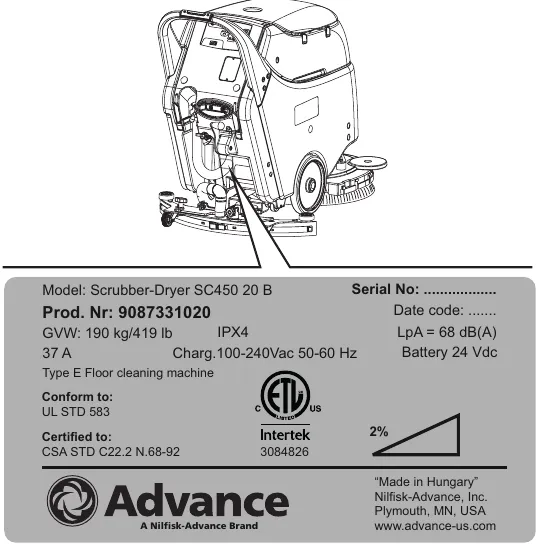
| Model | |
| Product Nr. | |
| Serial No. |
Safety
The following symbols indicate potentially dangerous situations. Always read this information carefully and take all necessary precautions to safeguard people and property.
Symbols
Note: It indicates a remark related to important or useful functions.
General instructions
Specific warnings and cautions to inform about potential damages to people and machine are shown below.
- This machine must be used by properly trained operators only.
- Do not wear jewels when working near electrical components.
- Do not work under the lifted machine, if it is not securely fixed.
- Do not operate the machine near toxic, dangerous, flammable and/or explosive powders, liquids or vapors. This machine is not suitable for collecting dangerous powders.
- BATTERY Version - Before performing any cleaning, maintenance, repair or replacement procedure, turn the machine main switches to “0” and disconnect the battery connector.
- (For WET batteries only). Keep the battery away from sparks, flames and incandescent material. During the normal operation explosive gases are released.
- (For WET batteries only). Battery charging produces highly explosive hydrogen gas. Keep the battery cover open during battery charging and perform this procedure in well-ventilated areas and away from naked flames.
- CABLE Version - Before performing any maintenance, repair, cleaning or replacement procedure disconnect the plug from the electrical mains.
Safety cautions
- Carefully read all the instructions before performing any maintenance/repair procedure.
- Always protect the machine against the sun, rain and bad weather, both under operation and inactivity condition. Store the machine indoors, in a dry place.
- Before using the machine, close all doors and/or covers.
- This machine is not intended for use by persons (including children) with reduced physical, sensory or mental capabilities, or lack of experience and knowledge, unless they have been given supervision or instruction concerning use of the machine by a person responsible for they safety. Children should be supervised to ensure that they do not play with the machine.
- Close attention is necessary when used near children.
- Use only as shown in this Manual. Use only Nilfisk’s recommended accessories.
- Check the machine carefully before each use, always check that all the components have been assembled before use. If the machine is not perfectly assembled it can cause damages to people and properties.
- Take all necessary precautions to prevent hair, jewels and loose clothes from being caught by the machine moving parts.
- Do not use the machine on slopes with a gradient exceeding the specifications.
- Do not use the machine on incline.
- Do not tilt the machine more than the angle indicated on the machine itself, in order to prevent instability.
- Do not use the machine in particularly dusty areas.
- Use the machine only where a proper lighting is provided.
- While using this machine, take care not to cause damage to people or objects.
- Do not bump into shelves or scaffoldings, especially where there is a risk of falling objects.
- Do not lean liquid containers on the machine, use the relevant can holder.
- The machine working temperature must be between 32°F (0°C) and +104°F (+40°C).
- The storage temperature must be between 32°F (0°C) and +104°F (+40°C).
- The humidity must be between 30% and 95%.
- When using floor cleaning detergents, follow the instructions on the labels of the detergent bottles.
- To handle floor cleaning detergents, wear suitable gloves and protections.
- Do not use the machine as a means of transport; do not push/tow it.
- Do not allow the brush/pad to operate while the machine is stationary to avoid damaging the floor.
- In case of fire, use a powder fire extinguisher, not a water one.
- Do not tamper with the machine safety guards and follow the ordinary maintenance instructions scrupulously.
- Do not allow any object to enter into the openings. Do not use the machine if the openings are clogged. Always keep the openings free from dust, hairs and any other foreign material which could reduce the air flow.
- Do not remove or modify the plates affixed to the machine.
- This machine cannot be used on roads or public streets.
- Pay attention during machine transportation when temperature is below freezing point. The water in the recovery tank or in the hoses could freeze and seriously damage the machine.
- Use only brushes supplied with the machine or those specified in the Instrucion for use manual. Using other brushes could reduce safety.
- If parts must be replaced, require ORIGINAL spare parts from an Authorised Dealer or Retailer.
- Do not wash the machine with direct or pressurised water jets, or with corrosive substances.
- The machine must be disposed of properly, because of the presence of toxic-harmful materials (batteries, oils, etc.), which are subject to standards that require disposal in special centres.
Safety cautions (continued)
- BATTERY Version - Before using the battery charger, ensure that frequency and voltage values, indicated on the machine serial number plate, match the mains voltage.
- Do not pull or carry the machine by the battery charger cable and never use the battery charger cable as a handle. Do not close a door on the battery charger cable, or pull the battery charger cable around sharp edges or corners. Do not run the machine on the battery charger cable.
- To reduce the risk of fire, electric shock, or injury, do not leave the machine unattended when it is plugged in.
- Keep the battery charger cable away from heated surfaces.
- (Before performing any maintenance procedure, disconnect the battery charger cable from the electrical mains to avoid any risk of fire, electric shock or injuries.
- Do not smoke while charging the batteries.
- (For WET batteries only). When lead (WET) batteries are installed on the machine, do not tilt the machine for more than 30° from the horizontal plane to prevent the highly corrosive acid from leaking out of the batteries. If the machine must be tilted to perform any maintenance procedure, remove the batteries.
- CABLE Version - The machine power supply cable is grounded and the relevant plug is grounded too. In case of machine malfunction or breakdown, grounding connection reduces the risk of electric shock.
- The power supply cable plug must be connected to an appropriate outlet, which is grounded according to law in force.
- Improper connection can cause electric shock. Consult a qualified technician to make sure that the outlet is properly grounded.
- Do not tamper with the power supply cable plug. If the power supply cable plug cannot be connected to the outlet, have new grounded outlet installed by a qualified technician, according to the law in force.
- Before connecting the power supply plug to the electrical mains, check that frequency and voltage, shown on the machine serial number plate, match the electrical mains voltage.
- Do not handle the plug or the machine with wet hands.
- Turn off all controls before unplugging.
- Regularly check the power supply cable for damages, cuts, cracks and wear. If necessary, replace it.
- If the power supply cable is damaged, it must be replaced by the Manufacturer or by an authorised Service Centre.
- Do not pull or carry the machine by the power supply cable and never use the power supply cable as a handle. Do not close a door on the power supply cable, or pull the power supply cable around sharp edges or corners. Do not run the machine on the power supply cable.
- The rotating brush must not come into contact with the power supply cable.
- Keep the supply cable away from heated surfaces.
- To reduce the risk of fire, electric shock, or injury, do not leave the machine unattended when it is plugged in. Disconnect the machine from the electrical mains when not in use and before performing maintenance procedures.
- In case of machine malfunctions, ensure that these are not due to lack of maintenance. If necessary, request assistance from the authorised personnel or from an authorised Service Center.
- If the machine
- does not work properly
- is damaged
- has water or foam leaks
- has been left outdoors exposed to bad weather conditions
- is wet or has been dropped into water
Machine lifting
Machine transportation
- All covers are closed.
- The solution and recovery tanks are emptied.
- The batteries are disconnected.
- The machine is securely fastened to the means of transport.
Machine nomenclature, battery version (know your machine)
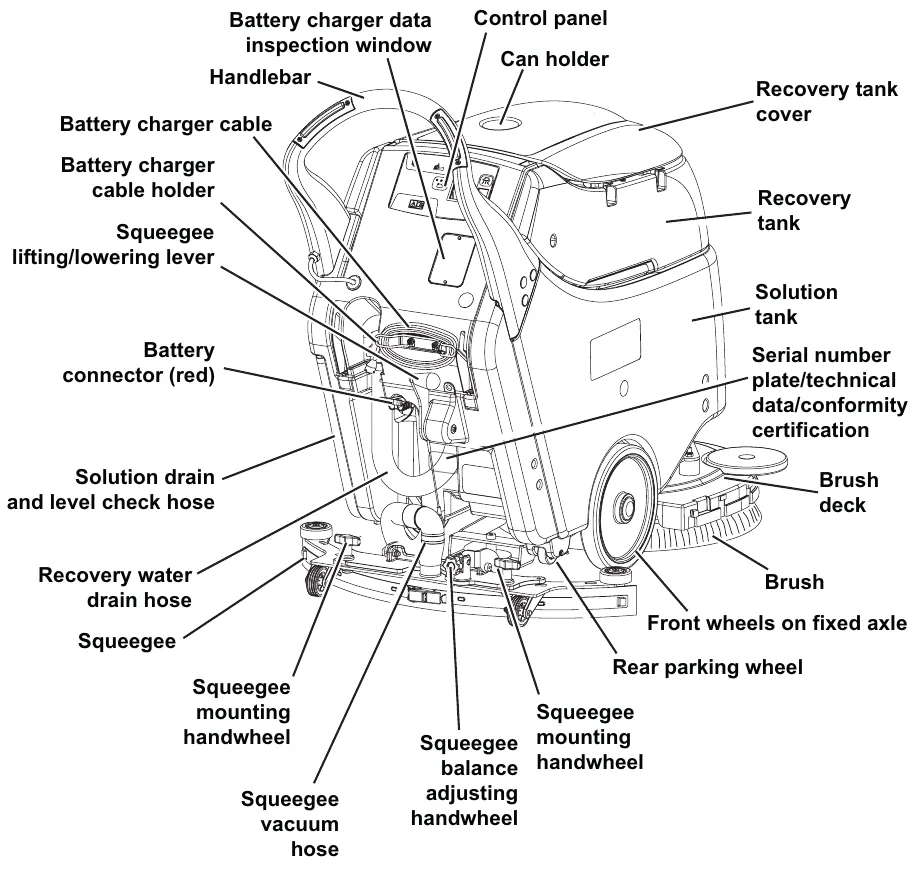
Machine nomenclature, battery version (continued)
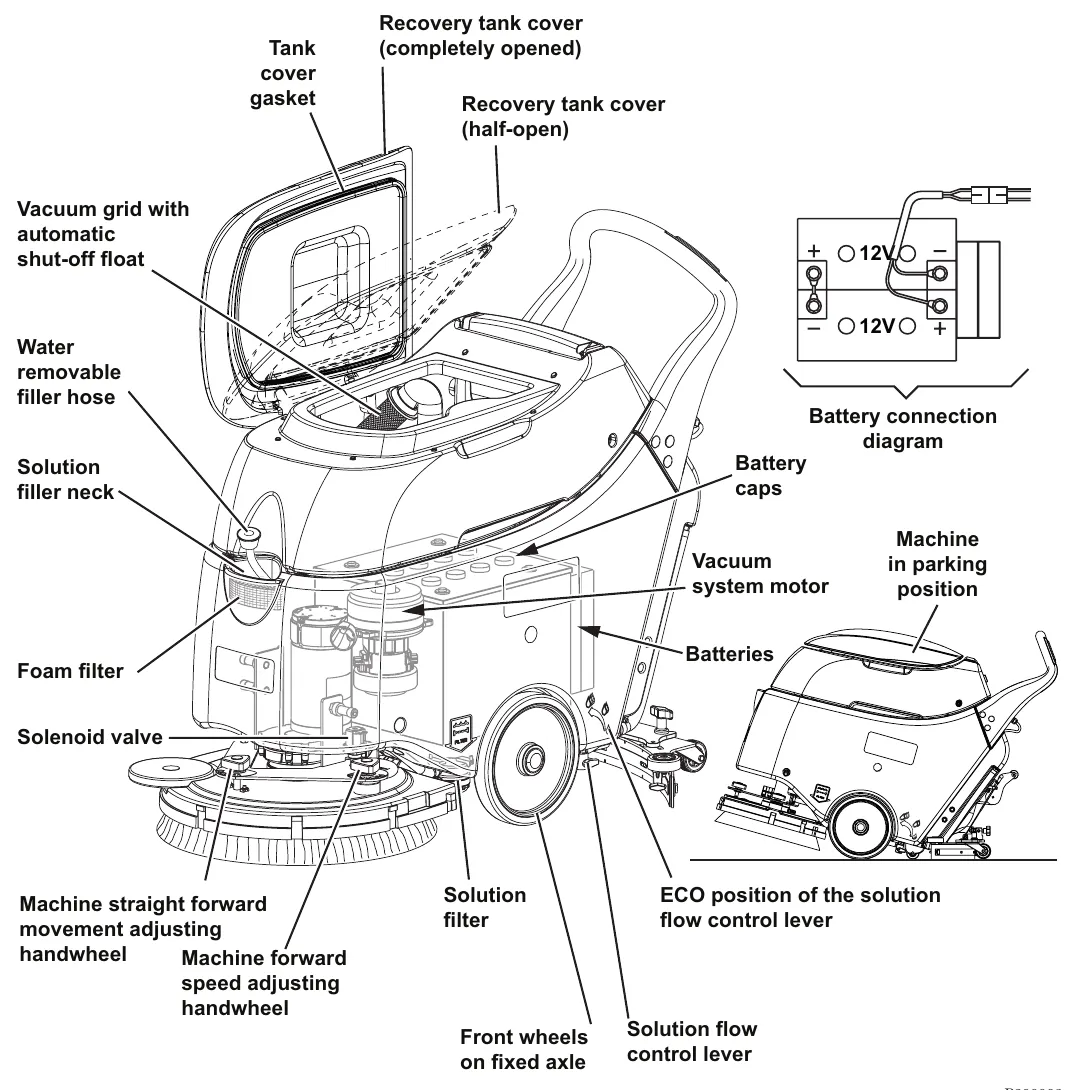
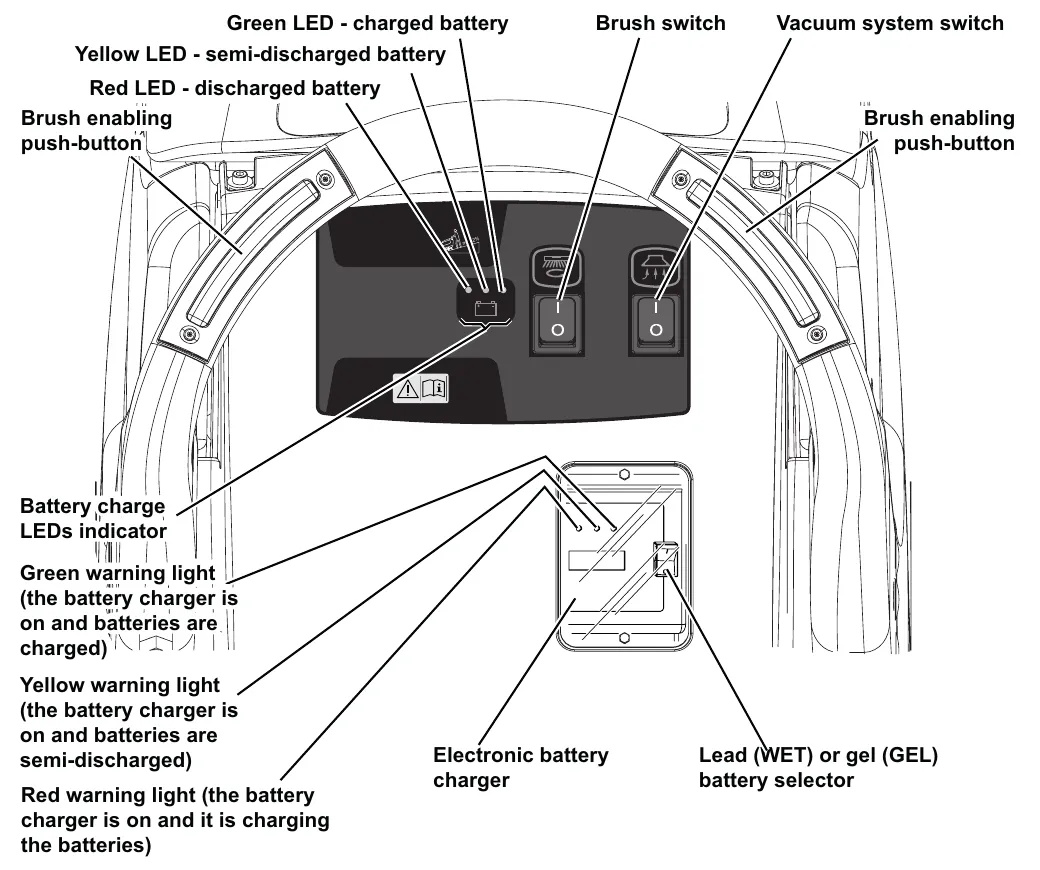
Control panel, battery version
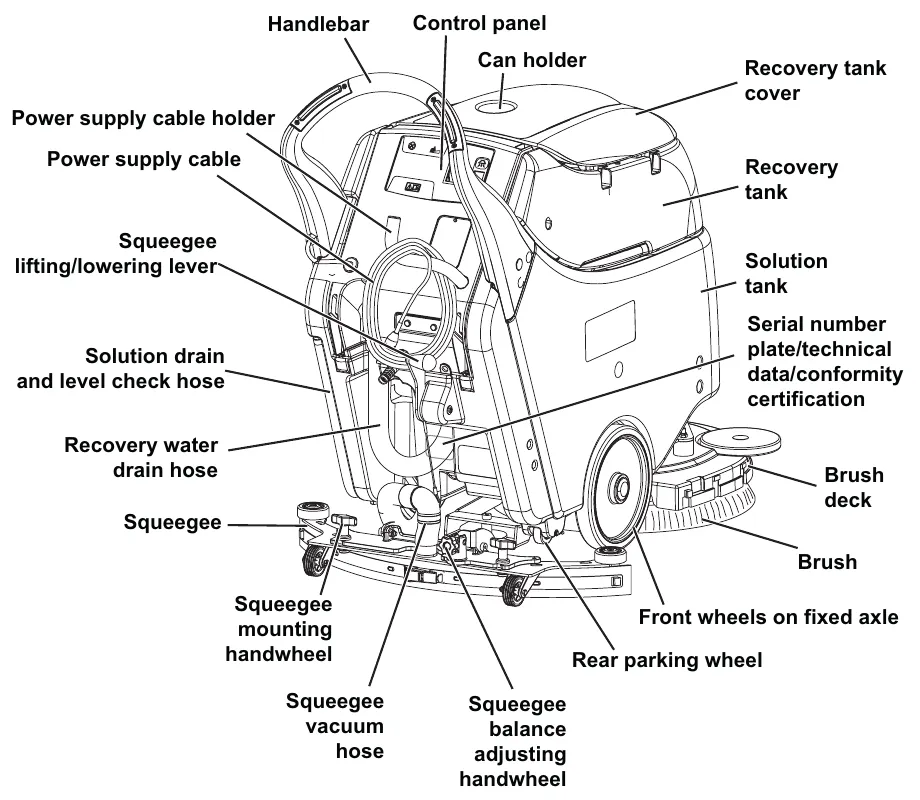
Machine nomenclature, cable version (know your machine)
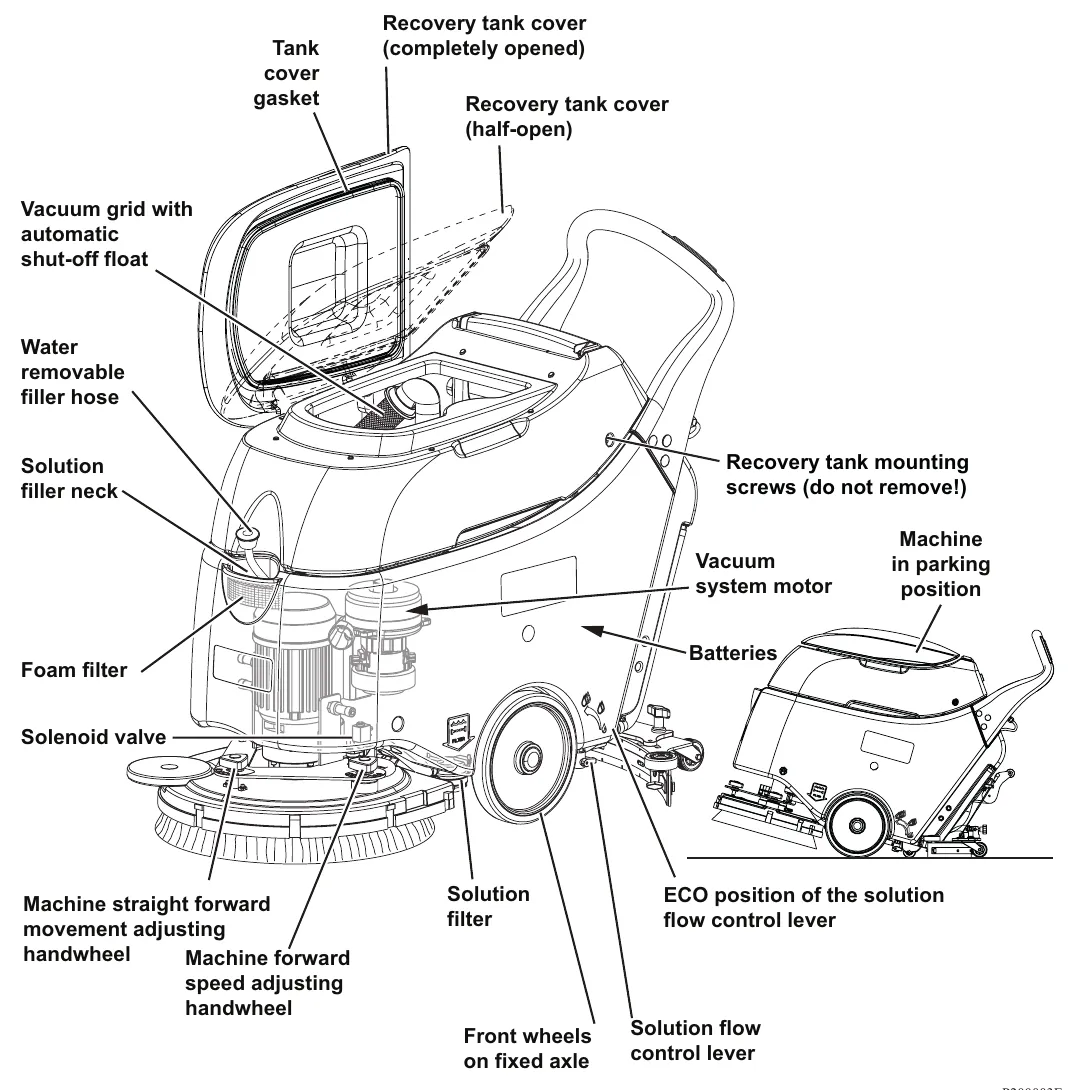
Machine nomenclature, cable version (continued)
Control panel, cable version
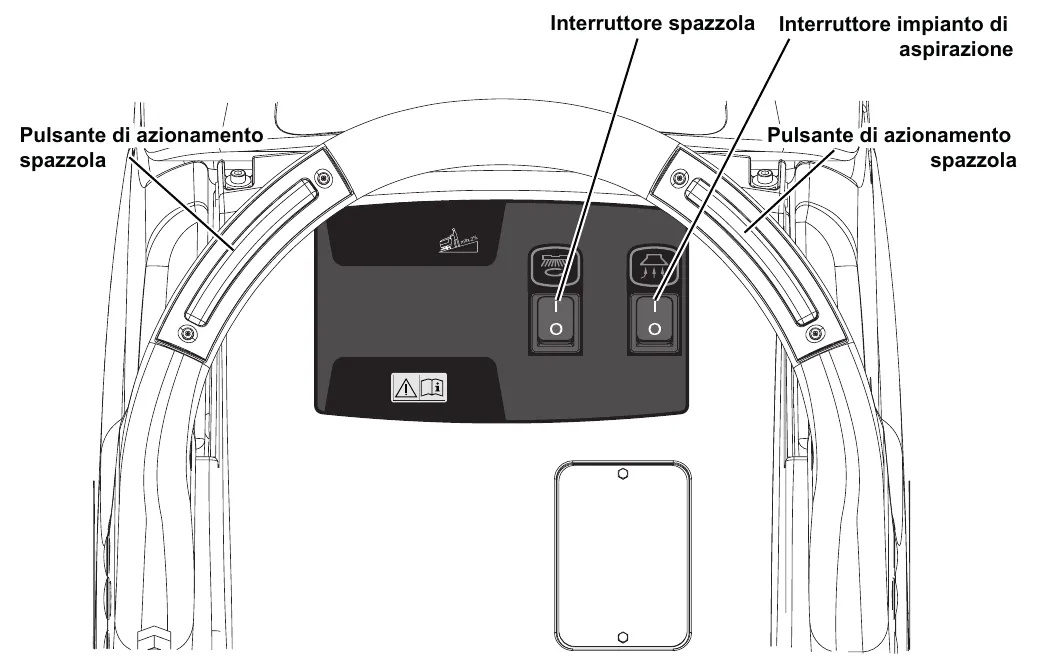
The callout labels in this drawing are printed in Italian in the manual. Interruttore spazzola means brush switch, Interruttore impianto di aspirazione means vacuum system switch, and Pulsante di azionamento spazzola means brush enabling push-button, as on page 13.
Service and diagnostic equipment
Besides a complete set of standard meters, the following instruments are necessary to perform fast checks, maintenance and repairs on Nilfisk-Advance machines:
Besides a complete set of standard meters, the following instruments are necessary to perform fast checks and repairs on Nilfisk-Advance machines:
- Laptop computer charged with the current version of EzParts, Adobe Reader and (if possible) Internet connection
- Digital Volt Meter (DVM)
- Amperometric pliers with possibility of making DC measurements
- Hydrometer
- Battery charge tester to check 12V batteries
- Static control wrist strap
- Dynamometric wrench set
- A copy of the Instruction for use and Spare Parts List of the machine to be serviced (provided with the machine or available at www.advance-us.com or other Nilfisk-Advance websites).
The following equipment is also available at Nilfisk-Advance Centers:
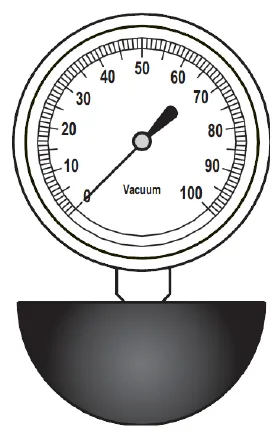
- Vacuum water lift gauge, P/N 56205281
Technical data, battery version
| Descriptions / Model | Advance SC450 20B | Nilfisk SC450 53B |
|---|---|---|
| Solution tank capacity | 10.5 US gal (40 liters) | |
| Recovery tank capacity | 11.9 US gal (45 liters) | |
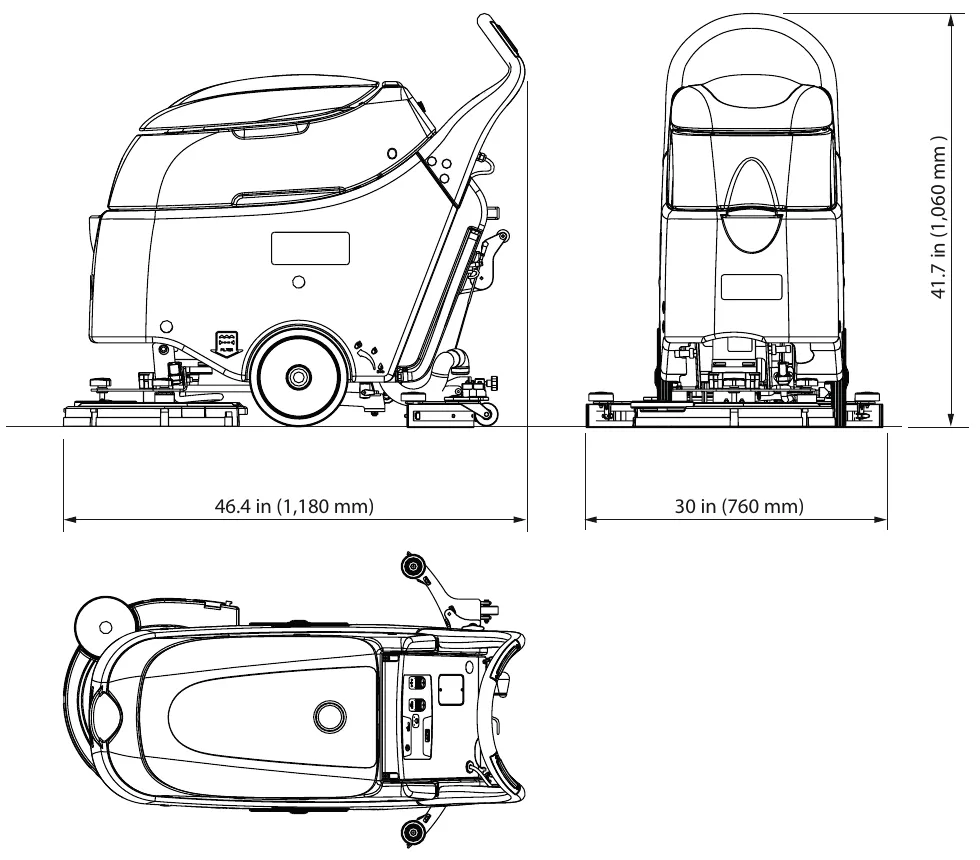
| Machine length | 46.4 in (1,180 mm) | |
| Machine width without squeegee | 22 in (559 mm) | |
| Machine height | 41.7 in (1,060 mm) | |
| Cleaning width | 20 in (530 mm) | |
| Squeegee width | 30 in (760 mm) | |
| Brush diameter | 20 in (530 mm) | |
| Diameter of wheels on fixed axle | 10 in (254 mm) | |
| Wheel pressure on the floor | 710 psi (4.9 N/mm2) | |
| Brush pressure with full tank and lowered squeegee | 66 lb (30 kg) | |
| Min/max solution flow | 0.10÷0.42 gpm (0.4÷1.6 liters/min) | |
| ECO solution flow | 0.10 gpm (0.4 liters/min) | |
| Sound pressure level at workstation (ISO 11201, ISO 4871, EN 60335-2-72) (LpA) | 68 dB(A) ± 3 dB(A) | |
| Machine sound pressure level (ISO 3744, ISO 4871, EN 60335-2-72) (LwA) | 86 dB(A) | |
| Vibration level at the operator’s arms (ISO 5349-1, EN 60335-2-72) | < 98.4 in/s2 (< 2.5 m/s2) | |
| Maximum gradient when working | 2% | |
| IP protection class | X4 | |
| Protection class (electric) | III | |
| Vacuum power | 0.44 hp (330 W) | |
| Vacuum water lift (blocked) | 43.3 inH2O (1,100 mmH2O) | |
| Brush motor power | 0.64 hp (480 W) | |
| Brush rotation speed | 154 rpm | |
| Total absorbed power | 34 A (0.8 kW) | |
| Battery compartment size (width x length x height) | 13.7 x 13.7 x 11.8 in (350 x 350 x 300 mm) | |
| Battery voltage | 24 V | |
| Standard batteries (2) | Dry: 12 V 70 Ah C5 | |
| Battery charger | 100-240 VAC | |
| Work autonomy (standard batteries) | 2 hour | |
| Weight without batteries and with empty tanks | 167 lb (76 kg) | 154 lb (70 kg) |
| Gross vehicle weight (GVW) | 419 lb (190 kg) | 419 lb (190 kg) |
| Shipping weight | 227 lb (103 kg) | 214 lb (97 kg) |
Technical data, cable version
| Descriptions / Model | Nilfisk SC450 53E |
|---|---|
| Solution tank capacity | 10.5 US gal (40 liters) |
| Recovery tank capacity | 11.9 US gal (45 liters) |
| Machine length | 46.4 in (1,180 mm) |
| Machine width without squeegee | 22 in (559 mm) |
| Machine height | 41.7 in (1,060 mm) |
| Cleaning width | 20 in (530 mm) |
| Squeegee width | 30 in (760 mm) |
| Brush diameter | 20 in (530 mm) |
| Diameter of wheels on fixed axle | 10 in (254 mm) |
| Wheel pressure on the floor | 710 psi (4.9 N/mm2) |
| Brush pressure with full tank and lowered squeegee | 66 lb (30 kg) |
| Min/max solution flow | 0.10÷0.42 gpm (0.4÷1.6 liters/min) |
| ECO solution flow | 0.10 gpm (0.4 liters/min) |
| Sound pressure level at workstation (ISO 11201, ISO 4871, EN 60335-2-72) (LpA) | 70 dB(A) ± 3 dB(A) |
| Machine sound pressure level (ISO 3744, ISO 4871, EN 60335-2-72) (LwA) | 89 dB(A) |
| Vibration level at the operator’s arms (ISO 5349-1, EN 60335-2-72) | < 98.4 in/s2 (< 2.5 m/s2) |
| Maximum gradient when working | 2% |
| IP protection class | X4 |
| Protection class (electric) | I |
| Vacuum power | 0.44 hp (550 W, 50-60 Hz) |
| Vacuum water lift (blocked) | 47.2 inH2O (1,200 mm H2O) |
| Brush motor power | 0.64 hp (1,100 W 50-60 Hz) |
| Brush rotation speed | 150 rpm |
| Total absorbed power | 7.5 A (1.7 kW) |
| Power supply | 230 V - 50-60 Hz |
| Weight without batteries and with empty tanks | 207 lb (94 kg) |
| Gross vehicle weight (GVW) | 273 lb (124 kg) |
| Shipping weight | 266 lb (121 kg) |
Corrected an obvious misprint: vacuum water lift printed as "1.200 mm H2O" (now 1,200 mm H2O, which is 47.2 inH2O, and matches the thousands comma used on page 18).
Dimensions
Overall length 46.4 in (1,180 mm), squeegee width 30 in (760 mm), height 41.7 in (1,060 mm).
Maintenance
The lifespan of the machine and its maximum operating safety are ensured by correct and regular maintenance.
The following table provides the scheduled maintenance. The intervals shown may vary according to particular working conditions, which are to be defined by the person in charge of the maintenance. For instructions on maintenance procedures, see the following paragraphs.
Scheduled maintenance table
A ● marks the interval for each procedure.
| Procedure | Daily, after using the machine | Weekly | Every six months | Yearly |
|---|---|---|---|---|
| Battery charging (battery version) | ● | |||
| Squeegee cleaning | ● | |||
| Brush/pad cleaning | ● | |||
| Tank and vacuum grid with float cleaning, and cover gasket check | ● | |||
| Power supply cable check (cable version) | ● | |||
| Squeegee blade check and replacement | ● | |||
| Solution filter cleaning | ● | |||
| WET battery fluid level check | ● | |||
| Brush/pad-holder motor carbon brush check or replacement (battery version) | ● | |||
| Vacuum system motor carbon brush check or replacement | ● |
Control system, battery version
Functional description
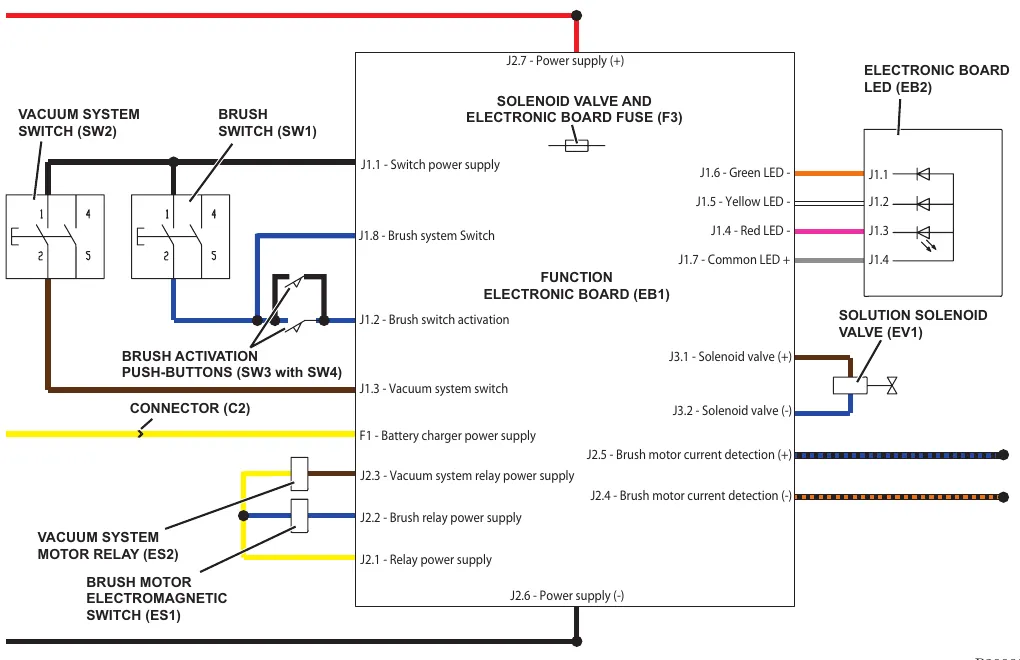
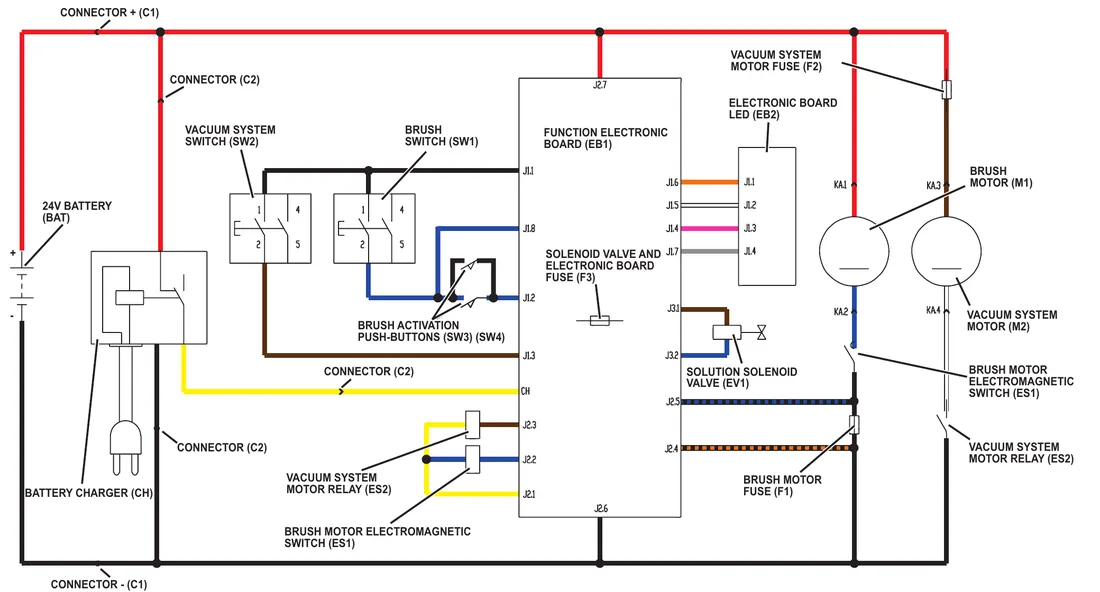
The function control is performed directly by the brush switch (SW1), the vacuum system switch (SW2) and the brush activation push-buttons (SW3 with SW4).
The switches (SW1) and (SW2) power the function electronic board (EB1).
The control circuits are protected by the fuse (F3) on the function electronic board (EB1).
The battery voltage is shown on the electronic board LED (EB2).
Wiring diagram
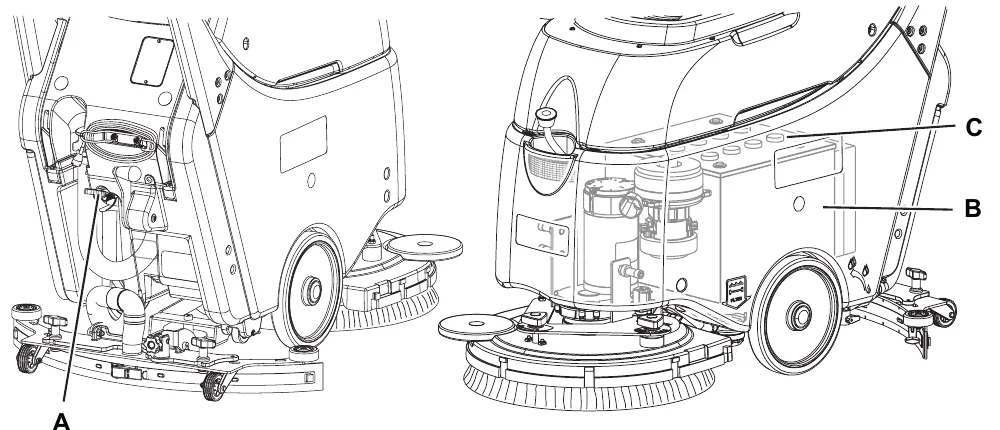
Component location
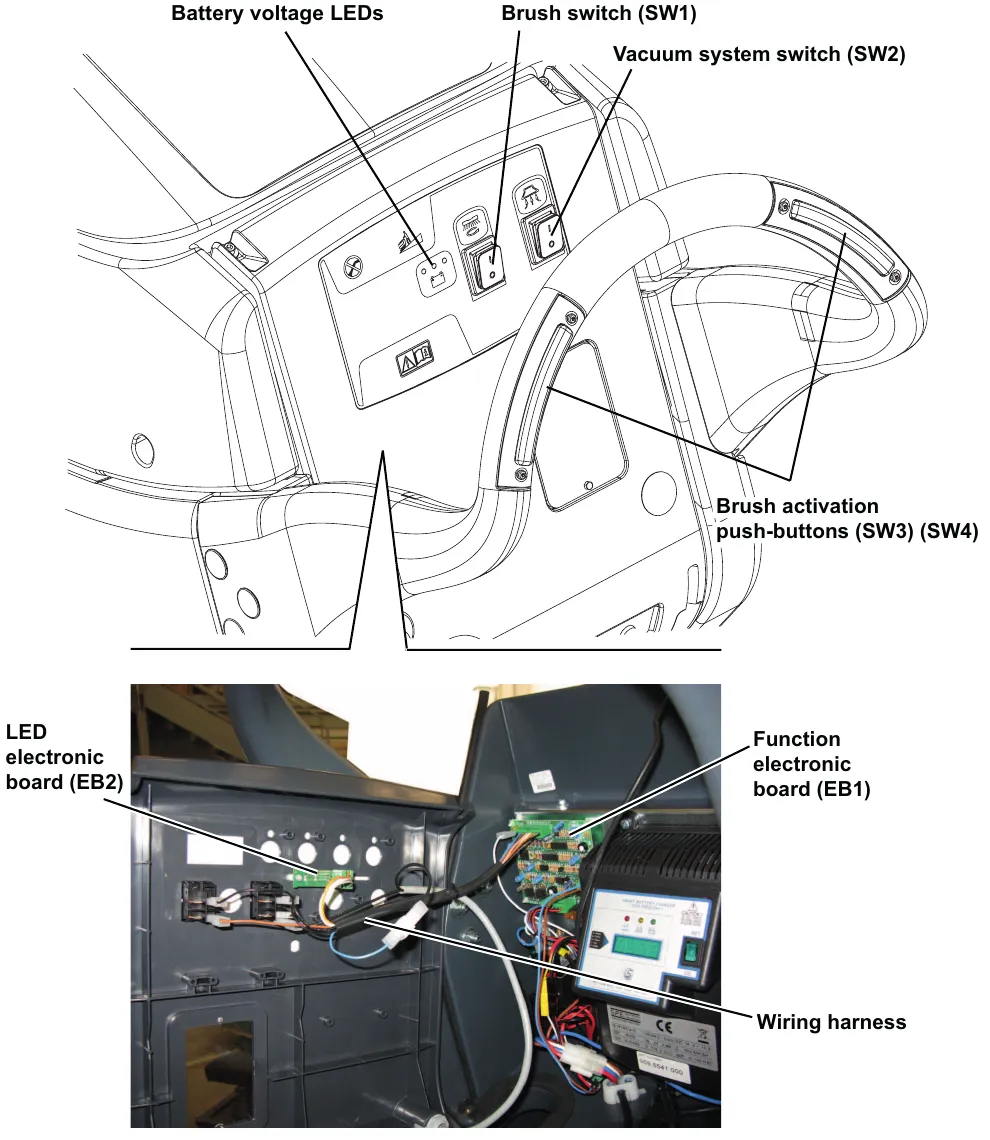
- Brush switch (SW1)
- Vacuum system switch (SW2)
- Brush activation push-button (SW3)
- Battery voltage LEDs
- Function electronic board (EB1)
- LED electronic board (EB2)
- Wiring harness
Removal and installation
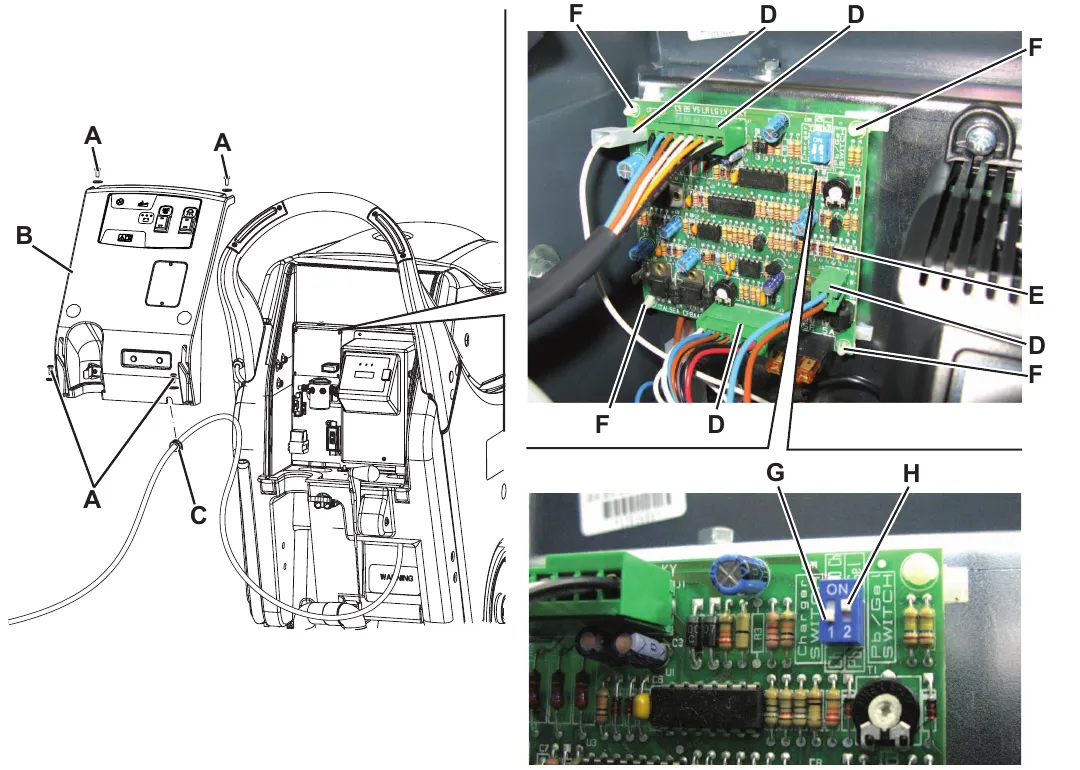
Function electronic board disassembly/assembly: disassembly
- Drive the machine on a level floor. Make sure that the machine cannot move independently.
- Check that the control panel switches are turned to “0”. Disconnect the battery connector (red).
- Move aside the recovery water drain hose.
- Remove the battery charger cable, if equipped, from the cable holder.
- Remove the screws (A).
- Carefully move the panel (B) by disengaging the wiring harness grommet (C) from its housing.
- Disconnect the connectors (D) of the function electronic board (E).
- Disengage the four fasteners (F) and remove the function electronic board (E).
Assembly
- Assemble the components in the reverse order of disassembly, and note the following:
- When installing a new function electronic board (E), set the following:
- battery charger on board (Ch) or not (NO Ch), with the selector (G)
- battery type, Pb (Wet) or Gel, with the selector (H)
- When installing a new function electronic board (E), set the following:
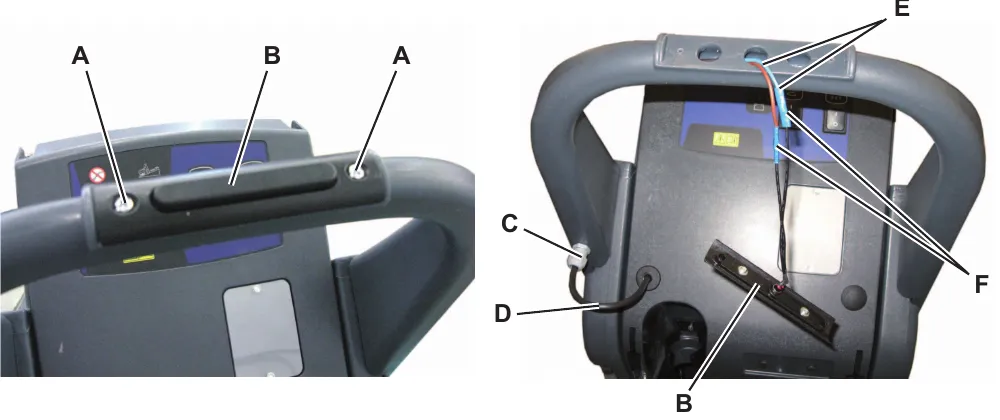
Brush activation push-button disassembly/assembly (old version)
Disassembly
- Drive the machine on a level floor. Make sure that the machine cannot move independently.
- Check that the control panel switches are turned to “0”. Disconnect the battery connector (red).
- Remove the screws (A) and move the brush activation push-button (B).
- Loosen the ring nut (C) off the bulkhead connection and push the cable (D) inside the handlebar as much as possible, then pull the cables (E) with the joints (F) of the push-button (B).
- Cut the cables (E) on the joints (F) and retrieve the push-button (B).
Assembly
- Assemble the components in the reverse order of disassembly, and note the following:
- Restore the connections (F) by using the joints supplied with the push-button.
- Before tightening the ring nut (C) push the cable (D) inside the handlebar as much as possible.
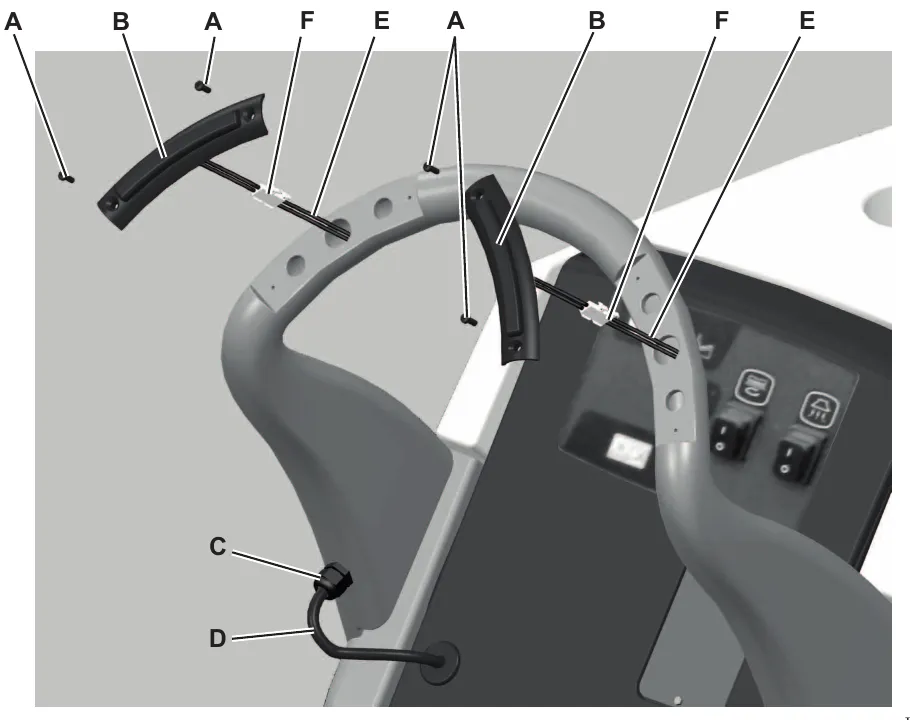
Brush activation push-button disassembly/assembly (new version)
Disassembly
- Drive the machine on a level floor. Make sure that the machine cannot move independently.
- Check that the control panel switches are turned to “0”. Disconnect the battery connector (red).
- Remove the screws (A) and move the brush activation push-button (B).
- Loosen the ring nut (C) off the bulkhead connection and push the cable (D) inside the handlebar as much as possible, then pull the cables (E) with the connectors (F) of the push-buttons (B).
- Disconnect the connectors (F) and retrieve the push-buttons (B).
Assembly
- Assemble the components in the reverse order of disassembly, and note the following:
- Before tightening the ring nut (C) push the cable (D) inside the handlebar as much as possible.
Corrected an obvious misprint: the first sub-heading is printed in Italian as "Smontaggio" (now Disassembly, as on page 25).
Specifications
Function electronic board specifications
The function electronic board performs the following:
- BRUSH MOTOR PROTECTION: By reading the voltage drop across (F1) fuse, the main brush motor amperage (M1) is monitored. If the voltage drop is higher than 40 mV, the 3 LEDs on the LED electronic board (EB2) start flashing simultaneously. If this condition persists, after a time inversely proportional to the value of voltage drop detected, the brush motor is stopped. To reset the protection, the electronic board must be turned off and on with the switches (SW1) and (SW2).
- BATTERY PROTECTION: Battery charge status is shown by the 3 LEDs on the LED electronic board (EB2), depending on the type of battery (WET/GEL) according to the following diagram:
| WET | GEL | |
|---|---|---|
| Green LED on (fixed) | V>21.0 | V>22.3 |
| Yellow LED on (fixed) | 21.0>V>20.3 | 22.3>V>21.6 |
| Red LED flashing | V>20.3 | V>21.6 |
When the red LED starts flashing, brush and vacuum system functions are automatically deactivated.
- PROCEDURE FOR BATTERY SETTING (WET/GEL): on the electronic board there is a dip-switch with 2 positions, marked as “WET” and “GEL”.
Connectors on the function electronic board
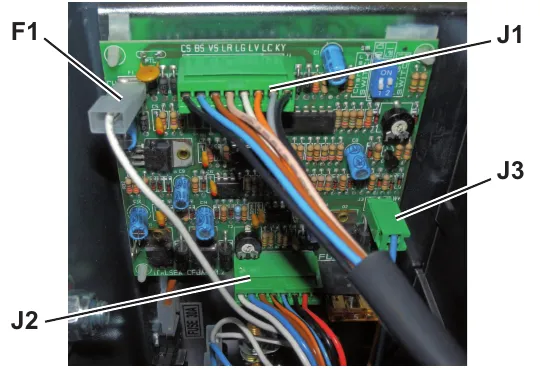
J1 - 8 way-connector
| PIN | Description | Voltage Ref. to B - | |
|---|---|---|---|
| 1 | CS | Switch power supply | 24V |
| 2 | BS | Brush switch activation | 24V |
| 3 | VS | Vacuum system switch | 24V |
| 4 | LR | Red LED (<=> EB2 PIN 2) | 0V |
| 5 | LG | Yellow LED (<=> EB2 PIN 3) | 0V |
| 6 | LV | Green LED (<=> EB2 PIN 4) | 0V |
| 7 | LC | Common LED (<=> EB2 PIN 1) | 5V |
| 8 | KY | Brush system switch | 24V |
J2 - 8 way-connector
| PIN | Description | Voltage Ref. to B - | |
|---|---|---|---|
| 1 | CT | Relay power supply | 24V |
| 2 | BT | Brush relay power supply | 0V |
| 3 | VT | Vacuum system relay power supply | 0V |
| 4 | S- | Brush motor current detection - | 0V |
| 5 | S+ | Brush motor current detection + | 0V |
| 6 | V- | Power supply - | 0V |
| 7 | V+ | Power supply + | 24V |
| 8 | BL | Not used | - |
J3 - 3 way-connector
| PIN | Description | Voltage Ref. to B - | |
|---|---|---|---|
| 1 | W+ | Solenoid valve + | 24V |
| 2 | W- | Solenoid valve - | 0V |
F1 - Faston
| PIN | Size | Description | Voltage Ref. to B - | ||
|---|---|---|---|---|---|
| 1 | 0.25 in (6.3 mm) | Power supply from battery charger | 24V | 24V | 24V (*) |
| 2 | 0.19 in (4.8 mm) | Not used | - | ||
Control system, cable version
Functional description
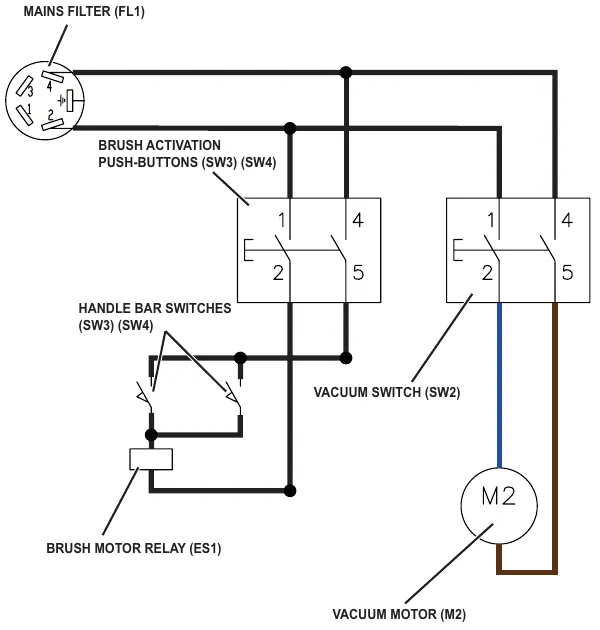
The function control is performed directly by the brush switch (SW1), the vacuum system switch (SW2) and the brush activation push-buttons (SW3 with SW4).
The switches (SW1) and (SW2) power the function electronic board (EB1).
Wiring diagram
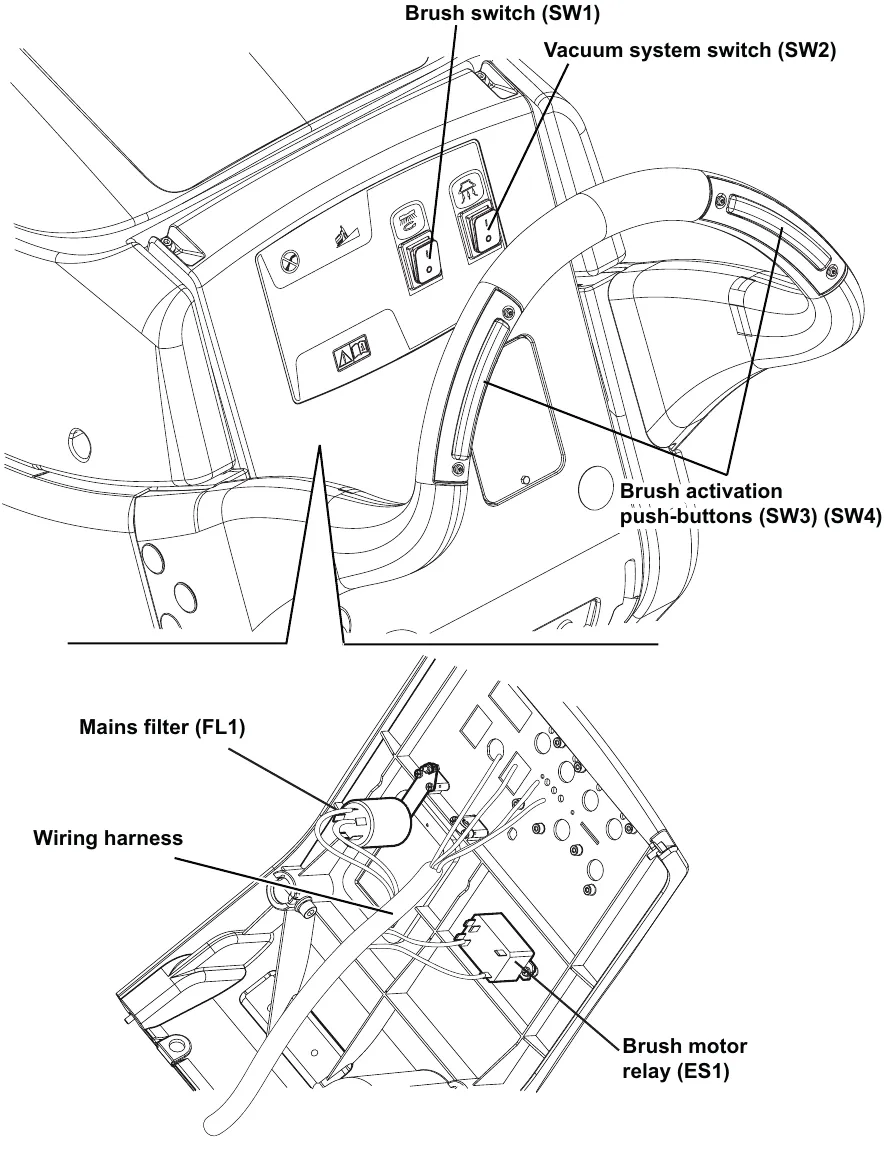
Component location
- Brush switch (SW1)
- Vacuum system switch (SW2)
- Brush activation push-buttons (SW3) (SW4)
- Mains filter (FL1)
- Brush motor relay (ES1)
Removal and installation
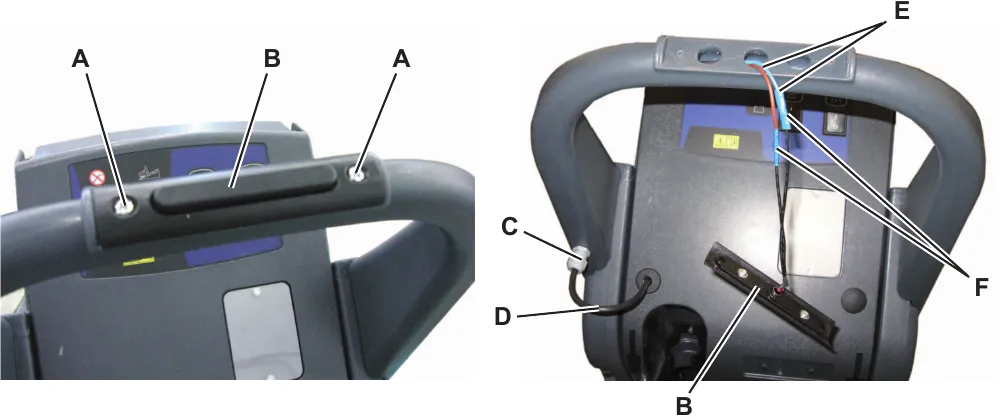
Brush activation push-button disassembly/assembly (old version): disassembly
- Drive the machine on a level floor. Make sure that the machine cannot move independently.
- Make sure that the power supply cable plug is disconnected from the electrical mains.
- Remove the screws (A) and move the brush activation push-button (B).
- Loosen the ring nut (C) off the bulkhead connection and push the cable (D) inside the handlebar as much as possible, then pull the cables (E) with the joints (F) of the push-button (B).
- Cut the cables (E) on the joints (F) and retrieve the push-button (B).
Assembly
- Assemble the components in the reverse order of disassembly, and note the following:
- Restore the connections (F) by using the joints supplied with the push-button.
- Before tightening the ring nut (C) push the cable (D) inside the handlebar as much as possible.
Corrected an obvious misprint: the steps are printed numbered 1, 1, 2, 3, 4, 5. They are numbered in sequence here, 1 to 6.
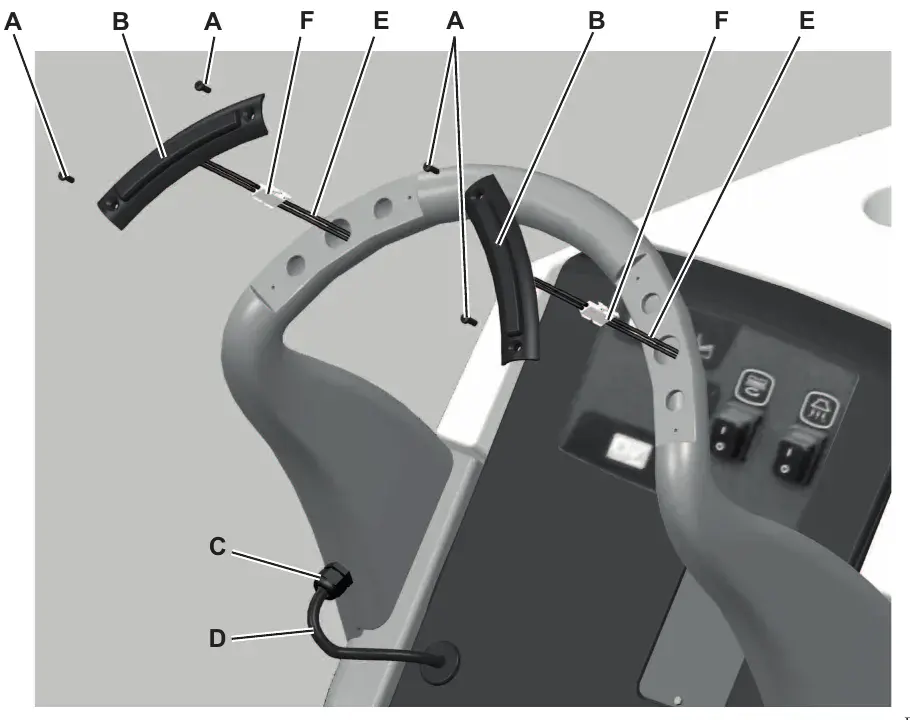
Brush activation push-button disassembly/assembly (new version)
Disassembly
- Drive the machine on a level floor. Make sure that the machine cannot move independently.
- Make sure that the power supply cable plug is disconnected from the electrical mains.
- Remove the screws (A) and move the brush activation push-button (B).
- Loosen the ring nut (C) off the bulkhead connection and push the cable (D) inside the handlebar as much as possible, then pull the cables (E) with the connectors (F) of the push-buttons (B).
- Disconnect the connectors (F) and retrieve the push-buttons (B).
Assembly
- Assemble the components in the reverse order of disassembly, and note the following:
- Before tightening the ring nut (C) push the cable (D) inside the handlebar as much as possible.
Corrected obvious misprints: the first sub-heading is printed in Italian as "Smontaggio" (now Disassembly, as on page 31), and the steps are printed numbered 1, 1, 2, 3, 4, 5 (numbered in sequence here, 1 to 6).
Electrical system, battery version
Functional description
Basically the electrical system consists of a function electronic board (EB1) which determines the brush and vacuum system motor activation by means of the relevant switches (SW1) and (SW2), disabling them when the battery voltage drops below the battery safety threshold value.
The battery is connected to the system by means of the ANDERSON POWER connector (C1).
The on-board battery charger (CH) is connected to the battery with the red (+) and black (-) connector (C2) and supplies the enabling signal (+24V) to activate the machine functions only when its yellow connector (C2) is disconnected from the electrical mains. When the battery charger is connected to the electrical mains, the battery charger inner relay opens the contact and stops the enabling signal on the yellow connector (C2). When the battery charger is not installed, the yellow connector (C2) is not connected and the dip-switch on the electronic board (EB1) must be turned to “NO CH”.
For further details, see the descriptions of individual sub-systems.
Fuses
The brush motor circuit is protected from short-circuits by the 40A fuse (F1). The motor is protected from overloads by means of the electronic protection system described in the Function Electronic Board Specifications chapter.
The vacuum system motor circuit is protected by the 30A blade fuse (F2).
The solenoid valve (EV1) and the function electronic board (EB1) control circuits are protected by 5A blade fuses (F3) on the function electronic board (EB1).
Wiring diagram
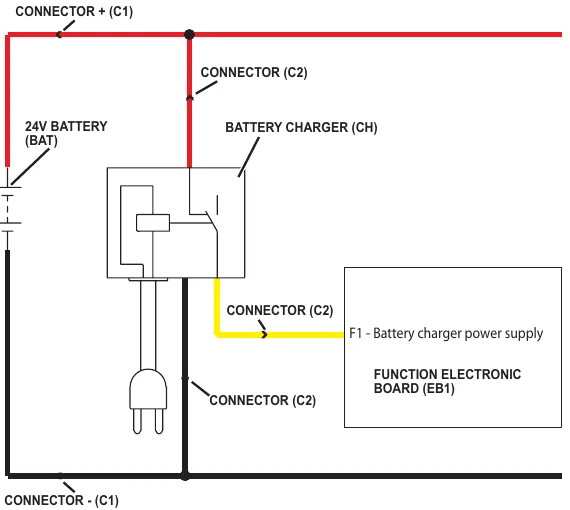
Component location
- Batteries (BAT)
- Battery connections
- Battery charger (CH)
- Battery connector (C1)
- Electrical component box
- Brush fuse (F1)
- Vacuum fuse (F2)
- Control/solenoid fuse (F3)
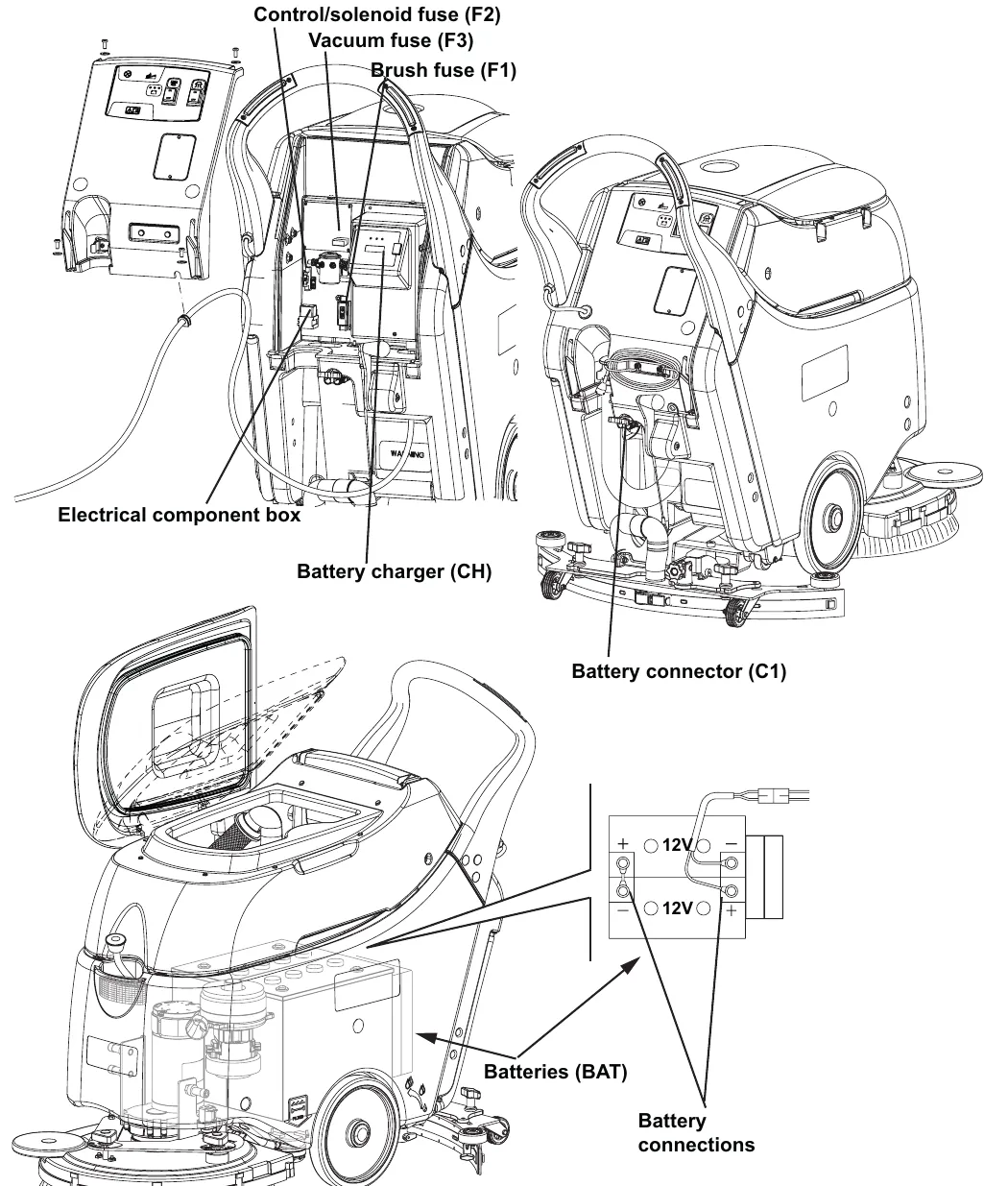
Note: in the drawing the callouts read "Control/solenoid fuse (F2)" and "Vacuum fuse (F3)", the reverse of the list above and of page 33, which give F2 as the vacuum fuse and F3 as the control/solenoid fuse. The drawing is shown as printed.
Maintenance and adjustments
Battery installation and battery type setting (WET or GEL/AGM)
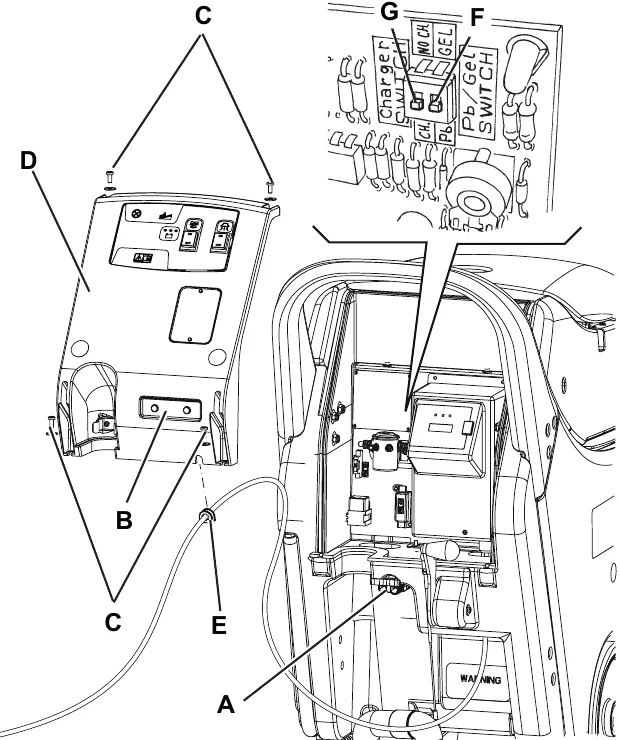
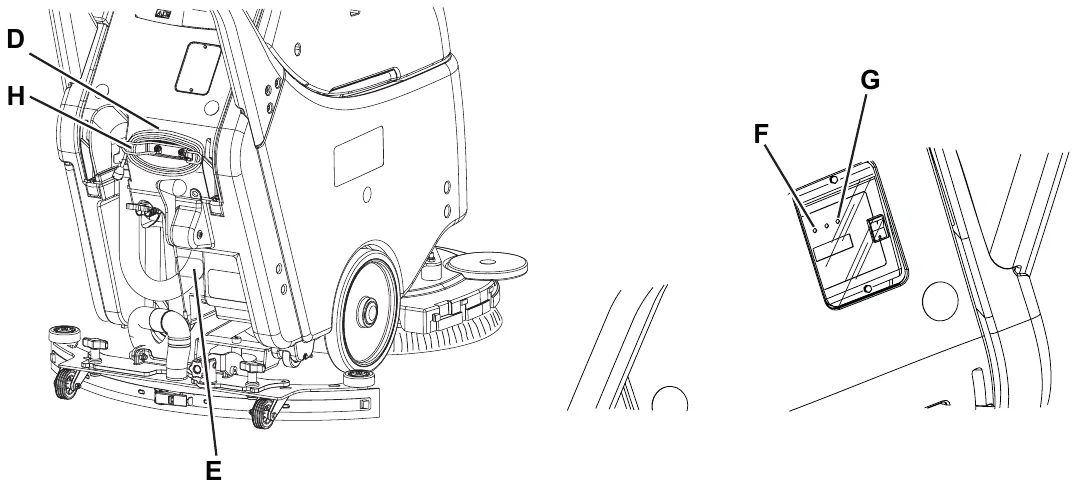
Set the electronic board of the machine and of the battery charger (if equipped) according to the type of batteries installed (WET or GEL/AGM) as shown below:
Machine setting
- Ensure the battery connector (A) is disconnected.
The machine factory setting is for GEL batteries. If this setting corresponds to the type of batteries installed, go to step 7. Otherwise, perform steps 2 to 6.
- Move aside the recovery water drain hose.
- Remove the battery charger cable, if equipped, from the cable holder (B).
- Remove the screws (C) and carefully move aside the panel (D) by disengaging the grommet (E) from its housing on the panel (D).
- Turn the microswitch (F) to WET position.
Warning! Do not move/set the adjacent switch (G).
- Perform steps 2 to 5 in the reverse order.
Battery installation and battery type setting (WET or GEL/AGM) (continues)
Battery charger setting (for machines with on-board battery charger)
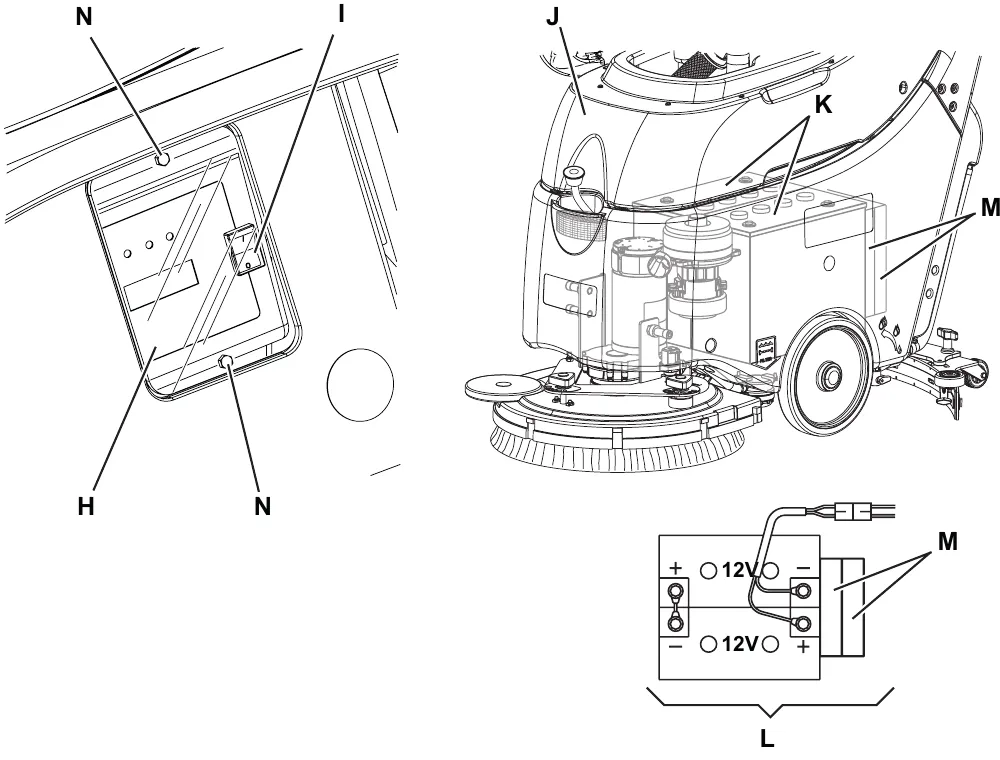
- Remove the battery charger data inspection window screws (N).
- Remove the window (H).
- Turn the battery charger selector (I) to WET for lead batteries, or to GEL for GEL/AGM batteries.
- Install the window (H) and tighten the screws (N).
Battery installation
- Remove the recovery tank cover (J).
- Install the batteries (K) on the machine according to the diagram (L).
Warning! For a proper machine balance, install the batteries in the compartment, with the shims (M) placed on the rear wall.
- Install the recovery tank cover (J).
- If necessary, charge the batteries (see the Battery charging paragraph).
Battery charging
Note: Charge the batteries when the yellow or red warning light on the control panel turns on, or at the end of every working cycle.
Do not reinstall the recovery tank until the battery charging cycle is over.
- Drive the machine to the appointed recharging area.
- Turn off the machine by turning the switches to “0”.
- For WET batteries only:
- Tip up the recovery tank.
- Check the level of electrolyte inside the batteries; if necessary, top up through the caps.
- Leave all the battery caps open for next charging.
- If necessary, clean the upper surface of the batteries.
- Charge the batteries according to one of the following procedures, depending on the presence of the electronic battery charger.
Battery charging (continues)
Charging the batteries with an external battery charger
- Check that the external battery charger is suitable by referring to the battery charger Manual. The battery charger voltage rating must be 24 V.
- Disconnect the battery connector (A) and connect it to the external battery charger.
- Connect the battery charger to the electrical mains.
- After charging, disconnect the battery charger from the electrical mains and from the battery connector (A).
- (For WET batteries only): Check the level of electrolyte inside the batteries (B) and close all the caps (C).
- Connect the battery connector (A) to the machine.
- (For WET batteries only): Tip down the recovery tank.
Battery charging (continues)
Charging the batteries with an (optional) battery charger installed on the machine
- Connect the battery charger cable (D) to the electrical mains (the electrical mains voltage and frequency must be compatible with the battery charger values shown on the machine serial number plate (E)).
When the battery charger is connected to the electrical mains, all machine functions are automatically cut off.
If the warning light (F) on the battery charger control panel stays on, the battery charger is charging the batteries. - When the green warning light (G) turns on, the battery charging is completed.
- When the battery charging is completed, disconnect the battery charger cable (D) from the electrical mains and wind it round its housing (H).
- (For WET batteries only): Tip down the recovery tank.
Note: For further information about the battery charger operation, see the Battery charger Manual.
Fuse check and replacement
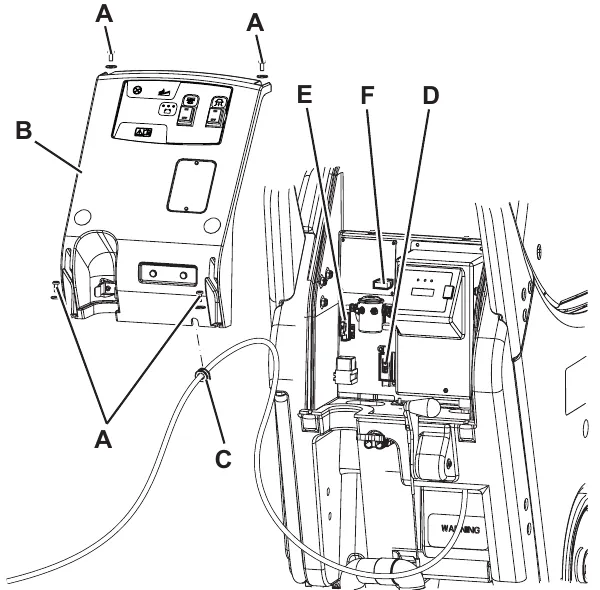
- Drive the machine on a level floor. Make sure that the machine cannot move independently.
- Check that the control panel switches are turned to “0”. Disconnect the battery connector (red).
- Move aside the recovery water drain hose.
- Remove the battery charger cable, if equipped, from the cable holder.
- Remove the screws (A).
- Carefully move the panel (B) by disengaging the wiring harness grommet (C) from its housing.
- Check the following fuses for integrity:
- (D) Brush deck fuse F1 (40 A)
- (E) Vacuum system fuse F2 (30 A)
- (F) Electronic board fuse F3 (5 A)
- Replace the open fuse, when the component that caused deactivation has fully cooled down. Parts ›
- Engage the grommet (C) and install the cover (B), then tighten the screws.
- Place the battery charger cable, if equipped, on the cable holder.
- Connect the battery connector (red).
Charge condition display
| INDICATION | TRANSITION THRESHOLD (VOLT) | CONSEQUENCE | ||
|---|---|---|---|---|
| WET | GEL | |||
| 1 | GREEN LED: fixed - YELLOW LED: fixed | 22 V | 22.2 V | - |
| 2 | YELLOW LED: fixed - RED LED: flashing | 20.4 V | 21.6 V | Brushes + Vacuum system OFF |
Troubleshooting
| Trouble | Possible Causes | Remedy |
|---|---|---|
| The machine is not working | The batteries (BAT) are discharged or its connections are not efficient | Charge the batteries or clean/repair the connections |
| The batteries (BAT) are broken | Check the battery no-load voltage | |
| The battery charger (CH) is broken | Replace Parts › | |
| The fuses (F1, F2, F3) are open | Replace Parts › | |
| The wiring harness is cut or pressed or short circuited | Repair |
Machine wiring diagram
Specifications
| Descriptions / Model | Advance SC450 20B | Nilfisk SC450 53B |
|---|---|---|
| Total absorbed power | 34 A (0.8 kW) | |
| Battery compartment size (width x length x height) | 13.7 x 13.7 x 11.8 in (350 x 350 x 300 mm) | |
| Battery voltage | 24 V | |
| Standard batteries (2) | Dry: 12 V 70 Ah C5 | |
| Battery charger | 100-240 VAC | |
| Work autonomy (standard batteries) | 2 hour | |
Electrical system, cable version
Wiring diagram
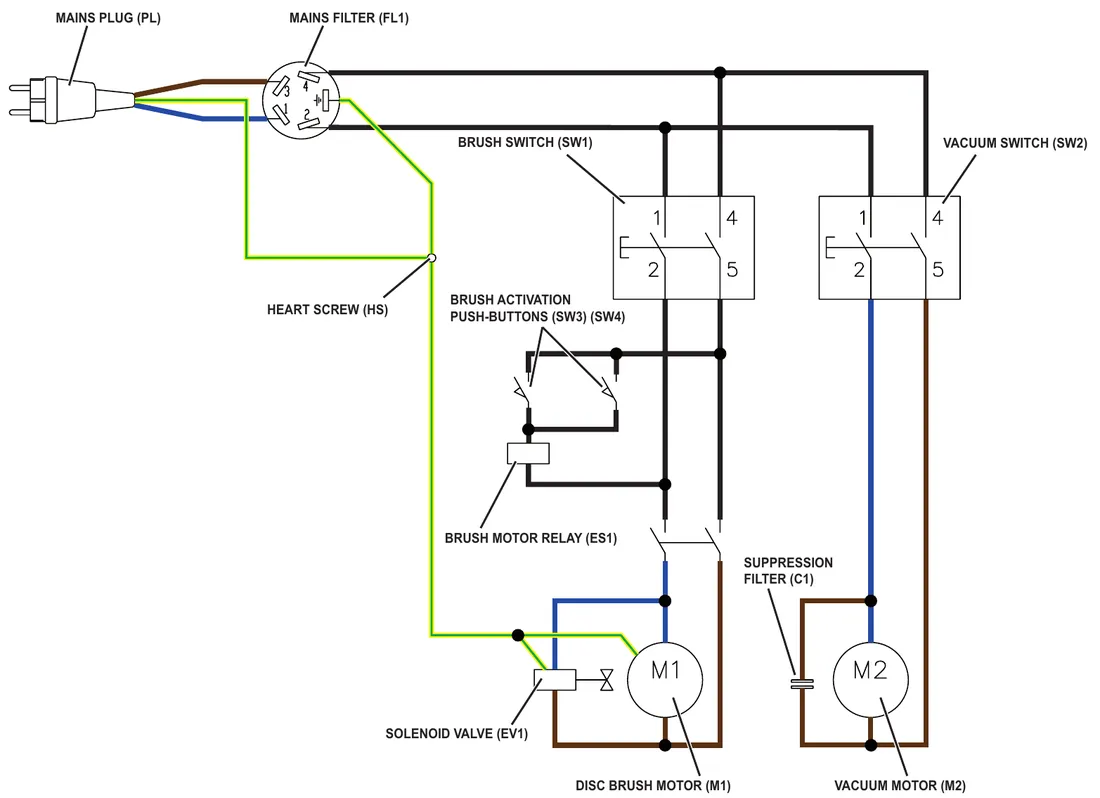
Specifications
| Descriptions / Model | Nilfisk SC450 53E |
|---|---|
| Total absorbed power | 7.5 A (1.7 kW) |
| Power supply | 230 V - 50-60 Hz |
Recovery system, battery version
Functional description
The water recovery system removes the dirty water from the floor and pipes it to a recovery tank. When the machine is running, the dirty water on the floor is collected by the squeegee blades and collected through the slots in the same, piped through the vacuum hose and into the tank by the airflow created by vacuum motor (M2). The dirty water is piped into the recovery tank, while the airflow continues to the vacuum fan.
The vacuum system motor (M2) is supplied by the relay (ES2) which is driven by the electronic board (EB1) when the switch (SW2) is closed. The circuit is protected by the vacuum fuse (F2).
The automatic float in the vacuum grid stops vacuum system motor (M2) from collecting any liquids.
When the automatic float closes and shuts down the vacuum system, the vacuum system motor noise will increase and the floor will not be dried.
When the recovery tank is full it can be emptied through the drain hose.
Wiring diagram
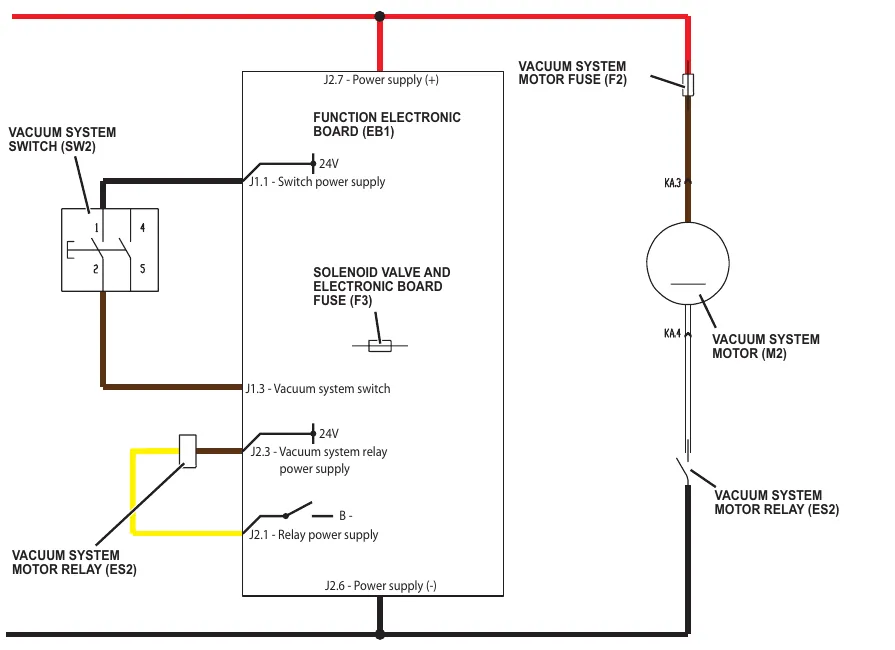
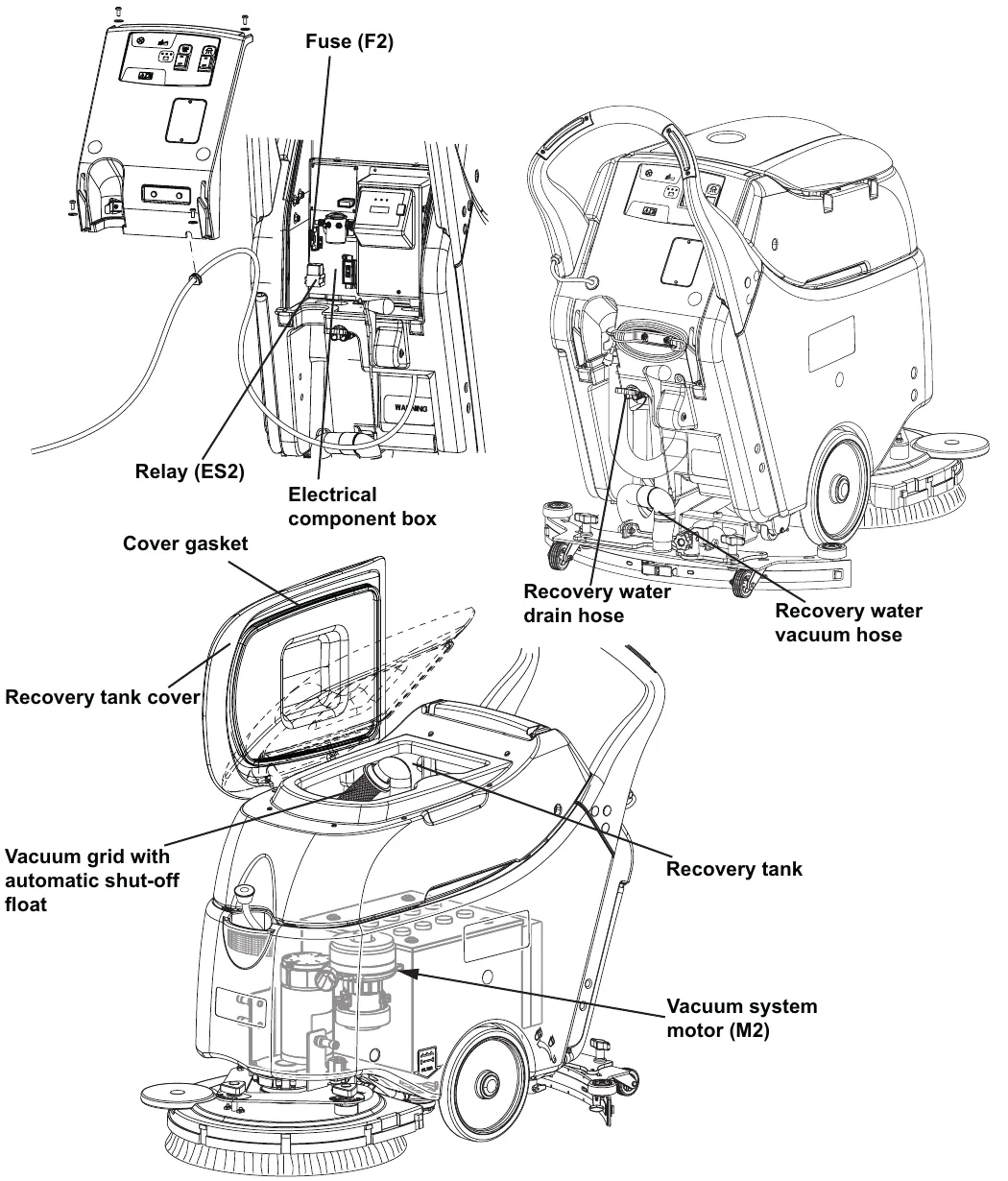
Component location
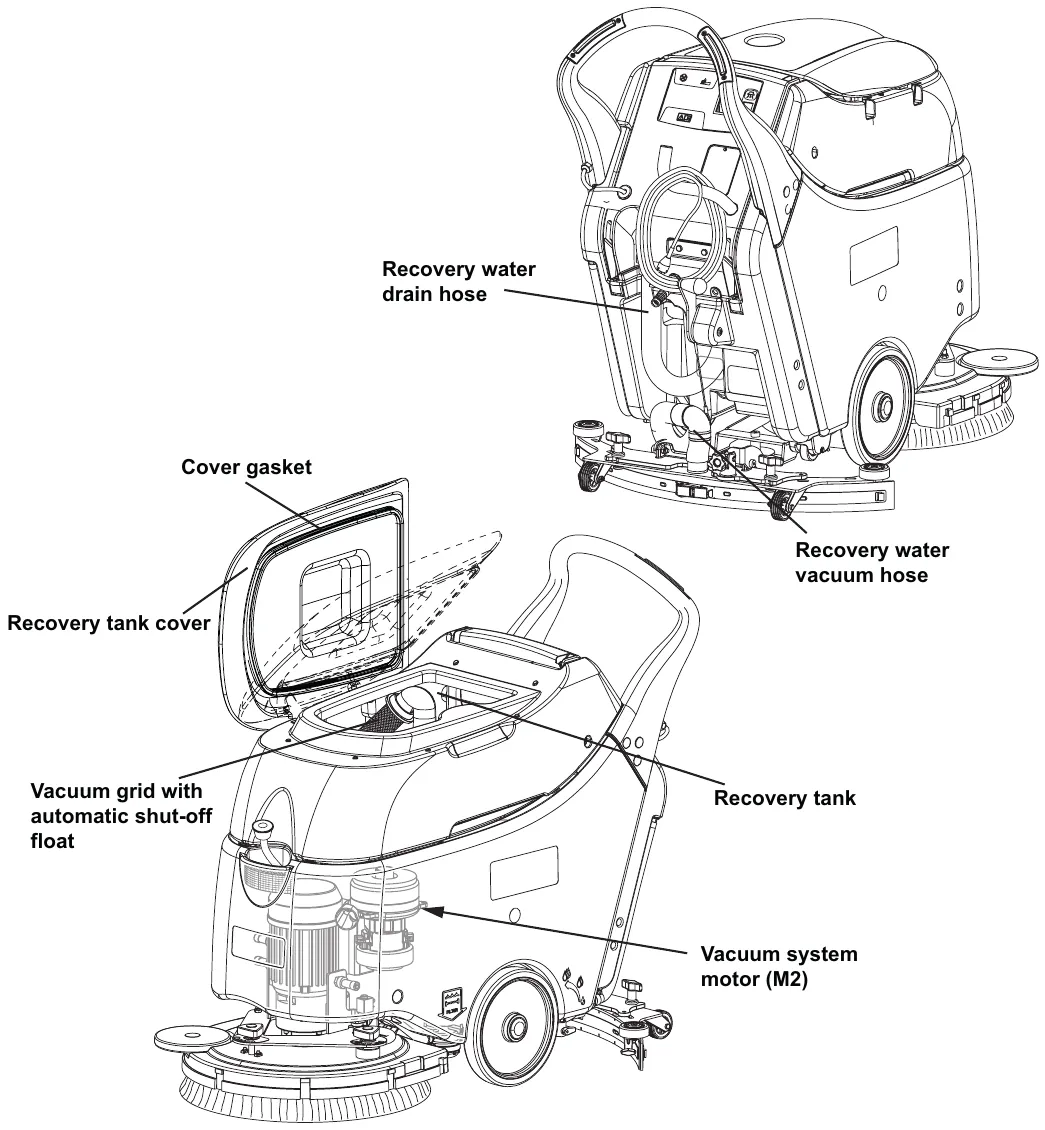
- Recovery tank
- Vacuum grid with automatic shut-off float
- Recovery tank cover
- Cover gasket
- Recovery water drain hose
- Recovery water vacuum hose
- Vacuum system motor (M2)
- Electrical component box
- Vacuum fuse (F2)
- Relay (ES2)
Maintenance and adjustments
Tank and vacuum grid cleaning
- Drive the machine to the appointed disposal area.
- Check that the control panel switches are turned to “0”. Disconnect the battery connector (red).
- Discharge the recovery water from the relevant tank.
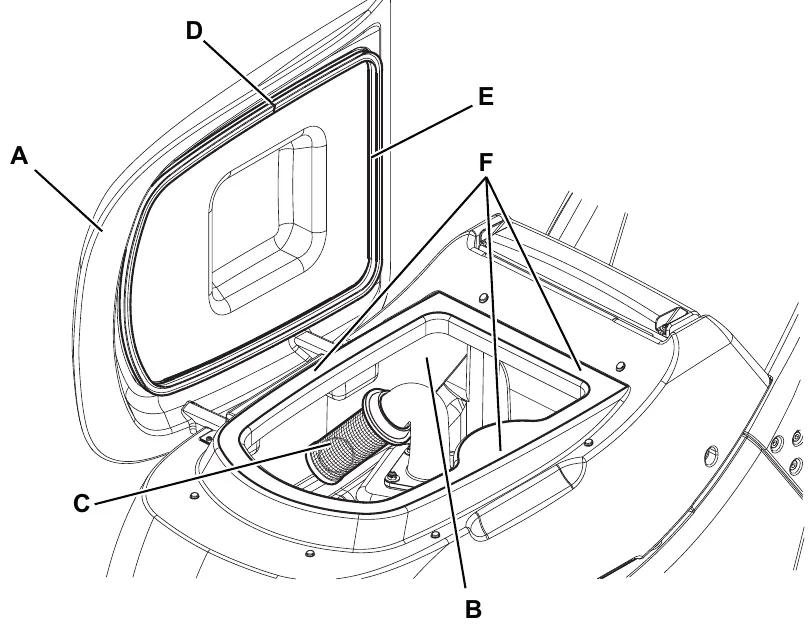
- Open the recovery tank cover (A), then clean and wash the cover, the tank (B) and the vacuum grid (C) with clean water.
If necessary, remove the grid (C) clean it carefully and reinstall it.
If necessary, clean also the solution tank.
Drain the water from the tanks with the relevant drain hoses. - Check the recovery tank cover gasket (D) for integrity.
The gasket (D) must be in good shape, as it is necessary for the recovery tank stay sealed.
If necessary replace the gasket (D) by removing it from its housing. When assembling the new gasket, install its junction (E) in the central rear area as shown in the figure. Parts › - Check that the seating surface (F) of the gasket (D) is integral and adequate for the gasket itself.
- Close the recovery tank cover (A).
Corrected an obvious misprint: step 6 is printed "the gasket (E)". The gasket is (D) and (E) is its junction, as in step 5 (now gasket (D)).
Troubleshooting
| Trouble | Possible Causes | Remedy |
|---|---|---|
| The vacuum system motor does not turn on | The vacuum system motor carbon brushes are worn | Replace Parts › |
| The switch (SW2) is broken | Replace Parts › | |
| The vacuum system motor is faulty | Check the amperage. Check the carbon brushes. Replace. Parts › | |
| The vacuum fuse (F2) is blown | Replace Parts › | |
| The relay (ES2) is broken | Replace Parts › | |
| The recovery water vacuuming is insufficient or there is no vacuuming | The vacuum grid with automatic shut-off float is activated because the recovery tank is full | Drain the recovery tank |
| The vacuum grid is dirty | Clean | |
| The tank cover is not correctly positioned | Adjust | |
| The tank cover gasket is not efficient | Clean/replace Parts › | |
| The vacuum system motor filter is dirty | Clean | |
| The vacuum gaskets are damaged or do not match perfectly | Repair or replace Parts › | |
| The squeegee vacuum hose is broken | Replace Parts › | |
| The recovery tank vacuum hose is broken | Replace Parts › |
Removal and installation
Vacuum system motor amperage check
- Check that the squeegee and the vacuum hose are clean and that there is no dirt in their inner parts.
- Keep the squeegee lifted.
- Remove the recovery water tank.
Warning! Do not touch uncovered electrical components while performing the following steps.
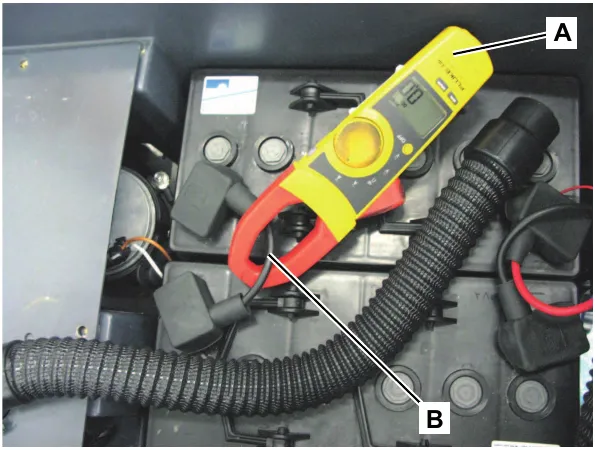
- Apply the Amp clamp (A) on the battery cable (B).
- Turn on the vacuum system and check that the vacuum system motor amperage is 13 - 17 A at 24 V.
Turn off the vacuum system.
Remove the Amp clamp (A).
If the amperage is higher, perform the following procedures to detect and correct the abnormal input:- Check that the vacuum fuse (F2) is properly positioned
- Check the condition of the vacuum system motor carbon brushes
- Remove the vacuum system motor (see the procedure in the Vacuum System Motor Disassembly/Assembly paragraph), and check the condition of all its components.
If the above-mentioned procedures do not produce the correct readings for the vacuum system motor amperage, the motor must be replaced (see the procedure in the Vacuum System Motor Disassembly/Assembly paragraph).
Reassembly
- Assemble the components in the reverse order of disassembly.
Corrected an obvious misprint: the sub-heading is printed "Reassemby" (now Reassembly).
Vacuum system motor carbon brush check/replacement
Disassembly/check
- Remove the vacuum system motor (see the procedure in the Vacuum System Motor Disassembly/Assembly paragraph).
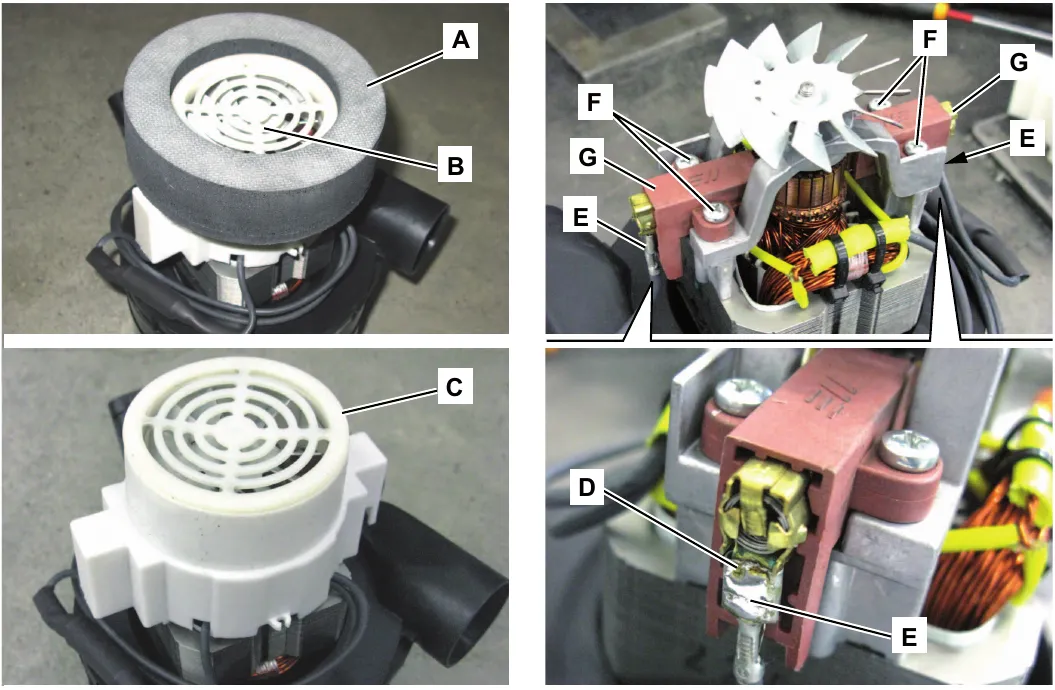
- At the workbench, remove the sealing ring (A) from the vacuum system motor (B).
- Remove the fan cover (C) by disengaging its inner fasteners.
- With a proper tool, remove the soldering (D) between both lead-in wires (E).
- Disconnect the lead-in wires (E).
- Remove the screws (F) and remove the carbon brushes (G).
- Check the carbon brushes (G) for wear. The carbon brushes are worn when:
- The contact with the motor armature is insufficient
- The contact surface is not even
- The stroke is less than 0.12 in (3 mm)
- The thrust spring is broken, etc.
In this cases, replace both motor carbon brushes. Parts ›
Assembly
- Assemble the components in the reverse order of disassembly, and note the following:
- after connecting the lead-in wires (E) fasten them with a soldering (D).
Corrected an obvious misprint: step 7 is printed "carbon brushes (D)". The carbon brushes are (G) and (D) is the soldering, as in step 6 (now carbon brushes (G)).
Vacuum system motor disassembly/assembly
- Remove the recovery water tank.
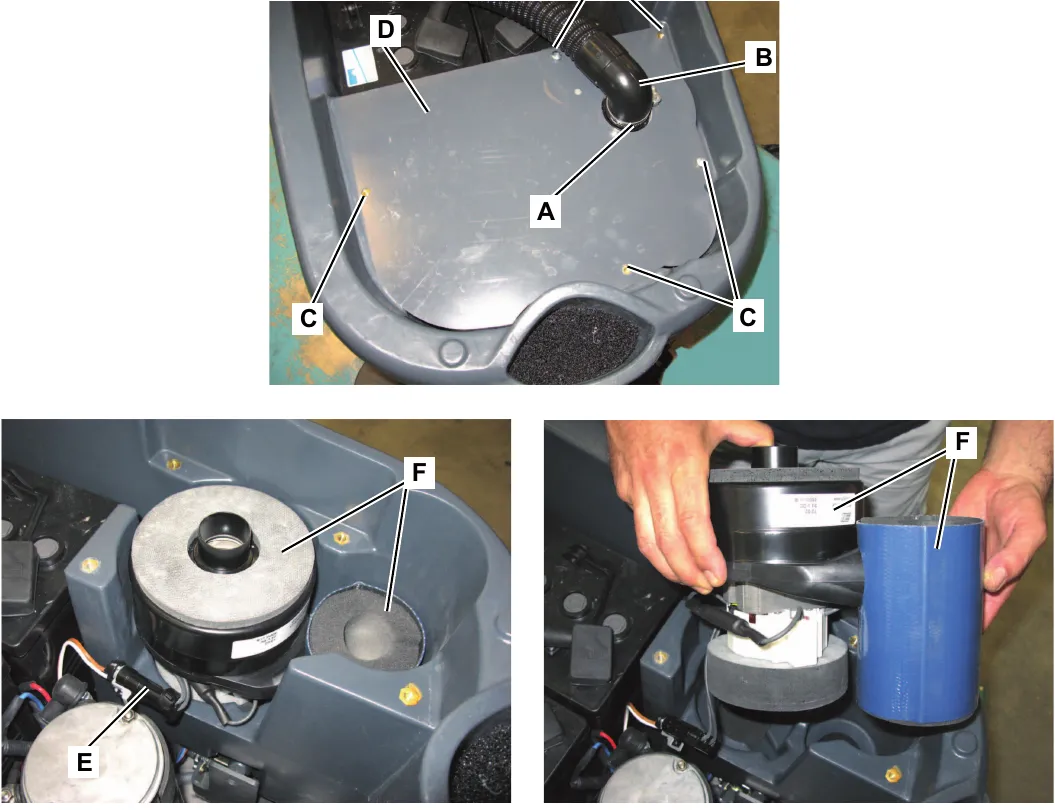
- Loosen the fastener (A) and disconnect the hose (B) from the vacuum system motor below.
- Remove the screws (C) and remove the cover (D).
- Disconnect the connector (E) and remove the vacuum system motor (F) by lifting it. Parts ›
Assembly
- Assemble the components in the reverse order of disassembly.
Specifications
| Descriptions / Model | Advance SC450 20B | Nilfisk SC450 53B |
|---|---|---|
| Recovery tank capacity | 11.9 US gal (45 liters) | |
| Vacuum power | 0.44 hp (330 W) | |
| Vacuum water lift (blocked) | 43.3 inH2O (1,100 mmH2O) | |
Recovery system, cable version
Functional description
The water recovery system removes the dirty water from the floor and pipes it to a recovery tank. When the machine is running, the dirty water on the floor is collected by the squeegee blades and collected through the slots in the same, piped through the vacuum hose and into the tank by the airflow created by vacuum motor (M2). The dirty water is piped into the recovery tank, while the airflow continues to the vacuum fan.
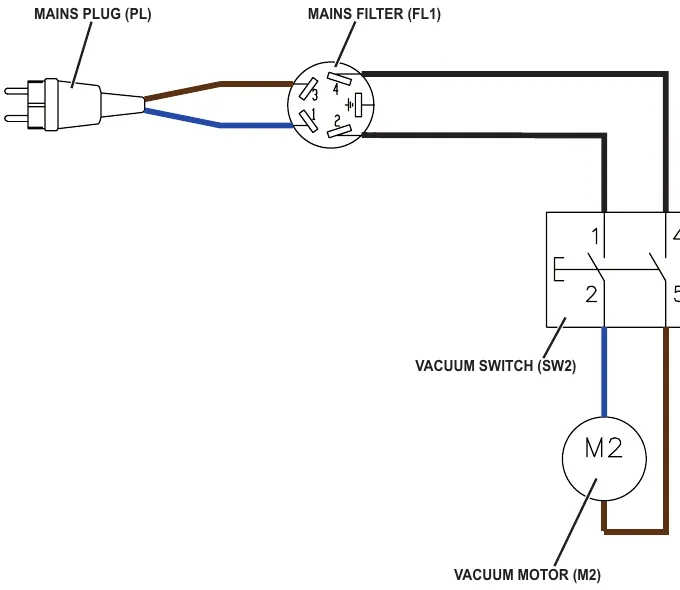
The vacuum system motor (M2) is supplied by the switch (SW2).
The automatic float in the vacuum grid stops vacuum system motor (M2) from collecting any liquids.
When the automatic float closes and shuts down the vacuum system, the vacuum system motor noise will increase and the floor will not be dried.
When the recovery tank is full it can be emptied through the drain hose.
Wiring diagram
Component location
- Recovery tank
- Vacuum grid with automatic shut-off float
- Recovery tank cover
- Cover gasket
- Recovery water drain hose
- Recovery water vacuum hose
- Vacuum system motor (M2)
Maintenance and adjustments
Tank and vacuum grid cleaning
- Drive the machine to the appointed disposal area.
- Check that the control panel switches are turned to “0”. Disconnect the battery connector (red).
- Discharge the recovery water from the relevant tank.
- Open the recovery tank cover (A), then clean and wash the cover, the tank (B) and the vacuum grid (C) with clean water.
If necessary, remove the grid (C) clean it carefully and reinstall it.
If necessary, clean also the solution tank.
Drain the water from the tanks with the relevant drain hoses. - Check the recovery tank cover gasket (D) for integrity.
The gasket (D) must be in good shape, as it is necessary for the recovery tank stay sealed.
If necessary replace the gasket (D) by removing it from its housing. When assembling the new gasket, install its junction (E) in the central rear area as shown in the figure. Parts › - Check that the seating surface (F) of the gasket (D) is integral and adequate for the gasket itself.
- Close the recovery tank cover (A).
Corrected an obvious misprint: step 6 is printed "the gasket (E)". The gasket is (D) and (E) is its junction, as in step 5 (now gasket (D)).
Troubleshooting
| Trouble | Possible Causes | Remedy |
|---|---|---|
| The vacuum system motor does not turn on | The vacuum system motor carbon brushes are worn | Replace Parts › |
| The switch (SW2) is broken | Replace Parts › | |
| The vacuum system motor is faulty | Check the amperage. Check the carbon brushes. Replace. Parts › | |
| The recovery water vacuuming is insufficient or there is no vacuuming | The vacuum grid with automatic shut-off float is activated because the recovery tank is full | Drain the recovery tank |
| The vacuum grid is dirty | Clean | |
| The tank cover is not correctly positioned | Adjust | |
| The tank cover gasket is not efficient | Clean/replace Parts › | |
| The vacuum system motor filter is dirty | Clean | |
| The vacuum gaskets are damaged or do not match perfectly | Repair or replace Parts › | |
| The squeegee vacuum hose is broken | Replace Parts › | |
| The recovery tank vacuum hose is broken | Replace Parts › |
Removal and installation
Vacuum system motor amperage check
- Check that the squeegee and the vacuum hose are clean and that there is no dirt in their inner parts.
- Keep the squeegee lifted.
- Remove the recovery water tank.
Warning! Do not touch uncovered electrical components while performing the following steps.
- Apply the Amp clamp on the electrical main cable.
- Turn on the vacuum system and check that the vacuum system motor amperage is 2.0 and 3.0 A at 230 Vac.
Turn off the vacuum system.
Remove the Amp clamp (A).
If the amperage is higher, perform the following procedures to detect and correct the abnormal input:- Check the condition of the vacuum system motor carbon brushes
- Remove the vacuum system motor (see the procedure in the Vacuum System Motor Disassembly/Assembly paragraph), and check the condition of all its components.
If the above-mentioned procedures do not produce the correct readings for the vacuum system motor amperage, the motor must be replaced (see the procedure in the Vacuum System Motor Disassembly/Assembly paragraph).
Reassembly
- Assemble the components in the reverse order of disassembly.
Corrected obvious misprints: the sub-heading is printed "Reassemby" (now Reassembly), and the amperage is printed in Italian style as "2,0 e 3,0 Amp at 230 Vac" (now 2.0 and 3.0 A at 230 Vac).
Vacuum system motor carbon brush check/replacement
Disassembly/check
- Remove the vacuum system motor (see the procedure in the Vacuum System Motor Disassembly/Assembly paragraph).
- At the workbench, remove the sealing ring (A) from the vacuum system motor (B).
- Remove the fan cover (C) by disengaging its inner fasteners.
- With a proper tool, remove the soldering (D) between both lead-in wires (E).
- Disconnect the lead-in wires (E).
- Remove the screws (F) and remove the carbon brushes (G).
- Check the carbon brushes (G) for wear. The carbon brushes are worn when:
- The contact with the motor armature is insufficient
- The contact surface is not even
- The stroke is less than 0.12 in (3 mm)
- The thrust spring is broken, etc.
In this cases, replace both motor carbon brushes. Parts ›
Assembly
- Assemble the components in the reverse order of disassembly, and note the following:
- after connecting the lead-in wires (E) fasten them with a soldering (D).
Corrected an obvious misprint: step 7 is printed "carbon brushes (D)". The carbon brushes are (G) and (D) is the soldering, as in step 6 (now carbon brushes (G)).
Vacuum system motor disassembly/assembly
- Remove the recovery water tank.
- Loosen the fastener (A) and disconnect the hose (B) from the vacuum system motor below.
- Remove the screws (C) and remove the cover (D).
- Disconnect the connector (E) and remove the vacuum system motor (F) by lifting it. Parts ›
Assembly
- Assemble the components in the reverse order of disassembly.
Specifications
| Descriptions / Model | Nilfisk SC450 53E |
|---|---|
| Recovery tank capacity | 11.9 US gal (45 liters) |
| Vacuum power | 0.44 hp (550 W, 50-60 Hz) |
| Vacuum water lift (blocked) | 47.2 inH2O (1,200 mm H2O) |
Corrected an obvious misprint: vacuum water lift is printed "0.44 hp (550 W, 50-60 Hz)", a copy of the row above. Now 47.2 inH2O (1,200 mm H2O), as on page 19.
Scrub system, disc, battery version
Functional description
The disc brush system can be started by the operator. The disc brush turn counter-clockwise.
The brush system, when turning, cleans/washes the floor surface and assist machine forward movement.
The deck, where brushes suitable for cleaning the particular type of floor are installed, is the main part of the brush system. The brush deck is fixed and integrated in the machine with a support plate. On the support plate, there are two handwheels to adjust the machine straight forward movement and speed.
The brush working pressure is functional to the machine designed balance.
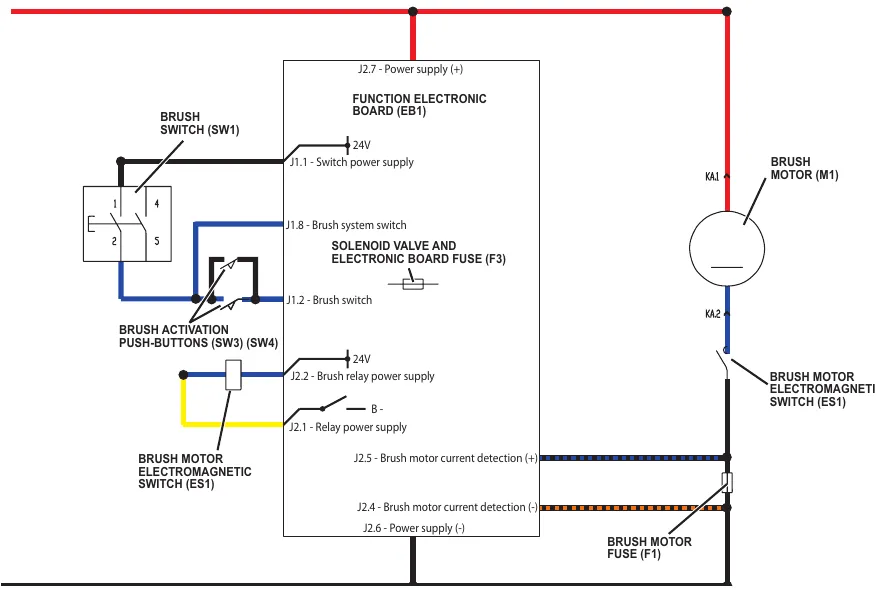
The brush motor (M1) is supplied by the electromagnetic switch (ES1) which is driven by the function electronic board (EB1) when the switches (SW1) and (SW3 with SW4) are closed. The circuit is protected by the brush fuse (F1) and by the electronic protection system described in the Function Electronic Board Specifications, in the Control System chapter.
The system, once activated, uses the solution coming form the solution system, to wash the floor.
In case of brush motor overload, a safety system stops the brushes after about one minute of continuous overload. The overload is shown by the three battery warning LEDs flashing simultaneously.
The overload is detected by monitoring the current flow on the motor. The current is measured by checking the voltage drop through the brush fuse (F1). If the voltage drop is higher than 40 mV, the 3 battery LEDs flash simultaneously and, if the overload persists, the motor stops after a variable delay, depending on the overload amount.
To start scrubbing again after a brush stop due to overload, turn off and then on the machine with the brush switch (SW1).
To work properly, the brush motor needs the following:
- Brush switch (SW1) turned on
- Push-button (SW3) pressed
- Charged battery (the red LED must not be flashing).
Wiring diagram
Component location
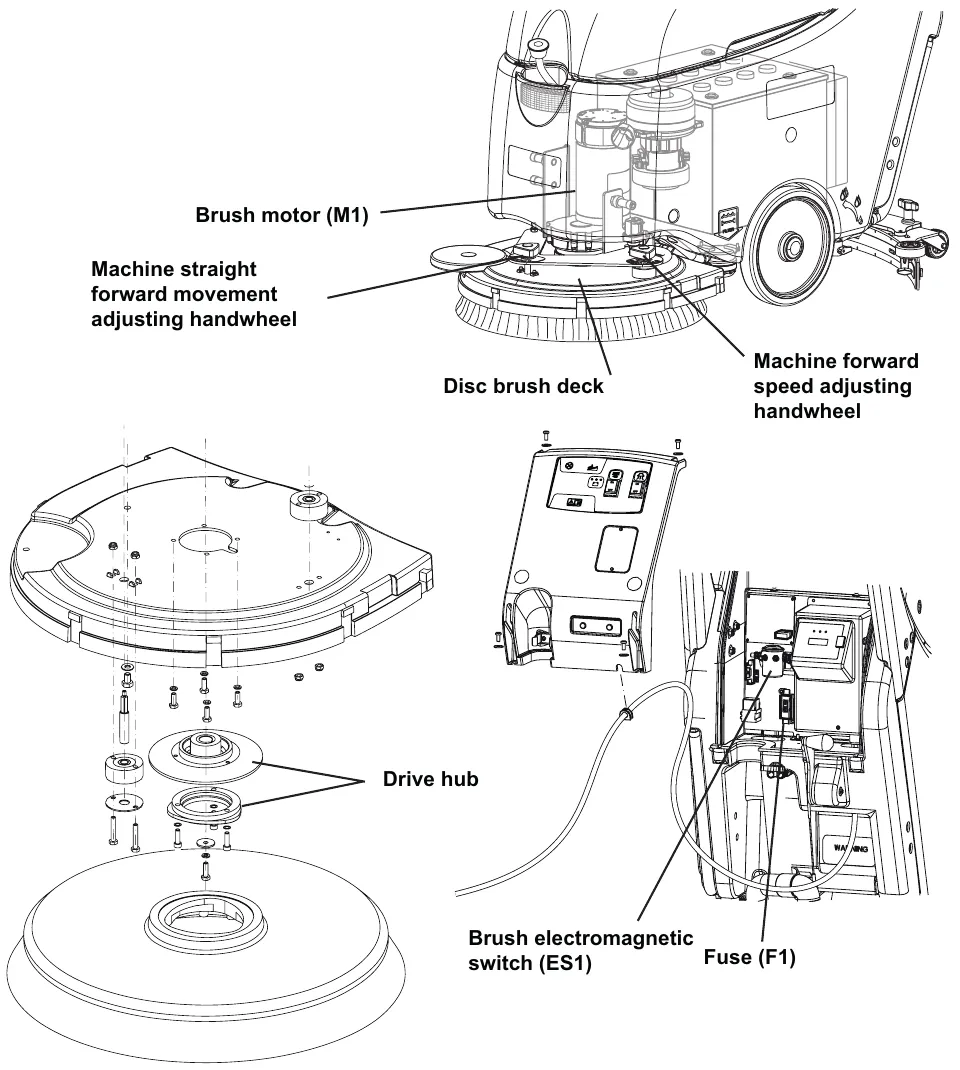
- Disc brush deck
- Brush motor (M1)
- Drive hub
- Brush electromagnetic switch (ES1)
- Brush fuse (F1)
- Machine forward speed adjusting handwheel
- Machine straight forward movement adjusting handwheel
Maintenance and adjustments
Brush cleaning
- Drive the machine on a level floor and lift the brush/pad-holder deck. Make sure that the machine cannot move independently.
- Check that the control panel switches are turned to “0”.
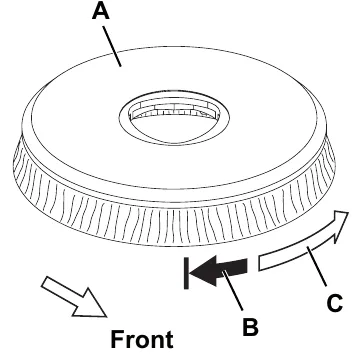
- Remove the brush/pad-holder (A) according to the following procedure:
- When the deck is lifted, grab the brush/pad-holder with the hands and turn it first in one direction (B) and then in the other direction (C) to release it.
- Clean the brush with water and detergent.
- Check the brush bristles for integrity and wear; if necessary, replace the brush. Parts ›
- Install the brush.
Machine forward movement adjustment
Note: The machine speed and forward movement vary according to the type of floor to be cleaned and the choice of using the brush or the pad. If necessary, perform the following procedure.
- Adjust the machine speed with the handwheel (A) according to the following procedure:
- Turn it counter-clockwise to increase the machine speed.
- Turn it clockwise to decrease the machine speed.
- If it is difficult to keep the machine moving straight-forwardly because it deviates to the left or to the right, adjust the knob (B) by turning it clockwise or counter-clockwise.
- With the machine ready to operate, perform hands-on tests of the machine speed; if necessary, perform step 2 again.
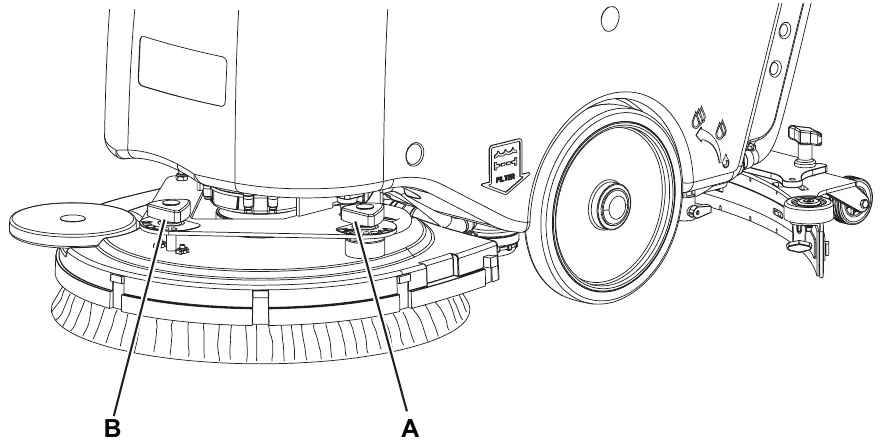
Troubleshooting
Open circuit
- The brush fuse (F1) determines an open in the supply circuit of the brush deck motor. This system allows to prevent the circuits from being damaged under overload conditions.
- The open in the fuse can be caused by the following:
- Short circuit in the brush motor wiring harness; fault in the motor.
| Trouble | Possible Causes | Remedy |
|---|---|---|
| The brush does not clean properly | The brush is excessively worn | Replace Parts › |
| One brush does not turn | Activation of motor overload | Restart the machine |
| The motor carbon brushes are worn | Replace Parts › | |
| The motor is faulty | Check the motor amperage/replace Parts › | |
| There are ropes or debris restraining the brush rotation | Remove and clean | |
| The brush fuse (F1) is open | Replace Parts › | |
| The motor electromagnetic switch (ES1) is damaged | Replace Parts › | |
| The brush motor electromagnetic switch wiring harness is damaged | Repair | |
| The brush motor electromagnetic switch wiring harness is damaged | Repair | |
| The wiring harness between function electronic board (EB1) and brush motor electromagnetic switch (ES1) is damaged | Repair |
Removal and installation
Brush motor amperage check
- Remove the brush.
- Remove the recovery water tank.
Warning! Do not touch uncovered electrical components while performing the following steps.
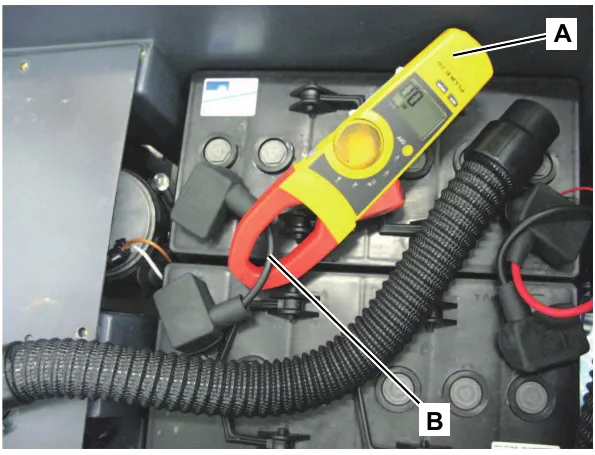
- Apply the Amp clamp (A) on the battery cable (B).
- Turn on the brush and check that the brush motor amperage is between 2 and 3 A at 24 V.
Stop the brush rotation.
Remove the Amp clamp (A).
If the amperage is higher, perform the following procedures to detect and correct the abnormal input:
- Check that the brush hub is free from foreign materials (ropes, dirt, ...) preventing it from turning.
- Check that the brush fuse (F1) is properly positioned
- Check the condition of the brush motor carbon brushes
- Remove the brush motor (see the procedure in the Brush Motor Disassembly/Assembly paragraph), and check the condition of all its components.
If the above-mentioned procedures do not produce the correct readings for the brush motor amperage, the motor must be replaced (see the procedure in the Brush Motor Disassembly/Assembly paragraph).
Reassembly
- Assemble the components in the reverse order of disassembly.
Corrected an obvious misprint: the sub-heading above step 5 is printed "Reset" (now Reassembly, since step 5 is the reassembly step, as on page 50).
Brush motor carbon brush check/replacement
Disassembly/check
- Remove the brush motor (see the procedure in the Brush Motor Disassembly/Assembly paragraph).
- Fasten the brush motor at the workbench.
Note: Remove one carbon brush at a time, to avoid confusing their positions.
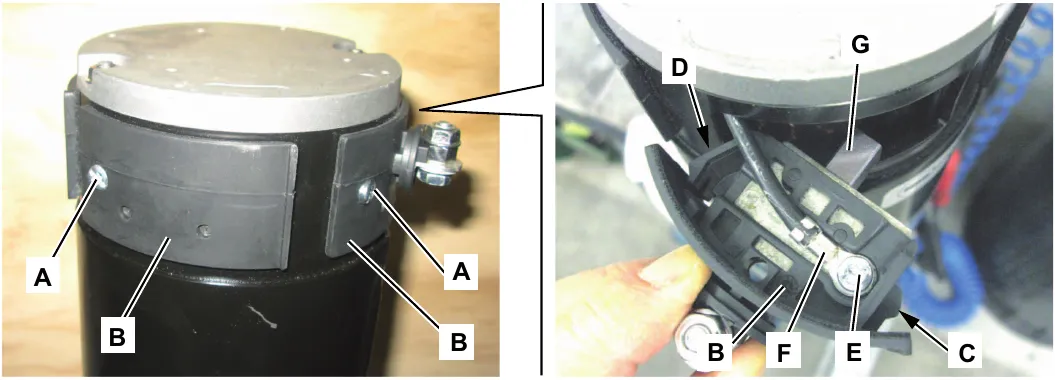
- Remove the screw (A) of one of the four carbon brush assemblies (B).
- Remove the carbon brush assembly (B) by disengaging the inner fasteners (C) and (D).
- If necessary, remove the screw (E) and disconnect the electrical connection (F) from the carbon brush assembly.
- Check the carbon brush (G) for wear. The carbon brush is worn when:
- The contact with the motor armature is insufficient
- The contact surface is not even
- The stroke is less than 0.12 in (3 mm)
- The thrust spring is broken, etc.
- Remove and check the other carbon brush assemblies (B) by performing steps 3 to 6.
- If necessary, disconnect the electrical connection (F) and remove the carbon brush assemblies to replace them.
Replace the carbon brushes as an assembly. Parts ›
Assembly
- Assemble the components in the reverse order of disassembly, and note the following:
When fastening the electrical connections (F), take care of their insulation from the surrounding parts of the frame.
Brush deck disassembly/assembly
Disassembly
- Check that the control panel switches are turned to “0”. Disconnect the battery connector (red).
- Remove the recovery water tank.
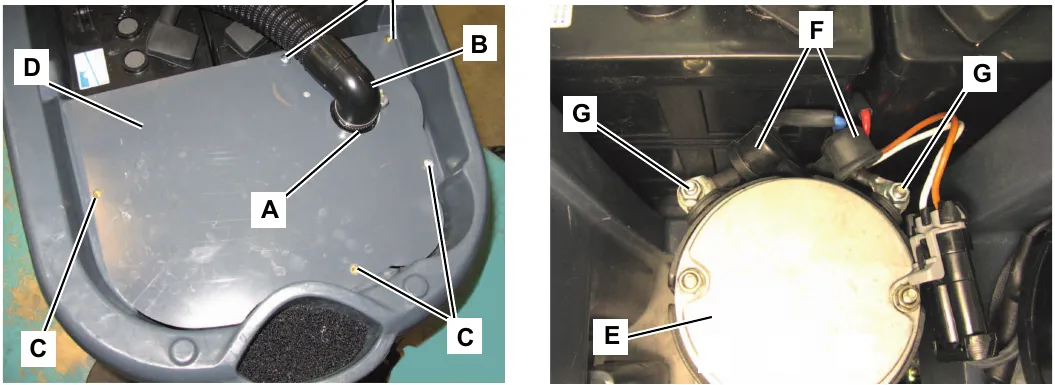
- Loosen the fastener (A) and disconnect the hose (B) from the vacuum system motor below.
- Remove the screws (C) and remove the cover (D).
- On the brush motor (E) disengage the rubber caps (F), then disconnect the electrical connections (G) of the motor.
Brush deck disassembly/assembly (continues)
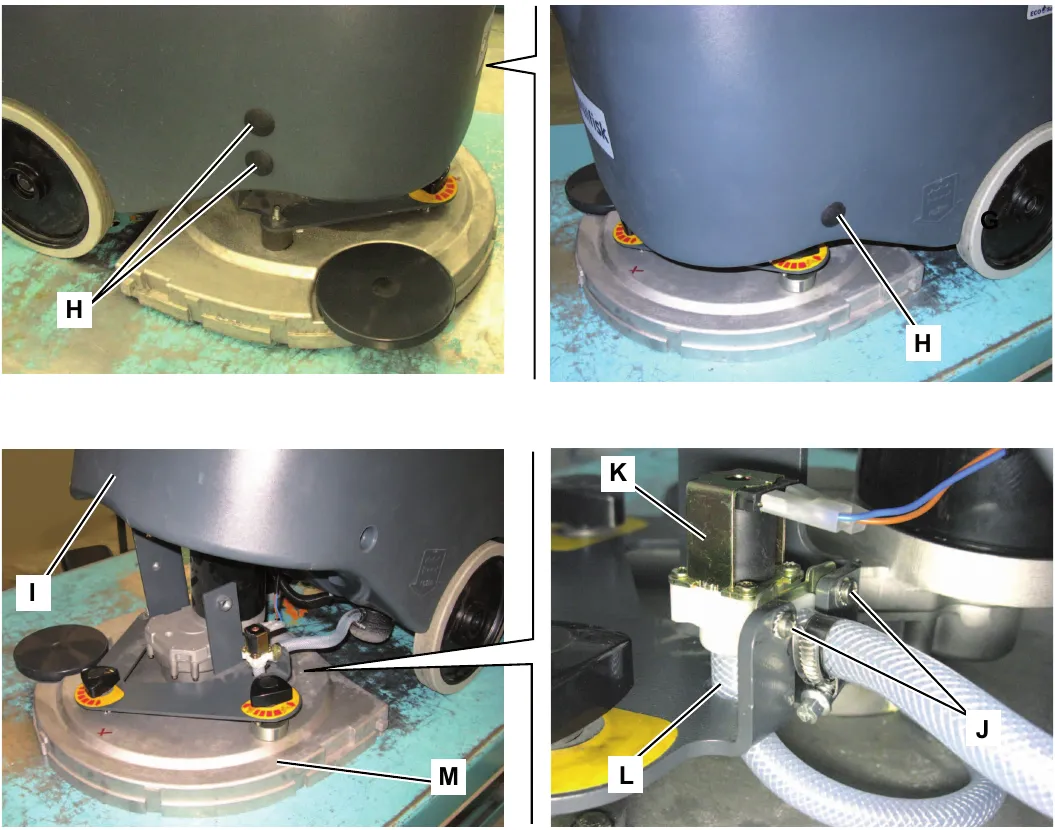
- Remove the plugs (H) on the machine front sides and remove the screws below.
- Lift the machine front side (I) and keep it lifted.
- Loosen the screws (J) fastening the solution solenoid valve (K).
- Move the solenoid valve (K) and disconnect the hose (L) from the solenoid valve by pulling it.
- Recover the brush deck (M).
Assembly
- Assemble the components in the reverse order of disassembly.
Brush motor disassembly/assembly
Disassembly
- Remove the brush.
- Place the machine on a hoisting system.
- Check that the control panel switches are turned to “0”. Disconnect the battery connector (red).
- Remove the recovery water tank.
- Loosen the fastener (A) and disconnect the hose (B) from the vacuum system motor below.
- Remove the screws (C) and remove the cover (D).
- On the brush motor (E), cut the fastening clamp (F) of the wiring harness (G).
- Move the rubber caps (H) protecting the electrical connections (I).
- Remove the nuts and disconnect the electrical connections (I) from the motor (E).
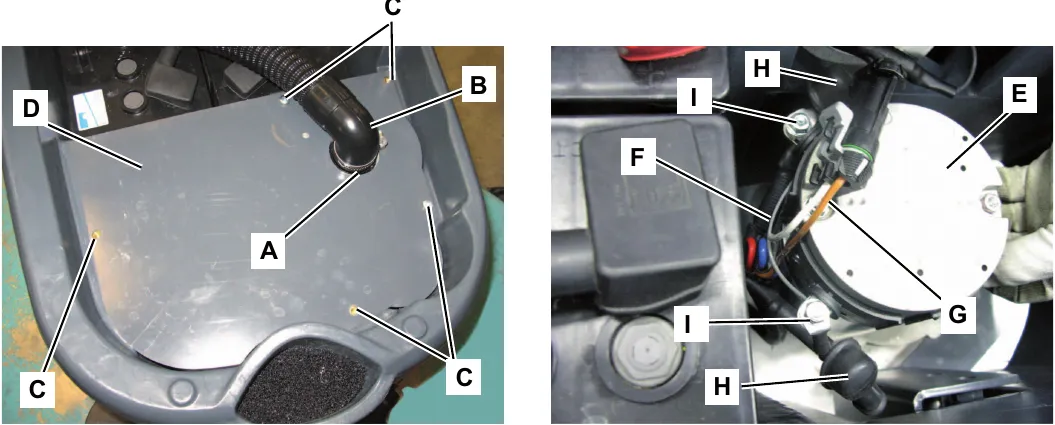
Brush motor disassembly/assembly (continues)
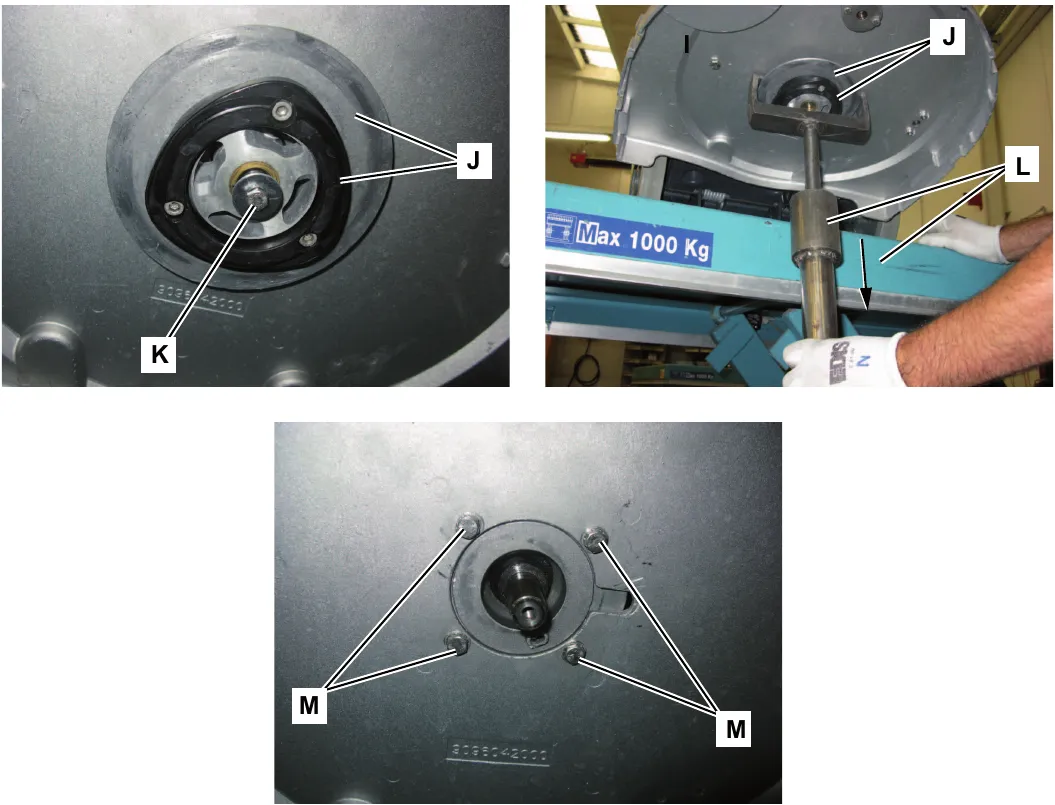
- Lift the machine with the hoisting system; then let the brush hub (J) to protrude slightly from the edge of the hoisting system.
- Remove the screw (K).
- Remove the brush hub (J); if necessary use a sliding hammer puller (L).
- Remove the brush motor fastening screws (M).
- Lower the hoisting system, then remove the brush motor (E). Parts ›
Assembly
- Assemble the components in the reverse order of disassembly.
Specifications
| Descriptions / Model | Advance SC450 20B | Nilfisk SC450 53B |
|---|---|---|
| Brush diameter | 20 in (530 mm) | |
| Brush pressure with full tank and lowered squeegee | 66 lb (30 kg) | |
| Brush motor power | 0.64 hp (480 W) | |
| Brush rotation speed | 154 rpm | |
Scrub system, disc, cable version
Functional description
The disc brush system can be started by the operator. The disc brush turn counter-clockwise.
The brush system, when turning, cleans/washes the floor surface and assist machine forward movement.
The deck, where brushes suitable for cleaning the particular type of floor are installed, is the main part of the brush system. The brush deck is fixed and integrated in the machine with a support plate. On the support plate, there are two handwheels to adjust the machine straight forward movement and speed.
The brush working pressure is functional to the machine designed balance.
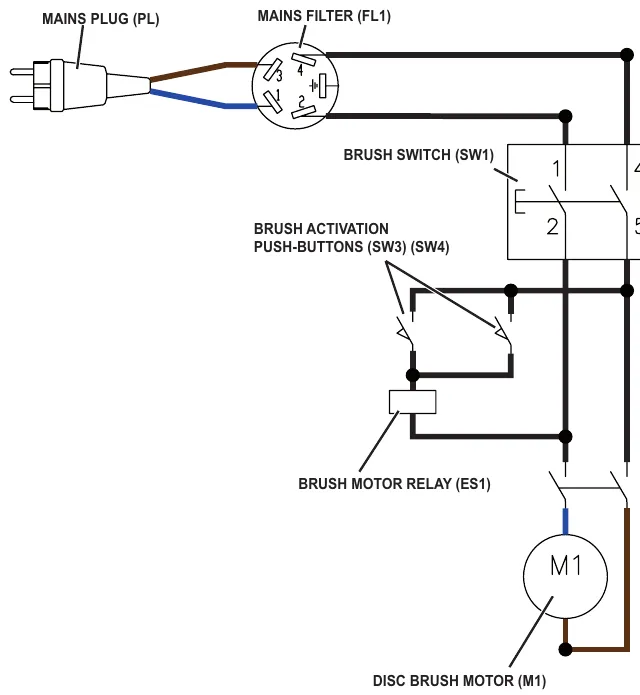
The brush motor (M1) is supplied by the electromagnetic switch (ES1) which is driven by the fu switches (SW1) and (SW3 with SW4).
The system, once activated, uses the solution coming form the solution system, to wash the floor.
To work properly, the brush motor needs the following:
- Brush switch (SW1) turned on
- Push-buttons (SW3) pressed
Wiring diagram
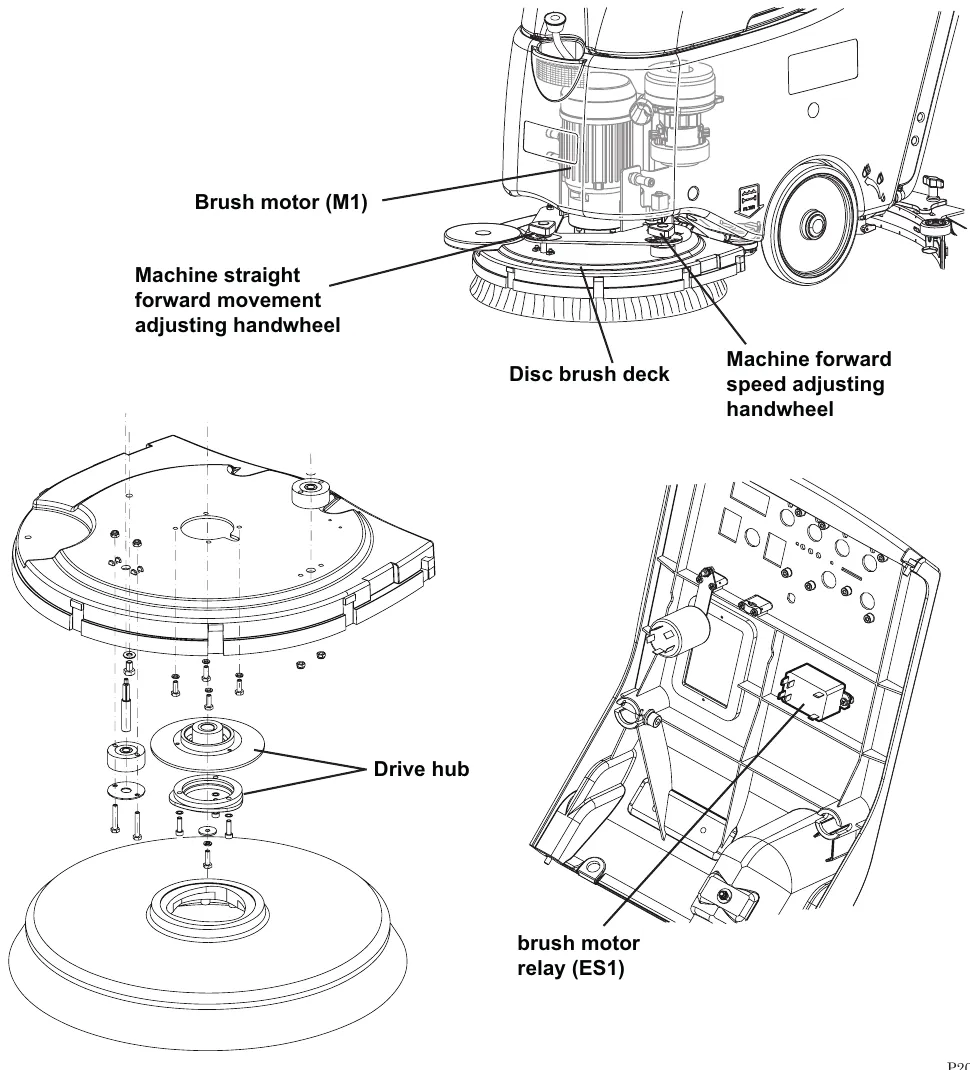
Component location
- Disc brush deck
- Brush motor (M1)
- Drive hub
- Brush electromagnetic switch (ES1)
- Machine forward speed adjusting handwheel
- Machine straight forward movement adjusting handwheel
Maintenance and adjustments
Brush cleaning
- Drive the machine on a level floor and lift the brush/pad-holder deck. Make sure that the machine cannot move independently.
- Check that the control panel switches are turned to “0”.
- Remove the brush/pad-holder (A) according to the following procedure:
- When the deck is lifted, grab the brush/pad-holder with the hands and turn it first in one direction (B) and then in the other direction (C) to release it.
- Clean the brush with water and detergent.
- Check the brush bristles for integrity and wear; if necessary, replace the brush. Parts ›
- Install the brush.
Machine forward movement adjustment
Note: The machine speed and forward movement vary according to the type of floor to be cleaned and the choice of using the brush or the pad. If necessary, perform the following procedure.
- Adjust the machine speed with the handwheel (A) according to the following procedure:
- Turn it counter-clockwise to increase the machine speed.
- Turn it clockwise to decrease the machine speed.
- If it is difficult to keep the machine moving straight-forwardly because it deviates to the left or to the right, adjust the knob (B) by turning it clockwise or counter-clockwise.
- With the machine ready to operate, perform hands-on tests of the machine speed; if necessary, perform step 2 again.
Troubleshooting
| Trouble | Possible Causes | Remedy |
|---|---|---|
| The brush does not clean properly | The brush is excessively worn | Replace Parts › |
| One brush does not turn | The motor carbon brushes are worn | Replace Parts › |
| The motor is faulty | Check the motor amperage/replace Parts › | |
| There are ropes or debris restraining the brush rotation | Remove and clean | |
| The motor electromagnetic switch (ES1) is damaged | Replace Parts › | |
| The brush motor electromagnetic switch wiring harness is damaged | Repair | |
| The brush motor electromagnetic switch wiring harness is damaged | Repair |
Removal and installation
Brush motor amperage check
- Remove the brush.
- Remove the recovery water tank.
Warning! Do not touch uncovered electrical components while performing the following steps.
- Apply the Amp clamp (A) on the battery cable (B).
- Turn on the brush and check that the brush motor amperage is between 2 and 4 A at 230 Vac.
Stop the brush rotation.
Remove the Amp clamp (A).
If the amperage is higher, pes to detect and correct the abnormal input:
- Check that the brush hub is free from foreign materials (ropes, dirt, ...) preventing it from turning.
- Remove the brush motor (see the procedure in the Brush Motor Disassembly/Assembly paragraph), and check the condition of all its components.
If the above-mentioned procedures do not produce the correct readings for the brush motor amperage, the motor must be replaced (see the procedure in the Brush Motor Disassembly/Assembly paragraph).
Reassembly
- Assemble the components in the reverse order of disassembly.
Corrected an obvious misprint: the sub-heading above step 5 is printed "Reset" (now Reassembly, as on page 50). Also, step 3 says "battery cable" although this is the cable version, and the sentence "If the amperage is higher, pes to detect and correct the abnormal input" is garbled in the manual. Both are shown as printed.
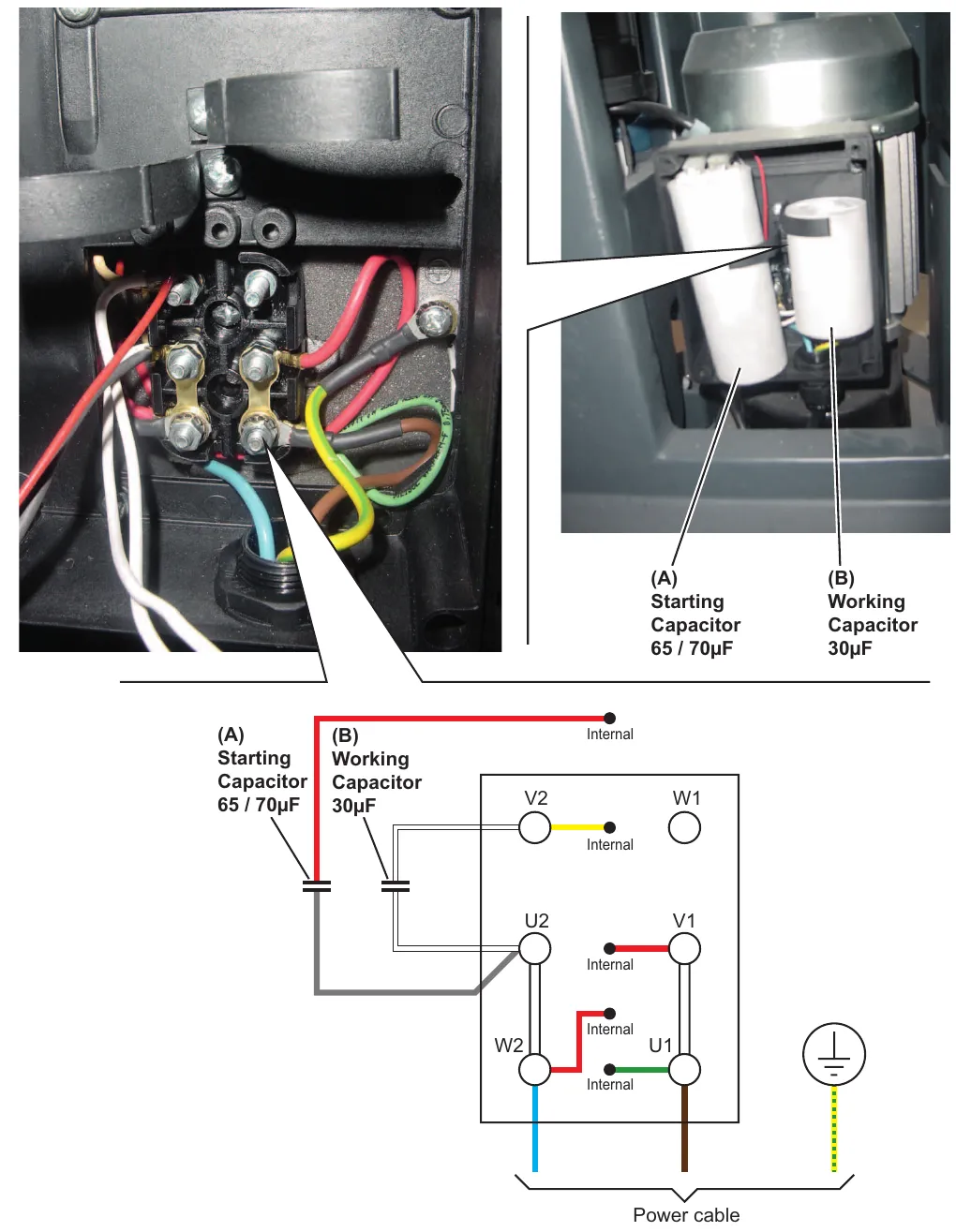
Brush deck motor - capacitor wiring diagram (230V)
Internal wiring connections
Specifications
| Descriptions / Model | Nilfisk SC450 53E |
|---|---|
| Brush diameter | 20 in (530 mm) |
| Brush pressure with full tank and lowered squeegee | 88 lb (40 kg) |
| Brush motor power | 0.64 hp (1,100 W, 50-60 Hz) |
| Brush rotation speed | 150 rpm |
Corrected an obvious misprint: brush motor power is printed "1.100 W" (now 1,100 W, as on page 19).
Solution system, battery version
Functional description
The solution system supplies the detergent to the brushes when cleaning the floor. The solution tank is also the main machine body. The detergent quantity is adjusted by the operator with the lever under the solution tank, on the left rear side. The solution flows from the tank to the tap, through the filter and solenoid valve (EV1) and then to the brush deck.
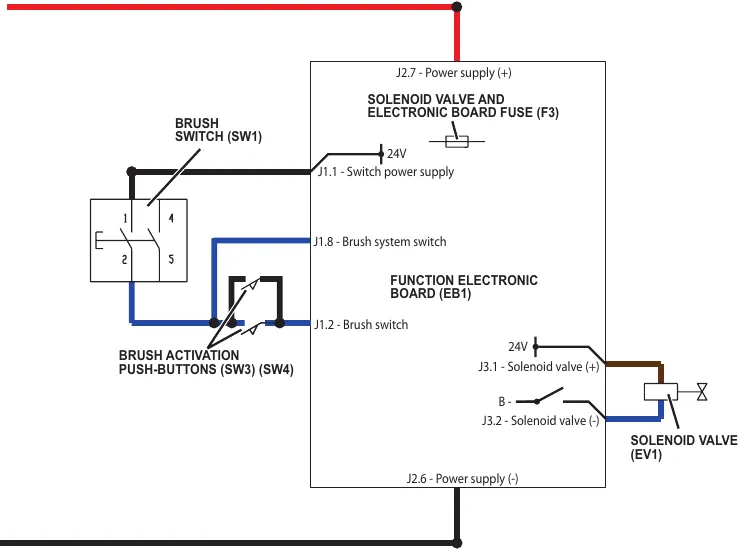
The solenoid valve (EV1) is supplied by the function electronic board (EB1) when the switches (SW1) and (SW3 with SW4) are closed. The circuit is protected by the control/solenoid fuse (F3) on the function electronic board (EB1). The solution flow is regulated by the manual solution flow control lever.
Wiring diagram
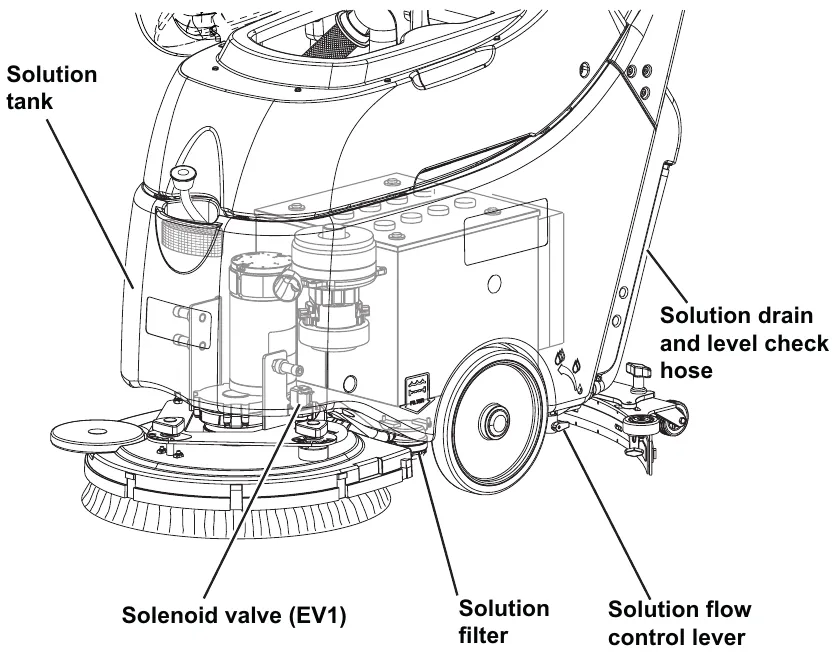
Component location
- Solution tank
- Solution flow control lever
- Solution filter
- Solenoid valve (EV1)
- Solution drain and level check hose
Maintenance and adjustments
Solution filter cleaning
- Drain the solution tank.
- Drive the machine on a level floor. Make sure that the machine cannot move independently.
- Check that the control panel switches are turned to “0”. Disconnect the battery connector (red).
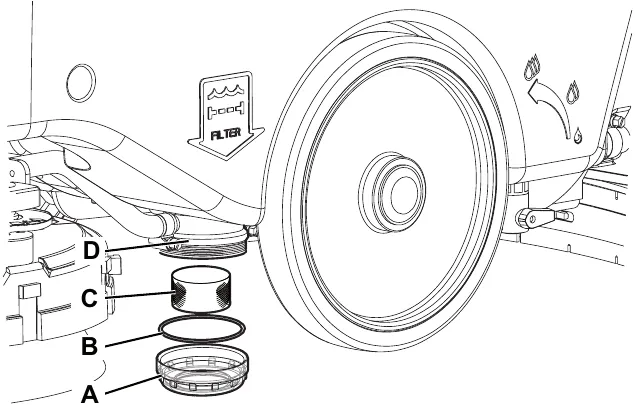
- On the machine lower side, in front of the left centre wheel, unscrew the transparent cover (A) with the gasket (B), then remove the filter strainer (C). Clean and install them on the support (D); install the gasket (B) and the filter strainer (C) properly on the cover (A) and on the support (D). Parts ›
- Connect the battery connector (red).
Troubleshooting
| Trouble | Possible Causes | Remedy |
|---|---|---|
| Small amount of solution or no solution reaches the brush | The tank filter (optional) is clogged/dirty | Clean the filter Parts › |
| The solution filter is clogged/dirty | Clean Parts › | |
| The solenoid valve (EV1) is faulty or the electrical connection is open | Replace the solenoid valve or repair the electrical connection Parts › | |
| There is dust/debris in the tank or in the detergent hoses, obstructing the solution flow | Clean the tank/hoses | |
| There is an open in the control/solenoid fuse (F3) | Replace Parts › | |
| The solution reaches the brush also when the machine is off | There is dirt or calcium deposit on the solenoid valve gaskets (EV1) | Clean the solenoid valve inner gaskets |
| The solenoid valve (EV1) is broken | Replace the solenoid valve Parts › |
Specifications
| Descriptions / Model | Advance SC450 20B | Nilfisk SC450 53B |
|---|---|---|
| Solution tank capacity | 10.5 US gal (40 liters) | |
| Min/max solution flow | 0.10÷0.42 gpm (0.4÷1.6 liters/min) | |
Solution system, cable version
Functional description
The solution system supplies the detergent to the brushes when cleaning the floor. The solution tank is also the main machine body. The detergent quantity is adjusted by the operator with the lever under the solution tank, on the left rear side. The solution flows from the tank to the tap, through the filter and solenoid valve (EV1) and then to the brush deck.
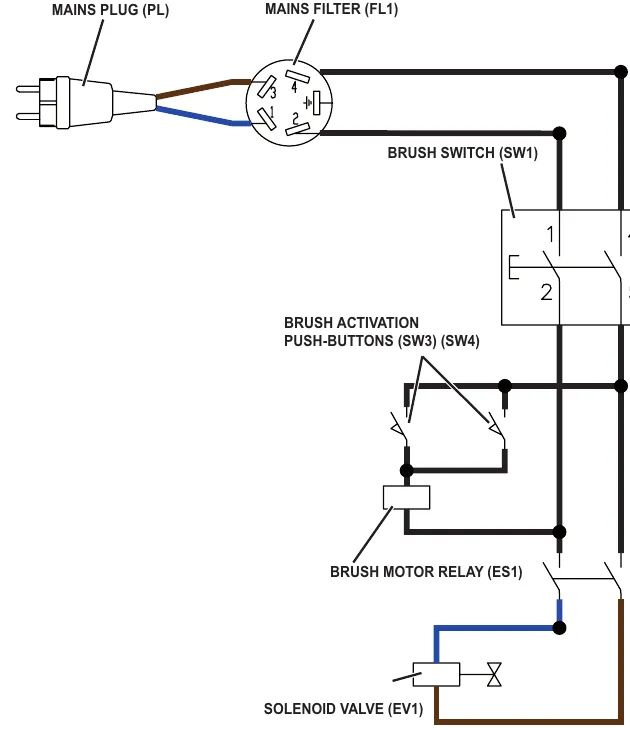
The solenoid valve (EV1) is supplied by the brush motor relay (ES) when the switches (SW1) and (SW3 with SW4) are closed. The solution flow is regulated by the manual solution flow control lever.
Wiring diagram
Component location
- Solution tank
- Solution flow control lever
- Solution filter
- Solenoid valve (EV1)
- Solution drain and level check hose
Maintenance and adjustments
Solution filter cleaning
- Drain the solution tank.
- Drive the machine on a level floor. Make sure that the machine cannot move independently.
- Check that the control panel switches are turned to “0”. Disconnect the battery connector (red).
- On the machine lower side, in front of the left centre wheel, unscrew the transparent cover (A) with the gasket (B), then remove the filter strainer (C). Clean and install them on the support (D); install the gasket (B) and the filter strainer (C) properly on the cover (A) and on the support (D). Parts ›
- Connect the battery connector (red).
Troubleshooting
| Trouble | Possible causes | Remedy |
|---|---|---|
| Small amount of solution or no solution reaches the brush | The tank filter (optional) is clogged/dirty | Clean the filter |
| The solution filter is clogged/dirty | Clean | |
| The solenoid valve (EV1) is faulty or the electrical connection is open | Replace the solenoid valve or repair the electrical connection Parts › | |
| There is dust/debris in the tank or in the detergent hoses, obstructing the solution flow | Clean the tank/hoses | |
| The solution reaches the brush also when the machine is off | There is dirt or calcium deposit on the solenoid valve gaskets (EV1) | Clean the solenoid valve inner gaskets |
| The solenoid valve (EV1) is broken | Replace the solenoid valve Parts › |
Specifications
| Descriptions / Model | Nilfisk SC450 53E |
|---|---|
| Solution tank capacity | 10.5 US gal (40 liters) |
| Min/max solution flow | 0.105/0.422 gpm (0.4/1.6 liters/min) |
Squeegee system
Functional description
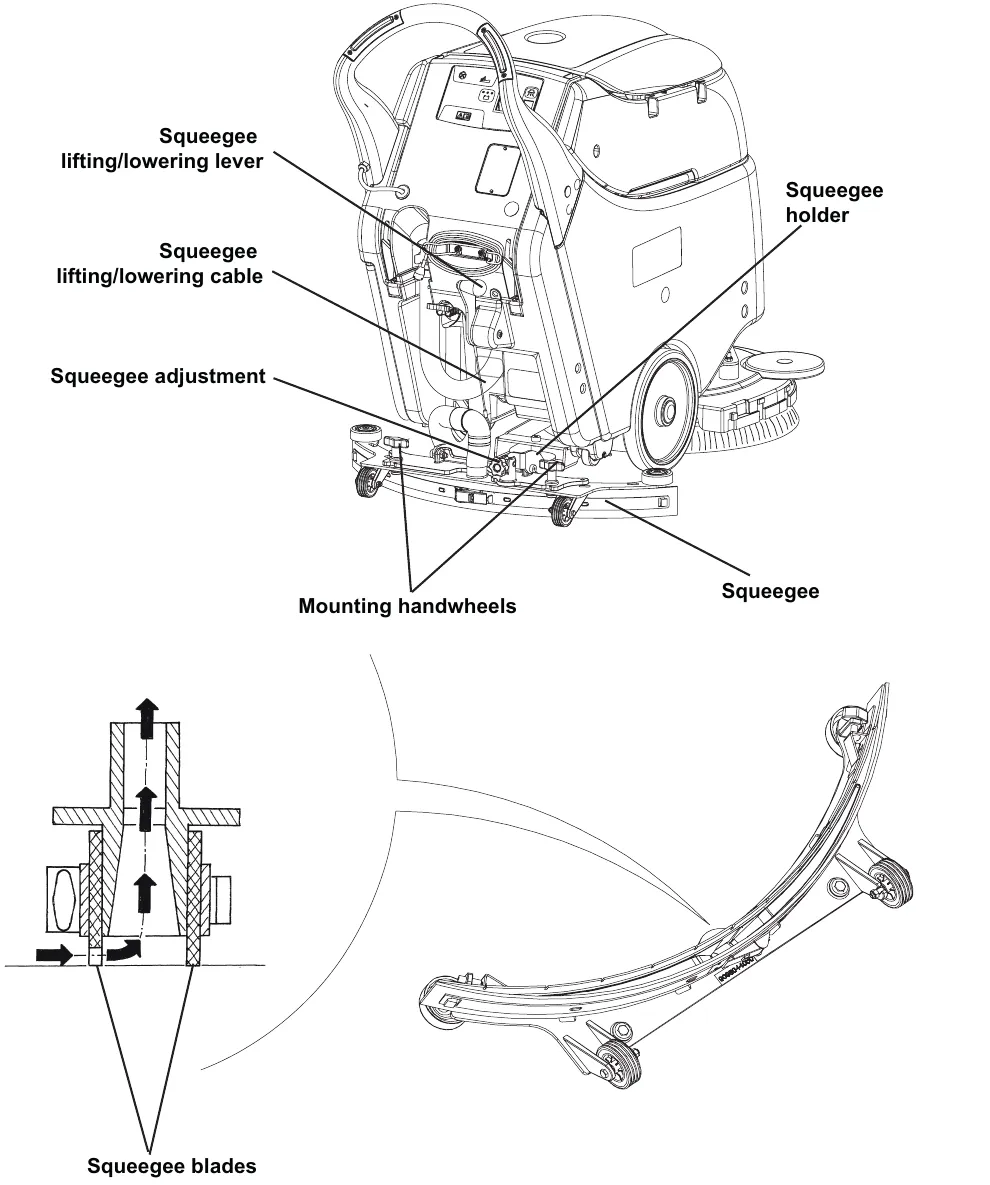
The squeegee system cleans the liquid off the floor, which is then collected by the recovery system.
The squeegee is mounted on castors, the pressure of the tires on the floor is caused by the spring load on the system.
The squeegee is fastened to the machine by two wing nuts in the squeegee support slots. In case of fixed obstacles, the quick-fit system allows for squeegee immediate removal.
The squeegee support is hinged to the machine by means of a bracket which allows the squeegee to turn sideways.
The angle of the squeegee and the correct adherence of the blades on the floor can be adjusted with a knob.
The front blade has openings on the edges to convey and collect the water towards the centre of the squeegee. The design and the central duct make it easy for the squeegee to clear the water. The rear blade edge is smooth, to collect the water and dry the floor.
All 4 functional edges of each blade can be used before it needs replacing.
The squeegee is lifted and lowered by a cable which is manually controlled by the operator with a knob.
Component location
- Squeegee
- Squeegee blades
- Squeegee holder
- Mounting handwheels
- Squeegee adjustment
- Squeegee lifting/lowering lever
- Squeegee lifting/lowering cable
Maintenance and adjustments
Squeegee cleaning
- Drive the machine on a level floor. Make sure that the machine cannot move independently.
- Check that the control panel switches are turned to “0”.
- Lower the squeegee with the lever.
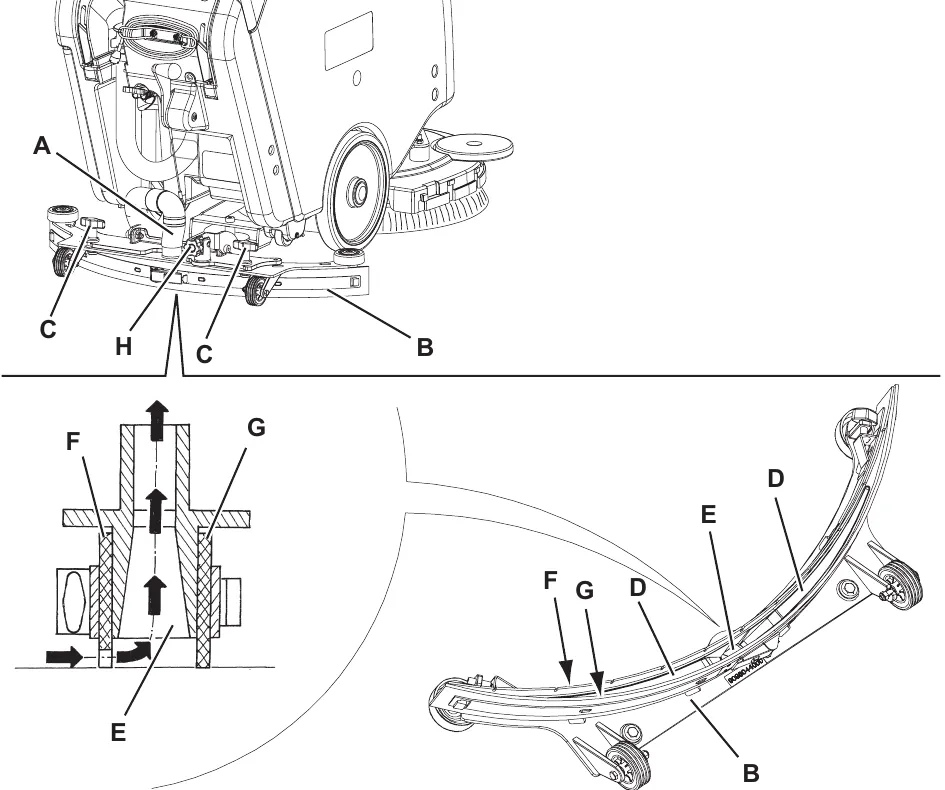
- Disconnect the vacuum hose (A) from the squeegee (B).
- Loosen the handwheels (C) and remove the squeegee (B).
- Wash and clean the squeegee (B). In particular, clean the compartments (D) and the vacuum hole (E) from dirt and debris.
- Check the front blade (F) and the rear blade (G) for integrity, cuts and tears; if necessary replace them (see the procedure in the following paragraph). Parts ›
- Assemble the components in the reverse order of disassembly, and note the following:
- If necessary, use the handwheel (H) to adjust the squeegee balance.
Step 8 ends with "note the following:" and nothing follows it in the manual; shown as printed.
Squeegee blade check and replacement
- Disassemble and clean the squeegee.
- Check that the edge (A) of the front blade (B) and the edge (C) of the rear blade (D) lay down on the same level, along their length; otherwise adjust their height according to the following procedure:
- Open the lever (E) and disengage the fasteners (F), then adjust the rear blade (D); after adjusting engage the fasteners (F) and close the lever (E).
- Loosen the handwheels (G) and adjust the front blade (B); after adjusting tighten the handwheels (G).
- Check that the front blade (B) and the rear blade (D) are integral and free from cuts and lacerations; if necessary replace them. Parts › Also check the front corner (H) of the rear blade (D) for wear; if it is worn, overturn the blade to replace the worn corner with the other one (I), if it is integral. If the other corner is worn too, replace the blade.
- Assemble the squeegee.
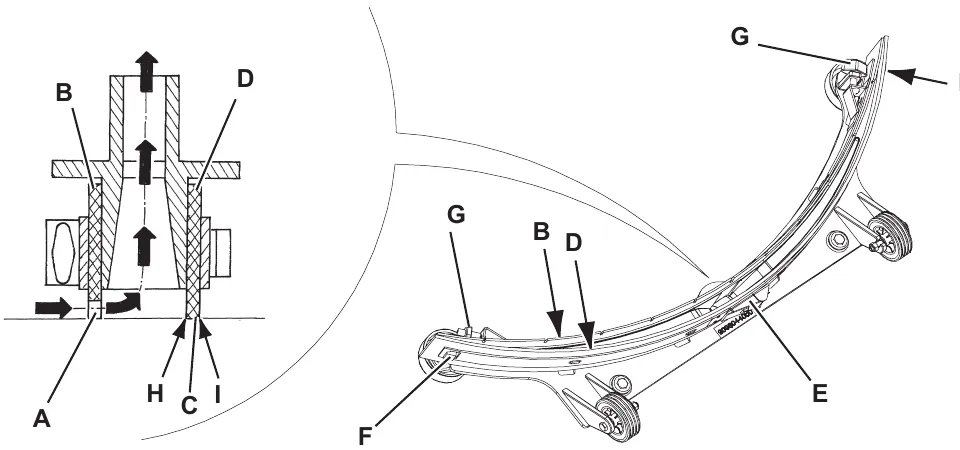
Corrected an obvious misprint: in step 3 the front blade is printed "(C)" (now (B), as in step 2 on this page, where (C) is the edge of the rear blade).
Troubleshooting
| Trouble | Possible causes | Remedy |
|---|---|---|
| The recovery water vacuuming is insufficient or there is no vacuuming | The squeegee or the vacuum hose is clogged or damaged | Clean or repair/replace Parts › |
| There is debris under the blade | Remove | |
| The squeegee blade edges are torn or worn | Replace Parts › | |
| The squeegee springs are not efficient | Replace Parts › | |
| The squeegee is not balanced | Adjust with the relevant handwheel |
Removal and installation
Squeegee spring disassembly/assembly
Disassembly
- Drive the machine to the appointed disposal area, and empty the recovery tank and the solution tank.
- Check that the control panel switches are turned to “0”. Disconnect the battery connector (red).
- Remove the recovery tank.
- Remove the batteries.
- Remove the squeegee (as shown in Squeegee Cleaning paragraph).
- Remove the brush (as shown in Brush Cleaning paragraph).
- With the help of an assistant, place the machine on a hoisting system (A) (or on a floor with a suitable step), overturned as shown in the figure; lay the machine front and central side (B) on the hoisting system (A) and let the rear side (C) free.
- Remove the screw with the nut (D) and release the squeegee lifting cable (E).
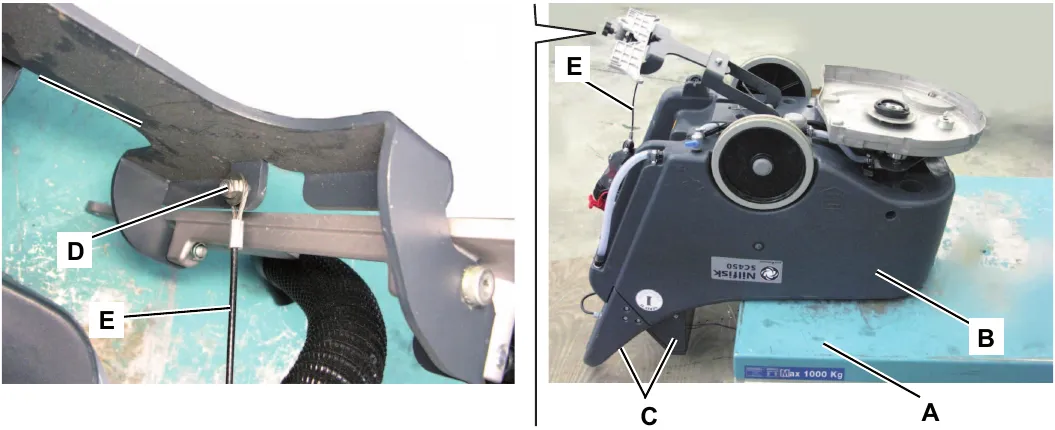
Squeegee spring disassembly/assembly (continues)
- Disconnect the solution valve (F), by pulling it.
- Open the clamps (G) and move aside the hose (H).
- Disengage the squeegee springs (I) from the bracket (J).
- Release the retaining rings (K) and recover the springs (L) and the washers (M). Parts ›
- Remove the right and left wheels (N) and (P). Parts ›
- Remove the other components (Q); remove the wheel shaft (T) from its housing by tapping it with a plastic mallet (S).
- Retrieve the squeegee springs (R). Parts ›
Assembly
- Assemble the components in the reverse order of disassembly.
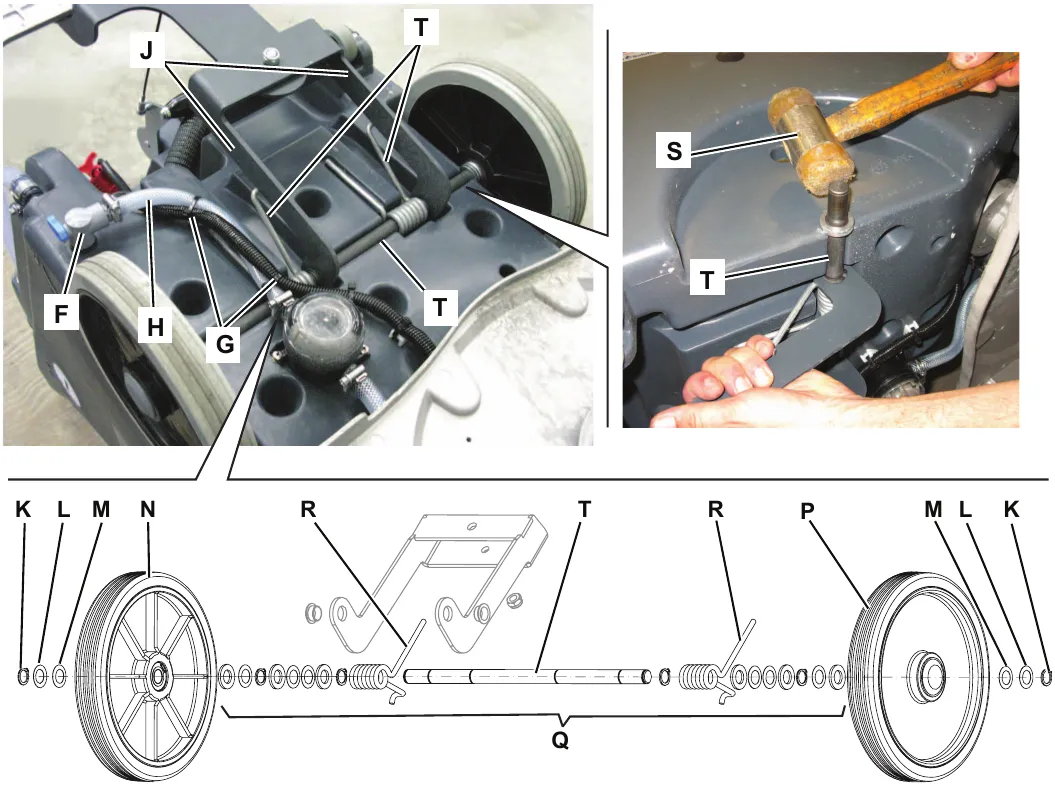
Specifications
| Descriptions / Model | Advance SC450 20B | Nilfisk SC450 53B / SC450 53E |
|---|---|---|
| Squeegee width | 30 in (760 mm) | |
Wheel system, non-traction
Component location
- Front wheels on fixed axle
- Rear parking wheel
- Machine in parking position
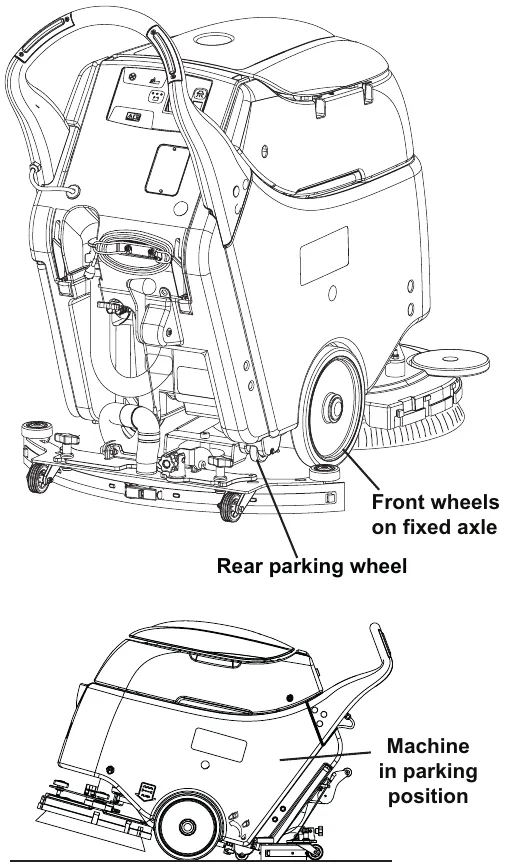
Specifications
| Descriptions / Model | Advance SC450 20B | Nilfisk SC450 53B / SC450 53E |
|---|---|---|
| Diameter of wheels on fixed axle | 10 in (254 mm) | |
| Wheel pressure on the floor | 710 psi (4.9 N/mm2) | |
Advance and Nilfisk are trademarks of Nilfisk A/S. Southeastern Equipment & Supply is an independent dealer.