
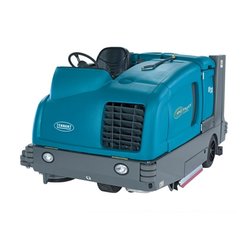
SC450 Instructions for use (operator manual)
Instruction for Use - Original Instructions. Printed in English, Spanish, French and Portuguese.
Models: 9087331020 - 9087371020
Form no. 9099602000. 8/12 Revised 4/14 (2).
This reader shows the English section (pages 3 to 26) plus the pages common to all languages.
This page is blank in the printed manual.
Table of contents
- Introduction
- Unpacking/delivery
- Safety
- Machine description: machine structure, control panel, accessories/options, technical data, wiring diagram
- Use: battery check/setting on a new machine, battery installation and battery type setting, before machine start-up, machine start and stop, machine operation, machine transport/parking, tank emptying, after using the machine, recovery tank removal, machine long inactivity
- Maintenance: scheduled maintenance table, battery charging, squeegee cleaning, squeegee blade check and replacement, brush cleaning, tank and vacuum grid cleaning, solution filter cleaning, fuse check/replacement
- Troubleshooting
- Scrapping
Introduction
NOTE The numbers in brackets refer to the components shown in Machine Description chapter.
Manual purpose and contents
The purpose of this Manual is to provide the operator with all necessary information to use the machine properly, in a safe and autonomous way. It contains information about technical data, safety, operation, storage, maintenance, spare parts and disposal.
Before performing any procedure on the machine, the operators and qualified technicians must read this Manual carefully. Contact Advance in case of doubts concerning the interpretation of the instructions and for any further information.
Target
This Manual is intended for operators and technicians qualified to perform the machine maintenance.
The operators must not perform procedures reserved for qualified technicians. Advance will not be answerable for damages coming from the non-observance of this prohibition.
How to keep this manual
The Instruction for use Manual must be kept near the machine, inside an adequate case, away from liquids and other substances that can cause damage to it.
Identification data
The machine model and serial number are marked on the plate (29).
Product code and year of production are marked on the same plate.
This information is useful when requiring machine spare parts. Use the following table to write down the machine identification data.
| MACHINE model | |
| PRODUCT code | |
| MACHINE serial number |
Other reference manuals
Electronic Battery Charger Manual, to be considered as integral part of this Manual
Moreover, the following Manuals are available:
- Service Manual (that can be consulted at Advance Service Centers)
- Spare Parts List (supplied with the machine)
Spare parts and maintenance
All necessary operating, maintenance and repair procedures must be performed by qualified personnel or by Advance Service Centers.
Only original spare parts and accessories must be used.
Contact Advance for service or to order spare parts and accessories, specifying the machine model, product code and serial number.
Changes and improvements
Advance constantly improves its products and reserves the right to make changes and improvements at its discretion without being obliged to apply such benefits to the machines that were previously sold.
Any change and/or addition of accessories must be approved and performed by Advance.
Operation capabilities
This scrubber-dryer is used to clean (scrubbing and drying) smooth and solid floors, in civil or industrial environment, under safe operation conditions by a qualified operator.
The scrubber-dryer cannot be used for fitted carpet and carpet cleaning.
Conventions
Forward, backward, front, rear, left or right are intended with reference to the operator’s position, that is to say in driving position with the hands on the handlebar (2).
Unpacking/delivery
To unpack the machine, carefully follow the instructions on the packing.
When the machine is delivered, check that the packing and the machine were not damaged during transportation.
In case of visible damages, keep the packing and have it checked by the carrier that delivered it. Call the carrier immediately to fill in a damage claim.
Please check that the following items have been supplied with the machine:
- Technical documents: Scrubber-dryer Instruction for use Manual; Battery Charger Manual; Scrubber-dryer Spare Parts List
- No. 2 lamellar fuses
Safety
The following symbols indicate potentially dangerous situations. Always read this information carefully and take all necessary precautions to safeguard people and property.
The operator’s cooperation is essential in order to prevent injury. No accident prevention program is effective without the total cooperation of the person responsible for the machine operation. Most of the accidents that may occur in a factory, while working or moving around, are caused by failure to comply with the simplest rules for exercising prudence. A careful and prudent operator is the best guarantee against accidents and is essential for successful completion of any prevention program.
Visible symbols on the machine
Symbols that appear on this manual
NOTE It indicates a remark related to important or useful functions.
CONSULTATION It indicates the necessity to refer to the Instruction for use Manual before performing any procedure.
General instructions
Specific warnings and cautions to inform about potential damages to people and machine are shown below.
- Before performing any cleaning, maintenance, repair or replacement procedure, turn the machine main switches to “0” and disconnect the battery connector.
- This machine must be used by properly trained operators only.
- Do not wear jewels when working near electrical components.
- Do not work under the lifted machine without supporting it with safety stands.
- Do not operate the machine near toxic, dangerous, flammable and/or explosive powders, liquids or vapors: This machine is not suitable for collecting dangerous powders.
- When using lead (WET) batteries, keep sparks, flames and smoking materials away from the batteries. During the normal operation explosive gases are released.
- When using lead (WET) batteries, battery charging produces highly explosive hydrogen gas. During battery charging, remove the recovery tank and perform this procedure in well-ventilated areas and away from naked flames.
- Carefully read all the instructions before performing any maintenance/repair procedure.
- Before using the battery charger, ensure that frequency and voltage values, indicated on the machine serial number plate, match the electrical mains voltage.
- Do not pull or carry the machine by the battery charger cable and never use the battery charger cable as a handle. Do not close a door on the battery charger cable, or pull the battery charger cable around sharp edges or corners. Do not run the machine on the battery charger cable.
- Keep the battery charger cable away from heated surfaces.
- Do not charge the batteries if the battery charger cable or the plug are damaged. If the machine is not working as it should, has been damaged, left outdoors or dropped into water, return it to the Service Center.
- To reduce the risk of fire, electric shock, or injury, do not leave the machine unattended when it is plugged in. Before performing any maintenance procedure, disconnect the battery charger cable from the electrical mains.
- Do not smoke while charging the batteries.
General instructions (continued)
- Always protect the machine against the sun, rain and bad weather, both under operation and inactivity condition. Store the machine indoors, in a dry place: This machine must be used in dry conditions, it must not be used or kept outdoors in wet conditions.
- Before using the machine, close all doors and/or covers as shown in the Instruction for use Manual.
- This machine is not intended for use by persons (including children) with reduced physical, sensory or mental capabilities, or lack of experience and knowledge, unless they have been given supervision or instruction concerning use of the machine by a person responsible for they safety. Children should be supervised to ensure that they do not play with the machine.
- Close attention is necessary when used near children.
- Use only as shown in this Manual. Use only Advance’s recommended accessories.
- Check the machine carefully before each use, always check that all the components have been assembled before use. If the machine is not perfectly assembled it can cause damages to people and properties.
- Take all necessary precautions to prevent hair, jewels and loose clothes from being caught by the machine moving parts.
- Do not use the machine on slopes with a gradient exceeding the specifications.
- Do not use the machine on incline.
- Do not use the machine on slopes with a gradient exceeding the specifications.
- Do not use the machine in particularly dusty areas.
- Use the machine only where a proper lighting is provided.
- While using this machine, take care not to cause damage to people or objects.
- Do not bump into shelves or scaffoldings, especially where there is a risk of falling objects.
- Do not lean liquid containers on the machine, use the relevant can holder.
- The machine working temperature must be between 32 °F and 104 °F (0 °C and +40 °C).
- The machine storage temperature must be between 32 °F and 104 °F (0 °C and +40 °C).
- The humidity must be between 30% and 95%.
- When using floor cleaning detergents, follow the instructions on the labels of the detergent bottles.
- To handle floor cleaning detergents, wear suitable gloves and protections.
- Do not use the machine as a means of transport.
- Do not allow the brush to operate while the machine is stationary to avoid damaging the floor.
- In case of fire, use a powder fire extinguisher, not a water one.
- Do not tamper with the machine safety guards and follow the ordinary maintenance instructions scrupulously.
- Do not allow any object to enter into the openings. Do not use the machine if the openings are clogged. Always keep the openings free from dust, hairs and any other foreign material which could reduce the air flow.
- Do not remove or modify the plates affixed to the machine.
- This machine cannot be used on roads or public streets.
- Pay attention during machine transportation when temperature is below freezing point. The water in the recovery tank or in the hoses could freeze and seriously damage the machine.
- Use brushes and pads supplied with the machine or those specified in the Instruction for use Manual. Using other brushes or pads could reduce safety.
- In case of machine malfunctions, ensure that these are not due to lack of maintenance. If necessary, request assistance from the authorised personnel or from an authorised Service Center.
- If parts must be replaced, require ORIGINAL spare parts from an Authorised Dealer or Retailer.
- To ensure machine proper and safe operation, the scheduled maintenance shown in the relevant chapter of this Manual, must be performed by the authorised personnel or by an authorised Service Center.
- Do not wash the machine with direct or pressurised water jets, or with corrosive substances.
- The machine must be disposed of properly, because of the presence of toxic-harmful materials (batteries, etc.), which are subject to standards that require disposal in special centres (see Scrapping chapter).
Machine description
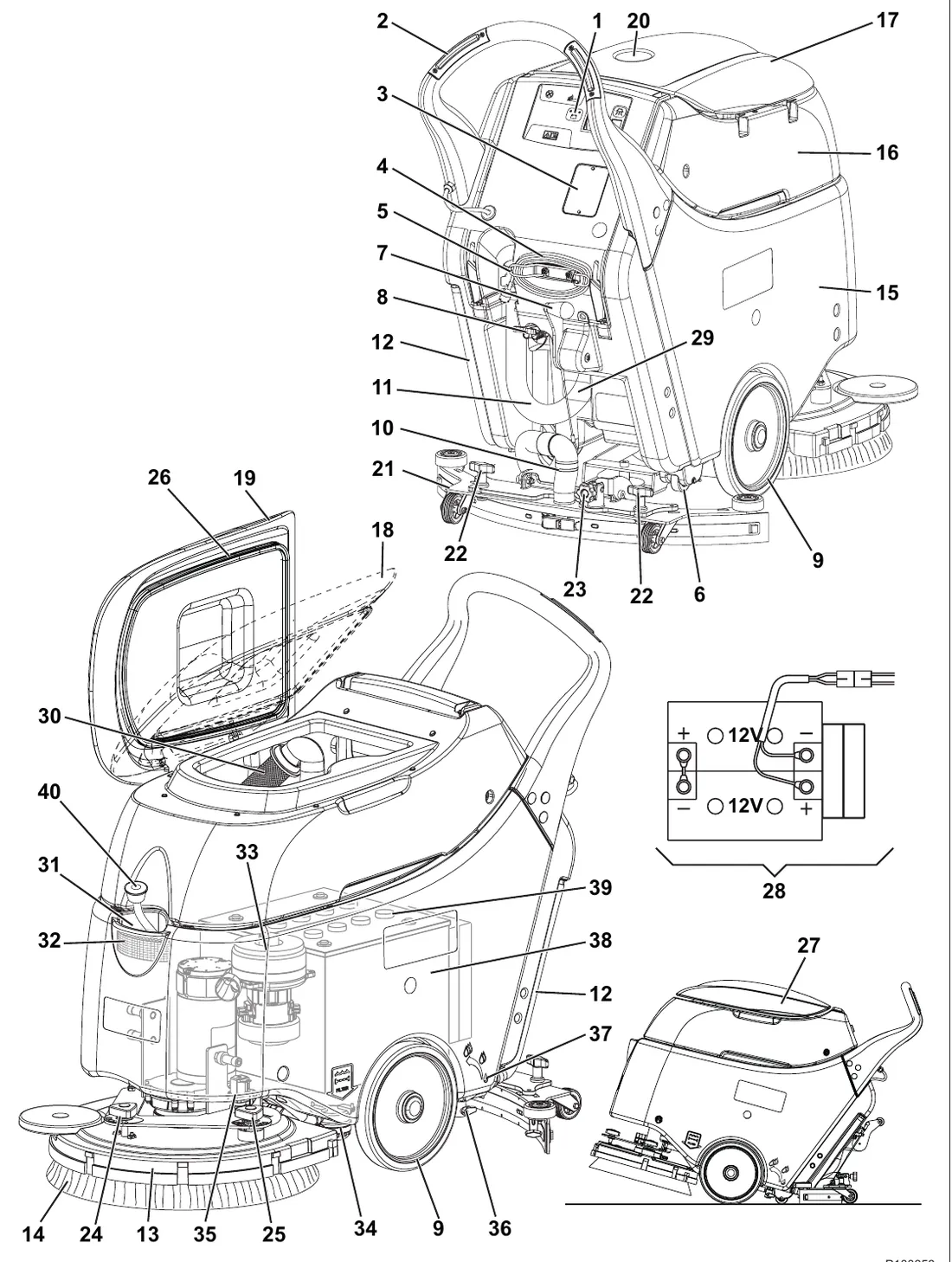
Machine structure
- Control panel
- Handlebar
- Battery charger data inspection window
- Battery charger cable
- Battery charger cable holder
- Rear parking wheel
- Squeegee lifting/lowering lever
- Battery connector (red). This connector also works as EMERGENCY push-button, to stop immediately all functions.
- Front wheels on fixed axle
- Squeegee vacuum hose
- Recovery water drain hose
- Solution drain and level check hose
- Brush deck
- Brush/pad-holder
- Solution tank
- Recovery tank
- Recovery tank cover
- Recovery tank cover (half-open)
- Recovery tank cover (completely opened)
- Can holder
- Squeegee
- Squeegee mounting handwheels
- Squeegee balance adjusting handwheel
- Machine straight forward movement adjusting handwheel
- Machine forward speed adjusting handwheel
- Tank cover gasket
- Machine in parking position
- Battery connection diagram
- Serial number plate/technical data/conformity certification
- Vacuum grid with automatic shut-off float
- Solution filler neck
- Foam filter
- Vacuum system motor
- Solution filter
- Solenoid valve
- Solution flow control lever
- Solution flow control lever ECO position (water “economy” usage, for a washing autonomy set for ~ 90 minutes)
- Batteries
- Battery caps
- Water removable filler hose (optional)
Machine structure (continues)
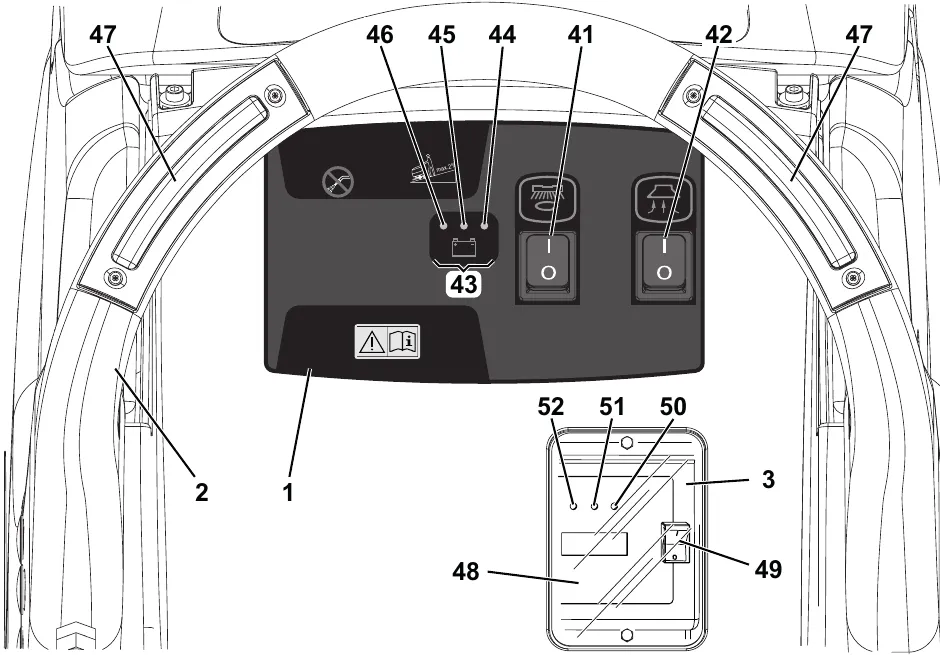
Control panel
- Brush/pad-holder switch
- Vacuum system switch
- Battery charge indicator
- Green LED - charged battery
- Yellow LED - semi-discharged batteries
- Red LED - discharged batteries
- Brush enabling push-button
- Electronic battery charger
- Lead (WET) or gel (GEL) battery selector
- Green warning light (the battery charger is on and batteries are charged)
- Yellow warning light (the battery charger is on and batteries are semi-discharged)
- Red warning light (the battery charger is on and it is charging the batteries)
Accessories/options
In addition to the standard components, the machine can be equipped with the following accessories/options, according to the machine specific use:
- GEL batteries
- Brushes of different materials
- Pads of different materials
- Polyurethane squeegee blades
- Removable solution feed hose
For further information concerning the optional accessories, contact an authorised Retailer.
Technical data
| Model | SC450 |
|---|---|
| Solution tank capacity | 10.5 US gal (40 liters) |
| Recovery tank capacity | 11.9 US gal (45 liters) |
| Machine length | 46.4 in (1,180 mm) |
| Machine width without squeegee | 22 in (559 mm) |
| Machine height | 41.7 in (1,060 mm) |
| Brush diameter | 20 in (530 mm) |
| Squeegee width | 30 in (760 mm) |
| Cleaning width | 20 in (530 mm) |
| Front wheel diameter | 10 in (254 mm) |
| Wheel specific pressure on the floor | 710 psi (4.9 N/mm2) |
| Brush/pad pressure on the floor with full tank and lowered squeegee | 66 lb (30 kg) |
| Min/max solution flow | 0.10 ÷ 0.42 gpm (0.4 ÷ 1.6 liters/min) |
| ECO solution flow | 0.10 gpm (0.4 liters/min) |
| Sound pressure level at workstation (ISO 11201, ISO 4871, EN 60335-2-72) (LpA) | 68 dB(A) ± 3 dB(A) |
| Machine sound pressure level (ISO 3744, ISO 4871, EN 60335-2-72) (LwA) | 85 dB(A) |
| Vibration level at the operator’s arms (ISO 5349-1, EN 60335-2-72) | < 98.4 in/s2 (< 2.5 m/s2) |
| Maximum gradient when working | 2% |
| IP protection class | X4 |
| Protection class (electric) | III |
| Vacuum system motor power | 0.44 hp (330 W) |
| Vacuum system circuit capacity | 43.3 in H2O (0.0107 MPa, 1,100 mmH2O) |
| Brush motor power | 0.64 hp (480 W) |
| Brush speed | 154 rpm |
| Total absorbed power | 34 A (0.8 kW) |
| Battery compartment size (width x length x height) | 13.7 x 13.7 x 11.8 in (350 x 350 x 300 mm) |
| Battery voltage | 24 V |
| Standard battery (2) | Dry: 12 V 70 Ah C5 |
| Battery charger | 100-240 VAC |
| Standard battery autonomy | 2 hours |
| Weight without batteries and with empty tanks | 167 lb (76 kg) |
| Gross vehicle weight (GVW) | 419 lb (190 kg) |
| Shipping weight | 227 lb (103 kg) |
Machine material composition and recyclability
| Type | Recyclable percentage | SC450 |
|---|---|---|
| Aluminium | 100 % | 8 % |
| Electric motors - various | 29 % | 18 % |
| Ferrous materials | 100 % | 19 % |
| Wiring harnesses | 80 % | 1 % |
| Liquids | 100 % | 0 % |
| Plastic - non-recyclable material | 0 % | 1 % |
| Plastic - recyclable material | 100 % | 9 % |
| Polyethylene | 92 % | 42 % |
| Rubber | 20 % | 2 % |
Vacuum system circuit capacity is printed as 0.0107 MPa (1,100 mmH2O); the inches of water figure is our conversion.
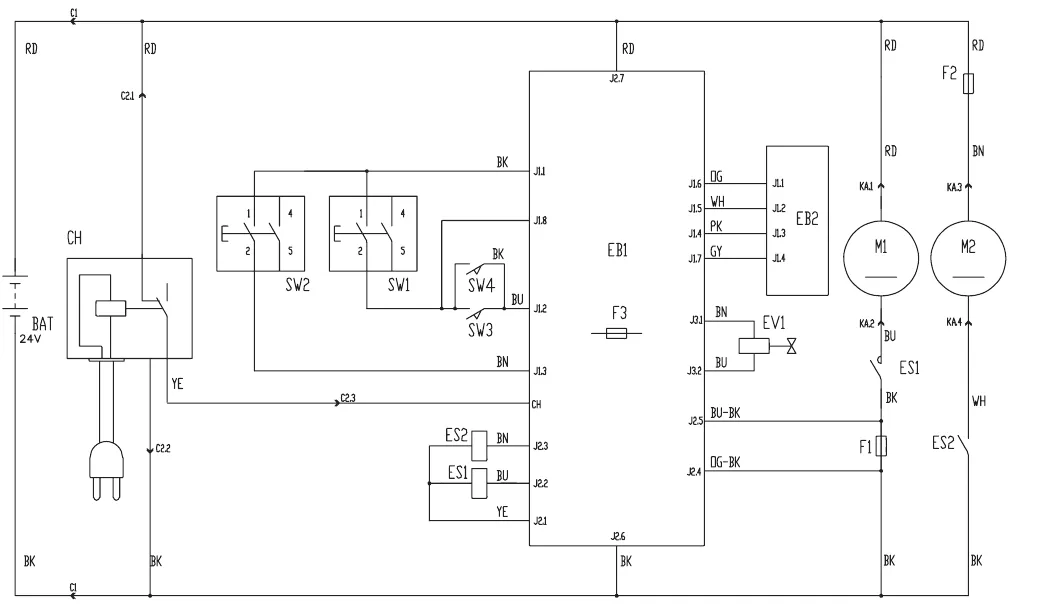
Wiring diagram
| Key | |
|---|---|
| BAT | 24 V batteries |
| C1 | Battery connector |
| C2 | Battery charger connector |
| CH | Battery charger |
| EB1 | Function electronic board |
| EB2 | Electronic board LEDs |
| ES1 | Brush/pad motor electromagnetic switch |
| ES2 | Vacuum system motor relay |
| EV1 | Solution solenoid valve |
| F1 | Brush motor fuse (40 A) |
| F2 | Vacuum system motor fuse (30 A) |
| F3 | Solenoid valve and electronic board fuse (5 A) |
| M1 | Brush/pad-holder motor |
| M2 | Vacuum system motor |
| SW1 | Brush/pad-holder switch |
| SW2 | Vacuum system switch |
| SW3 | Brush enabling push-button |
| SW4 | Brush enabling push-button |
| Color codes | |
|---|---|
| BK | Black |
| BU | Blue |
| BN | Brown |
| GN | Green |
| GY | Grey |
| OG | Orange |
| PK | Pink |
| RD | Red |
| VT | Violet |
| WH | White |
| YE | Yellow |
Use
Battery check/setting on a new machine
The machine requires two 12 V batteries, connected according to the diagram (28).
The machine can be supplied in one of the following modes:
WET or GEL/AGM batteries already installed and ready to be used
- Turn on the machine by pressing the brush/pad-holder and vacuum system switches (41 and 42). If the green LED (44) turns on, the batteries are ready to be used.
- If the yellow or red LED (45 or 46) turns on, the batteries must be charged (see the procedure in Maintenance chapter).
Without batteries
- Buy appropriate batteries [See the Technical Data paragraph and the diagram (28)]. For battery choice and installation, apply to qualified battery Retailers.
- Set the machine and the battery charger (if equipped) according to the type of batteries installed, according to the procedure shown in the following paragraph.
Battery installation and battery type setting (WET or GEL/AGM)
Set the electronic board of the machine and of the battery charger (if equipped) according to the type of batteries installed (WET or GEL/AGM) as shown below:
Machine setting
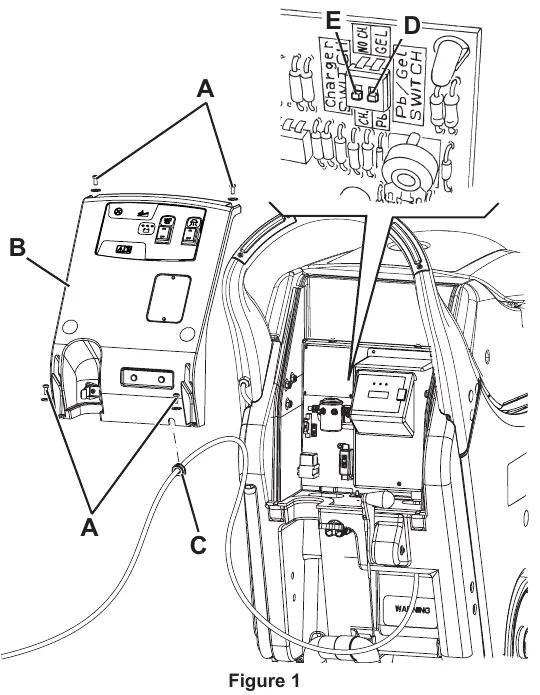
- Check that the battery connector (8) is disconnected. The machine factory setting is for GEL batteries. If this setting corresponds to the type of batteries installed, go to step 7. Otherwise, perform steps 2, 3 and 4 too.
- Move aside the recovery water drain hose (11).
- Remove the battery charger cable, if equipped, from the cable holder (5).
- Remove the screws (A, Fig. 1) and carefully move aside the panel (B) by disengaging the grommet (C) from its housing on the panel (B).
- Turn the microswitch (D) to WET position.
- Perform steps 3, 4 and 5 in the reverse order.
Battery charger setting (for machines with on-board battery charger)
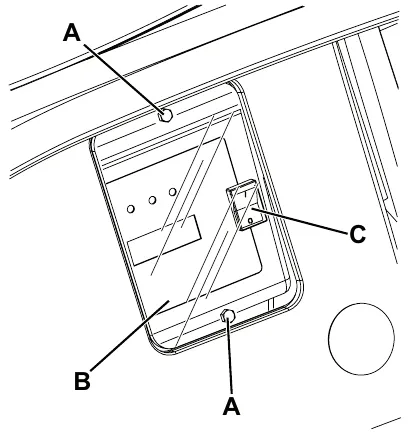
- Remove the battery charger data inspection window screws (A, Fig. 2).
- Remove the window (B).
- Turn the battery charger selector (C) to WET for lead batteries, or to GEL for gel/agm batteries.
- Install the window (B) and tighten the screws (A).
Battery installation
- Remove the recovery tank (16) as shown in the relevant paragraph.
- Install the batteries on the machine according to the diagram (28).
- Install the recovery tank (16).
Battery charging
- Charge the batteries (see the procedure in Maintenance chapter).
Before machine start-up
Brush or pad-holder installation
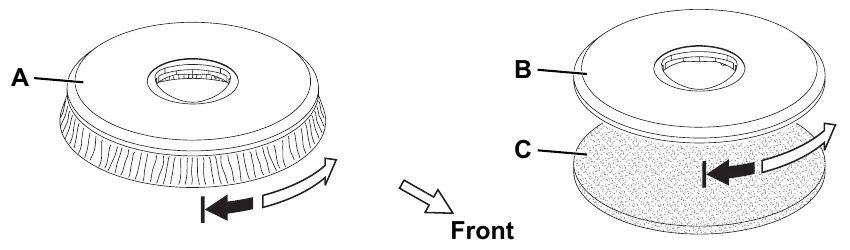
NOTE Install either the brush (A, Fig. 3) or the pad-holder (B and C) according to the type of floor to be cleaned.
- Make sure that the switches (41 and 42) are turned to “0”.
- Lift the brush/pad-holder deck (13) by prying the handlebar (2).
- Place the brush (A, Fig. 3) or the pad-holder (B - C) under the deck.
- Lower the deck (13) by using the handlebar (2).
- Turn on the machine by pressing the switch (41).
- Press the push-button (47) for a few seconds, to engage the brush/pad-holder to the deck hub (13). If necessary, repeat the procedure until the brush/pad-holder is engaged.
Available brushes and their relevant application guides (suggestions only)
| Models | MIDLITE GRIT 180 | MIDGRIT 240 | PROLENE | PROLITE | UNION MIX |
|---|---|---|---|---|---|
| General cleaning: | |||||
| Concrete | ● | ● | ● | ||
| Terrazzo floor | ● | ● | ● | ||
| Ceramic tiles/quarrystones | ● | ● | ● | ||
| Marble | ● | ||||
| Vinyl tiles | ● | ● | |||
| Rubber tiles | ● | ||||
| Polishing: | |||||
| Rubber tiles | ● | ||||
| Marble | ● | ||||
| Vinyl tiles | ● | ||||
Parts › Brushes and pads for the SC450.
Squeegee installation
- Install the squeegee (21) and fasten it with the handwheels (22), then connect the vacuum hose (10) to the squeegee.
- With the handwheel (23), adjust the squeegee so that the rear blade - in all its length - touches the floor and the front blade is slightly detached from the floor.
Solution tank filling
- Use the filler neck (31) or the removable filler hose (40, optional) to fill the tank (15) with a solution suitable for the work to be performed. Do not fill the solution tank completely, leave few inches from the edge. Always follow the dilution instructions on the label of the chemical product used to prepare the solution. The solution temperature must not exceed 104 °F (40 °C).
Machine start and stop
Starting the machine
- Prepare the machine as shown in the previous paragraph.
- Drive the machine to the working place by pushing it with the hands on the handlebar (2).
- Lower the squeegee (21) with the lever (7).
- Turn the solution flow control lever (36) to one of the following positions, according to the type of cleaning to be performed:
- ECO system: when the lever (36) is turned to ECO position (37), the machine works in a special condition of programmed water “economy” usage; as the water flow is set and constant, the machine can work with a washing autonomy of ~ 90 minutes [0.10 gpm (0.4 liters/min) average].
- Variable system: when the lever is turned to the left (variable flow) the flow rate can increase up to 0.42 gpm (1.6 liters/min) (when the tank is full), with an autonomy of ~ 40 minutes.
- Press the brush/pad-holder switch (41) and the vacuum system switch (42).
- Press the push-button (47) to enable the brush/pad-holder.
- Start cleaning, by moving the machines with the handlebar (2).
NOTE If the green LED (44) turns on, the machine is ready to be used. If the yellow or red LED (45 or 46) turns on, the batteries must be charged (see the procedure in Maintenance chapter).
Stopping the machine
- Stop the machine and the brush/pad-holder by releasing the push-button (47).
- Turn off the brush/pad-holder and the vacuum system by pressing the switches (41) and (42).
- Lift the squeegee (21) with the lever (7).
- With the handlebar (2) slightly lower the machine until the rear wheel (6) comes into contact with the floor (parking position (27)).
Machine operation (scrubbing/drying)
- Start the machine as shown in the previous paragraph.
- While keeping both hands on the handlebar (2), press the push-button (47), then manoeuvre the machine and start scrubbing/drying the floor.
- If necessary, stop the machine and adjust the squeegee balancing handwheel (23).
- If necessary, adjust the solution quantity by using the valve (36).
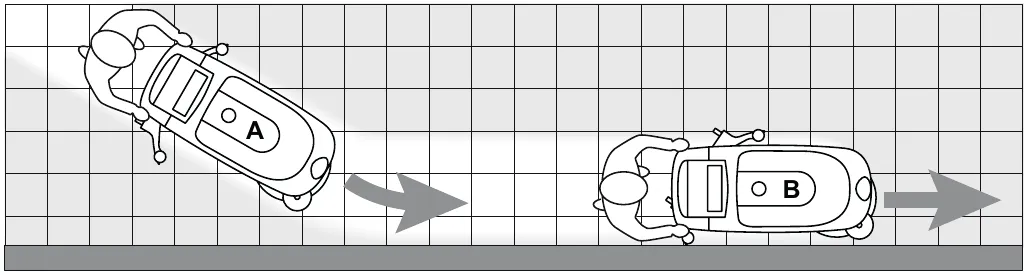
NOTE For correct scrubbing/drying of floors at the sides of the walls, Advance suggests to go near the walls with the right side of the machine as shown in figure 4.
Battery discharge during operation
- Until the green LED (44) stays on, the batteries allow the machine to work normally. When the green LED (44) turns off and the yellow and red LED (45) and (46) turn on in sequence, it is necessary to charge the battery as the machine residual autonomy is at the minimum level.
Machine speed adjustment
- The machine speed varies according to the type of floor to be cleaned and the choice of using the brush or the pad. If necessary, stop the machine and turn the forward speed adjusting handwheel (25) as shown below:
- Turn it counter-clockwise to increase the forward speed;
- Turn it clockwise to decrease the forward speed.
Machine straight-forward drive
- If it is difficult to keep the machine moving straight-forwardly because it deviates to the left or to the right, adjust the handwheel (24) by turning it clockwise or counter-clockwise.
Machine transport/parking
To transport/park the machine, proceed as follows.
- Turn the brush/pad-holder switch and the vacuum system switch (41 and 42) to “0”.
- Lift the squeegee with the lever (7).
- Grab the handlebar (2) and slightly lower it until the brush lifts from the floor. While holding the machine in this position, drive it to the appointed parking area. Then lower the machine until the rear wheel (6) comes into contact with the floor (parking position (27)).
- When finishing working, remove the brush/pad-holder (see the procedure in Maintenance chapter).
Tank emptying
An automatic float shut-off system (30) turns off the vacuum system when the recovery tank (16) is full.
The vacuum system deactivation is signalled by a sudden increase in the vacuum system motor noise frequency, and the floor is not dried.
When the recovery tank (16) is full, empty it according to the following procedure.
Recovery tank emptying
- Turn the brush/pad-holder switch and the vacuum system switch (41 and 42) to “0”.
- Lift the squeegee with the lever (7).
- Drive the machine to the appointed disposal area.
- Grasp the handlebar (2) and slightly lower it until the rear wheel (6) comes into contact with the floor.
- Empty the recovery tank with the drain hose (11). Then, rinse the tank with clean water.
Solution tank emptying
- Perform steps 1 to 4.
- Empty the solution tank with the hose (12). Then, rinse the tank with clean water.
After using the machine
After working, before leaving the machine:
- Turn the brush/pad-holder switch and the vacuum system switch (41 and 42) to “0”.
- Remove the brush/pad-holder as shown in Maintenance chapter.
- Empty the tanks (15 and 16) as shown in the previous paragraph.
- Perform the daily maintenance procedures (see the Maintenance chapter).
- Store the machine in a clean and dry place, with the brush/pad-holder and the squeegee lifted or removed.
Recovery tank removal
To check or charge the lead (WET) batteries, or to perform other procedures, it may be necessary to remove the recovery tank (16) as shown below.
- Empty the recovery tank (16) as shown in the relevant paragraph.
- Drive the machine on a level floor.
- Make sure that the switches (41 and 42) are turned to “0”.
- Remove the recovery water drain hose (11) from its holder.
- Grasp the recovery tank (A, Fig. 5) in the area (B) and slightly raise it.
- Disconnect the vacuum hose (C) from the tank.
- Disconnect the hose (D) from the tank vacuum grid.
- Remove the drain hose(E) through the slit, then remove the tank (A).
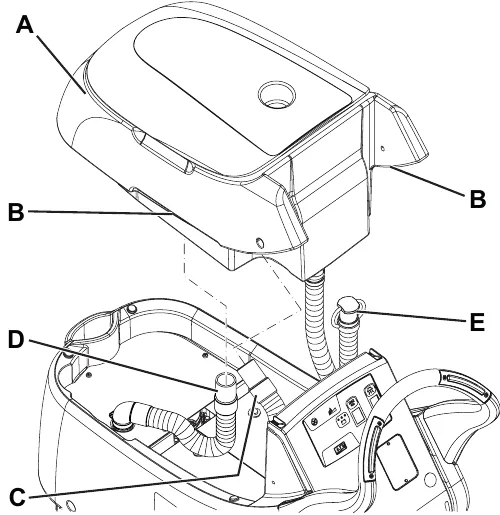
- Install the tank by performing steps 4 to 8 in the reverse order of removal.
Machine long inactivity
If the machine is not going to be used for more than 30 days, proceed as follows:
- Perform the procedures shown in After Using the Machine paragraph.
- Disconnect the battery connector (8).
Maintenance
The lifespan of the machine and its maximum operating safety are ensured by correct and regular maintenance. The following chart provides the scheduled maintenance. The intervals shown may vary according to particular working conditions, which are to be defined by the person in charge of the maintenance.
All scheduled or extraordinary maintenance procedures must be performed by qualified personnel, or by an authorised Service Center.
This Manual describes only the easier and most common maintenance procedures.
For other maintenance procedures shown in the Scheduled Maintenance Table, refer to the Service Manual that can be consulted at any Service Center.
Scheduled maintenance table
| Procedure | Daily, after using the machine | Weekly | Every six months | Yearly |
|---|---|---|---|---|
| Battery charging | ● | |||
| Squeegee cleaning | ● | |||
| Brush/pad cleaning | ● | |||
| Tank and vacuum grid with float cleaning, and cover gasket check | ● | |||
| Squeegee blade check and replacement Parts › | ● | |||
| Solution filter cleaning Parts › | ● | |||
| WET battery fluid level check | ● | |||
| Brush/pad-holder motor carbon brush check or replacement (1) | (1) | |||
| Vacuum system motor carbon brush check or replacement (1) | (1) |
● marks the interval shaded in the manual.
(1) This maintenance procedure must be performed by an authorised Advance Service Center.
Battery charging
NOTE Charge the batteries when the yellow or red LED (45 or 46) turns on, or at the end of each working cycle.
- Drive the machine to the appointed recharging area.
- Turn off the machine by pressing the switches (41 and 42).
- For WET batteries only:
- Remove the recovery water tank as shown in Use chapter. Check the level of electrolyte inside the batteries; if necessary, top up through the caps.
- Leave all the battery caps open for next charging.
- If necessary, clean the upper surface of the batteries.
- Connect the battery charger cable (4) to the electrical mains (the electrical mains voltage and frequency must be compatible with the battery charger values shown on the machine serial number plate (29)). When the battery charger is connected to the electrical mains, all machine functions are automatically cut off. If the red warning light (52) on the battery charger control panel stays on, the battery charger is charging the batteries.
- When the green warning light (50) turns on, the battery charging is completed.
- When the battery charging is completed, disconnect the battery charger cable (4) from the electrical mains and wind it round its housing (5).
- (For WET batteries only): Reinstall the recovery tank.
NOTE For further information about the battery charger (48) operation, see the relevant Manual.
Squeegee cleaning
NOTE The squeegee must be clean and its blades must be in good conditions in order to get a good drying.
- Drive the machine on a level floor.
- Make sure that the switches (41 and 42) are turned to “0”.
- Lower the squeegee (21) with the lever (7).
- Loosen the handwheels (22) and remove the squeegee (21).
- Disconnect the vacuum hose (10) from the squeegee.
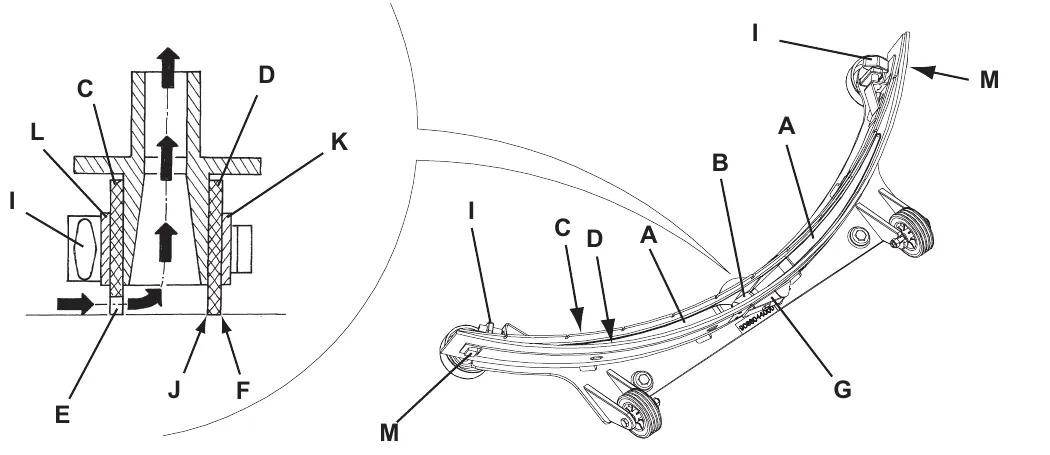
- Wash and clean the squeegee (Fig. 6). In particular, clean the compartments (A) and the vacuum hole (B) from dirt and debris. Check the front blade (C) and the rear blade (D) for integrity, cuts and tears; if necessary replace them (see the procedure in the following paragraph).
- Install the squeegee in the reverse order of removal.
Squeegee blade check and replacement
- Clean the squeegee (Fig. 6) as shown in the previous paragraph.
- Check that the edge (E) of the front blade (C) and the edge (F) of the rear blade (D) lay down on the same level, along their length; otherwise adjust their height according to the following procedure:
- Remove the tie rod (G), disengage the retainers (M) and adjust the rear blade (D); then engage the retainers and install the tie rod.
- Loosen the handwheels (I) and adjust the front blade (C); then tighten the handwheels.
- Check the front blade (C) and rear blade (D) for integrity, cuts and tears; if necessary replace them as shown below. Check that the front corner (J) of the rear blade is not worn; otherwise, overturn the blade to replace the worn corner with an integral one. If the other corners are worn too, replace the blade according to the following procedure:
- Remove the tie rod (G), disengage the fasteners (M) and remove the retaining strip (K), then replace/overturn the rear blade (D).
- Install the blade in the reverse order of removal.
- Unscrew the handwheels (I) and remove the retaining strip (L), then replace the front blade (C).
- Install the blade in the reverse order of removal.
- Connect the vacuum hose (10) to the squeegee.
- Install the squeegee (21) and screw down the handwheels (22).
- If necessary, adjust the squeegee balance adjusting handwheel (23).
Brush cleaning
- Drive the machine on a level floor.
- Make sure that the switches (41 and 42) are turned to “0”.
- Remove the brush/pad-holder as follows:
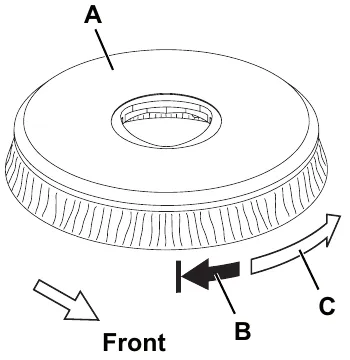
- When the deck (13) is lifted, grab the brush/pad-holder (A, Fig, 7) with the hands and turn it first in one direction (B) and then in the other direction (C) to release it.
- Clean and wash the brush/pad with water and detergent.
- Check the brush bristles for integrity and wear; if necessary, replace the brush.
- Check the pad for wear; if necessary, replace the pad.
Tank and vacuum grid cleaning
- Drive the machine to the appointed disposal area.
- Check that the switches (41 and 42) are turned to “0” and disconnect the battery connector (8).
- Drain the water from the tanks (15 and 16) through the drain hose (11) and hose (12).
- Open the cover (17), then clean and wash the cover, the tanks and the vacuum grid (30) with clean water.
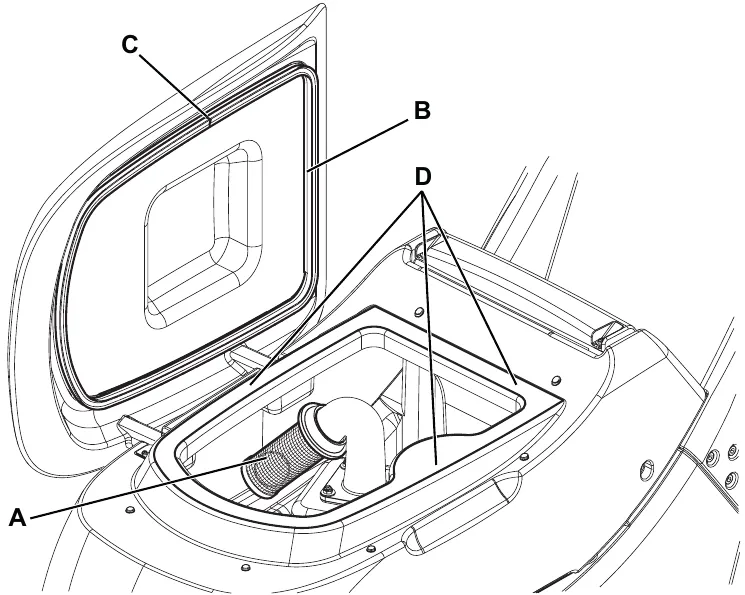
- If necessary, remove the grid (A, Fig. 8) clean it carefully and reinstall it.
- Check the recovery tank cover gasket (B) for integrity.
NOTE The gasket (B) creates vacuum in the tank that is necessary for vacuuming the recovery water.
If necessary replace the gasket (B) by removing it from its housing. When assembling the new gasket, install the joint (C) in the side area, as shown in the figure.
- Check that the seating surface (D) of the gasket (B) is integral and adequate for the gasket itself.
- Close the recovery tank cover (17).
Solution filter cleaning
- Empty the solution tank (15) as shown in the relevant paragraph.
- Drive the machine on a level floor.
- Check that the switches (41 and 42) are turned to “0” and disconnect the battery connector (8).
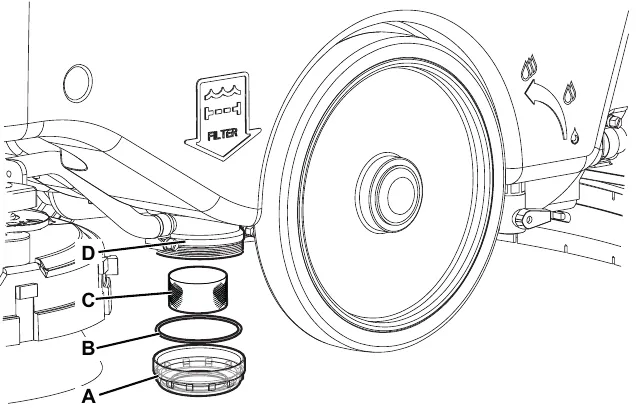
- Unscrew the transparent cover (A, Fig. 9), remove the gasket (B), then remove the filter strainer (C). Clean and install them on the support (D).
NOTE Install the gasket (B) and the filter strainer (C) properly on the cover (A) and on the support (D).
Fuse check/replacement
- Disconnect the battery connector (8).
- Move aside the recovery water drain hose (11).
- Remove the battery charger cable, if equipped, from the cable holder (5).
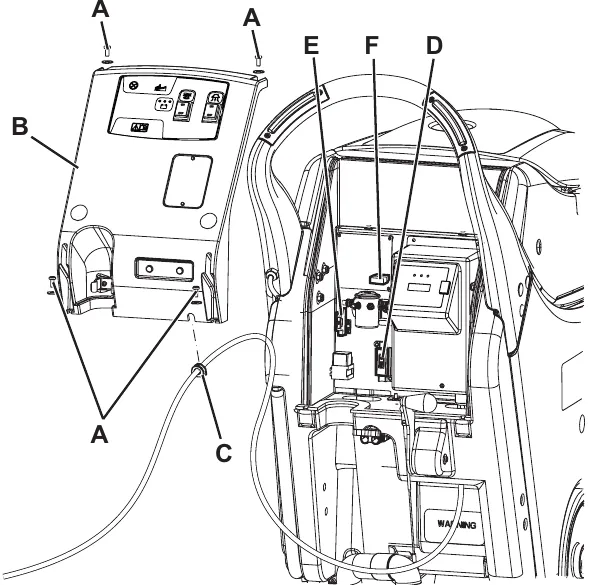
- Remove the screws (A, Fig. 10) and carefully move aside the panel (B) by disengaging the grommet (C) from its housing on the panel (B).
- Check/replace the following fuses:
- (D) Brush deck fuse F1 (40 A)
- (E) Vacuum system fuse F2 (30 A)
- (F) Electronic board fuse F3 (5 A)
- Perform steps 1 to 4 in the reverse order.
Troubleshooting
| Trouble | Possible Cause | Remedy |
|---|---|---|
| The motors do not work; no warning light turns on. | The battery connector is disconnected. | Connect. |
| The batteries are completely discharged. | Charge the batteries. | |
| The switch (41) is broken. | Replace. (*) | |
| The LEDs (43) flash simultaneously. | The deck motor is overloaded. | Use less aggressive brushes suitable for the floor to be cleaned. |
| There are foreign materials (tangled threads, etc.) preventing the brush from rotating. | Clean the brush hub. | |
| The brush does not work. | The fuse (F1) is blown. | Replace. |
| The push-button (47) is broken. | Replace. (*) | |
| The vacuum system motor does not turn on. | The fuse (F2) is blown. | Replace. |
| The switch (42) is broken. | Replace. (*) | |
| The dirty water vacuuming is insufficient. | The recovery tank is full. | Empty the tank. |
| The hose is disconnected from the squeegee. | Connect. | |
| The vacuum grid is clogged or the float is stuck closed. | Clean the grid or check the float. | |
| The squeegee is dirty or the squeegee blades are worn or damaged. | Clean and check the squeegee. Parts › | |
| The tank cover is not properly closed or the gasket is damaged. | Close the cover or clean/replace the gasket. Parts › | |
| The solution flow to the brush is insufficient. | The solution solenoid valve is faulty. | Replace. (*) |
| The solution filter is dirty. | Clean the filter. Parts › | |
| The squeegee leaves marks on the floor. | There are debris under the squeegee blades. | Remove the debris. |
| The squeegee blades are worn, chipped or torn. | Replace the blades. Parts › | |
| The squeegee has not been adjusted with the handwheel. | Adjust it. |
(*) This maintenance procedure must be performed by an authorised Advance Service Center.
NOTE The machine is inoperative without the battery charger. In case of battery charger malfunction, contact an authorised Service Center.
For further information, refer to the Service Manual, available at any Advance Service Center.
Scrapping
Have the machine scrapped by a qualified scrapper.
Before scrapping the machine, remove and separate the following materials, which must be disposed of properly according to the Law in force:
- Battery
- Brushes/pads
- Plastic hoses and components
- Electrical and electronic components (*)
(*) Refer to the nearest Advance Center especially when scrapping electrical and electronic components.
This page is blank in the printed manual.
Advance contact details
14600 21st Avenue North
Plymouth, MN 55447-3408
www.advance-us.com
Phone: 800-989-2235
Fax: 800-989-6566
©2014 Nilfisk-Advance, Inc. A Nilfisk-Advance Brand
Advance and Nilfisk are trademarks of Nilfisk A/S. Southeastern Equipment & Supply is an independent dealer.