T600e/T600 walk-behind floor scrubber
English (EN). Operator Manual 9016600, Rev. 06 (09-2024). North America / International.
Hygenic® Fully Cleanable Recovery Tank
TennantTrue® Parts
IRIS® a Tennant Technology
Pro-Panel® Controls
Insta-Fit™ Adapter
Smart-Fill™ Automatic Battery Watering
Powered by Lithium-Ion. ec-H2O NanoClean.
For Parts manuals and other language Operator manuals, visit: www.tennantco.com/manuals
9016600
Rev. 06 (09-2024)
Introduction
This manual is furnished with each new model. It provides necessary operation and maintenance instructions.
Read this manual completely and understand the machine before operating or servicing it.
This machine will provide excellent service. However, the best results will be obtained at minimum costs if:
• The machine is operated with reasonable care.
• The machine is maintained regularly - per the maintenance instructions provided.
• The machine is maintained with manufacturer supplied or equivalent parts.
To view, print or download manuals online visit www.tennantco.com/manuals
Protect the environment
Please dispose of packaging materials and used machine components such as batteries in an environmentally safe way according to your local waste disposal regulations.
Always remember to recycle.
Tennant Company
10400 Clean Street
Eden Prairie, MN 55344-2650
USA
Phone: (800) 553-8033
www.tennantco.com
1-STEP, Pro-Membrane, Severe Environment, Zone Settings and Quiet-Mode are trademarks of Tennant Company.
This product may contain portions of software that have various 3rd party licenses. More information can be found at: www.tennantco.com/opensource
Specifications and parts are subject to change without notice.
Original Instructions. Copyright ©2018-2024 Tennant Company. All rights reserved.
Intended use
The T600e/T600 walk-behind floor scrubber is intended for commercial use, for example in hotels, schools, hospitals, factories, shops, offices and rental businesses. It is designed to scrub hard floor surfaces (concrete, tile, stone, synthetic, etc.) in an indoor environment. This machine is not intended for cleaning carpets or sanding wood floors. Use only recommended pads/brushes and commercially available floor cleaning detergents. Do not use this machine other than described in this Operator Manual.
Machine data
Please fill out at time of installation for future reference.
Model No. -
Serial No. -
Installation Date -
Serial number label location
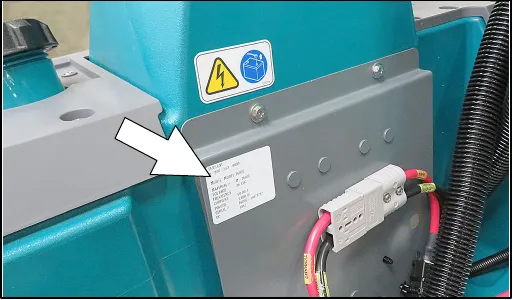
Uncrating machine
Carefully check machine for signs of damage. Report damages at once to carrier. Contact distributor or Tennant for missing items.
To uncrate the machine, remove straps, wheel blocks and shipping brackets. Using the supplied ramp carefully back the machine off the pallet. Make sure scrub head is in the raised position.
Contents
- Introduction (page 2)
- Intended use (page 2)
- Machine data (page 2)
- Serial number label location (page 2)
- Uncrating machine (page 2)
- Safety (page 5)
- Important safety instructions (page 5)
- Safety labels (page 8)
- Lithium-ion battery safety label (page 9)
- Operation (page 10)
- Machine components (page 10)
- Scrub head types (page 11)
- Control panel components (page 12)
- T600e control panel model (page 12)
- T600 Pro-Membrane control panel model (page 12)
- T600 Pro-Panel controls model (page 13)
- Machine symbols (page 14)
- T600 Pro-Panel symbols (page 14)
- Installing batteries (page 15)
- Lithium-ion battery (page 15)
- Flooded/sealed lead-acid batteries (page 15)
- How the machine works (page 16)
- Brush and pad information (page 16)
- Machine setup (page 17)
- Installing squeegee assembly (page 17)
- Installing and removing disk brushes/pads (disk scrub head model) (page 18)
- Installing orbital pads (orbital scrub head model) (page 19)
- Installing cylindrical brushes (cylindrical brush scrub head model) (page 20)
- Filling solution tank (page 20)
- Filling severe environment detergent tank (T600 ec-H2O model option) (page 21)
- ec-H2O water conditioning cartridge (ec-H2O model) (page 21)
- Filling automatic battery watering tank (option) (page 22)
- Control panel operation (page 23)
- T600e control panel (page 23)
- 1-step button (page 23)
- Brush pressure button (page 23)
- Solution flow button (page 23)
- ec-H2O button / indicator (option) (page 23)
- Service indicator (page 24)
- Parking brake indicator (option) (page 24)
- Battery discharge indicator (page 24)
- Automatic battery watering indicator (option) (page 24)
- T600 Pro-Membrane control panel (page 25)
- 1-step button (page 25)
- Brush pressure button (page 25)
- Solution flow button (page 25)
- Severe environment button (ec-H2O model option) (page 25)
- Quiet-mode button (page 26)
- Preset zone control buttons (page 26)
- ec-H2O button / indicator (option) (page 26)
- Service indicator (page 26)
- Battery discharge indicator (page 27)
- Automatic battery watering indicator (option) (page 27)
- T600 Pro-Panel controls (page 28)
- Home screen (page 28)
- Help button (page 28)
- Login screen (page 28)
- ec-H2O indicator (option) (page 29)
- 1-step button (page 29)
- Brush pressure button (page 29)
- Solution flow button (page 29)
- Severe environment button (ec-H2O model option) (page 30)
- Maximum scrub speed button (page 30)
- Quiet-mode button (page 30)
- Battery discharge indicator (page 31)
- Video tutorial button (operator mode home screen) (page 31)
- Preset zone control buttons (page 32)
- Service indicator button (page 32)
- Fault screens (page 33)
- Machine settings button (page 34)
- Machine operation (page 34)
- Pre-operation check list (page 34)
- Operating machine (page 34)
- Double scrubbing (page 36)
- Emergency shut-off button (page 36)
- While operating machine (page 37)
- Circuit breaker panel (page 37)
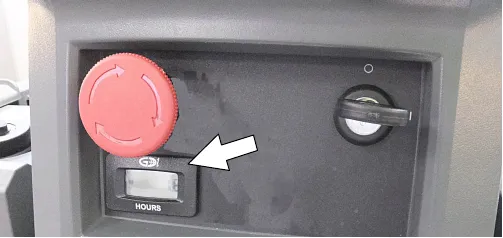
- Hour meter (page 38)
- Draining tanks (page 38)
- Draining recovery tank (page 38)
- Draining solution tank (page 39)
Contents, continued
- Service indicator codes (page 40)
- T600e model service indicator codes (page 40)
- T600 model service indicator codes (page 41)
- T600e/T600 lithium-ion battery system service indicator codes (page 43)
- T600e/T600 on-board battery charger service indicator codes (page 44)
- T600e/T600 ec-H2O system service indicator codes (page 45)
- Maintenance (page 46)
- Maintenance chart (page 46)
- Machine maintenance (page 47)
- Yellow touch points (page 47)
- After daily use (page 47)
- After weekly use (page 49)
- After every 50 hours of use (page 50)
- After every 100 hours of use (page 51)
- After every 200 hours of use (page 51)
- Electric motors (page 51)
- Belts (cylindrical brush model) (page 51)
- Batteries (page 52)
- Flooded (wet) and maintenance-free sealed lead-acid batteries (page 52)
- Checking connections / cleaning (page 52)
- Lithium-ion battery pack (page 53)
- Charging batteries (page 53)
- Battery charger settings (page 54)
- Off-board battery charger settings (page 55)
- Selecting battery type (T600 Pro-Panel model) (page 55)
- Manual battery watering system (Trojan battery option) (page 56)
- Automatic battery watering system (Trojan battery option) (page 57)
- Battery compartment drain hose (page 58)
- Squeegee blade replacement (page 58)
- ec-H2O water conditioning cartridge replacement (page 59)
- Machine jacking (page 60)
- Pushing and transporting machine (page 60)
- Pushing machine (page 60)
- Transporting machine (page 61)
- Storing machine (page 61)
- Freeze protection (page 62)
- Troubleshooting (page 63)
- Specifications (page 65)
- General machine dimensions/capacities/performance (page 65)
- Machine dimensions (page 69)
- Supervisor controls (page 73)
- T600e model (page 73)
- T600 Pro-Membrane control panel model (page 74)
- T600 Pro-Panel controls model (page 75)
- To add/edit user profiles (page 76)
- Enabling the login screen (page 78)
- Disabling the login screen (page 79)
- Changing the factory-assigned supervisor login code (page 80)
Important safety instructions - save these instructions
The following warning precautions are used throughout this manual as indicated in their description:
The following information signals potentially dangerous conditions to the operator. Know when these conditions can exist. Locate all safety devices on the machine. Report machine damage or faulty operation immediately.
- Read manual before operating machine.
- Do not use or pick up flammable materials or reactive metals.
- Do not use near flammable liquids, vapors or combustible dusts.
This machine is not equipped with an explosion proof motor. The electric motor will spark upon start up and during operation which could cause a flash fire or explosion if machine is used in an area where flammable vapors/liquids or combustible dusts are present.
- Lead-acid batteries emit hydrogen gas. Explosion or fire can result. Keep sparks and open flame away when charging.
- Disconnect battery cables and charger cord before cleaning and servicing machine.
- Do not charge batteries with damaged cord. Do not modify plug.
If the charger supply cord is damaged or broken, it must be replaced by the manufacturer or its service agent or a similarly qualified person in order to avoid a hazard.
- Do not use outdoors. Store indoors.
- Spinning pad/brush, keep hands away.
IRIS Telemetry (Option) - This machine may be equipped with technology that automatically communicates over the cellular network. If the machine will be operated where cell phone use is restricted because of concerns related to equipment interference, please contact a Tennant representative for information on how to disable the cellular communication functionality.
1. Do not operate machine:
- Unless trained and authorized.
- Unless operator manual is read and understood.
- Unless mentally and physically capable of following machine instructions.
- Under the influence of alcohol or drugs.
- While using a cell phone or other types of electronic devices.
- If not in proper operating condition.
- In outdoor areas. This machine is for indoor use only.
- In areas where flammable vapors/liquids or combustible dusts are present.
- With pads or accessories not supplied or approved by Tennant. The use of other pads may impair safety.
- In areas with possible falling objects.
- In areas that are too dark to safely see the controls or operate machine.
2. Before operating machine:
- Check machine for fluid leaks.
- Make sure all safety devices are in place and operate properly.
- Set the directional lever before pulling start bail.
3. When operating machine:
- Use only as described in this manual.
- Report machine damage or faulty operation immediately.
- Wear closed-toe, non-slip work shoes.
- Reduce speed when turning.
- Go slowly on inclines and slippery surfaces.
- Always be aware of surroundings while operating machine.
- Drive slowly through doorways and narrow openings.
- Be cautious of the squeegee near bystanders and obstacles.
- Do not access the video / help screens while machine is moving. (Pro-Panel)
- Do not scrub or transport on inclines that exceed 2% grade.
- Follow site safety guidelines concerning wet floors.
- Follow mixing, handling and disposal instructions on chemical containers.
- Do not carry passengers on machine.
Important safety instructions - continued
- Use care when reversing machine.
- Keep children and unauthorized persons away from machine.
- Do not allow machine to be used as a toy.
- Do not use spray nozzle for off-aisle cleaning, slip hazard may occur.
- Do not leave machine unattended when filling solution tank with auto-fill feature.
- Park machine on level surface when filling solution tank with auto-fill feature.
4. Before leaving or servicing machine:
- Stop on level surface.
- Turn off machine and remove key.
5. When servicing machine:
- Disconnect battery connection and charger cord before working on machine.
- Do not pull on battery charger cord to unplug. Grasp plug at outlet and pull.
- All work must be done with sufficient lighting and visibility.
- All repairs must be performed by trained personnel.
- Use Tennant supplied or approved replacement parts.
- Do not modify the machine from its original design.
- Block machine tires before jacking machine up.
- Jack machine up at designed locations only. Support machine with jack stands.
- Use hoist or jack that will support the weight of the machine.
- Do not push or tow the machine without an operator controlling the machine,
- Do not push the machine on inclines with brake disabled.
- Avoid moving parts. Do not wear loose clothing or jewelry and secure long hair.
- Do not disconnect the off-board charger's DC cord from the machine's receptacle when the charger is operating. Arcing may result. If the charger must be interrupted during charging cycle, disconnect the AC power supply cord first.
- Do not use incompatible battery chargers as this may damage battery packs and potentially cause a fire hazard.
- Inspect charger cord regularly for damage.
- Do not plug in charger if prongs are wet.
- Open recovery tank to vent batteries if temperature is above 80°F/27°C when charging batteries.
- Keep work area well ventilated.
- Avoid contact with battery acid.
- Always follow site safety rules when disposing battery compartment liquid.
- Follow site safety rules concerning battery removal.
- Keep all metal objects off batteries.
- Use a non-conductive battery removal device.
- Do not power spray or hose off machine. Electrical malfunction may occur. Use damp cloth.
- Use a hoist or adequate assistance when lifting batteries.
- Battery installation must be done by trained personnel.
- Only use distilled water when filling the automatic battery watering tank.
- Wear personal protection equipment as needed and where recommended in this manual.
For Safety: wear protective gloves.
For Safety: wear eye protection.
6. When loading/unloading machine onto/off truck or trailer:
- Drain tanks before loading machine.
- Use a ramp that can support the machine weight and operator.
- Do not operate on a slippery ramp.
- Use caution when operating on ramp.
- The machine may only be operated on gradients up to 2%.
- Lower the scrub head and squeegee before tying down machine.
- Turn machine off and remove key.
- Block machine wheels.
- Use tie-down straps to secure machine.
Important safety instructions - continued
7. When using Lithium-ion Battery Model:
- Battery service to be performed by Tennant Service only.
- Battery installation requires a specific service kit which includes a hoisting strap and proper lifting instructions. Contact Tennant Service.
- Do not attempt to lift battery by hand or by any other unauthorized method.
- Battery pack is designed exclusively for specific Tennant machine applications. Do not install battery pack in unapproved machines.
- Dispose of battery in accordance with local regulations. Contact Tennant Service.
- Contact Tennant Service or your local regulatory authorities for proper transporting instructions of lithium-ion batteries.
- Disconnect battery cable connector, battery management system (BMS) connector and charger cord before working on machine.
- Use only OEM approved battery charger supplied with lithium-ion battery.
- Do not expose battery to temperatures below -22°F/-30°C, above 140°F/60°C.
- Do not use machine immediately after long-term extreme temperature storage. Before use, return battery module temperature range to 50°F/10°C~95°F/35°C
- Do not operate or store battery in hazardous environment (electrically charged, humidity, extreme temperatures and magnetic fields).
- Do not expose battery to flame or plasma.
- Do not disassemble or mistreat battery. Do not tear seal tape or will void warranty.
- Do not drop, crush or subject battery to impact, as it may cause battery to heat up or catch fire.
- Do not put battery in fire or water to avoid battery explosion.
- Do not touch battery with wet hand, avoid electric shock.
- Stop using or charging the battery immediately if battery has abnormal temperature, leakage or other abnormal conditions.
Safety labels
The safety labels appear on the machine in the locations indicated. Replace labels if they are missing or become damaged or illegible.
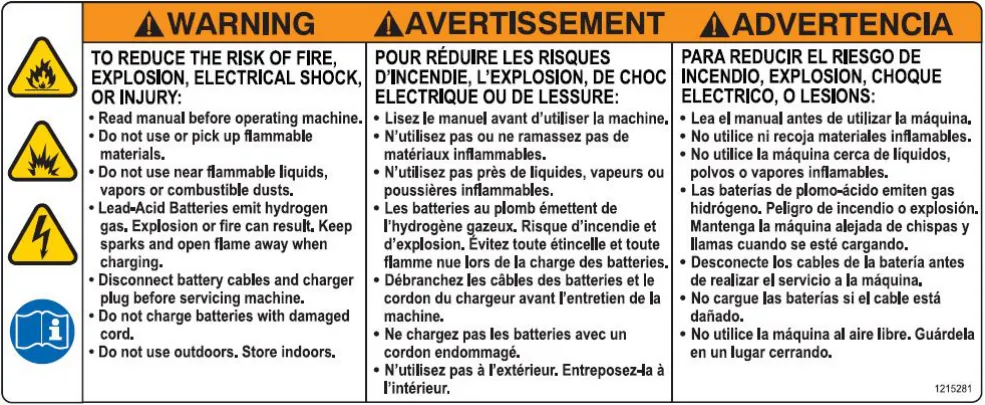
Warning label, recovery tank cover
Located on recovery tank cover.
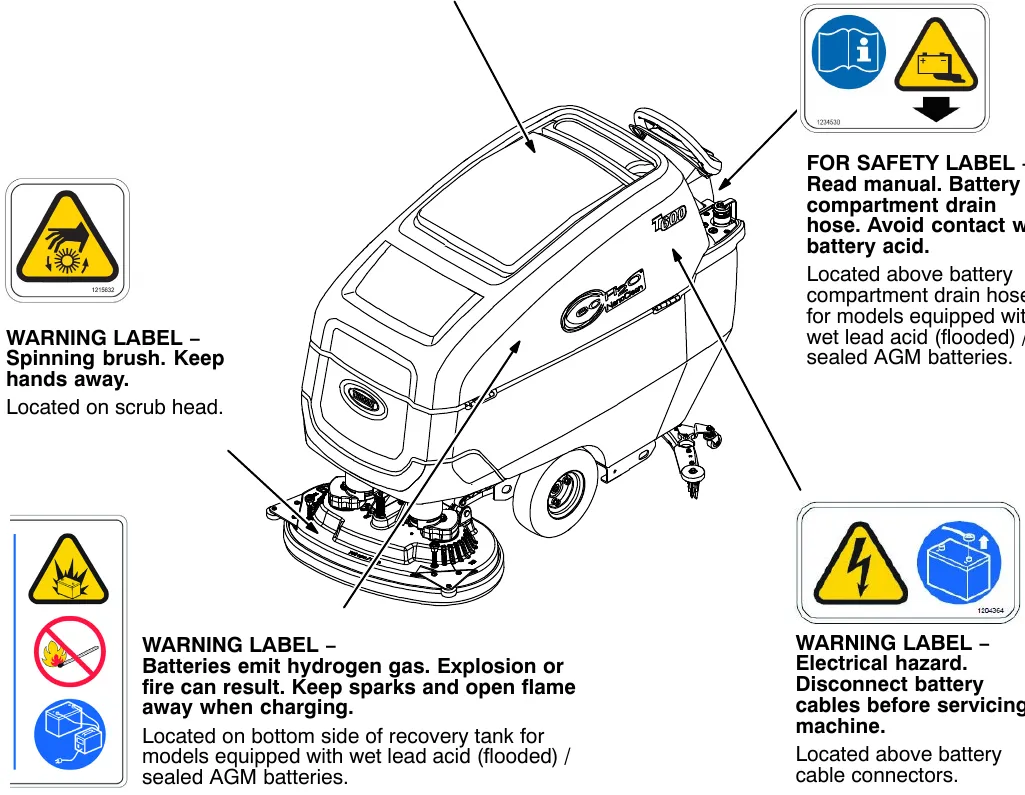
WARNING LABEL - Spinning brush. Keep hands away.
Located on scrub head.
FOR SAFETY LABEL - Read manual. Battery compartment drain hose. Avoid contact with battery acid.
Located above battery compartment drain hose for models equipped with wet lead acid (flooded) / sealed AGM batteries.
WARNING LABEL - Batteries emit hydrogen gas. Explosion or fire can result. Keep sparks and open flame away when charging.
Located on bottom side of recovery tank for models equipped with wet lead acid (flooded) / sealed AGM batteries.
WARNING LABEL - Electrical hazard. Disconnect battery cables before servicing machine.
Located above battery cable connectors.
Lithium-ion battery safety label
This safety label appears on the battery in the location indicated. Replace label if missing or becomes damaged or illegible.
LITHIUM BATTERY CAUTION LABEL - Located on top of battery pack.
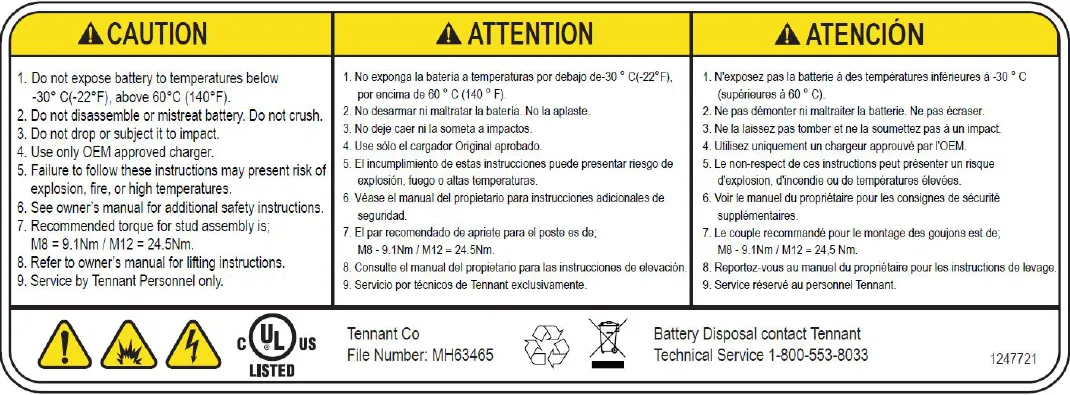
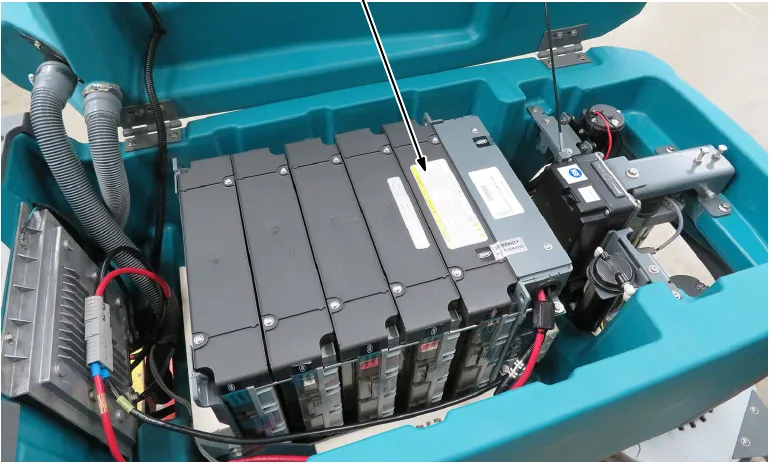
Corrected an obvious misprint: "LITHUIM BATTERY CAUTION LABEL" printed with a typo (now "LITHIUM", as in the page heading).
Machine components
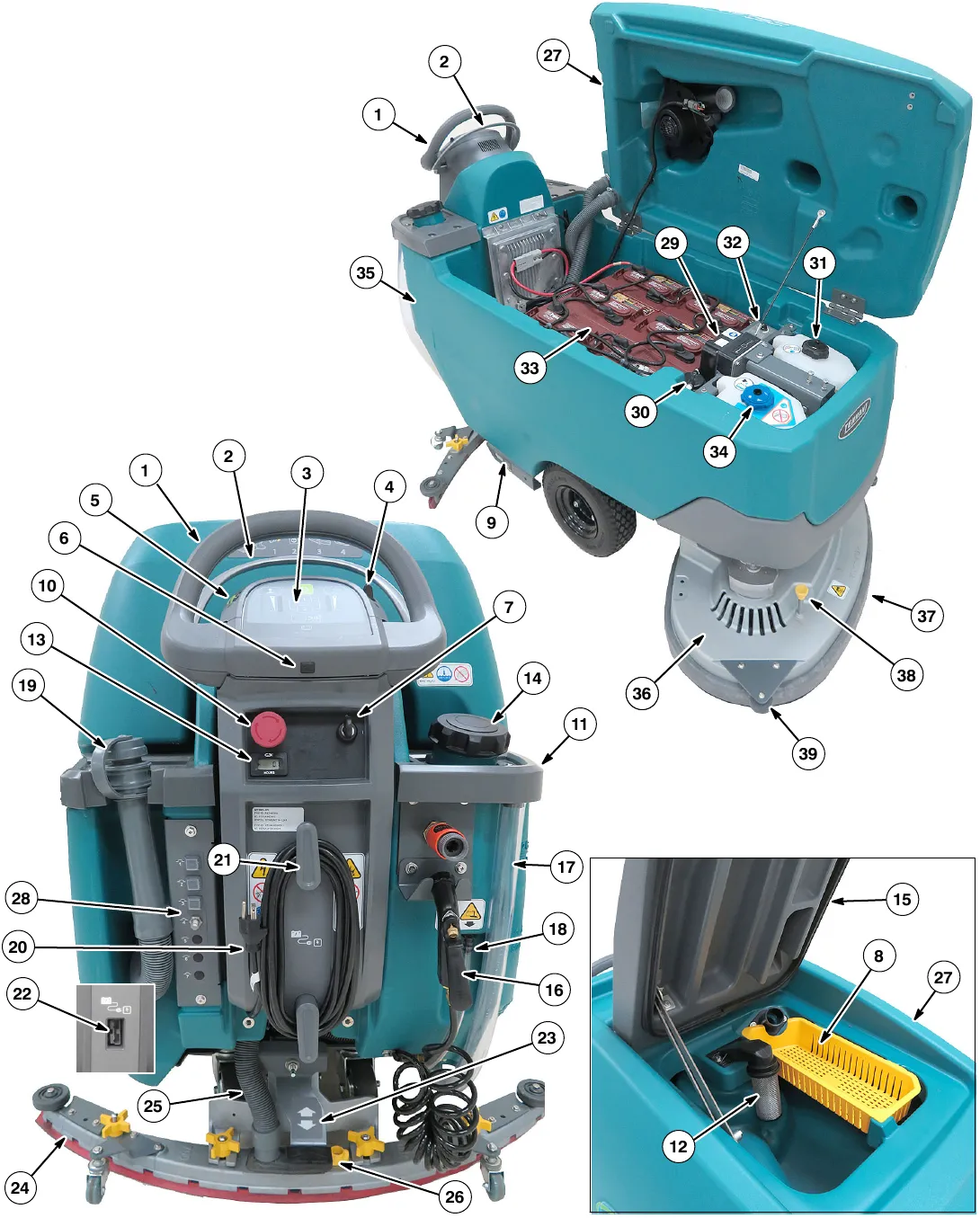
Machine components
- Control handle
- Variable speed control start bail
- Control panel
- Directional lever
- Speed control dial
- USB port (Service only)
- Key switch
- Recovery tank debris tray
- Transport tie-down bracket
- Emergency shut-off button
- Accessory rails
- Recovery tank float shut-off screen
- Hour meter
- Solution tank fill port
- Recovery tank lid
- Tank rinse out spray nozzle (T600 LCD Model option)
- Solution tank level/drain hose
- Battery compartment drain hose
- Recovery tank drain hose
- On-board battery charger cord
- On-board battery charger cord hooks
- Off-board battery charger receptacle (off-board battery charger model)
- Squeegee lower/lift foot pedal
- Squeegee assembly
- Squeegee vacuum hose
- Squeegee debris/drip tray
- Recovery tank
- Circuit breaker panel
- ec-H2O module (option)
- ec-H2O water conditioning cartridge
- Severe environment detergent tank (T600 ec-H2O option)
- Detergent mixing ratio knob (T600 Severe environment option)
- Battery compartment
- Automatic battery watering tank (option)
- Solution tank
- Scrub head
- Scrub head skirt
- Pad release plunger
- Wall rollers
Scrub head types
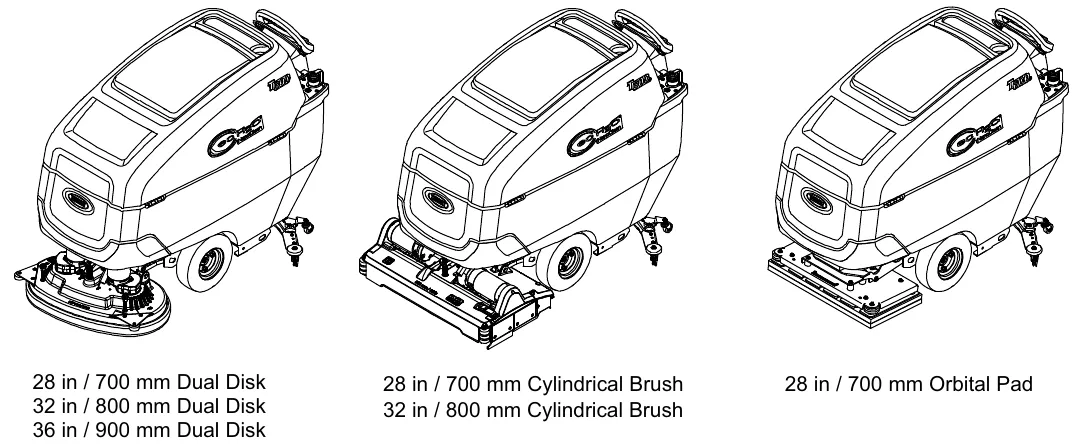
Dual disk: 28 in (700 mm), 32 in (800 mm) and 36 in (900 mm).
Cylindrical brush: 28 in (700 mm) and 32 in (800 mm).
Orbital pad: 28 in (700 mm).
Control panel components
T600e control panel model
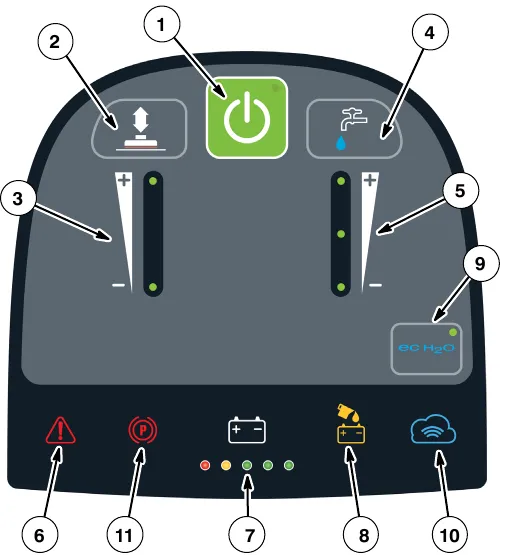
- 1-Step button
- Brush pressure button
- Brush pressure indicator
- Solution flow button
- Solution flow indicator
- Service Indicator
- Battery discharge indicator (BDI)
- Automatic battery watering indicator (option)
- ec-H2O button / indicator (option)
- Cloud Connectivity indicator (Telemetry option)
- Parking Brake indicator (option)
T600 Pro-Membrane control panel model
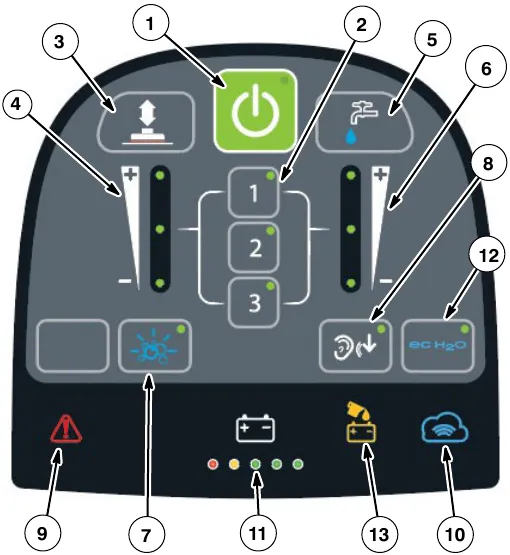
- 1-Step button
- Preset zone control buttons
- Brush pressure button
- Brush pressure indicator
- Solution flow button
- Solution flow indicator
- Severe environment button (option)
- Quiet-mode button
- Service Indicator
- Cloud Connectivity indicator (Telemetry option)
- Battery discharge indicator (BDI)
- ec-H2O button / indicator (option)
- Automatic battery watering indicator (option)
T600 Pro-Panel controls model
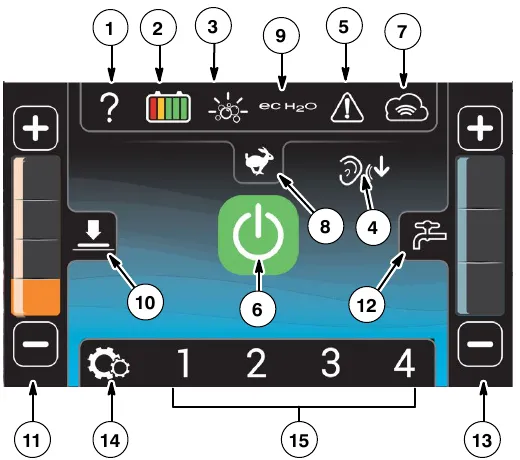
- Help button
- Battery discharge indicator (BDI)
- Severe environment button
- Quiet mode button
- Service indicator button
- 1-Step button
- Telemetry Connectivity indicator (option)
- Maximum scrub speed button
- ec-H2O indicator (option)
- Brush pressure button
- Brush pressure indicator
- Solution flow button
- Solution flow indicator
- Machine Settings button
- Preset zone control buttons
Machine symbols
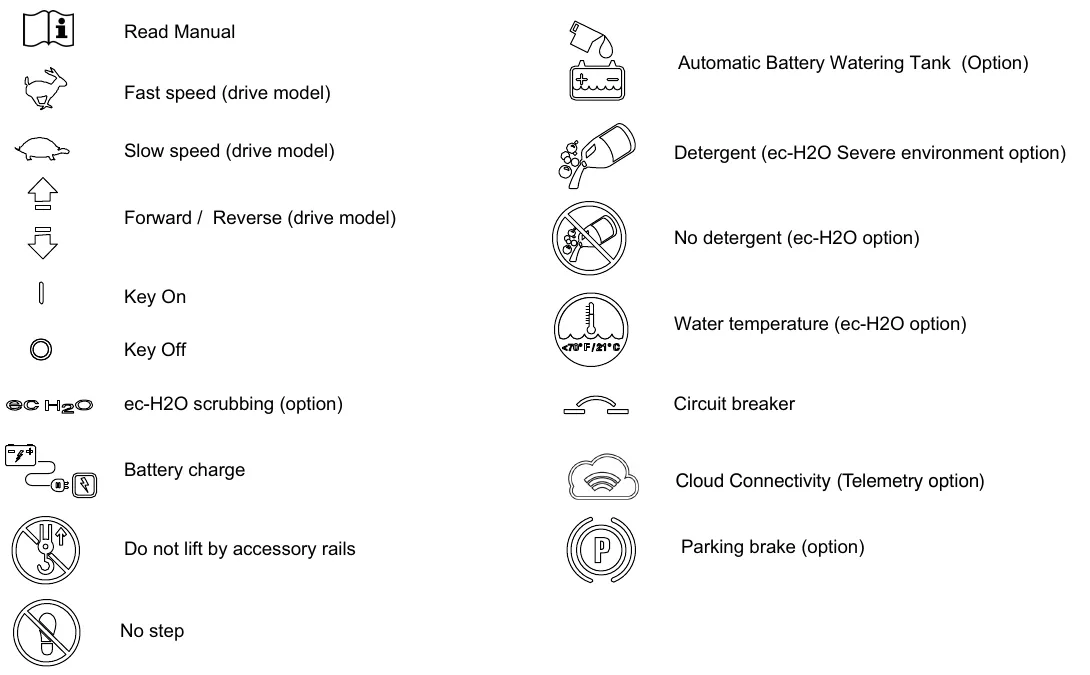
Read Manual. Fast speed (drive model). Slow speed (drive model). Forward / Reverse (drive model). Key On. Key Off. ec-H2O scrubbing (option). Battery charge. Do not lift by accessory rails. No step.
Automatic Battery Watering Tank (Option). Detergent (ec-H2O Severe environment option). No detergent (ec-H2O option). Water temperature (ec-H2O option). Circuit breaker. Cloud Connectivity (Telemetry option). Parking brake (option).
T600 Pro-Panel symbols
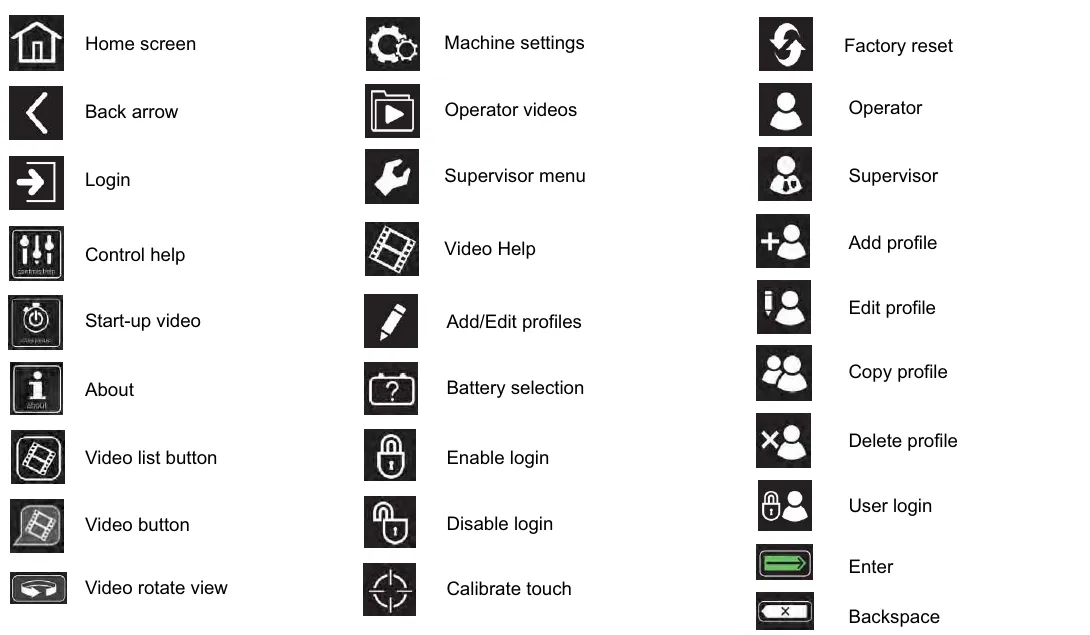
Home screen. Back arrow. Login. Control help. Start-up video. About. Video list button. Video button. Video rotate view. Machine settings. Operator videos. Supervisor menu. Video Help. Add/Edit profiles. Battery selection. Enable login. Disable login. Calibrate touch. Factory reset. Operator. Supervisor. Add profile. Edit profile. Copy profile. Delete profile. User login. Enter. Backspace.
Installing batteries
Lithium-ion battery
For machines equipped with lithium-ion battery, contact Tennant Service for battery service and replacement.
Flooded/sealed lead-acid batteries
Battery specifications
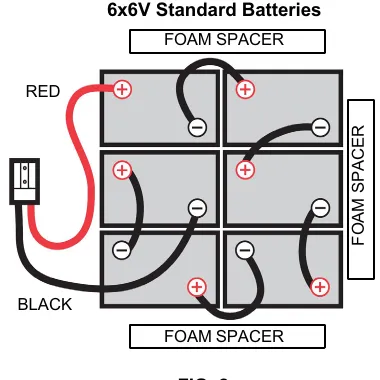
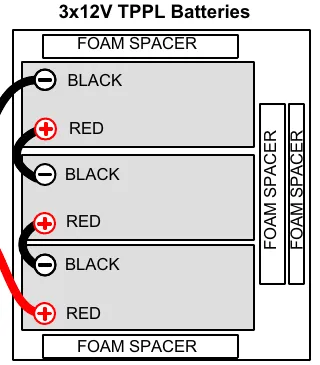
Requires six 6 volt deep-cycle batteries, ≤ 360 Ah @ 20 hr or three 12V TPPL batteries.
Contact distributor or Tennant for battery recommendations.
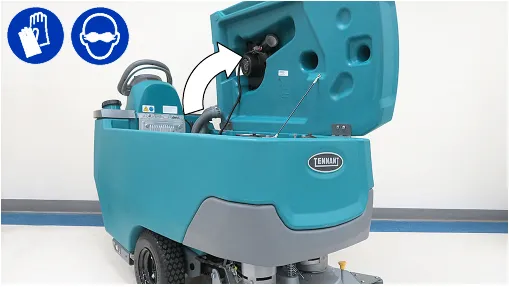
- Lift the recovery tank to access the battery compartment (Figure 1).
NOTE: If there is liquid in battery compartment, drain battery compartment before installing batteries. See BATTERY COMPARTMENT DRAIN HOSE (page 58).
- Carefully install the batteries into the battery compartment tray and arrange the battery posts as shown (Figures 2 & 3). Position foam spacer(s) as shown. Using the supplied battery post boots, connect the cables to battery posts, RED TO POSITIVE (+) & BLACK TO NEGATIVE (-).
IMPORTANT: Before charging batteries, make sure the battery charger and the machine's battery discharge indicator are properly set for battery type. Failure to properly set will result in battery damage. See BATTERY CHARGER SETTINGS (page 54).
IRIS battery charging metrics notification
Machines equipped with capability to report battery charging data via IRIS are supplied with a charger and set of batteries from the factory. When a battery reaches its end of life and must be replaced, Tennant highly recommends that the same battery type be used to continue to maximize the machines performance. In the event a battery with a different amp hour (AH), type (Flooded, AGM, Gel, TPPL), or manufacturer is selected for replacement please contact Tennant technical service department for assistance in determining the feasibility of the replacement batteries and if so, selecting the correct charging profile. Availability of IRIS battery metric reporting is not guaranteed with third party supplied batteries.
How the machine works
Conventional scrubbing:
When using the conventional scrubbing mode, water and detergent mixture from the solution tank flows to the floor and the rotating brush(es)/pad(s) scrub the floor clean. As the machine moves forward, the squeegee with vacuum suction picks up the dirty solution from the floor into the recovery tank.
ec-H2O NanoClean Technology (option):
When using the ec-H2O NanoClean technology, normal water passes through a module where it is electrically converted into a cleaning solution. The electrically converted water attacks the dirt, allowing the machine to easily scrub away the suspended soil. The converted water then returns to normal water in the recovery tank.
Brush and pad information
For best cleaning results use the appropriate brush or pad for your cleaning application. Listed below are brushes and pads and the applications for which each is best suited.
NOTE: The amount and type of soilage play an important role in determining the type of brush or pad to use. Contact a Tennant representative for specific recommendations.
Soft nylon bristle scrub brush (White) - Recommended for cleaning coated floors without removing finish. Cleans without scuffing.
Polypropylene bristle scrub brush (Black) - This general purpose polypropylene bristle scrub brush is used for scrubbing lightly compacted soilage. This brush works well for maintaining concrete, wood and grouted tile floors.
Super abrasive bristle scrub brush (Gray) - Nylon fiber impregnated with abrasive grit to remove stains and soilage. Strong action on any surface. Performs well on buildup, grease, or tire marks.
Tufted pad driver - Standard pad driver has short bristles, or “tufts,” on the back to hold the pad in place.
Polishing pad (White) - Used to maintain highly polished or burnished floors.
Buffing pad (Red) - Used for light duty scrubbing without removing floor finish.
Scrubbing pad (Blue) - Used for medium to heavy-duty scrubbing. Removes dirt, spills, and scuffs and leaves surface clean ready for re-coating.
Stripping pad (Brown) - Used for stripping of floor finish to prepare the floor for re-coating.
Heavy duty stripping pad (Black) - Used for aggressive stripping of heavy finishes/sealers, or very heavy duty scrubbing.
Surface preparation pad (Maroon) - Used for very aggressive chemical free removal of floor finish to prepare the floor for re-coating.
Turf scrubbing pad (Green) - Used to scrub uneven floor surfaces with crevices, cracks and deep grout lines.
Melamine scrubbing pad (Orbital scrub head model) - Made of an open-cell polymeric foam that removes black marks from floors and restores tile.
Machine setup
Installing squeegee assembly
Scrub heads and squeegee assemblies are identified by size (Figure 4). Refer to table below for appropriate squeegee assembly size for specific scrub head size.
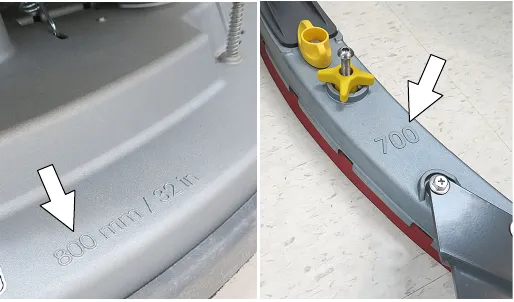
| Scrub head size | Standard squeegee size | Narrow aisle squeegee size |
|---|---|---|
| 28 in (700 mm) disk | 25.6 in (650 mm) | n/a |
| 32 in (800 mm) disk | 27.6 in (700 mm) | 25.6 in (650 mm) |
| 36 in (900 mm) disk | 31.5 in (800 mm) | 27.6 in (700 mm) |
| 28 in (700 mm) cylindrical | 25.6 in (650 mm) | n/a |
| 32 in (800 mm) cylindrical | 27.6 in (700 mm) | 25.6 in (650 mm) |
| 28 in (700 mm) orbital | 25.6 in (650 mm) | n/a |
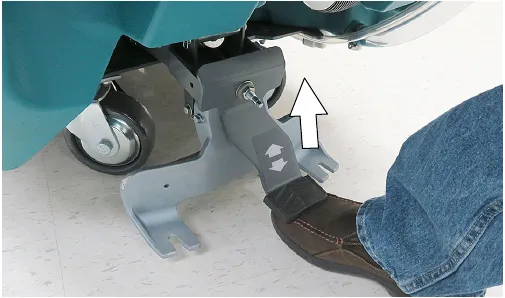
- Lift the squeegee mount bracket to the raised position. Place foot under pedal to lift (Figure 5).
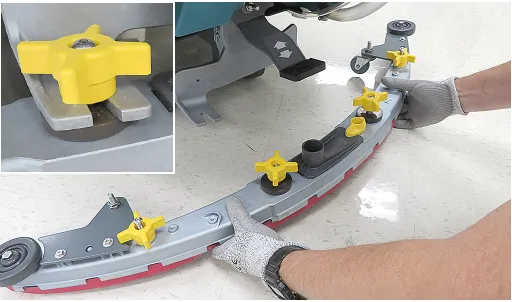
- Attach the squeegee assembly to the squeegee mount bracket (Figure 6). Make sure the black disks are positioned below the squeegee mount bracket as shown. Tighten the star knobs by hand only.
NOTE: Do not over-tighten the star knobs. The squeegee assembly should easily detach from bracket if it hooks a fixed object.
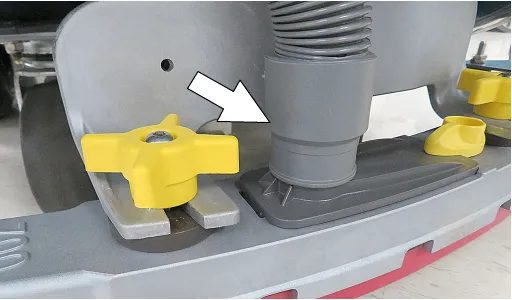
- Connect the vacuum hose to the squeegee assembly (Figure 7).
- Check squeegee blade for proper roll-out. Lower squeegee to floor and propel machine forward for a short distance. The rear blade should roll-out evenly across the full length of the squeegee at a 45° deflection (Figure 8).
NOTE: The two squeegee casters are factory set and should not require any adjustment.
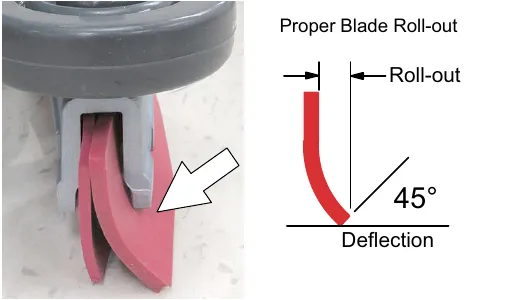
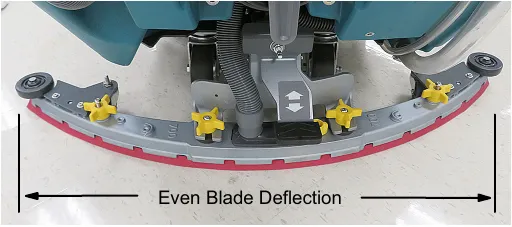
- If the squeegee blade does not deflect evenly across the full length of the squeegee, the blade pitch may be out of adjustment (Figure 9).
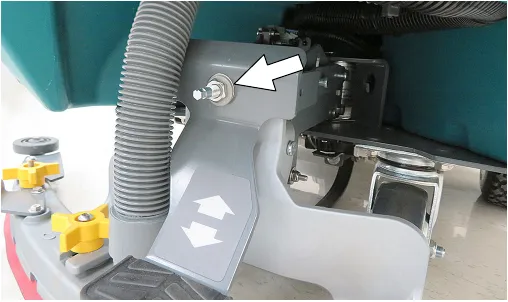
NOTE: The blade pitch adjustment is factory set and should not require further adjustment. However, if blade tips are higher or lower than center of squeegee, blade pitch adjustment is required.
- To readjust blade pitch, loosen locking nut on adjustment shaft and rotate shaft counterclockwise to raise squeegee tips or clockwise to lower squeegee tips (Figure 10). 7mm and 17mm wrench required.
Installing and removing disk brushes/pads (disk scrub head model)
- Raise scrub head off floor and remove key.
- Attach the pad to the pad driver before installing the driver. Secure pad with center-lock (Figure 11).
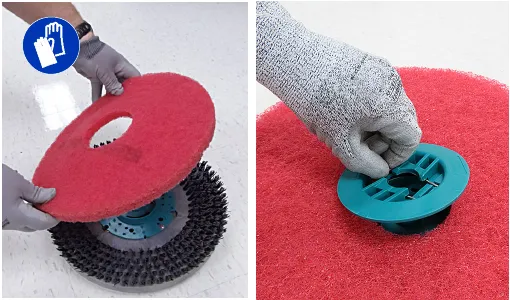
- Set the yellow spring clips to the open position to make brush installation easier. Press spring clips together then downward to set (Figure 12).
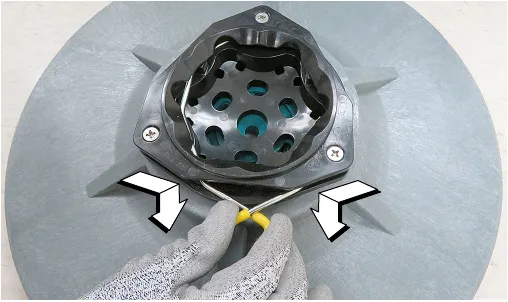
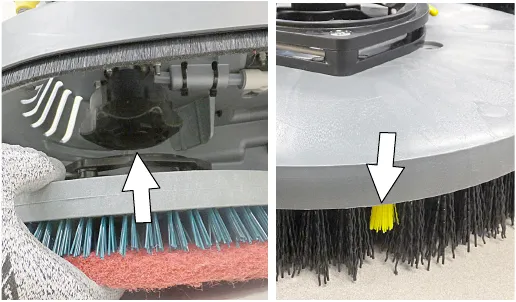
- Align the pad driver or brush under the motor hub and push it upward to engage hub (Figure 13).
Replace pads or brushes when they no longer clean effectively or when the bristles on the brush disk are worn to the yellow indicator (Figure 13).
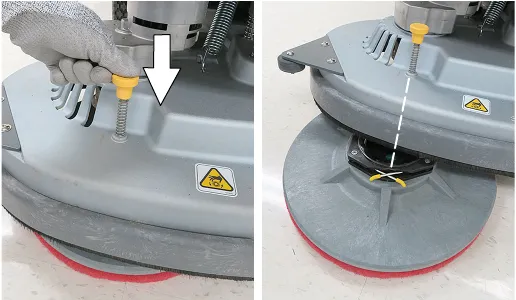
- To remove the pad drivers/brushes, raise the scrub head and press down on the yellow pad release plunger (Figure 14). Pad will drop to floor.
NOTE: If the pad driver/brush does not easily drop to floor, try aligning the spring clip with the plunger before pressing the plunger.
Installing orbital pads (orbital scrub head model)
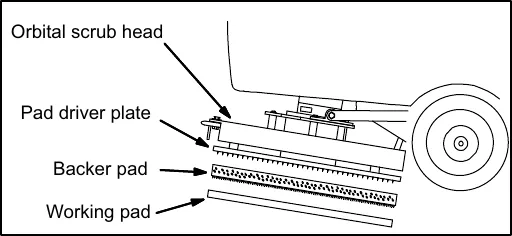
For best cleaning performance and to avoid damaging the pad driver plate or floor surface, always use backer pad with working pads (Figure 15).
- Raise scrub head off floor and remove key.
- Attach backer pad, retaining strips facing downward, to working pad (Figure 16).
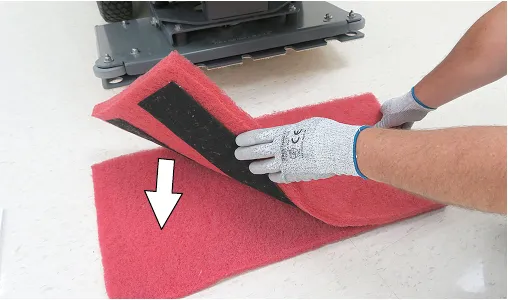
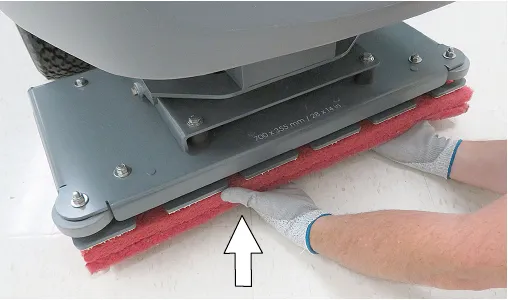
- Attach the two pads to the bottom of the scrub head (Figure 17). Make sure pad is centered on scrub head.
Installing cylindrical brushes (cylindrical brush scrub head model)
- Raise scrub head off floor and remove key.
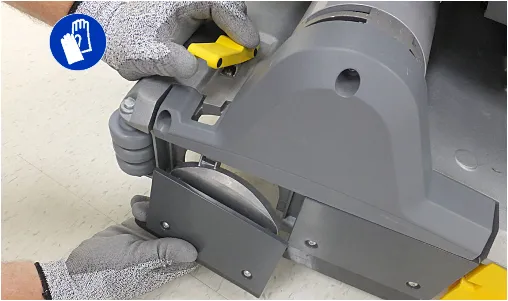
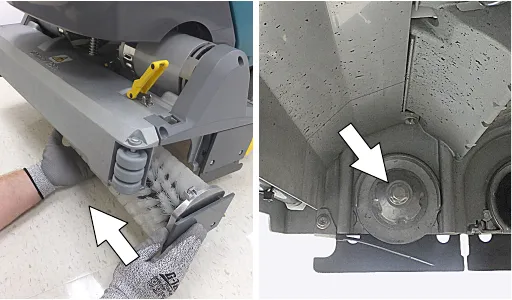
- Unfasten yellow latch and remove the idler plate from the scrub head (Figure 18).
- Attach idler plate to brush end with double row of bristles (Figure 19).
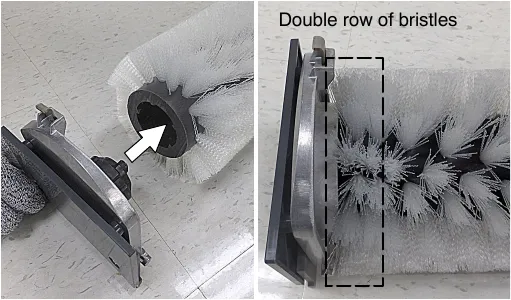
- Guide brush onto the drive hub and refasten latch (Figure 20).
Filling solution tank
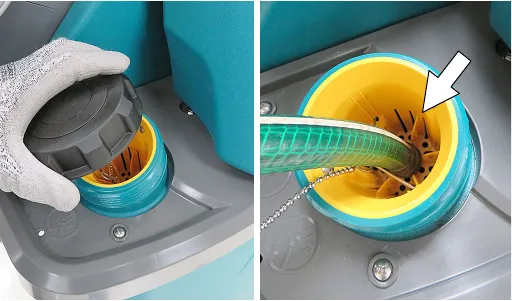
- Remove the cap from the solution tank. Insert the fill hose into the yellow strainer. The ribs at bottom of strainer will hold hose in place while filling (Figure 21).
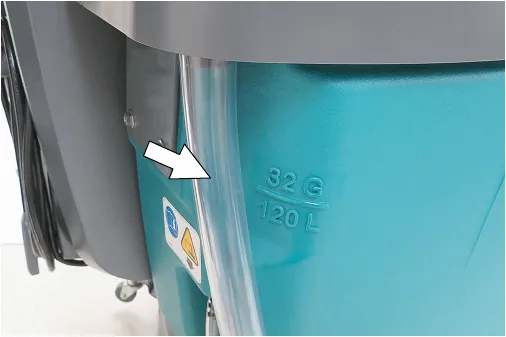
- Fill the solution tank with water until level reaches the ”32 G/120 L” mark on the solution tank indicator (Figure 22).
ec-H2O Scrubbing (Option)- Fill solution tank with only cool clean water (less than 70°F (21°C)). Do not add conventional floor cleaning detergents. An ec-H2O system fault will occur if cleaning detergents are added.
Conventional Scrubbing - Fill solution tank with water (not to exceed 140°F (60°C)). Pour a recommended cleaning detergent into the solution tank according to mixing instructions on the container.
NOTE: Do not use the ec-H2O system when there are conventional cleaning detergents in the solution tank. Drain, rinse, and refill the solution tank with clear cool water before operating the ec-H2O system. Conventional cleaning detergents will cause an ec-H2O system fault.
- Turn off the water supply and remove the fill hose from yellow strainer.
- Replace the cap on the solution tank.
Filling severe environment detergent tank (T600 ec-H2O model option)
- Lift the recovery tank to access the severe environment detergent tank (Figure 23). Drain recovery tank before lifting tank.
- Remove black cap from detergent tank and add a recommended cleaning detergent at full concentration (Figure 24). Do not add water. Use a funnel to prevent splashing liquid on scrub head motors below.
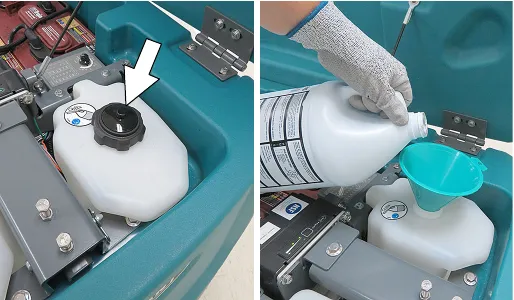
NOTE: To prevent from running out of detergent while operating, it is recommended to refill the severe environment tank when refilling the solution tank.
- Replace cap on detergent tank.
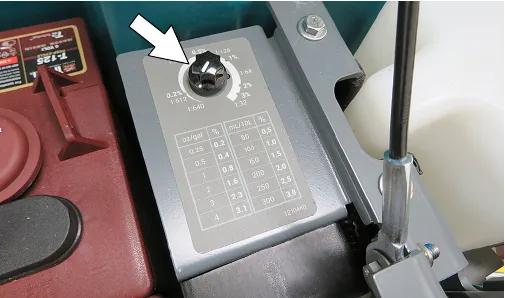
- Adjust the detergent mixing ratio knob according to the cleaning detergent's mixing instructions (Figure 25).
ec-H2O water conditioning cartridge (ec-H2O model)
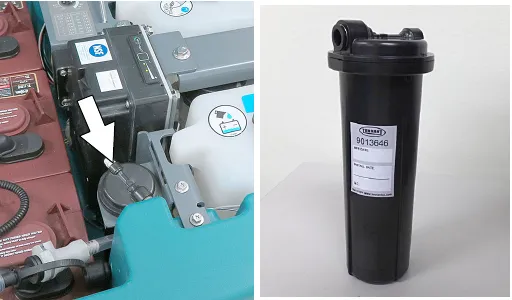
The ec-H2O system is equipped with a water conditioning cartridge (Figure 26). The cartridge is designed to protect the machine's plumbing system from potential scaling.
The cartridge is required to be replaced when it reaches its maximum water usage or expiration time on when the cartridge was activated, which ever comes first.
Depending on machine usage a new cartridge can last anywhere from 12 to 24 months.
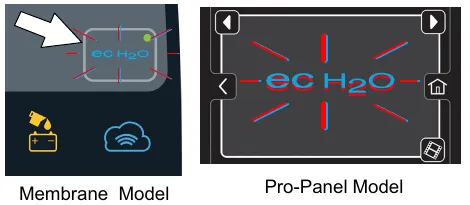
The control panel will signal the following code when it's time to replace the cartridge (Figure 27). The ec-H2O icon will begin to blink blue and red. See SERVICE INDICATOR CODES (page 40) for further details.
All cartridges are labeled with a manufacture date. The shelf-life of an un-installed cartridge is one year from manufacture date. For new cartridge replacement, the ec-H2O module timer must be reset. See ec-H2O WATER CONDITIONING CARTRIDGE REPLACEMENT (page 59).
Filling automatic battery watering tank (option)
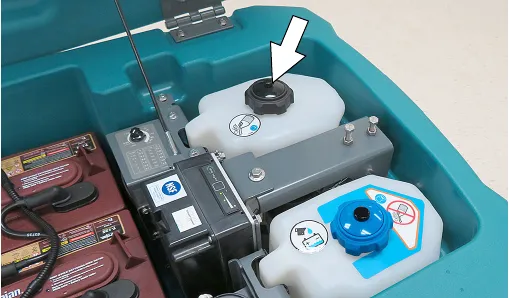
- Lift the recovery tank to access the automatic battery watering tank (Figure 28). Drain recovery tank before lifting tank.
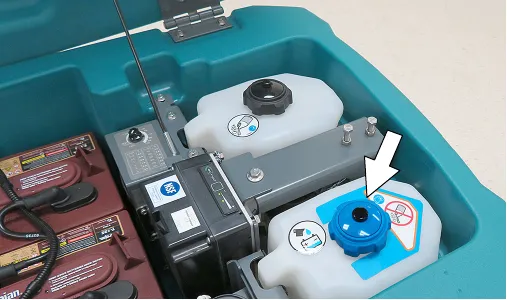
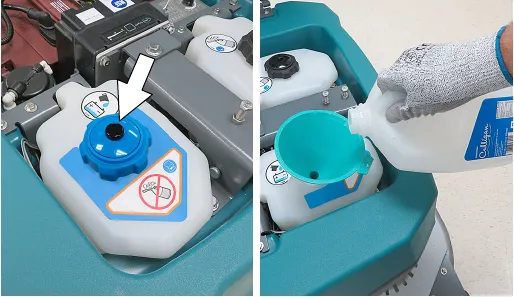
- Remove the blue cap from the automatic battery watering tank (Figure 29).
- Pour distilled water into tank (Figure 29). Use a funnel to prevent splashing liquid on scrub head motors below.
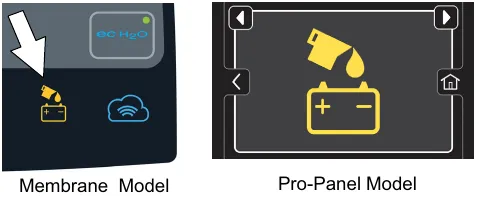
- When the tank needs refilling, the automatic battery watering indicator will alert user to add distilled water (Figure 30). See CONTROL PANEL OPERATION (page 23) for further details.
Control panel operation
The control panel operation can be set up with lockout functionality by using the Supervisor Controls feature. This will prevent the operator from changing or saving the settings. See SUPERVISOR CONTROLS instructions at the back of the manual (page 73).
The supervisor controls feature will lower machine variability for consistent, repeatable cleaning results, provide machine quality assurance regardless of user experience, and reduce user training requirements.
T600e control panel
1-STEP button
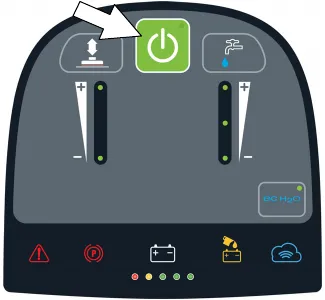
With key turned on, press the 1-STEP button to activate the scrub function (Figure 31). The scrub head will lower to floor. Press button again to stop the scrub function and to raise scrub head.
Brush pressure button
Press the brush pressure button to increase or decrease the brush pressure (Figure 32). The brush pressure LED indicator will display the pressure setting.
One LED = Low pressure, two LEDs = High pressure.
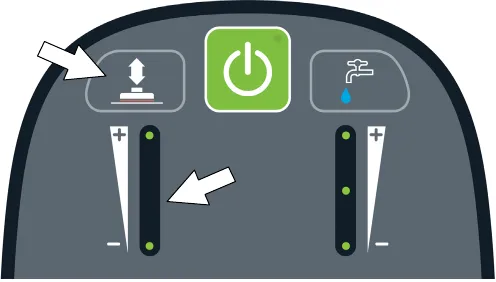
Solution flow button
Press the solution flow button to increase or decrease the solution flow rate (Figure 33). The solution flow indicator will display flow setting.
No LED = No flow, One LED = Low flow, two LEDs = Medium flow, three LEDs = High flow.
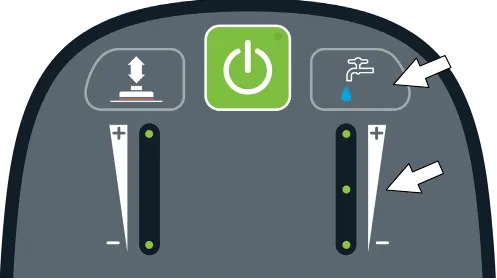
ec-H2O button / indicator (option)
The ec-H2O system automatically turns on at each key start. A blue ec-H2O indicator appears when machine is equipped with the ec-H2O option. The green LED illuminates when ec-H2O is activated. To turn off the ec-H2O system, press the ec-H2O button. The green LED indicator will disappear (Figure 34).
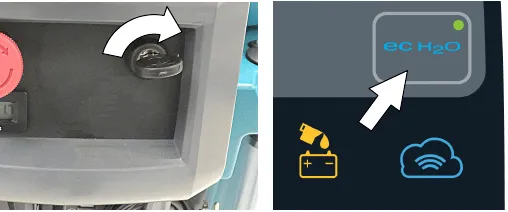
NOTE: If a fault occurs to the ec-H2O system, the machine will automatically turn off the ec-H2O system and convert over to conventional scrubbing. The service indicator icon will remain solid red or continue to blink red until the ec-H2O fault is serviced.
| ec-H2O indicator | Condition |
|---|---|
| Solid blue | Normal operation |
| Blinking blue/red | Water conditioning cartridge expired. Replace cartridge. |
| Solid or blinking red | A system fault has occurred. See Service Indicator Codes. |
Service indicator
When the machine or on-board battery charger detects a fault, the service indicator will light up and begin flashing (Figure 35). The battery discharge indicator lights will also flash a fault code. See SERVICE INDICATOR CODES (page 40) to diagnose machine fault.
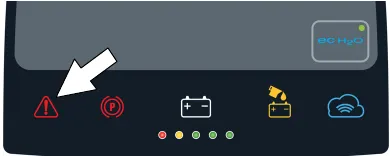
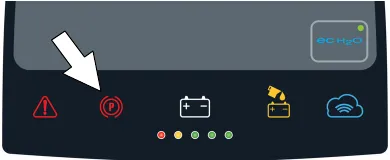
Parking brake indicator (option)
Lights up when parking brake lever is engaged. To turn off indicator, disengage parking brake lever near left rear wheel (Figure 36).
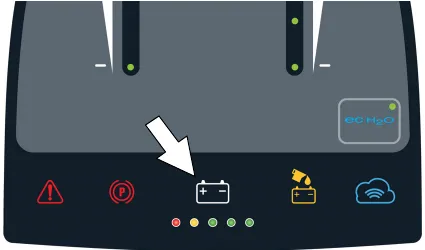
Battery discharge indicator
The battery discharge indicator (BDI) displays the charge level of the batteries while the machine is operating. When the batteries are fully charged, all five indicators are lit (Figure 37). When the discharge level reaches the red light, stop scrubbing and recharge the batteries. When the red light begins to flash, the scrub function will be disabled to protect the batteries from total discharge. The machine will still propel when the red light is flashing. This will allow user to transport the machine to the charging station.
NOTE: Lithium-ion Battery Model - Once the scrub function is disabled (flashing red light), the propel run time is limited to 15 minutes before machine power completely shuts down. Do not store the machine for a long period at this discharged level, the battery may further discharge to a level that is unrecoverable.
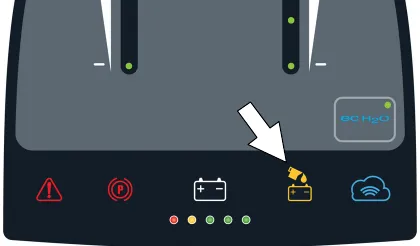
Automatic battery watering indicator (option)
The automatic battery watering (ABW) indicator will turn on and begin to flash when the battery watering tank is empty and needs refilling (Figure 38).
To protect the batteries from damage, the machine's scrub function will be disabled after 10 hours of continued use if tank is not refilled. When the indicator flashes rapidly, the scrub function will be disabled. Add distilled water and restart key to clear the flashing indicator. See FILLING AUTOMATIC BATTERY WATERING TANK (page 22).
| ABW indicator | Condition |
|---|---|
| Flashing | Empty ABW tank. Refill tank and restart key. |
| Solid | ABW system attempted to water batteries but batteries are already full or watering hose is kinked. Check for kink. Restart key. |
| Flashing rapidly | Empty ABW tank has been empty too long and scrub function has been disabled. Refill tank and restart key. |
T600 Pro-Membrane control panel
1-STEP button
With key turned on, press the 1-STEP button to activate the scrub function (Figure 39). The scrub head will lower to floor. Press button again to stop the scrub function and to raise scrub head.
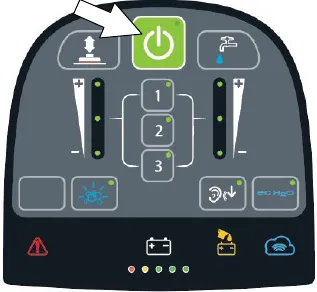
Brush pressure button
Press the brush pressure button to increase or decrease the brush pressure (Figure 40). The brush pressure LED indicator will display the pressure setting.
One LED = Low pressure, two LEDs = Medium pressure, three LEDs = High pressure.
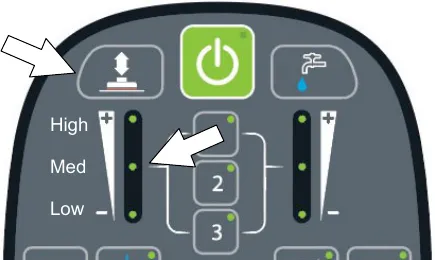
NOTE: If brush pressure is set too high for scrubbing conditions, the brush pressure setting will automatically reduce to a lower setting and begin flashing. The flashing LED alerts the operator to reduce the brush pressure setting to prevent brush motor overload.
Solution flow button
Press the solution flow button to increase or decrease the solution flow rate (Figure 41). The solution flow indicator will display flow setting.
No LED = No flow, One LED = Low flow, two LEDs = Medium flow, three LEDs = High flow.
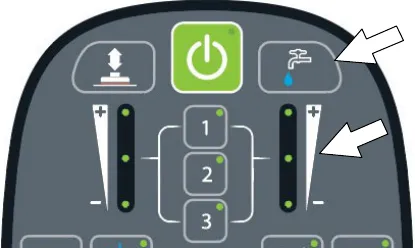
Severe environment button (ec-H2O model option)
Press the Severe Environment button to deliver a boost of cleaning detergent for areas with excessive soil buildup (Figure 42).
Press button one time for a 30 second boost. A green LED in the corner will blink slowly when dispensing. During the last 5 seconds, the LED will blink rapidly as an alert that the dispensing is about to stop.
To deliver a continuous detergent boost, press and hold button for 2 seconds until green LED turns solid green. Press button at anytime to turn off.
To alert user when detergent tank is empty, the bubbles icon will blink for 15 seconds. If button is pressed when tank is empty, the bubbles icon will continue to blink for 15 seconds until tank is refilled.
NOTE: When the severe environment mode is turned on, the ec-H2O system will automatically turn off and the brush pressure and solution flow settings will increase to the high settings. When turned off, the settings will revert back to the original settings. When operating the Severe Environment mode for extended periods, if desired, the solution flow rate and the down pressure can be decreased to a lower setting to conserve solution and detergent usage and optimize battery run time.
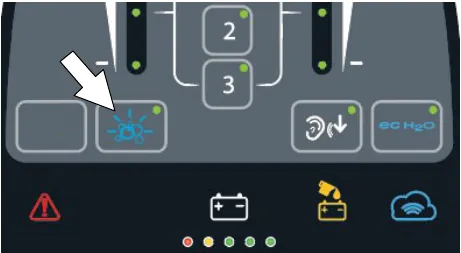
Quiet-mode button
Press the Quiet-Mode button to reduce the vacuum motor sound . A green LED in the corner will turn on when activated. Press button to turn off.
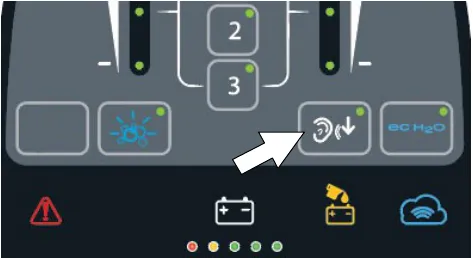
Preset zone control buttons
Use the zone control buttons to preset up to three zones with different solution flow rates, brush pressures, scrub speeds and scrub modes (Figure 44).
Zone 1 = Preset Zone Control Button 1
Zone 2 = Preset Zone Control Button 2
Zone 3 = Preset Zone Control Button 3
The zone control buttons are factory preset for different scrubbing applications. A green LED in the corner will turn on when activated.
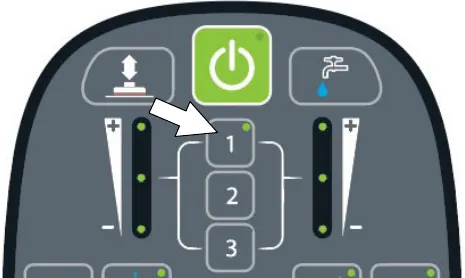
To preset the zone control buttons for different scrubbing applications, select the desired settings from list below, then press and hold the zone button until the green LED blinks three times to save preset.
- Brush pressure setting
- Solution flow rate
- Quiet-Mode on or off
- ec-H2O system on or off (option)
- Severe Environment mode on or off (T600 option)
- Maximum scrub speed (See Supervisor Controls)
NOTE: The severe environment mode and ec-H2O system cannot be preset together.
ec-H2O button / indicator (option)
The ec-H2O system automatically turns on at each key start. A blue ec-H2O indicator appears when machine is equipped with the ec-H2O option. The green LED illuminates when ec-H2O is activated. To turn off the ec-H2O system, press the ec-H2O button. The green LED indicator will disappear (Figure 45).
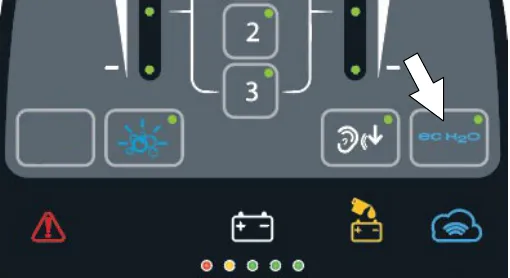
NOTE: If a fault occurs to the ec-H2O system, the machine may automatically turn off the ec-H2O system and convert over to conventional scrubbing. The service indicator icon will remain solid red or continue to blink red until the ec-H2O fault is serviced.
| ec-H2O indicator | Condition |
|---|---|
| Solid blue | Normal operation |
| Blinking blue/red | Water conditioning cartridge expired. Replace cartridge. |
| Solid or blinking red | A system fault has occurred. See Service Indicator Codes. |
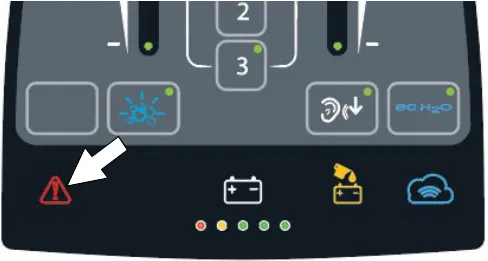
Service indicator
When the machine or on-board battery charger detects a fault, the service indicator will light up and begin flashing (Figure 46). The battery discharge indicator lights will also flash a fault code. See SERVICE INDICATOR CODES (page 40) to diagnose machine fault.
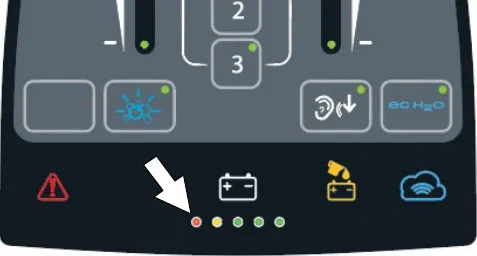
Battery discharge indicator
The battery discharge indicator (BDI) displays the charge level of the batteries while the machine is operating. When the batteries are fully charged, all five indicators are lit (Figure 47). When the discharge level reaches the red light, stop scrubbing and recharge the batteries. When the red light begins to flash, the scrub function will be disabled to protect the batteries from total discharge. The machine will still propel when the red light is flashing. This will allow user to transport the machine to the charging station.
NOTE: Lithium-ion Battery Model - Once the scrub function is disabled (flashing red light), the propel run time is limited to 15 minutes before machine power completely shuts down. Do not store the machine for a long period at this discharged level, the battery may further discharge to a level that is unrecoverable.
Automatic battery watering indicator (option)
The automatic battery watering (ABW) indicator will flash when the battery watering tank is empty and needs refilling (Figure 48).
To protect the batteries from damage, the machine's scrub function will be disabled after 10 hours of continued use if tank is not refilled. When the indicator flashes rapidly, the scrub function will be disabled. Add distilled water and restart key to clear the flashing indicator. See FILLING AUTOMATIC BATTERY WATERING TANK (page 22).
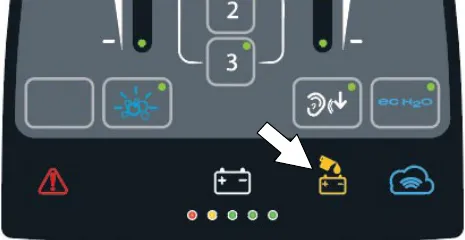
| ABW indicator | Condition |
|---|---|
| Flashing | Empty ABW tank. Refill tank and restart key. |
| Solid | ABW system attempted to water batteries but batteries are already full or watering hose is kinked. Check for kink. Restart key. |
| Flashing rapidly | Empty ABW tank has been empty too long and scrub function has been disabled. Refill tank and restart key. |
T600 Pro-Panel controls
Home screen
There are two types of user modes that will interface with the home screen.
At key start up, a new machine from the factory will automatically start up in the supervisor mode.
Supervisor Mode - Capable of machine operation with full use of all controls, along with configuring permissions and restrictions for the operator mode and login capability.
Operator Mode - Capable of machine operation with permissions and restrictions controlled by the supervisor.
To configure the home screen with permissions and restrictions and login capability for Operator Mode, see SUPERVISOR CONTROLS instructions at the back of the manual (page 73).
Supervisor Mode home screen provides access to the machine settings button and to the maximum scrub speed button (Figure 49).
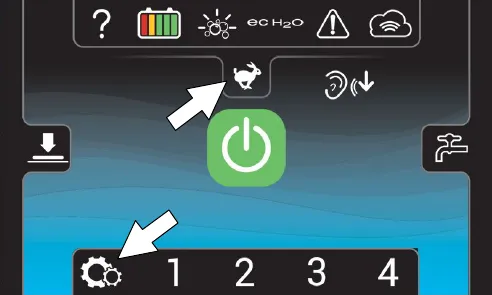
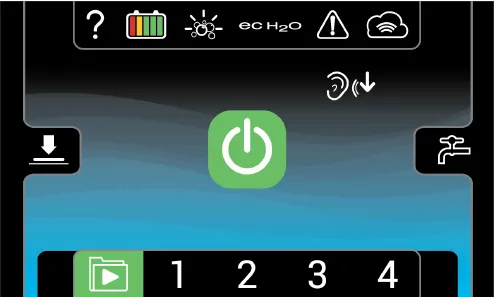
Operator Mode home screen restricts access to the machine settings button and maximum scrub speed button (Figure 50).
Help button
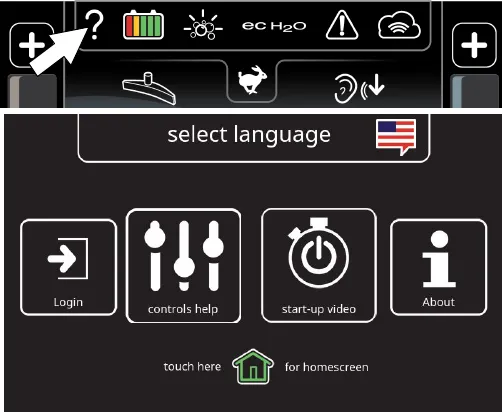
For first time users, press the help button (?) to access the help screen. The help screen will allow you to select a different screen language, enable login settings, help identify control panel icons, view machine start-up video and access machine system information (Figure 51).
Login screen
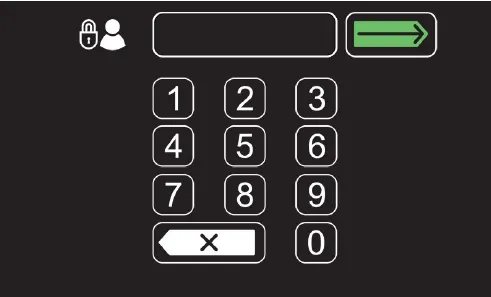
When login is enabled in the supervisor mode, a login screen will appear at key start up (Figure 52 ). Enter your assigned login code and press the green arrow to access the home screen. See SUPERVISOR CONTROLS instructions at the back of the manual to enable login at start up.
ec-H2O indicator (option)
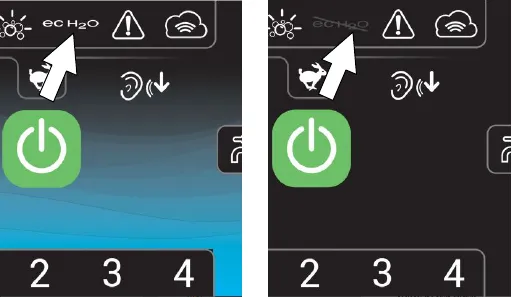
The ec-H2O system automatically turns on at each key start. The ec-H2O icon will appear on the home screen that is illuminated blue, indicating that the system is activated (Figure 53). To turn off the ec-H2O system, press the ec-H2O button. The background turns black and a slash mark over the icon indicates that the ec-H2O system is turned off.
1-STEP button
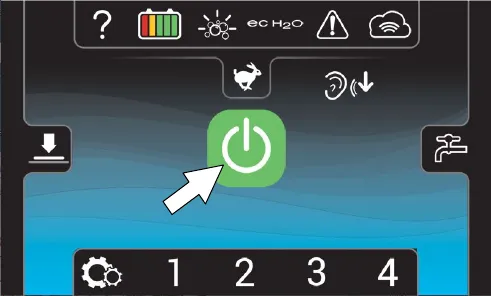
Press the 1-STEP button to activate the scrub function (Figure 54). The scrub head will lower to floor. Press button again to stop the scrub function and to raise scrub head.
Brush pressure button
Press the brush pressure button to display the brush pressure indicator (Figure 55). Press the (+) button to increase brush pressure. Press the (-) button to decrease the brush pressure.
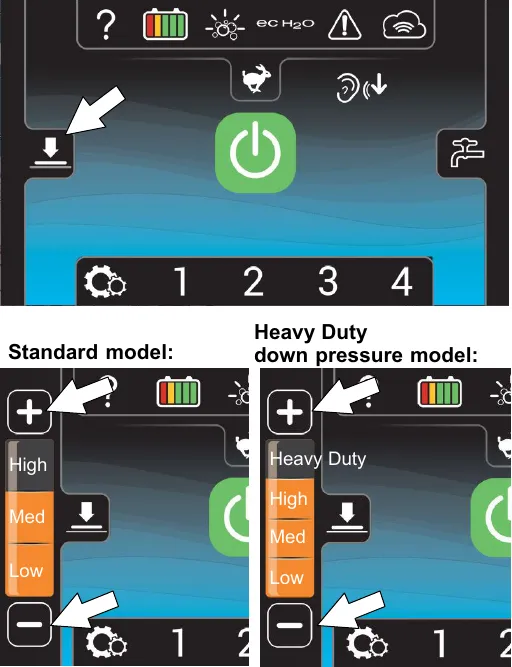
NOTE: If brush pressure is set too high for scrubbing conditions, the brush pressure setting will automatically reduce to a lower setting and begin flashing. When flashing, reduce brush pressure to prevent brush motor overload.
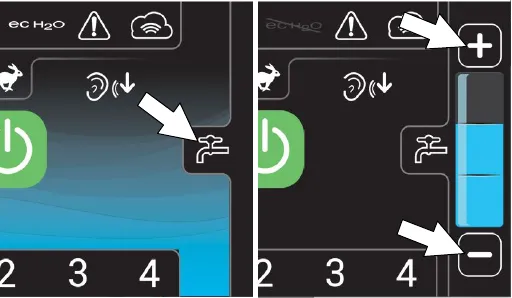
Solution flow button
Press the solution flow button to display the solution flow indicator (Figure 56). Press the (+) button to increase solution flow. Press the (-) button to decrease the flow solution or to turn it off.
Severe environment button (ec-H2O model option)
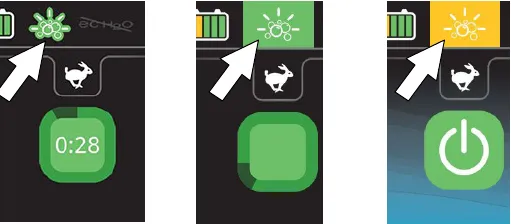
Press the Severe Environment button to deliver a boost of cleaning detergent for areas with excessive soil buildup (Figure 57).
Press button one time for a 30 second detergent boost. The button will turn green and a 30 second count down timer will start. Press button at anytime to turn off.
To deliver a continuous detergent boost, press and hold button for 2 seconds until a continuous timer is displayed. Press button at anytime to turn off.
To alert user when the severe environment detergent tank is empty, the button will blink yellow.
NOTE: When the severe environment mode is turned on, the ec-H2O system will automatically turn off and the brush pressure and solution flow settings will increase to the high settings. When turned off, the settings will revert back to the original settings. When operating the Severe Environment mode for extended periods, if desired, the solution flow rate and the down pressure can be decreased to a lower setting to conserve solution and detergent usage and optimize battery run time.
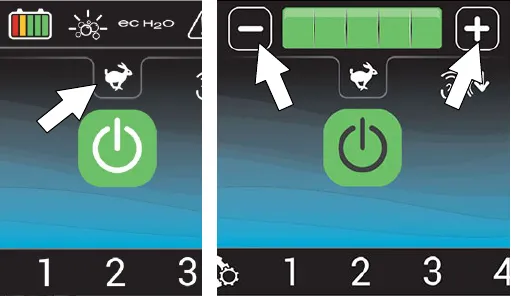
Maximum scrub speed button
Press the maximum scrub speed button to access the maximum speed scrub settings (Figure 58). Press the (+) button to increase the maximum scrub speed. Press the (-) button to decrease the maximum scrub speed. The maximum scrub speed button is only accessible in the Supervisor Mode. See SUPERVISOR CONTROLS instructions at the back of the manual for further details (page 73).
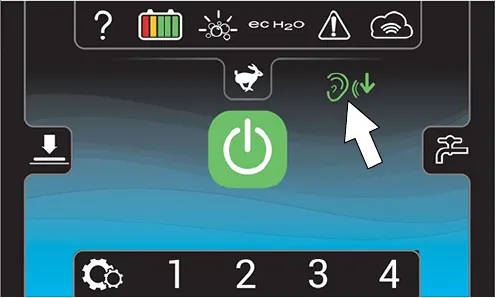
Quiet-mode button
Press the Quiet-Mode button to reduce the vacuum motor sound for noise restricted areas (Figure 59). The button will turn green when activated. Press button again to turn off.
NOTE: When the Quiet-Mode is activated the water pickup will slightly be reduced.
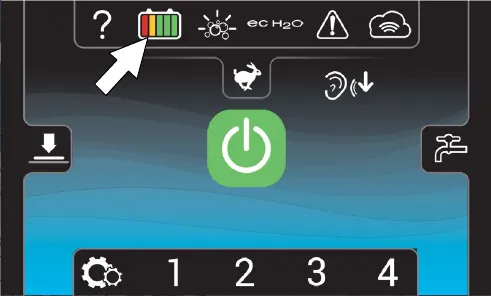
Battery discharge indicator
The battery discharge indicator (BDI) displays the charge level of the batteries while the machine is operating. When the batteries are fully charged, all five indicators are lit (Figure 60). When the discharge level reaches the red light, stop scrubbing and recharge the batteries. When the red light begins to flash, the scrub function will be disabled to protect the batteries from total discharge. The machine will still propel when the red light is flashing. This will allow user to transport the machine to the charging station.
NOTE: Lithium-ion Battery Model - Once the scrub function is disabled (flashing red light), the propel run time is limited to 15 minutes before machine power completely shuts down. Do not store the machine for a long period at this discharged level, the battery may further discharge to a level that is unrecoverable.
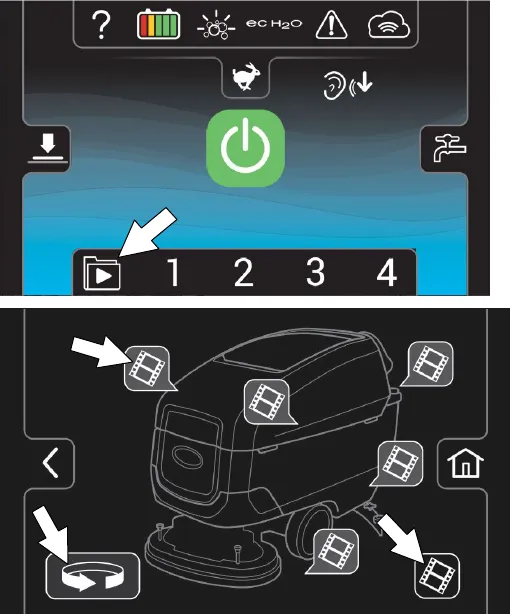
Video tutorial button (operator mode home screen)
Press the video tutorial button to access the video tutorial screen (Figure 61). It includes videos on how to perform specific operation and maintenance procedures. Press the video buttons to start video. Press the rotate button for additional videos. The lower right video button provides a list of additional tutorial videos.
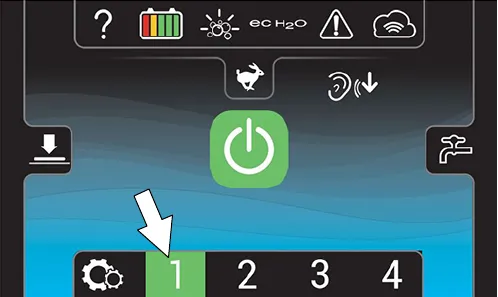
Preset zone control buttons
Use the zone control buttons to preset up to four zones with different solution flow rates, brush pressure, scrub speeds and scrub modes (Figure 62).
The four zone control buttons are factory preset for different scrubbing applications. The zone control button will turn green when zone is activated.
To preset the zone control buttons for different scrubbing applications:
NOTE: Only the supervisor mode has the capability to change the factory zone settings (See SUPERVISOR CONTROLS instructions at back of manual).
- Select the desired settings from list below,
- Brush pressure rate
- Solution flow rate
- Quiet-Mode on or off
- ec-H2O system on or off (option)
- Severe Environment mode on or off (option)
- Maximum scrub speedNOTE: The severe environment mode and ec-H2O system cannot be preset together.
- Then press and hold a zone button until a screen prompts you to name the new preset zone. Select “yes” to name the preset zone (Figure 63).
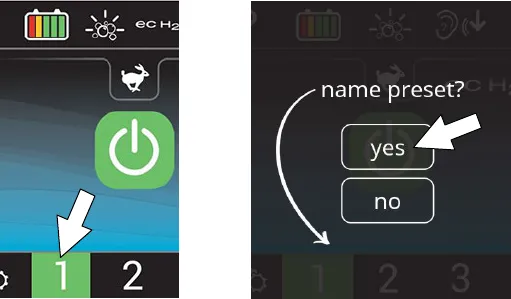
- If the zone settings are configured to scrub a lobby for example, name the zone “LOBBY” (Figure 64). Press the green arrow to save the new zone preset.
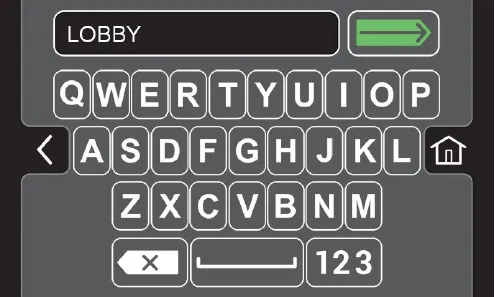
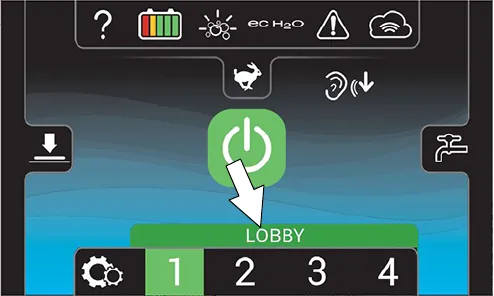
- The name will appear above the zone setting number when the zone button is pressed (Figure 65). Repeat process for other zone presets.
Service indicator button
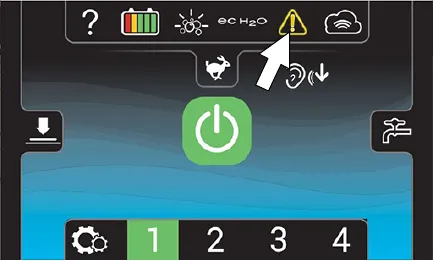
The service indicator button will flash yellow or red when a machine fault is detected (Figure 66). Press the service indicator button to view fault screen.
Flashing yellow indicates a warning that requires service, but machine is still operable. Flashing red indicates a fault which will shut down the machine and require service. See FAULT SCREENS below.
Fault screens
When a fault is initially detected, the following fault screens will automatically pop up to indicate the fault.
Press the left and right arrow button at top of screen to scroll through the fault screens.
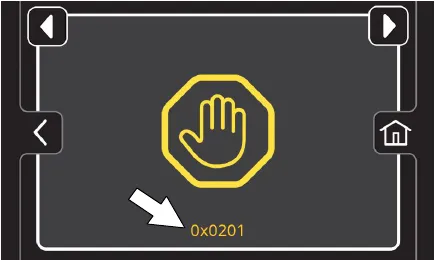
Yellow machine fault Screen (Figure 67) - Machine fault has been detected. A fault code will appear below the fault icon. See SERVICE INDICATOR CODES.
Flashing Blue and Red ec-H2O Screen (Figure 68) - The water conditioning cartridge has expired. See ec-H2O WATER CONDITIONING CARTRIDGE REPLACEMENT (page 59).
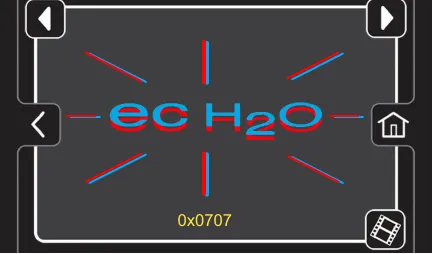
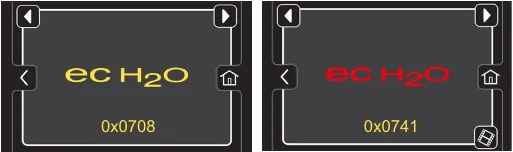
Yellow ec-H2O Fault Screen - Machine detected an ec-H2O system water or plumbing fault (Figure 69).
Red ec-H2O Fault Screen - Machine detected an ec-H2O system electrical fault (Figure 69).
A fault code will appear below the ecH2O icon. See SERVICE INDICATOR CODES.
NOTE: If a fault occurs to the ec-H2O system, the machine may automatically turn off the ec-H2O system and convert over to conventional scrubbing. The service indicator button will continue to flash until the ec-H2O fault is serviced.
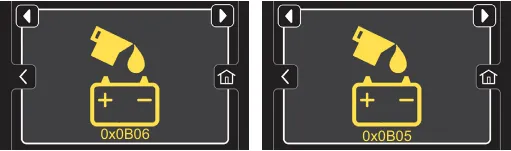
Yellow Automatic Battery Watering Fault Screen -
Code 0x0B06 - The Automatic Battery Watering tank is empty and needs refilling (Figure 70). To protect the batteries from damage, the machine's scrub function will be disabled after 10 hours of continued use if tank is not refilled. Add distilled water to the battery watering tank and restart key to clear fault. See FILLING AUTOMATIC BATTERY WATERING TANK (page 22).
Code 0x0B05 - ABW system attempted to water batteries but batteries are already full or watering hose is kinked. Check for kink. Restart key to clear fault.
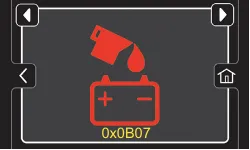
Red Automatic Battery Watering Fault Screen - The
Code 0x0B07 - Automatic Battery Watering tank is empty and needs refilling. The scrub function is disabled until tank is refilled (Figure 71). Add distilled water to the battery watering tank and restart key to clear fault. See FILLING AUTOMATIC BATTERY WATERING TANK (page 22).
Machine settings button
Press the machine settings button to access the following menu options (Figure 72).
The home screen must be in the supervisor mode to access the machine settings button. See SUPERVISOR CONTROLS instructions at back of manual for further details (page 73).
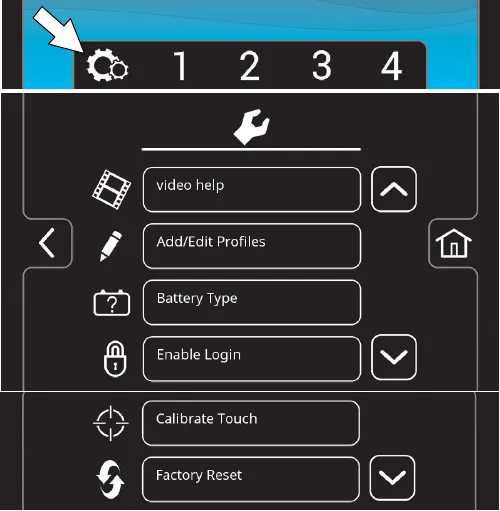
Video help - Use to view specific operation and maintenance procedures. See Figure 61.
Add/Edit Profiles - Use to add/edit user profiles for machine use. See SUPERVISOR CONTROLS.
Battery Type - Use to configure the machine for different battery types. This ensures the on-board battery charger charging profile is properly programmed to your battery type. See BATTERIES (page 52).
Enable Login - Use to activate a required login code at machine start up to operate machine.
Calibrate Touch - Use this to recalibrate the touch screen if the touch points become misaligned.
Factory Reset - Resets the supervisor login code back to the factory default code, removes user profiles and resets any custom preset zone control buttons back to the factory preset zones. See SUPERVISOR CONTROLS.
Machine operation
Pre-operation check list
☐ Sweep area and remove any obstructions.
☐ Check the battery fluid. Fill as necessary.
☐ Machines with Smart-Fill Automatic Battery Watering option: Check the automatic battery watering tank. Fill with distilled water as necessary.
☐ Check the battery charge level. Charge as necessary.
☐ Check brushes/pads for wear and damage.
☐ Check scrub head skirt for wear and damage.
☐ Check squeegee blades for wear, damage and for proper deflection adjustment.
☐ Clean the squeegee drip trap reservoir.
☐ Check the squeegee vacuum hose for debris or blockage.
☐ Confirm recovery tank is empty and clean.
☐ Confirm recovery tank debris tray is clean.
☐ Confirm recovery tank float shut-off screen is clean
☐ Cylindrical brush model - confirm debris trough is empty and clean.
☐ ec-H2O Scrubbing: Confirm solution tank is filled with clear cool water only.
☐ ec-H2O Scrubbing: Confirm all conventional cleaning agents/restorers are drained and rinsed from solution tank.
☐ Check machine for proper operation.
Operating machine
For control panel operating instructions, see CONTROL PANEL OPERATION (page 23).
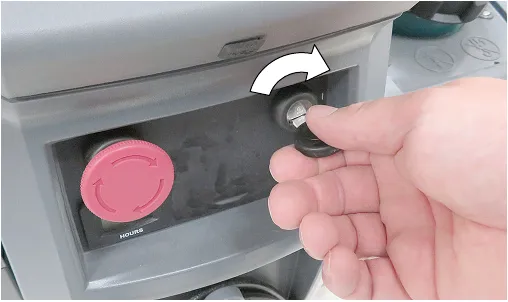
- Turn the key to the on ( I ) position (Figure 73).
NOTE: Lithium-ion Battery Model - There is a slight delay before machine power turns on after turning key on. There is also a 3 second delay when powering off the machine.
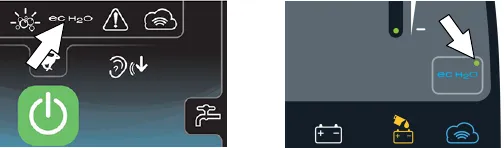
- ec-H2O models - The ec-H2O system will automatically turn on at key start up. The ec-H2O indicator will appear on the control panel indicating that the system is activated (Figure 74).
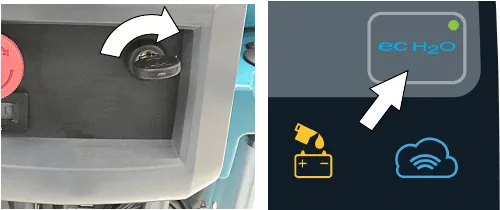
NOTE: Lithium-ion Battery Model - To cycle key, turn key off and wait up to 3 seconds for machine power to completely shut off. Then turn key back on again.
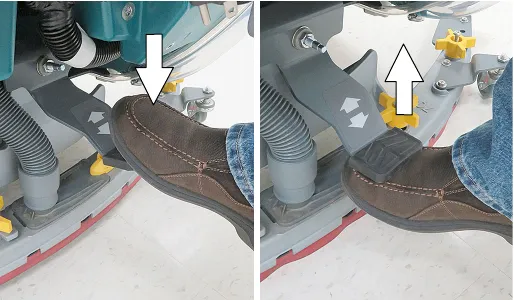
- Lower the squeegee assembly to floor by stepping on foot pedal (Figure 76). To raise squeegee assembly, place foot under foot pedal and lift. The vacuum motor will automatically start when squeegee is lowered to floor.
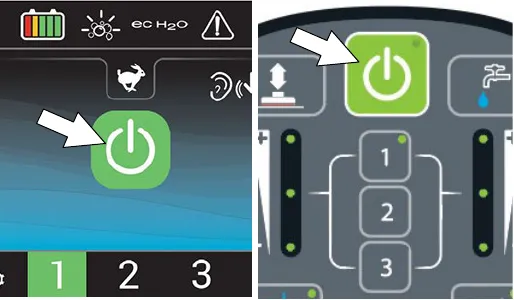
- Press the 1-STEP button to activate the scrub function (Figure 77). The scrub head will lower to floor.
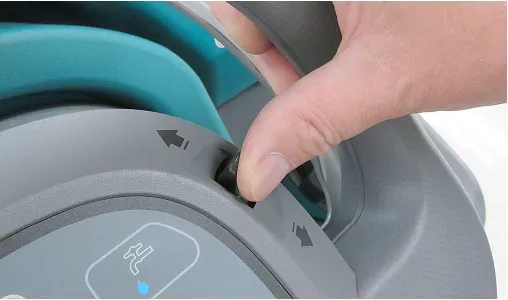
- Push the directional lever forward to go forward (Figure 78). Pull the lever back to go in reverse. Lift squeegee assembly when reversing.
- To begin scrubbing, pull the start bail (Figure 79).
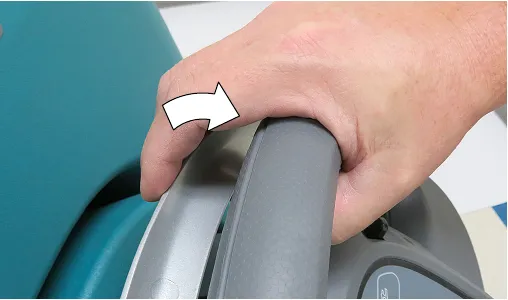
Corrected an obvious misprint: "set directional level before pulling start bail" printed with a typo (now "lever", as in step 5 and on page 5).
- To adjust the scrubbing speed, turn the speed dial to the desired speed (Figure 80).
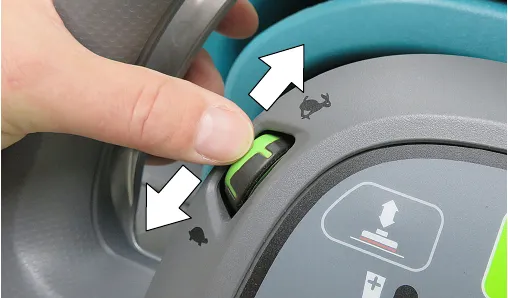
- To stop scrubbing, release the start bail and press the 1-STEP button. Continue to drive machine forward to pick up any remaining water then raise squeegee assembly off floor. Turn key off.
NOTE: Lithium-ion Battery Model - The machine will automatically shut off if not operated for more than one hour to conserve battery energy. To restart machine, turn key off and wait up to 3 seconds before turning key back on again.
Double scrubbing
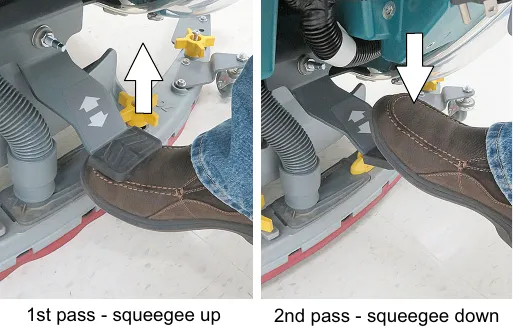
Double scrubbing is the process of making two or more passes over a heavily soiled area. The first pass is made with the squeegee raised off the floor (Figure 81). This allows the solution to penetrate the soiled area for an extended period (3-5 minutes). The second pass is made with the squeegee lowered.
Double scrubbing can be performed using the ec-H2O SCRUBBING SYSTEM (option) or CONVENTIONAL SCRUBBING method.
Emergency shut-off button
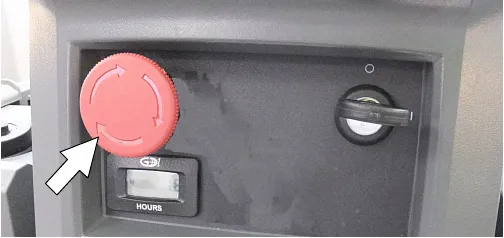
Push the emergency shut-off button in the event of an emergency (Figure 82). This red button shuts off all power to machine. To regain power, turn the button clockwise and restart the key.
NOTE: Lithium-ion Battery Model - To restart machine, turn key off and wait at least 3 seconds for machine power to completely shut off then restart key.
While operating machine
- Overlap each scrub path by 2 in (5 cm).
- Keep machine moving to prevent damage to floor finish.
- Raise scrub head when approaching bumps such as floor transitions and thresholds. If bump height exceeds a half inch (1.27 cm) remove scrub disks from machine.
- Reduce speed around turns, near crossings, and approaching tight areas, etc.
- Avoid bumping the machine into posts and walls.
- Wipe squeegee blades with a cloth if blades leave streaks.
- When draining and refilling machine, always top off the optional Severe Environment tank with detergent.
- Pour a recommended foam control solution into the recovery tank if excessive foam appears.
ATTENTION: Foam buildup will not activate the float shut-off screen, vacuum motor damage will result.
- Use the double scrubbing method for heavily soiled areas. First scrub the area with the squeegee up, let solution set for 3-5 minutes, then scrub the area a second time with squeegee down.
- Orbital Scrub Head Model - Use caution when working near the tile cove and floor mounted fixtures such as pedestal sinks and other breakable items. Keep the metal scrub head edge away to avoid possible damage.
- When leaving the machine unattended, park on level surface, turn machine off and remove key.
NOTE: Lithium-ion Battery Model - The machine will automatically shut off if left unattended for more than one hour to conserve battery energy. To restart machine, turn key off and wait up to 3 seconds before turning key back on again.
- Do not operate machine in areas where the ambient temperature is above 110°F (43°C) or below 36°F (2°C).
- If machine becomes disable, it can be pushed as described in the PUSHING AND TRANSPORTING MACHINE section (page 60).
Circuit breaker panel
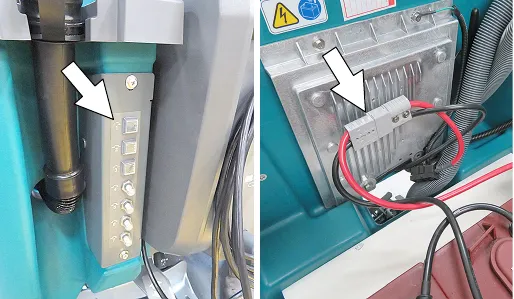
The machine is equipped with resettable circuit breakers to protect the machine from a current overload. If a circuit breaker trips, unplug the battery cable connector and reset the breaker by pressing the reset button after the breaker has cooled down. Reconnect the battery cable connection. If the circuit breaker does not reset or continues to trip contact service personnel.
The circuit breaker panel is located below the control console. The circuit breakers are identified as described below (Figure 83).
T600e model
| Circuit breaker | Rating | Circuit protected |
|---|---|---|
| CB1 | 2.5 A | Key switch circuit |
| CB2 | 10 A | ec-H2O system, Automatic battery watering system (option) |
| CB3 | 10 A | Actuator motor |
| CB4 | 40 A | Propel |
| CB5 | 25 A | Vacuum fan |
| CB6 | 30 A | Left Scrub motor |
| 30 A | Scrub motor (Orbital model) | |
| CB7 | 30 A | Right Scrub motor |
T600 model
| Circuit breaker | Rating | Circuit protected |
|---|---|---|
| CB1 | 2.5 A | Key switch circuit |
| CB2 | 10 A | Control board, ec-H2O system, Automatic battery watering system |
| CB3 | 15 A | Spray nozzle pump (option) |
| CB4 | 40 A | Propel |
Hour meter
The hour meter records the number of hours the machine has been operated. Use the hour meter to perform specific maintenance procedures and to record service history (Figure 84).
Draining tanks
Draining recovery tank
Drain and clean the recovery tank after each use.
- Transport the machine to drain area.
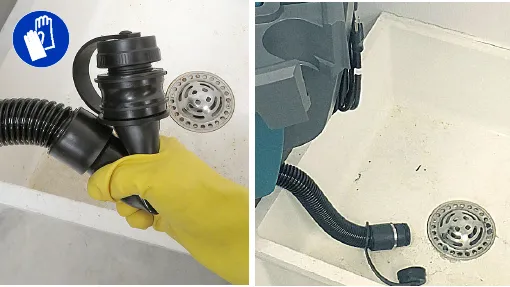
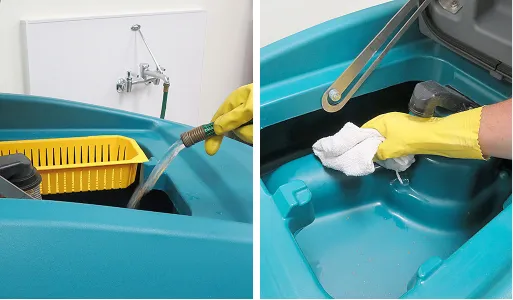
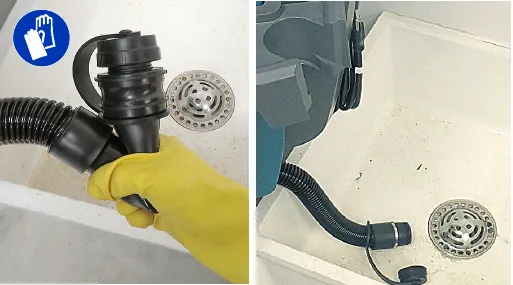
- Remove the recovery tank drain hose from storage hook and pinch hose as shown (Figure 85). Over a drain basin, remove cap and slowly release the pinched hose to drain.
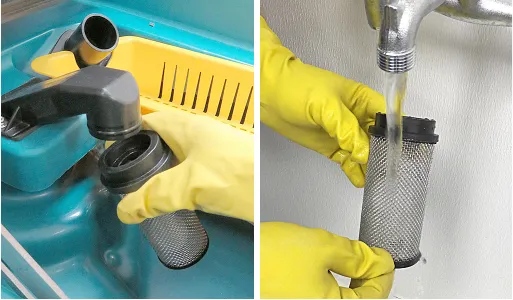
- Remove and clean the float shut-off screen (Figure 86). Reinstall screen after cleaning.
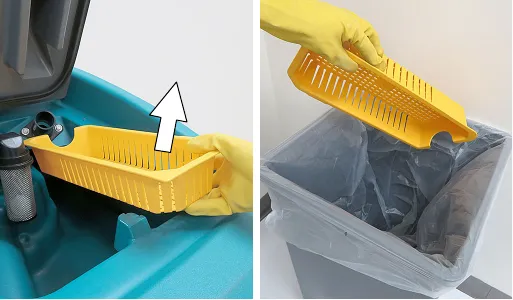
- Remove the debris tray and empty (Figure 87). Reinstall tray after cleaning.
- Rinse out the recovery tank with clean water and wipe clean of any soil residue (Figure 88).
Draining solution tank
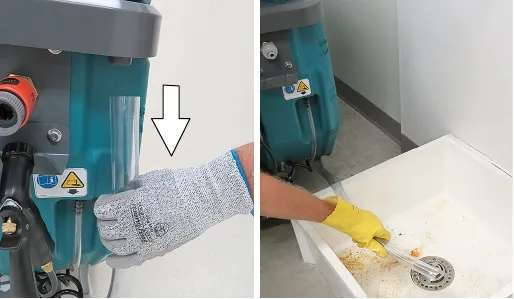
Drain the solution tank daily.
- Transport the machine to drain area.
- To drain remaining water from solution tank, pull the solution tank level hose from the accessory rail (Figure 89). Firmly reconnect the hose to the accessory rail after draining tank.
- Rinse solution tank with clean water.
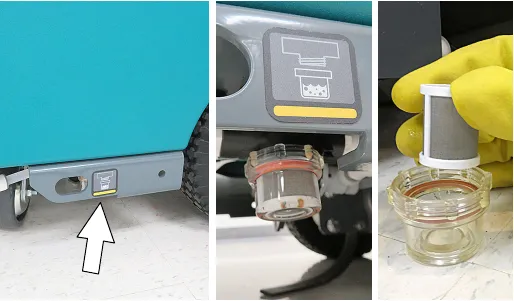
- Remove the solution tank filter and clean screen after every 50 hours of use (Figure 90). Solution filter is located under machine at rear. Drain solution tank before removing filter.
Service indicator codes
Batteries and chargers: make sure your charger is compatible with your batteries, and set its charging algorithm to your battery pack before you use it.
When the machine or battery charger detects a fault, the service indicator will flash. A fault code will be provided to determine problem as described below.
T600e model service indicator codes
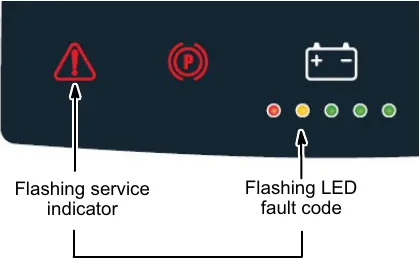
| LED fault code | Cause | Solution |
|---|---|---|
| Emergency shut-off button activated Electronic parking brake system is disengaged (option) | Release emergency shut-off button and restart machine See PUSHING AND TRANSPORTING MACHINE (page 60) | |
| Solution valve wiring, connector or control board problem | Check connections. Contact service | |
| Propel circuit breaker tripped | Reset circuit breaker. If fault repeats, contact service. | |
| Propel motor wiring, connector or control board problem | Contact service | |
| Propel faults | Restart machine. If fault repeats, contact service. | |
| Battery watering pump wiring, connector or control board problem | Contact service | |
| Brush motor relay short fault | Check pad for floor type. If fault repeats contact service. | |
| Start bail is pulled or obstructed before turning machine on. | Release start bail or remove bail obstruction before turning machine on. | |
| Battery watering pump board fault ec-H2O pump control board fault | Disconnect battery cable connection and contact service to replace control board. | |
| Battery watering system fault | Contact service | |
| Charger communication fault Scrub control board communication fault ec-H2O system communication fault Battery watering CAN fault | Restart. If fault repeats, contact service. |
T600 model service indicator codes
Pro-Membrane control panel: read the flashing LED fault code. Pro-Panel controls (LCD): press the service indicator to open the fault code screen.
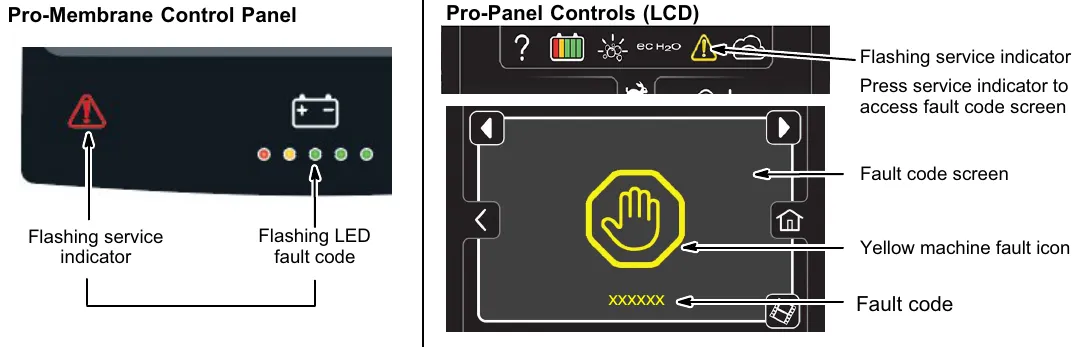
| LED fault code | LCD fault code | Cause | Solution |
|---|---|---|---|
| 0xFFF0# | Emergency shut-off button activated Electronic parking brake system is disengaged (option) | Release emergency shut-off button and restart machine See PUSHING AND TRANSPORTING MACHINE (page 60) | |
| 0x0201# | Head lift actuator, wiring, connector or control board problem | Contact service | |
| 0x0101# | Brush motor wiring, connector or control board problem | Contact service | |
| 0x0111# | |||
| 0x0102# | Brush motor 1 voltage loss | Contact service | |
| 0x0112# | Brush motor 2 voltage loss | ||
| 0x0208# | Actuator stalled | Check for blockage. If fault repeats, contact service. | |
| 0x0301# | Solution valve wiring, connector or control board problem | Check connections. Contact service | |
| 0x0303# | Solution valve over current | Contact service | |
| 0x0501# | Vacuum motor wiring, connector or control board problem | Contact service | |
| 0x0601# | Severe environment detergent pump wiring, connector or control board problem | Contact service | |
| 0x0901# | Propel motor wiring, connector or control board problem | Contact service | |
| 0x0900# | Propel I-Drive fault | Reset circuit breaker or restart machine. If fault repeats, contact service. | |
| 0x0903# | Propel I-Drive communication lost | ||
| 0x0904# | Propel power cycle fault | ||
| 0x0905# | Propel current limit fault | ||
| 0x0908–0x0950# | Propel faults | ||
| 0x090A–0x093F# | Propel faults |
T600 service indicator codes - continued
| LED fault code | LCD fault code | Cause | Solution |
|---|---|---|---|
| 0x0B09# | Battery watering pump pressure switch not connected or stuck open | Connect pressure switch. Cycle key. If fault persists, contact service. | |
| 0x0B11# | Battery watering pump wiring, connector or control board problem | Contact service | |
| 0x0103# | Brush motor 1 over current | Check pad for floor type. If fault repeats contact service. | |
| 0x0104# | |||
| 0x0105# | |||
| 0x0109# | Brush motor 1 over temp fault | ||
| 0x0113# | Brush motor 2 over current | Check pad for floor type. If fault repeats contact service. | |
| 0x0114# | |||
| 0x0115# | |||
| 0x0119# | Brush motor 2 over temp fault | ||
| 0x0116# | Brush motor 2 short fault | Contact service | |
| 0x0902# | Start bail is pulled or obstructed before turning machine on. | Release start bail or remove bail obstruction before turning machine on. | |
| 0x0107# | Brush motor 1 control board fault | Unplug battery cable connector from battery battery pack and contact service to replace control board. | |
| 0x0117# | Brush motor 2 control board fault | ||
| 0x0207# | Actuator motor control board fault | ||
| 0x0307# | Solution valve control board fault | ||
| 0x0507# | Vacuum motor control board fault | ||
| 0x0607# | Detergent pump control board fault | ||
| 0x0617# | Spray pump control board fault | ||
| 0x0B17# | Battery watering pump board fault | ||
| 0x0717# | ec-H2O pump control board fault | Unplug battery cable connector from battery battery pack and contact service to replace control board. | |
| 0x0503# | Vacuum motor over current | Check for obstruction. Contact service. | |
| 0x0504# | |||
| 0x0505# | |||
| 0x0506# | Vacuum motor shorted fault | Check for obstruction. Contact service | |
| 0x0603# | Severe environment detergent pump over current | Contact service | |
| 0x0604# | |||
| 0x0605# | Severe environment detergent pump shorted fault | ||
| 0x0606# | Severe environment detergent pump shorted fault | Contact service | |
| 0x0B01# | Battery watering system fault | ||
| 0x0B13-16# | |||
| 0xF103# | Charger communication fault | Restart. If fault repeats, contact service. | |
| 0xFF20# | Scrub control board communication fault | ||
| 0x0704# | ec-H2O system communication fault | ||
| 0x0B04# | Battery watering CAN fault |
T600e/T600 lithium-ion battery system service indicator codes
Batteries and chargers: make sure your charger is compatible with your batteries, and set its charging algorithm to your battery pack before you use it.
| LED fault code | LCD fault code | Cause | Solution |
|---|---|---|---|
1st LED solid red | 0x0D00# | Battery management system (BMS) hardware fault | Contact service |
| 0x0D0A# | |||
| 0x0D17–0x0D19# | |||
| 0x0D1A# | |||
| 0x0D0B# | |||
| 0x0D0F# | |||
| 0x0D20–0x0D29# | |||
| 0x0D2A# | |||
| 0x0D2B# | |||
| 0x0D35# | |||
1st LED solid red | 0x0D03# | BMS over current charge protection | Unplug charger from AC power, wait 2 minutes and re-plug in charger. If fault code repeats, contact service. |
| 0x0D04# | BMS over current fault | Look for obstruction and restart machine. If fault code repeats, contact service. | |
| 0x0D05# | |||
| 0x0D15# | |||
| 0x0D16# | |||
| 0x0D24# | |||
1st LED solid red | 0x0D01# | BMS over voltage fault | Stop charging. Restart machine. If fault code repeats, contact service. |
| 0x0D0B# | |||
| 0x0D0D# | |||
| 0x0D0E# | |||
| 0x0D36# | |||
| 0x0D02# | BMS under voltage fault | Stop use of machine and recharge battery. | |
| 0x0D0C# | |||
| 0x0D0F# | |||
| 0x0D1C# | BMS cell deep discharge fault | Contact service. | |
| 0x0D1D# | BMS cell imbalance fault | ||
| 0x0D1E# | BMS Module voltage delta error | ||
1st LED solid red | 0x0D34# | BMS CAN communication lost | Restart machine. If fault code repeats, contact service. |
1st LED solid red | 0x0D06# | BMS over temperature protection fault | Stop charging. Move machine to cooler location. Allow battery to cool down before charging. If fault code repeats, contact service. |
| 0x0D11# | |||
| 0x0D38# | |||
| 0x0D07# | BMS under temperature protection fault | Stop charging. Move machine to warmer location. Allow battery to warm up above 32°F (0°C) before charging. If fault code repeats, contact service. | |
| 0x0D12# | |||
| 0x0D37# | |||
| 0x0D08# | BMS over temperature discharge fault | Stop operating machine. Move machine to cooler location. Allow battery to cool down before operating. If fault code repeats, contact service. | |
| 0x0D13# | |||
| 0x0D3A# | |||
| 0x0D09# | BMS under temperature discharge fault | Stop operating machine. Move machine to warmer location. Allow battery to warm up above 32°F (0°C) before operating. If fault code repeats, contact service. | |
| 0x0D14# | |||
| 0x0D39# | |||
| 0x0D31# | BMS Bus Bar temperature fault | Stop operating or charging machine. Allow battery to cool down. If fault code repeats, contact service. | |
| 0x0D32# | |||
| 0x0D33# |
T600e/T600 on-board battery charger service indicator codes
| LED fault code | LCD fault code | Cause | Solution |
|---|---|---|---|
| 0xF100# | Charger error condition. | Contact service Replace batteries | |
| 0xF104# | Charger timer exceeded maximum charging time | Contact service Replace batteries | |
| 0xF101# | Charger is not connected to battery pack | Check cable connections | |
| 0xF102# | Charger overheated | Let charger cool. Move to well ventilated area. Charge batteries in areas with temperatures 80°F (27°C) or less. If fault persists, contact service. |
T600e/T600 ec-H2O system service indicator codes - ec-H2O option
Pro-membrane control panel: read the flashing LED fault code and the ec-H2O indicator (solid or blinking red). Pro-Panel controls (LCD): press the flashing service icon to open the fault code screen, which shows the red or yellow ec-H2O fault icon and the fault code.
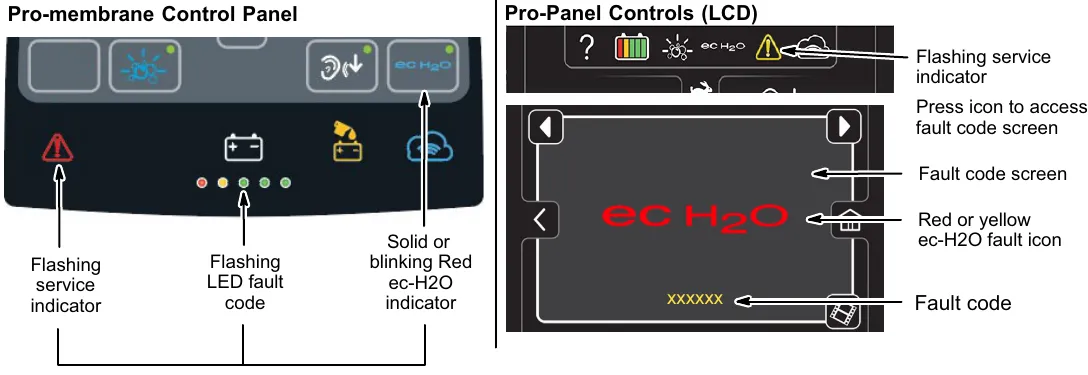
| LED fault code | LCD fault code | Cause | Solution |
|---|---|---|---|
| 0x0711# | ec-H2O pump wiring, connector or control board problem | Contact service | |
| 0x0704# | ec-H2O system communication fault | Restart. If fault repeats, contact service. | |
| 0x0713# | ec-H2O pump over current | Contact service | |
| 0x0714# | |||
| 0x0715# | |||
| 0x0703# | ec-H2O system breaker tripped | Reset circuit breaker. If trip repeats, contact service. | |
| 0x0712# | ec-H2O pump breaker tripped | ||
| ecH2O indicator solid red | 0x0716# | ec-H2O pump shorted fault | Contact service |
| 0x0717# | ec-H2O electrical fault | ||
| 0x0727# | ec-H2O control board fault | ||
| 0x072A# | ec-H2O electrode fault | ||
| 0x0741# | Water conditioning pump open | ||
| 0x0746# | Water conditioning pump fault | ||
| ecH2O indicator blinking red* | 0x0702# | ec-H2O pressure switch trip | Contact service |
| 0x0708*# | ec-H2O system over regulation | ||
| 0x0721# | No ec-H2O cell current | ||
| 0x0726# | ec-H2O cell shorted fault | ||
| ecH2O indicator blinking blue/red | 0x0707# | Water conditioning cartridge expired | Replace water conditioning cartridge. (See page 59) |
*Verify if cleaning detergent was added to solution tank. If ec-H2O system was operated with cleaning detergent, drain solution tank, add clear water and operate the ec-H2O system until the fault code clears. If fault repeats, continue to cycle key until fault clears.
NOTE: For machines equipped with lithium-ion battery, to cycle key, turn key off and wait up to 3 seconds for machine power to completely shut off. Then turn key back on again.
Maintenance chart
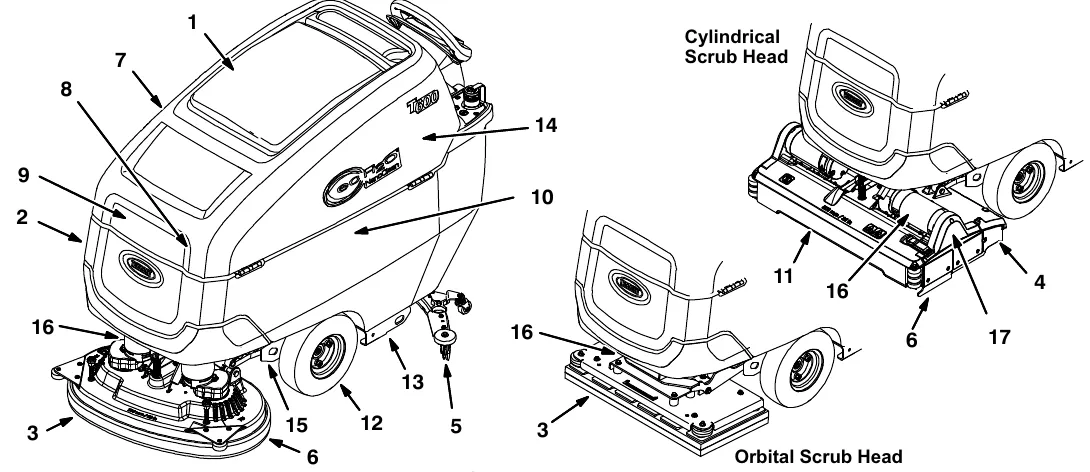
The table below indicates the Person Responsible for each procedure.
O = Operator T = Trained Personnel
| Interval | Person resp. | Key | Description | Procedure |
|---|---|---|---|---|
| Daily | O | 1 | Recovery tank | Drain, rinse, clean float shut-off screen and debris tray |
| O | 2 | Solution tank | Drain, rinse | |
| O | 3 | Pads | Check, flip or replace Parts › | |
| O | 3 | Brushes | Check, clean Parts › | |
| O | 4 | Debris trough (Cylindrical Brush) | Clean | |
| O | 5 | Squeegee | Clean, check for damage and wear Parts › | |
| O | 6 | Scrub head skirt | Check for damage and wear Parts › | |
| O | 7 | Machine | Clean with damp cloth | |
| O | 8 | Severe environment tank (option) | Check, refill | |
| O | 9 | Automatic battery watering tank (option) | Check, refill | |
| O | 10 | Batteries | Charge if necessary | |
| Weekly | O | 10 | Battery cells | Check electrolyte level |
| O | 10 | Battery compartment | Check for liquid and drain | |
| O | 5 | Squeegee assembly drip trap reservoir | Check, clean | |
| 50 Hours | O | 11 | Cylindrical brushes. | Rotate brushes. Check for wear Parts › |
| O | 11 | Cylindrical scrub head | Clean underside of scrub head | |
| O | 1 | Recovery tank lid seal | Check for wear Parts › | |
| O | 2 | Solution tank filter | Remove and clean Parts › | |
| O | 12 | Pneumatic air-filled tires (option) | Check pressure | |
| 100 Hours | O | 10 | Battery watering system (option) | Check hoses for damage and wear |
| O | 13 | Rear casters | Lubricate | |
| 200 Hours | O | 10 | Batteries, terminals and cables | Check and clean |
| 500 Hours | O | 5 | Squeegee casters | Inspect for wear. Replace if sleeve bearings are worn Parts › |
| 750 Hours | T | 14 | Vacuum motor | Replace carbon brushes Parts › |
| 1250 Hours | T | 15 | Propel motor | Replace carbon brushes Parts › |
| T | 16 | Brush motor | Replace carbon brushes Parts › | |
| T | 17 | Brush belt (Cylindrical Brush) | Replace belt Parts › |
Machine maintenance
Batteries and chargers: make sure your charger is compatible with your batteries, and set its charging algorithm to your battery pack before you use it.
To keep the machine in good working condition, simply perform the following maintenance procedures.
Yellow touch points
This machine is equipped with easy to find yellow touch points for simple service items. A few examples shown below (Figure 91). No tools are required to perform these maintenance operations.
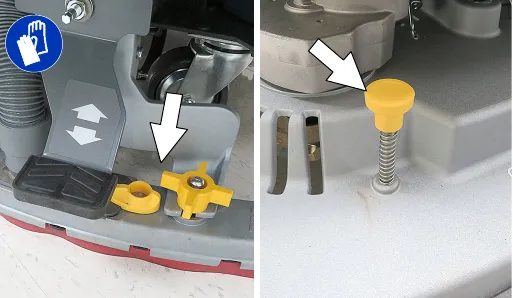
After daily use
- Drain and rinse out the recovery tank (Figure 92). See DRAINING TANKS (page 38).
- Remove the debris tray and empty (Figure 93). Reinstall tray after cleaning.
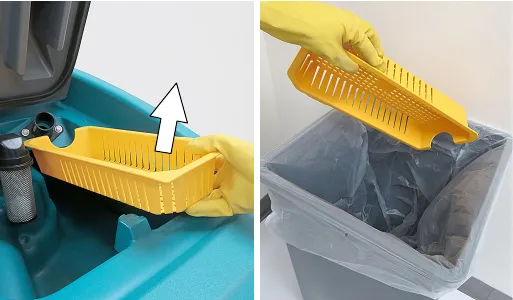
- Remove and clean the float shut-off screen (Figure 94). Reinstall screen after cleaning.
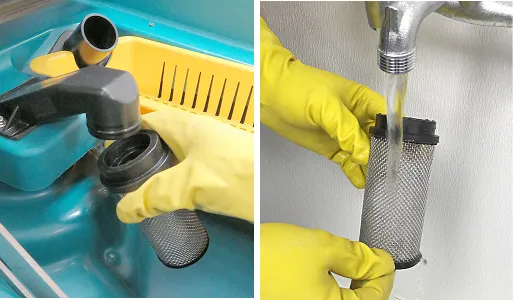
- Drain and rinse out the solution tank (Figure 95).
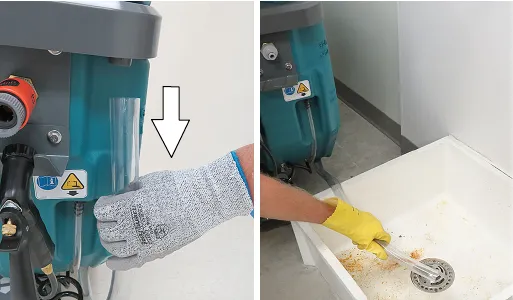
- Disk scrub head - Turn pad over or replace when worn (Figure 96).
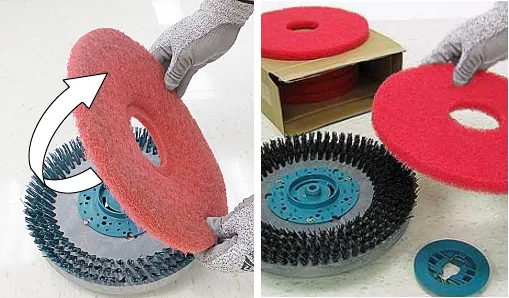
- Replace brushes when they no longer clean effectively or when the bristles are worn to the yellow indicator (Figure 97).
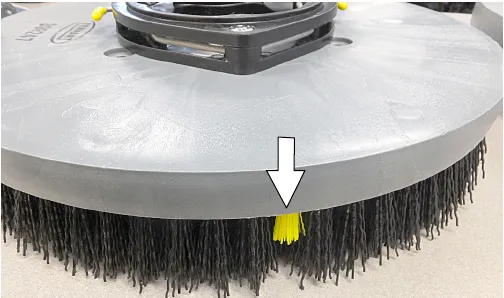
Orbital scrub head - Turn the working pad over or replace when worn (Figure 98).
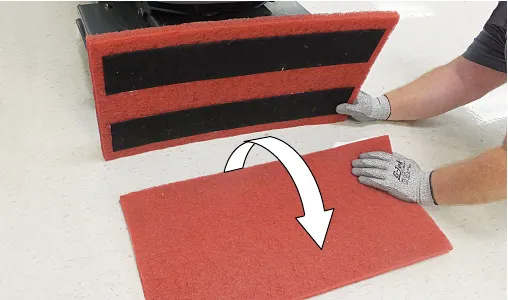
- Wipe the squeegee blades clean. Inspect blades for wear and damage (Figure 99). Rotate blade if worn. See SQUEEGEE BLADE REPLACEMENT (page 58). Parts ›
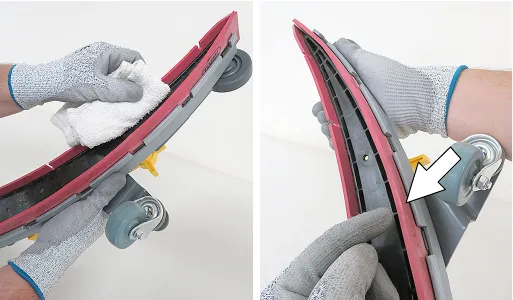
- Clean scrub head skirt. Check for wear or damage (Figure 100). Replace if worn or damaged.
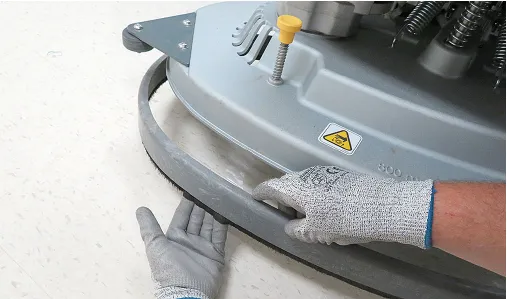
- Clean the outside surface of the machine with an all purpose cleaner and damp cloth (Figure 101).
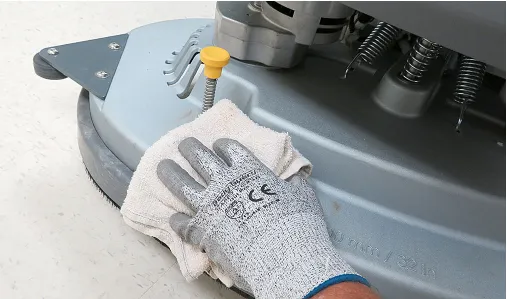
- Cylindrical brush scrub head - Remove and clean debris trough (Figure 102).
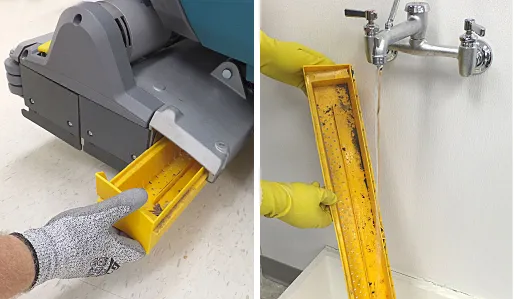
- Severe environment option - Refill the severe environment tank with a recommended cleaning detergent at full concentration (Figure 103). Replace cap.
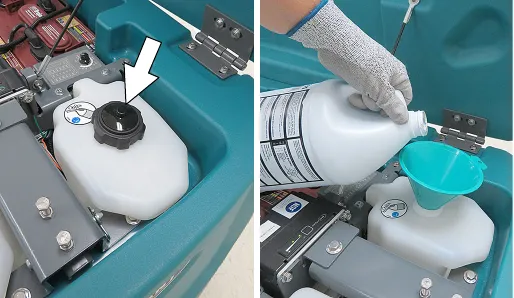
- Automatic battery watering option - Refill tank with distilled water (Figure 104). Replace cap.
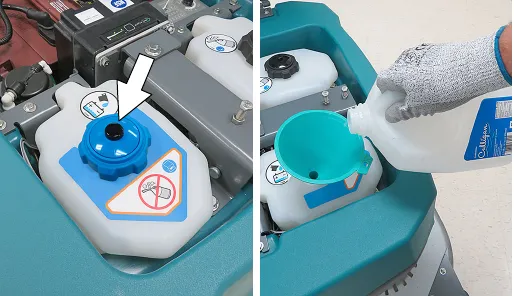
- Charge batteries (Figure 105). See BATTERIES (page 52).
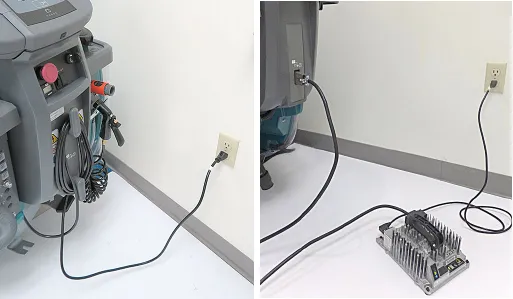
After weekly use
- Check the electrolyte level in each battery cell (Figure 106). See BATTERIES (page 52).
NOTE: If machine is equipped with the automatic or manual battery watering system, See BATTERIES.
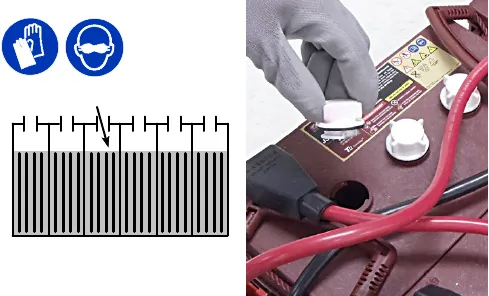
- Check for liquid in the battery compartment. (Figure 107). See BATTERY COMPARTMENT DRAIN HOSE (page 58) for further details.
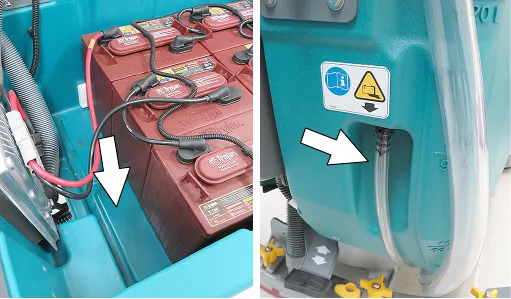
Corrected an obvious misprint: "Check for liquid in the battery compartment. (Figure 106)" printed with the wrong figure number (now Figure 107, as labeled under the picture on this page).
- Remove the drip trap cover from the squeegee assembly and clean reservoir (Figure 108).
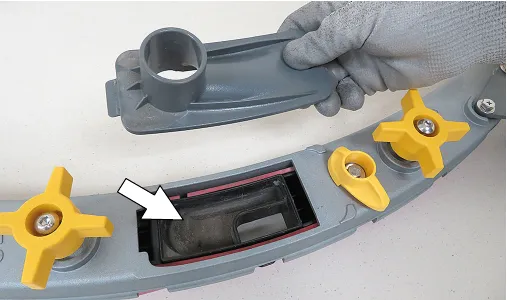
After every 50 hours of use
- Drain solution tank. Remove the solution tank filter and clean screen (Figure 109). Turn the filter bowl counter-clockwise to remove. Parts ›
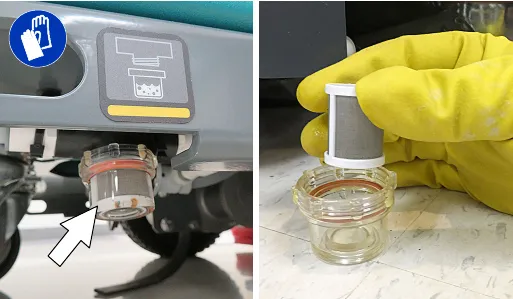
- Inspect and clean the seal on the recovery tank lid (Figure 110). Replace seal if damaged. Parts ›
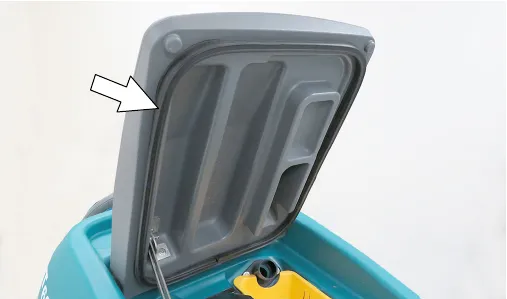
- Cylindrical brushes - Rotate brushes from front to rear (Figure 111). Replace brushes when they no longer clean effectively. Parts ›
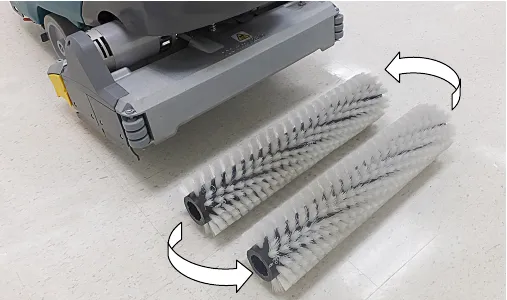
- Check tire pressure if equipped with the pneumatic (air-filled) tires (Figure 112). The proper tire pressure is 60 to 65 psi (415 to 450 kPa).
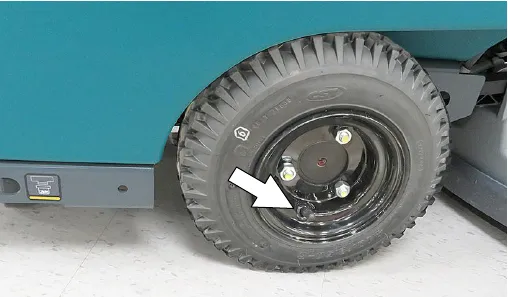
- Cylindrical scrub head - Remove debris buildup from underside of scrub head, including the idler plates and drive hubs (Figure 113).
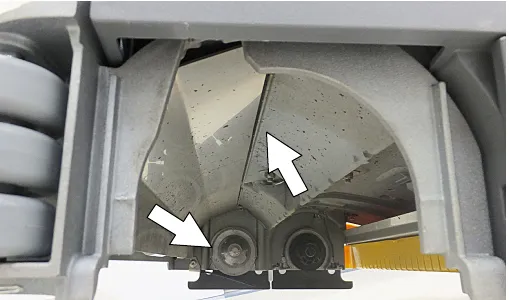
Corrected an obvious misprint: "415 to 450 kPA" printed with a capital A (now kPa, the unit symbol for kilopascal).
After every 100 hours of use
If machine is equipped with the optional battery watering system, check hoses for leaks, loose hose connections and for damage or wear (Figure 114). Replace system if damaged.
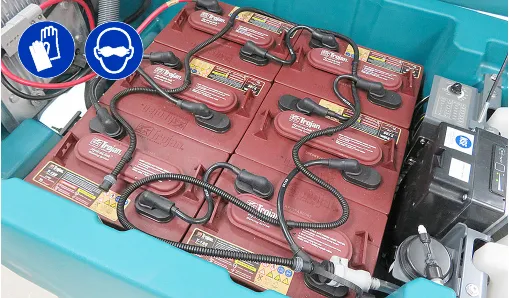
Lubricate rear casters with a grease gun. Use Lubriplate EMB grease (Tennant part no. 01433-1) (Figure 115).
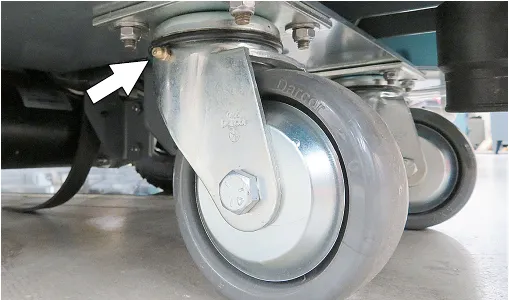
After every 200 hours of use
Check batteries for loose battery connections and clean the surface of the batteries, including terminals and cable clamps to prevent corrosion (Figure 116). See BATTERIES (page 52).
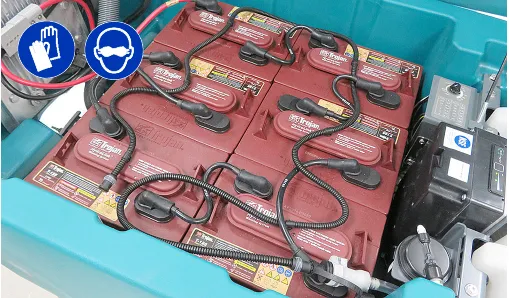
Electric motors
Replace motor carbon brushes as indicated. Contact trained personnel for carbon brush replacement.
| Carbon brush replacement | Hours |
|---|---|
| Vacuum motor | 750 |
| Propel motor | 1250 |
| Disk brush motors | 1250 |
| Cylindrical brush motors | 1250 |
| Orbital brush motor | 1250 |
Belts (cylindrical brush model)
Replace belts every 1250 hours. Contact trained personnel for belt replacement (Figure 117).
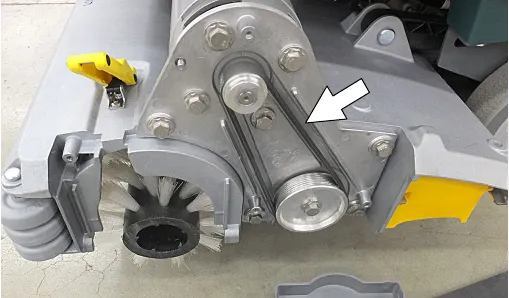
Corrected an obvious misprint: "clean the surface of the batteries ... (Figure 114)" in the 200 hour paragraph printed with the wrong figure number (now Figure 116, as labeled under the picture beside it).
Batteries
Batteries and chargers: make sure your charger is compatible with your batteries, and set its charging algorithm to your battery pack before you use it.
Your machine is equipped with either flooded (wet) lead-acid, maintenance-free (Sealed AGM) batteries or lithium-ion battery supplied by Tennant.
The lifetime of the batteries depends on their proper maintenance. To get the most life from the batteries:
Flooded (wet) and maintenance-free sealed lead-acid batteries
• Do not charge the batteries more than once a day and only after running the machine for a minimum of 15 minutes. TPPL batteries can be opportunity charged during the day to extend run time.
• Do not leave the batteries partially discharged for long period of time.
• Only charge the batteries in a well-ventilated area to prevent gas build up.
• Allow the charger to complete charging the batteries before re-using the machine.
• Maintain the proper electrolyte levels of flooded (Wet lead-acid) batteries by checking battery cell levels weekly.
Your machine is equipped with either flooded (Wet) lead-acid or maintenance-free (Sealed AGM/TPPL) batteries supplied by Tennant.
Maintenance-free (Sealed AGM/TPPL) batteries do not require watering. Cleaning and other routine maintenance is still required.
The flooded (wet) lead-acid batteries require routine watering as described below. Check the battery electrolyte level weekly.
NOTE: If machine is equipped with the automatic or manual battery watering system, proceed to the BATTERY WATERING SYSTEM instructions (page 56).
Corrected an obvious misprint: "BATTERY WATERING SYSYEM" printed with a typo (now "SYSTEM", as in the Battery watering system headings on pages 56 and 57).
The electrolyte level should be slightly above the battery plates as shown before charging (Figure 118). Add distilled water if low. DO NOT OVERFILL. The electrolyte will expand and may overflow when charging. After charging, distilled water can be added up to about 0.12 in (3 mm) below the sight tubes.
NOTE: Make sure the battery caps are in place while charging. There may be a sulfur smell after charging batteries. This is normal.
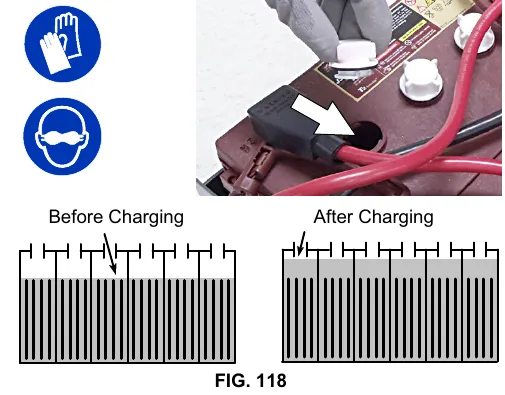
Checking connections / cleaning
After every 200 hours of use, check for loose battery connections and clean the surface of the batteries, including terminals and cable clamps to prevent battery corrosion. Use a scrub brush with a strong mixture of baking soda and water (Figure 119). Do not remove battery caps when cleaning batteries.
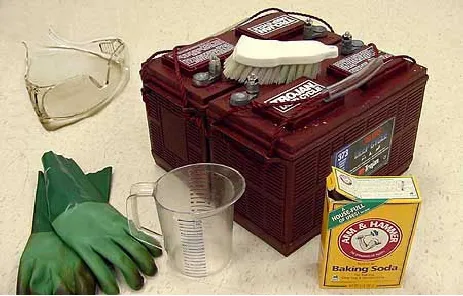
Lithium-ion battery pack
Batteries and chargers: make sure your charger is compatible with your batteries, and set its charging algorithm to your battery pack before you use it.
The lithium-ion battery pack is a maintenance-free battery protected by a battery management system (BMS). To achieve the maximum battery life, carefully follow the instructions below:
• Carefully follow the Important Safety Instructions section in the manual when using the Lithium-ion Battery Model.
• Only use the lithium-ion battery charger supplied with machine.
• Charge battery pack in well-ventilated areas. For best charging performance, charge the battery pack in temperatures below 80°F/27°C and above 32°F/0°C. Battery pack may shut down and not take a charge in elevated or freezing temperatures.
• It is recommended to only recharge battery pack when the discharge level is fully depleted (i.e. when discharge indicator reaches red light). If the red light begins to flash, the scrub function will automatically be disabled. This allows the user to use the remaining power to propel the machine back to charging station. Do not store the machine for a long period at this depleted level, the battery pack may further discharge to a level that is unrecoverable.
• When the machine shuts down due to a depleted battery pack, do not repeatedly cycle the key on and off. This may cause permanent battery pack damage. Recharge battery pack immediately to avoid damage.
• Allow charge cycle to completely charge battery pack.
• Avoid frequent complete charge cycles if battery pack was not fully depleted.
• Opportunity charging (i.e. partial charge cycle of a half hour or more) is only recommended if discharge level is below 80% (i.e. when discharge indicator is at or beyond second green light).
• Do not operate machine in temperatures above 110°F / 43°C or below -4°F / -20°C. Machine may shutdown if exceed these temperatures.
• When removing or replacing the lithium-ion battery pack, a specific lifting kit is recommended. It's important to use non-conductive lifting straps positioned at all four lift points with straps angled at 45° or greater when hoisting battery pack.
• Contact Tennant Service for lithium-ion battery service and replacement.
Charging batteries
The charging instructions in this manual are intended for the battery charger supplied with your machine. The use of other battery chargers that are not supplied and approved by Tennant are prohibited.
If your machine is equipped with an off-board battery charger refer to the charger owners manual for operating instructions. Contact distributor or Tennant for battery charger recommendations.
IMPORTANT NOTICE: The battery charger is set to charge the battery type supplied with your machine. If you choose to change to a different battery type or capacity (i.e. flooded (wet) lead-acid, maintenance-free, sealed, AGM batteries), the charger's charging profile must be changed to prevent battery damage. See BATTERY CHARGER SETTINGS (page 54).
- Transport the machine to a well-ventilated area.
- Park the machine on a flat, dry surface, turn off machine and remove key.
- If the machine is equipped with flooded (wet) lead-acid batteries check the battery electrolyte level weekly before charging. For models equipped with the automatic battery watering system, check if the automatic battery water tank needs refilling. Add distilled water if low.
- For models equipped with an on-board charger, remove the charger's power cord from the storage hooks and plug power cord into a properly grounded wall outlet (Figure 120).
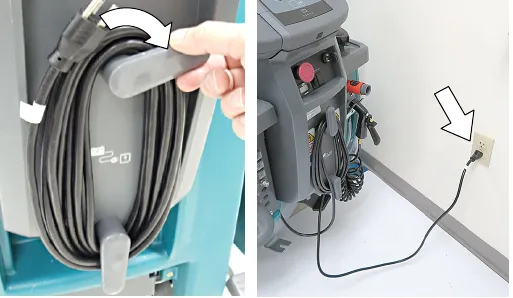
For models equipped with off-board chargers, first connect the charger's DC cord into the machine's battery charge receptacle then plug the AC power supply cord into a properly grounded wall outlet (Figure 121). Refer to the off-board battery charger owners manual for operating instructions.
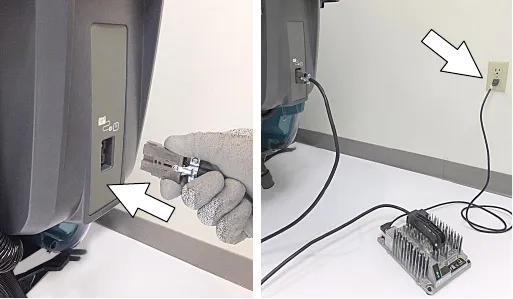
- The charger will automatically begin charging and shut off when fully charged. The maximum charging cycle may take up to 6-12 hours depending on battery type.
On-board battery charger: The battery discharge indicator lights will ripple back and forth during the charging cycle. When all five lights repeatedly flash two times, the charging cycle is complete (Figure 122).
NOTE: Lithium-ion Battery Model - If the key is in the off position when charging (recommended), the battery discharge indicator will automatically shut off 5 minutes after the charge cycle has completed to conserve energy. To see the charge status, turn the key to the on position.
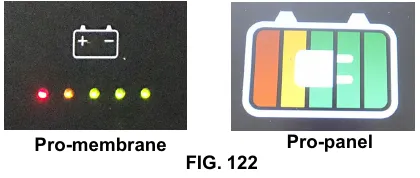
- After charging batteries unplug the power supply cord and wrap cord around the cord hooks.
For models equipped with an off-board charger, always disconnect the AC power supply cord first before disconnecting charger from machine.
Battery charger settings
Batteries and chargers: make sure your charger is compatible with your batteries, and set its charging algorithm to your battery pack before you use it.
NOTE: The following instructions only apply to battery chargers that are equipped with machines that use lead-acid batteries.
The battery charger is set to charge the battery type supplied with your machine. If you choose to change to a different battery type or capacity, the charger's charging profile must be changed to prevent battery damage.
The machine must also be reprogrammed to match battery type to prevent battery damage and/or short run-time.
NOTE: For machines shipped without batteries, the machine and the on-board battery charger are set for GEL batteries as the default. If you choose to use a different battery type, the settings must be changed as described as below.
NOTE: For machines shipped without batteries and supplied with an Off-Board Charger, the off-board battery charger is set for 180-240 AH wet lead-acid batteries from the factory. The machine is set for GEL batteries as the default. The machine must be reprogrammed to match charger settings (See OFF-BOARD BATTERY CHARGER below).
IRIS MODELS: For models equipped with capability to report battery charging data via IRIS, Tennant recommends using the same battery type. If a different amp hour or battery type is desired, contact Tennant Service Department.
Off-board battery charger
- To change the off-board battery charger settings, see OFF-BOARD BATTERY CHARGER SETTINGS (page 55).
- To reprogram the machine to match the off-board charger setting, see below:
T600e Membrane and T600 Pro-Membrane Models - Service application software required, contact service.
T600 Pro-Panel Model - See SELECTING BATTERY TYPE (page 55).
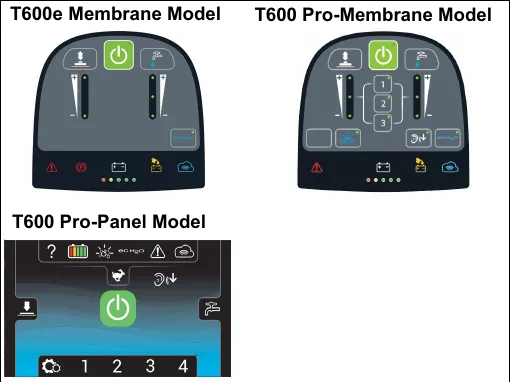
Off-board battery charger settings
NOTE: The following instructions are intended for Delta-Q off-board charger model RC-900-U36 supplied by Tennant.
- To display the current profile setting, press and release the Select Charge Profile Button (Figure 123). The profile setting is indicated by the number of consecutive green flashes after the initial two red flashes. This code is repeated twice.
ex. Profile Setting 3: (Flashes: Red-Red-Green-Green-Green)
ex. Profile Setting 4-3: (Flashes: Red-Red, Green-Green-Green-Green - pause - Green-Green-Green)
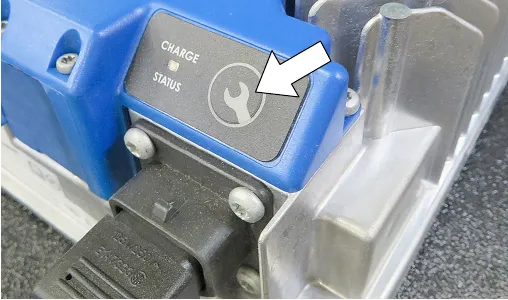
- To enter the battery select mode to choose a new profile setting, press and hold the Select Charge Profile Button for 5 seconds. Fast red flashes will confirm select mode entry.
- Indicator will then display current profile setting. This is repeated 4 times.
ex. Profile Setting 3: (Flashes: Red-Red-Yellow-Yellow-Yellow)
- To change profile setting, press the Select Charge Profile Button while the current setting is repeating 4 times. Continue to press button until desired profile setting is flashing as described in table.
| Profile setting | Battery description |
|---|---|
| 3 | Wet, Trojan 180-240 AH |
| 7 | Wet, Trojan 270-360 AH |
| 2-1 | Wet, TAB/Enersys 180-260 AH |
| 2-8 | Gel, Deka 180-200 AH |
| 4-3 | AGM, Discover 200-400 AH |
| 5-1 | Gel, Sonnenschein 150-250 AH |
| 1-6-8 | TPPL, 12XFC48 / 12XFC58 / 12XFC60 |
- To save new setting, press the button for 7 seconds until new setting is displayed by green flashes. The new setting will repeat two times with two red flashed between repeats.
- Confirm new setting by repeating step 1.
On-board battery charger
T600e Membrane and T600 Pro-Membrane Models - To change the on-board battery charger settings and to reprogram the machine's battery discharge indicator, service application software is required. Contact service.
T600 Pro-Panel Model - To change the on-board battery charger settings, see SELECTING BATTERY TYPE. The battery discharge indicator will automatically reprogram to match battery selection.
NOTE: TPPL batteries come with an unique battery charger that is only used with TPPL batteries. It's not intended to be changed.
Selecting battery type (T600 Pro-Panel model)
NOTE: To perform this procedure, machine must be in supervisor mode. See SUPERVISOR CONTROLS instructions at back of manual (page 73).
- Turn the key to the on position.
- Press the settings button located on the home screen (Figure 124).
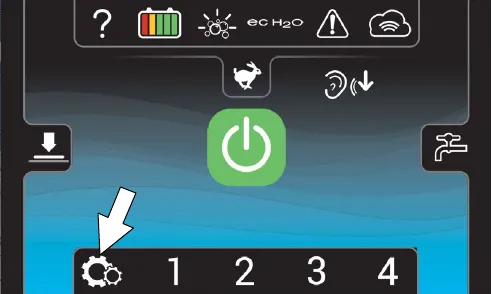
- Press the Battery Type button (Figure 125).
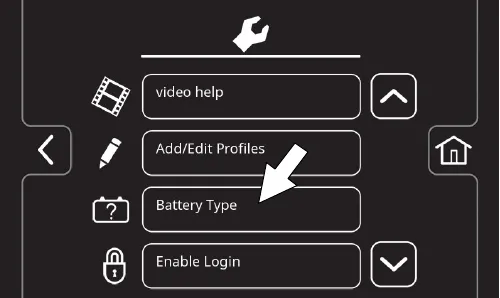
- Select battery type and brand installed in machine (Figure 126). See battery label to determine type and brand. Press the up and down arrows to scroll through battery selection.
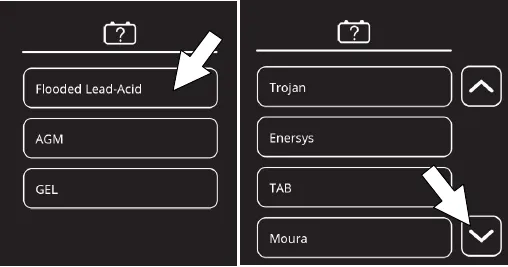
NOTE: The battery charger profile and battery discharge indicator will automatically reprogram when battery type is selected.
Manual battery watering system (Trojan battery option)
Batteries and chargers: make sure your charger is compatible with your batteries, and set its charging algorithm to your battery pack before you use it.
The following instructions are for models equipped with the manual battery watering system option.
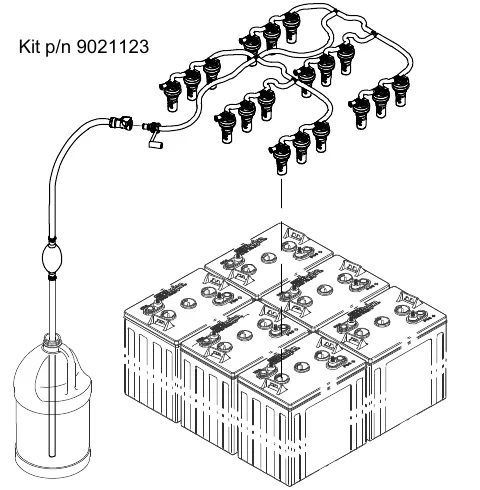
The optional manual battery watering system provides a safe and easy way to maintain the proper electrolyte levels in your batteries. It is designed exclusively for Trojan flooded (wet) lead-acid batteries.
Before using the battery watering system check hoses and connections for damage or wear.
- Fully charge batteries prior to using the battery watering system. Do not add water to batteries before charging, the electrolyte level will expand and may overflow when charging.
- After charging batteries, check the electrolyte level indicator on each battery cap. If any of the indicator floats are low, add water as described in the next step (Figure 127).
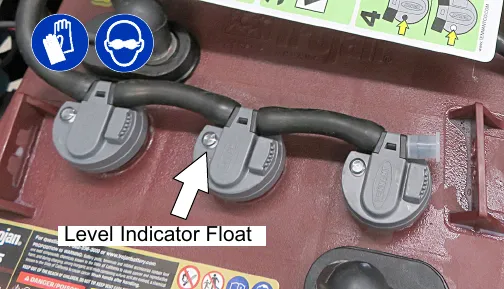
- If the level indicator has a low white float add distilled water as described in the following instructions (Figure 128).
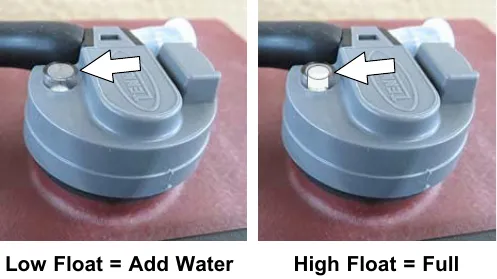
- Locate the battery fill hose coupler inside the battery compartment. Remove the dust cap and connect the hand pump hose (Figure 129).
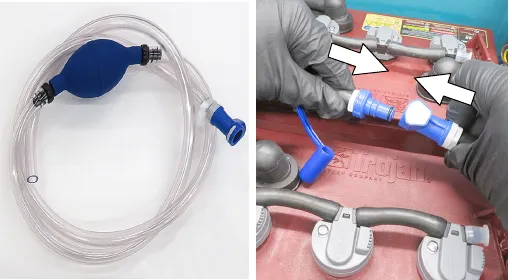
- Submerge the other end of the hand pump hose into a bottle of distilled water (Figure 130).
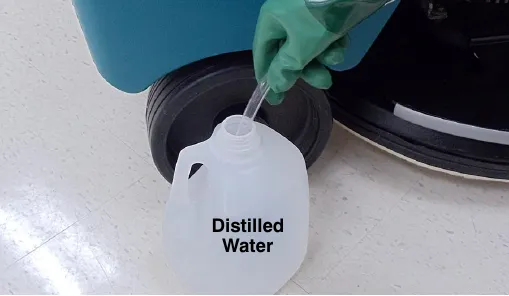
- Squeeze the bulb on the hand pump hose until firm. The indicator float will rise when full (Figure 131).
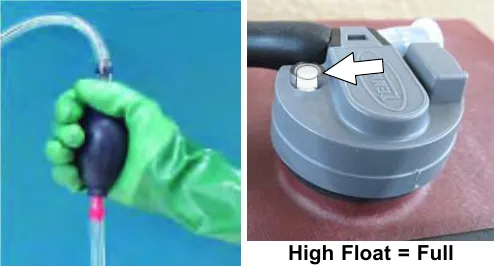
- After adding water, replace the dust cap on the battery watering distribution hose and store the hand pump hose inside the machine's battery compartment for future use.
Automatic battery watering system (Trojan® battery option)
Batteries and chargers: make sure your charger is compatible with your batteries, and set its charging algorithm to your battery pack before you use it.
The automatic battery watering system is designed to automatically refill the batteries after the machine reaches a limited number of charge cycles. Do not remove battery caps and manually add water to the batteries.
Check the automatic battery watering system for leaks, loose hose connections and for damage or wear. (Figure 132). Replace if damaged.
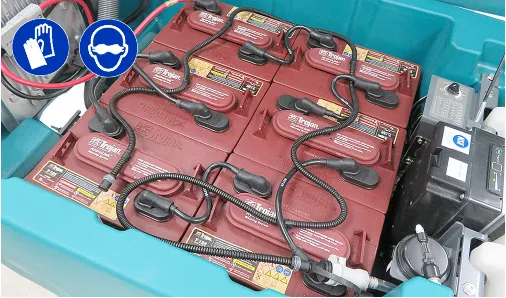
Check the water level in the automatic watering tank periodically. Add distilled water when low (Figure 133).
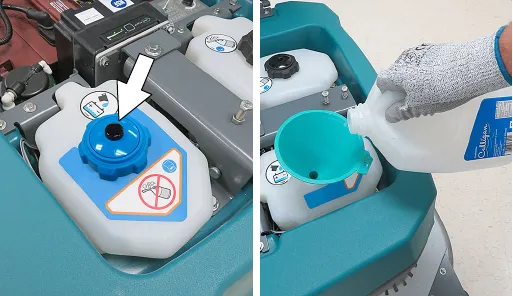
The automatic battery watering indicator will also alert user to add distilled water when tank is empty (Figure 134). See CONTROL PANEL OPERATION (page 23) for further details.
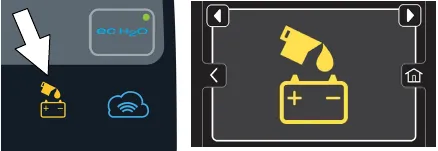
Battery compartment drain hose
Use the battery compartment drain hose to drain liquid from the battery compartment.
- Position rear of machine over area where battery compartment can be safely drained, turn off the machine, and remove the key.
- Pull the battery compartment drain hose from hose holder and carefully drain liquid from battery compartment (Figure 135).
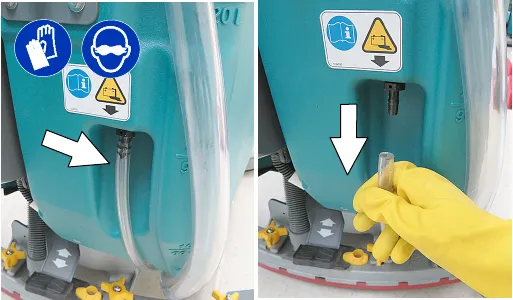
- Firmly reconnect the drain hose to holder after draining battery compartment.
Squeegee blade replacement
Each squeegee blade has four wiping edges. When the blades become worn, simply rotate the blades end-for-end or top-to-bottom for a new wiping edge.
Replace blade if all four edges are worn.
- Remove the squeegee assembly from the machine.
- Fully loosen all four star knobs on squeegee assembly. This will separate the spring loaded blade retainer from squeegee frame (Figure 136). To loosen the knobs quickly, squeeze the blade retainer and squeegee frame together.
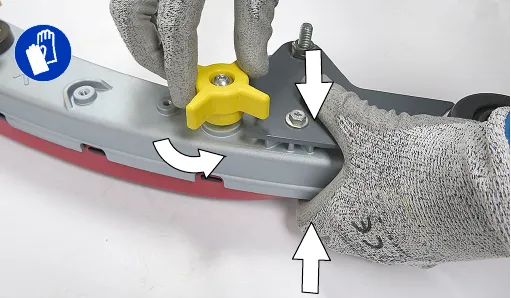
- Remove worn blade(s) from the blade retainer (Figure 137).
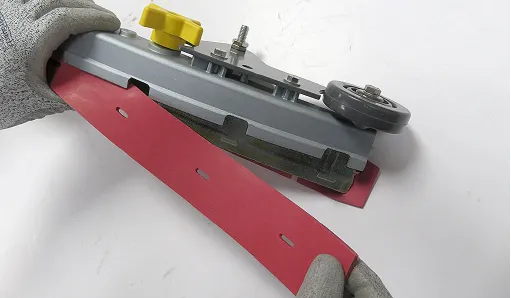
- Rotate the rear blade to a new wiping edge and reinstall blade (Figure 138). Make sure to align the slots in the blade with retainer tabs.
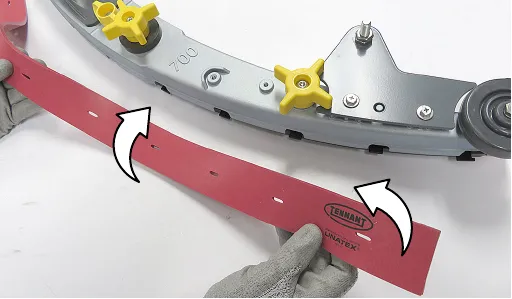
- Squeeze the squeegee frame and blade retainer together and re-tighten the star knobs (Figure 139).
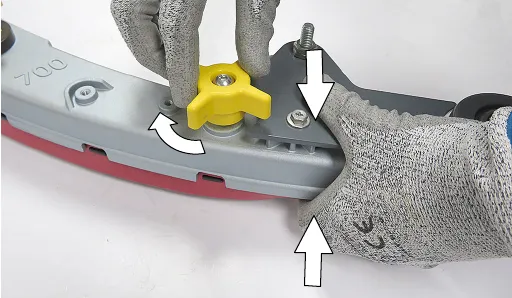
- Replace the squeegee casters every 5th replacement blade set or 500 hours or 12 months of machine use, whichever comes first. Uneven floor types may require more frequent replacements (Figure 140). Parts ›
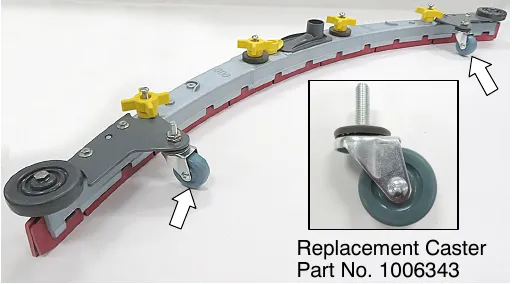
ec-H2O water conditioning cartridge replacement
The water conditioning cartridge is required to be replaced when it reaches its maximum water usage or expiration time of when the cartridge was activated, which ever comes first. The control panel will signal a code when it's time to replace cartridge. See CONTROL PANEL OPERATION (page 23) for further details.
Depending on machine usage, on average, a new cartridge can last anywhere from 12 months for heavy machine usage to 24 months for light machine usage.
- Park the machine on a level surface and remove the key.
- Lift the recovery tank to access the ec-H2O water conditioning cartridge (Figure 141). Drain recovery tank before lifting tank.
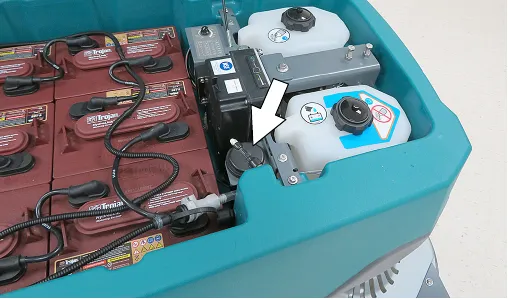
- Disconnect the two hose connectors from the top of the cartridge by pressing the gray collars inward and pulling the connectors outward (Figure 142). Lift cartridge to remove. Parts ›
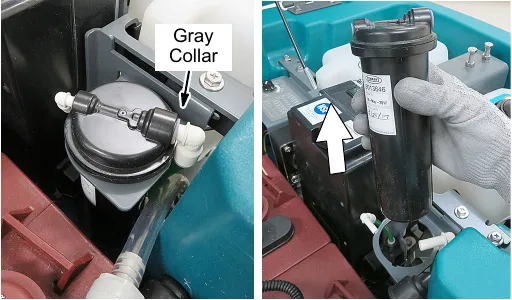
- Fill in the installation date on the new cartridge label (Figure 143).
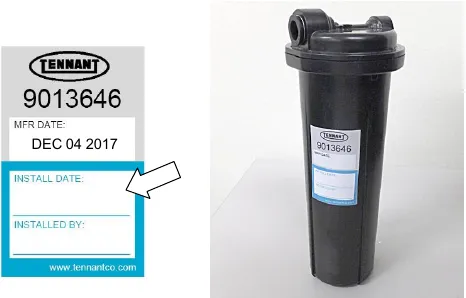
- Install the new cartridge and reconnect the two hoses. Make sure the hose connectors are fully inserted into the cartridge.
- Reset timer for new cartridge.
Carefully read and understand all steps first before performing procedure.
a. Turn key on.
b. Press and hold the service switch, located on the ec-H2O module, for 10 seconds. After releasing service switch, the three solution flow indicator lights will begin to (ripple) move back and forth (Figure 144).
c. Within 5 seconds after releasing the service switch, while the three indicator lights are moving back and forth, quickly press and release the solution flow button located on ec-H2O module (Figure 144).
The three indicator lights will then blink three times to indicate timer has been reset. Repeat process if the three indicator lights do not blink three times.
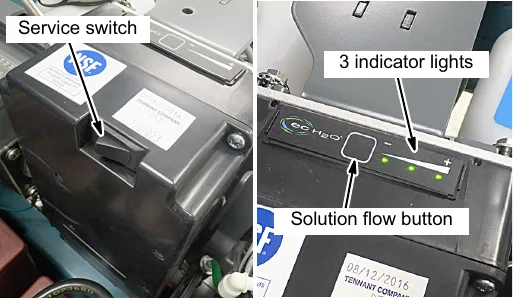
Machine jacking
Use the designated locations to jack up the machine for service (Figure 145). Empty the recovery and solution tanks and position the machine on a level surface before jacking. Stay clear from the solution tank filter bowl when jacking.
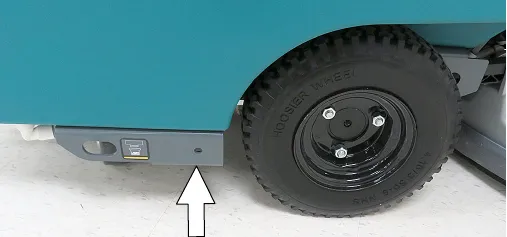
Pushing and transporting machine
Pushing machine
If the machine becomes disabled, it can be pushed as describe below.
Only push the machine for a very short distance and do not exceed 2 mph (3.2 km/h). It is not intended to be pushed for a long distance or at a high speed.
For models equipped with an electronic parking brake system, the brake must be disengaged before pushing machine. To disengage brake, position the brake lever on the transaxle to the down position (Figure 146).
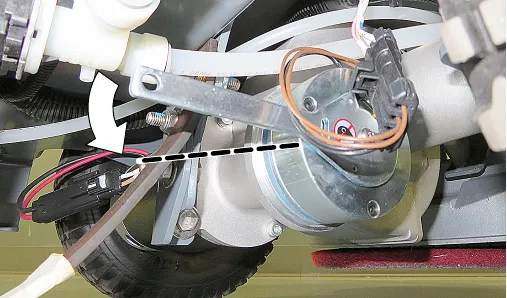
Corrected an obvious misprint: "3.2 kp/h (2 mph)" printed with a typo (now "2 mph (3.2 km/h)"; kp/h is km/h, and 3.2 km/h is 2 mph).
Immediately after pushing the machine, re-engage the brake lever to prevent a roll hazard.
NOTE: When brake lever is disengaged, the propel will be disabled and a fault will be detected until lever is re-engaged.
Transporting machine
When transporting the machine by use of trailer or truck, carefully follow loading and tie-down procedure:
- Drain tanks, raise scrub head and remove scrub disks and squeegee assembly.
- Carefully load machine in trailer or on truck.
- Once loaded, position the front of the machine up against the front of the trailer or truck. Lower the scrub head and turn key off.
- Place a block behind each wheel (Figure 147).
- Using tie-down straps, secure the machine using the four tie-down brackets located on the machine frame (Figure 147). It may be necessary to install tie-down brackets to the floor of your trailer or truck.
NOTE: When transporting machine in an open truck or trailer, secure recovery tank lid.
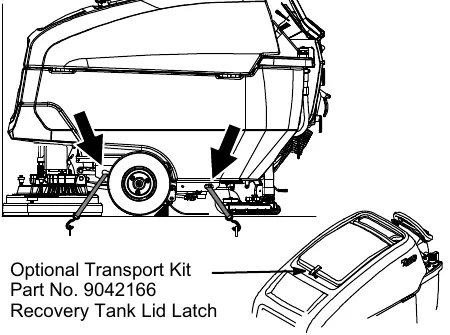
Storing machine
Batteries and chargers: make sure your charger is compatible with your batteries, and set its charging algorithm to your battery pack before you use it.
The following steps should be taken when storing the machine for extended periods of time.
- Charge the batteries before storing machine to prolong the life of the batteries. Recharge lead-acid batteries once a month. Recharge Lithium-ion Battery Pack once a year.
- Disconnect batteries before storing.
- Drain and rinse recovery tank and solution tank.
- Store the machine in a dry area with squeegee and scrub head in the up position.
- Open the recovery tank lid to promote air circulation.
- If storing machine machine in freezing temperatures, proceed to FREEZE PROTECTION (page 62).
NOTE: To prevent potential machine damage store machine in a rodent and insect free environment.
Freeze protection
Storing machine in freezing temperatures.
- Completely drain solution tank and recovery tank.
- Empty the water from the solution tank filter located under machine. Replace filter (Figure 148).
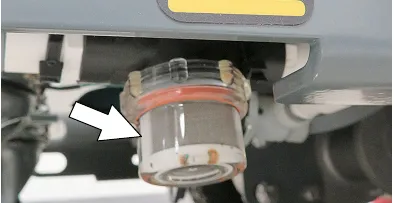
- Pour 1 gallon (4 liters) of propylene glycol based recreational vehicle (RV) antifreeze into the solution tank.
Models equipped with optional Severe Environment detergent tank - Lift tank from machine and empty the detergent from tank (Figure 149). Return tank. Pour a 1/4 gallon (1 liter) of propylene glycol based recreational vehicle (RV) antifreeze into the detergent tank.
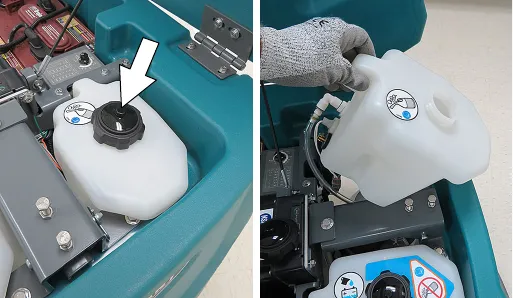
- Models not equipped with ec-H2O system - Turn machine on and operate the solution flow system. Turn the machine off when the antifreeze is visible on the floor.
Models equipped with ec-H2O system and Severe Environment mode - Set the detergent ratio dial to the highest flow rate. Turn machine on and set solution flow rate to high. Operate ec-H2O scrubbing and press the severe environment button to cycle the antifreeze through both systems. Turn machine off when antifreeze is visible on the floor. This may take up to two minutes.
Models equipped with ec-H2O system - Turn machine on and set the solution flow rate to high and operate ec-H2O scrubbing to cycle antifreeze through system. Turn machine off when antifreeze is visible on the floor. This may take up to two minutes.
Models equipped with spray nozzle option - Operate the spray nozzle to cycle antifreeze through pump.
- Models equipped with optional automatic battery watering tank - Lift tank from machine and empty the water from tank (Figure 150).
IMPORTANT: DO NOT add antifreeze to the automatic battery watering tank.
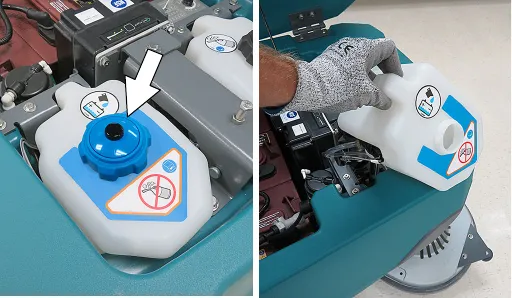
- After storing machine in freezing temperatures, drain any remaining antifreeze from the solution tank and from the optional Severe Environment detergent tank. Add clean water to solution tank and to optional detergent tank and operate the machine and spray nozzle to flush system.
- Refill the automatic battery watering tank with distilled water, if equipped.
Troubleshooting
| Problem | Cause | Solution |
|---|---|---|
| Service indicator icon is flashing | Machine or on-board battery charger fault has been detected | See SERVICE INDICATOR CODES (page 40) |
| ec-H2O icon is red or flashing red | ec-H2O system fault has been detected | See SERVICE INDICATOR CODES (page 40) |
| ec-H2O icon is flashing red and blue | ec-H2O cartridge has reached maximum water usage or expiration | Replace ec-H2O cartridge |
| Machine will not operate | Emergency shut-off button activated | Turn button to reset |
| Machine fault detected | See SERVICE INDICATOR CODES (page 40) | |
| Batteries discharged | Recharge batteries | |
| Loose battery cable(s) | Tighten loose cables | |
| Faulty battery(s) | Replace battery(s) | |
| Faulty key switch | Contact service | |
| Faulty start bail switch | Contact service | |
| Circuit breaker tripped | Reset circuit breaker | |
| Faulty control board | Contact service | |
| On-board battery charger will not operate | Plug not connected to power supply | Check plug connection |
| Batteries over discharged | Replace batteries | |
| Battery charger fault detected | See SERVICE INDICATOR CODES (page 40) | |
| Faulty charger | Replace charger | |
| Faulty power supply cord | Replace power supply cord | |
| Machine will not propel | Propel fault has been detected | See SERVICE INDICATOR CODES (page 40) |
| Circuit breaker tripped (T600e) | Reset circuit breaker | |
| Electronic parking brake system is disengaged (option) | See PUSHING AND TRANSPORTING MACHINE (page 60). | |
| Faulty propel motor or wiring | Contact service | |
| Worn carbon brushes in motor | Contact service | |
| Brush motor will not operate | Brush motor fault has been detected. | See SERVICE INDICATOR CODES (page 40) |
| Faulty pad motor or wiring | Contact service | |
| Circuit breaker tripped (T600e) | Reset circuit breaker | |
| Worn carbon brushes in motor | Contact service | |
| Broken or loose belt (cylindrical brush model) | Contact service | |
| Vacuum motor will not operate | Squeegee assembly is raised off floor | Lower squeegee assembly to floor |
| Vacuum motor fault has been detected | See SERVICE INDICATOR CODES (page 40) | |
| Faulty vacuum motor or wiring | Contact service | |
| Circuit breaker tripped | Reset circuit breaker | |
| Poor scrubbing performance | Debris caught in brush/pad | Remove debris |
| Worn brush/pad | Replace brush/pad | |
| Incorrect brush pressure | Adjust brush pressure | |
| Wrong brush/pad type | Use correct brush/pad for application | |
| Low battery charge | Recharge batteries | |
| Uneven brush pressure | Scrub head/brushes not level. Contact service | |
| Broken or loose belt (cylindrical brush model) | Contact service |
Troubleshooting - continued
| Problem | Cause | Solution |
|---|---|---|
| Trailing water - poor or no water pickup | Full recovery tank or excessive foam buildup | Drain recovery tank |
| Loose drain hose cap or flow control valve is open | Replace cap or close flow control valve on drain hose | |
| Worn squeegee blades | Rotate or replace squeegee blades | |
| Squeegee casters are worn | Replace casters | |
| Squeegee blade pitch out of adjustment | Adjust blade pitch | |
| Clogged drip trap (Squeegee assembly) | Remove cover and clean | |
| Clogged squeegee assembly | Clean squeegee assembly | |
| Loose vacuum hose connection | Secure vacuum hose connection | |
| Clogged vacuum hose | Flush vacuum hose | |
| Damaged vacuum hose | Replace vacuum hose | |
| Clogged float shut-off screen in recovery tank | Clean screen | |
| Recovery tank lid not completely closed | Check lid for obstructions | |
| Defective seals on recovery tank lid | Replace seal Parts › | |
| Little or no solution flow | Empty solution tank | Refill solution tank |
| Low solution flow rate set | Increase solution flow rate | |
| Clogged solution tank filter | Clean filter | |
| Plugged solution supply line | Flush solution supply line | |
| Severe environment tank does not dispense detergent | No detergent | Refill tank |
| Faulty float switch | Contact service | |
| Defective pump | Contact service | |
| Defective pump potentiometer | Contact service | |
| Faulty control panel | Contact service | |
| Automatic battery watering tank does not dispense water | Tank is empty | Refill tank |
| Defective pump | Contact service | |
| Pump not priming | Contact service | |
| Faulty control board | Contact service | |
| Short run time | Low battery charge | Charge batteries |
| Batteries need maintenance | See BATTERIES (page 52) | |
| Defective battery or end of battery life | Replace batteries | |
| Battery discharge indicator (BDI) programmed incorrectly | See CHARGING BATTERIES (page 53) | |
| Faulty charger | Replace battery charger | |
| Brush pressure set too high | Lower brush pressure | |
| Solution tank auto-fill does not function properly | Coupler not properly connected | Connect coupler |
| Faulty shut-off float | Replace float. Contact service | |
| Machine not on level surface | Machine must be on level surface | |
| Excessive scrub head noise (Orbital model) | Damaged scrub head isolators | Replace isolators. Contact service |
General machine dimensions/capacities/performance
| Model | 28 in (700 mm) Disk | 32 in (800 mm) Disk | 36 in (900 mm) Disk |
|---|---|---|---|
| Length | 63.7 in (1617 mm) | 65.8 in (1671 mm) | 69.3 in (1761 mm) |
| Width | 30.1 in (764 mm) | 33.7 in (865 mm) | 37.6 in (955 mm) |
| Height | 43.6 in (1107 mm) | 43.6 in (1107 mm) | 43.6 in (1107 mm) |
| Weight (less batteries) | 463 lb (210 kg) | 466 lb (212 kg) | 470 lb (214 kg) |
| Weight (with lead-acid batteries) | 1033 lb (470 kg) | 1036 lb (471 kg) | 1040 lb (473 kg) |
| Weight (with Lithium-ion battery pack) | 575 lb (261 kg) (2-pack) 646 lb (293 kg) (4-pack) 680 lb (308 kg) (5-pack) | 578 lb (262 kg) (2-pack) 649 lb (294 kg) (4-pack) 683 lb (310 kg) (5-pack) | 582 lb (264 kg) (2-pack) 653 lb (296 kg) (4-pack) 687 lb (312 kg) (5-pack) |
| GVW (with lead-acid batteries) | 1301 lb (591 kg) | 1304 lb (593 kg) | 1308 lb (595 kg) |
| GVW (with Lithium-ion battery pack) | 843 lb (382 kg) (2-pack) 914 lb (415 kg) (4-pack) 948 lb (430 kg) (5-pack) | 846 lb (384 kg) 917 lb (416 kg) 951 lb (431 kg) | 850 lb (386 kg) (2-pack) 921 lb (418 kg) (4-pack) 955 lb (433 kg) (5-pack) |
| Solution tank capacity | 32 gal (121 L) | ||
| Recovery tank capacity | 37 gal (140 L) | ||
| Severe Environment tank capacity | 1.1 gal (4 L) | ||
| Automatic battery watering tank capacity | 1.1 gal (4 L) | ||
| Scrubbing path width | 28 in (700 mm) | 32 in (800 mm) | 36 in (900 mm) |
| Squeegee width | 38.3 in (973 mm) | 41.3 in (1049 mm) | 46.6 in (1234 mm) |
| Down pressure (T600e) | Low: 150 lbs (68 kg), High: 200 lbs (90 kg) | ||
| Down pressure (T600) | Low: 100 lbs (45 kg), Med: 150 lbs (68 kg), High: 200 lbs (90 kg) | ||
| Down pressure (T600e Heavy Duty down pressure model) | n/a | Low: 150 lbs (68 kg), High: 200 lbs (90 kg) Heavy Duty: 300 lbs (136 kg) | n/a |
| Down pressure (T600 Heavy Duty down pressure model) | n/a | Low: 100 lbs (45 kg), Med: 150 lbs (68 kg), High: 200 lbs (90 kg) Heavy Duty: 300 lbs (136 kg) | n/a |
| Scrubbing speed | 3.0 mph (4.8 km/h) (260 fpm (79 mpm)) | ||
| Transport speed | 3.3 mph (5.3 km/h) (290 fpm (88 mpm)) | ||
| Reverse speed | 1.6 mph (2.6 km/h) (140 fpm (43 mpm)) | ||
| Aisle turnaround width | 65 in (1650 mm) | 67 in (1700 mm) | 70 in (1775 mm) |
| Tires | 12.6 in (320 mm) solid, non-marking (Standard) 12.6 in (320 mm) foamed-fill, 12.6 in (320 mm) pneumatic (Pressure: 60-65 psi (415-450 kPa)) | ||
| Productivity rate - estimated actual | 24,005 ft²/hr (2230 m²/hr) | 27,698 ft²/hr (2573 m²/hr) | 31,391 ft²/hr (2916 m²/hr) |
| ec-H2O productivity rate - est. actual | 28,863 ft²/hr (2681 m²/hr) | 33,304 ft²/hr (3094 m²/hr) | 34,964 ft²/hr (3248 m²/hr) |
| Maximum operating gradient | 2% (1.15°) | ||
| Solution flow rate | Low: .50 gpm (1.89 L/min), Med: .75 gpm (2.84 L/min), High: 1.0 gpm (3.78 L/min) | ||
| ec-H2O solution flow rate | Low: .22 gpm (0.83 L/min), Med: .33 gpm (1.25 L/min), High: .44 gpm (1.66 L/min) | ||
| Brush motor (T600e) | 2-36 VDC, 0.75 hp (0.56 kW), 22 A, 200 rpm | ||
| Brush motor (T600) | 2-36 VDC, 1.00 hp (0.75 kW), 30 A, 300 rpm | ||
| Brush actuator motor | 36 VDC | ||
| Propel motor | 36 VDC, 0.5 hp (380 W), 12.6 A | ||
| Vacuum motor | 36 VDC, 0.75 hp (.56 kW), 15.6 A | ||
| Water lift | 50 in (1270 mm) | ||
| ec-H2O solution pump | 36 VDC, 5 A, 1.5 gpm (5.7 L/min), min open flow | ||
| Severe environment detergent pump (T600) | 24 VDC, 2.0 oz/min (.06 L/min), max open flow | ||
| Automatic battery watering pump | 12 VDC, 4 A, 0.9 gpm (3.5 L/min), min open flow | ||
| Spray nozzle pump (T600) | 36 VDC, 2.3 A, 4.9 gpm (18.5 L/min), max open flow | ||
| Machine voltage | 36 VDC | ||
| Battery capacity | 6-6V 240AH C/20 Wet, 6-6V 360AH C/20 Wet, 3-12V 210AH C/20 TPPL | ||
| Lithium-ion Battery capacity | 4.1 kWh (2-pack), 8.2 kWh (4-pack), 10.2 kWh (5-pack), 36 VDC | ||
| Total power consumption | 50 A nominal / 1.8 kW | ||
| Battery Charger - on-board (global) | 100-240VAC, 50/60Hz, 36VDC, 25A | ||
| Battery Charger - on-board, TPPL | 100-240VAC, 50/60Hz, 36VDC, 33A | ||
| Battery Charger - off-board (Smart) | 100-240VAC, 50/60Hz, 36VDC, 25A | ||
| Lithium-ion Battery Chargers - Standard | 100-240VAC, 50/60Hz, 36VDC, 900W, 25A | ||
| Lithium-ion Battery Chargers - Fast | 100-240VAC, 50/60Hz, 36VDC, 1200W, 33A | ||
Corrected an obvious misprint: "415-450 kPA" printed with a capital A (now kPa, as in "415 to 450 kPa" on page 50).
General machine dimensions/capacities/performance - continued
| Model | 28 in (700 mm) Disk | 32 in (800 mm) Disk | 36 in (900 mm) Disk |
|---|---|---|---|
| Protection grade | IPX3 | ||
| Sound pressure level LpA* | 69.5 dB(A) | ||
| Sound pressure level LpA* - Quiet mode | 62.2 dB(A) | ||
| Sound uncertainty KpA* | 3 dB(A) | ||
| Sound power level LwA + uncertainty KwA* | 89.3 dB(A) | ||
| Machine vibration at hand-arm* | <8.2 ft/s² (<2.5 m/s²) | ||
| Ambient operating temperature | Min: 36°F (2°C), Max: 110°F (43°C) | ||
*Values per IEC 60335-2-72. Specifications are subject to change without notice.
General machine dimensions/capacities/performance - continued
| Model | 28 in (700 mm) Cylindrical | 32 in (800 mm) Cylindrical | 28 in (700 mm) Orbital |
|---|---|---|---|
| Length | 64.4 in (1637 mm) | 64 in (1625 mm) | 62.6 in (1590 mm) |
| Width | 31.2 in (792 mm) | 35.1 in (892 mm) | 29.4 in (746 mm) |
| Height | 43.6 in (1107 mm) | 43.6 in (1107 mm) | 43.6 in (1107 mm) |
| Weight (less batteries) | 479 lb (218 kg) | 482 lb (219 kg) | 489 lb (222 kg) |
| Weight (with lead-acid batteries) | 1049 lb (477 kg) | 1052 lb (478 kg) | 1059 lb (481 kg) |
| Weight (with Lithium-ion battery pack) | 591 lb (268 kg) (2-pack) 662 lb (300 kg) (4-pack) 696 lb (316 kg) (5-pack) | 594 lb (269 kg) (2-pack) 665 lb (302 kg) (4-pack) 699 lb (317 kg) (5-pack) | 601 lb (273 kg) (2-pack) 672 lb (305 kg) (4-pack) 706 lb (320 kg) (5-pack) |
| GVW (with lead-acid batteries) | 1317 lb (599 kg) | 1320 lb (600 kg) | 1327 lb (603 kg) |
| GVW (with Lithium-ion battery pack) | 859 lb (390 kg) (2-pack) 930 lb (422 kg) (4-pack) 964 lb (437 kg) (5-pack) | 862 lb (391 kg) 933 lb (423 kg) 967 lb (439 kg) | 869 lb (394 kg) (2-pack) 940 lb (426 kg) (4-pack) 974 lb (442 kg) (5-pack) |
| Solution tank capacity | 32 gal (121 L) | ||
| Recovery tank capacity | 37 gal (140 L) | ||
| Severe Environment tank capacity | 1.1 gal (4 L) | ||
| Automatic battery watering tank capacity | 1.1 gal (4 L) | ||
| Scrubbing path width | 28 in (700 mm) | 32 in (800 mm) | 28 in (700 mm) |
| Squeegee width | 38.3 in (973 mm) | 41.3 in (1049 mm) | 38.3 in (973 mm) |
| Down pressure (T600e) | Low: 50 lbs (23 kg) High: 90 lbs (41 kg) | Low: 105 lbs (48 kg) High: 170 lbs (77 kg) | |
| Down pressure (T600) | Low: 50 lbs (23 kg) Med: 70 lbs (32 kg) High: 90 lbs (41 kg) | Low: 105 lbs (48 kg) Med: 135 lbs (61 kg) High: 170 lbs (77 kg) | |
| Scrubbing speed | 3.0 mph (4.8 km/h) (260 fpm (79 mpm)) | ||
| Transport speed | 3.3 mph (5.3 km/h) (290 fpm (88 mpm)) | ||
| Reverse speed | 1.6 mph (2.6 km/h) (140 fpm (43 mpm)) | ||
| Aisle turnaround width | 67 in (1700 mm) | 67.5 in (1713 mm) | 60 in (1540 mm) |
| Tires | 12.6 in (320 mm) solid, non-marking (Standard) 12.6 in (320 mm) foamed-fill, 12.6 in (320 mm) pneumatic (Pressure: 60-65 psi (415-450 kPa)) | ||
| Productivity rate - estimated actual | 24,005 ft²/hr (2230 m²/hr) | 27,698 ft²/hr (2573 m²/hr) | 24,005 ft²/hr (2230 m²/hr) |
| ec-H2O productivity rate - est. actual | 28,863 ft²/hr (2681 m²/hr) | 33,304 ft²/hr (3094 m²/hr) | 28,863 ft²/hr (2681 m²/hr) |
| Maximum operating gradient | 2% (1.15°) | ||
| Solution flow rate | Low: .50 gpm (1.89 L/min), Med: .75 gpm (2.84 L/min), High: 1.0 gpm (3.78 L/min) | ||
| ec-H2O solution flow rate | Low: .22 gpm (0.83 L/min), Med: .33 gpm (1.25 L/min), High: .44 gpm (1.66 L/min) | ||
| Brush motor (T600e) | 2-36 VDC, 0.9 hp (0.67 kW), 22 A, 1800 rpm Brush speed: 760 rpm | 36 VDC, 0.75 hp (0.56 kW), 18.5 A, 2200 rpm | |
| Brush motor (T600) | 2-36 VDC, 0.9 hp (0.67 kW), 22 A, 1800 rpm Brush speed: 760 rpm | 36 VDC, 0.75 hp (0.56 kW), 18.5 A, 2200 rpm | |
| Brush actuator motor | 36 VDC | ||
| Propel motor | 36 VDC, 0.5 hp (380 W), 12.6 A | ||
| Vacuum motor | 36 VDC, 0.75 hp (.56 kW), 15.6 A | ||
| Water lift | 50 in (1270 mm) | ||
| ec-H2O solution pump | 36 VDC, 5 A, 1.5 gpm (5.7 L/min), min open flow | ||
| Severe environment detergent pump (T600) | 24 VDC, 2.0 oz/min (.06 L/min), max open flow | ||
| Automatic battery watering pump | 12 VDC, 4 A, 0.9 gpm (3.5 L/min), min open flow | ||
| Spray nozzle pump (T600) | 36 VDC, 2.3 A, 4.9 gpm (18.5 L/min), max open flow | ||
| Machine voltage | 36 VDC | ||
| Battery capacity | 6-6V 240AH C/20 Wet, 6-6V 360AH C/20 Wet, 3-12V 210AH C/20 TPPL | ||
| Lithium-ion Battery capacity | 4.1 kWh (2-pack), 8.2 kWh (4-pack), 10.2 kWh (5-pack), 36 VDC | ||
| Total power consumption | 50 A nominal / 1.8 kW | ||
| Battery Charger - on-board (global) | 100-240VAC, 50/60Hz, 36VDC, 25A | ||
| Battery Charger - on-board, TPPL | 100-240VAC, 50/60Hz, 36VDC, 33A | ||
| Battery Charger - off-board (Smart) | 100-240VAC, 50/60Hz, 36VDC, 25A | ||
| Lithium-ion Battery Chargers - Standard | 100-240VAC, 50/60Hz, 36VDC, 900W, 25A | ||
| Lithium-ion Battery Chargers - Fast | 100-240VAC, 50/60Hz, 36VDC, 1200W, 33A | ||
| Protection grade | IPX3 | ||
Corrected an obvious misprint: "415-450 kPA" printed with a capital A (now kPa, as in "415 to 450 kPa" on page 50).
General machine dimensions/capacities/performance - continued
| Model | 28 in (700 mm) Cylindrical | 32 in (800 mm) Cylindrical | 28 in (700 mm) Orbital |
|---|---|---|---|
| Sound pressure level LpA* | 69.2 dB(A) | 69.5 dB(A) | |
| Sound pressure level LpA* - Quiet mode | 62.2 dB(A) | 62.3 dB(A) | |
| Sound uncertainty KpA* | 3 dB(A) | ||
| Sound power level LwA + uncertainty KwA* | 87.8 dB(A) | 88.8 dB(A) | |
| Machine vibration at hand-arm* | <8.2 ft/s² (<2.5 m/s²) | ||
| Ambient operating temperature | Min: 36°F (2°C), Max: 110°F (43°C) | ||
*Values per IEC 60335-2-72. Specifications are subject to change without notice.
Machine dimensions: disk model
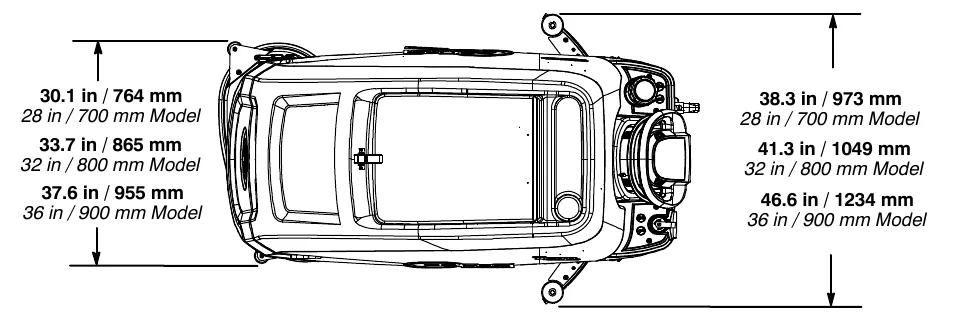
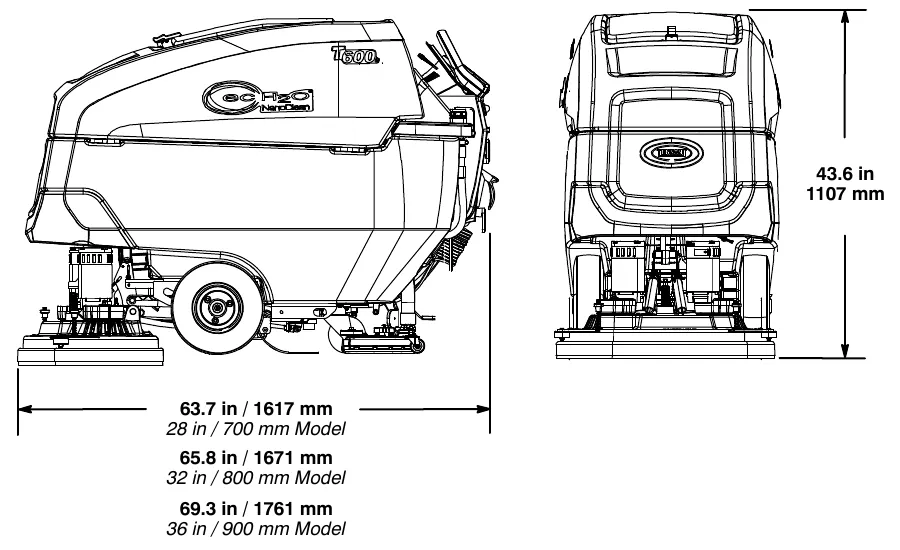
| Dimension | 28 in (700 mm) model | 32 in (800 mm) model | 36 in (900 mm) model |
|---|---|---|---|
| Machine width | 30.1 in (764 mm) | 33.7 in (865 mm) | 37.6 in (955 mm) |
| Squeegee width | 38.3 in (973 mm) | 41.3 in (1049 mm) | 46.6 in (1234 mm) |
| Length | 63.7 in (1617 mm) | 65.8 in (1671 mm) | 69.3 in (1761 mm) |
| Height | 43.6 in (1107 mm) | ||
Machine dimensions: cylindrical brush model
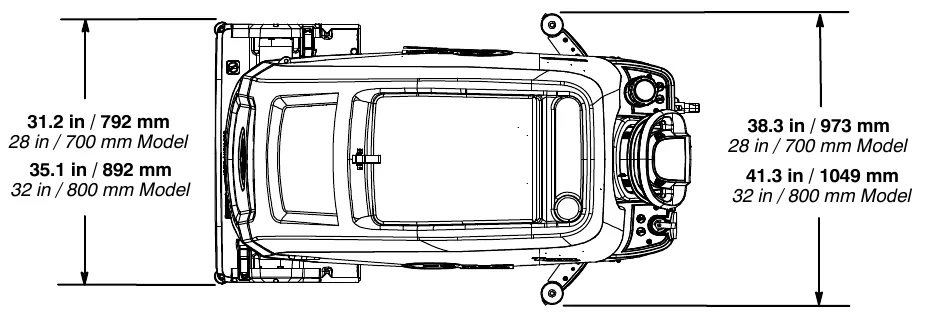
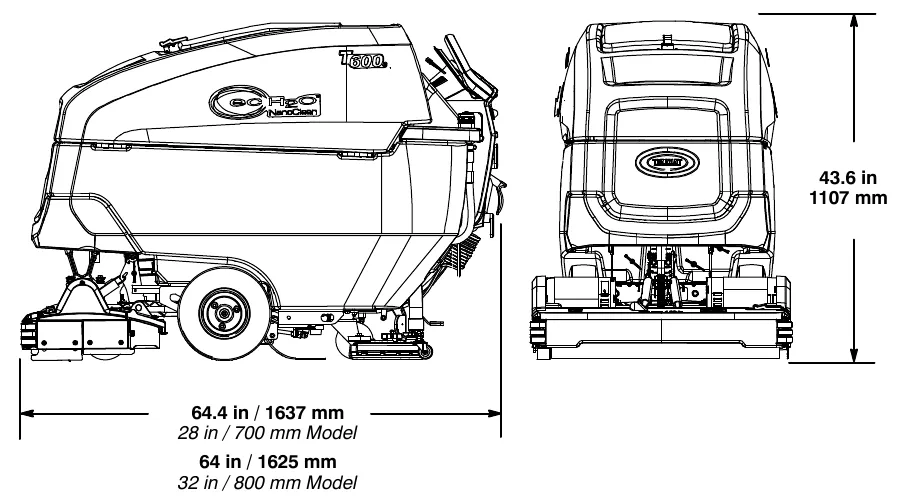
| Dimension | 28 in (700 mm) model | 32 in (800 mm) model |
|---|---|---|
| Machine width | 31.2 in (792 mm) | 35.1 in (892 mm) |
| Squeegee width | 38.3 in (973 mm) | 41.3 in (1049 mm) |
| Length | 64.4 in (1637 mm) | 64 in (1625 mm) |
| Height | 43.6 in (1107 mm) | |
Machine dimensions: orbital pad model
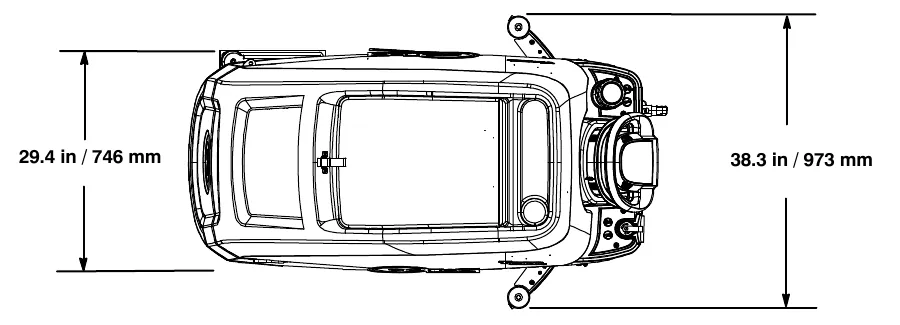
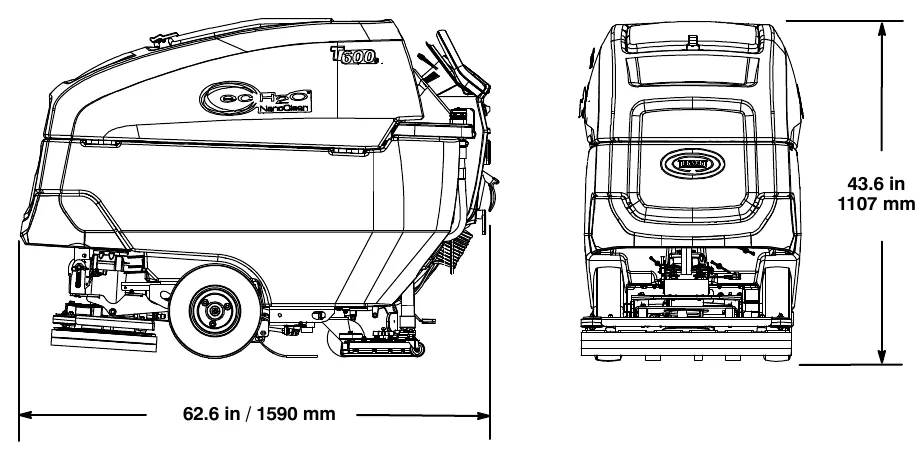
| Dimension | 28 in (700 mm) model |
|---|---|
| Machine width | 29.4 in (746 mm) |
| Squeegee width | 38.3 in (973 mm) |
| Length | 62.6 in (1590 mm) |
| Height | 43.6 in (1107 mm) |
This page is intentionally blank.
Supervisor controls
The supervisor controls feature allows a supervisor to program the machine's scrubbing settings for operator use. The lockout functionality will prevent the operator from changing or saving scrub settings.
The supervisor controls feature will lower machine variability for consistent, repeatable cleaning results, provide machine quality assurance regardless of user experience, and reduce user training requirements.
T600e model
The machine has two supervisor control modes of operation to choose from:
Unlocked Mode 1: Operator has ability to use full range of brush pressure and solution flow settings. The Unlocked Mode 1 is the factory default setting.
Lockout Mode 2: Maximum limits for brush pressure and solution flow settings are preset and locked by supervisor.
Entering the supervisor control modes
- Park the machine on a level surface and turn the key to off (O) position.
- Press and hold the brush pressure button while turning the key on. Release button when the far right battery discharge indicator LED turns on (Figure 151).
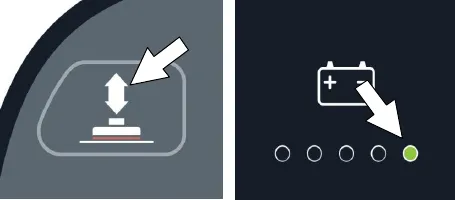
Fig. 151
The active mode setting will be displayed by a LED as described below (Figure 152),
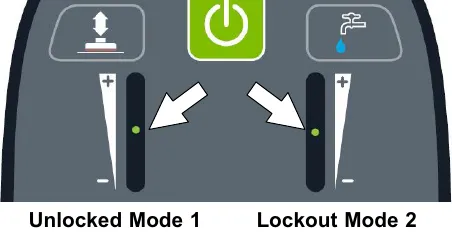
- Press the brush pressure button to toggle between the two modes (Figure 153). The LED of the selected mode will blink until saved.
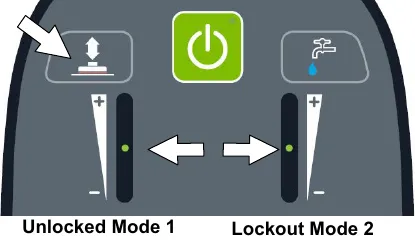
Fig. 153 - To save the selected mode, press and hold the brush pressure button and the solution flow button together until the LED turns solid, approximately 3 seconds (Figure 154).
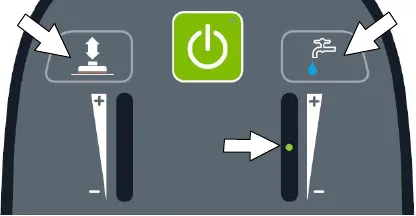
Fig. 154 - If Lockout Mode 2 was selected, press the solution flow button then choose the desired maximum limits for the solution flow and the brush pressure settings (Figure 155).
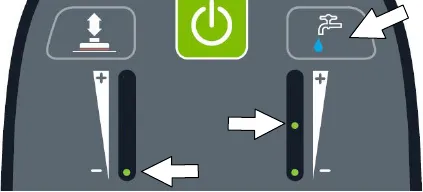
Fig. 155 - To save the desired maximum limits, press and hold the brush pressure button and the solution flow button together until the LED turns solid, approximately 3 seconds (Figure 156).
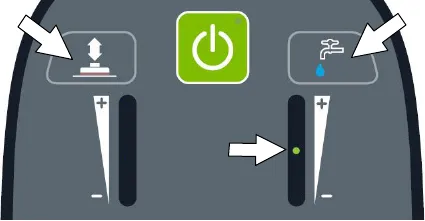
Fig. 156 - To exit the supervisor control mode, turn key off.
T600 Pro-Membrane control panel model
The machine has three supervisor control modes of operation to choose from:
Unlocked Mode 1: Operator has full control of all scrubbing parameters with the ability to reconfigure the preset zone control buttons. The Unlocked Mode 1 is the factory default setting.
Lockout Mode 2: Zone control buttons are preset and locked by supervisor. Operator has the ability to reconfigure the preset zone control buttons, but are not able to save them.
Lockout Mode 3: Zone control buttons are preset and locked by supervisor. Operator is restricted to only use the zone control buttons preset by supervisor.
Entering the supervisor control modes
- Park the machine on a level surface and turn the key to off (O) position.
- Press and hold the brush pressure button while turning the key on. Release button when the far right battery discharge indicator LED turns on (Figure 157). After releasing button, the active supervisor control mode will display as described in step 3 (Figure 158),
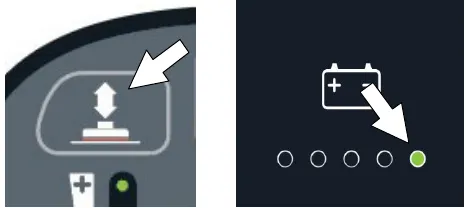
Fig. 157 - To select or change a supervisor control mode, press and hold the specific zone control button until the LED blinks three times (Figure 158). After selection is made, the LED will turn solid to indicate new mode.
Unlocked mode 1 = Zone control button 1
Lockout mode 2 = Zone control button 2
Lockout mode 3 = Zone control button 3
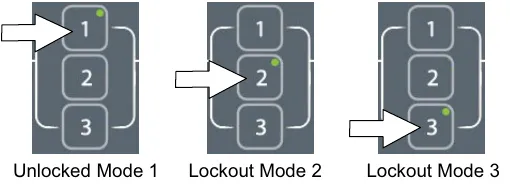
- Press the solution flow button to configure the zone control button presets for lockout modes 2 or 3 (Figure 159).
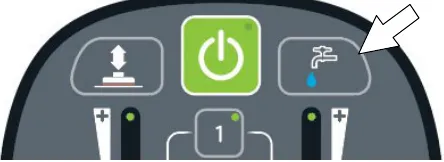
Fig. 159 - Configure the zone control button presets from list below, then press and hold zone control button until it blinks three times to save preset. Repeat process for other two zones.
Zone control presets:
- Brush pressure rate
- Solution flow rate
- Quiet-Mode button on or off
- ec-H2O mode switch on or off
- Severe Environment button on or off (Hold button for 3 seconds until LED turns on)
- Maximum scrubbing speed settingTo adjust the maximum scrub speed setting, press the severe environment button to cycle through the five speed selections as described below (Figure 160). For models without the severe environment button, press area on panel as shown. The button is hidden.
The speed selection is displayed by the battery discharge indicator LEDs. The red LED represents the lowest speed. The far right green LED represents the highest speed (Figure 160).
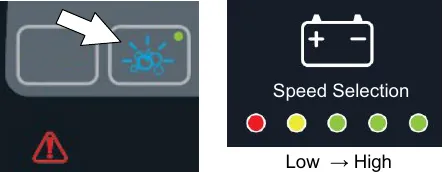
Fig. 160
NOTE: The maximum scrub speed setting can only be adjusted in supervisor control lockout modes 2 and 3.
- To exit the supervisor control mode, turn key off.
T600 Pro-Panel controls model
There are two types of user modes that will interface with the home screen.
Operator Mode - Capable of machine operation with permissions and restrictions controlled by the supervisor. The operator mode home screen restricts access to the machine settings button and maximum scrub speed button (Figure 161).
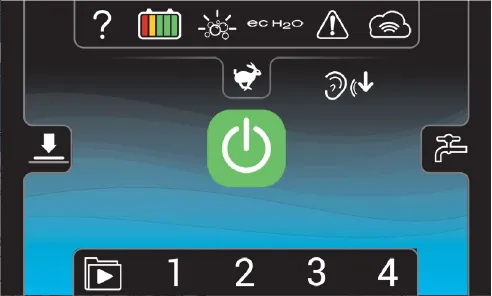
Supervisor Mode - Capable of machine operation with full use of all controls, along with configuring permissions and restrictions for the operator mode and login capability. The supervisor mode home screen provides access to the machine settings button and to the maximum scrub speed button (Figure 162).
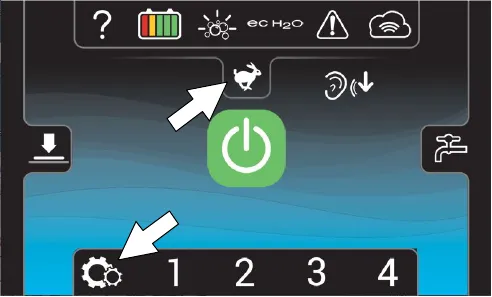
A new machine from the factory will automatically start up in the supervisor mode with a preassigned default supervisor profile. The machine's factory-assigned supervisor login code is “1234”. This login code is not required until it is enabled. The default supervisor profile name and login code can be changed as described in this section. If the new assigned supervisor mode login code is forgotten, use the recovery login code 836626826.
Entering the supervisor mode
- Turn on the machine. The home screen will display at start up (Figure 163). Press the help button.
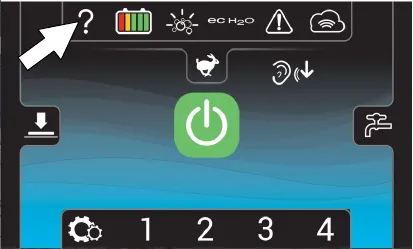
Fig. 163 - Press the login button (Figure 164).
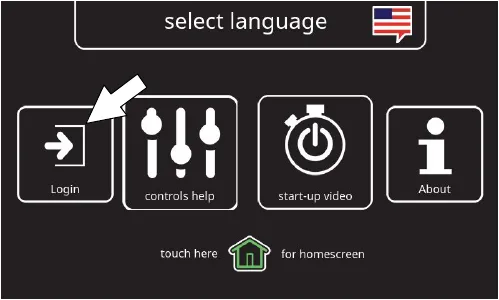
Fig. 164 - First time use - Enter the factory-assigned supervisor mode login code “1234” then press the green enter button (Figure 165).
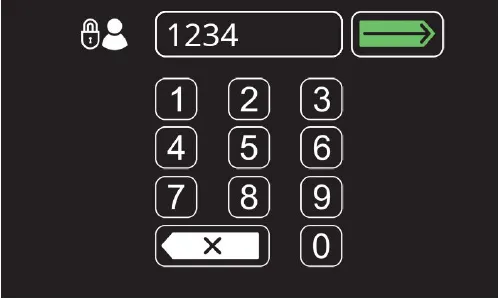
Fig. 165
- The supervisor mode home screen will appear (Figure 166). Press the machine settings button.
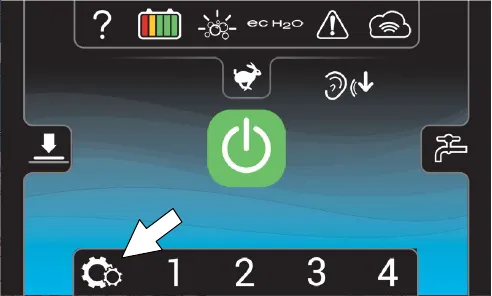
Fig. 166 - The machine's setting screen provides access to the following menu (Figure 167).
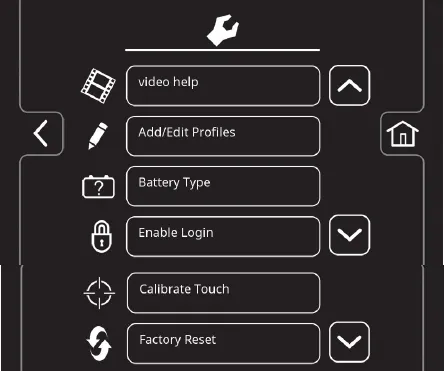
Fig. 167
Video help - Use to view specific operation and maintenance procedures.
Add/Edit Profiles - Use to add/edit user profiles for machine use.
Battery Type - Use to configure the machine for different battery types. See BATTERIES.
Enable Login - Use to activate a required login code at machine start up to operate machine.
Calibrate Touch - Use this to recalibrate the touch screen if the touch points become misaligned.
Factory Reset - Resets the supervisor login code back to the factory default code “1234”, removes user profiles and resets any custom preset zone control buttons back to the factory preset zones.
To add/edit user profiles
- Press the Add/Edit Profiles button to enter a new user profile (Figure 168).
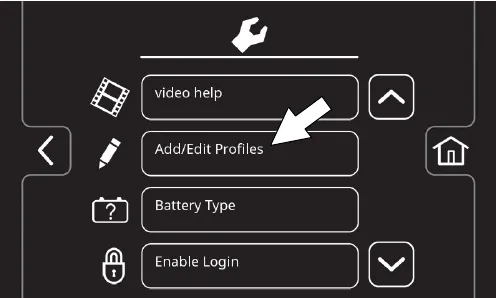
Fig. 168 - Press the Add Profile button to add a new user profile (Figure 169).
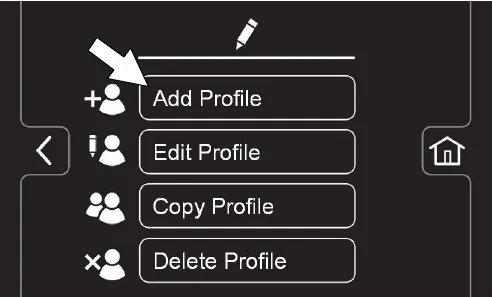
Fig. 169
Use the edit, copy and delete profile buttons to manage the current user profiles.
Press to edit an existing user profile (edit profile icon)
Press to copy an existing user profile (copy profile icon)
Press to delete a user profile (delete profile icon)
- Press the Operator button to add an Operator mode profile or press the Supervisor button to add an additional supervisor mode profile (Figure 170).
Note: The machine's default supervisor profile can not be deleted from profile list.
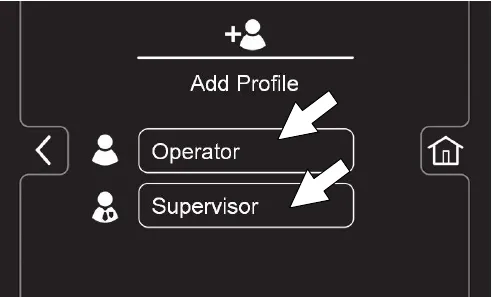
Fig. 170 - Enter the name of the new user profile then press the green enter button (Figure 171).
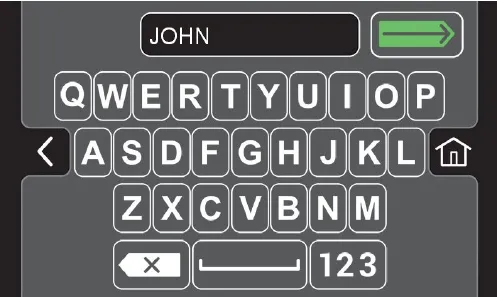
Fig. 171 - Assign a login code for the new user profile then press the green enter button (Figure 172). The new login code can be any combination of numbers ranging from 3 to 8 digits in length.
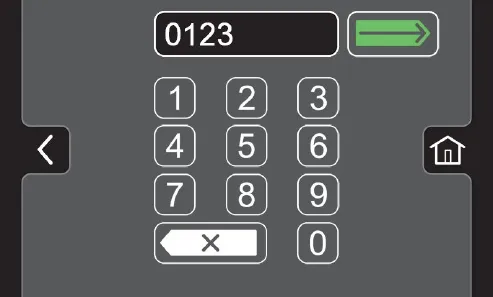
Fig. 172
- Select the controls the new user should only have access to use (Figure 173). Green represents unlocked controls and gray represents locked controls. Press the flashing save button to save new profile.
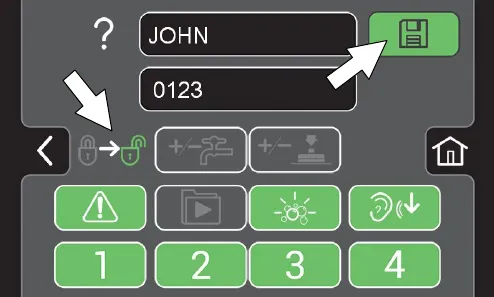
Fig. 173 - The new user profile is now saved to the operator profile list as shown (Figure 174). Multiple Operator and Supervisor user profiles can be added. Press the back arrow to return to the previous screen to add more user profiles.
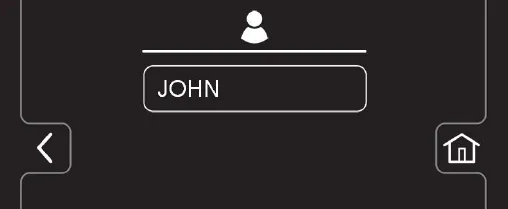
Fig. 174 - To enable the login screen at start up (Figure 175), see Enabling the login screen.
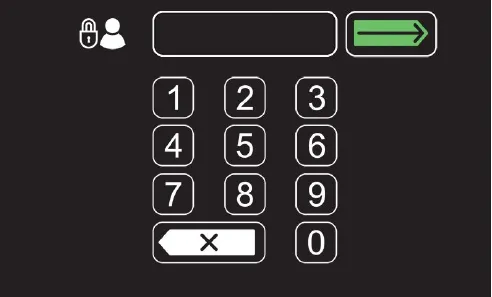
Fig. 175
Enabling the login screen
- Turn on the machine.
- Press the help button and log into the machine as supervisor mode (Figure 176). See Entering the supervisor mode.
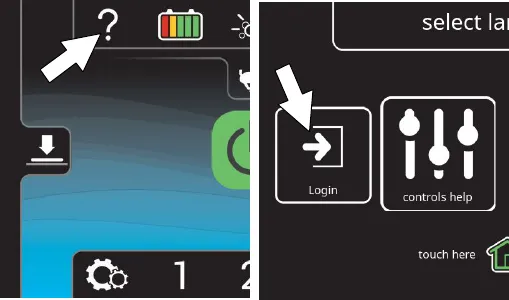
Fig. 176 - Press the machine settings button (Figure 177).
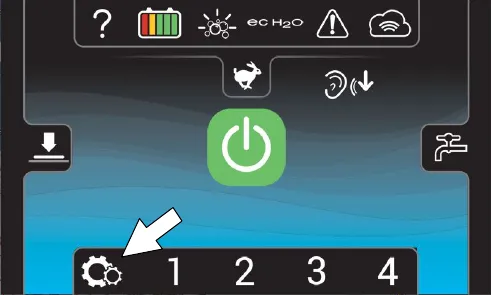
Fig. 177 - Press the Enable Login button (Figure 178). The Enable button will change from Enable Login to Disable Login.
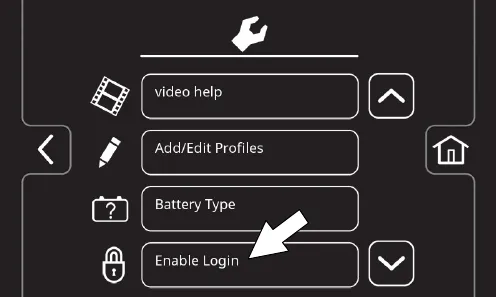
Fig. 178
- Press the yes button to enable login (Figure 179).
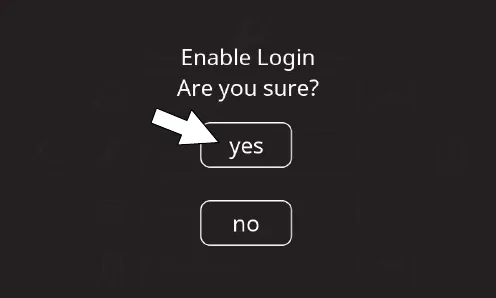
Fig. 179 - Now at machine start up, the login screen will display (Figure 180). The user will need to enter their assigned login code to operator machine.
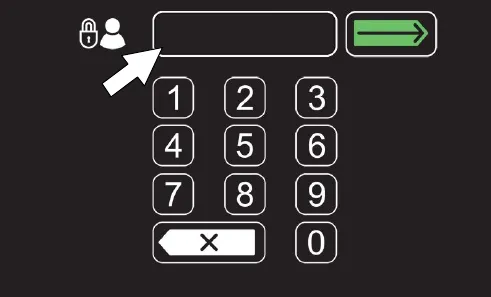
Fig. 180 - When the user is done operating the machine, it is recommended the user log out by pressing the help button, and then pressing the logout button (Figure 181). Turning the key to the off position is another way to also logout
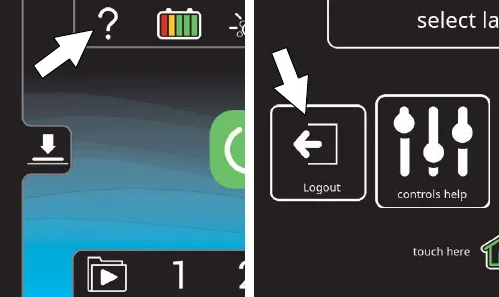
Fig. 181
Disabling the login screen
- Turn on the machine.
- Press the help button and log into the machine as supervisor mode (Figure 182). See Entering the supervisor mode.
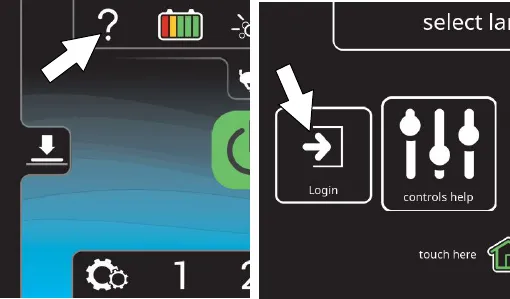
Fig. 182 - Press the machine settings button (Figure 183).
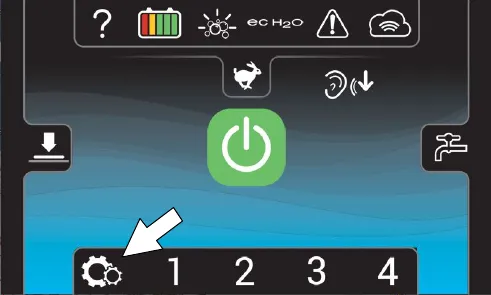
Fig. 183 - Press the Disable Login button (Figure 184).
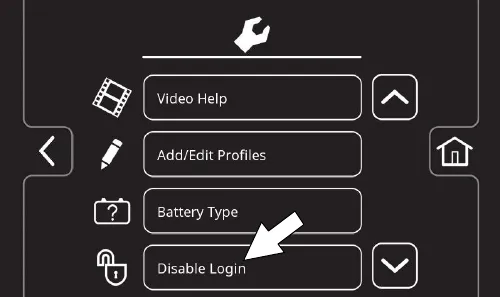
Fig. 184
- Press the yes button to disable the login at machine start up (Figure 185).
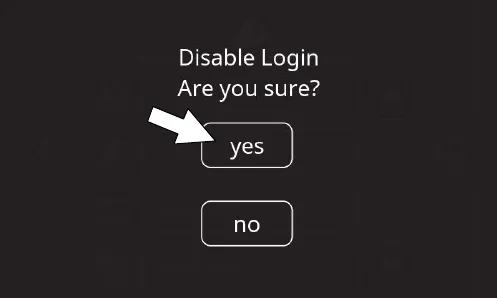
Fig. 185 - Press either the Operator button or Supervisor button to select desired user profile as your home screen default without login (Figure 186).
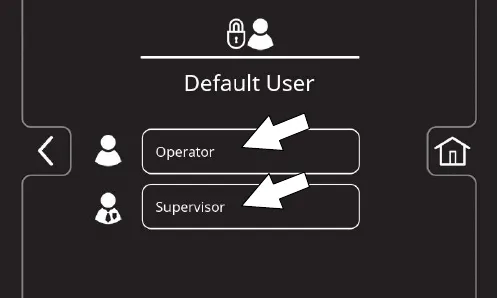
Fig. 186 - Select a pre-assigned user profile. In this example, operator profile “JOHN” is selected (Figure 187). Turn the key off to apply the setting.
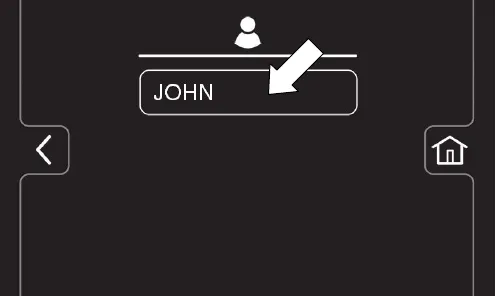
Fig. 187 - At start up, the home screen is now set for the desired user profile as the default without login.
NOTE: To change to a different user profile as the default home screen without login, you must re-enable login and repeat the disabling login instructions.
Changing the factory-assigned supervisor login code
- Press the machine's setting button (Figure 188)
Fig. 188 - Press the Add/Edit Profiles button (Figure 189).
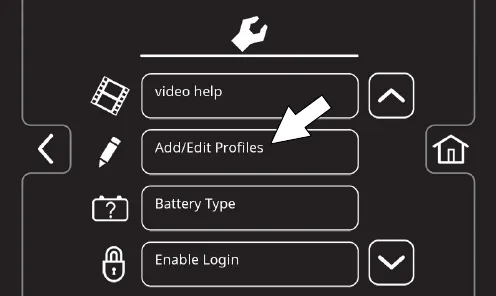
Fig. 189 - Press the Edit Profile button (Figure 190).
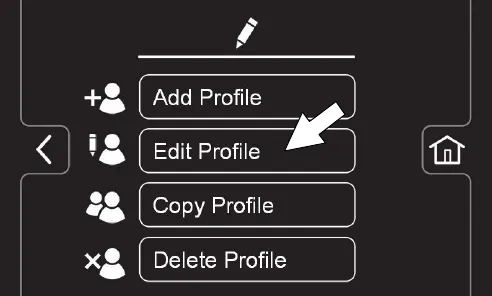
Fig. 190
- Press the Supervisor button then press the DEFAULT SUPER button (Figure 191).
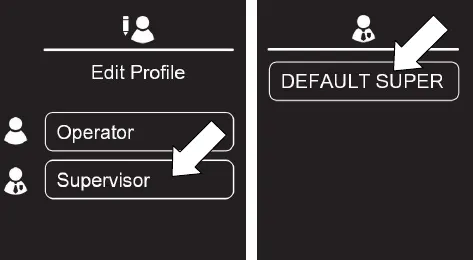
Fig. 191 - Press the factory-assigned login code and enter a new login code (Figure 192). Press the flashing save button to save the new login code.
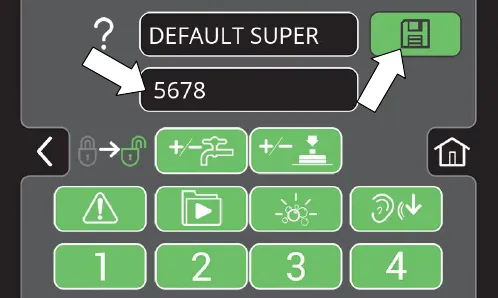
Fig. 192
This page is intentionally blank.
Tennant and Nobles are trademarks of Tennant Company. Southeastern Equipment & Supply is an independent dealer.